

Groups that run Fixed Contact for e mail advertising and Salesforce as their CRM normally hit the identical issues inside 1 / 4:
-
contacts added by means of e mail sign-up varieties by no means seem in Salesforce, so gross sales reps work leads that advertising already engaged with out understanding it,
-
marketing campaign engagement knowledge lives in Fixed Contact whereas deal data reside in Salesforce, leaving each groups with an incomplete image of the client,
Nonetheless, the 2 platforms ended up coexisting (a advertising group that adopted Fixed Contact years earlier than the corporate standardized on Salesforce, a nonprofit operating each for various features, or separate departments selecting instruments independently), the longer they function with out a connection, the broader the information hole grows.
Connecting Fixed Contact and Salesforce eliminates that hole.
New contacts captured by means of Fixed Contact sign-up varieties and touchdown pages move into Salesforce as leads so reps can observe up with out ready for a guide handoff. E-mail engagement knowledge (opens, clicks, bounces) attaches to Salesforce data so gross sales groups can see which prospects are participating with advertising content material.
Marketing campaign membership syncs between platforms so reporting displays the complete funnel from first e mail contact to closed-won deal.
A local Fixed Contact connector exists on the Salesforce AppExchange, and third-party options like SyncApps by Cazoomi provide bidirectional sync. Automation instruments (Zapier, Make) and customized API growth spherical out the choices. Every methodology differs in setup complexity, sync route, knowledge protection, and price.
One downside no connection methodology solves: the sync strikes contact data between programs, but it surely doesn’t confirm whether or not these data are correct, full, or present.
That’s the place ZoomInfo is available in.
ZoomInfo integrates natively with Salesforce by means of the AppExchange and affords API and MCP entry that may feed verified, enriched contact knowledge into any system within the stack, so the data flowing between Fixed Contact and Salesforce are correct and full earlier than a single e mail is shipped or a lead is assigned.
This text covers the Fixed Contact-Salesforce integration panorama: which strategies can be found, what knowledge each handles, how one can set them up, the use circumstances that justify connecting each platforms, and the constraints to plan for. It additionally covers how ZoomInfo matches as an information enrichment layer for each platforms.
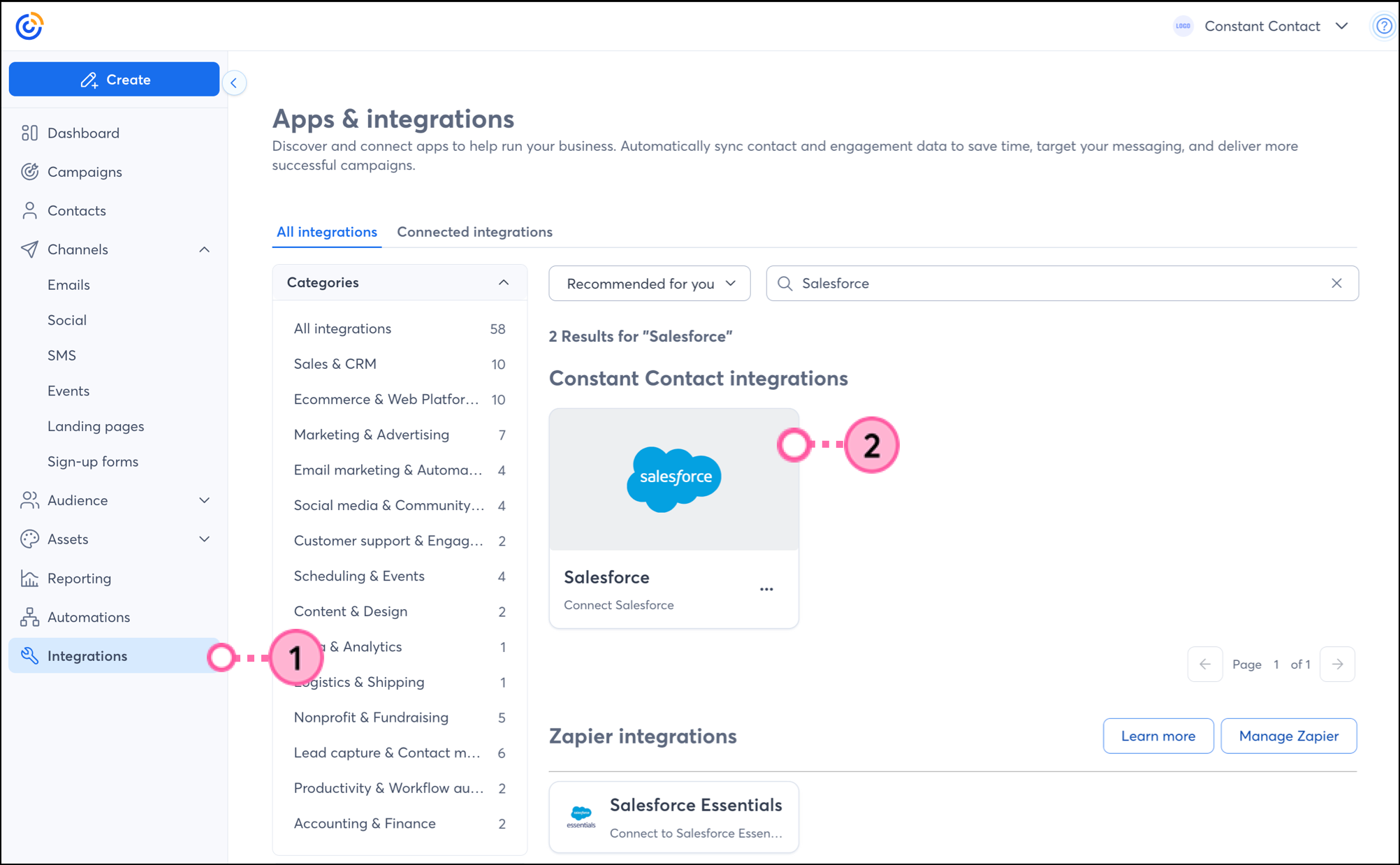
Integration Overview
Supply: Fixed Contact
Does a local integration exist?
Sure. Fixed Contact affords a native connector on the Salesforce AppExchange (Fixed Contact for Salesforce v1.0) that syncs contacts between the 2 platforms. Third-party AppExchange options like SyncApps by Cazoomi lengthen the native reference to bidirectional sync and marketing campaign monitoring.
What knowledge can sync?
Contacts, leads, e mail engagement metrics (opens, clicks, bounces), marketing campaign membership, and record membership. The particular fields and objects rely upon the tactic. The native connector handles contact and lead sync with primary engagement knowledge.
Third-party middleware provides campaign-level reporting, customized area mapping, and bidirectional updates.
Is the sync bidirectional?
It relies on the tactic. The native AppExchange connector primarily syncs contacts from Salesforce to Fixed Contact and pushes engagement knowledge again.
Third-party options like SyncApps by Cazoomi provide full bidirectional sync. Zapier and Make default to one-way per workflow; bidirectional requires duplicate workflows.
Is it real-time or batch?
The native connector runs on a schedule. Zapier triggers inside 1 to fifteen minutes of an occasion. Make situations can run on triggers or configurable schedules. Middleware options run on scheduled intervals. Customized API integrations can method real-time by means of polling or event-driven patterns on the Salesforce facet.
What are the obtainable strategies?
Native AppExchange connector, third-party middleware (SyncApps by Cazoomi), automation platforms (Zapier, Make), and customized API growth utilizing the Fixed Contact V3 API and Salesforce REST API.
|
Methodology |
Setup Problem |
Information Stream |
Actual-time? |
Approximate Value |
|---|---|---|---|---|
|
Native AppExchange Connector |
Low |
Primarily Salesforce to CC + engagement knowledge again |
Scheduled |
Free (included with each platforms) |
|
SyncApps by Cazoomi |
Medium |
Bidirectional |
Scheduled (configurable intervals) |
From ~$49/mo |
|
Zapier |
Low |
One-way per Zap |
Close to real-time (1-15 min) |
From $19.99/mo |
|
Make |
Medium |
Configurable per situation |
Close to real-time or scheduled |
From $10.59/mo |
|
Customized API |
Excessive |
Totally customizable |
Polling or close to real-time |
Developer time + internet hosting |
One distinction value settling upfront: the native connector and SyncApps deal with ongoing scheduled sync and may handle present data, making them appropriate for each preliminary setup and long-term operation.
Zapier and Make solely act on new occasions after activation, making them ongoing-sync instruments however not migration instruments. Customized API growth has no ceiling on both job.
Integration Strategies
Native AppExchange Connector (Fixed Contact for Salesforce)
The way it works: The Fixed Contact for Salesforce connector, obtainable on the Salesforce AppExchange, hyperlinks a Fixed Contact account to a Salesforce org.
It syncs contacts between the 2 platforms, maps Salesforce leads and contacts to Fixed Contact e mail lists, and pushes e mail engagement knowledge (opens, clicks, bounces, unsubscribes) again into Salesforce so reps can see advertising exercise on their data.
What it syncs: Salesforce Leads and Contacts sync to Fixed Contact as e mail subscribers. E-mail marketing campaign engagement metrics move again to Salesforce as exercise data. Record membership maps between Fixed Contact lists and Salesforce campaigns or customized fields.
Suits: ongoing sync for groups that want primary contact sharing and engagement visibility; appropriate for preliminary record inhabitants and continued updates.
Setup course of:
-
Map Salesforce Lead and Contact fields to Fixed Contact subscriber fields (title, e mail, telephone, firm, and any customized fields each platforms share).
-
Choose which Salesforce data to sync: outline filters by document sort, marketing campaign membership, or customized standards to regulate which contacts move to Fixed Contact.
Strengths: No value past present Fixed Contact and Salesforce subscriptions. Official AppExchange itemizing with Salesforce safety evaluation. Easy setup for groups that want the fundamentals: contacts out, engagement knowledge again. No third-party vendor to handle.
Limitations: Restricted customization of area mapping and sync logic in comparison with middleware. Sync runs on a schedule, not in actual time. Superior marketing campaign reporting and bidirectional updates could require a extra succesful resolution. Customized objects and complicated knowledge relationships usually are not supported.
Greatest for: Small to mid-size groups that want a no-cost connection between Fixed Contact and Salesforce for contact sharing and primary engagement monitoring, with out advanced sync necessities.
SyncApps by Cazoomi (Bidirectional Middleware)
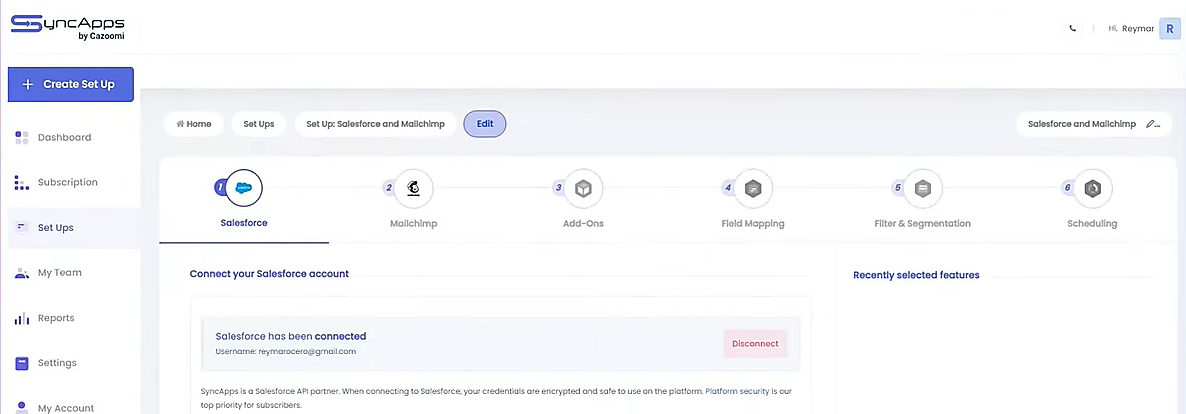
The way it works: SyncApps by Cazoomi is integration middleware constructed for connecting CRM and advertising platforms. It supplies bidirectional sync between Fixed Contact and Salesforce with area mapping, battle decision, and marketing campaign monitoring.
Supply: YouTube
SyncApps maps the information fashions of each platforms, dealing with the structural variations between Salesforce’s Lead/Contact/Account mannequin and Fixed Contact’s subscriber record mannequin.
What it syncs: Contacts and leads (bidirectional), e mail engagement knowledge, marketing campaign membership, record membership, customized fields, and tags. SyncApps can sync Salesforce Campaigns with Fixed Contact lists, so marketing campaign membership stays aligned throughout each programs. Unsubscribes in Fixed Contact replicate again to Salesforce to stop re-marketing to opted-out contacts.
Suits: each preliminary migration (full historic sync) and ongoing bidirectional sync.
Setup course of:
-
Map fields between Salesforce Leads/Contacts and Fixed Contact subscribers. SyncApps auto-maps commonplace fields (title, e mail, telephone) and allows you to manually map customized fields.
-
Configure sync route (one-way or bidirectional), battle decision guidelines (e.g., “most not too long ago up to date document wins”), and filtering standards (which data to incorporate or exclude).
Strengths: Constructed for CRM-to-email-marketing sync, with pre-configured templates for Fixed Contact and Salesforce. Handles bidirectional sync with battle decision out of the field.
Syncs marketing campaign membership and unsubscribe standing throughout each platforms, stopping compliance gaps. Can migrate historic knowledge alongside ongoing sync.
Limitations: Provides a month-to-month subscription value on prime of each platform subscriptions. Pricing scales with document depend and sync frequency. Much less versatile for non-marketing use circumstances. Requires familiarity with each platforms’ knowledge fashions to configure area mapping appropriately.
Greatest for: Groups operating each platforms long-term that want bidirectional sync with marketing campaign monitoring, unsubscribe administration, and historic knowledge migration. Organizations the place advertising and gross sales each replace contact data and wish adjustments mirrored in each programs.
Zapier
Supply: HubSpot
The way it works: Zapier connects Fixed Contact and Salesforce by means of event-driven automations referred to as Zaps. Every Zap pairs a set off (an occasion in a single app) with a number of actions (what occurs within the different).
Each platforms are well-supported Zapier connectors, with a number of set off and motion choices protecting frequent marketing-to-CRM workflows.
What it syncs: Contacts, leads, marketing campaign responses, and record membership. Every object sort and sync route requires its personal Zap. Customized fields could be mapped manually within the setup move.
Engagement-level knowledge (particular person e mail opens, clicks) is extra restricted by means of Zapier than by means of the native connector or middleware, since Zapier acts on set off occasions relatively than pulling mixture engagement metrics.
Suits: ongoing sync of recent data solely; not a migration instrument for historic knowledge.
Setup course of:
-
Select a set off app (e.g., Fixed Contact) and choose the set off occasion (e.g., “New Contact” or “New Contact Exercise”).
-
Flip the Zap on. For bidirectional sync, create a second Zap with the set off and motion apps reversed, and add a filter to stop infinite loops.
Strengths: Quickest setup with no technical information required. A template library covers frequent Fixed Contact-Salesforce workflows. Dependable for easy, single-object syncs. Zapier’s filter and formatting steps can add conditional logic (e.g., solely sync contacts from a particular record).
Limitations: Every Zap handles one trigger-action pair, so syncing contacts, marketing campaign responses, and record membership requires separate Zaps (every counting in opposition to your plan’s job allocation). Bidirectional sync wants duplicate Zaps with loop-prevention logic. No built-in deduplication.
Historic data created earlier than the Zap was activated don’t sync. Engagement knowledge depth is proscribed in comparison with middleware.
Greatest for: Small groups that want a fast, low-cost connection between particular workflows (e.g., new Fixed Contact subscriber creates a Salesforce Lead). Groups that need to automate one or two knowledge flows with out investing in middleware.
Make (Previously Integromat)
Supply: HubSpot
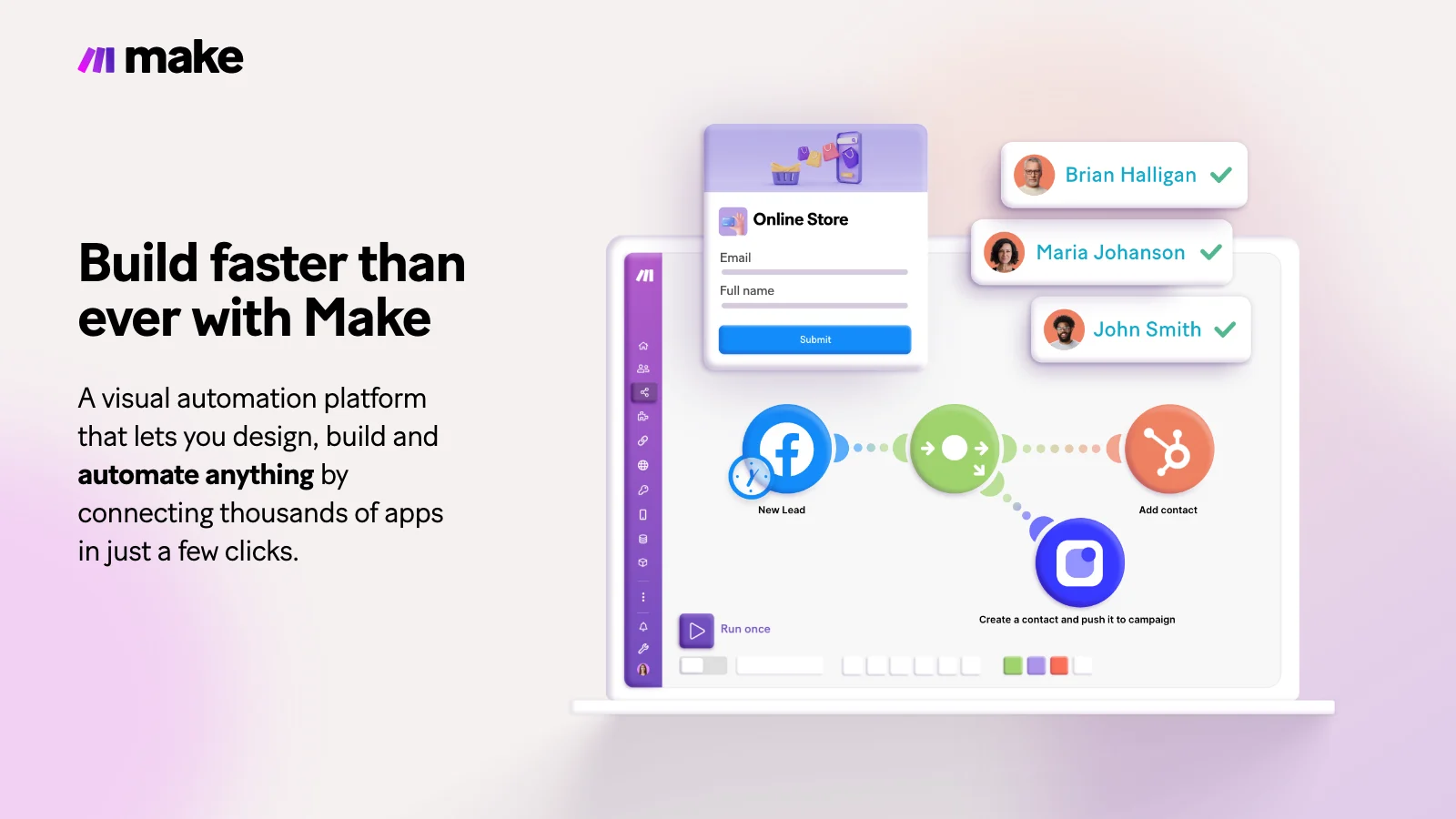
The way it works: Make makes use of a visible situation builder the place modules (app actions) join in a flowchart. Every module represents a step: look ahead to a set off, remodel knowledge, create or replace a document. Eventualities can department, filter, loop, and deal with errors, providing extra management than Zapier’s linear construction.
Each Fixed Contact and Salesforce have devoted Make modules.
What it syncs: Contacts, leads, marketing campaign knowledge, record membership, and customized fields. Make helps iterators for batch processing, routers for conditional paths, and aggregators for combining data earlier than writing, permitting extra advanced knowledge transformation between the 2 platforms than Zapier.
Suits: ongoing sync with conditional logic; not a migration instrument for historic knowledge.
Setup course of:
-
Join the 2 modules and map fields. Make supplies features for remodeling knowledge between platforms (e.g., formatting telephone numbers, mapping Fixed Contact record membership to Salesforce marketing campaign membership).
Strengths: Superb management over knowledge transformation and conditional routing. The visible builder makes advanced workflows simpler to observe than code. Batch operations and error dealing with are inbuilt. Per-operation pricing is decrease than Zapier at greater volumes.
Limitations: Steeper studying curve than Zapier’s guided setup. Bidirectional sync nonetheless requires cautious loop-prevention configuration. Each the Fixed Contact V3 API and Salesforce REST API impose price limits, and high-volume situations may have throttling.
Greatest for: Groups with conditional sync necessities (e.g., solely sync contacts tagged with a particular label, or route subscribers to totally different Salesforce document sorts based mostly on record membership). Mid-size groups whose sync volumes make Zapier’s per-task pricing costly.
Customized API Integration
The way it works: Each platforms present complete APIs.
Fixed Contact’s V3 REST API covers contacts, contact lists, tags, customized fields, e mail campaigns, marketing campaign reporting, occasions, segments, and social posting, with OAuth 2.0 authentication.
Salesforce’s REST API covers all commonplace and customized objects, with Platform Occasions and Change Information Seize for event-driven sync. A customized integration connects these APIs instantly, with your individual middleware dealing with authentication, area mapping, transformation, battle decision, and error restoration.
What it syncs: Something each APIs expose. That is the one methodology that helps advanced sync situations like mapping Fixed Contact engagement knowledge to customized Salesforce objects, syncing occasion registrations to Salesforce Campaigns, or imposing enterprise guidelines that transcend area mapping.
Suits: both one-time migration or ongoing sync; the one methodology with no ceiling on both.
Setup course of:
-
Design the information mannequin mapping between Fixed Contact and Salesforce objects, together with how Fixed Contact lists map to Salesforce Campaigns, how subscriber fields map to Lead/Contact fields, and a cross-reference desk for matching document IDs.
-
Construct the sync service: a server-side software that polls the Fixed Contact API for brand spanking new or up to date contacts and engagement knowledge, transforms data in keeping with the mapping, and writes adjustments to Salesforce (or the reverse route, or each).
-
Implement battle decision logic for bidirectional sync (timestamp-based, source-priority, or field-level guidelines).
-
Add logging, error dealing with, and retry logic. Fixed Contact enforces API price limits of 10,000 requests per day and 4 requests per second. Salesforce’s API request allocation scales by version and license depend (beginning at 100,000 for Skilled and Enterprise editions).
Strengths: Full management over what syncs, when, and the way. Can implement advanced enterprise logic (e.g., sync occasion registrants to a particular Salesforce Marketing campaign, set off Fixed Contact automations from Salesforce deal stage adjustments).
No per-record or per-operation charges from a third-party connector. Fixed Contact’s V3 API is well-documented with an interactive API reference and official SDKs in C#, PHP, Python, Ruby, and TypeScript.
Limitations: Requires growth assets to construct and preserve. You personal the infrastructure, monitoring, and error restoration.
Fixed Contact’s API doesn’t help webhooks for traditional integrations (webhooks are scoped to Expertise Companions solely), so real-time occasion notifications from Fixed Contact require polling. Salesforce variations its API with every seasonal launch. The preliminary construct takes weeks, not hours.
Greatest for: Organizations with customized knowledge fashions, advanced marketing campaign reporting necessities, or enterprise logic that have to be enforced throughout sync. Groups with in-house builders and a long-term dedication to operating each platforms with tight integration.
Key Use Circumstances
1. New E-mail Subscribers Grow to be Salesforce Leads
When a prospect indicators up by means of a Fixed Contact sign-up touchdown web page or embedded kind, the combination creates a Salesforce Lead with the captured data so the gross sales group can observe up with out ready for a guide handoff. If the subscriber got here from a paid marketing campaign, the lead supply carries over for attribution.
Greatest integration methodology: Zapier or native AppExchange connector (one-directional, event-triggered or scheduled).
2. E-mail Engagement Scoring in Salesforce
Advertising and marketing sends a nurture sequence by means of Fixed Contact. The mixing syncs engagement knowledge (opens, clicks, bounces) to the corresponding Salesforce Contact or Lead data.
Gross sales reps can see which prospects opened the final three emails or clicked by means of to the pricing web page, serving to them prioritize follow-up based mostly on demonstrated curiosity relatively than guesswork.
Greatest integration methodology: Native AppExchange connector or SyncApps by Cazoomi (scheduled sync of engagement metrics).
3. Salesforce Marketing campaign Membership Drives Fixed Contact Record Concentrating on
A gross sales supervisor creates a Salesforce Marketing campaign for a product launch and provides goal contacts. The mixing syncs these Marketing campaign members to a Fixed Contact record, so advertising can ship a focused e mail sequence to precisely the viewers gross sales recognized, with out manually exporting and importing a CSV.
Greatest integration methodology: SyncApps by Cazoomi or customized API (bidirectional campaign-list mapping).
4. Occasion Registration Monitoring Throughout Each Platforms
Fixed Contact’s built-in occasion administration instruments deal with registration, ticketing, and fee processing.

Supply: Fixed Contact
The mixing syncs registrants to Salesforce as Marketing campaign members with an “Occasion Registered” standing, giving gross sales visibility into which prospects are attending. Submit-event follow-up could be triggered from Salesforce based mostly on attendance standing.
Greatest integration methodology: Customized API or SyncApps by Cazoomi (occasion registrants mapped to Salesforce Marketing campaign members).
5. Unsubscribe Compliance Throughout Each Methods
When a contact unsubscribes from Fixed Contact emails, the combination updates the corresponding Salesforce document to replicate the opt-out, stopping gross sales from re-adding the contact to future advertising lists.
This retains each programs aligned on consent standing and reduces the chance of sending emails to contacts who opted out.
Greatest integration methodology: SyncApps by Cazoomi or native connector (bidirectional unsubscribe standing sync).
Limitations and Issues
Information That Would not Sync Simply
Fixed Contact and Salesforce mannequin contacts in another way.
Fixed Contact treats all subscribers as a flat record with tags and record membership.
Salesforce separates contacts into Leads (unqualified) and Contacts tied to Accounts, with a proper conversion course of between them.
Deciding whether or not a Fixed Contact subscriber maps to a Salesforce Lead or Contact requires logic that the majority easy connectors deal with solely by means of pre-configured guidelines, not dynamic analysis.
Fixed Contact’s e mail template content material, automation path configurations, and AI-generated analytics don’t switch to Salesforce.
Full e mail HTML, design property, and marketing campaign scheduling knowledge keep inside Fixed Contact. What syncs is the metadata: who obtained what, who engaged, and the way.
Sync Conflicts
Bidirectional sync creates the chance of conflicting updates. If advertising updates a contact’s telephone quantity in Fixed Contact whereas a gross sales rep adjustments the identical quantity in Salesforce, which change wins? With out specific battle decision guidelines, one replace overwrites the opposite.
The native connector and Zapier provide restricted battle dealing with. SyncApps and customized builds permit configurable decision guidelines (timestamp-based, source-priority, or field-level), however these have to be arrange deliberately.
Pricing Implications
Fixed Contact enforces API price limits of 10,000 requests per day and 4 requests per second. Salesforce’s API limits start at 100,000 requests per 24 hours for Skilled and Enterprise editions, plus per-license allocations.
Third-party instruments carry their very own prices.
Zapier fees by the variety of duties (every synced document counts as a job). Make fees by operations. SyncApps pricing scales with document depend and sync frequency.
For groups syncing 1000’s of contacts with frequent marketing campaign engagement knowledge, these prices compound.
Fixed Contact’s personal pricing scales by contact depend ($12/mo for Lite at 500 contacts, escalating steeply above 10,000 contacts), so giant syncs that inflate the Fixed Contact contact depend can set off plan upgrades.
Permissions and Entry
Organising the combination requires admin entry on each side. In Salesforce, System Administrator entry is required to put in AppExchange packages and configure Related Apps or Exterior Consumer Apps for API entry.
In Fixed Contact, account admin rights are wanted to authorize OAuth connections and configure integration settings. In case your Salesforce org makes use of field-level safety or sharing guidelines, the combination consumer’s profile should have entry to each area you propose to sync.
Upkeep
Each platforms replace independently.
Fixed Contact’s V3 API changed the deprecated V2 API and should introduce breaking adjustments with future variations.
Salesforce variations its API with every seasonal launch (the present model is Summer time ’26, API model 67.0). Customized fields added after preliminary setup is not going to sync until the combination configuration is up to date.
Third-party instruments could change pricing, deprecate connectors, or alter authentication strategies. Plan for periodic evaluations of the combination’s well being and accuracy.
What No Methodology Fixes: The Information Itself
Each methodology above strikes data between Fixed Contact and Salesforce. None of them checks whether or not these data are correct, full, or present. A lead with a lifeless e mail tackle in Salesforce syncs as a subscriber with a lifeless e mail tackle in Fixed Contact, and the subsequent marketing campaign bounces.
A contact with the fallacious job title travels simply as reliably as a clear one. The mixing ensures each programs agree; it doesn’t guarantee they’re proper.
The place ZoomInfo Suits In
Each methodology on this information strikes knowledge between Fixed Contact and Salesforce. None of them improves the information being moved.
When the combination is reside however e mail campaigns bounce as a result of addresses are stale, leads arrive in Salesforce with lacking titles and no firm context, and advertising sends nurture sequences to contacts who modified jobs two quarters in the past, the bottleneck is not the connector.
That’s the hole ZoomInfo closes.
ZoomInfo is a B2B knowledge and go-to-market platform constructed on 500M contacts, 100M firms, 135M+ verified telephone numbers, and 200M+ verified enterprise e mail addresses. That knowledge is verified by means of a multi-source pipeline backed by 300+ human researchers and reaching as much as 95% accuracy on first-party knowledge.
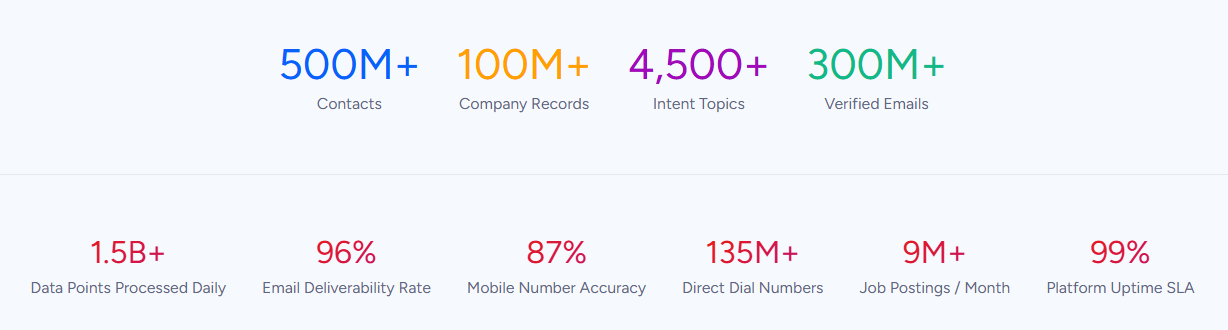
For groups operating a Fixed Contact-Salesforce integration, ZoomInfo addresses the information high quality layer that no connector handles.
ZoomInfo integrates natively with Salesforce by means of the AppExchange, offering CRM enrichment, lead routing, and real-time knowledge updates inside Salesforce data.
Earlier than a contact ever syncs to Fixed Contact, ZoomInfo ensures the Salesforce document has a verified enterprise e mail (so the advertising e mail truly lands), an correct job title (so the content material is related), and present firm particulars (so segmentation displays actuality).
The identical knowledge feeds ZoomInfo’s GTM Context Graph, which processes 1.5B+ knowledge factors each day and combines third-party intelligence with CRM data, dialog transcripts, and behavioral indicators to floor not simply what occurred in a deal, however why.
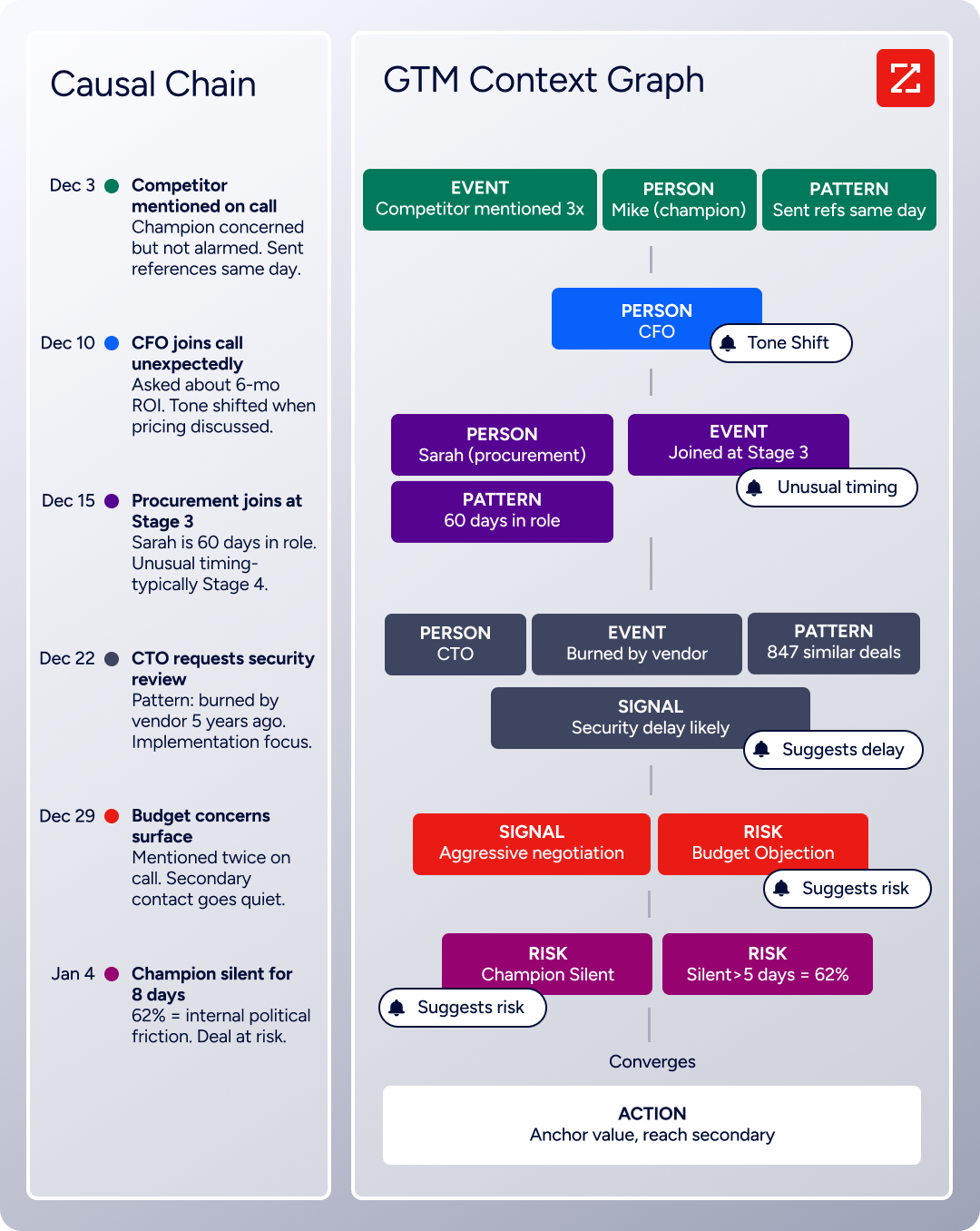
In follow, a group operating each platforms can use ZoomInfo to complement Salesforce data earlier than they sync to Fixed Contact. Verified emails imply advertising campaigns attain actual inboxes as an alternative of bouncing.
Correct titles and firm knowledge imply Fixed Contact’s segmentation builder can goal the best personas with the best content material.
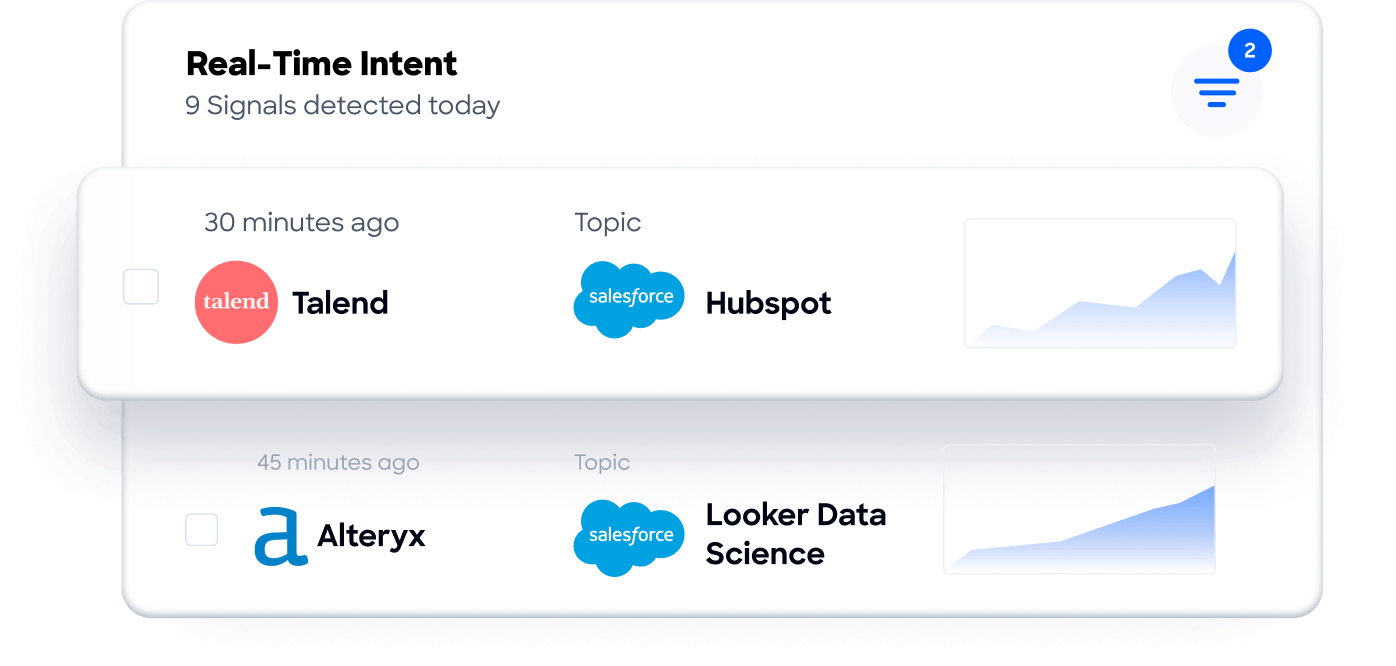
Purchaser Intent knowledge from ZoomInfo, monitoring indicators from 210 million IP-to-Group pairings, can prioritize which accounts obtain campaigns by means of Fixed Contact, so advertising focuses ship quantity on prospects who’re actively researching related options.
Enriched data additionally make the combination itself extra dependable. Fewer clean e mail fields imply fewer sync errors and fewer bounce-backs that harm Fixed Contact’s 97% deliverability price. Constant formatting throughout data reduces the false positives that create duplicate subscribers.
For groups utilizing ZoomInfo’s API or MCP entry, the identical verified knowledge can feed any customized workflow or AI agent, extending enrichment past what the native Salesforce connector covers.
Seismic’s gross sales group attributed 39% of energetic pipeline to alternatives recognized or influenced by ZoomInfo indicators, whereas boosting productiveness by 54% and saving 11.5 hours per week. (Seismic)
Ultimate Verdict
A local Fixed Contact-Salesforce connector exists on the AppExchange, and third-party middleware extends it with bidirectional sync and marketing campaign monitoring. For many groups, the best alternative relies on scale and complexity.
-
Small groups syncing subscribers and primary engagement knowledge ought to begin with the native AppExchange connector. It’s free, formally supported, and requires no third-party instrument or engineering assets.
-
Groups that want bidirectional sync with battle decision, marketing campaign membership mapping, and unsubscribe compliance ought to take a look at SyncApps by Cazoomi or related middleware that handles the structural variations between the 2 knowledge fashions.
-
Groups with easy, event-driven sync wants (e.g., new subscriber creates a Salesforce Lead) ought to take into account Zapier or Make for quick, low-cost setup with out middleware overhead.
-
Organizations with advanced knowledge fashions, customized reporting necessities, or enterprise logic that have to be enforced throughout sync ought to put money into a customized API integration utilizing Fixed Contact’s V3 API and Salesforce’s REST API.
Earlier than committing to a technique, make clear why each platforms have to coexist.
If the reply is short-term (a advertising group evaluating Salesforce Advertising and marketing Cloud as a alternative for Fixed Contact), maintain the sync easy and plan for consolidation.
If the reply is structural (Fixed Contact serves as the e-mail and occasion platform for its ease of use and 97% deliverability price whereas Salesforce handles the complete gross sales pipeline), put money into a technique that helps bidirectional sync and retains consent standing aligned.
Both approach, the standard of the contact knowledge in each programs determines whether or not the combination delivers worth or simply replicates issues throughout two platforms.
ZoomInfo, with its native Salesforce integration and API and MCP entry, is the information enrichment layer that retains data correct whereas the connector retains them aligned.
FAQ
Does Fixed Contact have a local Salesforce integration?
Sure. A local Fixed Contact connector is out there on the Salesforce AppExchange (Fixed Contact for Salesforce v1.0). It syncs contacts between the 2 platforms and pushes e mail engagement knowledge again to Salesforce data.
The connector is included without charge with each platform subscriptions. For bidirectional sync and marketing campaign monitoring, third-party options like SyncApps by Cazoomi lengthen the native connector’s capabilities.
Can I sync historic contacts between Fixed Contact and Salesforce?
The native AppExchange connector and middleware options like SyncApps can deal with present data throughout an preliminary sync. Zapier and Make solely course of data created after the workflow is activated.
For big-scale historic migration, middleware instruments or a customized script utilizing the Fixed Contact V3 API’s bulk exercise endpoints (which help async CSV import/export) and Salesforce’s Bulk API 2.0 are the beneficial paths.
How do I forestall duplicate contacts when syncing?
Use a shared distinctive identifier (e mail tackle is the most typical) as an identical key. Earlier than making a document within the goal system, the combination ought to verify whether or not an identical document already exists. SyncApps contains deduplication logic by default. Zapier supplies a “Search” step earlier than the “Create” step for this objective.
Customized API integrations ought to use upsert logic with every platform’s native upsert capabilities. Fixed Contact’s API helps a create-or-update operation on contacts, which serves as a built-in deduplication mechanism.
What occurs to unsubscribes when each programs are related?
When a contact unsubscribes from Fixed Contact emails, the combination ought to replace the corresponding Salesforce document to replicate the opt-out. SyncApps handles this bidirectionally. The native connector pushes unsubscribe knowledge again to Salesforce.
With out this sync, there’s a compliance danger: a gross sales rep might re-add an opted-out contact to a advertising record by means of Salesforce, triggering undesirable emails. Guaranteeing unsubscribe standing flows in each instructions is important for CAN-SPAM and GDPR compliance.
Does the combination help Fixed Contact’s occasion administration options?
Not by means of the native connector or Zapier in a significant approach. Fixed Contact’s built-in occasion administration (RSVP, ticketing, fee processing) generates registrant knowledge that may be synced to Salesforce as Marketing campaign members by means of a customized API integration or middleware like SyncApps.
The occasion particulars themselves (ticket sorts, fee standing, check-in knowledge) sometimes require customized growth to map into Salesforce objects.
What are the API price limits I would like to contemplate?
Fixed Contact’s V3 API enforces 10,000 requests per day (resetting at UTC midnight) and 4 requests per second. Salesforce’s API limits begin at 100,000 requests per 24 hours for Skilled and Enterprise editions, plus per-license allocations.
Each platforms return 429 standing codes when limits are exceeded. Excessive-volume syncs (1000’s of contacts with frequent engagement updates) could require batching, throttling, or higher-tier plans on both platform. Expertise Companions on Fixed Contact’s platform obtain greater price limits.
Can Fixed Contact’s automation paths be triggered by Salesforce knowledge?
In a roundabout way. Fixed Contact’s Automation Path Builder helps triggers based mostly on Fixed Contact occasions (record additions, tag adjustments, e mail clicks, kind submissions), but it surely can not natively pay attention for Salesforce occasions like deal stage adjustments or job completions.
You possibly can create an oblique set off: use Zapier or Make so as to add a tag or transfer a contact to a particular record in Fixed Contact when a Salesforce occasion happens, and configure that record addition or tag because the set off for a Fixed Contact automation path.
How does ZoomInfo enhance a Fixed Contact-Salesforce integration?
ZoomInfo solves the information high quality downside that no sync instrument addresses. Contact data in CRMs decay as folks change jobs, e mail addresses go inactive, and firm particulars shift. ZoomInfo enriches Salesforce data with verified contact knowledge, firm attributes, technographics, and intent indicators by means of its native Salesforce integration.
These enriched data then sync to Fixed Contact with correct emails, appropriate titles, and present firm particulars, which reduces bounce charges, improves segmentation accuracy, and ensures advertising campaigns attain the best folks.
The end result: the information flowing between each programs is correct and full, making the combination extra beneficial and the advertising it helps simpler.
Construct out your Salesforce stack:

