

Groups that run Pipedrive as their CRM and Fb Lead Advertisements for demand technology normally hit the identical friction inside 1 / 4:
-
leads submitted by On the spot Varieties sit inside Meta’s platform whereas reps work offers in Pipedrive, making a blind spot between advert spend and pipeline,
-
contact particulars auto-filled by Fb do not match the sphere construction in Pipedrive, so information arrive incomplete or malformed,
Nevertheless the 2 platforms ended up coexisting (a advertising and marketing crew operating paid social whereas gross sales lives in Pipedrive, a founder managing each channels solo, or an company producing leads on behalf of a shopper who tracks offers in Pipedrive), the longer the handoff stays guide, the broader the hole between lead seize and first contact.
Connecting Pipedrive and Fb Lead Advertisements closes that hole.
New lead submissions circulation immediately into Pipedrive’s Leads Inbox or as new offers, so reps see incoming prospects with out leaving their CRM. Contact fields (identify, electronic mail, telephone, customized query responses) map to Pipedrive individual and deal information, so the info arrives structured and able to act on.
Automated routing and exercise creation imply a rep can observe up inside minutes of type submission quite than ready for a batch export.
Pipedrive affords a native Fb Lead Advertisements Sync app in its Market that pushes advert submissions into the CRM in actual time. For groups that want conditional logic, multi-step workflows, or connections to extra instruments, third-party automation platforms (Zapier, Make) present extra configurability. Every methodology differs in setup complexity, information protection, sync path, and value.
One downside no connection methodology solves: the sync delivers lead information from Fb into Pipedrive, nevertheless it doesn’t confirm whether or not these information include correct enterprise contact information, actual telephone numbers, or appropriate job titles.
That’s the place ZoomInfo is available in. ZoomInfo integrates natively with Pipedrive by its market and affords API and MCP entry that may feed verified, enriched B2B information into any CRM workflow, so the leads flowing from Fb into Pipedrive are correct and full earlier than a rep picks up the telephone.
This text covers the complete panorama of the Pipedrive-Fb Lead Advertisements integration: which strategies can be found, what information every one handles, the right way to set them up, the use circumstances that justify connecting each platforms, and the restrictions to plan for. On the finish it additionally covers how ZoomInfo matches into the image as a knowledge enrichment layer that strengthens the information flowing between Fb Lead Advertisements and Pipedrive.
Let’s begin with an outline of the mixing.
Integration Overview
Does a local integration exist?
Sure. Pipedrive affords a Fb Lead Advertisements Sync app in its Market that connects Fb Lead Advertisements kinds to Pipedrive in actual time. Leads submitted by On the spot Varieties on Fb or Instagram sync immediately into Pipedrive as new leads, contacts, or offers.
What information can sync?
Contact data captured by the On the spot Kind (identify, electronic mail, telephone quantity, customized query responses) maps to Pipedrive individual fields and deal fields. The sync covers the info the submitter offers or Fb auto-fills from their profile.
Is the sync bidirectional?
No. All strategies circulation one path: Fb Lead Advertisements to Pipedrive. Lead submissions push into the CRM, however Pipedrive information doesn’t circulation again to Meta. That is inherent to the mixing’s nature (Fb is a lead supply, not a knowledge vacation spot for CRM information).
Is it real-time or batch?
The native Pipedrive sync app pushes leads into Pipedrive as they’re submitted. Zapier triggers hearth inside 1 to fifteen minutes relying on plan tier. Make situations can run on triggers or scheduled intervals.
What are the out there strategies?
Native Pipedrive Market app, third-party automation (Zapier, Make), and Meta’s webhook-based API paired with Pipedrive’s REST API for customized growth.
|
Methodology |
Setup Issue |
Information Circulation |
Actual-time? |
Price |
|---|---|---|---|---|
|
Native (Pipedrive Market App) |
Low |
Fb to Pipedrive |
Sure |
Included with Pipedrive plan |
|
Zapier |
Low-Medium |
One-way per Zap |
Close to real-time (1-15 min) |
From $19.99/mo |
|
Make |
Medium |
Configurable per state of affairs |
Close to real-time or scheduled |
From $10.59/mo |
|
Customized API |
Excessive |
Totally customizable |
Actual-time through webhooks |
Developer time + internet hosting |
One distinction value settling upfront: the native app and Zapier sync new lead submissions as they occur. Neither handles historic leads submitted earlier than the connection was activated. Customized API growth is the one methodology that may backfill older leads from Meta’s Lead Advertisements API (the place lead information is out there for 90 days after submission).
Integration Strategies
Native Pipedrive Fb Lead Advertisements Sync App
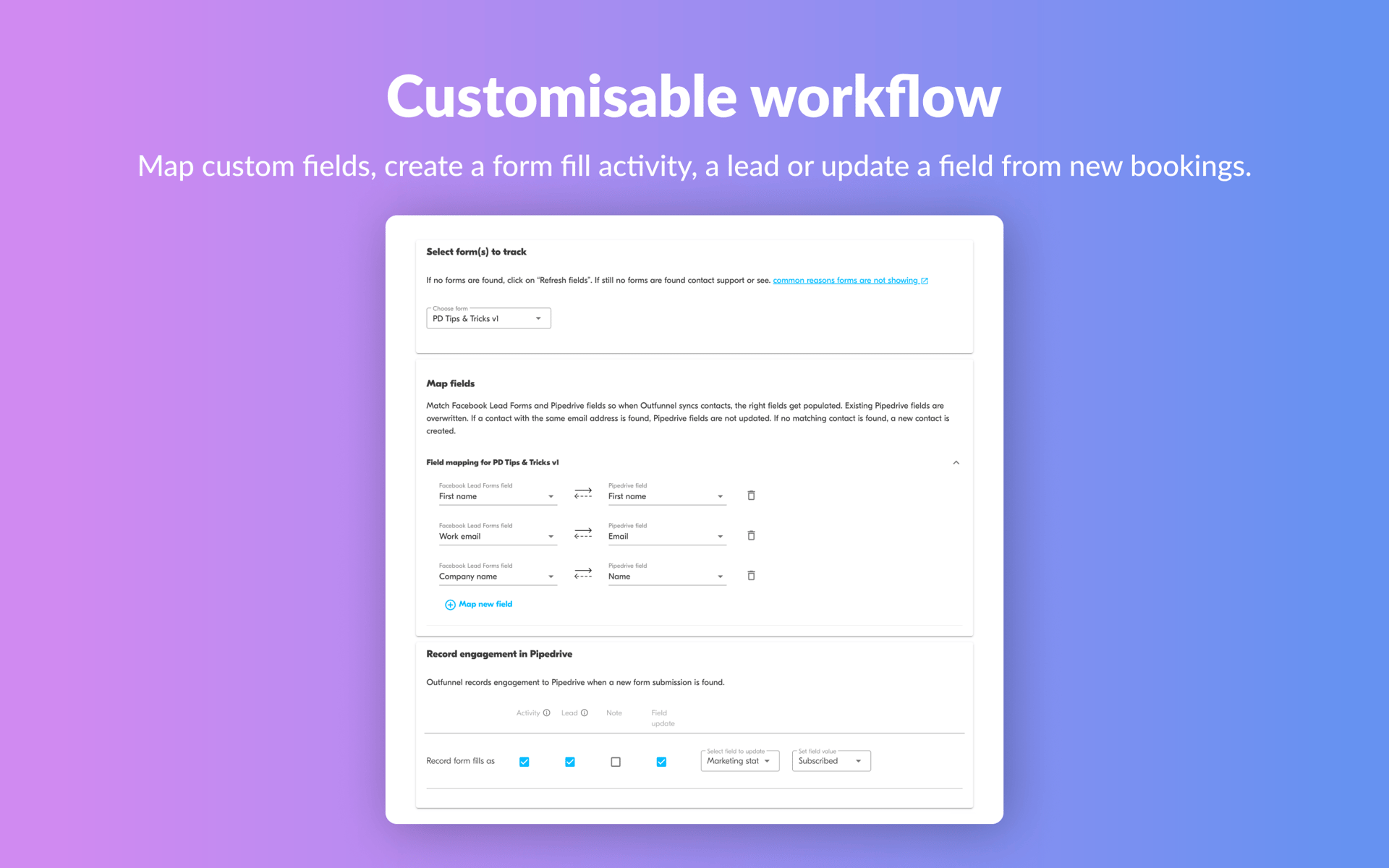
The way it works: Pipedrive’s Fb Lead Advertisements Sync app is a first-party Market integration that connects your Fb advert account to Pipedrive.
When a prospect submits an On the spot Kind on Fb or Instagram, the app pushes the submission into Pipedrive in actual time, creating a brand new lead, individual, or take care of the captured contact information mapped to Pipedrive fields.
Supply: Pipedrive
What it syncs: Contact data from the On the spot Kind submission: identify, electronic mail tackle, telephone quantity, and responses to any customized questions configured within the type. These map to Pipedrive individual fields. The app may create a deal related to the brand new contact and route it to a selected pipeline and stage.
Suits: ongoing sync of recent lead submissions; not a migration or backfill device.
Setup course of:
-
Map the On the spot Kind fields (identify, electronic mail, telephone, customized questions) to the corresponding Pipedrive fields (individual identify, electronic mail, telephone, customized fields on the individual or deal).
-
Configure the vacation spot: select whether or not new submissions create a lead within the Leads Inbox, a deal in a selected pipeline and stage, or each. Set the deal proprietor if utilizing automated project.
Strengths: First-party integration maintained inside Pipedrive’s ecosystem. No third-party device to configure or pay for. Actual-time sync with no polling delay. Setup requires no technical information. Included at no extra value on Pipedrive plans that help Market apps.
Limitations: One-directional solely (Fb to Pipedrive). Restricted to the info captured within the On the spot Kind; engagement metrics (advert impressions, click-through charges) don’t sync. Area mapping is much less versatile than automation platforms that enable information transformation mid-flow. Historic leads submitted earlier than the app was put in don’t sync.
Greatest for: Small and mid-sized groups that need leads flowing from Fb adverts into Pipedrive with minimal setup and no extra value. Groups already utilizing Pipedrive as their major CRM and operating Fb Lead Advertisements as a top-of-funnel channel.
Zapier
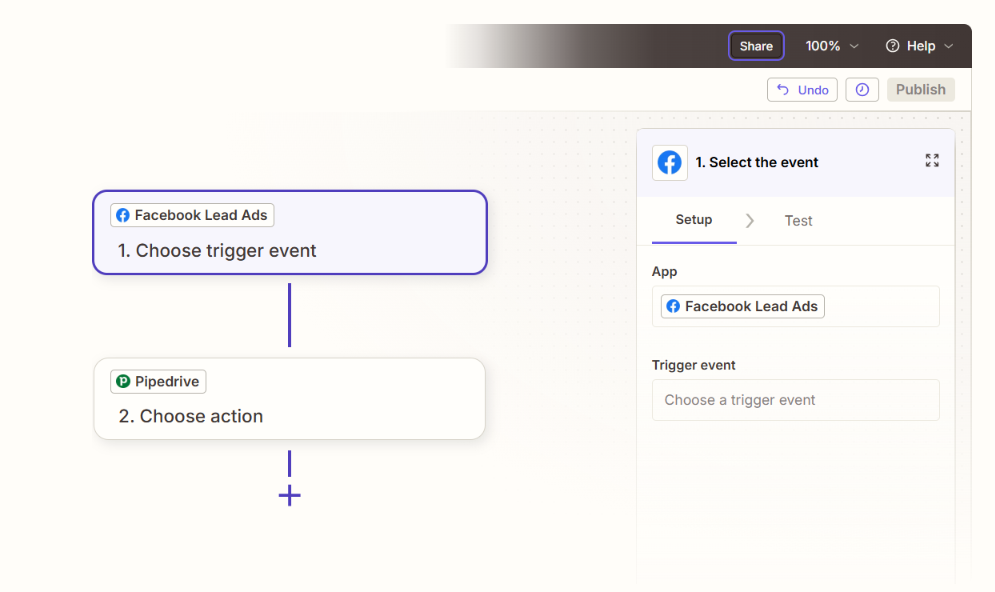
The way it works: Zapier connects Fb Lead Advertisements and Pipedrive by event-driven automations known as Zaps.
Every Zap pairs a set off (a brand new lead submission on Fb) with a number of actions (create an individual, create a deal, ship a notification in Pipedrive). Each platforms have well-supported Zapier connectors, and pre-built Zap templates exist for this pairing.
Supply: Pipedrive
What it syncs: The identical contact information captured within the On the spot Kind: identify, electronic mail, telephone, and customized query responses. Zapier provides the power to rework, format, or enrich information between the set off and the motion utilizing intermediate steps (Formatter, Filter, Lookup).
For instance, you’ll be able to break up a full identify into first and final identify fields, format telephone numbers to a constant commonplace, or filter out leads that do not meet a qualification threshold based mostly on a customized query response earlier than they attain Pipedrive.
Suits: ongoing sync with conditional logic and information transformation; not a migration device.
Setup course of:
-
Select “Pipedrive” because the motion app and choose the motion (e.g., “Create Individual,” “Create Deal,” or “Create Lead”).
-
Map the Fb type fields to the corresponding Pipedrive fields. Add Formatter steps if it’s worthwhile to break up names, reformat telephone numbers, or remodel customized query values.
Strengths: No engineering sources required. Pre-built templates scale back setup time to minutes. Multi-step Zaps can create an individual, create an related deal, add an exercise (e.g., a follow-up name), and ship a Slack notification in a single circulation. Filter steps can disqualify leads earlier than they attain the CRM, conserving the pipeline clear.
Limitations: Every Zap handles one trigger-action pair (or multi-step chain). Zapier fees by job depend, and every lead synced counts as a minimum of one job (multi-step Zaps devour one job per step).
No bidirectional sync. Historic leads created earlier than the Zap was activated don’t sync. Close to real-time quite than on the spot: Zapier checks triggers each 1 to fifteen minutes relying on plan tier.
Greatest for: Groups that want information transformation, conditional filtering, or multi-app workflows (e.g., sync to Pipedrive and add the result in a Mailchimp listing or notify a Slack channel on the identical time). Groups on Pipedrive plans the place the native Market app’s subject mapping is simply too inflexible.
Make (Previously Integromat)
The way it works: Make makes use of a visible state of affairs builder the place modules (app actions) join in a flowchart. A Fb Lead Advertisements set off module watches for brand new submissions, and a Pipedrive module creates or updates information. Situations can department, filter, loop, and deal with errors, giving extra management than Zapier’s linear construction.
What it syncs: The identical type submission information (identify, electronic mail, telephone, customized query responses), with full entry to Make’s information transformation toolkit: textual content parsing, JSON manipulation, date formatting, and mathematical operations between modules. Make additionally helps iterators for batch processing and routers for conditional paths.
Suits: ongoing sync with complicated conditional logic; not a migration device.
Setup course of:
-
Join the 2 modules and map fields. Use Make’s built-in features to rework information between platforms (e.g., parse a full identify into first and final, standardize telephone quantity format, or map customized query values to Pipedrive dropdown choices).
Strengths: Positive management over information transformation and conditional routing. The visible builder makes complicated workflows simpler to observe than code. Error dealing with and retry logic are in-built. Per-operation pricing is decrease than Zapier at increased volumes.
Routers enable a single lead submission to set off completely different Pipedrive actions based mostly on circumstances (e.g., path to completely different pipelines based mostly on a customized query response).
Limitations: Steeper studying curve than Zapier’s guided setup. The Fb Lead Advertisements module’s set off conduct and out there fields rely on Make’s connector upkeep. Each platforms’ APIs impose fee limits that will have an effect on high-volume situations.
Greatest for: Groups with conditional routing necessities (e.g., ship leads from completely different advert kinds to completely different Pipedrive pipelines, or create a deal provided that a lead meets particular qualification standards). Mid-size groups whose lead volumes make Zapier’s per-task pricing costly.
Customized API Integration
The way it works: Fb Lead Advertisements exposes lead information by the Meta Advertising and marketing API’s webhook system, which pushes a notification to a registered endpoint each time a person submits a lead type.
Pipedrive’s REST API helps creating individuals, offers, leads, actions, and notes through commonplace POST requests with webhook help for event-driven actions.
A customized integration connects these APIs immediately, with middleware dealing with authentication, subject mapping, information transformation, deduplication, and error restoration.
What it syncs: Something each APIs expose. On the Fb aspect: all On the spot Kind subject responses, type metadata (type ID, advert ID, marketing campaign ID, timestamp), and inventive context. On the Pipedrive aspect: individuals, organizations, offers, leads, actions, notes, and customized fields.
That is the one methodology that may implement enterprise logic like lead scoring based mostly on type responses, automated deduplication towards present Pipedrive contacts, or backfilling historic leads from Meta’s lead retrieval endpoints (information out there for 90 days).
Suits: both backfill of historic leads or ongoing real-time sync; the one methodology with no ceiling on both.
Setup course of:
-
Register a Meta App within the Meta for Builders portal and subscribe to the leadgen webhook subject in your Fb Web page. Acquire a Web page Entry Token with leads_retrieval and pages_manage_ads permissions.
-
Map the retrieved type fields to Pipedrive’s individual, deal, and customized subject schema. Implement deduplication logic (e.g., examine if an individual with the identical electronic mail already exists earlier than creating a brand new file).
-
Deploy, monitor, and keep. Each APIs model independently (Pipedrive launched API v2; Meta variations its Advertising and marketing API quarterly).
Strengths: Full management over what syncs, when, and the way. Actual-time sync through webhooks. Can implement lead scoring, deduplication, and conditional routing in code. Can backfill historic leads as much as Meta’s 90-day retention window. No per-record or per-operation charges from a third-party connector.
Limitations: Requires growth sources to construct and keep. You personal the infrastructure, monitoring, and error restoration. API adjustments on both platform require ongoing upkeep. The preliminary construct takes days to weeks, not minutes.
Greatest for: Groups with excessive lead volumes, complicated routing necessities, or deduplication wants that no off-the-shelf device can fulfill. Organizations with in-house growth sources and a long-term dedication to the Pipedrive-Fb Lead Advertisements connection.
Key Use Instances
1. Actual-Time Lead-to-Rep Routing from Paid Social
A advertising and marketing crew runs Fb Lead Advertisements for a B2B service firm. When a prospect submits an On the spot Kind requesting a session, the native Pipedrive sync app creates a brand new deal within the “Inbound” pipeline and assigns it to the subsequent out there rep through round-robin.
The rep will get a Pipedrive notification and calls the lead inside minutes of submission, whereas the prospect’s intent remains to be contemporary.
Greatest integration methodology: Native Pipedrive Fb Lead Advertisements Sync app (real-time, zero latency).
2. Certified Lead Filtering Earlier than CRM Entry
An company operating Fb Lead Advertisements for a number of purchasers makes use of customized questions in On the spot Varieties to qualify leads (e.g., finances vary, firm dimension, timeline).
A Zapier Zap with a filter step solely creates Pipedrive offers for leads that meet the qualification threshold, conserving the pipeline clear and stopping reps from chasing unqualified contacts.
Greatest integration methodology: Zapier (filter steps allow conditional creation based mostly on type responses).
3. Multi-Pipeline Routing by Advert Marketing campaign
A SaaS firm runs separate Fb Lead Advertisements campaigns for various merchandise. A Make state of affairs makes use of routers to examine the form_id or marketing campaign identify in every lead submission and routes it to the proper Pipedrive pipeline (e.g., “Product A Inbound” vs. “Product B Inbound”), assigning the deal to the crew that owns that product line.
Greatest integration methodology: Make (routers deal with conditional branching by marketing campaign or type).
4. Occasion Registration with Automated Comply with-Up
An organization makes use of Fb Lead Advertisements to seize registrations for a webinar. Every submission syncs to Pipedrive as a brand new individual with an related exercise (a scheduled follow-up name two days after the occasion).
The rep’s Pipedrive exercise calendar reveals the follow-up with none guide entry, so no registrant falls by the cracks.
Greatest integration methodology: Zapier or Make (multi-step circulation creating an individual, a deal, and a scheduled exercise in a single automation).
5. Historic Lead Backfill Throughout CRM Migration
An organization transitioning from spreadsheet-based lead monitoring to Pipedrive must import the previous 60 days of Fb Lead Advertisements submissions.
A customized API integration queries Meta’s lead retrieval endpoints for historic type submissions (out there for 90 days) and bulk-creates Pipedrive individual and deal information with correct timestamps and supply attribution.
Greatest integration methodology: Customized API (solely methodology that may entry historic lead information from Meta).
Limitations and Issues
One-Directional Information Circulation
Each methodology flows one path: Fb Lead Advertisements to Pipedrive. There is no such thing as a approach to push Pipedrive information again to Meta. CRM updates (deal stage adjustments, contact corrections, qualification standing) don’t feed again into Fb’s advert optimization.
To shut the loop and let Meta’s Benefit+ leads campaigns optimize for downstream conversions, groups have to implement the Conversions API individually, which is a definite integration from the lead sync and requires both a customized construct or a third-party device that helps CAPI.
Lead High quality from Auto-Stuffed Varieties
Fb On the spot Varieties pre-populate contact fields from a person’s profile, which reduces friction but additionally reduces intent. Customers can submit a type in two faucets with out consciously deciding to interact. This produces increased lead volumes however variable downstream conversion.
Meta has launched SMS telephone verification and work electronic mail validation as form-level qc, however these are configured in Meta Advertisements Supervisor, not within the integration layer.
Groups seeing excessive spam or low-quality leads ought to tackle it on the advert configuration stage earlier than adjusting the sync.
Information Mapping Limitations
Fb On the spot Varieties seize a flat listing of fields. Pipedrive’s information mannequin is richer: individuals, organizations, offers, leads, actions, merchandise, and customized fields with relationships between them.
The native sync app and Zapier deal with fundamental subject mapping (identify, electronic mail, telephone to individual; type identify to deal), however neither can robotically create a company file from a company-name type subject and affiliate it with the individual.
Groups with structured information necessities might have Make’s transformation capabilities or a customized construct.
Meta’s 90-Day Lead Information Retention
Meta makes lead information out there for obtain for 90 days from the time a type is submitted. After 90 days, the info is now not retrievable by the API.
If the mixing goes down for an prolonged interval, leads older than 90 days are misplaced except they have been already synced or exported. Join a CRM integration promptly after launching a Lead Advertisements marketing campaign.
Pricing Implications
The native Pipedrive sync app is included with Pipedrive plans at no extra value. Third-party instruments carry their very own charges: Zapier fees by job depend (every synced lead is a minimum of one job; multi-step Zaps devour extra), and Make fees by operation. For groups producing a whole bunch of leads per day, these per-lead prices compound.
On the Fb aspect, there is no such thing as a integration payment, however the advert spend follows Meta’s auction-based pricing mannequin.
Permissions and Entry
Organising the mixing requires admin-level entry on each side. In Pipedrive, account admin rights are wanted to put in Market apps and generate API tokens. On Fb, the person authorizing the connection should have admin entry to each the Fb Web page operating the adverts and the advert account.
In case your Meta Enterprise Suite makes use of Leads Entry Supervisor, the mixing’s entry to steer information should be granted explicitly.
Upkeep
Each platforms evolve independently. Pipedrive launched Webhooks v2 as a breaking change and is transitioning to API v2. Meta variations its Advertising and marketing API quarterly, and adjustments to On the spot Kind fields, permissions, or the webhook payload construction can break integrations.
Third-party connectors (Zapier, Make) could replace their modules on a unique schedule. Plan for periodic evaluations of the mixing’s well being, significantly after platform updates on both aspect.
What No Methodology Fixes: The Information Itself
Each methodology above delivers lead submissions from Fb into Pipedrive. None verifies whether or not the info in these submissions is correct, present, or full.
A telephone quantity auto-filled from a Fb profile could also be a private cell the prospect by no means solutions for enterprise calls.
An electronic mail tackle could also be a Gmail account quite than a company electronic mail. A job title subject (if the shape even captures one) is self-reported and unverified.
The mixing ensures Pipedrive receives the lead; it doesn’t make sure the lead is reachable, accurately recognized, or value pursuing.
The place ZoomInfo Suits In
Each methodology on this information delivers leads from Fb On the spot Varieties into Pipedrive. None improves the info inside these leads.
When a prospect submits a type in two faucets utilizing auto-filled Fb profile information, the ensuing file could carry a private electronic mail as a substitute of a enterprise tackle, a telephone quantity that hasn’t been lively in years, or no job title in any respect.
The mixing faithfully delivers that incomplete file to Pipedrive, the place a rep wastes time calling a useless quantity or emailing an tackle that bounces.
That’s the hole ZoomInfo closes.
ZoomInfo is an AI GTM platform constructed on 500M contacts, 100M firms, 135M+ verified telephone numbers, and 200M+ verified enterprise emails. That information is verified by a multi-source pipeline backed by 300+ human researchers, reaching as much as 95% accuracy on first-party information.
For groups operating Fb Lead Advertisements into Pipedrive, ZoomInfo addresses the info high quality layer that no form-to-CRM sync handles.
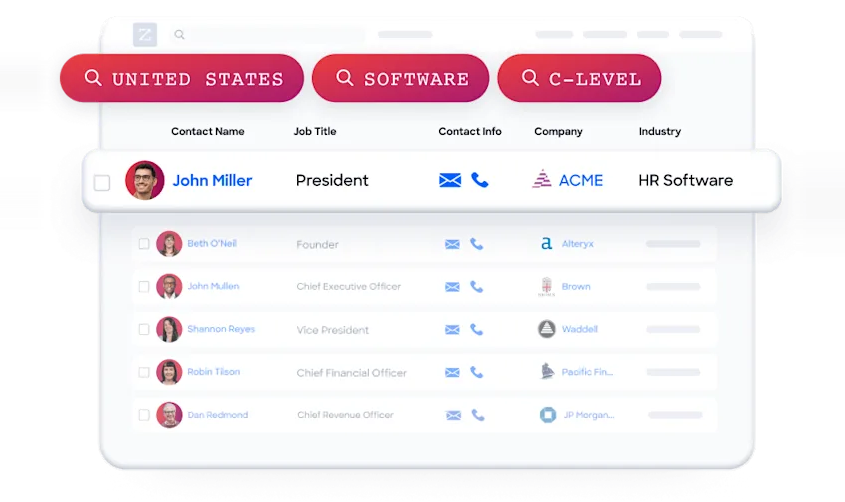
ZoomInfo integrates natively with Pipedrive by its market, offering lead enrichment and information import immediately into the CRM.
When a Fb lead lands in Pipedrive, ZoomInfo can enrich the file with a verified enterprise electronic mail, a direct-dial telephone quantity, correct job title and seniority, firm attributes (trade, headcount, income), and technographic information.
Supply: ZoomInfo
The identical information feeds ZoomInfo’s GTM Context Graph, which processes 1.5B+ information factors every day and unifies third-party intelligence with CRM information, dialog transcripts, and behavioral alerts to floor not simply what occurred in a deal, however why.
In follow, a crew operating Fb Lead Advertisements can use ZoomInfo to counterpoint each new Pipedrive file because it arrives. A lead that got here in with only a identify and private Gmail tackle turns into a file with a verified enterprise electronic mail, a direct-dial quantity, the prospect’s present title and division, and their firm’s profile.
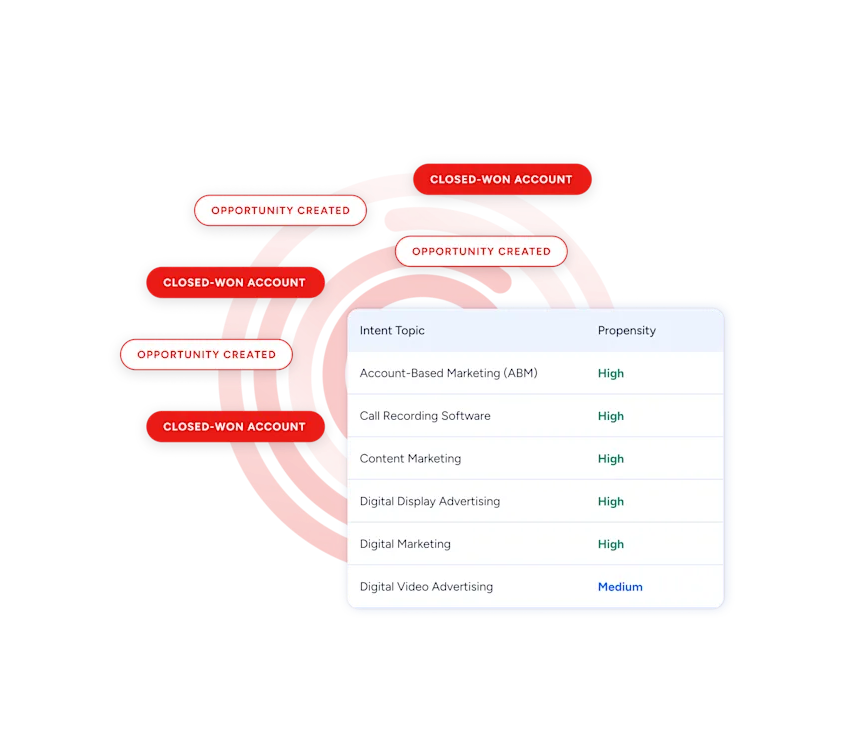
Purchaser Intent information from ZoomInfo, monitoring alerts from 210 million IP-to-Group pairings, may layer into Pipedrive to assist reps prioritize which Fb results in name first based mostly on lively shopping for alerts, quite than working the listing in submission order.
Supply: ZoomInfo
For groups that construct past native integrations, ZoomInfo’s Enterprise API and MCP server expose the identical intelligence to any customized workflow or AI agent.
Enriched information additionally make the Fb-to-Pipedrive sync extra productive. Reps cease losing dials on useless telephone numbers. E-mail follow-ups land at company inboxes as a substitute of non-public accounts the prospect by no means checks for enterprise. And the info flowing by Pipedrive’s pipeline views and experiences displays verified data quite than self-reported, auto-filled profile information of unknown age.
Seismic’s gross sales crew attributed 39% of lively pipeline to alternatives recognized or influenced by ZoomInfo alerts, whereas boosting productiveness by 54% and saving 11.5 hours per week. (Seismic)
Ultimate Verdict
A local integration between Pipedrive and Fb Lead Advertisements exists by Pipedrive’s Market, and third-party automation instruments add flexibility for groups with conditional routing or information transformation wants.
For many groups, the best selection will depend on lead quantity, routing complexity, and information high quality necessities.
-
Small groups operating a single Fb Lead Advertisements type into one Pipedrive pipeline ought to begin with the native Pipedrive sync app. It’s free, real-time, and requires no third-party device.
-
Groups that want conditional filtering, multi-step workflows, or connections to extra instruments (Slack notifications, electronic mail advertising and marketing platforms) ought to use Zapier or Make. Zapier is quicker to arrange; Make affords finer management and decrease per-operation prices at increased volumes.
-
Organizations with complicated information fashions, excessive lead volumes, deduplication necessities, or a have to backfill historic leads ought to put money into a customized API integration utilizing Meta’s Advertising and marketing API and Pipedrive’s REST API.
Earlier than investing within the integration, make clear what position Fb Lead Advertisements performs in your pipeline.
If Fb is one lead supply amongst many and volumes are average, the native sync app handles the job with no added value or complexity. If Fb is a major demand technology channel producing a whole bunch or hundreds of leads per thirty days, the info high quality of these leads determines whether or not the pipeline they feed is actual or inflated.
ZoomInfo, with its native Pipedrive integration and API and MCP entry, is the info enrichment layer that turns auto-filled Fb type submissions into verified, actionable CRM information.
FAQ
Does Pipedrive have a local integration with Fb Lead Advertisements?
Sure. Pipedrive affords a Fb Lead Advertisements Sync app in its Market that connects Fb On the spot Varieties to Pipedrive in actual time. When a prospect submits a lead type on Fb or Instagram, the submission robotically creates a brand new file in Pipedrive with the captured contact information mapped to individual and deal fields. The app is included at no extra value on Pipedrive plans that help Market integrations.
Can I sync historic Fb leads into Pipedrive?
Not by the native app or third-party automation instruments like Zapier and Make, which solely course of leads submitted after the mixing is activated. To import historic leads, you want a customized API integration that queries Meta’s lead retrieval endpoints. Meta retains lead information for 90 days from the time of type submission; after that, the info is now not accessible by the API.
How do I forestall low-quality Fb leads from coming into Pipedrive?
Handle high quality at two ranges. First, configure your On the spot Varieties in Meta Advertisements Supervisor to make use of the “Larger intent” type sort (which provides a assessment display screen), allow SMS telephone verification, and require work electronic mail addresses. Second, use a Zapier or Make filter step to display screen leads based mostly on customized query responses earlier than creating information in Pipedrive (e.g., disqualify leads beneath a minimal finances threshold or outdoors your goal geography).
What Pipedrive plan do I would like for the Fb Lead Advertisements integration?
The native Fb Lead Advertisements Sync app is accessible by the Pipedrive Market. Market app entry is accessible throughout Pipedrive’s plans, although particular capabilities (like workflow automations triggered by new leads) require the Progress plan or increased. Zapier and Make integrations work with any Pipedrive plan that gives API entry, which is included on all plans.
Does the mixing ship Pipedrive information again to Fb?
No. All integration strategies circulation one path: Fb Lead Advertisements to Pipedrive. To ship downstream conversion information again to Meta for advert optimization (enabling the Conversion leads efficiency aim in Benefit+ campaigns), it’s worthwhile to implement Meta’s Conversions API individually. This can be a distinct integration from the lead sync and requires both a customized construct or a third-party device that helps CAPI.
What occurs if the mixing goes down?
Leads submitted whereas the mixing is inactive are usually not robotically synced when the connection is restored. For the native app and Zapier/Make, any leads submitted in the course of the outage are missed except you manually export them from Meta Advertisements Supervisor or Leads Centre and import them into Pipedrive. Meta retains lead information for 90 days, so a well timed guide restoration is feasible. Common monitoring of the mixing’s well being is the perfect prevention.
How does ZoomInfo enhance a Fb Lead Advertisements-to-Pipedrive workflow?
ZoomInfo solves the info high quality hole between Fb’s lead seize and Pipedrive’s gross sales execution. Fb On the spot Varieties auto-fill contact fields from person profiles, which regularly means private electronic mail addresses, outdated telephone numbers, and no verified job title or firm information. ZoomInfo enriches these information with verified enterprise emails, direct-dial telephone numbers, correct titles, and firm attributes by its native Pipedrive integration. The outcome: reps work from correct, full information quite than uncooked type submissions, bettering connection charges and lowering wasted effort on unreachable or misidentified leads.
Can I take advantage of Pipedrive automations to behave on new Fb leads?
Sure. As soon as a Fb lead syncs into Pipedrive (through the native app, Zapier, or Make), Pipedrive’s built-in workflow automations can set off on the brand new file. For instance, you’ll be able to arrange an automation to assign the deal to a rep based mostly on territory, create a follow-up exercise, or ship a personalised electronic mail template. Workflow automations can be found on the Progress plan and above.

