

Groups that use Dialpad for calls and Salesforce as their CRM normally hit the identical friction inside 1 / 4:
-
name exercise logged in Dialpad by no means reaches Salesforce data, so reps kind up notes after each dialog,
Nevertheless, the 2 platforms ended up coexisting (a gross sales group selecting Dialpad for AI-powered calling whereas the org standardizes on Salesforce, a contact middle operating Dialpad Assist alongside Salesforce Service Cloud, or completely different departments adopting instruments independently), the longer they run and not using a connection, the extra handbook work piles up and the much less dependable the info in both system turns into.
Connecting Dialpad and Salesforce eliminates that hole.
Calls made or obtained in Dialpad log robotically to the matching Salesforce Lead, Contact, or Account, so reps cease copying notes by hand. Transcriptions, AI-generated name summaries, and sentiment knowledge stream into Salesforce data so managers can evaluate conversations with out switching instruments. Inbound callers match to CRM data immediately, giving reps context earlier than they are saying hey.
Dialpad provides a native Salesforce integration on its Professional and Enterprise plans, with a corresponding app on the Salesforce AppExchange. For groups that want automation past the native connector, third-party instruments like Zapier can bridge extra workflows. Customized API growth can also be doable, with each platforms providing full developer APIs. Every methodology differs in setup complexity, knowledge stream, sync path, and price.
There’s additionally one downside no connection methodology solves: the combination logs calls and syncs exercise, however it doesn’t confirm whether or not the contact data behind these calls are correct, present, or full.
And that’s the place ZoomInfo is available in. ZoomInfo integrates natively with Salesforce and connects to Dialpad via Refrain, whereas its API and MCP entry can feed verified, enriched contact and firm knowledge into any system within the stack. The end result: each platforms work with data which are correct and full earlier than a single name is positioned.
This text covers the complete panorama of the Dialpad-Salesforce integration: which strategies can be found, what knowledge each handles, tips on how to set them up, the use circumstances that justify connecting each platforms, and the constraints to plan for. It additionally covers how ZoomInfo matches in as an information enrichment and dialog intelligence layer for groups operating each platforms.
Let’s begin with an summary of the combination.
Integration Overview
Does a local integration exist?
Sure. Dialpad provides a native Salesforce integration via the Salesforce AppExchange. The mixing embeds Dialpad’s calling, messaging, and AI options inside Salesforce, with computerized name logging and real-time transcription synced to CRM data. It’s out there on Dialpad’s Professional and Enterprise plans.
What knowledge can sync?
Calls (inbound and outbound), name recordings, real-time transcriptions, AI-generated name summaries (AI Recaps), voicemails, SMS messages, and get in touch with particulars. Name exercise logs robotically to the matching Salesforce Lead, Contact, Account, or Alternative. Customized area mapping is supported for particular use circumstances.
Is the sync bidirectional?
Partially. Name exercise flows from Dialpad into Salesforce robotically. Salesforce contact knowledge surfaces inside Dialpad’s interface (caller ID matching, contact lookup) so reps see CRM context throughout calls. Nevertheless, bulk file synchronization is just not a core perform of the native integration; it handles exercise logging and contextual show, not full CRM knowledge sync.
Is it real-time or batch?
Close to real-time. Name logs, transcriptions, and AI Recaps push into Salesforce as calls full. Caller identification in opposition to Salesforce data occurs reside throughout inbound calls.
What are the out there strategies?
Native Dialpad-Salesforce integration (Professional and Enterprise plans), third-party automation (Zapier), and customized API growth utilizing each platforms’ APIs.
|
Methodology |
Setup Problem |
Knowledge Stream |
Actual-time? |
Value |
|---|---|---|---|---|
|
Native (Dialpad Professional/Enterprise) |
Low |
Dialpad to Salesforce (exercise); Salesforce to Dialpad (contact context) |
Close to real-time |
Included with Professional ($25/consumer/mo) and Enterprise plans |
|
Zapier |
Medium |
One-way per Zap |
Close to real-time (1-15 min) |
From $19.99/mo |
|
Customized API |
Excessive |
Totally customizable |
Actual-time through webhooks |
Developer time + internet hosting |
One distinction price settling upfront: the native integration handles ongoing, computerized exercise logging as a part of every day gross sales and help workflows. Zapier handles event-triggered automations the native connector doesn’t cowl. Customized API growth provides essentially the most flexibility however requires devoted engineering sources to construct and preserve.
Integration Strategies
Native Dialpad-Salesforce Integration (Professional and Enterprise Plans)
The way it works: Dialpad’s native Salesforce integration connects the 2 platforms via a CTI (Laptop Telephony Integration) embedded inside Salesforce.
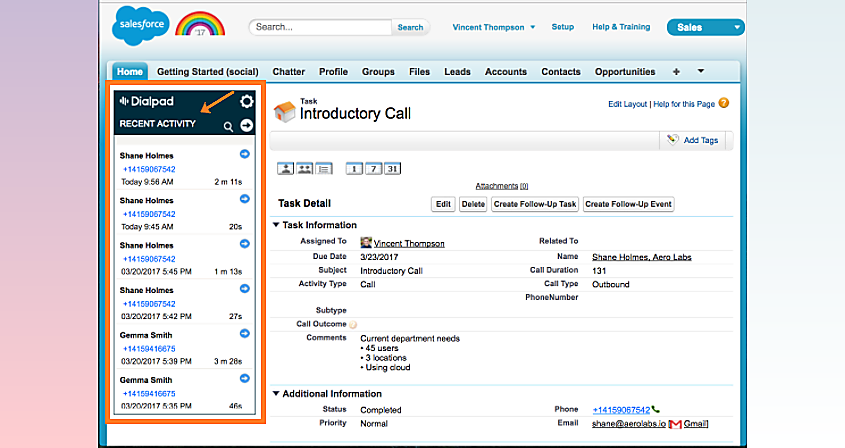
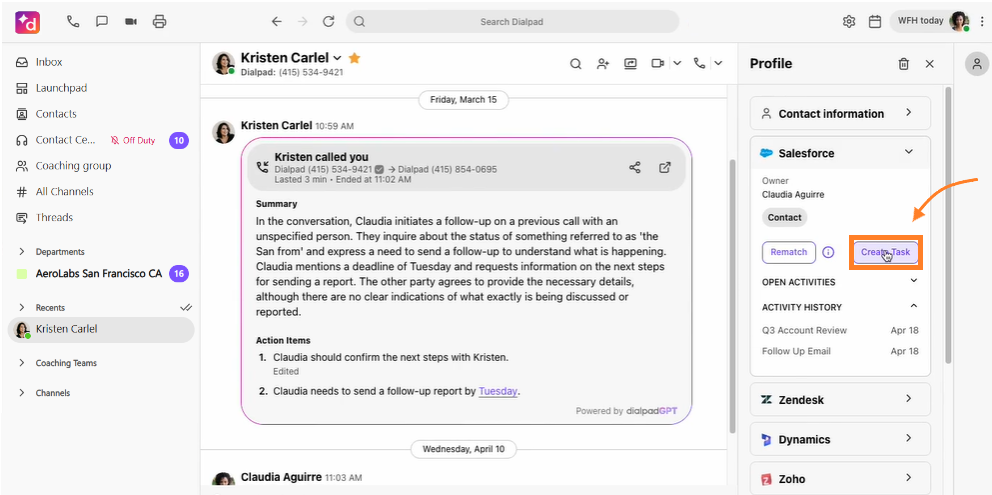
Reps make calls from Salesforce with click-to-dial, and all name exercise logs robotically to the related CRM file. Inbound calls set off a Salesforce file lookup so the rep sees the caller’s account historical past, open alternatives, and up to date exercise earlier than selecting up. Actual-time transcription and AI Recaps generated by Dialpad’s DialpadGPT mannequin push into Salesforce after every name.
Supply: Dialpad
What it syncs: Outbound and inbound name logs, name recordings, voicemails, real-time transcriptions, AI Recaps (post-call summaries with motion gadgets), SMS messages, and caller identification knowledge. Dialpad surfaces Salesforce contact, lead, and account data inside its interface throughout reside calls.
Suits: ongoing sync of name exercise and AI-generated insights into Salesforce as a part of gross sales, help, or contact middle workflows; not an information migration instrument.
Setup course of:
-
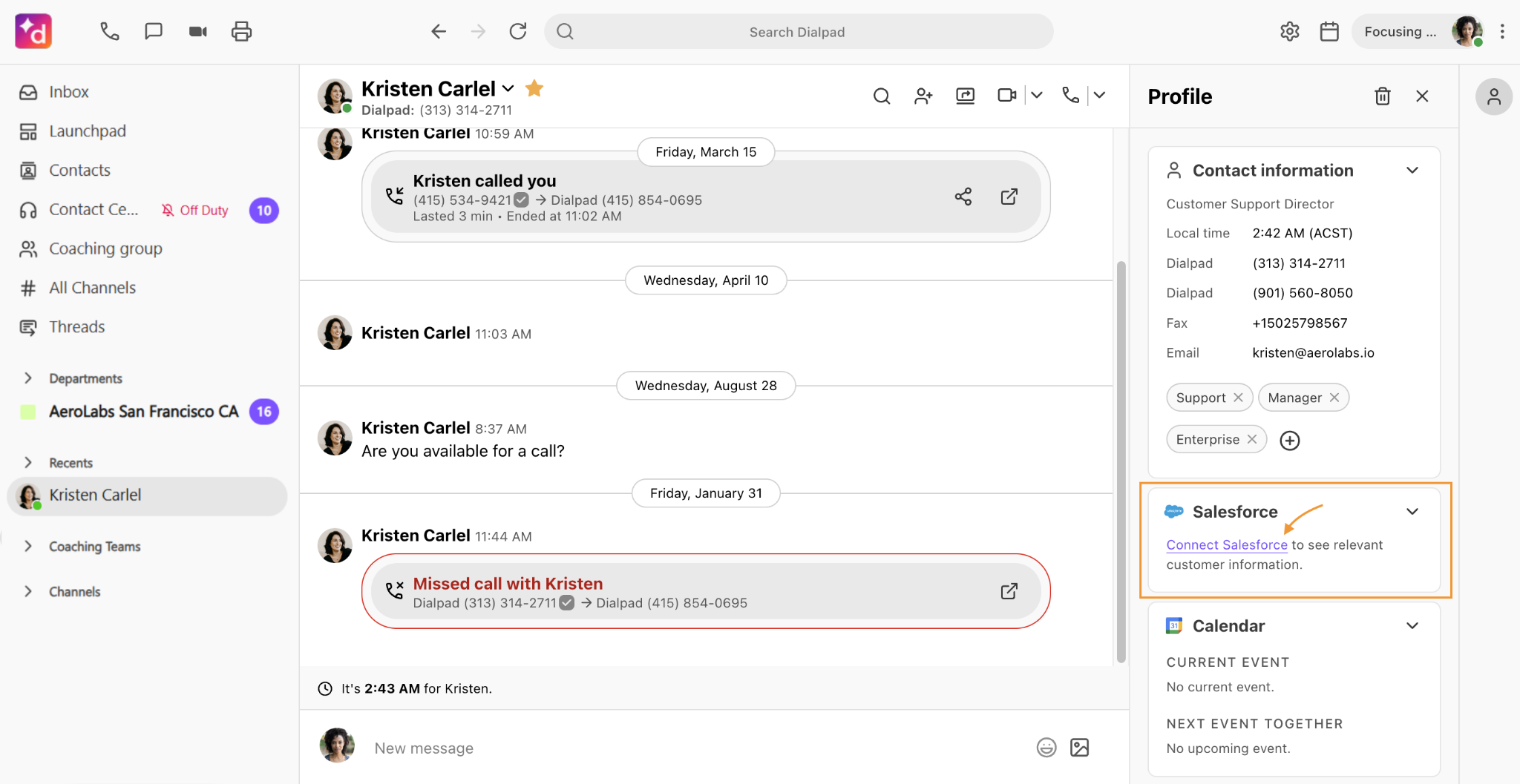
In Dialpad, navigate to Admin Settings > Integrations > Salesforce. Authenticate with Salesforce utilizing OAuth, granting Dialpad permission to learn contact knowledge and write exercise data.
-
Configure which name occasions log to Salesforce (inbound calls, outbound calls, voicemails, SMS) and the way Dialpad matches callers to Salesforce data (by cellphone quantity, e-mail, or each). Set guidelines for logging calls as Salesforce Duties or Actions.
-
Take a look at by putting a name from Salesforce to a identified contact and verifying the decision log, transcription, and AI Recap seem on the contact’s file.
Supply: Dialpad
Strengths: First-party integration maintained by Dialpad and distributed via the Salesforce AppExchange. No third-party instrument to configure or pay for individually. Click on-to-dial from inside Salesforce eliminates app-switching. Transcriptions and name summaries stream into CRM data robotically, giving managers visibility with out listening to recordings. Actual-time caller identification surfaces CRM context throughout inbound calls.
Limitations: Accessible solely on Dialpad Professional ($25/consumer/month billed yearly) and Enterprise (customized pricing) plans. The Customary plan ($15/consumer/month) doesn’t embrace Salesforce integration. The sync is activity-focused (calls, transcriptions, AI Recaps), not a full bidirectional CRM knowledge sync. Customized fields and sophisticated object mapping could require extra configuration. Dialpad Assist and Dialpad Promote have per-minute name charges ($0.01/min inbound, $0.02/min outbound within the US) which are separate from the combination itself.
Greatest for: Gross sales and help groups already on Dialpad Professional or Enterprise that use Salesforce as their CRM and wish computerized name logging, AI-generated name summaries, and click-to-dial with out leaving Salesforce.
Zapier
The way it works: Zapier connects Dialpad and Salesforce via event-driven automations known as Zaps. Every Zap pairs a set off in a single app with an motion within the different. Dialpad is listed in Zapier’s market as a connector, enabling workflows that transcend what the native Dialpad-Salesforce integration covers.
What it syncs: Relying on out there triggers, Zapier can seize occasions like new calls, missed calls, voicemails, or new contacts in Dialpad and push them into Salesforce as Duties, Leads, or customized object data. Within the reverse path, new Salesforce data can set off actions in Dialpad (similar to including a contact). Discipline mapping is handbook and configurable per Zap.
Suits: ongoing sync for particular event-triggered workflows the native integration doesn’t cowl; not a alternative for the native CTI integration.
Setup course of:
-
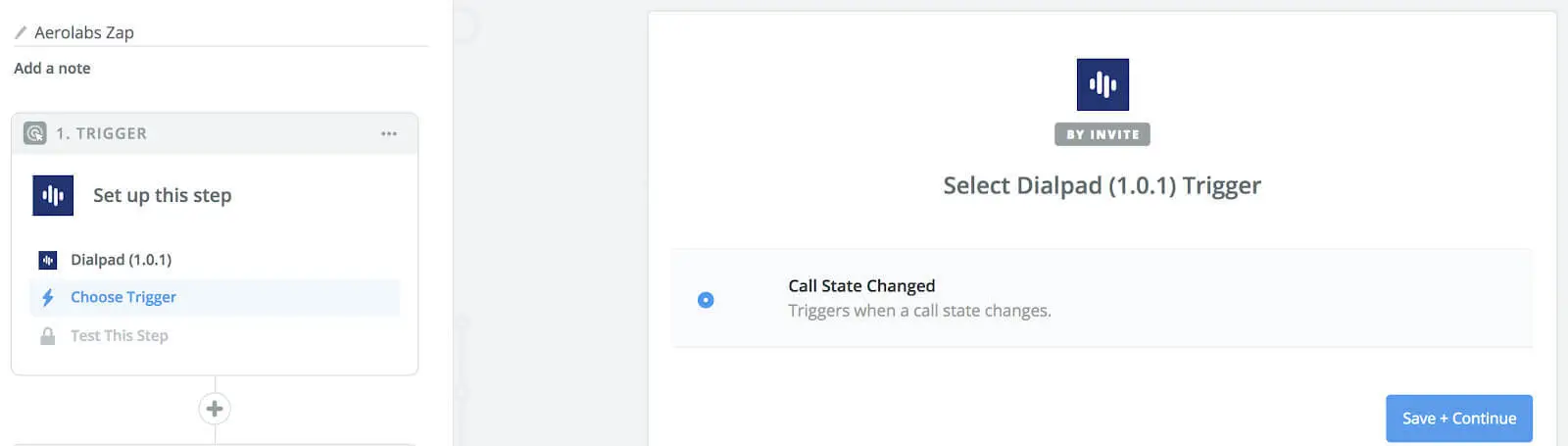
Select a set off app (e.g., Dialpad) and choose the set off occasion (e.g., “New Name” or “New Missed Name”).
-
Map the out there fields from the Dialpad set off (caller title, cellphone quantity, name period, recording URL) into the corresponding Salesforce fields.
Supply: Dialpad
Strengths: Extends the combination past the native connector’s scope. No engineering sources required. Helpful for workflows like creating Salesforce Leads from missed Dialpad calls, triggering Slack notifications on particular name occasions, or syncing Dialpad knowledge to Salesforce objects the native integration would not write to. Accessible to groups on any Dialpad plan with Zapier entry.
Limitations: Every Zap handles one trigger-action pair, so a number of workflows require separate Zaps (every counting in opposition to your Zapier plan’s activity allocation). Doesn’t present the CTI panel, click-to-dial, or real-time caller identification that the native integration provides. Occasions created earlier than the Zap was activated don’t sync. Zapier processes triggers inside 1 to fifteen minutes relying on plan tier.
Greatest for: Groups that want particular automated workflows between Dialpad and Salesforce past what the native integration handles, similar to creating CRM data from missed calls or routing voicemail knowledge to customized Salesforce objects.
Customized API Integration
The way it works: Each platforms present full developer APIs. Dialpad exposes a REST API (base URL: https://dialpad.com/api/v2/) overlaying cellphone, SMS, consumer administration, analytics, contact middle operations, and AI capabilities, with webhook help for real-time occasion notifications throughout name occasions, SMS occasions, contact occasions, and agent standing occasions.
Salesforce supplies REST, SOAP, and Bulk APIs, plus Pub/Sub APIs overlaying all commonplace and customized objects, Platform Occasions, and Change Knowledge Seize for event-driven sync. A customized integration connects these APIs instantly, with your individual middleware dealing with authentication, knowledge mapping, and sync logic.
What it syncs: Something each APIs expose. On Dialpad’s facet: calls, SMS, transcriptions, contact middle analytics, consumer and agent knowledge. On Salesforce’s facet: any commonplace or customized object. That is the one methodology that helps advanced eventualities like syncing Dialpad’s AI-generated analytics into customized Salesforce dashboards or triggering Dialpad name workflows primarily based on Salesforce Platform Occasions.
Suits: particular use circumstances the place neither the native integration nor Zapier supplies the required knowledge stream or enterprise logic; the one methodology with no ceiling on customization.
Setup course of:
-
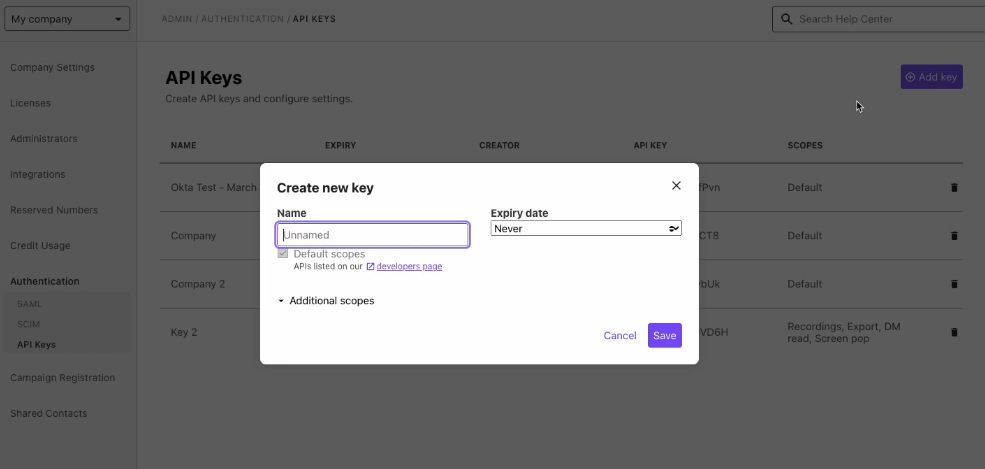
Construct the sync service: a server-side software that listens for Dialpad webhooks (name occasions, SMS occasions, contact occasions) and writes reworked knowledge to Salesforce through the REST API, or vice versa.
-
Implement error dealing with and retry logic. Dialpad enforces 20 requests per second per firm with per-endpoint limits (e.g., 5 calls initiated per minute per consumer). Salesforce’s every day API allocation begins at 100,000 requests for Skilled and Enterprise editions.
-
Add monitoring, logging, and alerting for sync failures. Dialpad webhook occasions are delivered in JWT format for verification.
Supply: Dialpad
Strengths: Full management over what syncs, when, and the way. Actual-time sync through Dialpad webhooks and Salesforce Platform Occasions. Can implement enterprise logic that neither the native integration nor third-party instruments help. No per-operation charges from a connector.
Limitations: Requires growth sources to construct and preserve. Each APIs have price limits that should be revered. Dialpad’s API is versioned at v2 with a changelog monitoring updates; Salesforce variations its API with every seasonal launch (present: Summer time ’26, API model 67.0). The preliminary construct takes weeks, not hours.
Greatest for: Groups with sync necessities that neither the native integration nor Zapier can fulfill, similar to customized analytics pipelines, advanced multi-object sync logic, or integration with inner techniques that bridge each platforms.
Key Use Circumstances
1. Computerized Name Logging for Gross sales Groups
Gross sales reps make outbound prospecting calls via Dialpad and wish each name logged in Salesforce with out handbook knowledge entry. The native integration robotically creates a Salesforce Job on the matching Contact or Lead file with name period, final result, recording hyperlink, and AI-generated recap. Managers can evaluate name exercise in Salesforce experiences with out asking reps to log notes.
Supply: Dialpad
Greatest integration methodology: Native Dialpad-Salesforce integration.
2. Inbound Name Routing with CRM Context
A help group receives inbound calls via Dialpad Assist. When a caller’s quantity matches a Salesforce Contact or Account, the native integration surfaces the CRM file on display screen earlier than the agent solutions. The agent sees open circumstances, current alternatives, and account tier, and may have a better-informed dialog with out toggling between techniques.
Greatest integration methodology: Native Dialpad-Salesforce integration.
3. Missed Name Lead Seize
SDR groups operating outbound campaigns via Dialpad obtain callbacks from prospects. When a name is missed, a Zapier Zap can robotically create a Salesforce Lead or Job with the caller’s quantity, the time of the decision, and any voicemail knowledge, so no prospect falls via the cracks throughout high-volume campaigns.
Greatest integration methodology: Zapier (event-triggered, covers missed name eventualities the native integration could not log as leads).
4. AI Dialog Analytics in Salesforce Dashboards
Gross sales managers wish to monitor name high quality metrics, sentiment developments, and AI Playbook adherence throughout the group, all seen inside Salesforce. A customized API integration can pull Dialpad’s Stats API knowledge (AI-generated transcriptions, name analytics, and agent efficiency metrics) into Salesforce customized objects, powering dashboards that mix CRM pipeline knowledge with dialog intelligence.
Greatest integration methodology: Customized API integration.
5. Contact Heart Efficiency Monitoring
Organizations operating Dialpad Assist as their contact middle with Salesforce Service Cloud for case administration can use the native integration to log each buyer interplay as a Salesforce Exercise. Supervisors monitor name volumes, deal with occasions, and backbone patterns in Salesforce with out switching to Dialpad’s analytics dashboard, maintaining all service metrics in a single reporting layer.
Greatest integration methodology: Native Dialpad-Salesforce integration.
Limitations and Concerns
Plan-Gated Entry
The native Salesforce integration requires Dialpad’s Professional plan ($25/consumer/month billed yearly, or $35 billed month-to-month) or Enterprise plan (customized pricing). Groups on the Customary plan ($15/consumer/month) can’t entry it. Because the Customary plan additionally excludes CRM app integrations extra broadly, connecting Dialpad to Salesforce at any degree requires upgrading to Professional at minimal.
Exercise-Targeted, Not Full CRM Sync
The native integration logs name exercise (calls, recordings, transcriptions, AI Recaps) and surfaces CRM context throughout calls. It isn’t a bidirectional CRM knowledge sync instrument. Contacts created in Dialpad don’t robotically seem in Salesforce as Leads or Contacts, and Salesforce file updates don’t push area modifications again into Dialpad. Groups needing full file synchronization require Zapier workflows or customized API growth.
Per-Minute Name Prices
Dialpad Join plans embrace free home calling, however Dialpad Assist and Dialpad Promote cost per-minute charges: $0.01/min for inbound and $0.02/min for outbound calls in the US. Worldwide calls are charged at country-specific charges. These prices are separate from the combination however have an effect on the overall price of operating each platforms collectively.
API Price Limits
Each platforms implement price limits that have an effect on customized integrations. Dialpad permits 20 requests per second per firm, with per-endpoint limits (e.g., 100 SMS sends per minute, 5 name initiations per minute per consumer). Salesforce’s every day API allocation begins at 100,000 requests per 24-hour interval for Skilled and Enterprise editions, plus per-license allocations. Excessive-volume contact facilities could have to throttle customized integrations or improve plan tiers to extend limits.
Permissions and Entry
Establishing the native integration requires admin entry on either side. In Dialpad, account admin rights are wanted to configure the Salesforce integration and generate API tokens. In Salesforce, System Administrator entry is required to put in the AppExchange app and configure API-enabled profiles. Salesforce orgs utilizing field-level safety or sharing guidelines should guarantee the combination consumer’s profile has entry to each object and area the combination wants to put in writing to.
Upkeep
Each platforms launch updates often. Dialpad ships product enhancements on the primary Thursday of each month and maintains an API changelog. Salesforce variations its API with every seasonal launch. Customized fields, objects, or automation guidelines added after the preliminary setup will not be coated by the combination with out reconfiguration. Periodic evaluations of the combination’s well being are warranted, notably after main platform updates on both facet.
What No Methodology Fixes: The Knowledge Itself
Each methodology above connects Dialpad and Salesforce so name exercise flows between them. None of them checks whether or not the contact data in Salesforce are correct, present, or full.
A rep calling a prospect whose cellphone quantity modified two months in the past wastes time on a lifeless line. A contact file with the improper job title will get a pitch that misses totally. The mixing faithfully logs calls in opposition to data which will have been stale earlier than the primary ring.
The place ZoomInfo Suits In
Each methodology on this information connects Dialpad and Salesforce so name exercise flows between them. None of them improves the contact knowledge that determines whether or not these calls attain the correct individual, on the proper quantity, with the correct context. When the combination is reside however reps are nonetheless calling lifeless numbers, pitching contacts who modified roles, or working accounts with incomplete firm knowledge, the bottleneck is not the connector.
That’s the hole ZoomInfo closes.
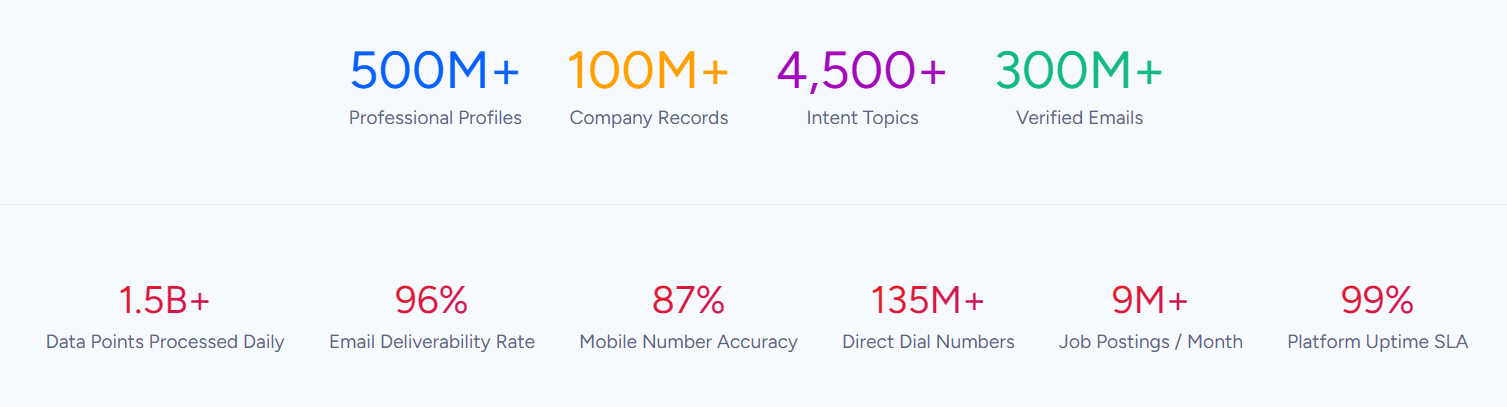
ZoomInfo is a B2B knowledge and go-to-market platform constructed on 500M contacts, 100M corporations, 135M+ verified cellphone numbers, and 200M+ verified enterprise emails. That knowledge is verified via a multi-source pipeline backed by 300+ human researchers, reaching as much as 95% accuracy on first-party knowledge. For groups operating Dialpad and Salesforce collectively, ZoomInfo addresses two layers no connector handles: knowledge high quality and dialog intelligence.
Supply: ZoomInfo
On the info facet, ZoomInfo integrates natively with Salesforce via the AppExchange, offering CRM enrichment, lead routing, and real-time knowledge updates inside Salesforce data. Earlier than a rep picks up the cellphone in Dialpad, ZoomInfo ensures the Salesforce file they’re calling from has a verified direct dial, an correct job title, and present firm particulars.
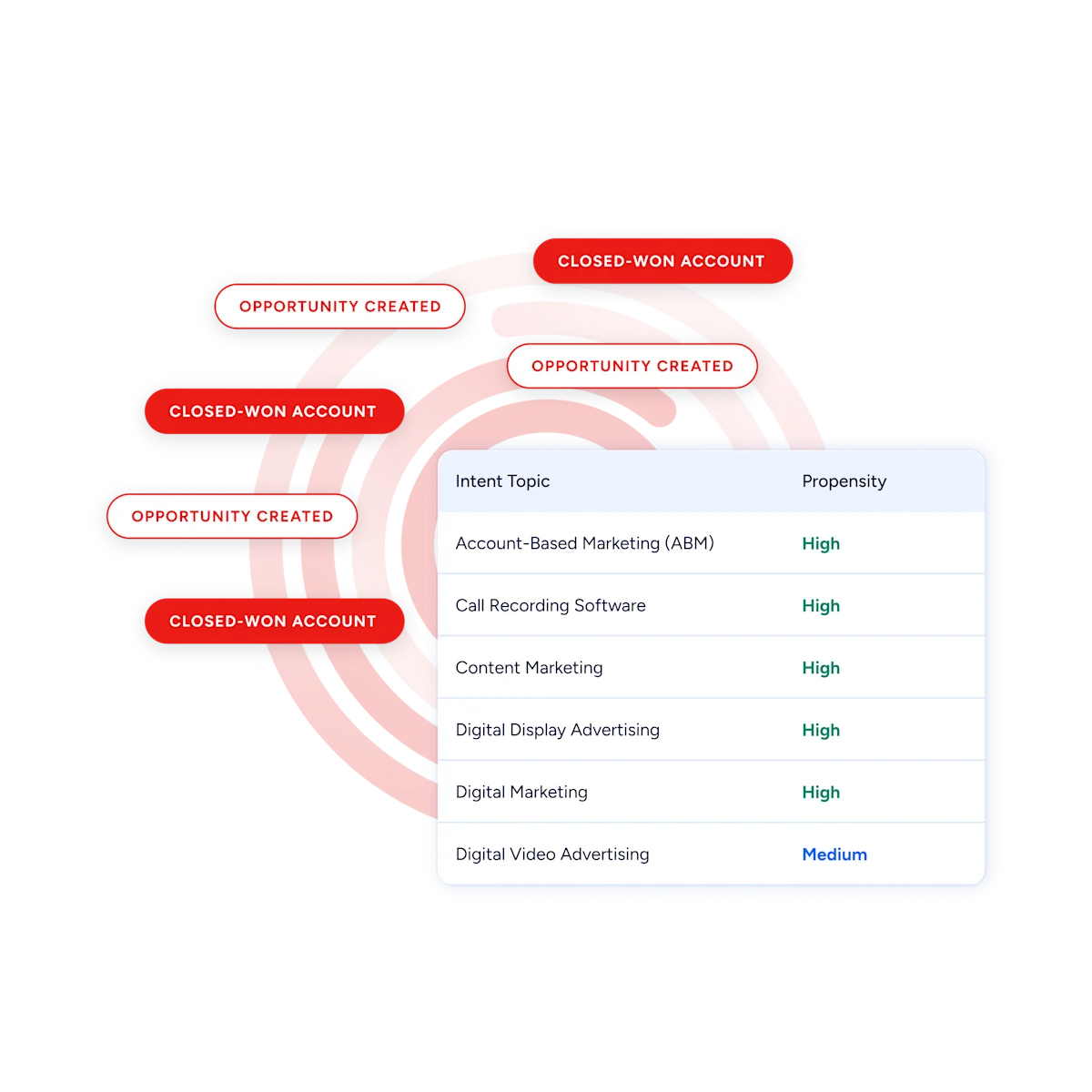
Purchaser Intent knowledge, monitoring alerts from 210 million IP-to-Group pairings, can prioritize which accounts ought to obtain outbound calls within the first place, so reps spend their time on prospects actively researching related options. With Agent Groups, a sign like that may kick off the complete play, from analysis straight via to the decision itself, slightly than ending as a activity in Salesforce.
Supply: ZoomInfo
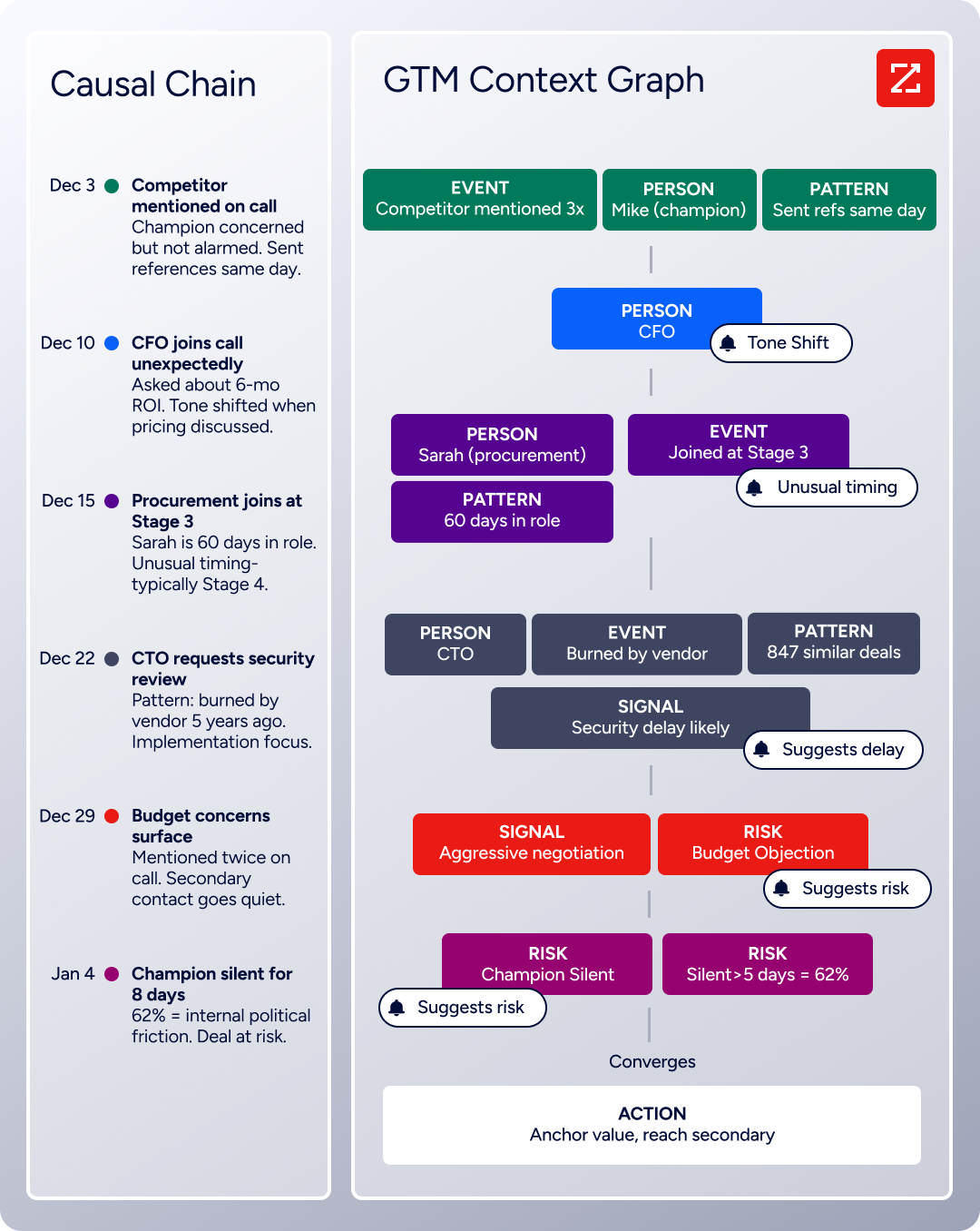
On the dialog intelligence facet, ZoomInfo’s Refrain integrates with Dialpad to seize, transcribe, and analyze calls. Refrain goes past primary transcription: it extracts deal alerts, identifies aggressive mentions, tracks objection patterns, and feeds all of this into ZoomInfo’s GTM Context Graph. The Context Graph processes 1.5B+ knowledge factors every day and unifies third-party intelligence with CRM data, dialog transcripts, and behavioral alerts.
The end result isn’t just a log of what occurred on a name, however context about why a deal is shifting or stalling, surfaced via ZoomInfo’s GTM Workspace or out there through API and MCP entry for any instrument within the stack.
Supply: ZoomInfo
In observe, a group operating Dialpad for calls and Salesforce for CRM can use ZoomInfo to complement Salesforce data so each name goes to a verified quantity with full purchaser context. Refrain captures the dialog and extracts intelligence. The native Dialpad-Salesforce integration logs the exercise.
Collectively, the three platforms create a closed loop: correct knowledge feeds knowledgeable calls, calls generate dialog intelligence, and that intelligence feeds again into the CRM file for the subsequent interplay.
Seismic attributed 39% of lively pipeline to alternatives recognized or influenced by ZoomInfo alerts, whereas changing into 54% extra productive. (Seismic)
Closing Verdict
A local Dialpad-Salesforce integration exists, and for many groups it’s the place to begin. It’s first-party, well-maintained, and handles the core job: logging name exercise and surfacing CRM context throughout calls. The proper selection relies on plan tier and workflow complexity.
-
Gross sales groups on Dialpad Professional or Enterprise that use Salesforce as their CRM ought to activate the native integration instantly. It handles computerized name logging, AI Recaps, click-to-dial, and inbound caller identification with no extra instruments or engineering sources.
-
Organizations with advanced analytics necessities, customized object sync wants, or inner techniques that should bridge each platforms ought to spend money on a customized API integration, with the understanding that it requires devoted growth and ongoing upkeep.
Earlier than investing within the integration, make clear what worth you want from connecting the 2 platforms.
If the objective is eliminating handbook name logging and giving reps CRM context throughout calls, the native integration on a Professional plan handles it. If the objective is constructing a dialog intelligence pipeline with verified knowledge flowing in each instructions, the mix of ZoomInfo’s Salesforce integration, Refrain for Dialpad, and the native Dialpad-Salesforce connector creates a stack the place each name is knowledgeable by correct knowledge and each dialog generates intelligence.
FAQ
Does Dialpad combine natively with Salesforce?
Sure. Dialpad provides a local Salesforce integration via the Salesforce AppExchange. It embeds a CTI panel inside Salesforce for click-to-dial, logs calls robotically as Duties, and syncs real-time transcriptions and AI-generated name summaries to CRM data. The mixing requires Dialpad’s Professional plan ($25/consumer/month billed yearly) or Enterprise plan. It isn’t out there on the Customary plan.
What Dialpad plan do I want for the Salesforce integration?
The Professional plan at minimal. Dialpad’s Customary plan ($15/consumer/month) doesn’t embrace Salesforce or different CRM integrations. The Professional plan ($25/consumer/month billed yearly, or $35 billed month-to-month) unlocks Salesforce integration together with different CRM connectors. The Enterprise plan (customized pricing) contains all Professional options plus superior capabilities and a devoted buyer success supervisor.
Does the combination sync contacts between Dialpad and Salesforce?
Not within the conventional sense. The native integration is activity-focused: it logs name knowledge (recordings, transcriptions, AI Recaps) to present Salesforce data and surfaces Salesforce contact data inside Dialpad throughout calls.
It doesn’t create new Salesforce Leads or Contacts from Dialpad contacts, nor does it push Salesforce area updates into Dialpad. Groups needing that degree of file synchronization ought to use Zapier or a customized API integration.
Can I take advantage of Dialpad’s AI options inside Salesforce?
Partially. When the native integration is lively, Dialpad’s AI-generated content material (real-time transcriptions, AI Recaps with motion gadgets, and name summaries) logs robotically to the related Salesforce file. Reps and managers can evaluate AI-generated insights in Salesforce with out opening Dialpad.
Nevertheless, real-time AI teaching options (AI Stay Coach Playing cards, AI Playbooks) seem solely contained in the Dialpad interface throughout the name and don’t floor in Salesforce.
What Salesforce permissions are wanted to arrange the combination?
System Administrator entry in Salesforce is required to put in the Dialpad app from the AppExchange and authorize the OAuth connection.
In case your Salesforce org makes use of field-level safety or sharing guidelines, the combination consumer’s profile should have write entry to each object and area the place name exercise knowledge will likely be saved. On the Dialpad facet, account admin rights are wanted to configure the combination settings and authorize the Salesforce connection.
Is there a price past the Dialpad subscription for the combination?
The native Salesforce integration is included with Dialpad Professional and Enterprise plans at no extra price.
Nevertheless, Dialpad Assist and Dialpad Promote cost per-minute name charges ($0.01/min inbound, $0.02/min outbound within the US) which are separate from the combination. If utilizing Zapier as a supplemental connector, Zapier’s subscription begins at $19.99/month and costs by activity depend. Customized API integrations incur developer time and internet hosting prices.
How does ZoomInfo enhance a Dialpad-Salesforce setup?
ZoomInfo solves two issues no connector addresses.
First, knowledge high quality: ZoomInfo enriches Salesforce data with verified direct dials, correct job titles, firm attributes, and intent alerts earlier than reps make calls via Dialpad, so each dial reaches an actual individual on the proper quantity. Second, dialog intelligence: ZoomInfo’s Refrain integrates with Dialpad to seize and analyze calls, extracting deal alerts, aggressive mentions, and objection patterns that feed into the GTM Context Graph.
The native Dialpad-Salesforce integration logs the exercise; ZoomInfo ensures the info behind the calls is correct and the conversations generate intelligence. From there, Agent Groups can decide up that intelligence and run the subsequent steps of the play, from updating the account file to launching follow-up outreach, inside the approvals you set.
Can I strive the Dialpad-Salesforce integration earlier than committing?
Sure. Dialpad provides a 14-day free trial that features entry to the platform’s core options. If the trial supplies entry to the Professional-tier Salesforce integration, you may check the connection throughout that interval. Salesforce provides a free Developer Version for testing integrations. Confirm with Dialpad’s gross sales group whether or not the trial contains the Salesforce connector, as trial entry to particular integrations could differ.
See what else plugs into Salesforce:

