

Groups that run Calendly for scheduling and HubSpot as their CRM often uncover the identical issues inside 1 / 4:
-
assembly information lives in Calendly whereas contact information dwell in HubSpot, so reps copy reserving particulars into the CRM by hand after each name,
Nevertheless the 2 platforms ended up coexisting (a gross sales staff that adopted Calendly for its reserving velocity whereas the org standardized on HubSpot, a advertising staff embedding Calendly on touchdown pages that feed HubSpot nurture sequences, or completely different departments selecting instruments at completely different instances), the longer they run and not using a connection, the broader the hole between scheduling exercise and CRM actuality.
Connecting Calendly and HubSpot eliminates that hole.
Conferences booked by Calendly mechanically create or replace contact information in HubSpot, so each reserving populates the CRM with out guide entry. Assembly exercise logs to the contact timeline so reps and managers see the complete engagement image in a single place.
Routing types in Calendly can lookup HubSpot contact possession in actual time, so inbound leads land on the appropriate rep’s calendar immediately reasonably than sitting in a queue.
Calendly affords a native HubSpot integration out there on the Groups plan and above. For groups on decrease tiers or with customized necessities, third-party automation instruments like Zapier and Make can bridge the 2 platforms with extra restricted information protection.
Customized API growth can also be attainable, with each platforms providing well-documented APIs and webhook help. Every technique differs in setup complexity, sync course, information protection, and price.
There may be additionally one downside no connection technique solves: the sync strikes assembly information into CRM information, nevertheless it doesn’t confirm whether or not the contact behind that reserving continues to be on the firm, nonetheless reachable at that e mail, or nonetheless the appropriate individual to speak to.
And that’s the place ZoomInfo is available in. ZoomInfo integrates natively with each HubSpot and Calendly, and affords API and MCP entry that may feed verified, enriched contact information into any workflow, so the information behind each booked assembly are correct and full earlier than the dialog begins.
This text covers the complete panorama of the Calendly-HubSpot integration: which strategies can be found, what information each handles, learn how to set them up, the use instances that justify connecting each platforms, and the constraints to plan for.
On the finish it additionally covers how ZoomInfo matches into the image as a knowledge enrichment layer that strengthens the information flowing between Calendly and HubSpot.
Let’s begin with an summary of the mixing.
Integration Overview
Does a local integration exist?
Sure. Calendly affords a native HubSpot integration that mechanically syncs scheduled conferences into HubSpot CRM. The combination is on the market on Calendly’s Groups plan ($16/seat/month) and above, and will be present in each the Calendly integrations listing and the HubSpot App Market.

Supply: Calendly
What information can sync?
Assembly occasions, contact info (title, e mail, cellphone), type responses from Calendly reserving questions, assembly outcomes, and Notetaker recaps. The combination creates new HubSpot contacts when a reserving comes from an unknown e mail and logs assembly exercise to current contact timelines.
Is the sync bidirectional?
Partially. Assembly information flows from Calendly into HubSpot mechanically. HubSpot contact possession information flows again into Calendly’s routing logic when utilizing Routing Kinds with HubSpot lookup, enabling real-time rep matching.
Nevertheless, HubSpot contact edits (up to date cellphone numbers, firm adjustments) don’t push again into Calendly.
Is it real-time or batch?
The native integration pushes assembly information into HubSpot in close to real-time as bookings, cancellations, and reschedules happen. Third-party instruments like Zapier set off inside 1 to fifteen minutes relying on plan tier.
What are the out there strategies?
Native Calendly-HubSpot integration (Groups plan and above), third-party automation (Zapier, Make), and customized API growth utilizing each platforms’ APIs and webhooks.
|
Methodology |
Setup Issue |
Knowledge Circulate |
Actual-time? |
Price |
|---|---|---|---|---|
|
Native (Calendly Groups+) |
Low |
Calendly to HubSpot (assembly information); HubSpot to Calendly (possession lookup) |
Close to real-time |
Included with Groups plan ($16/seat/mo) |
|
Zapier |
Medium |
One-way per Zap |
Close to real-time (1-15 min) |
From $19.99/mo |
|
Make |
Medium |
Configurable per situation |
Close to real-time or scheduled |
From $10.59/mo |
|
Customized API |
Excessive |
Absolutely customizable |
Actual-time through webhooks |
Developer time + internet hosting |
One distinction value settling upfront: the native integration syncs assembly occasions as they occur and fits groups that need automated, zero-maintenance CRM updates from scheduling exercise. Zapier and Make deal with event-triggered flows with narrower information protection however work on decrease Calendly tiers.
Customized API growth is the one possibility that may tailor sync logic to arbitrary enterprise guidelines, nevertheless it requires devoted engineering sources.
Integration Strategies
Native Calendly-HubSpot Integration (Groups Plan and Above)
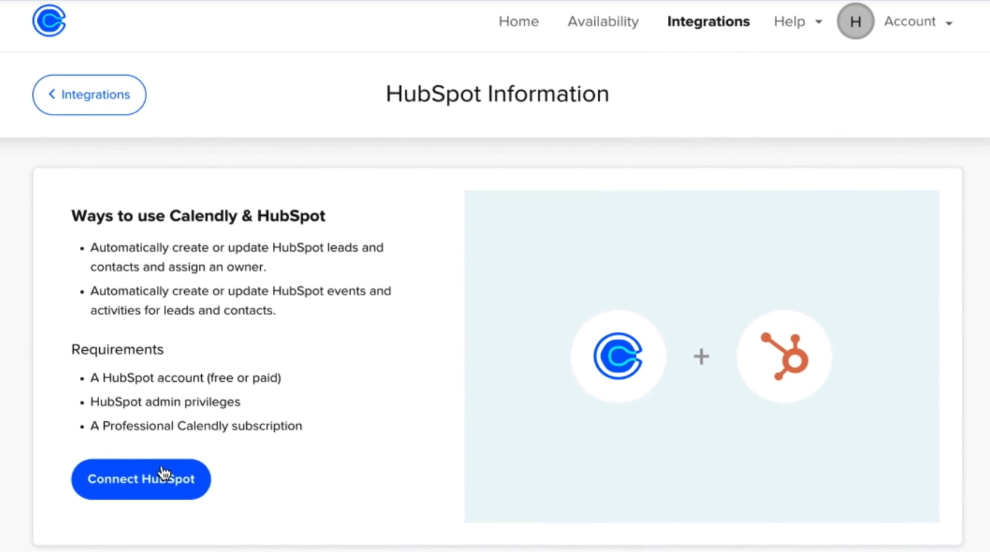
The way it works: Calendly’s native HubSpot integration connects the 2 platforms straight. When somebody books a gathering by Calendly, the mixing checks whether or not the invitee’s e mail matches an current HubSpot contact. If it finds a match, the assembly exercise logs to that contact’s timeline.
Supply: Calendly
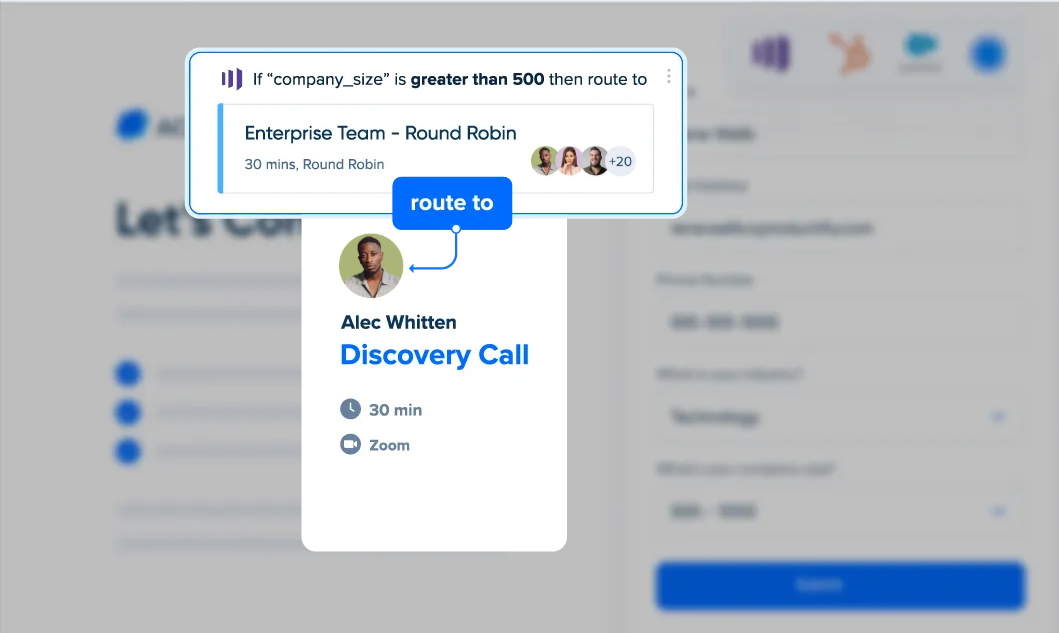
If no match exists, Calendly creates a brand new contact in HubSpot with the invitee’s particulars. The combination additionally helps Routing Kinds with HubSpot possession lookup: when a lead submits a type, Calendly queries HubSpot, identifies the assigned contact or firm proprietor, and routes the customer to that proprietor’s reserving web page.
Supply: Calendly
What it syncs: New contacts (title, e mail, and any information collected by Calendly reserving questions), assembly occasions (booked, rescheduled, cancelled), assembly exercise on contact timelines, and Notetaker recaps (AI-generated assembly summaries pushed to HubSpot).
Calendly reserving query responses can map to HubSpot contact properties, carrying qualification information into the CRM.
Suits: ongoing sync of assembly information into HubSpot as a part of energetic gross sales, advertising, and recruiting workflows; not a migration device.
Setup course of:
-
Grant Calendly permission to create and replace contacts, log actions, and skim contact possession information in your HubSpot org.
-
Configure which assembly occasions ought to sync to HubSpot (bookings, cancellations, reschedules) and the way invitee information maps to HubSpot contact properties.
-
If utilizing Routing Kinds, allow HubSpot possession lookup on the routing type’s logic tab so inbound leads match to their assigned HubSpot proprietor and path to that rep’s calendar.
Strengths: First-party integration maintained by Calendly and listed within the HubSpot App Market. No third-party device to configure or pay for individually. Contact creation and assembly logging occur mechanically with no guide CRM entry.
HubSpot possession lookup in Routing Kinds permits real-time lead-to-rep matching with out guide reassignment. Notetaker recap push retains assembly notes contained in the CRM.
Limitations: Accessible solely on Calendly’s Groups plan ($16/seat/month) and above. The first information movement is Calendly to HubSpot; adjustments made to contact information in HubSpot don’t movement again into Calendly. Customized area mapping between the 2 platforms could require guide configuration for non-standard fields.
The combination doesn’t sync Calendly’s Contacts module information (customized fields, lists, relationship historical past) into HubSpot.
Finest for: Gross sales and advertising groups already on Calendly Groups or Enterprise that use HubSpot as their CRM and need automated contact creation, assembly logging, and lead routing with out third-party instruments or engineering sources.
Zapier
Supply: Calendly
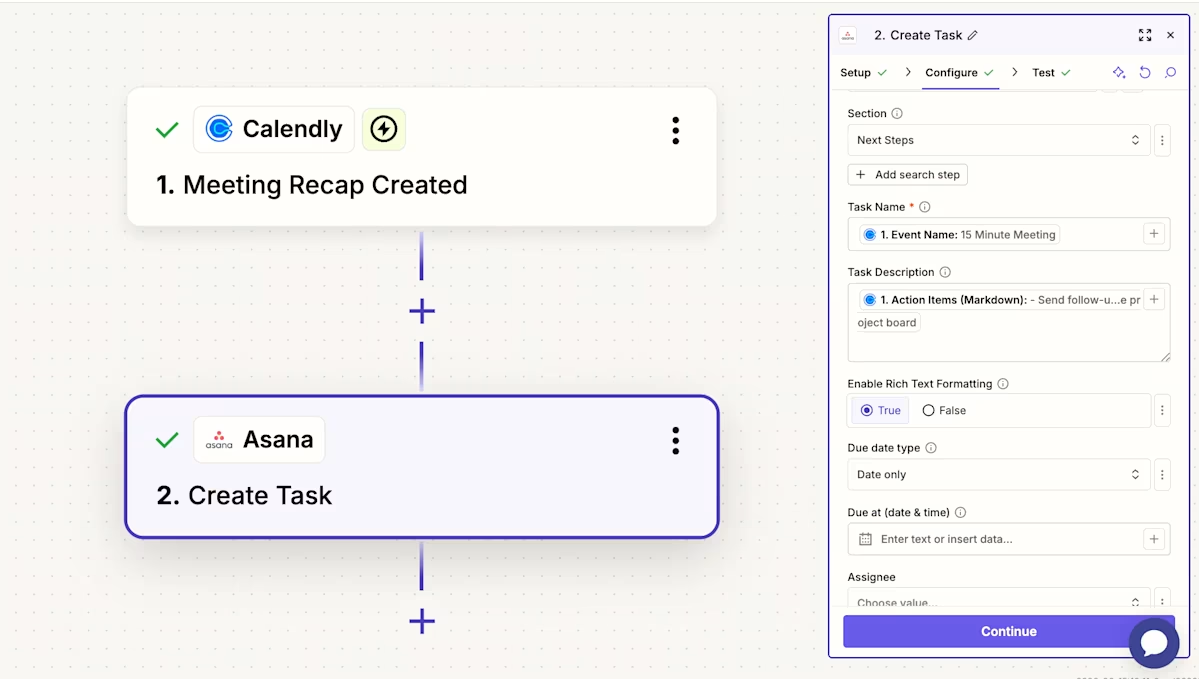
The way it works: Zapier connects Calendly and HubSpot by event-driven automations referred to as Zaps. Every Zap pairs a set off (an occasion in a single app) with a number of actions (what occurs within the different). Each platforms have well-supported Zapier connectors, and the out there trigger-action mixtures cowl core scheduling-to-CRM workflows.
Supply: Calendly
What it syncs: Relying on the Zap configuration, Zapier can seize new Calendly bookings, cancellations, and invitee particulars, then create or replace HubSpot contacts, create offers, log actions, or set off workflows. Discipline mapping is guide and configurable within the Zap setup movement.
Zapier doesn’t entry Calendly’s Notetaker recaps or HubSpot possession lookup the way in which the native integration does.
Suits: ongoing sync of recent reserving occasions; not a alternative for the native integration’s routing and recap options.
Setup course of:
-
Map the out there fields from the Calendly set off (invitee title, e mail, reserving questions, occasion kind, scheduled time) into the corresponding HubSpot fields.
-
Flip the Zap on. For added workflows (e.g., logging cancellations individually, creating offers on reserving), create further Zaps.
Strengths: Works on Calendly Normal plans and above (not restricted to Groups). No engineering sources required. Fast to arrange for easy use instances like creating HubSpot contacts from Calendly bookings. Zapier’s filter and formatting steps can add conditional logic (e.g., solely sync bookings from particular occasion varieties or with sure type responses).
Limitations: No entry to Calendly’s Notetaker recaps or HubSpot possession lookup routing. Every Zap handles one trigger-action pair, so syncing bookings, cancellations, and reschedules requires separate Zaps. Bookings created earlier than the Zap was activated don’t sync.
Zapier fees by activity depend, and high-volume scheduling can accumulate prices rapidly.
Finest for: Small groups on Calendly Normal that desire a light-weight connection between Calendly and HubSpot for contact creation and exercise logging, while not having the routing or recap options of the native integration.
Make (Previously Integromat)
Supply: Calendly
The way it works: Make makes use of a visible situation builder the place modules (app actions) join in a flowchart. Every module represents a step: look ahead to a Calendly occasion, rework or filter information, create or replace a HubSpot report. Eventualities can department, filter, loop, and deal with errors, giving extra management than Zapier’s linear construction.
What it syncs: The identical core information as Zapier (bookings, cancellations, invitee particulars), with extra flexibility in how information transforms between platforms. Make helps iterators for batch processing and routers for conditional paths, so a single situation can deal with a number of occasion varieties with completely different logic branches.
Suits: ongoing sync with conditional logic or multi-step workflows; not a alternative for the native integration’s built-in options.
Setup course of:
-
Join the 2 modules and map fields. Make gives features for reworking information between platforms (e.g., formatting cellphone numbers, concatenating reserving query responses right into a HubSpot be aware).
Strengths: Superb management over information transformation and conditional routing. The visible builder makes complicated workflows simpler to comply with than code. Per-operation pricing is decrease than Zapier at greater volumes. Can deal with multi-step workflows in a single situation (e.g., test if contact exists, replace if sure, create if no, then add a be aware with reserving particulars).
Limitations: Steeper studying curve than Zapier’s guided setup. No entry to Calendly’s native Notetaker push or HubSpot possession routing. Each platforms’ APIs impose price limits that high-volume situations could must account for.
Finest for: Groups with conditional sync necessities (e.g., solely create HubSpot offers for bookings from particular occasion varieties, or route reserving information to completely different HubSpot pipelines primarily based on type responses). Mid-size groups whose sync volumes make Zapier’s per-task pricing costly.
Customized API Integration
The way it works: Each Calendly and HubSpot present full APIs. Calendly’s API v2 covers occasion varieties, scheduled occasions, invitees, and routing type submissions, with webhook help for real-time occasion notifications.
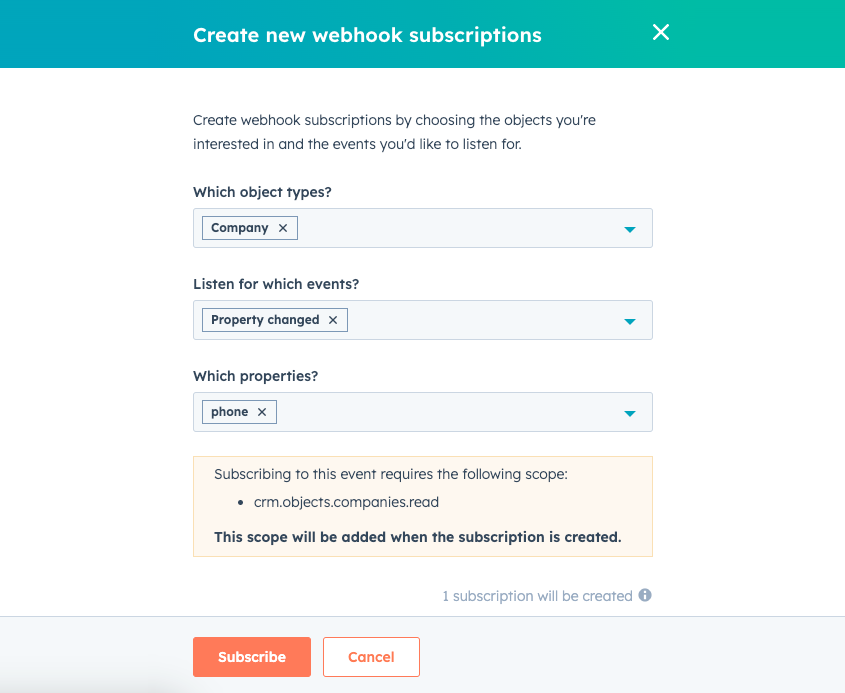
HubSpot’s REST API covers all commonplace and customized CRM objects, with webhooks for event-driven sync. A customized integration connects these APIs straight, with your personal middleware dealing with authentication, area mapping, transformation, and error restoration.
Supply: HubSpot
What it syncs: Something each APIs expose. That is the one technique that helps complicated situations like syncing Calendly routing type submissions into HubSpot customized objects, constructing multi-step qualification workflows that span each platforms, or implementing enterprise guidelines that transcend area mapping.
Calendly’s new Scheduling API additionally permits programmatic reserving from inside HubSpot-connected functions.
Suits: both specialised one-time information migration or ongoing sync with customized enterprise logic; the one technique with no ceiling on both.
Setup course of:
Strengths: Full management over what syncs, when, and the way. Actual-time sync through webhooks on each side. Can implement complicated enterprise logic of any variety. No per-record or per-operation charges from a third-party connector. Calendly’s MCP Server and HubSpot’s distant MCP server open further integration paths for AI agent workflows.
Limitations: Requires growth sources to construct and preserve. You personal the infrastructure, monitoring, and error restoration. API adjustments on both platform require ongoing upkeep. The preliminary construct takes weeks, not hours. Calendly doesn’t publish particular price restrict figures, which provides uncertainty to capability planning.
Finest for: Organizations with sync necessities that no off-the-shelf device can fulfill, akin to customized qualification workflows, multi-step routing logic, or integration with inner methods alongside HubSpot. Groups with in-house growth sources and a long-term dedication to each platforms.
Key Use Circumstances
1. Inbound Lead Seize from Calendly Reserving Pages
Advertising embeds Calendly on touchdown pages and web site CTAs. When a customer books a demo or session, the native integration creates a HubSpot contact with the invitee’s title, e mail, and reserving query responses, then logs the assembly to the contact timeline. HubSpot workflows set off nurture sequences, assign lead scores, and notify the gross sales staff, all with out guide information entry.
Finest integration technique: Native Calendly-HubSpot integration (Groups plan).
2. Actual-Time Lead Routing to the Proper Rep
When an inbound lead submits a Calendly Routing Type, the shape captures their e mail, queries HubSpot for the contact or firm proprietor, and routes the customer to that proprietor’s reserving web page.
The lead goes from type submission to booked assembly in a single movement, with no queue, no guide reassignment, and no delay. This cuts the lag that lets rivals interact first.
Finest integration technique: Native Calendly-HubSpot integration with HubSpot possession lookup (Groups plan).
3. Assembly Exercise Logging for Gross sales Reporting
Gross sales managers want visibility into rep exercise: what number of conferences have been booked, held, cancelled, and rescheduled. The native integration logs each Calendly occasion to the corresponding HubSpot contact timeline, making assembly exercise out there in HubSpot’s reporting dashboards alongside calls, emails, and deal levels.
No separate exercise tracker or guide CRM entry required.
Finest integration technique: Native Calendly-HubSpot integration (Groups plan).
4. Submit-Assembly Intelligence within the CRM
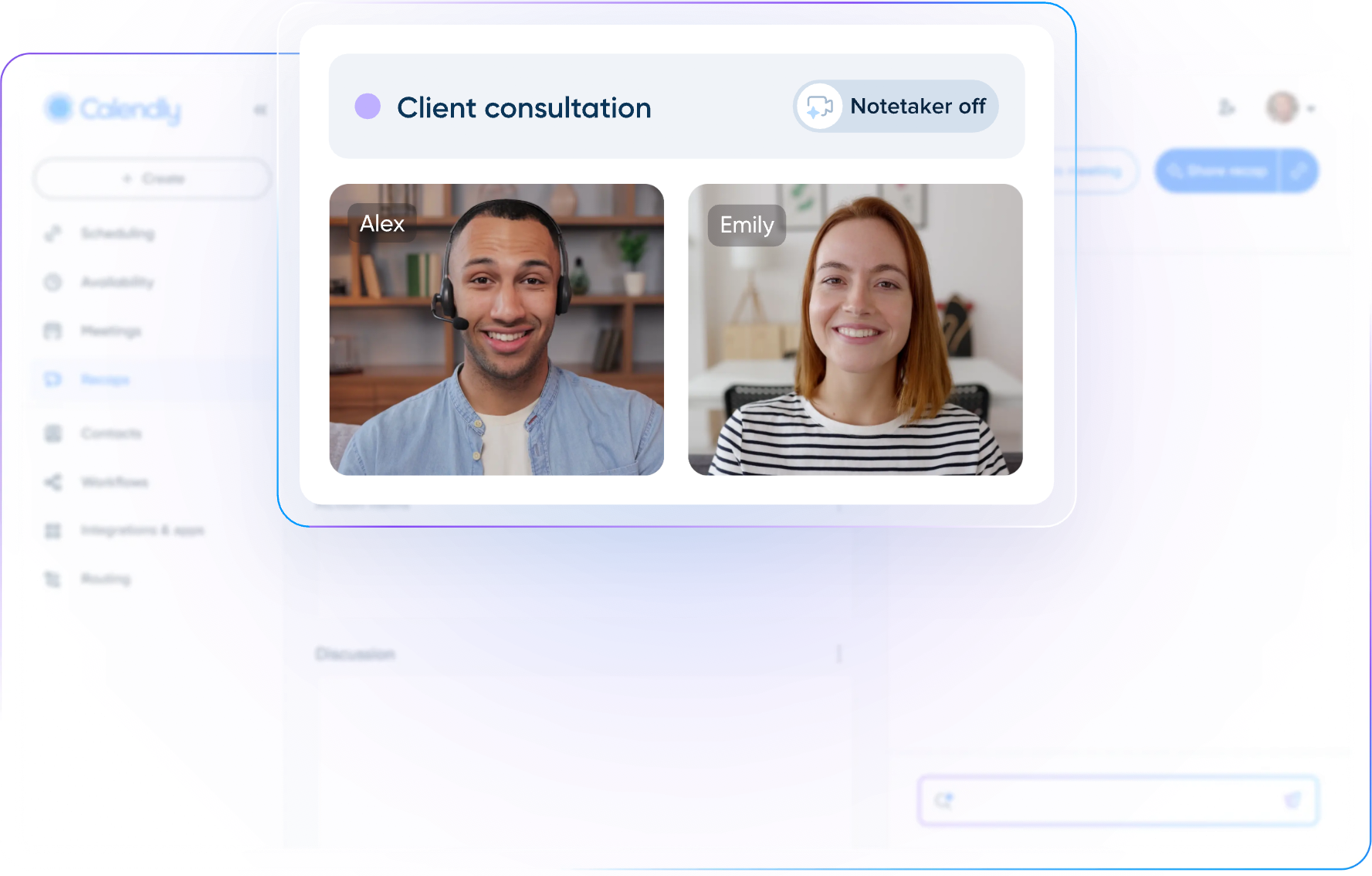
After a gathering, Calendly’s Notetaker generates an AI recap with key factors and motion objects. The native integration can push these recaps into HubSpot, attaching them to the contact report so the following rep or supervisor who opens the contact sees what was mentioned with out asking for a debrief or looking out a separate device.
Supply: Calendly
Finest integration technique: Native Calendly-HubSpot integration with Notetaker enabled (Groups plan).
5. Occasion-Primarily based Deal Creation
When a high-value prospect books a particular occasion kind (e.g., “Enterprise Demo” or “Pricing Assessment”), a Zapier Zap or Make situation can create a HubSpot deal mechanically, affiliate it with the contact, and assign it to the proper pipeline stage.
This ensures pipeline creation tracks scheduling exercise in actual time with out counting on reps to create offers manually.
Finest integration technique: Zapier or Make (works on Calendly Normal and above).
Limitations and Concerns
Knowledge That Would not Sync
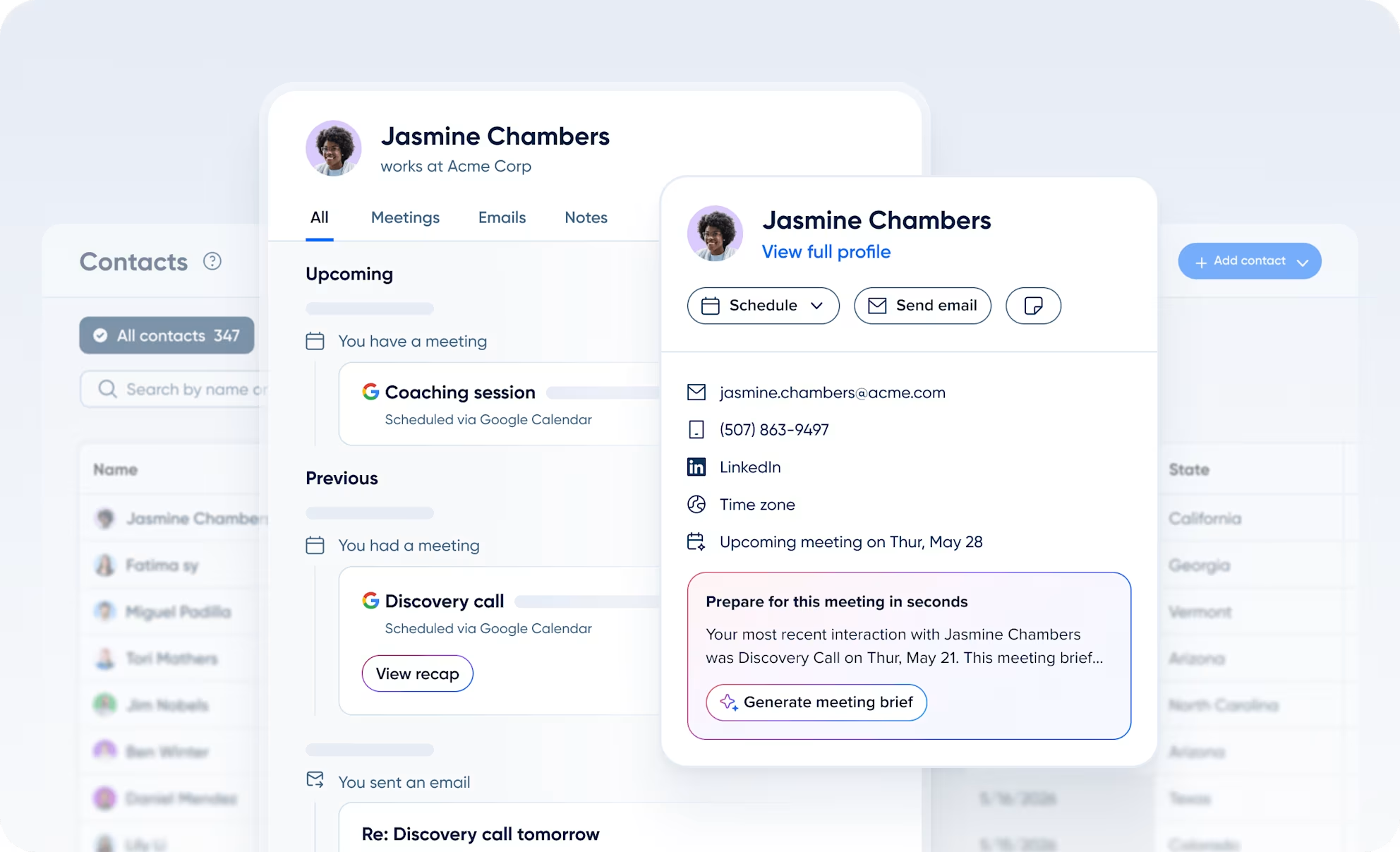
The native integration focuses on assembly occasions and primary contact information. Calendly’s Contacts module (customized fields, contact lists, relationship historical past, Gmail sync) doesn’t sync into HubSpot.
Supply: Calendly
Calendly’s Funds information (transaction quantities, bundle redemptions) doesn’t movement into HubSpot Commerce Hub or deal information by the native integration. If a staff wants fee information in HubSpot, a Zapier Zap or customized construct is required.
Sync Route
The first information movement is Calendly to HubSpot. When a contact’s cellphone quantity, firm, or job title is up to date in HubSpot, that change doesn’t propagate again to Calendly. Groups that preserve contact particulars in each methods will see drift over time except they deal with HubSpot as the only real system of report and replace Calendly manually (or construct a customized reverse sync).
Pricing Implications
The native integration requires Calendly’s Groups plan at $16/seat/month. Groups on the Free ($0) or Normal ($10/seat/month) plans can not entry it. On the HubSpot facet, the mixing works with all HubSpot tiers together with the free CRM, however superior options like workflows triggered by assembly occasions require HubSpot Skilled or above.
Third-party instruments carry their very own prices: Zapier begins at $19.99/month and fees by activity depend; Make begins at $10.59/month and fees by operation.
Permissions and Entry
Organising the native integration requires Calendly admin rights (proprietor, admin, or group admin) and HubSpot entry with permission to create contacts and log actions.
In case your HubSpot org makes use of field-level permissions or sharing guidelines, the mixing’s information writes have to be allowed for the related contact and exercise properties. Routing Type possession lookup requires that HubSpot contacts have assigned house owners, as unassigned information can’t be routed.
Upkeep
Each platforms evolve independently. Calendly releases product updates on an everyday cadence (the Notetaker CRM push characteristic is rolling out in levels).
HubSpot variations its API with date-based releases twice a 12 months. Customized fields added to both platform after the preliminary setup is not going to sync except you replace the mixing configuration. Third-party automation instruments could change pricing, deprecate connectors, or alter how they authenticate.
Plan for periodic critiques of the mixing’s well being and accuracy.
What No Methodology Fixes: The Knowledge Itself
Each technique above strikes scheduling information from Calendly into HubSpot. None of them checks whether or not the contact information in HubSpot are correct, present, or full.
A prospect who modified jobs two months in the past nonetheless sits within the CRM with their previous title and firm. A lead who booked a demo utilizing a private e mail has no firm information hooked up.
The combination ensures HubSpot is aware of a gathering was booked; it doesn’t make sure the individual behind that reserving continues to be the appropriate contact, nonetheless on the firm, or nonetheless reachable at that e mail.
The place ZoomInfo Suits In
Each technique on this information strikes scheduling information from Calendly into HubSpot. None of them improves the contact information that determines whether or not a booked assembly results in a certified dialog. When the mixing is dwell however reps stroll into calls with outdated titles, lacking direct dials, and no firm context on the account, the bottleneck is not the connector.
That’s the hole ZoomInfo closes.
ZoomInfo is a B2B information and go-to-market platform constructed on 500M contacts, 100M corporations, 135M+ verified cellphone numbers, and 200M+ verified enterprise e mail addresses.
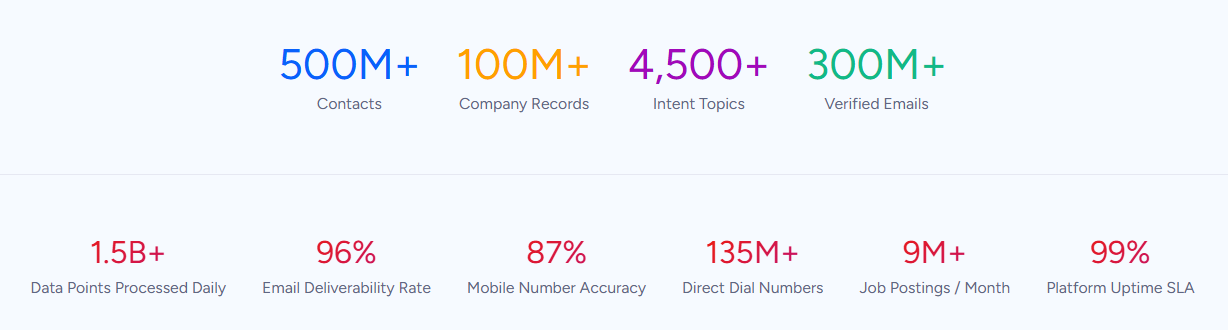
That information is verified by a multi-source pipeline backed by 300+ human researchers and reaching as much as 95% accuracy on first-party information. For groups working a Calendly-HubSpot integration, ZoomInfo addresses the information high quality layer that no scheduling connector handles.
ZoomInfo integrates natively with each platforms. The HubSpot integration gives real-time contact enrichment, scheduled database refresh, and lead scoring inside HubSpot utilizing ZoomInfo’s verified B2B information.
The Calendly integration makes use of ZoomInfo-optimized types to populate prospect information earlier than routing certified results in the appropriate rep through Calendly Routing for immediate scheduling.
Supply: Calendly
Collectively, these integrations create a workflow the place ZoomInfo enriches the contact in HubSpot, Calendly makes use of that enriched information for routing, and the booked assembly logs again to a HubSpot report that already has verified e mail, direct dial, firmographics, and technographics hooked up.
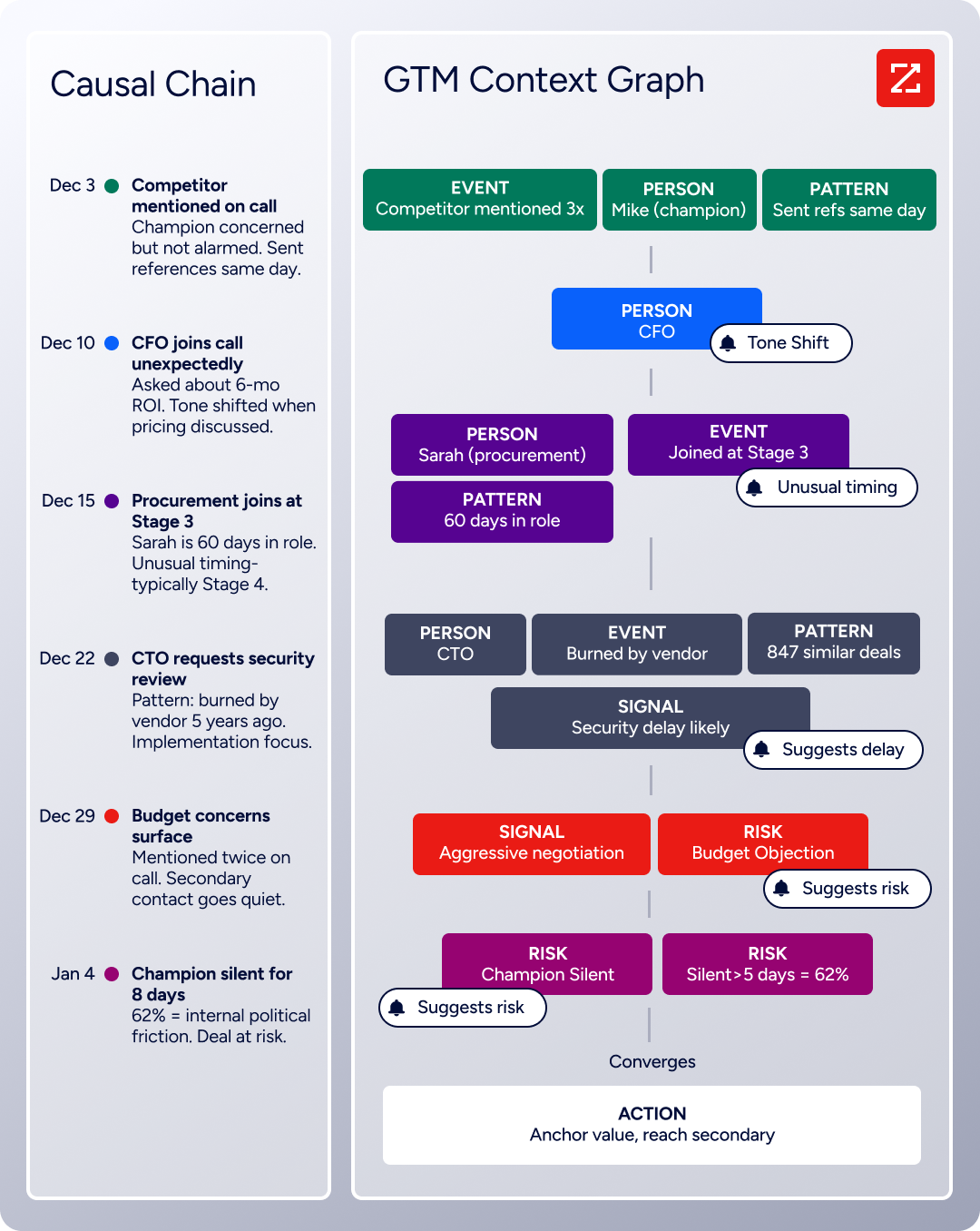
The identical information feeds ZoomInfo’s GTM Context Graph, which processes 1.5B+ information factors day by day by combining third-party intelligence with CRM information, dialog transcripts, and behavioral indicators to floor not simply what occurred in a deal, however why.
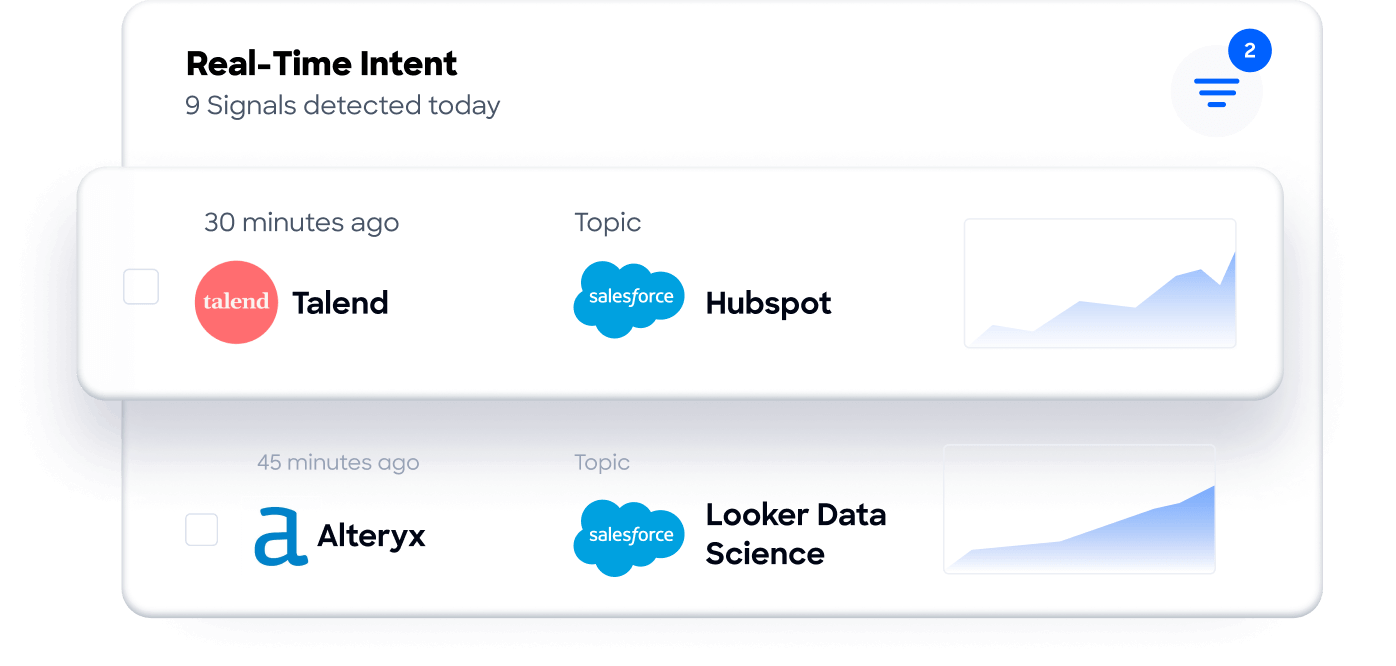
Purchaser Intent information from ZoomInfo, monitoring indicators from 210 million IP-to-Group pairings, can route into HubSpot to prioritize which accounts ought to obtain outreach and assembly invites within the first place, so reps focus their Calendly hyperlinks on prospects who’re actively researching related options.
Enriched information additionally make the Calendly-HubSpot integration extra dependable.
When Calendly’s Routing Kinds carry out a HubSpot possession lookup, the routing works accurately provided that HubSpot information have correct, full information to match towards. Clean firm fields, outdated titles, and lacking contact house owners trigger routing failures and misassigned conferences.
ZoomInfo’s enrichment fills these gaps earlier than the routing logic fires, decreasing misroutes and making certain inbound leads attain the appropriate rep.
Seismic’s gross sales staff attributed 39% of energetic pipeline to alternatives recognized or influenced by ZoomInfo indicators, whereas boosting productiveness by 54% and saving 11.5 hours per week. (Seismic)
Last Verdict
A local Calendly-HubSpot integration exists and handles the core workflow properly: assembly information flows into the CRM mechanically, contacts are created or up to date on reserving, and routing types can match inbound results in HubSpot contact house owners in actual time. For many groups, the appropriate alternative depends upon Calendly plan tier and workflow complexity.
-
Small groups on Calendly Normal that want primary contact creation from bookings ought to begin with Zapier or Make. Each are quick to arrange, reasonably priced at low volumes, and require no engineering sources.
-
Gross sales and advertising groups on Calendly Groups or Enterprise ought to activate the native HubSpot integration. It’s the solely technique that delivers automated contact creation, assembly timeline logging, HubSpot possession routing, and Notetaker recap push with out third-party instruments.
-
Organizations with complicated routing logic, customized qualification workflows, or integration with inner methods alongside HubSpot ought to spend money on a customized API integration utilizing each platforms’ APIs and webhooks.
Earlier than committing to a technique, make clear what the mixing wants to perform.
If the aim is logging conferences in HubSpot so exercise studies are correct, the native integration or a Zapier Zap is ample.
If the aim is closing the hole between a web site go to and a booked assembly with the appropriate rep, the native integration’s HubSpot possession routing is the differentiator. Both means, the standard of the contact information in HubSpot determines whether or not booked conferences result in certified conversations or wasted calls.
ZoomInfo, with its native integrations to each HubSpot and Calendly, plus API and MCP entry for any workflow, is the information enrichment layer that ensures each booked assembly begins with a verified, full contact report.
FAQ
Does Calendly combine natively with HubSpot?
Sure. Calendly affords a local HubSpot integration that syncs assembly information into HubSpot CRM, creates new contacts from reserving invitees, logs assembly exercise to contact timelines, and helps HubSpot possession lookup for lead routing. The combination is on the market on Calendly’s Groups plan ($16/seat/month) and Enterprise plan, and is listed in each the Calendly integrations listing and the HubSpot App Market.
Can I join Calendly and HubSpot on Calendly’s free or Normal plan?
Not by the native integration. The HubSpot integration requires Calendly’s Groups plan or above. Groups on the Free or Normal plan can use Zapier or Make to create light-weight automations between the 2 platforms, akin to creating HubSpot contacts when a Calendly assembly is booked. These third-party instruments don’t present the HubSpot possession routing or Notetaker recap push that the native integration delivers.
What occurs when somebody books a Calendly assembly they usually’re already in HubSpot?
The native integration matches the invitee’s e mail towards current HubSpot contact information. If it finds a match, the assembly occasion logs to that contact’s timeline with out creating a reproduction. If no matching report exists, it creates a brand new contact. The matching is email-based, so contacts booked below a distinct e mail deal with than the one saved in HubSpot could produce a reproduction report.
Can Calendly route results in the appropriate HubSpot contact proprietor mechanically?
Sure, utilizing Calendly Routing Kinds with HubSpot possession lookup. When a lead submits a Routing Type, Calendly queries HubSpot in actual time, identifies the contact or firm proprietor, and routes the customer to that proprietor’s reserving web page. This requires the native integration on Calendly’s Groups plan and assigned contact house owners in HubSpot.
Does Calendly’s Notetaker sync assembly notes to HubSpot?
Sure. Calendly’s Notetaker can push AI-generated assembly recaps, transcripts, and recording hyperlinks into HubSpot, attaching them to the corresponding contact report. This characteristic is rolling out in levels and requires the native HubSpot integration on a paid Calendly plan with Notetaker enabled.
What Calendly information does NOT sync to HubSpot?
Calendly’s Contacts module information (customized fields, contact lists, Gmail sync historical past), Funds information (transactions, assembly packages), and detailed analytics (web page views, conversion charges on reserving pages) don’t sync by the native integration. These require both third-party instruments or customized API growth to carry into HubSpot.
How does ZoomInfo enhance a Calendly-HubSpot integration?
ZoomInfo solves the information high quality downside that no scheduling connector addresses. It enriches HubSpot contact information with verified enterprise emails, direct-dial cellphone numbers, job titles, firmographics, and technographics earlier than conferences are booked.
This implies Calendly’s Routing Kinds match towards full, correct HubSpot information for proper lead task, and reps stroll into conferences with full context on who they’re speaking to and why the account issues.
ZoomInfo’s native integrations with each HubSpot and Calendly make it a pure addition to the two-platform workflow.
Is real-time sync attainable between Calendly and HubSpot?
Sure. The native integration pushes assembly occasions into HubSpot in close to real-time as they happen. Calendly additionally helps webhooks that fireside when an invitee books, cancels, or reschedules, enabling customized integrations to course of occasions as they occur. Zapier triggers inside 1 to fifteen minutes relying on plan tier. True sub-second sync requires a customized webhook integration.
Different instruments that hook up with HubSpot:

