

Groups that run Aircall for calling and HubSpot as their CRM often hit the identical issues inside 1 / 4:
-
name exercise lives in Aircall whereas deal and get in touch with information reside in HubSpot, so reps toggle between platforms to attach conversations to pipeline,
Nonetheless the 2 platforms ended up coexisting (a gross sales crew adopting Aircall for outbound dialing whereas the org runs on HubSpot, a help crew dealing with inbound requires accounts tracked in HubSpot, or separate departments selecting instruments independently), the longer they run and not using a connection, the extra name information goes unlogged and the tougher it turns into to behave on each buyer interplay.
Connecting Aircall and HubSpot closes that hole.
Inbound and outbound calls log mechanically to HubSpot contacts, offers, and tickets, so reps by no means copy exercise information by hand.
Name recordings and transcriptions connect to CRM information so anybody on the crew can evaluate what was stated with out leaving HubSpot. Contact particulars sync between the 2 platforms so a quantity up to date in HubSpot seems in Aircall (and vice versa), holding each techniques present.
Aircall gives a native HubSpot integration that ranks among the many most full in its market. Aircall is a HubSpot Premier Expertise Associate with a strategic funding from HubSpot Ventures, and the mixing has over 8,000 installs.
For groups that want automation past what the native connector offers, Zapier can lengthen the information circulation, and each platforms expose APIs for customized improvement. Every technique differs in setup complexity, sync route, information protection, and value.
There may be additionally one downside no connection technique solves: the mixing logs name exercise and syncs contact information, but it surely doesn’t confirm whether or not the cellphone numbers, emails, and firm particulars in these information are correct or present.
And that’s the place ZoomInfo is available in. ZoomInfo integrates natively with each HubSpot and Aircall (by way of Refrain, ZoomInfo’s dialog intelligence platform), and gives API and MCP entry that may feed verified, enriched contact and firm information into any workflow, so each techniques function on information which can be correct and full.
This text covers the Aircall-HubSpot integration: which strategies can be found, what information every one handles, methods to set them up, the use circumstances that justify connecting each platforms, and the constraints to plan for.
On the finish, it additionally covers how ZoomInfo matches into the image as a knowledge enrichment and dialog intelligence layer for groups operating Aircall and HubSpot collectively.
Let’s begin with an outline of the mixing.
Integration Overview

Supply: Aircall
Does a local integration exist?
Sure. Aircall gives a native HubSpot integration out there via each the Aircall App Market and the HubSpot Market. Aircall is a HubSpot Premier Expertise Associate with a strategic funding from HubSpot Ventures, and the connector has over 8,000 installs.
What information can sync?
Name exercise (inbound, outbound, missed calls, voicemails), name recordings, name transcriptions, SMS/MMS messages, contact particulars, name tags, and name notes. Exercise logs mechanically to HubSpot contacts, firms, offers, and tickets.
Is the sync bidirectional?
Partially. Contact information syncs each methods: contacts created or up to date in a single platform seem within the different. Name exercise flows one route, from Aircall to HubSpot, since Aircall is the system of report for telephony occasions.
Is it real-time or batch?
The native integration operates in close to real-time. Name occasions, recordings, and get in touch with updates push into HubSpot as they happen. Zapier-based automations set off inside 1 to fifteen minutes relying on plan tier.
What are the out there strategies?
Native Aircall-HubSpot integration (included on all Aircall plans with HubSpot), third-party automation (Zapier), and customized API improvement utilizing each platforms’ REST APIs.
|
Technique |
Setup Problem |
Knowledge Movement |
Actual-time? |
Value |
|---|---|---|---|---|
|
Native Integration |
Low |
Bidirectional (contacts); Aircall to HubSpot (name exercise) |
Close to real-time |
Included with Aircall plans |
|
Zapier |
Medium |
One-way per Zap |
Close to real-time (1-15 min) |
From $19.99/mo |
|
Customized API |
Excessive |
Totally customizable |
Actual-time by way of webhooks |
Developer time + internet hosting |
One distinction price settling upfront: the native integration handles each ongoing sync and retroactive logging of name historical past, making it appropriate for groups activating the connection mid-lifecycle.
Zapier handles event-triggered automation for workflows the native connector does not cowl (akin to triggering actions in third-party instruments based mostly on Aircall occasions). Customized API builds provide extra flexibility however require improvement sources and ongoing upkeep.
Integration Strategies
Native Aircall-HubSpot Integration
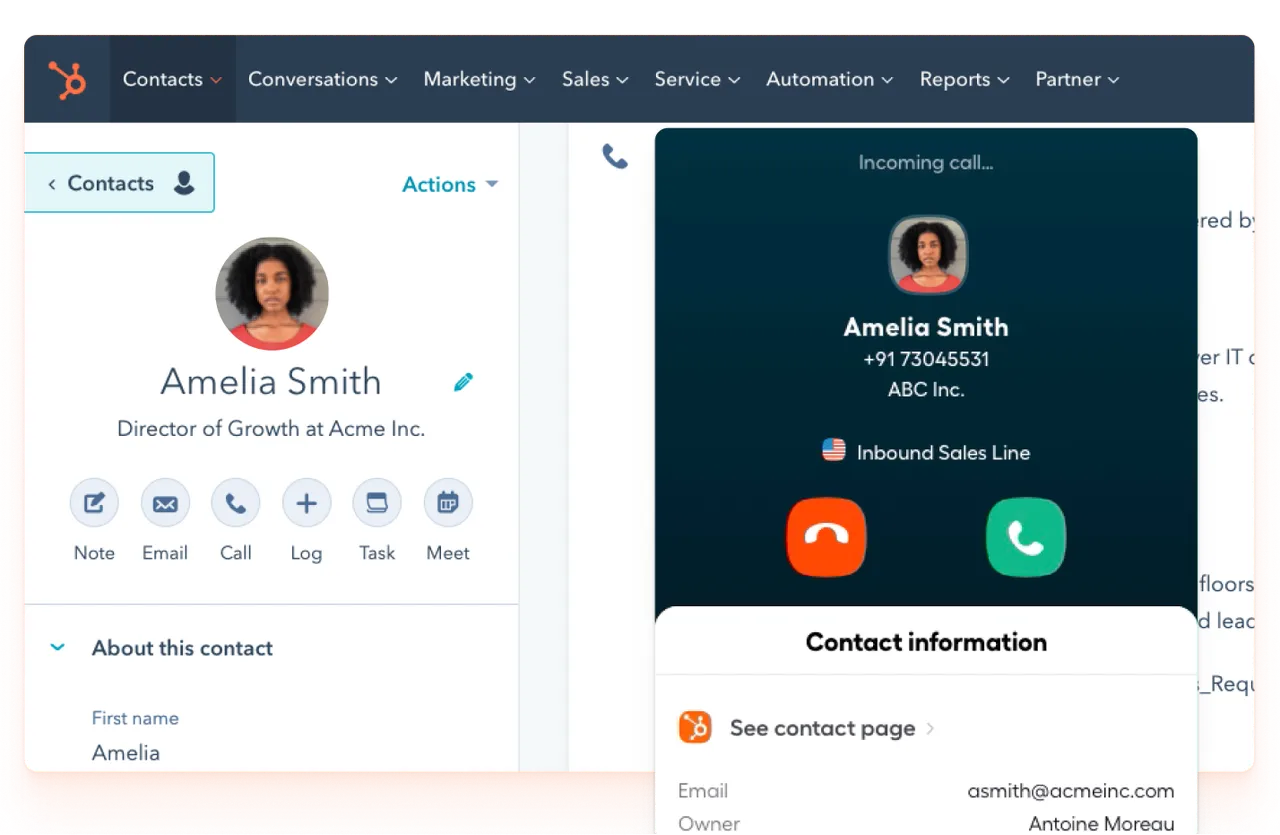
The way it works: Aircall’s native HubSpot integration connects the 2 platforms via a first-party connector. When a name is made, acquired, or missed in Aircall, the mixing logs the exercise to the matching HubSpot contact, deal, or ticket report.
Supply: Aircall
Contact information syncs each methods, so a brand new contact created throughout a name in Aircall seems in HubSpot, and get in touch with particulars up to date in HubSpot mirror in Aircall’s interface.
The mixing makes use of Aircall’s Perception Playing cards to point out HubSpot contact and deal context contained in the Aircall cellphone interface throughout reside calls.
What it syncs: All name sorts (inbound, outbound, missed), voicemails, name recordings, AI-generated name transcriptions, name tags and disposition codes, name notes and feedback, SMS/MMS messages, and get in touch with particulars. Name exercise creates engagement information on HubSpot contacts, firms, offers, and tickets.
Supply: Aircall
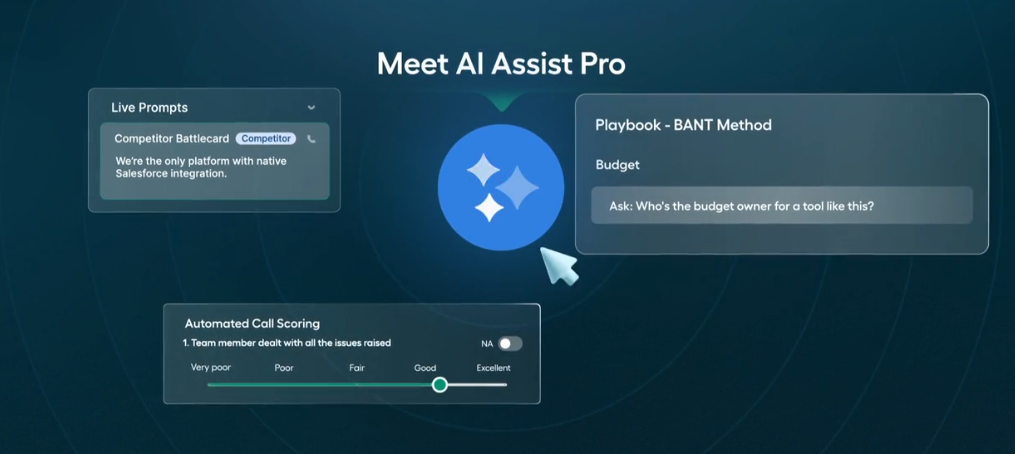
AI Help name summaries, key matters, and sentiment information additionally seem within the exercise log when AI Help is enabled.
Suits: ongoing bidirectional sync of contacts and one-directional logging of all name exercise; appropriate for each new deployments and mid-lifecycle activation.
Setup course of:
-
Configure contact matching guidelines: select whether or not Aircall ought to match incoming callers to current HubSpot contacts by cellphone quantity, and whether or not unmatched callers ought to create new contact information mechanically.
-
Set name logging preferences: choose which name sorts to log (inbound, outbound, missed, voicemails), whether or not to connect recordings and transcriptions, and which HubSpot object sorts (contacts, offers, tickets) ought to obtain exercise information.
-
Configure Perception Playing cards to show HubSpot contact particulars, deal data, and up to date exercise contained in the Aircall cellphone interface throughout reside calls.
-
Check by inserting a name to a recognized HubSpot contact and verifying that the decision exercise, recording, and any tags seem on the contact’s timeline in HubSpot.
Strengths: First-party integration maintained by Aircall as a Premier HubSpot Expertise Associate. No third-party software to configure or pay for individually. Covers the complete vary of name exercise (calls, SMS, voicemails, recordings, transcriptions). B
idirectional contact sync eliminates guide information entry. Perception Playing cards give reps HubSpot context with out leaving the cellphone interface. Included on all Aircall plans that help integrations.
Limitations: Name exercise flows one route (Aircall to HubSpot); HubSpot deal stage adjustments or workflow triggers don’t push information again into Aircall. Customized fields past commonplace name properties might require extra configuration.
The mixing depends on cellphone quantity matching for contact affiliation, which may miss matches if numbers are formatted inconsistently between the 2 platforms. Actual UI steps and out there configuration choices might range by Aircall plan tier.
Greatest for: Any crew utilizing each Aircall and HubSpot. The native integration is the beneficial place to begin for all use circumstances, masking gross sales name logging, help ticket monitoring, and get in touch with synchronization with minimal setup.
Zapier
Supply: HubSpot
The way it works: Zapier connects Aircall and HubSpot via event-driven automations referred to as Zaps. Every Zap pairs a set off (an occasion in a single app) with a number of actions (what occurs within the different).
Whereas the native integration handles core name logging and get in touch with sync, Zapier extends it by enabling customized workflows the native connector doesn’t help, akin to triggering actions in third-party instruments when particular name occasions happen or creating conditional logic based mostly on name outcomes.
What it syncs: Zapier can seize Aircall occasions (new calls, missed calls, new contacts, name tags utilized) and create or replace HubSpot information (contacts, offers, tickets, duties, notes). Every trigger-action pair handles one workflow. Customized area mapping is out there within the Zap configuration.
Suits: ongoing automation of customized workflows that reach past the native integration; not a alternative for the native connector’s core performance.
Setup course of:
-
Select Aircall because the set off app and choose a set off occasion (e.g., “Name Ended,” “New Contact,” or “Tag Utilized to Name”).
-
Select HubSpot because the motion app and choose an motion (e.g., “Create Job,” “Replace Contact,” or “Create Deal”).
-
Flip the Zap on. For bidirectional workflows, create a second Zap with the set off and motion apps reversed, and add a filter to stop infinite loops.
Strengths: Permits customized workflows the native integration does not cowl. No code required. Zapier’s filter and formatting steps permit conditional logic (e.g., solely create a deal in HubSpot when a name is tagged “certified”).
Can bridge Aircall and HubSpot with different instruments in the identical Zap (e.g., ship a Slack notification when a missed name creates a HubSpot process).
Limitations: Provides price on prime of each platform subscriptions (Zapier plans begin at $19.99/month). Every Zap handles one trigger-action pair, so advanced workflows require a number of Zaps, every counting towards process limits. Triggers hearth inside 1 to fifteen minutes relying on plan tier.
Historic occasions earlier than the Zap was activated don’t sync. Not an alternative choice to the native integration’s real-time name logging and recording attachment.
Greatest for: Groups that already use the native integration however want extra automation, akin to creating HubSpot offers based mostly on particular name outcomes, routing missed calls to explicit crew members, or triggering cross-platform notifications.
Customized API Integration
The way it works: Each Aircall and HubSpot present APIs for constructing customized integrations.
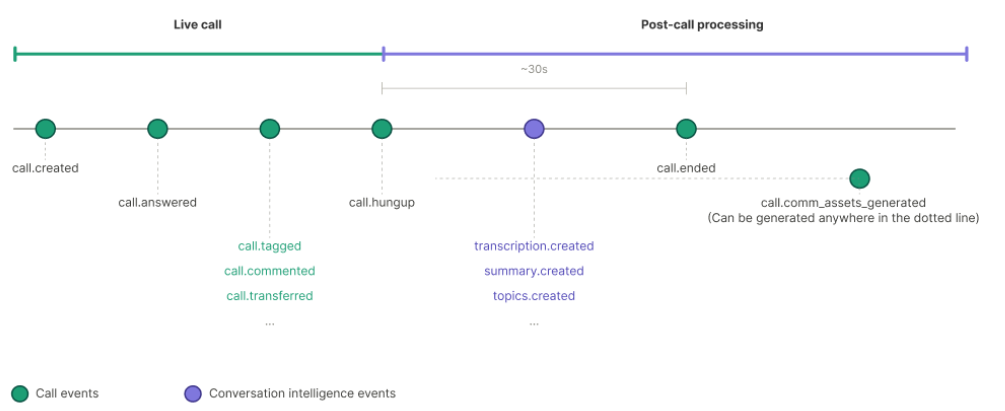
Aircall’s REST API covers customers, calls, contacts, tags, messages, and dialer campaigns, with a webhook system that fires POST requests on name occasions, contact adjustments, and message exercise.
Supply: Aircall
HubSpot’s REST API covers all CRM objects (contacts, firms, offers, tickets, customized objects) with webhook subscriptions for event-driven automation. A customized integration connects these APIs instantly, with middleware dealing with authentication, area mapping, transformation, and error restoration.
What it syncs: Something each APIs expose. That is the one technique that helps advanced eventualities like syncing customized objects, implementing enterprise logic throughout call-to-deal conversion, routing calls based mostly on HubSpot deal stage, or integrating name information with different inner techniques in the identical pipeline.
Suits: each ongoing sync and one-time information migration; the one technique with no ceiling on customization.
Setup course of:
-
Construct the sync service: a server-side software that listens for Aircall webhooks (name occasions, contact adjustments) and writes corresponding information to HubSpot by way of its API.
-
Deploy, monitor, and keep the mixing over time. Each platforms model their APIs (HubSpot launched date-based API versioning in 2026; Aircall maintains v1 and v2 endpoints).
Strengths: Full management over what syncs, when, and the way. Actual-time sync by way of webhooks on each side. Can implement advanced enterprise logic (e.g., auto-create a deal when a name with a selected tag exceeds a sure length). No per-operation charges from a third-party connector.
Limitations: Requires improvement sources to construct and keep. You personal the infrastructure, monitoring, and error restoration. API adjustments on both platform require ongoing upkeep. The preliminary construct takes weeks, not hours. Each platforms impose fee limits that have to be revered at scale.
Greatest for: Groups with sync necessities that neither the native integration nor Zapier can fulfill. Organizations with in-house improvement groups and a necessity for advanced call-to-CRM logic, multi-system information pipelines, or customized reporting that spans each platforms.
Key Use Instances
1. Computerized Gross sales Name Logging with Deal Context
Gross sales reps make outbound calls via Aircall and want each name logged to the proper HubSpot contact and deal with out guide information entry.
The native integration creates engagement information on the contact’s timeline, attaches the recording and transcription, and associates the exercise with the open deal. Managers can evaluate name historical past on any deal report to grasp the complete dialog arc with out asking reps for updates.
Greatest integration technique: Native Aircall-HubSpot integration.
2. Missed Name Observe-Up Workflows
When a prospect calls and nobody solutions, the missed name must set off a follow-up process in HubSpot assigned to the precise rep. The native integration logs the missed name to the contact report.
A Zapier Zap (or HubSpot workflow triggered by the logged exercise) can then create a process with a due date and notify the rep by way of Slack or e-mail, so no inbound lead falls via the cracks.
Greatest integration technique: Native integration (for logging) mixed with Zapier or HubSpot workflows (for process creation and notification).
3. Help Ticket Name Monitoring
Buyer help groups deal with inbound calls in Aircall for points tracked as HubSpot tickets. The native integration logs every name to the related ticket, so help managers can see the complete interplay historical past (calls, emails, chat) in a single place.
Name recordings connected to the ticket give QA groups direct entry to evaluate how the problem was dealt with.
Greatest integration technique: Native Aircall-HubSpot integration.
4. Lead Qualification Via Name Tagging
SDRs qualify leads throughout calls and apply Aircall tags (e.g., “Certified,” “Not ,” “Observe Up”) on the finish of every dialog.
The native integration syncs these tags to HubSpot, the place workflows can replace the contact’s lifecycle stage, transfer them to a unique pipeline stage, or set off a nurture sequence based mostly on the tag utilized.
Greatest integration technique: Native integration (for tag sync) mixed with HubSpot workflows (for lifecycle automation).
5. Actual-Time Caller Context by way of Perception Playing cards
When an inbound name arrives, reps have to know who is looking and the place they stand within the pipeline earlier than answering.

Supply: Aircall
The native integration’s Perception Playing cards present HubSpot contact particulars, current deal exercise, and open tickets contained in the Aircall cellphone interface, so the rep picks up the cellphone already knowledgeable and might reference the caller’s historical past instantly.
Greatest integration technique: Native Aircall-HubSpot integration.
Limitations and Issues
One-Directional Name Exercise Movement
The native integration pushes name information from Aircall to HubSpot, not the opposite manner round. HubSpot deal stage adjustments, contact property updates triggered by workflows, or lifecycle stage transitions don’t push information again into Aircall. If a rep must see HubSpot deal standing inside Aircall, the Perception Playing cards present a read-only view throughout calls, however Aircall doesn’t retailer or act on HubSpot workflow outputs independently.
Telephone Quantity Format Matching
Contact matching depends on cellphone numbers. If a contact’s quantity is saved in numerous codecs between Aircall and HubSpot (e.g., “+1 (555) 123-4567” vs. “5551234567”), the mixing might fail to match the information mechanically, creating duplicate contacts or orphaned name logs. Standardizing cellphone quantity formatting in each techniques earlier than activating the mixing reduces this threat.
Plan-Dependent Function Entry
Some Aircall options that improve the mixing are gated by plan tier. AI Help options that add name summaries and sentiment information to HubSpot exercise logs require a $9/person/month add-on on the Necessities plan or are included on Skilled. AI Help Professional with reside transcription and playbooks prices $49/person/month.
Aircall’s Necessities plan begins at $30/person/month and Skilled at $50/person/month, each with a minimal of three customers. On HubSpot’s facet, superior workflow automation and customized objects require Skilled or Enterprise tiers.
API Fee Limits
Each platforms impose fee limits that have an effect on high-volume customized integrations. Aircall’s webhook system instances out after 5 seconds per request and disables webhooks after 10 consecutive failures. HubSpot’s API enforces 100-190 requests per 10 seconds relying on plan tier, with day by day caps starting from 250,000 (Free/Starter) to 1,000,000 (Enterprise).
Groups syncing 1000’s of name information day by day via customized builds have to account for these limits.
Permissions and Entry
Establishing the native integration requires admin entry on each platforms. In Aircall, you want account admin rights to put in integrations and configure which numbers sync. In HubSpot, admin or tremendous admin entry is required to authorize the OAuth connection and configure which object sorts obtain name exercise information.
In case your HubSpot org makes use of field-level safety or sharing guidelines, the mixing person’s profile should have write entry to each area that receives name information.
Upkeep
Each platforms replace their merchandise independently. Aircall releases product updates on a daily cadence (current additions embody AI Voice Agent, WhatsApp integration, and AI Help Professional). HubSpot variations its API with date-based releases twice per 12 months.
Customized fields or new HubSpot objects added after the preliminary setup won’t obtain name information except the mixing configuration is up to date. Overview the mixing’s well being and accuracy periodically.
What No Technique Fixes: The Knowledge Itself
Each technique above strikes name exercise from Aircall into HubSpot and retains contact information in sync. None of them checks whether or not these contact information are correct, full, or present.
A name logged to a contact with an outdated job title, a lifeless e-mail deal with, or lacking firm information is faithfully recorded on a report that will already be flawed. The mixing ensures each techniques agree; it doesn’t guarantee they’re proper.
The place ZoomInfo Suits In
Each technique on this information strikes name information between Aircall and HubSpot and retains contacts in sync. None of them improves the information beneath.
When the mixing is reside however outbound calls go to disconnected numbers, prospect information carry outdated titles, and the CRM has no firm information to route or rating leads towards, the bottleneck is not the connector.
That’s the hole ZoomInfo closes.
ZoomInfo is a B2B information and GTM platform constructed on 500M contacts, 100M firms, 135M+ verified cellphone numbers, and 200M+ verified enterprise e-mail addresses. That information is verified via a multi-source pipeline backed by 300+ human researchers, reaching as much as 95% accuracy on first-party information.
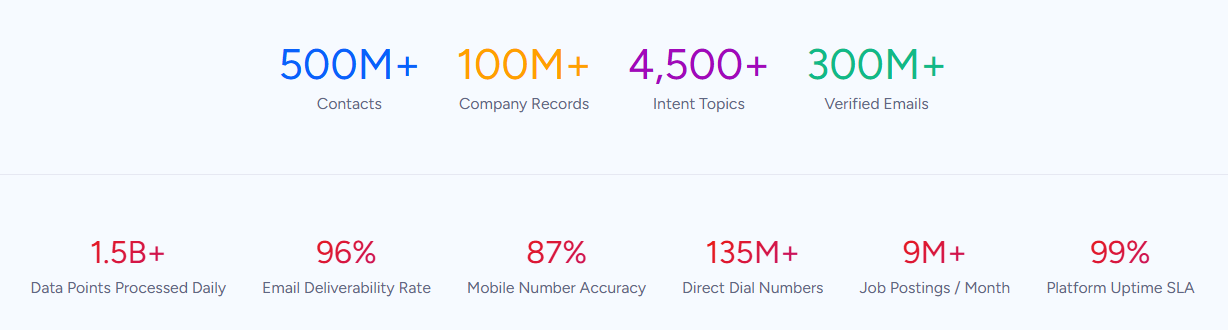
For groups operating an Aircall-HubSpot integration, ZoomInfo addresses each the information high quality downside and the dialog intelligence hole that no call-logging connector handles.
ZoomInfo integrates natively with HubSpot via its market, offering CRM enrichment, automated information import, and real-time updates inside HubSpot information.

Earlier than a rep picks up the cellphone in Aircall, ZoomInfo ensures the HubSpot contact has a verified direct dial (so outbound calls join), an correct job title (so the dialog is related), and present firm particulars (so the rep is just not pitching somebody who left).
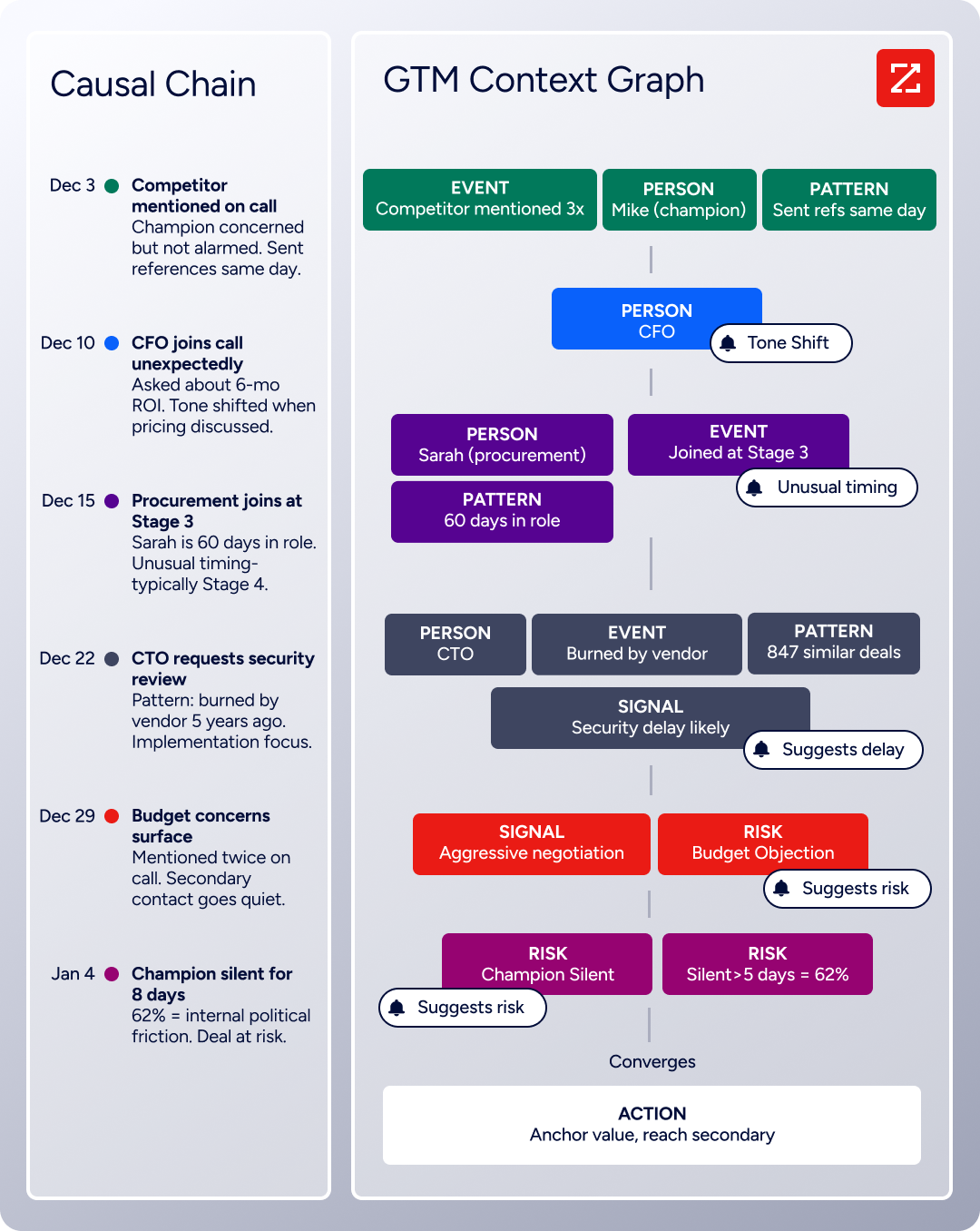
The identical information feeds ZoomInfo’s GTM Context Graph, which processes 1.5B+ information factors day by day and combines third-party intelligence with CRM information, dialog transcripts, and behavioral indicators to floor not simply what occurred in a deal, however why.
For a full breakdown of how ZoomInfo and HubSpot examine throughout information, options, and use circumstances, see our HubSpot vs ZoomInfo information.
ZoomInfo additionally connects with Aircall via Refrain, its dialog intelligence platform. Refrain imports name recordings from Aircall and applies computerized transcription, theme detection, and name evaluation, turning uncooked name information into structured insights: aggressive mentions, objection patterns, discuss ratios, and deal threat indicators.
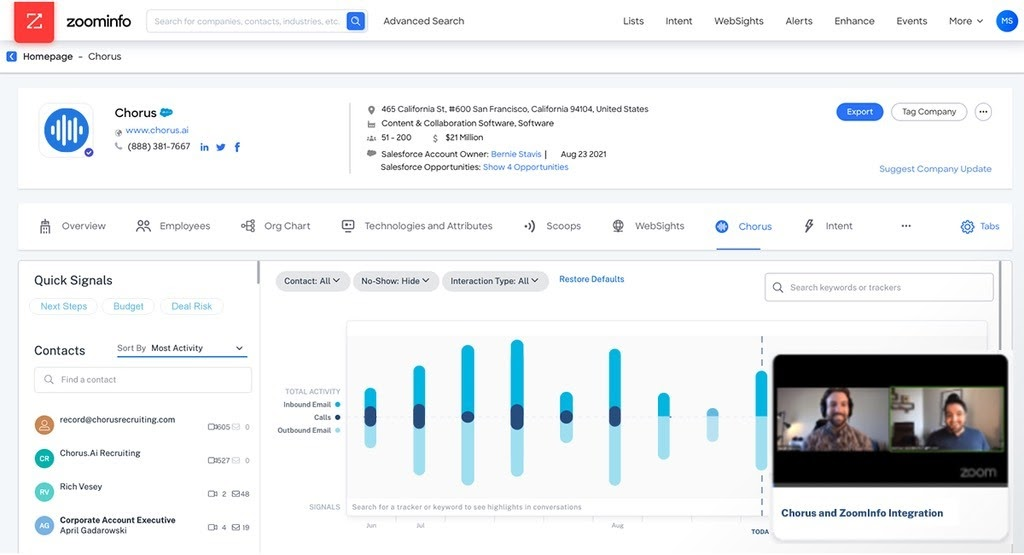
These insights feed the GTM Context Graph and are accessible via ZoomInfo’s GTM Workspace, giving reps AI-powered account briefs and next-best-action suggestions knowledgeable by each CRM information and precise name conversations.
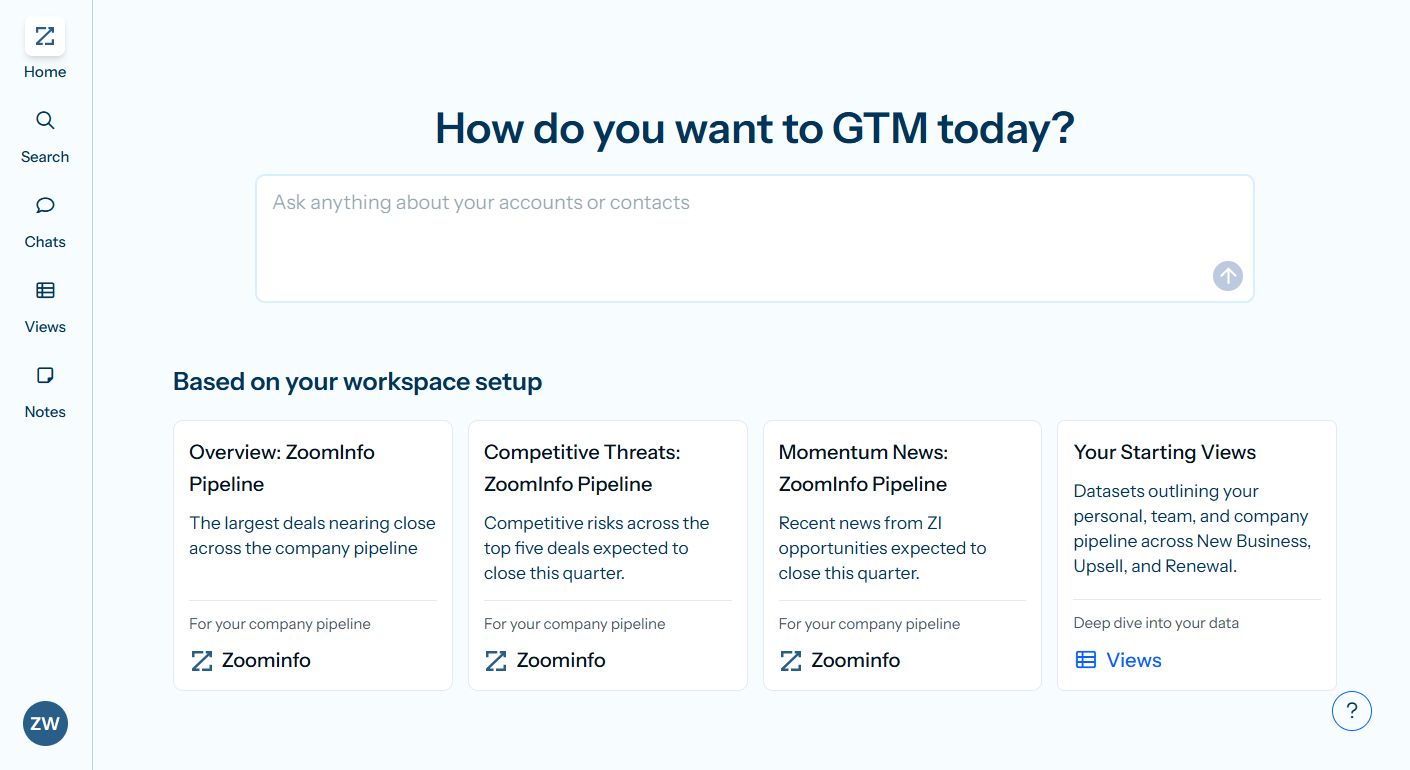
In follow, a crew operating Aircall and HubSpot can use ZoomInfo to complement HubSpot information earlier than any name occurs (verified direct dials, correct firm information, up to date org charts), then feed accomplished name recordings into Refrain for evaluation that goes past what Aircall’s built-in analytics present.
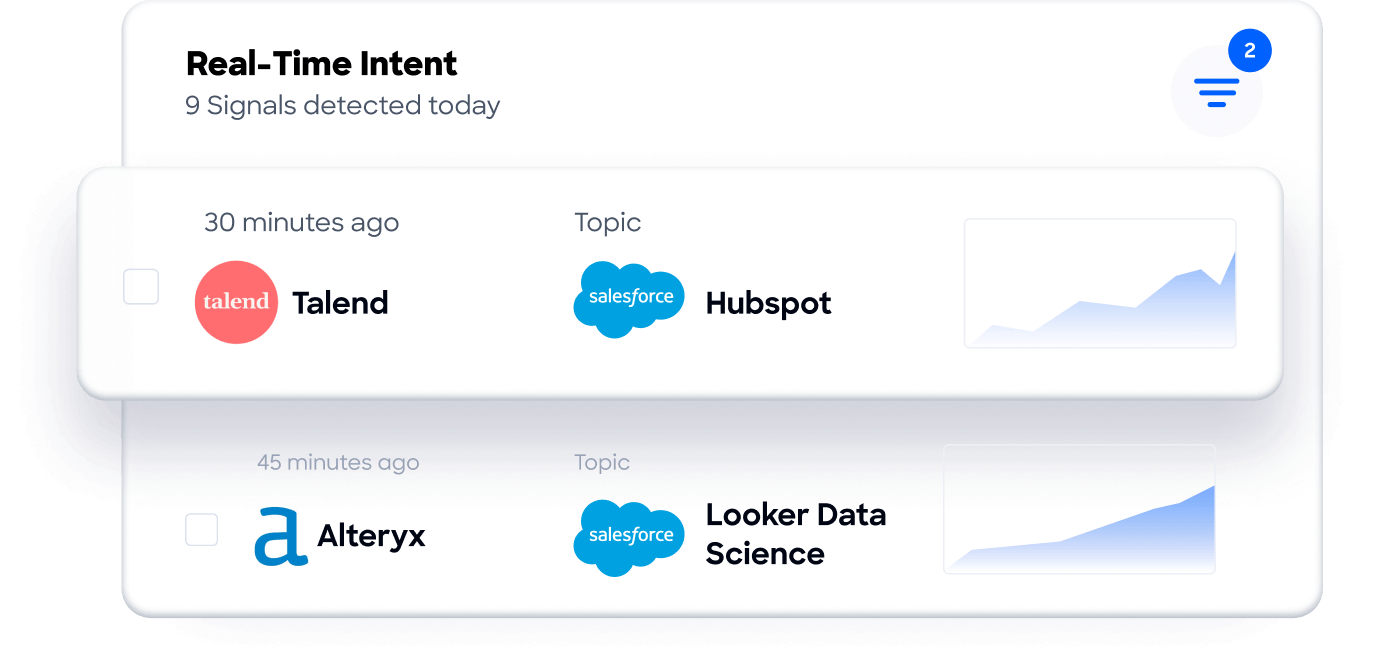
Purchaser Intent information from ZoomInfo, monitoring indicators from 210 million IP-to-Group pairings, can prioritize which accounts ought to obtain outbound calls via Aircall, so reps spend dialing time on prospects who’re actively researching related options quite than working via a stale checklist.
Enriched information additionally make the Aircall-HubSpot integration itself extra dependable. Standardized cellphone quantity formatting reduces contact matching failures. Full firm information allows extra correct lead routing via HubSpot workflows. And verified emails imply follow-up sequences triggered after calls attain actual inboxes.
Seismic’s gross sales crew attributed 39% of energetic pipeline to alternatives recognized or influenced by ZoomInfo indicators, whereas boosting productiveness by 54% and saving 11.5 hours per week. (Seismic)
Last Verdict
A local Aircall-HubSpot integration exists, and it is likely one of the strongest phone-to-CRM connectors out there: real-time name logging, bidirectional contact sync, recording and transcription attachment, and Perception Playing cards that floor CRM context throughout reside calls, all from a Premier HubSpot Expertise Associate. For many groups, the precise selection will depend on what they want past the native connector.
-
Groups of any dimension utilizing Aircall and HubSpot collectively ought to activate the native integration instantly. It covers name logging, contact sync, recording attachment, and tag synchronization with minimal setup and no extra price.
-
Groups that want customized automation past name logging (creating offers from particular name outcomes, routing missed calls to Slack, triggering multi-step workflows based mostly on name tags) ought to layer Zapier or HubSpot’s native workflow engine on prime of the native integration.
-
Organizations with advanced information fashions, multi-system pipelines, or enterprise logic that have to be enforced throughout call-to-CRM conversion ought to spend money on a customized API integration utilizing each platforms’ REST APIs and webhook techniques.
Earlier than constructing complexity past the native integration, make clear what hole you are attempting to fill.
If the hole is name logging and get in touch with sync, the native integration already solves it. If the hole is workflow automation triggered by name outcomes, HubSpot workflows (activated by logged name exercise) or a Zapier layer will deal with it.
If the hole is information high quality (outdated cellphone numbers, lacking firm information, stale contact information), that may be a totally different downside, and one which ZoomInfo solves.
With native integrations into each HubSpot and Aircall (by way of Refrain), plus API and MCP entry for any workflow, ZoomInfo is the information enrichment and dialog intelligence layer that ensures the information flowing between each platforms are correct, full, and actionable.
FAQ
Does Aircall combine natively with HubSpot?
Sure. Aircall gives a local HubSpot integration that logs all name exercise (inbound, outbound, missed calls, voicemails, SMS) to HubSpot contacts, offers, and tickets in close to real-time.
The mixing consists of bidirectional contact sync, name recording and transcription attachment, tag synchronization, and Perception Playing cards that show HubSpot contact and deal information contained in the Aircall cellphone interface throughout reside calls.
It’s included with Aircall plans that help integrations and requires no third-party software.
What Aircall plan do I want for the HubSpot integration?
The native HubSpot integration is out there on Aircall’s Necessities plan ($30/person/month, annual billing) and above. AI Help options that add name summaries and sentiment information to HubSpot exercise logs require an extra $9/person/month add-on on Necessities, or are included on Skilled ($50/person/month).
AI Help Professional with reside transcription and playbooks prices $49/person/month on any plan. Each Necessities and Skilled require a minimal of three customers.
Can name recordings and transcriptions sync to HubSpot?
Sure. The native integration attaches name recordings to the corresponding HubSpot contact, deal, or ticket timeline as engagement information. When AI Help or AI Help Professional is enabled, AI-generated name transcriptions, summaries, key matters, and sentiment information additionally sync to HubSpot. These seem within the exercise timeline so any crew member can evaluate what was mentioned with out leaving the CRM.
Does the mixing help bidirectional sync?
Partially. Contact information syncs each methods: contacts created or up to date in both platform seem within the different. Name exercise flows one route solely, from Aircall to HubSpot, since Aircall is the system of report for telephony occasions.
HubSpot deal stage adjustments, workflow triggers, and lifecycle stage transitions don’t push information again into Aircall, although Perception Playing cards present a read-only view of HubSpot information contained in the Aircall interface throughout calls.
How do I keep away from duplicate contacts when connecting the 2 platforms?
The mixing matches contacts by cellphone quantity. Earlier than activating the connection, standardize cellphone quantity formatting in each techniques (constant nation codes, no particular characters) to reduce false mismatches. Configure whether or not the mixing ought to mechanically create new HubSpot contacts for unmatched callers or skip them.
For current duplicates, HubSpot’s built-in duplicate administration instruments and ZoomInfo’s information high quality capabilities can establish and merge duplicate information.
Can I set off HubSpot workflows based mostly on Aircall name information?
Sure. When the native integration logs a name to a HubSpot contact or deal report, that engagement occasion can set off HubSpot workflows. For instance, a workflow can replace a contact’s lifecycle stage when a name tagged “Certified” is logged, or create a follow-up process when a missed name is recorded. The triggering logic runs on HubSpot’s facet utilizing the information the mixing pushes in.
What does a Zapier integration add past the native connector?
Zapier extends the mixing by enabling customized workflows the native connector doesn’t deal with, akin to making a HubSpot deal mechanically when a selected Aircall name tag is utilized, sending a Slack notification when a name exceeds a sure length, or logging Aircall exercise to a third-party software alongside HubSpot.
Zapier dietary supplements the native integration; it doesn’t change its core name logging and get in touch with sync.
How does ZoomInfo enhance an Aircall-HubSpot setup?
ZoomInfo addresses two layers that no call-logging integration touches. First, it enriches HubSpot contact information with verified direct dials, correct job titles, firm information, and intent indicators earlier than reps decide up the cellphone, so outbound calls join and conversations are related.
Second, via Refrain (its dialog intelligence platform, which integrates with Aircall), ZoomInfo analyzes name recordings for aggressive mentions, objection patterns, deal threat indicators, and training insights that transcend fundamental name metrics.
The consequence: higher information going into calls and deeper intelligence popping out of them.
Different instruments that hook up with HubSpot:

