

Groups that run PandaDoc for doc automation and Salesforce as their CRM often hit the identical friction inside 1 / 4:
-
reps toggle between each platforms to examine doc standing, copy pricing, or replace deal levels by hand,
Nonetheless the 2 platforms ended up coexisting (a gross sales staff that adopted PandaDoc for quicker proposals whereas the org runs on Salesforce, totally different departments selecting instruments independently, or a RevOps staff including doc automation to a longtime CRM), the longer they function with out a connection, the broader the hole between what the CRM says a few deal and what the doc path reveals.
Connecting PandaDoc and Salesforce closes that hole.
Paperwork created in PandaDoc pull contact, account, and alternative information from Salesforce so reps by no means retype buyer particulars. When a doc’s standing adjustments (despatched, seen, signed), that standing writes again to the Salesforce file so pipeline reviews mirror actuality with out guide updates.
Pricing and line objects stream between PandaDoc’s quoting engine and Salesforce Alternatives, so the quote the customer sees and the deal the CRM tracks are at all times the identical doc.
PandaDoc provides a native Salesforce integration constructed on Salesforce Lightning, accessible on the Marketing strategy ($49/seat/month) and above. The combination helps two-way synchronization and can also be accessible by way of the Salesforce AppExchange as PandaDoc for Salesforce CPQ.
For groups that want lighter automation or customized workflows, Zapier and PandaDoc’s personal REST API supply various connection strategies. Every differs in setup complexity, sync route, information protection, and value.
One downside no connection methodology solves: the combination strikes paperwork and deal information between programs, but it surely doesn’t confirm whether or not the contact information behind these paperwork are correct, present, or full.
That’s the place ZoomInfo is available in. ZoomInfo integrates natively with Salesforce by way of the AppExchange and provides API and MCP entry that feeds verified contact and firm information into any CRM workflow, so the information behind each PandaDoc proposal are correct earlier than the doc is created.
This text covers the complete panorama of the PandaDoc-Salesforce integration: which strategies can be found, what information each handles, learn how to set them up, the use instances that justify connecting each platforms, and the restrictions to plan for. It additionally covers how ZoomInfo suits in as a knowledge enrichment layer that strengthens the information flowing between PandaDoc and Salesforce.
Let’s begin with an summary of the combination.
Integration Overview
Supply: PandaDoc
Does a local integration exist?
Sure. PandaDoc provides a native Salesforce Lightning integration that embeds doc creation, sending, and monitoring inside Salesforce information. It’s accessible on PandaDoc’s Marketing strategy and above, and a separate PandaDoc for Salesforce CPQ package deal is accessible on the Enterprise plan.
What information can sync?
Contact, account, and alternative information flows from Salesforce into PandaDoc to auto-populate doc fields. Doc standing (draft, despatched, seen, accomplished, expired), line objects, and pricing information stream again from PandaDoc into Salesforce. Customized fields may be mapped bidirectionally.
Is the sync bidirectional?
Sure. PandaDoc helps two-way synchronization with Salesforce: Salesforce information populates PandaDoc paperwork, and PandaDoc writes doc standing, deal values, and line objects again into Salesforce information.
Is it real-time or batch?
The native integration operates in close to real-time. Doc standing adjustments in PandaDoc (despatched, seen, accomplished) replace the corresponding Salesforce file inside minutes. Knowledge pulled from Salesforce into PandaDoc displays the file’s state on the time of doc creation.
What are the accessible strategies?
Native PandaDoc-Salesforce integration (Marketing strategy and above), PandaDoc for Salesforce CPQ (Enterprise plan), Zapier, and customized API growth utilizing PandaDoc’s REST API alongside the Salesforce API.
|
Technique |
Setup Problem |
Knowledge Movement |
Actual-time? |
Value |
|---|---|---|---|---|
|
Native Integration |
Low |
Bidirectional |
Close to real-time |
Included with PandaDoc Enterprise ($49/seat/mo) |
|
PandaDoc for Salesforce CPQ |
Low |
Bidirectional |
Close to real-time |
Included with PandaDoc Enterprise (customized pricing) |
|
Zapier |
Medium |
One-way per Zap |
Close to real-time (1-15 min) |
From $19.99/mo |
|
Customized API |
Excessive |
Totally customizable |
Actual-time through webhooks |
Developer time + internet hosting |
One distinction price settling upfront: the native integration and CPQ package deal deal with ongoing, bidirectional sync as a part of each day gross sales workflows. Zapier handles event-triggered flows with narrower information protection and no document-level engagement monitoring. Customized API growth provides essentially the most flexibility however requires engineering assets to construct and preserve.
Integration Strategies
Native PandaDoc-Salesforce Integration (Enterprise Plan and Above)
The way it works: PandaDoc’s native Salesforce integration connects the 2 platforms by way of Salesforce Lightning. PandaDoc embeds inside Salesforce information (Alternatives, Accounts, Contacts), letting reps create, ship, and monitor paperwork with out leaving the CRM.
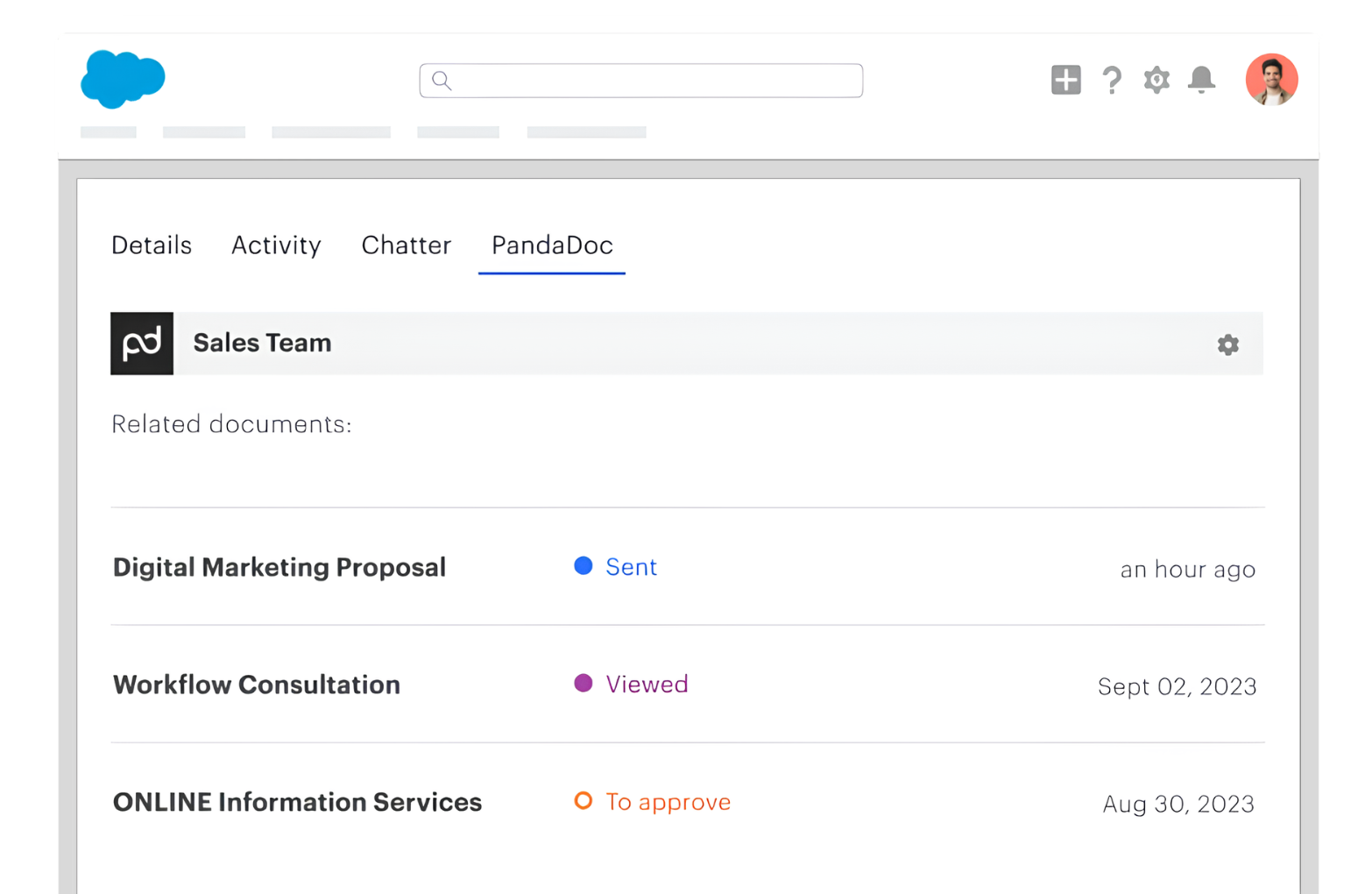
Supply: PandaDoc
Salesforce area information auto-populates PandaDoc templates by way of variables, and doc standing adjustments write again to Salesforce routinely through two-way synchronization.
What it syncs: Contact particulars, account info, and alternative information stream from Salesforce into PandaDoc paperwork. Doc standing (draft, despatched, seen, accomplished, expired), doc hyperlinks, and completion timestamps stream again into Salesforce.
Customized Salesforce fields may be mapped to PandaDoc variables for auto-population. Line objects and pricing from PandaDoc’s pricing tables can sync with Salesforce Alternative merchandise.
Matches: ongoing bidirectional sync for document-driven gross sales workflows; not a migration software.
Setup course of:
-
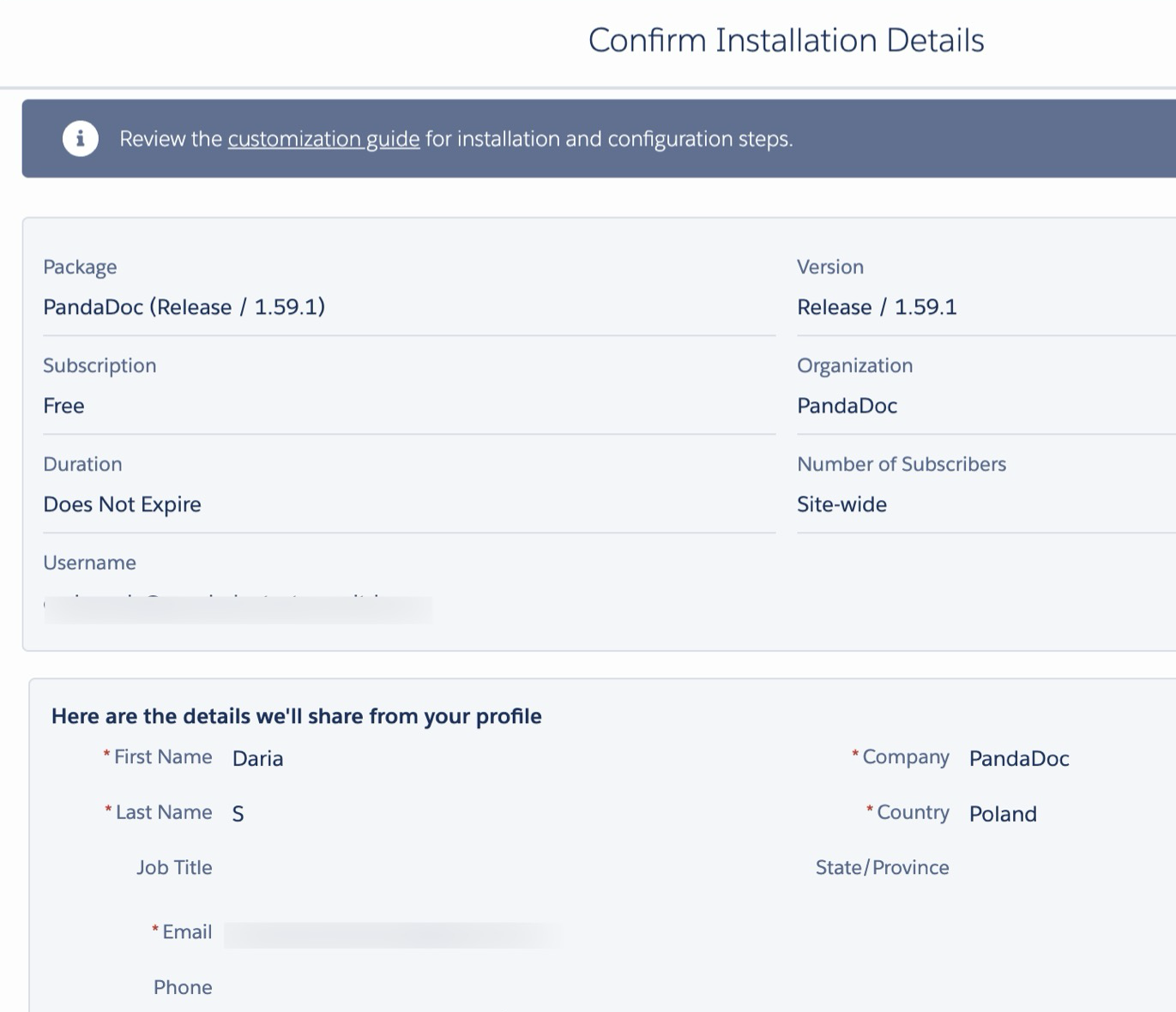
In Salesforce, navigate to Setup and seek for “PandaDoc” within the AppExchange, or set up the PandaDoc for Salesforce package deal instantly. You want System Administrator entry in Salesforce.
-
In PandaDoc, go to Settings > Integrations > Salesforce and authenticate along with your Salesforce credentials utilizing OAuth, granting PandaDoc learn and write entry to your Salesforce org.
-
Configure area mapping between Salesforce objects (Contacts, Accounts, Alternatives) and PandaDoc variables. Map commonplace fields (identify, e mail, firm) and any customized fields your templates use.
Supply: PandaDoc
Strengths: First-party integration maintained by PandaDoc. Reps create, ship, and monitor paperwork with out leaving Salesforce. Bidirectional information sync eliminates guide CRM updates.
Template variables pull reside Salesforce information, lowering information entry errors. Doc analytics (page-by-page engagement information) are accessible from inside Salesforce. Approval workflows can set off primarily based on Salesforce deal values or low cost thresholds.
Limitations: Requires PandaDoc Marketing strategy at minimal ($49/seat/month). Setup requires each PandaDoc admin rights and Salesforce System Administrator entry. Advanced area mappings (multi-select picklists, method fields, lookup relationships) might have further configuration.
The combination surfaces paperwork on the Alternative stage; syncing paperwork to customized Salesforce objects requires further setup or API work.
Finest for: Gross sales groups that create proposals, quotes, and contracts from inside Salesforce and want doc standing to stream again into the CRM routinely. Organizations the place Salesforce is the system of file and PandaDoc handles the doc lifecycle from quote to signature.
PandaDoc for Salesforce CPQ (Enterprise Plan)
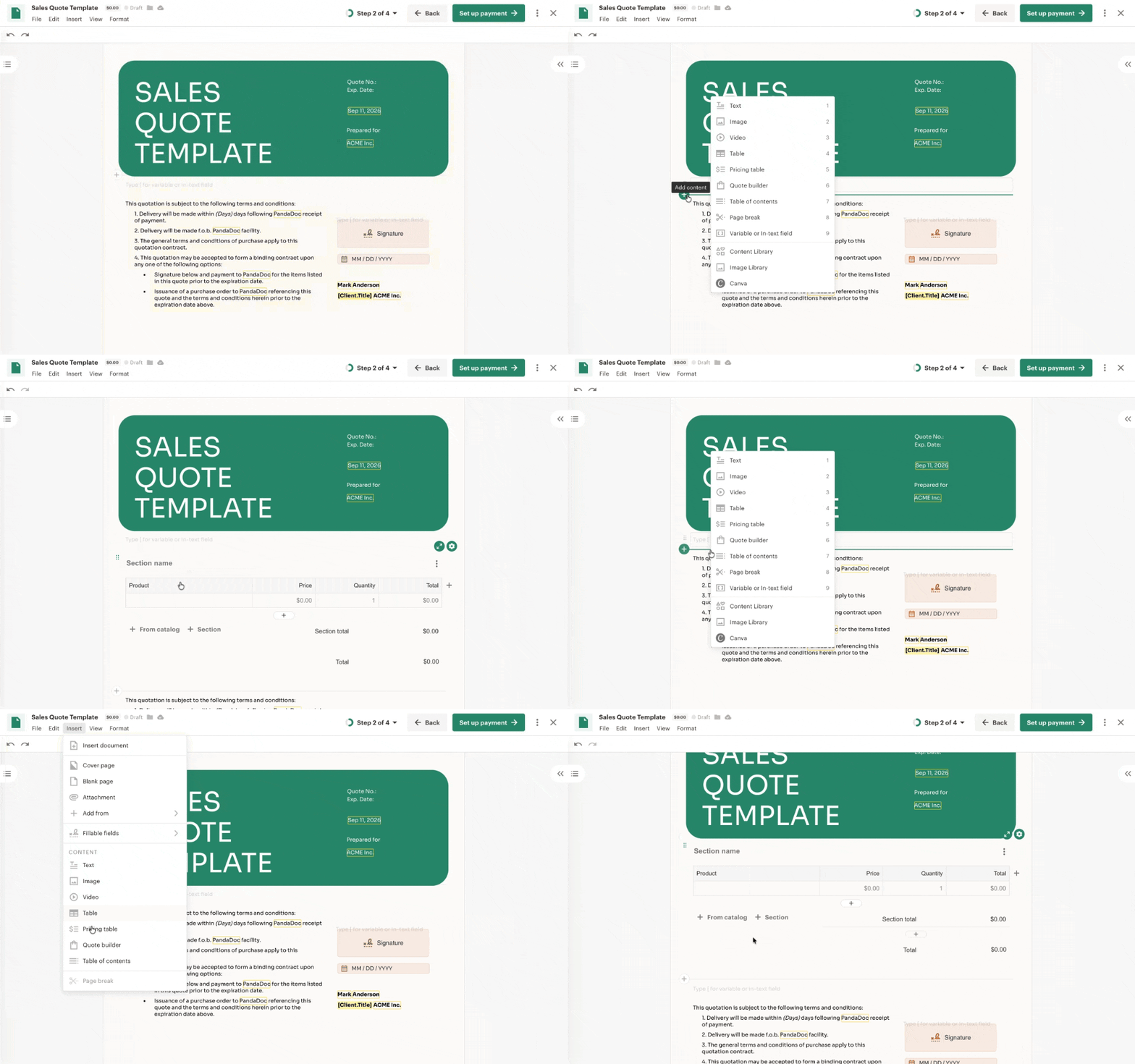
The way it works: PandaDoc CPQ for Salesforce is a quoting answer that embeds PandaDoc’s configure-price-quote engine inside Salesforce. Reps configure merchandise, apply pricing guidelines, generate quotes, and ship for signature with out leaving the CRM. The CPQ layer provides guided promoting workflows, conditional pricing logic, and approval routing on prime of the usual doc integration.
What it syncs: Every part the native integration syncs, plus CPQ-specific information: product catalog objects, pricing guidelines, low cost thresholds, configured quotes, and approval chain standing. PandaDoc’s Quote Builder pulls merchandise and pricing from a centralized catalog and writes the ultimate quote values again to Salesforce Alternative line objects.
Supply: PandaDoc
Matches: ongoing bidirectional sync for groups with complicated quoting workflows; extends the native integration with CPQ capabilities.
Setup course of:
-
Configure the PandaDoc Product Catalog along with your SKUs, pricing tiers, and low cost guidelines. Import merchandise through CSV or sync from an current Salesforce product catalog.
-
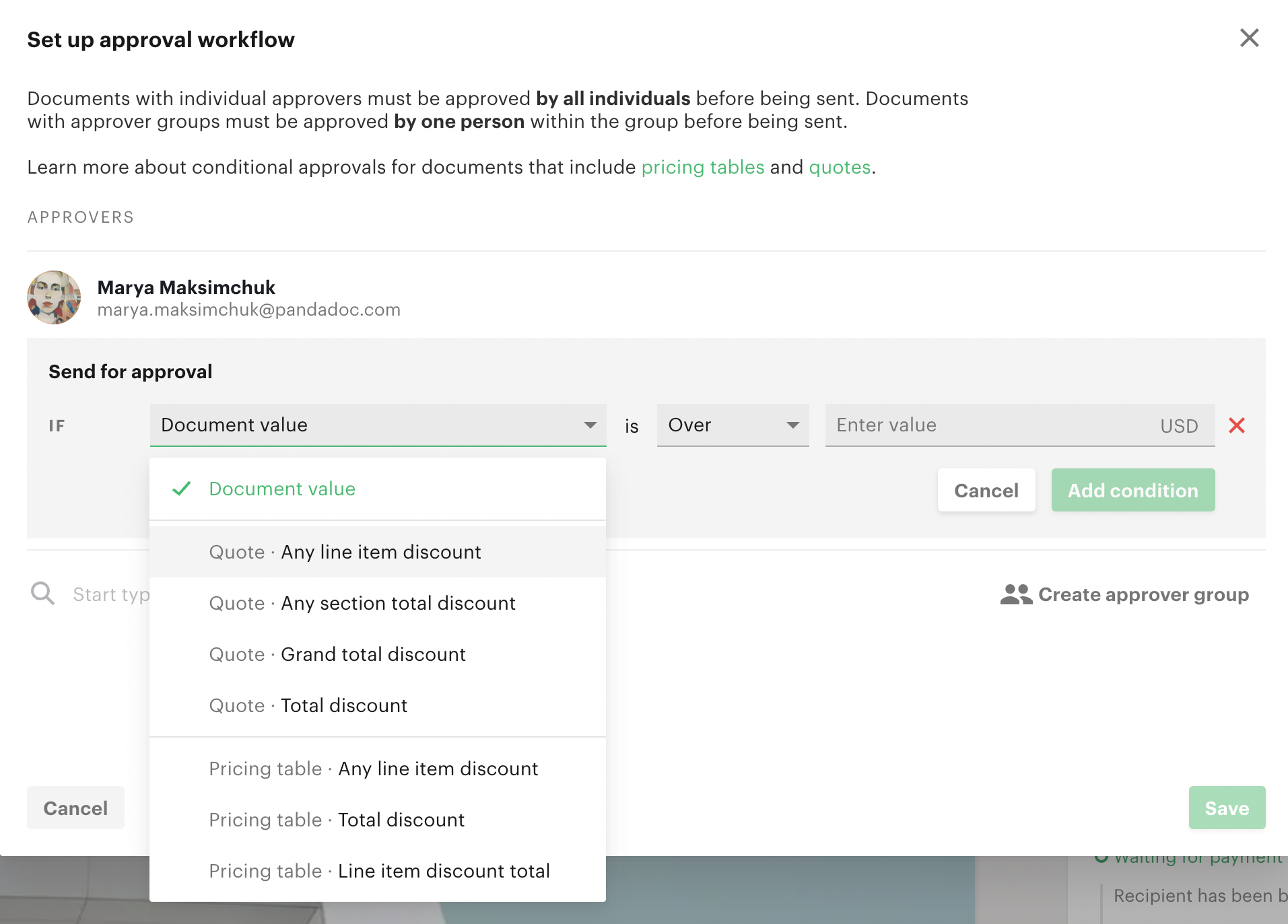
Construct CPQ workflows utilizing PandaDoc’s WHEN/THEN guidelines engine: outline pricing guardrails, bundle necessities, and conditional approvals (for instance, quotes exceeding a 20% low cost routinely path to a gross sales supervisor).
-
Check by operating a full cycle: configure a quote from a Salesforce Alternative, apply pricing guidelines, route for approval, generate the doc, ship for signature, and confirm that accomplished quote values write again to Salesforce.
Strengths: Eliminates the necessity for a separate CPQ software. Requires no coding or consultants to deploy. Guided promoting walks reps by way of product choice with out memorizing the complete catalog. Conditional approvals implement pricing governance routinely.
Supply: PandaDoc
Your complete stream from configuration by way of signature and fee occurs in a single platform. PandaDoc reviews that Salesforce CPQ customers see an 80% discount in guide area entry and 120 hours saved per 30 days.
Limitations: Enterprise plan solely (customized pricing, annual contract). Requires deeper preliminary setup to configure the product catalog, pricing guidelines, and approval chains.
Groups with very complicated product configurations (hundreds of SKUs with interdependent compatibility guidelines) should want a devoted enterprise CPQ platform. The foundations engine makes use of sequential processing, so rule ordering issues and might require iteration to get proper.
Finest for: Mid-market gross sales groups promoting configurable merchandise by way of Salesforce who need quote-to-signature in a single workflow with out implementing a big CPQ platform like Salesforce Income Cloud.
Zapier
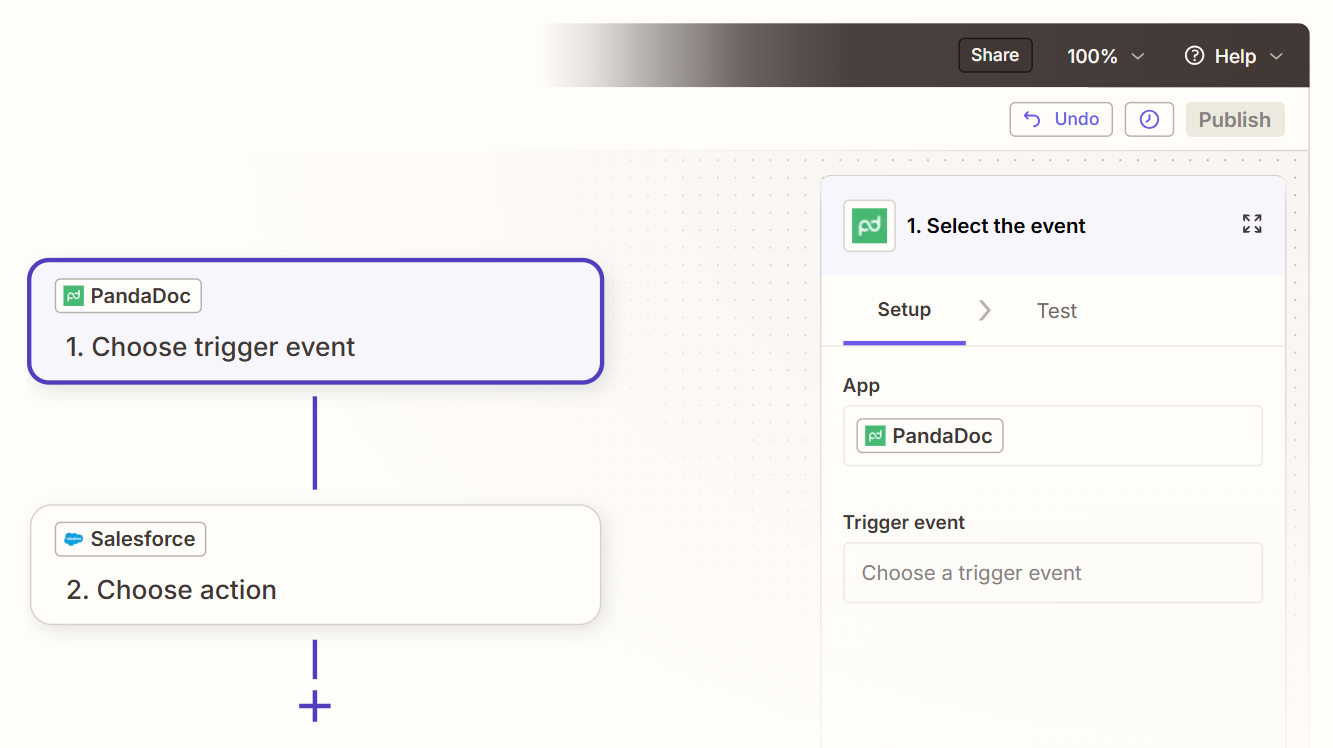
The way it works: Zapier connects PandaDoc and Salesforce by way of event-driven automations known as Zaps. Every Zap pairs a set off (an occasion in a single app) with a number of actions (what occurs within the different). PandaDoc has a local Zapier connector, and Salesforce is amongst Zapier’s hottest integrations.
Supply: Zapier
What it syncs: Zapier can set off on PandaDoc doc standing adjustments (created, despatched, seen, accomplished) and push information into Salesforce (create or replace information, log actions).
Within the reverse route, Salesforce occasions (new lead, alternative stage change) can set off PandaDoc actions (create doc from template). Area mapping is guide and restricted to fields every app’s Zapier connector exposes.
Matches: ongoing event-triggered sync for particular workflows; not a alternative for the native integration’s bidirectional information stream.
Setup course of:
-
Flip the Zap on. For bidirectional sync, create a second Zap with Salesforce because the set off and PandaDoc because the motion, and add filters to stop infinite loops.
Strengths: Out there to PandaDoc groups on any paid plan (the native Salesforce integration requires Enterprise; Zapier doesn’t). No engineering assets required. Fast to arrange for easy, single-event workflows. Zapier’s filter and formatting steps permit conditional logic (e.g., solely sync paperwork from a selected template or above a sure worth).
Limitations: Every Zap handles one trigger-action pair, so masking a number of doc occasions requires separate Zaps (every counting towards Zapier’s process allocation). No bidirectional information sync in a single Zap.
Doesn’t assist PandaDoc’s doc analytics or real-time engagement monitoring. Can not pull Salesforce information into PandaDoc templates at doc creation time (the native integration handles this). Historic paperwork created earlier than the Zap was activated don’t sync.
Finest for: Groups on PandaDoc Starter that need light-weight automation between PandaDoc and Salesforce with out upgrading to Enterprise. Organizations that want a selected, slender integration (e.g., “when a doc is signed in PandaDoc, create a Activity in Salesforce”) fairly than full bidirectional sync.
Customized API Integration
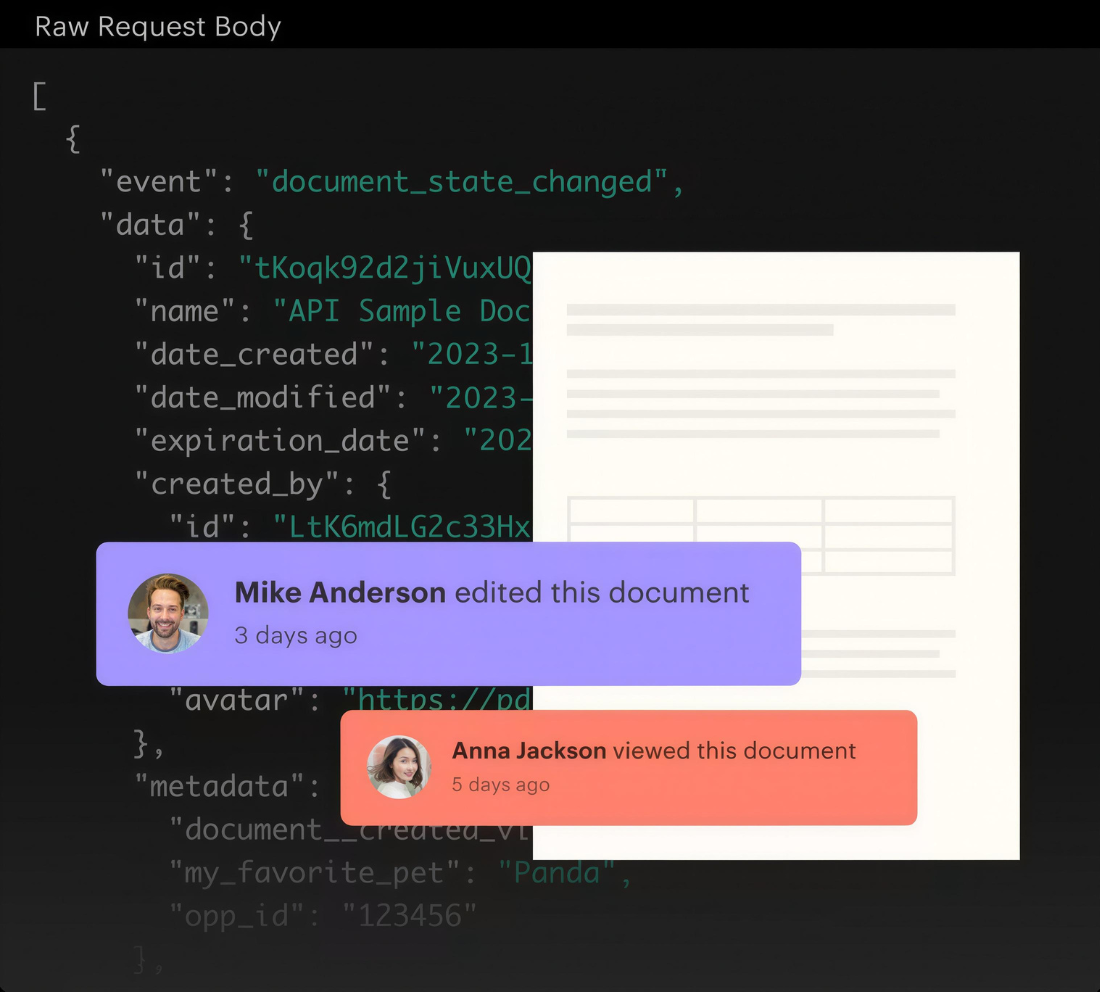
The way it works: Each PandaDoc and Salesforce present full APIs. PandaDoc’s REST API covers doc creation from templates, standing administration, area inhabitants, e-signature requests, and webhooks for real-time occasion notifications.
Supply: PandaDoc
Salesforce’s REST API covers all commonplace and customized objects, with Platform Occasions and Change Knowledge Seize for event-driven sync. A customized integration connects these APIs instantly, with your personal middleware dealing with authentication, area mapping, transformation, and error restoration.
What it syncs: Something each APIs expose. That is the one methodology that helps complicated situations like producing paperwork from customized Salesforce objects, syncing PandaDoc pricing desk information to customized Salesforce fields, embedding PandaDoc doc experiences inside Salesforce-connected functions through the JavaScript SDK, or implementing enterprise logic past the native integration’s area mapping.
Matches: both particular customized workflows or full-scale integration; the one methodology with no ceiling on complexity.
Setup course of:
-
Construct the combination service: a server-side software that listens for PandaDoc webhooks (doc standing adjustments set off HTTP POST to your endpoint) and Salesforce occasions, then transforms and writes information to the opposite platform.
-
Implement doc creation logic: when a Salesforce occasion fires (e.g., an Alternative reaches a selected stage), the combination creates a PandaDoc doc from a template through the API, populating fields with Salesforce information.
-
Add logging, error dealing with, and retry logic. PandaDoc’s API has per-endpoint fee limits (e.g., 500 RPM for doc creation from template). Salesforce’s API limits are edition-dependent.
-
Deploy, monitor, and preserve. PandaDoc webhook endpoints should be HTTPS and return HTTP 200 inside 20 seconds.
Strengths: Full management over what syncs, when, and the way. Actual-time sync through webhooks on each side. Can implement arbitrarily complicated enterprise logic. Helps situations the native integration can’t deal with (customized objects, embedded doc experiences, bulk doc technology). PandaDoc’s API ships with official SDKs in Python, Node.js, Java, and PHP. No per-operation charges from a third-party connector.
Limitations: Requires growth assets to construct and preserve. PandaDoc’s API has a separate pricing tier (free tier: 60 paperwork/yr; API Developer Plan: $40/month for 40 paperwork/month; Enterprise: customized). Salesforce API adjustments with every seasonal launch. The preliminary construct takes weeks, not hours.
Finest for: Organizations with in-house growth groups that have to embed PandaDoc doc workflows inside customized Salesforce functions, generate paperwork from customized objects, or implement enterprise logic the native integration can’t assist.
Key Use Instances
1. Proposal Era from Salesforce Alternatives
When an Alternative reaches a proposal-ready stage, a rep creates a PandaDoc doc from the Salesforce file. Contact identify, firm particulars, deal worth, and product line objects auto-populate from Salesforce fields into the PandaDoc template. The rep customizes the proposal, provides signature fields, and sends it to the customer. Doc standing updates stream again to Salesforce routinely.
Finest integration methodology: Native PandaDoc-Salesforce integration (bidirectional, real-time).
2. Automated Deal Stage Updates on Doc Completion
When a purchaser indicators a contract in PandaDoc, the combination updates the Salesforce Alternative stage to Closed-Gained with out guide intervention. The signed PDF attaches to the Alternative file, and the shut date updates to mirror the precise signature date. This eliminates the lag between a deal closing in PandaDoc and the CRM reflecting that standing.
Finest integration methodology: Native integration (computerized standing writeback) or Zapier (event-triggered stage replace for groups on decrease PandaDoc plans).
3. CPQ-Pushed Quoting for Configurable Merchandise
A rep promoting modular software program packages makes use of PandaDoc CPQ embedded in Salesforce to configure the deal. The guided promoting questionnaire walks by way of product choice, the principles engine applies quantity reductions and enforces bundle necessities, and the approval workflow routes the quote to a supervisor if the low cost exceeds the edge.
As soon as authorized, the customer receives a branded quote with interactive pricing, indicators it, and the ultimate line objects write again to the Salesforce Alternative.
Finest integration methodology: PandaDoc for Salesforce CPQ (Enterprise plan).
4. Contract Renewal Workflows
When a renewal date approaches (tracked in Salesforce), a Zapier Zap or PandaDoc automation generates a renewal contract from a template, pre-populated with the shopper’s particulars and up to date pricing. The renewal doc sends routinely, and its standing tracks in Salesforce alongside the renewal Alternative.
Finest integration methodology: Native integration with PandaDoc automations, or Zapier for groups that want less complicated trigger-based renewal technology.
5. Doc Engagement Monitoring for Gross sales Observe-Up
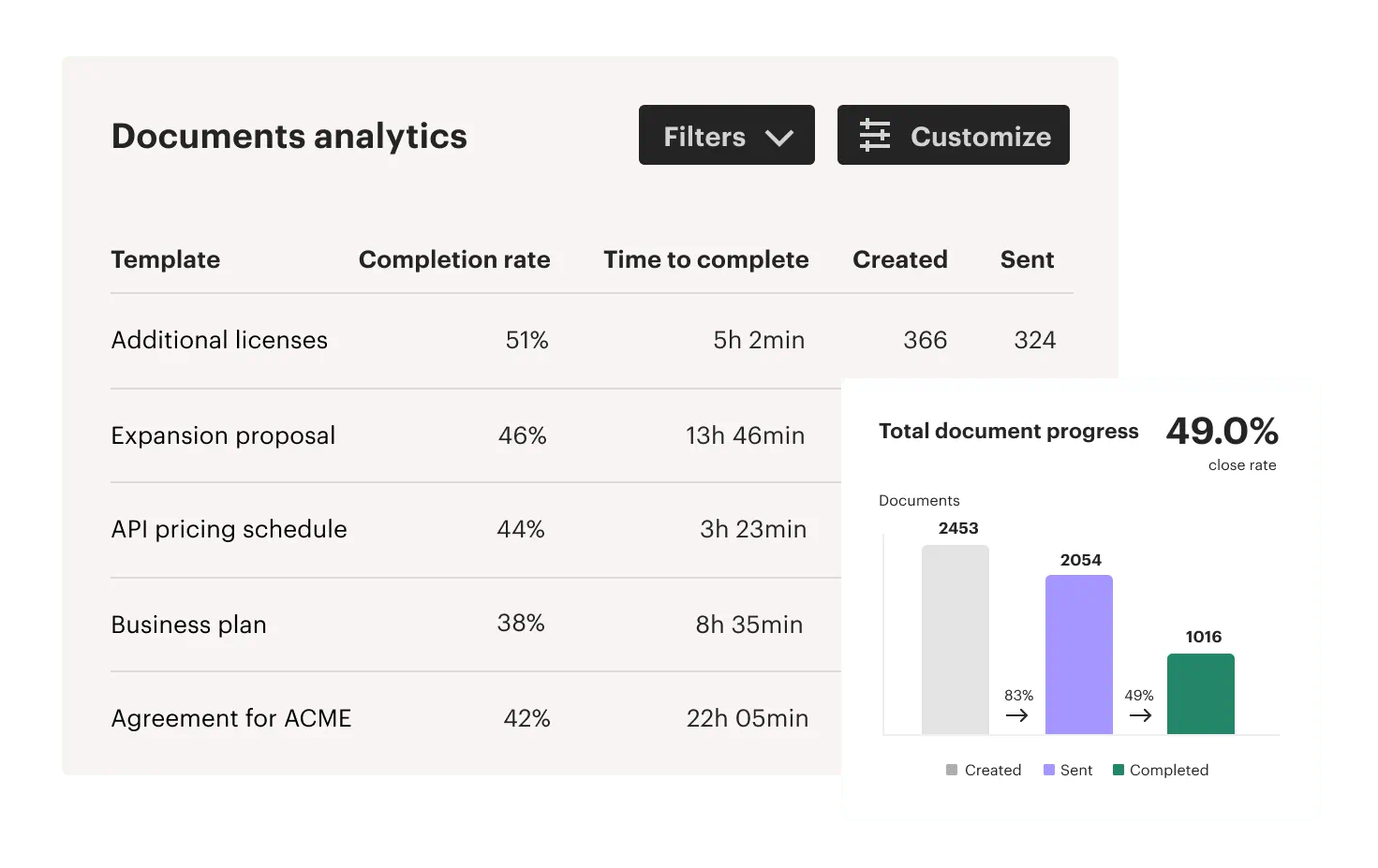
After sending a proposal, a rep screens Salesforce for PandaDoc engagement indicators. PandaDoc’s doc analytics monitor which pages the recipient seen and the way lengthy they spent on every part. When the customer revisits the pricing web page a number of occasions, the rep is aware of to comply with up on pricing considerations particularly, with out asking the customer to repeat what they’ve already reviewed.
Supply: PandaDoc
Finest integration methodology: Native PandaDoc-Salesforce integration (engagement information seen in Salesforce information).
Limitations and Issues
Plan-Gated Integration Options
The native Salesforce integration requires PandaDoc’s Marketing strategy at $49/seat/month. CPQ for Salesforce requires the Enterprise plan with customized pricing and an annual contract. Groups on PandaDoc’s Free ($0) or Starter ($19/consumer/month) plans can’t entry the native Salesforce integration and should depend on Zapier or the API to attach the 2 platforms.
Area Mapping Complexity
PandaDoc makes use of variables and template roles to map Salesforce information into paperwork. Customary fields (identify, e mail, firm, deal quantity) map cleanly. Advanced Salesforce area varieties (multi-select picklists, method fields, lookup relationships throughout objects, and polymorphic fields) might require intermediate transformation or customized API work to populate PandaDoc templates precisely.
Doc Enhancing After Ship
PandaDoc’s most persistently cited limitation on G2 and Capterra is that modifying a doc after sending it sometimes requires creating a brand new model and re-sending. In negotiation-heavy offers the place contract phrases change after preliminary distribution, this creates friction the combination can’t easy over.
Sync Conflicts
Bidirectional sync creates the opportunity of conflicting updates. If a rep updates deal worth in Salesforce whereas a purchaser selects totally different line objects in a PandaDoc quote, the programs might disagree on the ultimate quantity.
The native integration handles most standing sync routinely, however pricing conflicts between PandaDoc quotes and Salesforce Alternative line objects require clear operational guidelines about which system holds the authoritative deal worth.
API Fee Limits
PandaDoc enforces per-endpoint fee limits: 500 RPM for doc creation from template, 400 RPM for sending, 600 RPM for doc particulars, and 100 RPM for downloads.
Salesforce’s API limits begin at 100,000 requests per 24-hour interval for Skilled and Enterprise editions, plus per-license allocations. Groups producing excessive volumes of paperwork (bulk ship campaigns, end-of-quarter pushes) ought to confirm their fee restrict headroom on each side.
Permissions and Entry
Establishing the native integration requires PandaDoc admin rights and Salesforce System Administrator entry. In case your Salesforce org makes use of field-level safety or sharing guidelines, the combination consumer’s profile will need to have learn and write entry to each object and area you propose to map. PandaDoc gates CRM integrations behind its Marketing strategy and the Enterprise API tier for programmatic entry.
What No Technique Fixes: The Knowledge Itself
Each methodology above strikes paperwork and deal information between PandaDoc and Salesforce. None of them checks whether or not the contact information driving these paperwork are correct, full, or present.
A proposal despatched to an outdated e mail tackle by no means will get opened. A contract addressed to somebody who left the corporate three months in the past sits unsigned. The combination ensures each programs agree on the deal; it doesn’t make sure the individuals behind the deal are the appropriate ones.
The place ZoomInfo Matches In
Each methodology on this information strikes information between PandaDoc and Salesforce. None of them improves the contact information that drive the paperwork.
When the combination is reside however proposals go to lifeless e mail addresses, contracts attain contacts who modified roles, and quotes land with the flawed stakeholders as a result of the org chart in Salesforce is six months stale, the bottleneck is not the connector. That’s the hole ZoomInfo closes.
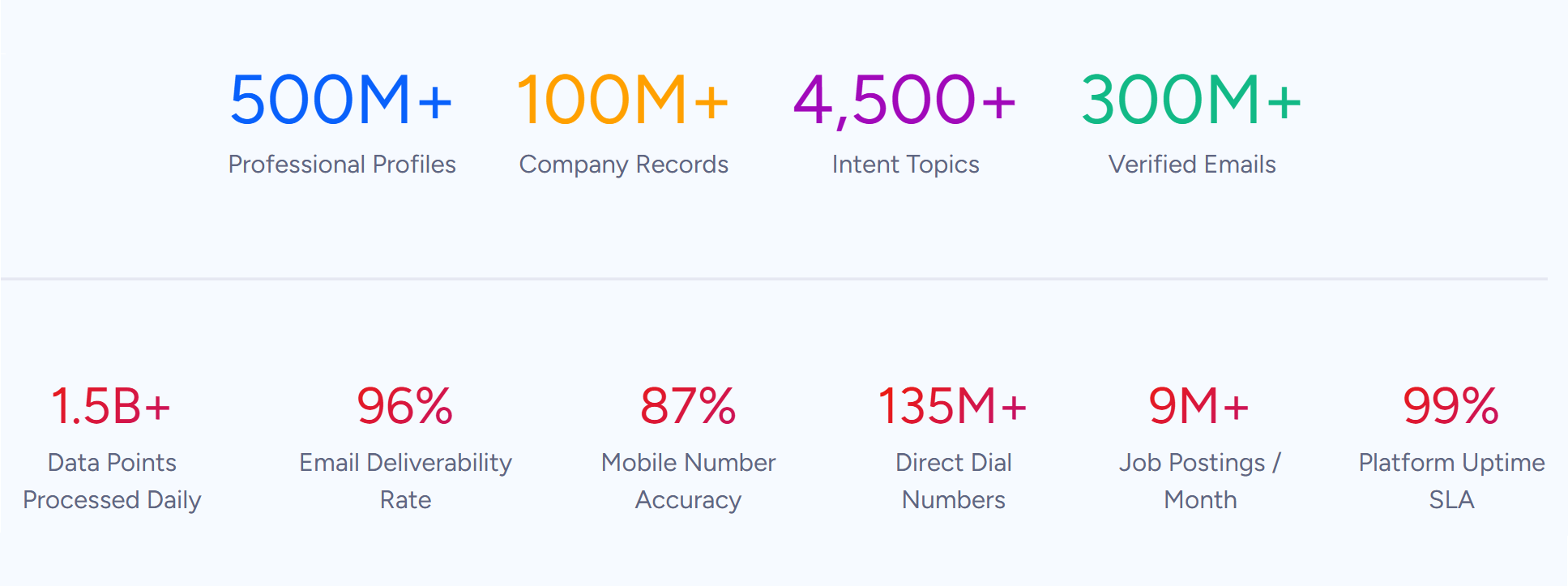
ZoomInfo is a B2B information and go-to-market platform constructed on 500M contacts, 100M corporations, 135M+ verified cellphone numbers, and 200M+ verified enterprise e mail addresses.
Supply: ZoomInfo
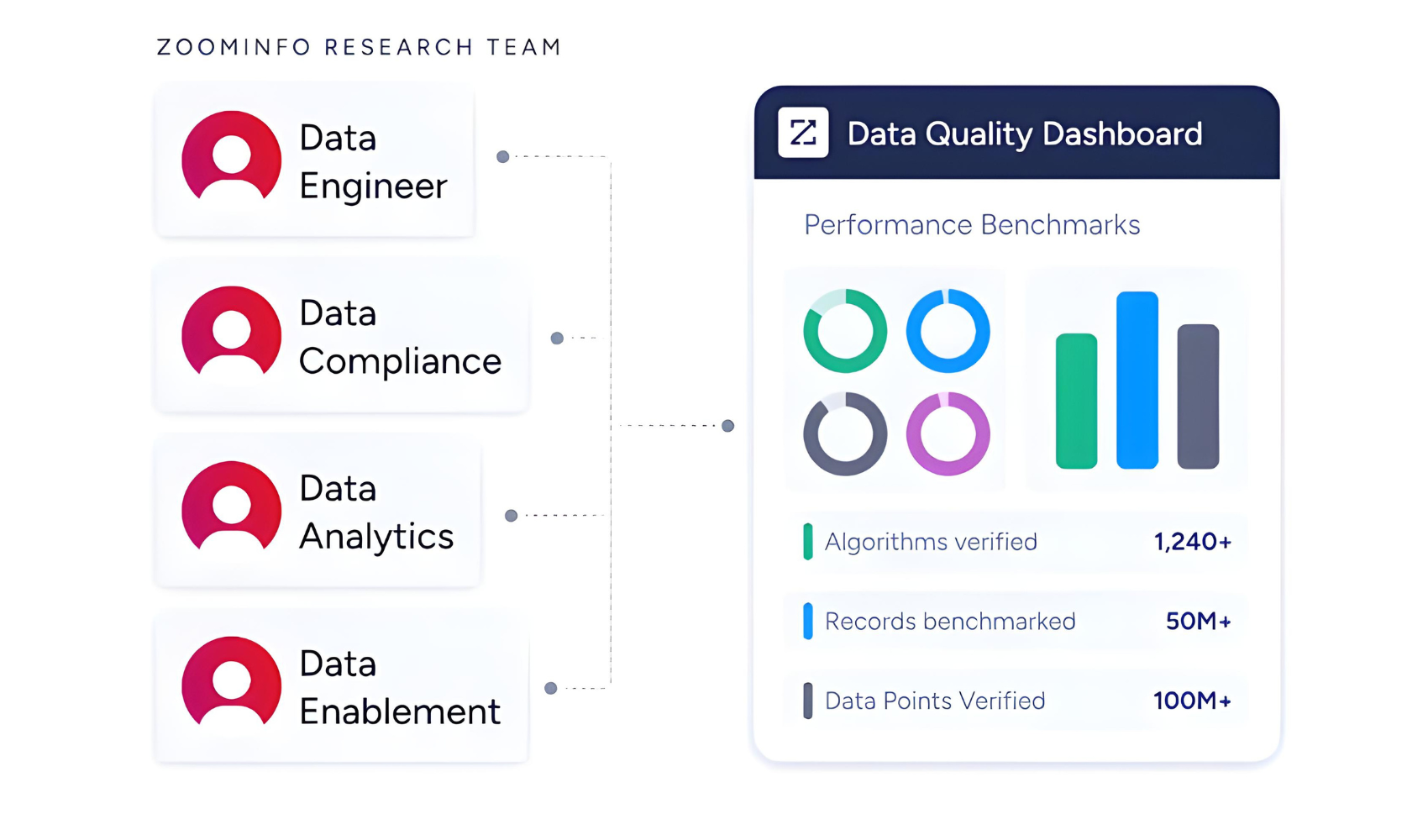
That information is verified by way of a multi-source pipeline backed by 300+ human researchers, reaching as much as 95% accuracy on first-party information. For groups operating a PandaDoc-Salesforce integration, ZoomInfo addresses the information high quality layer that no doc connector handles.
Supply: ZoomInfo
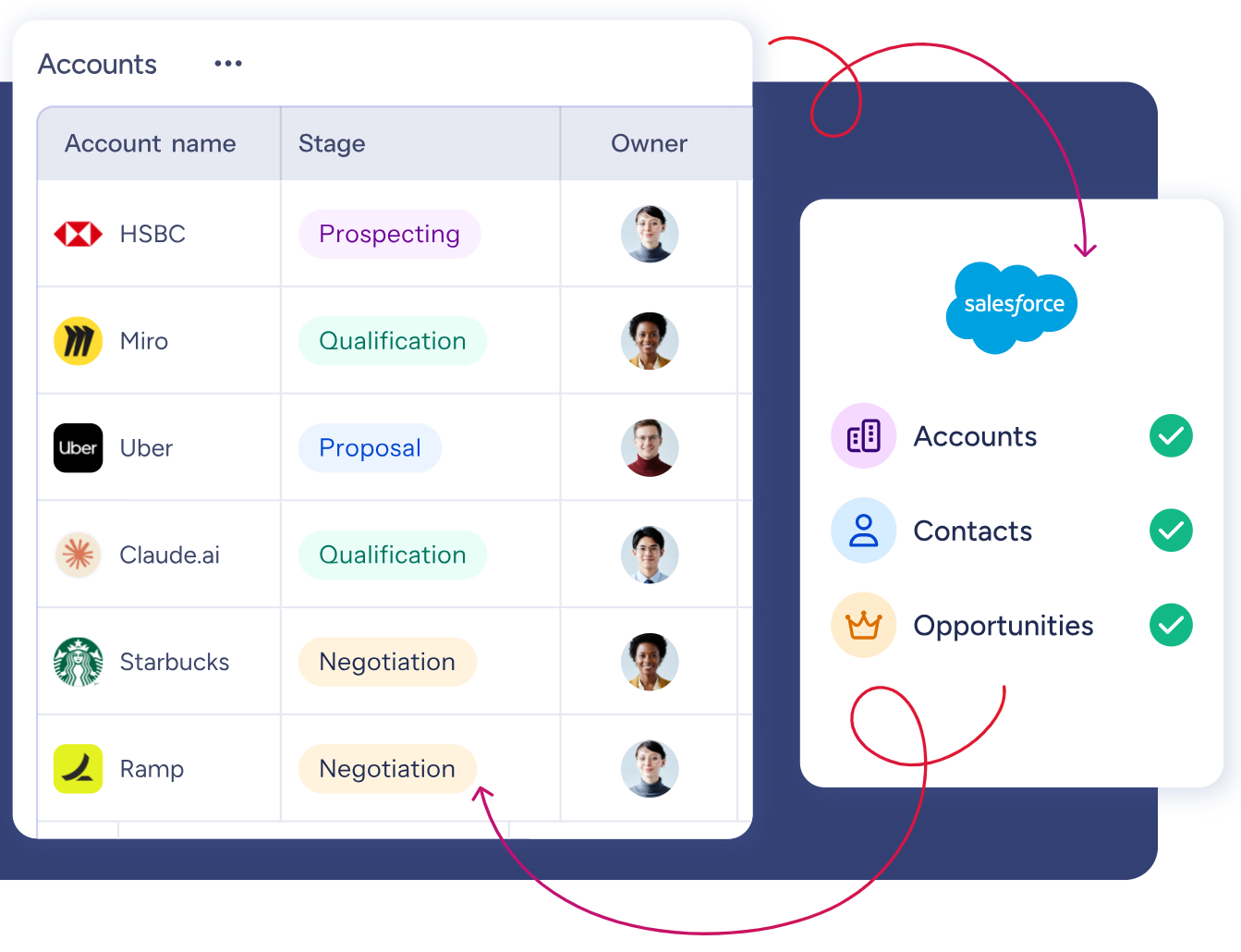
ZoomInfo integrates natively with Salesforce by way of the AppExchange, offering CRM enrichment, lead routing, and real-time information updates inside Salesforce information.
Supply: ZoomInfo
Earlier than a rep creates a PandaDoc proposal from a Salesforce Alternative, ZoomInfo ensures the contact file has a verified enterprise e mail (so the doc truly lands), an correct job title (so the proposal reaches the appropriate stakeholder), and present firm particulars (so the pricing displays the proper account section).
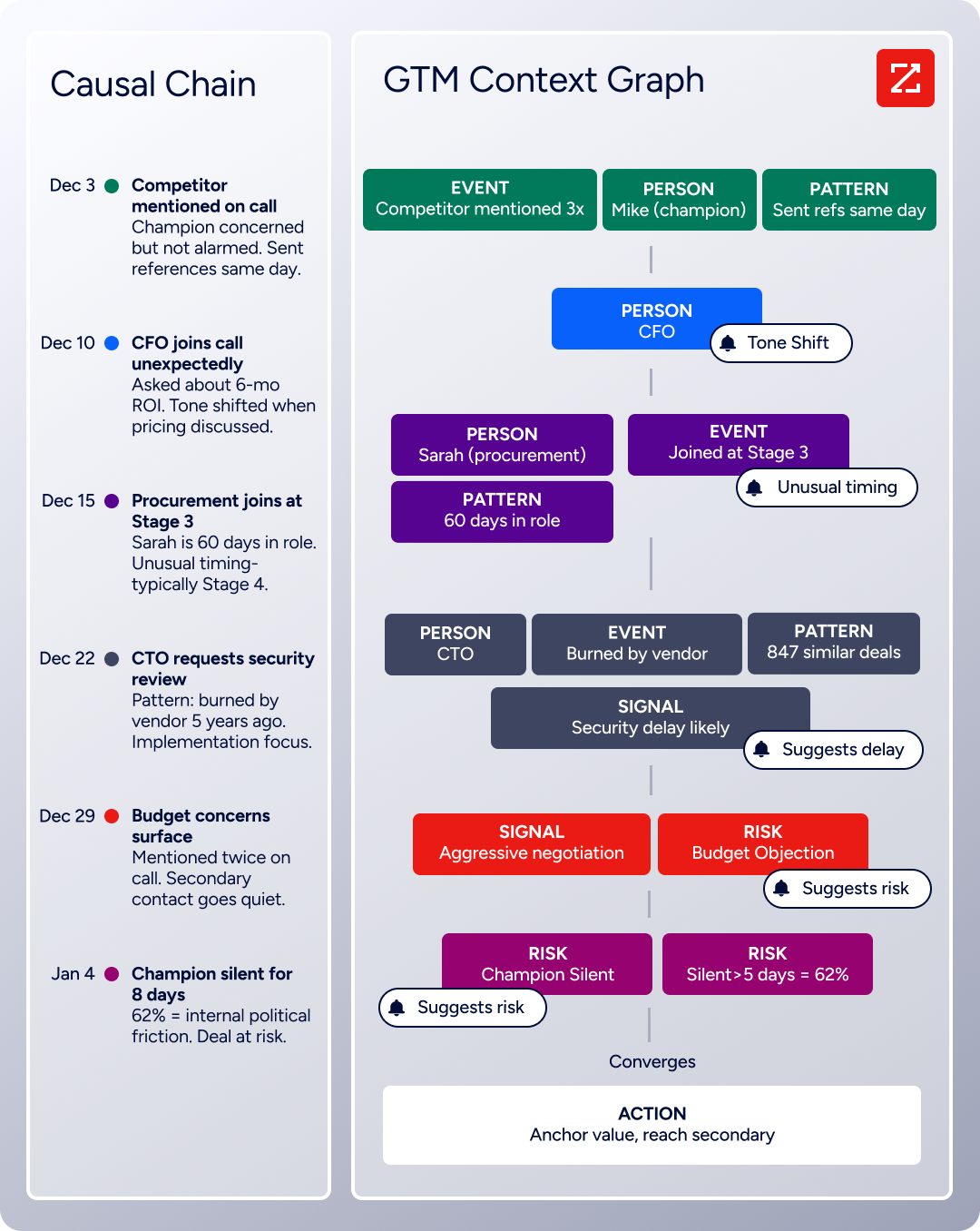
The identical information feeds ZoomInfo’s GTM Context Graph, which processes 1.5B + information factors each day by combining third-party intelligence with CRM information, dialog transcripts, and behavioral indicators to floor not simply what occurred in a deal, however why.
Supply: ZoomInfo
For a deeper take a look at how Salesforce and ZoomInfo evaluate as go-to-market platforms, see our Salesforce vs ZoomInfo breakdown.
In observe, a staff utilizing PandaDoc for proposals and contracts by way of Salesforce can use ZoomInfo to complement Salesforce information earlier than doc creation begins. Verified emails imply PandaDoc paperwork attain actual inboxes. Correct org charts imply proposals go to the appropriate decision-makers, not former workers.
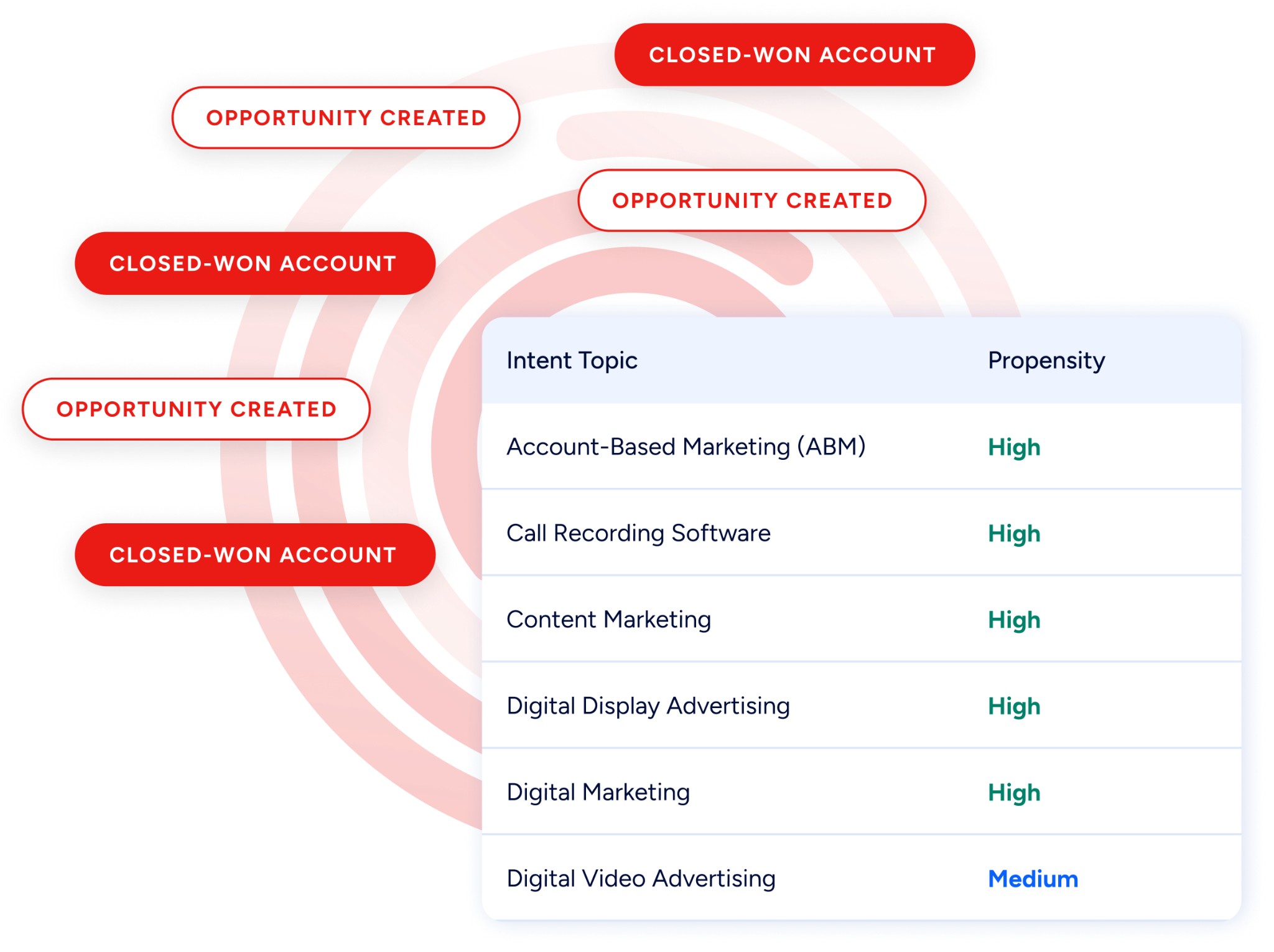
Purchaser Intent information from ZoomInfo, monitoring indicators from 210 million IP-to-Group pairings, can prioritize which accounts obtain proposals first, so reps spend their doc creation time on prospects who’re actively researching related options fairly than working by way of a stale checklist..
Supply: ZoomInfo
Enriched information additionally make the PandaDoc-Salesforce integration extra dependable. When Salesforce variables auto-populate a PandaDoc template, the fields they draw from are correct and full, lowering the guide cleanup reps do earlier than sending. Fewer clean fields imply fewer incomplete proposals.
Constant formatting throughout contact information reduces the errors that create awkward paperwork (“Pricey null null” is just not the primary impression a proposal ought to make). And intent indicators assist groups resolve which offers justify a customized proposal versus a templated quote, so the doc workflow matches the deal’s precise potential.
Seismic’s gross sales staff attributed 39% of lively pipeline to alternatives recognized or influenced by ZoomInfo indicators, whereas boosting productiveness by 54% and saving 11.5 hours per week. (Seismic)
Closing Verdict
A local integration between PandaDoc and Salesforce exists, and it’s one in every of PandaDoc’s deepest CRM connections. For many groups, the appropriate alternative depends upon PandaDoc plan tier and quoting complexity.
-
Gross sales groups on PandaDoc Enterprise that create proposals and contracts from Salesforce Alternatives ought to activate the native integration. It handles bidirectional sync, doc creation from Salesforce information, and computerized standing updates with no third-party software or engineering assets required.
-
Groups promoting configurable merchandise that want guided promoting, pricing guidelines, and approval workflows ought to consider PandaDoc CPQ for Salesforce on the Enterprise plan. It embeds the complete quote-to-signature workflow inside Salesforce with out requiring a big CPQ platform.
-
Groups on PandaDoc Starter that need light-weight automation ought to begin with Zapier. It covers particular event-triggered workflows (e.g., doc completion updates Alternative stage) with out requiring a plan improve.
-
Organizations with customized integration necessities (bulk doc technology, customized Salesforce objects, embedded doc experiences) ought to spend money on a customized API construct utilizing PandaDoc’s REST API and Salesforce’s APIs.
Earlier than committing to a way, make clear what doc workflow issues the combination wants to unravel.
If the purpose is eliminating guide information entry between the 2 platforms and protecting deal levels in sync with doc standing, the native integration on Enterprise handles it out of the field.
If the purpose is proudly owning your complete configure-price-quote-sign-pay workflow inside Salesforce, PandaDoc CPQ on Enterprise is the trail. Both approach, the standard of the contact information in Salesforce determines whether or not PandaDoc’s paperwork attain the appropriate individuals with the appropriate info.
ZoomInfo, with its native Salesforce integration, API, and MCP entry, is the information enrichment layer that ensures the information behind each proposal, quote, and contract are correct and full.
FAQ
Does PandaDoc combine natively with Salesforce?
Sure. PandaDoc provides a local Salesforce Lightning integration that embeds doc creation, sending, and monitoring inside Salesforce information. It helps two-way synchronization: Salesforce information populates PandaDoc templates, and doc standing adjustments write again to Salesforce Alternatives.
The combination is accessible on PandaDoc’s Marketing strategy ($49/seat/month) and above. A separate PandaDoc for Salesforce CPQ package deal, accessible on the Enterprise plan, provides configure-price-quote capabilities with guided promoting, pricing guidelines, and approval workflows.
What PandaDoc plan do I would like for the Salesforce integration?
The native Salesforce integration requires PandaDoc’s Marketing strategy at $49/seat/month (annual billing). CPQ for Salesforce requires the Enterprise plan, which has customized pricing and requires an annual contract. Groups on Free or Starter plans can’t use the native integration however can join PandaDoc and Salesforce by way of Zapier or PandaDoc’s REST API.
Can I create PandaDoc paperwork instantly from Salesforce?
Sure. With the native integration put in, a PandaDoc panel seems inside Salesforce Alternative, Account, and Contact information. Reps choose a template, and Salesforce area information (contact identify, firm, deal quantity, line objects) auto-populates the doc by way of variable mapping. The rep customizes the doc, provides signature fields, and sends it to the customer with out leaving Salesforce.
Does doc standing sync again to Salesforce routinely?
Sure. The native integration writes PandaDoc doc standing adjustments (despatched, seen, accomplished, expired) again to the corresponding Salesforce file in close to real-time. You possibly can configure which PandaDoc statuses set off Salesforce Alternative stage adjustments (for instance, “Accomplished” in PandaDoc strikes the Alternative to Closed-Gained).
What occurs if I edit a PandaDoc doc after sending it?
PandaDoc permits modifying despatched paperwork in some instances, however the commonest method for substantive adjustments is to create a brand new doc model and re-send. That is PandaDoc’s most regularly cited limitation on assessment platforms. The combination tracks the newest doc model, so Salesforce displays the present state of the newest doc related to the Alternative.
Can I exploit PandaDoc CPQ as a substitute of Salesforce Income Cloud?
PandaDoc CPQ for Salesforce is designed as a lighter various for mid-market groups that want quoting capabilities with out the implementation complexity of Salesforce Income Cloud. It covers guided promoting, pricing guidelines, conditional approvals, and doc technology in a single workflow.
Groups with very complicated product configurations (hundreds of interdependent SKUs, multi-currency pricing throughout dozens of areas) should want a devoted enterprise CPQ platform. For many mid-market gross sales groups, PandaDoc CPQ handles the job with out requiring consultants or months of implementation.
How does ZoomInfo enhance a PandaDoc-Salesforce workflow?
ZoomInfo solves the information high quality downside upstream of doc creation. Earlier than a rep generates a PandaDoc proposal from a Salesforce Alternative, ZoomInfo ensures the contact file has a verified enterprise e mail (so the doc reaches an actual inbox), an correct job title (so the proposal addresses the appropriate stakeholder), and present firm particulars (so pricing and positioning are related).
Its native Salesforce integration handles enrichment routinely, and its Purchaser Intent information can prioritize which accounts ought to obtain proposals primarily based on lively analysis indicators. The consequence: PandaDoc paperwork attain the appropriate individuals with correct info, and the engagement information that flows again into Salesforce connects to verified, present information.
What are the API fee limits for PandaDoc and Salesforce?
PandaDoc enforces per-endpoint fee limits on a 60-second sliding window: 500 requests per minute for doc creation from template, 400 for sending, 600 for doc particulars retrieval, and 100 for downloads.
The sandbox surroundings is capped at 10 RPM throughout all endpoints. Salesforce allocates API requests per 24-hour interval primarily based on version and license rely: Skilled and Enterprise editions begin at 100,000 requests, with further per-license allocations. Groups operating high-volume doc workflows ought to confirm their headroom on each platforms earlier than scaling.
Different instruments that hook up with Salesforce:

