

Groups that run Zoho CRM and Mailchimp aspect by aspect often uncover the identical issues inside 1 / 4:
-
contacts exist in each techniques with conflicting particulars, as a result of a discipline up to date in Zoho CRM by no means reached Mailchimp (or vice versa),
-
e mail marketing campaign engagement information stays locked inside Mailchimp whereas the gross sales crew works offers in Zoho CRM with out understanding which leads opened, clicked, or transformed,
Nonetheless, the 2 platforms ended up coexisting (a advertising crew that adopted Mailchimp earlier than the corporate standardized on Zoho CRM, a rising enterprise that wants Mailchimp’s e mail depth alongside Zoho’s gross sales pipeline, or separate departments selecting instruments independently), the longer each run with out a connection, the broader the hole between what advertising is aware of and what gross sales sees.
Connecting Zoho CRM and Mailchimp eliminates that hole.
Contacts created or up to date in Zoho CRM movement into Mailchimp audiences so campaigns goal the appropriate folks with present information. E mail engagement (opens, clicks, bounces) flows again into Zoho CRM so gross sales reps can see which leads have interaction with advertising content material and comply with up accordingly. Marketing campaign efficiency ties on to CRM information so income attribution stops being guesswork.
A local integration exists: the Mailchimp Extension for Zoho CRM gives two-way contact and marketing campaign synchronization from the Zoho Market. Past that, groups can join the 2 platforms via Zoho Circulate (Zoho’s personal automation platform), third-party automation instruments like Zapier, or customized API improvement. Every technique differs in setup complexity, sync path, information protection, and price.
One drawback no connection technique solves: the sync strikes information between techniques, however it doesn’t confirm whether or not the contact information inside them is correct, full, or present.
That’s the place ZoomInfo is available in. ZoomInfo integrates with each Zoho CRM and Mailchimp, and gives API and MCP entry that may feed verified, enriched contact and firm information into any system within the stack, so each platforms sync information which might be correct and full earlier than a marketing campaign ever sends.
This text covers the complete panorama of the Zoho CRM-Mailchimp integration: which strategies can be found, what information each handles, learn how to set them up, the use instances that justify connecting each platforms, and the restrictions to plan for. It additionally covers how ZoomInfo matches in as a knowledge enrichment layer for each platforms.
Integration Overview
Supply: Zoho CRM
Does a local integration exist?
Sure. The Mailchimp Extension for Zoho CRM is obtainable via the Zoho Market. Mailchimp additionally lists Zoho CRM as a native integration in its personal listing. The extension allows two-way synchronization of contacts and marketing campaign information between each platforms.
What information can sync?
Contacts, leads, and their related discipline information (title, e mail, telephone, firm, customized fields). Mailchimp marketing campaign metrics (opens, clicks, bounces, unsubscribes) can sync again into Zoho CRM information. Mailchimp viewers lists and tags can map to Zoho CRM modules. The precise fields and objects rely upon the tactic and configuration.
Is the sync bidirectional?
The native extension helps two-way contact synchronization. Contacts added or up to date in Zoho CRM push to Mailchimp audiences, and subscriber information from Mailchimp flows again into Zoho CRM. Third-party automation instruments usually deal with one path per workflow, although you possibly can configure bidirectional sync with separate workflows.
Is it real-time or batch?
The native extension syncs on a scheduled or on-demand foundation. Third-party instruments like Zapier set off inside 1 to fifteen minutes of an occasion. Zoho Circulate workflows run on triggers or configurable schedules. Customized API integrations can obtain near-real-time sync via Mailchimp webhooks and Zoho CRM Notification APIs.
What are the out there strategies?
Native Mailchimp Extension for Zoho CRM, Zoho Circulate, third-party automation (Zapier), and customized API improvement.
|
Methodology |
Setup Issue |
Knowledge Circulate |
Actual-time? |
Value |
|---|---|---|---|---|
|
Native Extension (Zoho Market) |
Low |
Bidirectional |
Scheduled/on-demand |
Free (included with Zoho CRM) |
|
Zoho Circulate |
Medium |
Configurable per movement |
Close to real-time or scheduled |
From $0 (free tier) to $15.83/mo |
|
Zapier |
Medium |
One-way per Zap |
Close to real-time (1-15 min) |
From $19.99/mo |
|
Customized API |
Excessive |
Absolutely customizable |
Actual-time through webhooks |
Developer time + internet hosting |
One distinction value settling upfront: the native extension handles ongoing bidirectional sync of contacts and marketing campaign information as a part of each day gross sales and advertising workflows. Zoho Circulate and Zapier deal with event-triggered flows with conditional logic. Customized API improvement gives probably the most management however requires engineering assets to construct and keep.
Integration Strategies
Native Mailchimp Extension for Zoho CRM
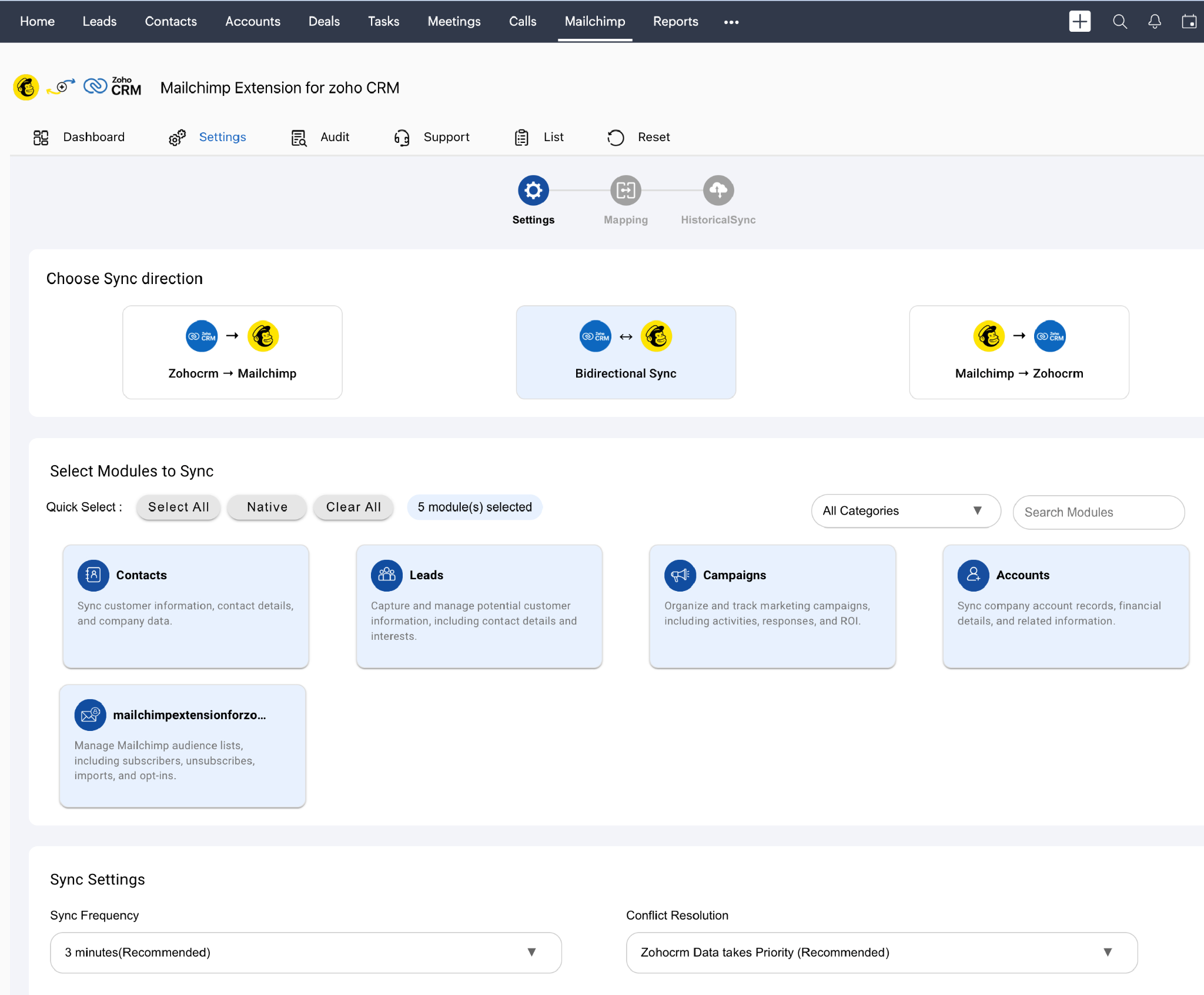
The way it works: The Mailchimp Extension for Zoho CRM is a first-party connector out there via the Zoho Market. It connects Zoho CRM to a Mailchimp account, enabling two-way synchronization of contacts and marketing campaign information. Mailchimp additionally lists Zoho CRM as a supported integration.
Supply: Zoho CRM
The extension maps Zoho CRM modules (Leads, Contacts) to Mailchimp audiences, syncs subscriber information, and pulls marketing campaign engagement metrics again into CRM information.
What it syncs: Contact and lead information (title, e mail, telephone, firm particulars, customized fields mapped throughout setup), Mailchimp viewers membership, tags, and marketing campaign engagement information (opens, clicks, bounces, unsubscribes). Marketing campaign efficiency metrics movement again into Zoho CRM so reps can see which contacts engaged with particular e mail campaigns.
Matches: ongoing bidirectional sync of contacts and marketing campaign information as a part of each day gross sales and advertising operations.
Setup course of:
-
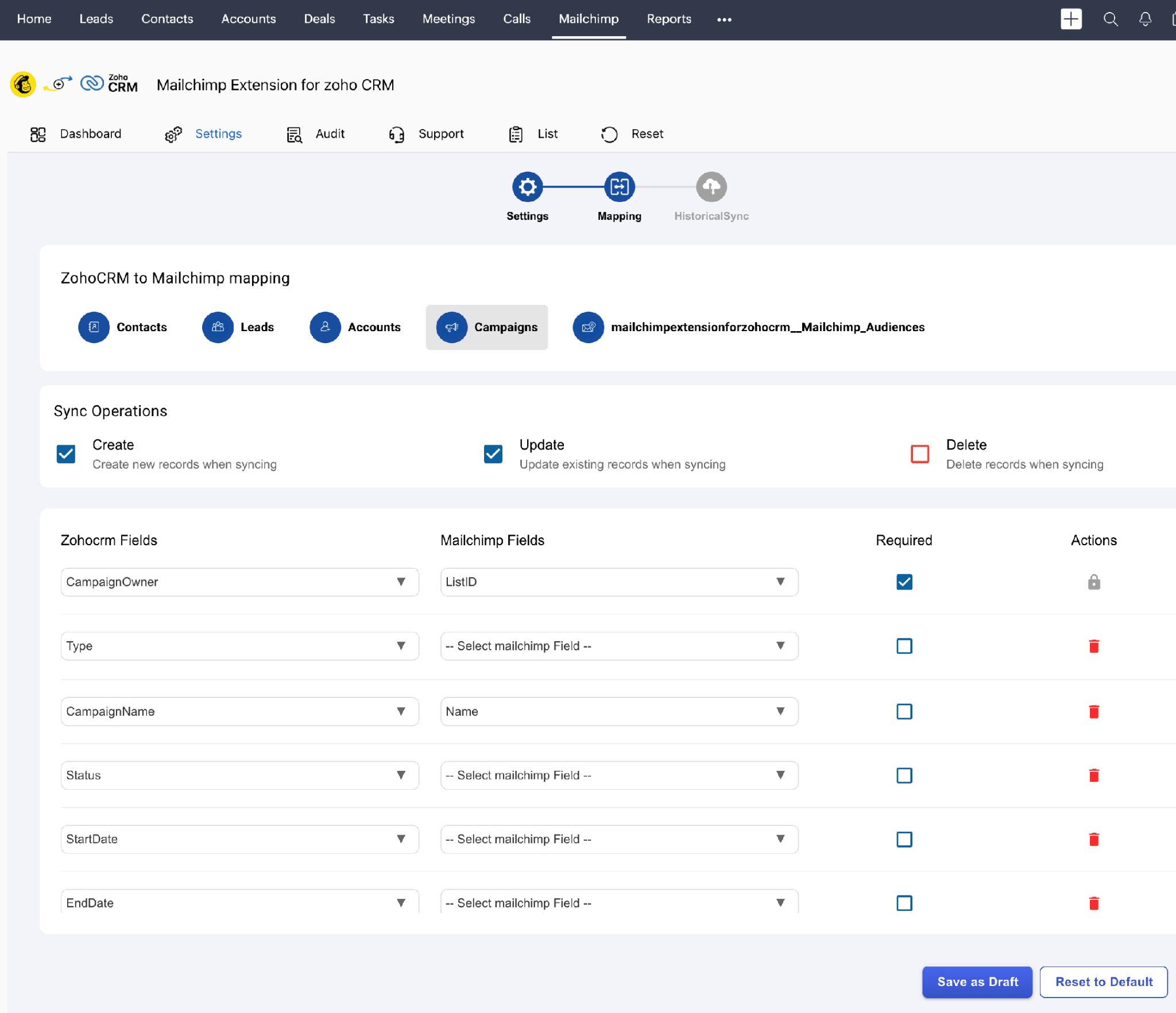
Map Zoho CRM modules (Leads, Contacts) to Mailchimp audiences. Configure discipline mapping between Zoho CRM fields and Mailchimp merge fields (e.g., First Title, Final Title, E mail, Firm).
-
Set sync preferences: select which path information flows (Zoho to Mailchimp, Mailchimp to Zoho, or each), configure sync frequency, and outline filters for which information ought to sync.
Supply: Zoho CRM
Strengths: First-party integration maintained via the Zoho Market. No third-party device to configure or pay for. Two-way sync retains each platforms aligned with out guide imports or exports. Marketing campaign engagement information flows into CRM information, giving gross sales reps visibility into advertising exercise.
Limitations: Sync runs on a schedule or on-demand slightly than on occasion triggers. Complicated conditional logic (e.g., syncing solely contacts that meet particular standards past fundamental filters) could require supplementing with Zoho Circulate or Zapier. Customized objects and Zoho CRM modules past Leads and Contacts might not be absolutely supported.
Finest for: Groups that desire a no-cost connection between Zoho CRM and Mailchimp for ongoing contact synchronization and marketing campaign visibility. Advertising and gross sales groups that want to shut the loop between e mail engagement and CRM pipeline information with out including third-party instruments.
Zoho Circulate
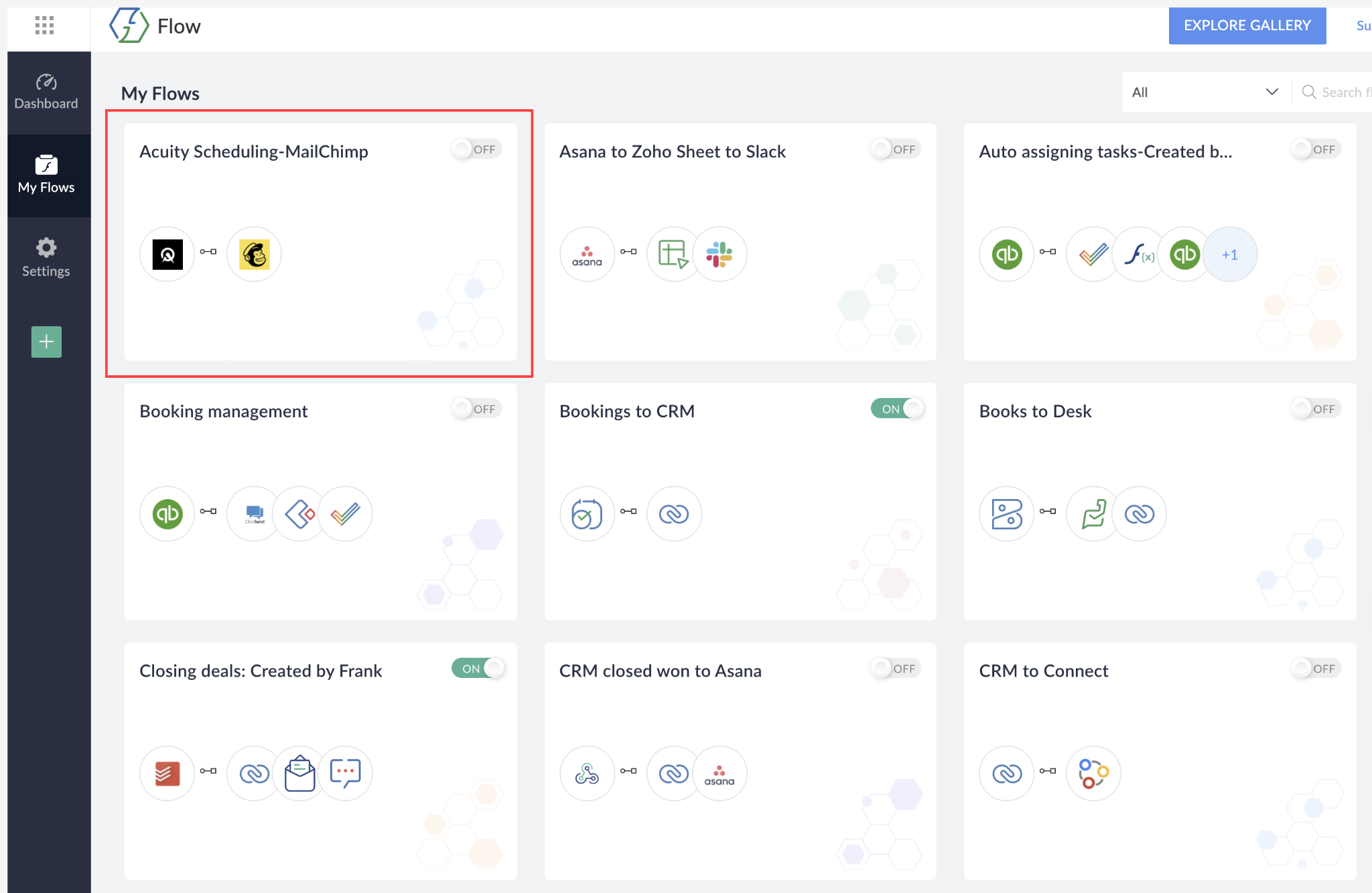
The way it works: Zoho Circulate is Zoho’s personal integration platform, constructed to attach Zoho apps with third-party companies via automated workflows. It makes use of a visible movement builder the place customers outline triggers, situations, and actions.
Supply: Zoho CRM
As a result of Zoho Circulate is a first-party Zoho product, it has native entry to Zoho CRM’s information mannequin, together with customized modules, customized fields, and workflow occasions that third-party instruments could not expose.
What it syncs: Any information accessible via each platforms’ APIs. Zoho Circulate can learn and write to Zoho CRM modules (Leads, Contacts, Accounts, Offers, customized modules) and work together with Mailchimp’s audiences, campaigns, tags, and subscriber information. This makes it extra versatile than the native extension for complicated use instances.
Matches: ongoing sync with conditional logic, multi-step workflows, and cross-app automation; significantly robust for groups already within the Zoho ecosystem.
Setup course of:
-
Create a brand new movement and choose Zoho CRM because the set off app. Select a set off occasion (e.g., “New Lead,” “Up to date Contact,” “Deal Stage Change”).
-
Configure the motion (e.g., “Add/Replace Subscriber,” “Add Tag,” “Ship Marketing campaign”). Map fields from Zoho CRM to Mailchimp.
-
Add conditional logic if wanted (e.g., solely sync contacts with a selected lead supply, or solely add subscribers who opted into advertising communications).
Strengths: Native entry to Zoho CRM information, together with customized modules and fields that third-party instruments could not expose. Constructed into the Zoho ecosystem, so groups already utilizing Zoho merchandise could have entry at no extra value. Helps multi-step workflows with branching logic, delays, and error dealing with. Can orchestrate actions throughout a number of Zoho apps and Mailchimp directly.
Limitations: Requires familiarity with the Zoho Circulate interface, which has a steeper studying curve than the native extension’s point-and-click setup. Bidirectional sync requires constructing separate flows for every path. Circulate execution limits range by plan tier.
Finest for: Groups already within the Zoho ecosystem that want conditional sync logic, multi-step workflows, or integration with different Zoho apps alongside the Zoho CRM-Mailchimp connection. Mid-size groups with use instances the native extension can’t deal with (e.g., syncing customized module information or triggering Mailchimp actions based mostly on deal stage adjustments).
Zapier
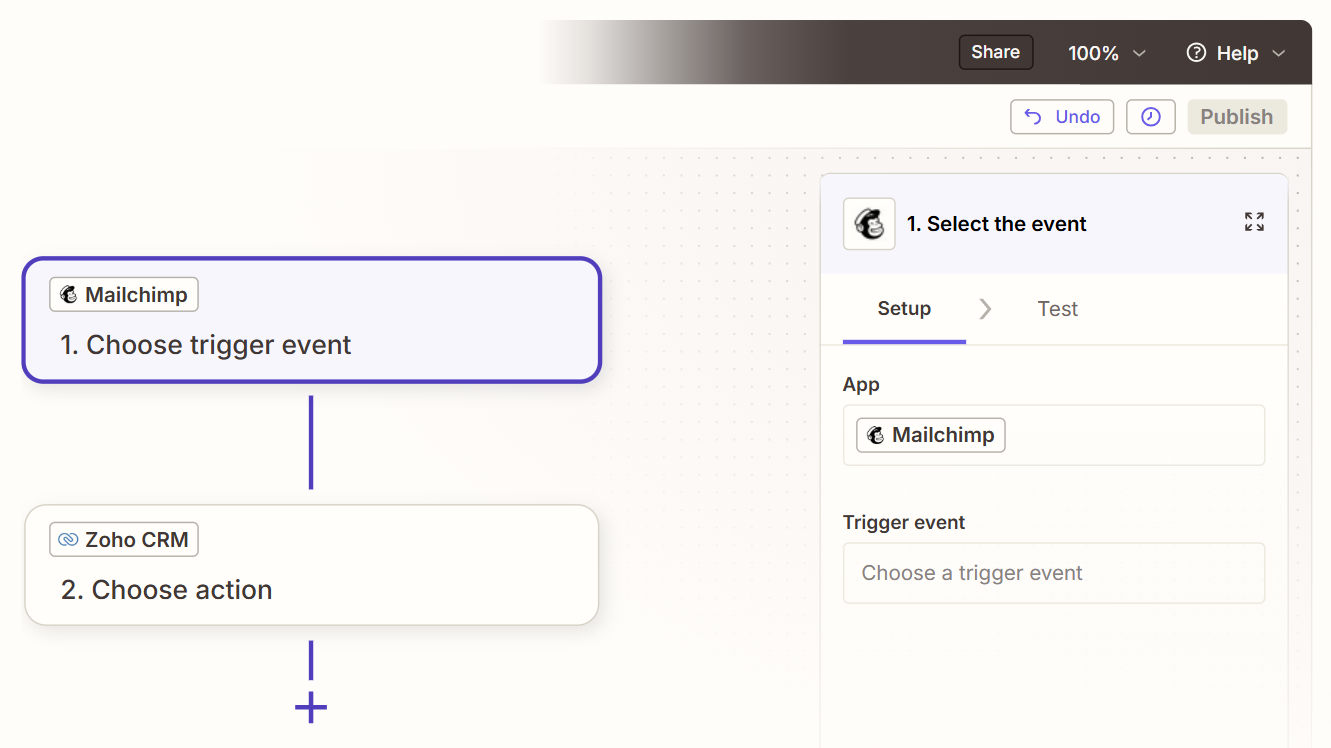
The way it works: Zapier connects Zoho CRM and Mailchimp via event-driven automations known as Zaps. Every Zap pairs a set off (an occasion in a single app) with a number of actions (what occurs within the different). Each platforms are well-supported Zapier connectors, with a big selection of set off and motion mixtures masking core CRM and e mail advertising objects.
Supply: Zapier
What it syncs: Contacts, leads, offers, and their related discipline information. Zapier can push new or up to date Zoho CRM information to Mailchimp as subscribers, or pull Mailchimp subscriber occasions (new subscriber, unsubscribe, marketing campaign exercise) again into Zoho CRM. Every object kind and path requires its personal Zap. Customized fields could be mapped manually within the setup movement.
Matches: ongoing sync of particular occasions between the 2 platforms; not a bulk migration device.
Setup course of:
-
Select a set off app (e.g., Zoho CRM) and choose the set off occasion (e.g., “New Lead” or “Up to date Contact”).
-
Flip the Zap on. For bidirectional sync, create a second Zap with the set off and motion apps reversed, and add a filter to stop infinite loops.
Strengths: Quickest setup with no technical information required. A big template library covers widespread Zoho CRM-Mailchimp workflows. Platform-agnostic, so groups not invested within the Zoho ecosystem can use it with out studying Zoho Circulate. Dependable for easy, single-object syncs.
Limitations: Every Zap handles one trigger-action pair, so syncing contacts, leads, and marketing campaign information requires separate Zaps (every counting in opposition to the plan’s activity allocation). Bidirectional sync wants duplicate Zaps with loop-prevention logic. No built-in deduplication. Historic information created earlier than the Zap was activated don’t sync. Zapier costs by activity depend, which provides up at larger volumes.
Finest for: Small groups that want a fast connection between Zoho CRM and Mailchimp for a selected use case (e.g., new leads routinely added to a Mailchimp nurture listing). Groups that use instruments exterior the Zoho ecosystem and like a platform-agnostic connector.
Customized API Integration
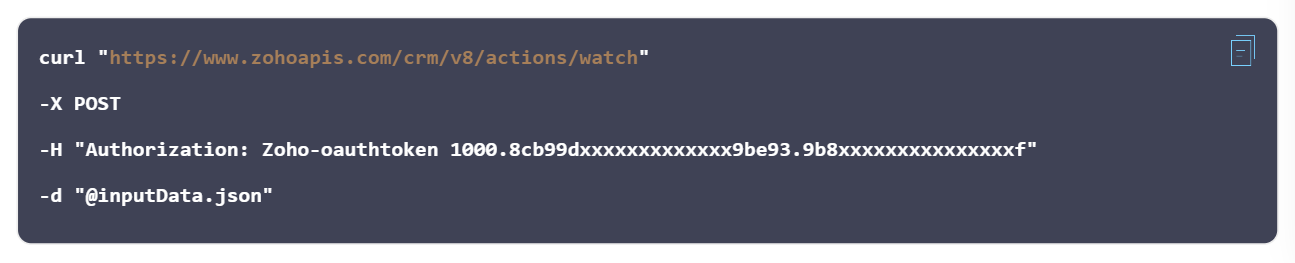
The way it works: Each Zoho CRM and Mailchimp present APIs. Zoho CRM’s REST API (V8) covers all customary and customized modules, with Notification APIs for event-driven callbacks on file creation, replace, and deletion.
Supply: Zoho CRM
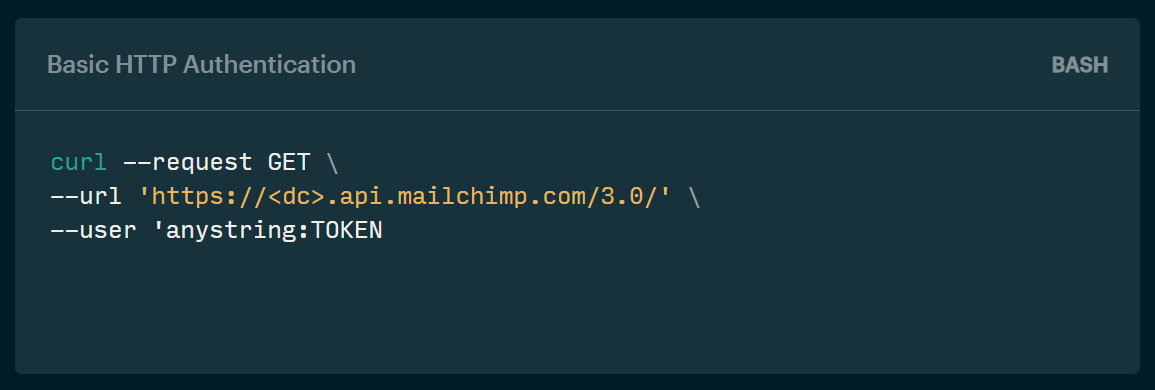
Mailchimp’s Advertising API (v3.0) covers audiences, campaigns, automation flows, and reporting, with webhook help for viewers information adjustments. A customized integration connects these APIs immediately, with your personal middleware dealing with authentication, discipline mapping, transformation, and error restoration.
Supply: Mailchimp
What it syncs: Something each APIs expose. That is the one technique that helps complicated sync eventualities like syncing customized Zoho CRM modules to Mailchimp segments, triggering Zoho CRM workflow guidelines based mostly on Mailchimp marketing campaign occasions, or implementing enterprise logic that no off-the-shelf connector helps.
Matches: both one-time migration or ongoing sync; the one technique with no ceiling on both.
Setup course of:
-
Construct the sync service: a server-side software that listens for occasions from each platforms (Zoho CRM Notification APIs, Mailchimp webhooks), transforms information based on the mapping, and writes adjustments to the opposite aspect.
-
Implement battle decision logic for bidirectional sync (timestamp-based, source-priority, or field-level guidelines).
Strengths: Full management over what syncs, when, and the way. Close to-real-time sync through occasion callbacks on either side. Can implement arbitrarily complicated enterprise logic. No per-record or per-operation charges from a third-party connector.
Limitations: Requires improvement assets to construct and keep. You personal the infrastructure, monitoring, and error restoration. API adjustments on both platform (Zoho CRM variations its API throughout V6, V7, and V8; Mailchimp maintains its Advertising API v3.0) require ongoing upkeep. The preliminary construct takes weeks, not hours.
Finest for: Groups with sync necessities that no off-the-shelf device satisfies. Organizations with in-house improvement groups and a long-term dedication to working each platforms with complicated information flows. Firms that have to sync customized modules, implement enterprise guidelines throughout sync, or combine at a scale the place third-party device prices turn out to be prohibitive.
Key Use Instances
1. New Lead Nurture Automation
When a brand new lead enters Zoho CRM (through an internet kind, import, or guide entry), the combination provides that contact to the suitable Mailchimp viewers and tags them for a nurture sequence.
The lead receives a welcome sequence, academic content material, or product info with out guide listing administration. Because the lead engages with emails, Mailchimp marketing campaign information flows again into Zoho CRM so the gross sales rep can see open and click on exercise on the lead file.
Finest integration technique: Native extension or Zoho Circulate (event-triggered, bidirectional information movement).
2. Deal-Stage-Based mostly Marketing campaign Focusing on
Gross sales groups transfer offers via pipeline levels in Zoho CRM. When a deal reaches a selected stage (e.g., “Proposal Despatched” or “Negotiation”), the combination strikes the related contact right into a focused Mailchimp viewers section for stage-appropriate content material: case research throughout analysis, pricing comparisons throughout negotiation, or onboarding supplies after shut.
This retains advertising content material aligned with the gross sales cycle with out reps manually tagging contacts.
Finest integration technique: Zoho Circulate (conditional logic based mostly on deal stage adjustments) or Zapier (set off on deal stage replace).
3. Advertising Certified Lead Handoff
Advertising runs campaigns via Mailchimp and tracks engagement (opens, clicks, downloads). When a subscriber crosses an outlined engagement threshold, the combination creates or updates a lead in Zoho CRM with the engagement information connected, assigns it to the appropriate gross sales rep through Zoho CRM’s project guidelines, and adjustments the lead standing to “Advertising Certified.”
The rep sees the complete engagement historical past with out logging into Mailchimp.
Finest integration technique: Zoho Circulate or customized API (multi-step logic with engagement scoring).
4. Buyer Re-engagement from CRM Segments
Gross sales reps in Zoho CRM determine dormant accounts or churned prospects utilizing CRM studies and filters. The mixing pushes these contacts to a devoted Mailchimp viewers section, the place a re-engagement e mail sequence (particular gives, product updates, check-in messages) runs routinely.
When a dormant contact re-engages (opens an e mail, clicks a hyperlink), the exercise flows again into Zoho CRM to alert the account proprietor.
Finest integration technique: Native extension or Zoho Circulate (segment-based sync with engagement information return).
5. Occasion and Webinar Registration Monitoring
Advertising promotes webinars and occasions via Mailchimp campaigns. When contacts register, the combination logs the registration as an exercise or observe on the corresponding Zoho CRM file. After the occasion, attendance information from Mailchimp flows again into the CRM so reps know which prospects attended and might comply with up with related subsequent steps.
Finest integration technique: Zapier or Zoho Circulate (event-triggered, one-directional with metadata).
Limitations and Issues
Knowledge That Would not Sync Simply
Zoho CRM and Mailchimp mannequin information in a different way. Zoho CRM organizes contacts into modules (Leads, Contacts, Accounts, Offers) with relationships between them. Mailchimp organizes subscribers into flat viewers lists with tags and segments.
Mapping a Zoho CRM lead with an related account, deal, and exercise historical past right into a Mailchimp subscriber means some relational context is misplaced. The subscriber in Mailchimp carries discipline values however not the complete deal pipeline context.
Full e mail thread historical past, attachments, and Zoho CRM exercise logs (calls, conferences, duties) don’t journey via the native extension or third-party connectors. Mailchimp’s AI-generated content material, automation movement logic, and template designs additionally don’t sync into Zoho CRM.
Sync Conflicts
Bidirectional sync creates the danger of conflicting updates. If a marketer updates a contact’s e mail in Mailchimp whereas a gross sales rep adjustments the identical discipline in Zoho CRM, which change wins? The native extension and most third-party instruments default to “final write wins,” which can not produce the appropriate reply for each discipline.
With out express battle decision guidelines, one replace overwrites the opposite silently. Groups ought to designate one platform because the system of file for particular fields (e.g., Zoho CRM owns telephone quantity and job title; Mailchimp owns e mail subscription preferences).
Pricing Implications
Mailchimp’s contact-based pricing means each subscriber counts in opposition to the plan’s contact restrict. Syncing a big Zoho CRM database into Mailchimp may push the account into a better pricing tier. Mailchimp’s Free plan caps at 250 contacts; Necessities begins at $13/month for 500 contacts and scales steeply by contact depend.
On the Zoho CRM aspect, API credit are consumed by integration calls: the Free plan permits 5,000 API credit per day, scaling to 50,000+ on paid plans with per-user additions. Mailchimp’s API enforces a restrict of 10 simultaneous connections. Groups working high-volume syncs ought to confirm that each platforms’ fee limits and pricing tiers accommodate the anticipated information movement.
Permissions and Entry
Organising the native extension requires admin entry in Zoho CRM to put in market extensions and configure integrations. On the Mailchimp aspect, an account with admin or supervisor permissions is required to generate API keys or authorize OAuth connections.
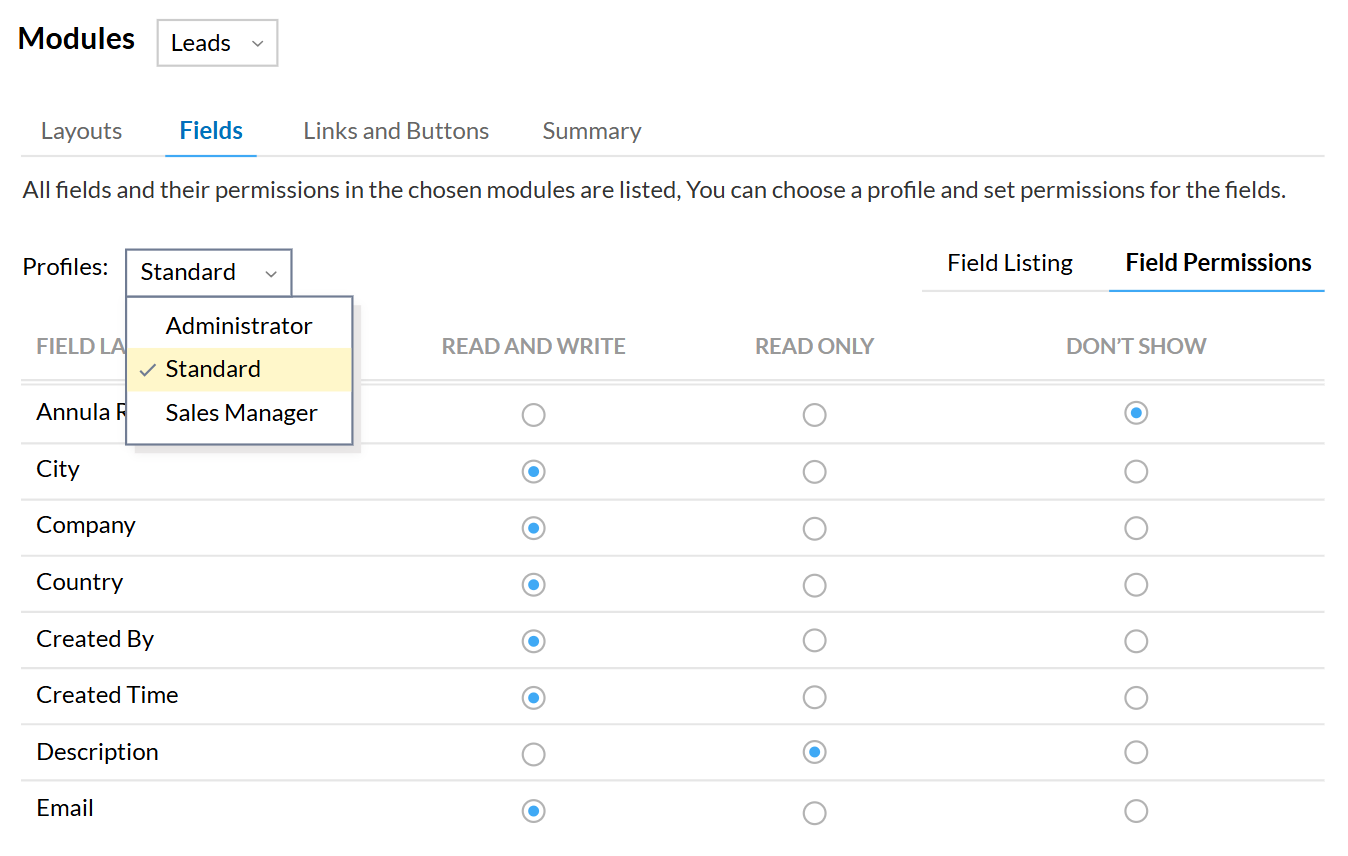
Zoho CRM’s role-based entry controls apply to the combination person, so the API token inherits the permissions of the person who created it. If that person’s entry is restricted (e.g., restricted to particular modules or fields), the combination inherits these restrictions.
Supply: Zoho CRM
Upkeep
Each platforms replace their options and APIs independently. Zoho CRM maintains a number of API variations (V6, V7, V8) concurrently, and new options could solely seem within the newest model. Mailchimp’s Advertising API v3.0 evolves with every product replace.
Customized fields added to both platform after the preliminary setup is not going to sync except the configuration is up to date. Third-party instruments could change pricing, deprecate connectors, or alter authentication strategies. Plan for periodic evaluations of the combination’s well being, discipline mappings, and information accuracy.
What No Methodology Fixes: The Knowledge Itself
Each technique above strikes information between Zoho CRM and Mailchimp. None of them checks whether or not these information are correct, full, or present.
A contact with a useless e mail handle in Zoho CRM syncs as a subscriber with a useless e mail handle in Mailchimp, the place it inflates the contact depend (and the invoice), damages sender status when the e-mail bounces, and wastes a slot within the viewers. A lead with a lacking job title travels simply as reliably as a totally enriched one. The mixing ensures each techniques agree; it doesn’t guarantee they’re proper.
The place ZoomInfo Matches In
Each technique on this information strikes information between Zoho CRM and Mailchimp. None of them improves the info being moved. When the combination is reside however advertising campaigns underperform as a result of half the subscriber listing has outdated job titles, bounced emails inflate the contact depend, and gross sales reps work leads with lacking telephone numbers, the bottleneck is now not the connector. Agent Groups can decide up from there, working the complete play finish to finish: coordinated specialist brokers share context, work from every account’s present state, and act inside the approvals and limits you set, so a re-engagement sequence or lead handoff would not stall as soon as the information are clear.
That’s the hole ZoomInfo closes.
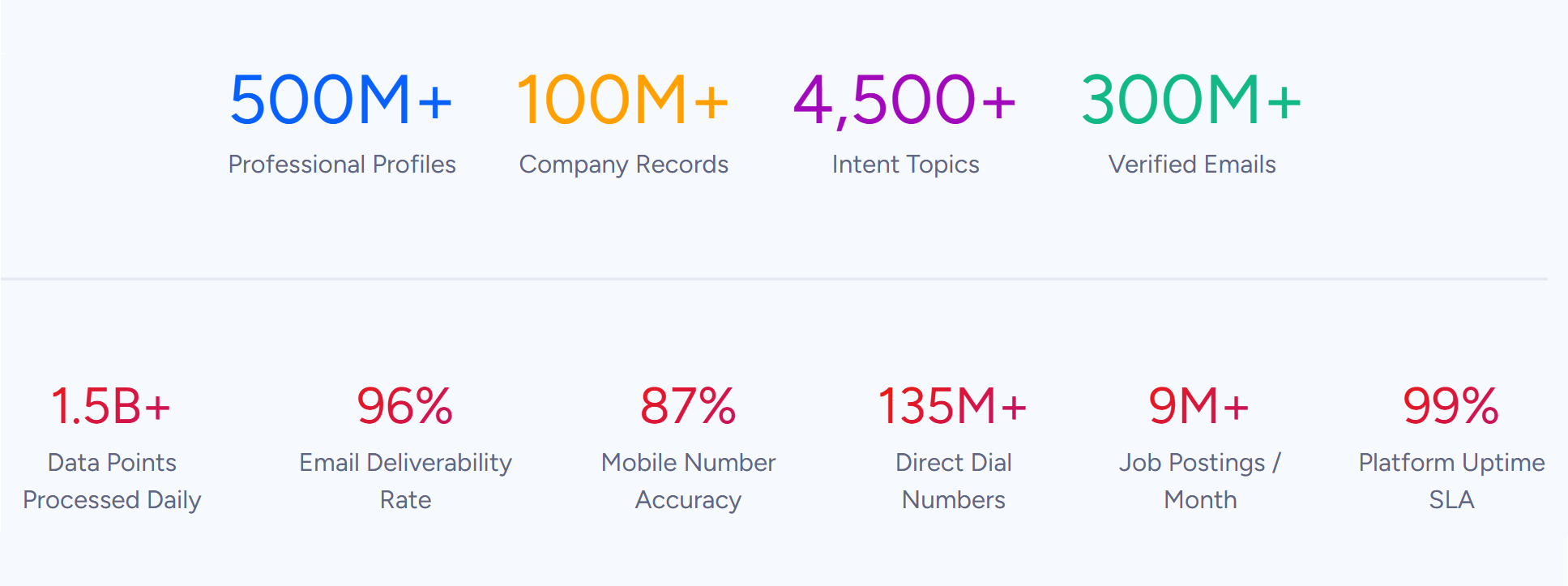
ZoomInfo is a B2B information and go-to-market platform constructed on 500M contacts, 100M corporations, 135M+ verified telephone numbers, and 200M+ verified enterprise emails.
Supply: ZoomInfo
That information is verified via a multi-source pipeline backed by 300+ human researchers, reaching as much as 95% accuracy on first-party information. For groups working a Zoho CRM-Mailchimp integration, ZoomInfo addresses the info high quality layer that no connector handles.
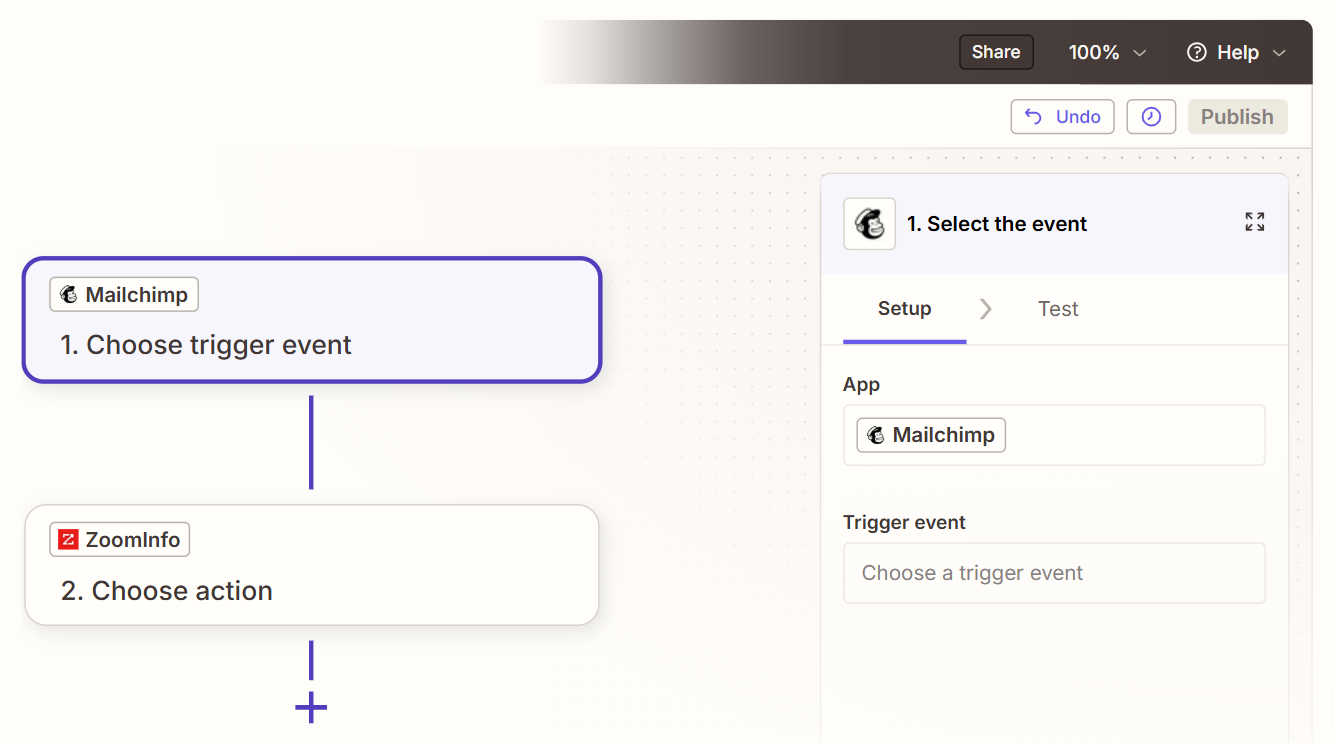
ZoomInfo integrates with Zoho CRM via its market, enabling information mapping and discipline synchronization to maintain CRM information up to date with verified contact and firm information. For Mailchimp, ZoomInfo connects via middleware platforms like Zapier and Workato, pushing enriched information into audiences.
Supply: Zapier
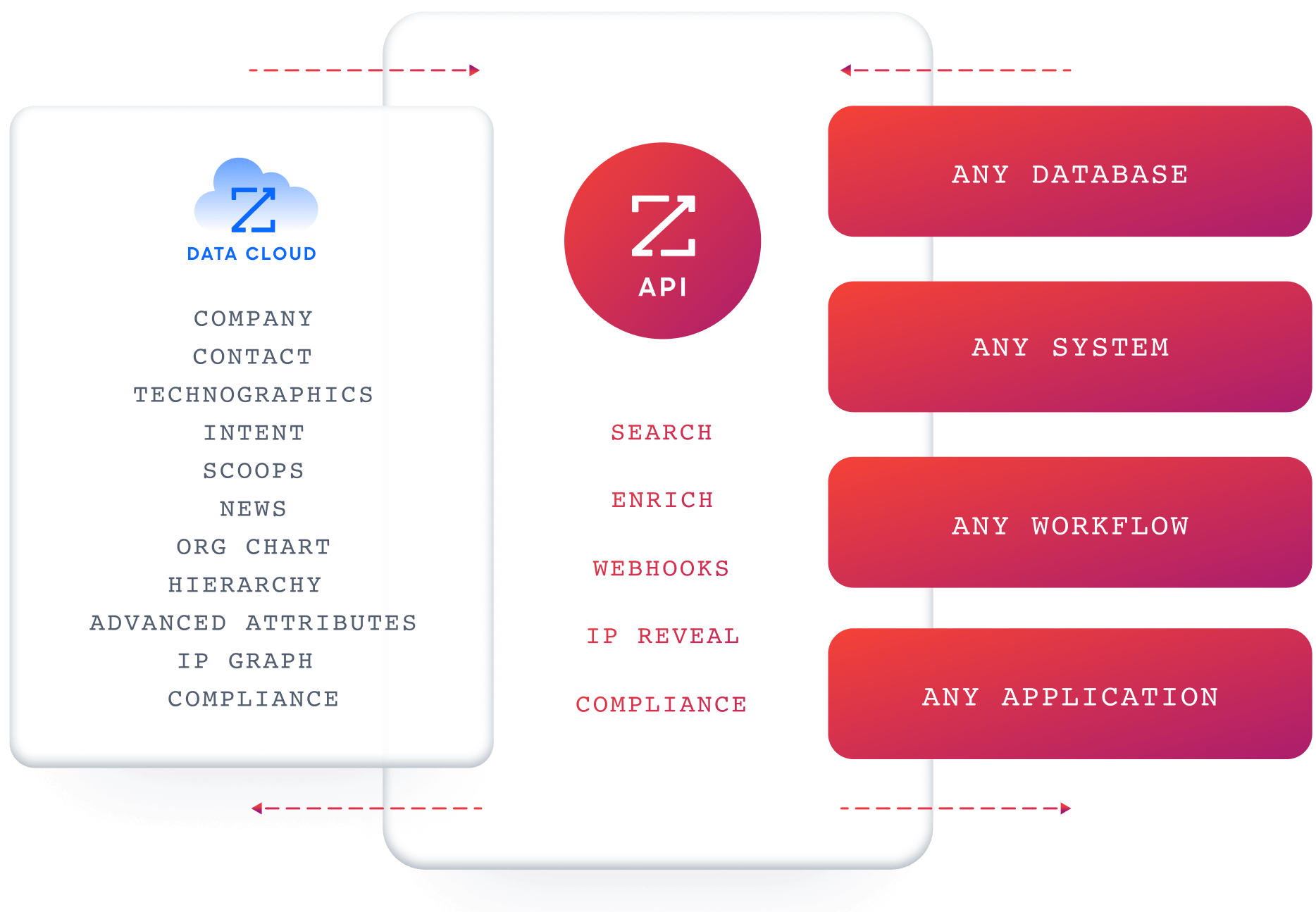
ZoomInfo’s Enterprise API and MCP server may also feed verified information into any system via customized integrations or automation instruments.
Supply: ZoomInfo
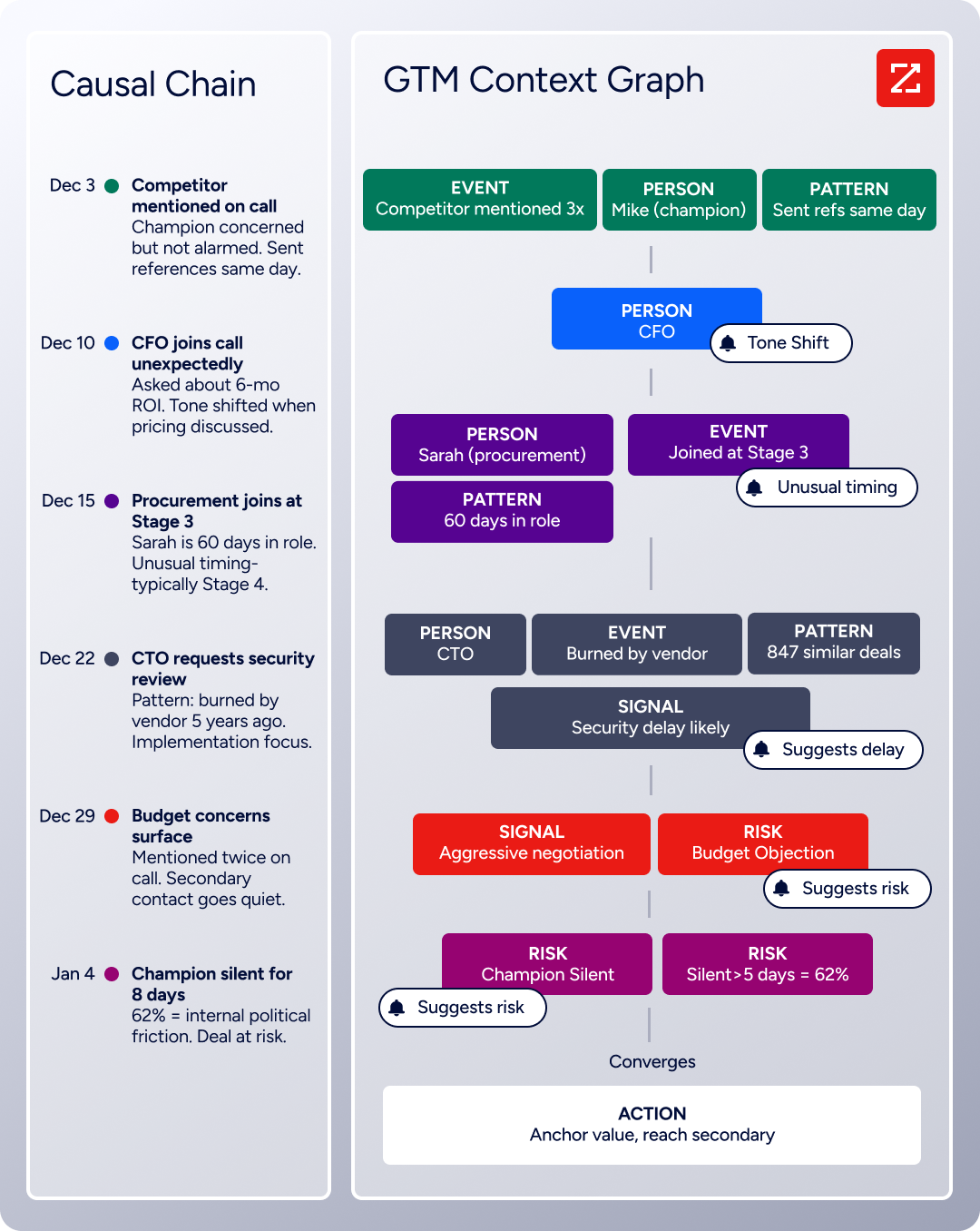
The identical information feeds ZoomInfo’s GTM Context Graph, which processes 1.5B + information factors each day, combining ZoomInfo’s B2B information together with your CRM information, dialog transcripts, and behavioral alerts to floor not simply what occurred in a deal, however why.
Supply: ZoomInfo
In follow, a crew working each Zoho CRM and Mailchimp can use ZoomInfo to complement CRM information earlier than they sync to Mailchimp. Verified emails imply campaigns attain actual inboxes as an alternative of bouncing. Correct job titles and firm particulars imply segmentation displays precise purchaser profiles, not stale information. With ZoomInfo Agent Groups, that very same enriched information may also drive the subsequent step: coordinated specialist brokers work from every account’s present state and perform the follow-up outreach itself, contained in the approvals and limits a crew units.
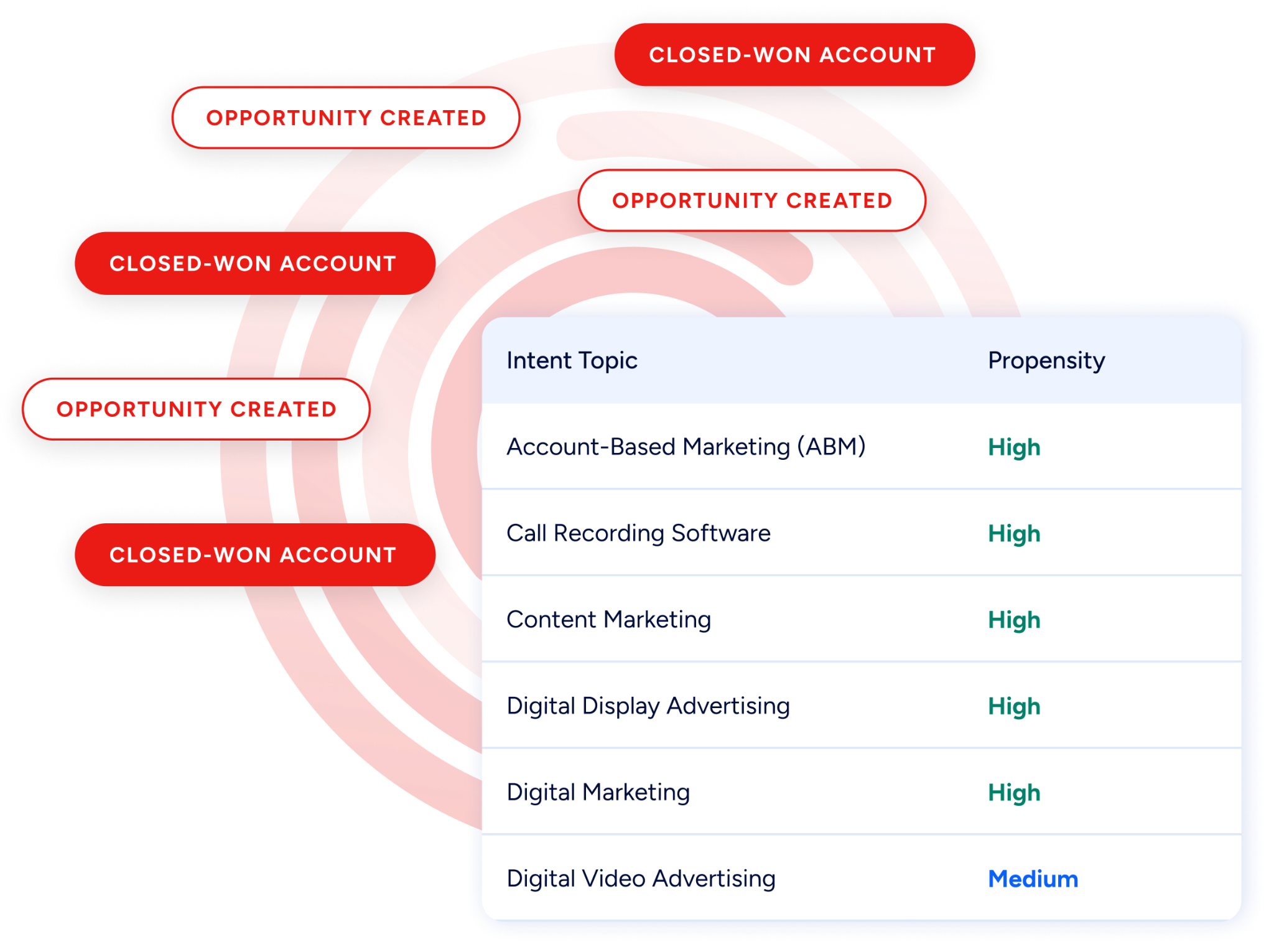
Purchaser Intent information from ZoomInfo, monitoring alerts from 210 million IP-to-Group pairings, could be routed into Zoho CRM to flag accounts actively researching related options, so advertising sends the appropriate marketing campaign on the proper second.
Supply: ZoomInfo
Enriched information additionally make the combination itself extra dependable. Fewer clean fields imply fewer mismatches throughout sync. Constant formatting reduces the false positives that create duplicate subscribers in Mailchimp.
Verified emails decrease bounce charges, which protects sender status and retains Mailchimp deliverability excessive (Mailchimp studies a larger than 99% common e mail deliverability fee, however that fee is dependent upon the standard of the info being despatched). And intent alerts assist groups resolve which contacts belong in energetic marketing campaign audiences, slightly than syncing each file indiscriminately.
Seismic’s gross sales crew attributed 39% of energetic pipeline to alternatives recognized or influenced by ZoomInfo alerts, whereas boosting productiveness by 54% and saving 11.5 hours per week. (Seismic)
Last Verdict
A local integration between Zoho CRM and Mailchimp exists and works nicely for normal contact synchronization and marketing campaign information sharing. Past the native connector, Zoho Circulate, Zapier, and customized API improvement every serve totally different ranges of complexity. For many groups, the appropriate selection is dependent upon how a lot the 2 platforms have to share.
-
Small groups that want contacts flowing between Zoho CRM and Mailchimp with marketing campaign engagement seen within the CRM ought to begin with the native Mailchimp Extension from the Zoho Market. It’s free, requires no third-party device, and covers the commonest synchronization wants out of the field.
-
Groups with conditional sync necessities (syncing solely contacts that meet particular standards, triggering actions based mostly on deal levels, or orchestrating multi-step workflows) ought to use Zoho Circulate or Zapier. Zoho Circulate is the stronger selection for groups already within the Zoho ecosystem; Zapier is quicker to arrange for groups that want a platform-agnostic device.
-
Organizations with complicated information fashions, customized modules, or enterprise logic that have to be enforced throughout sync ought to spend money on a customized API integration utilizing Zoho CRM’s REST API and Mailchimp’s Advertising API.
Earlier than committing to a way, make clear why each platforms coexist.
If the reply is operational (advertising lives in Mailchimp, gross sales lives in Zoho CRM, and each do their jobs nicely), spend money on a connection that retains each techniques aligned and offers every crew visibility into the opposite’s exercise. If the reply is transitional (the corporate is consolidating onto one platform), maintain the sync easy and concentrate on information hygiene for the eventual migration.
Both method, the standard of the info flowing between each techniques determines whether or not the combination delivers worth or simply replicates issues in two locations.
ZoomInfo, with its Zoho CRM integration and API and MCP entry for any platform together with Mailchimp, is the info enrichment layer that retains each techniques correct whereas the connector retains them aligned.
FAQ
Does Zoho CRM combine natively with Mailchimp?
Sure. The Mailchimp Extension for Zoho CRM is obtainable via the Zoho Market and allows two-way synchronization of contacts and marketing campaign information. Mailchimp additionally lists Zoho CRM as a supported integration in its personal listing. The extension is free to put in and doesn’t require a third-party automation device.
Can I sync Mailchimp marketing campaign engagement information again into Zoho CRM?
Sure. The native extension syncs marketing campaign metrics (opens, clicks, bounces, unsubscribes) again into Zoho CRM information. This offers gross sales reps visibility into which leads and contacts have interaction with advertising emails with out leaving the CRM. Zoho Circulate and Zapier may also push engagement occasions into Zoho CRM as actions or discipline updates.
What occurs if a contact is up to date in each platforms on the identical time?
With out express battle decision guidelines, the final write wins. If a gross sales rep updates a contact’s telephone quantity in Zoho CRM whereas a marketer updates the identical contact’s e mail in Mailchimp, each adjustments ought to survive since they have an effect on totally different fields.
But when either side replace the identical discipline (e.g., e mail handle), the platform that syncs final overwrites the opposite. Groups ought to designate one platform because the system of file for every important discipline to keep away from information loss.
Can I sync historic information between Zoho CRM and Mailchimp?
The native extension can sync present information through the preliminary setup. Zapier solely processes information created after the Zap is activated, so historic information requires a separate preliminary sync (guide export/import or a customized API script). Zoho Circulate can course of present information via a one-time movement, although this consumes API credit on each platforms proportional to the amount.
How does Mailchimp’s contact-based pricing have an effect on the combination?
Each contact synced from Zoho CRM into Mailchimp counts in opposition to Mailchimp’s plan restrict. Syncing a ten,000-contact CRM database into Mailchimp may push the account from the Necessities tier ($13/month at 500 contacts) to a considerably larger pricing band.
Groups ought to filter which contacts sync to Mailchimp (e.g., solely contacts with advertising opt-in, solely energetic leads) slightly than syncing your entire CRM database.
What Zoho CRM plan do I want for the combination?
The native Mailchimp extension is obtainable on all Zoho CRM plans, together with the free tier. API entry for customized integrations can also be out there on all plans, although API credit score limits scale by tier: the Free plan permits 5,000 credit per day, Customary gives 50,000 base credit, and Enterprise gives 50,000 base plus 1,000 per person. Zoho Circulate is included with many Zoho plans or out there as a standalone product.
How does ZoomInfo enhance a Zoho CRM-Mailchimp integration?
ZoomInfo solves the info high quality drawback that no sync device addresses. Contact information in CRMs decay as folks change jobs, telephone numbers go inactive, and firm particulars shift. ZoomInfo enriches information with verified contact information, firm attributes, technographics, and intent alerts.
Its Zoho CRM integration handles enrichment on the CRM aspect, and its API and middleware connections can feed the identical verified information into Mailchimp. The consequence: information flowing between each techniques is correct and full, which reduces bounced emails, improves marketing campaign concentrating on, and ensures gross sales reps work from present info.
Can I exploit Zoho Circulate as an alternative of Zapier to attach Zoho CRM and Mailchimp?
Sure. Zoho Circulate is Zoho’s personal integration platform and gives comparable trigger-action automation to Zapier.
For groups already utilizing Zoho merchandise, Zoho Circulate gives native entry to Zoho CRM’s information mannequin (together with customized modules and fields), could already be included within the present Zoho subscription, and retains the combination inside a single vendor’s ecosystem. Zapier is the higher selection for groups that additionally want to attach non-Zoho instruments in the identical workflow.

