

Most income groups have gathered numerous AI. There’s an assistant within the CRM, enrichment in a single software, and sequencing in one other. Every one handles a activity inside its personal software. None of them coordinates with the others, and none takes accountability for the end result you really care about: successful the deal, saving the renewal, or activating the champion.
So the work that issues most nonetheless lands in your group. Excessive-intent indicators wait hours for a response. Routing misfires ship good results in the incorrect rep. Reps spend their time on admin as a substitute of promoting, and earlier than RevOps can act on a single account, they bounce by means of 9 completely different programs to piece collectively its calls, emails, indicators, and get in touch with and firm information.
ZoomInfo has launched Agent Groups to shut this hole. Constructed on expertise from DoubleO.ai, Agent Groups provides your entire income group AI brokers that run full GTM performs reliably. It turns disconnected AI instruments, workflows, and indicators into coordinated GTM execution, from sign to motion. Describe a play in plain English, and Agent Groups builds it.
Agent Groups is obtainable now in GTM Studio.
Give an Agent Staff a GTM Movement, Not a Single Job
An Agent Staff takes on a whole GTM movement. That could possibly be activating an inbound purchaser, re-engaging a champion, handing off a closed-won account, or defending a renewal.
Specialised brokers, every with its personal function, directions, and instruments, work collectively inside a single play. They construct on each other’s work and share context from each prior step.
Every agent evaluates the following greatest motion from the present state of the file slightly than a path somebody drew months in the past, and adapts as circumstances change. Actual-time evaluations examine each step, so the play runs the identical approach each time, not simply within the demo.
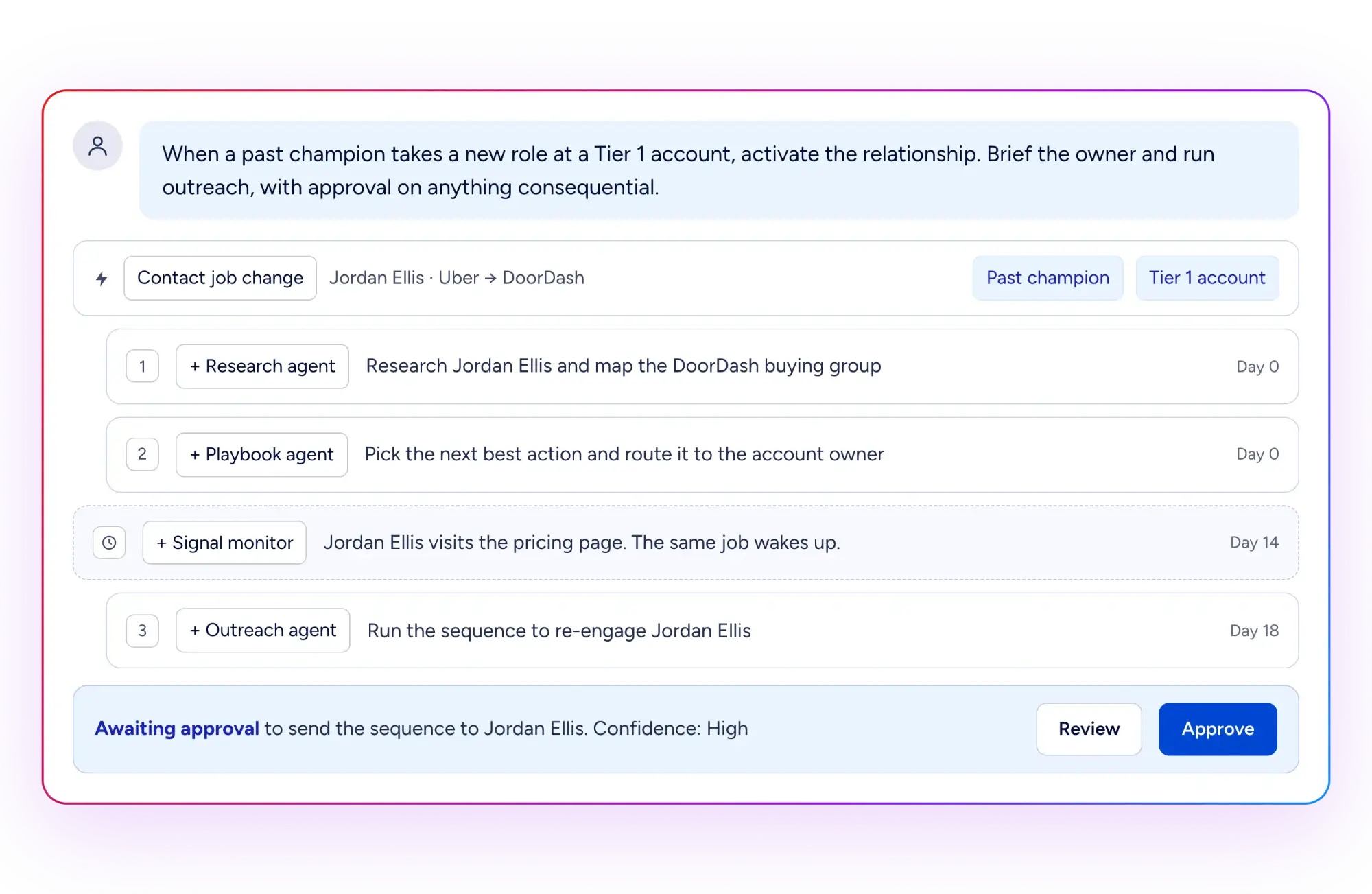
Why a Flowchart Cannot Run a Champion Play
Conventional automation follows a hard and fast path. If this, then that. It breaks the second actuality deviates from the diagram, and your operations group is left including branches for conditions nobody anticipated. Each deal is completely different: an enterprise account wants a distinct method from an SMB, and one trade wants a distinct pitch from one other.
Agent Groups works from state and context as a substitute. It reads the present buyer scenario, evaluates its choices, and chooses the following motion throughout the boundaries of your play.
Think about the steps in a champion play:
-
Jordan Ellis helped purchase your product at Uber.
-
Six months later, Jordan turned the Director of RevOps at DoorDash, a Tier 1 account.
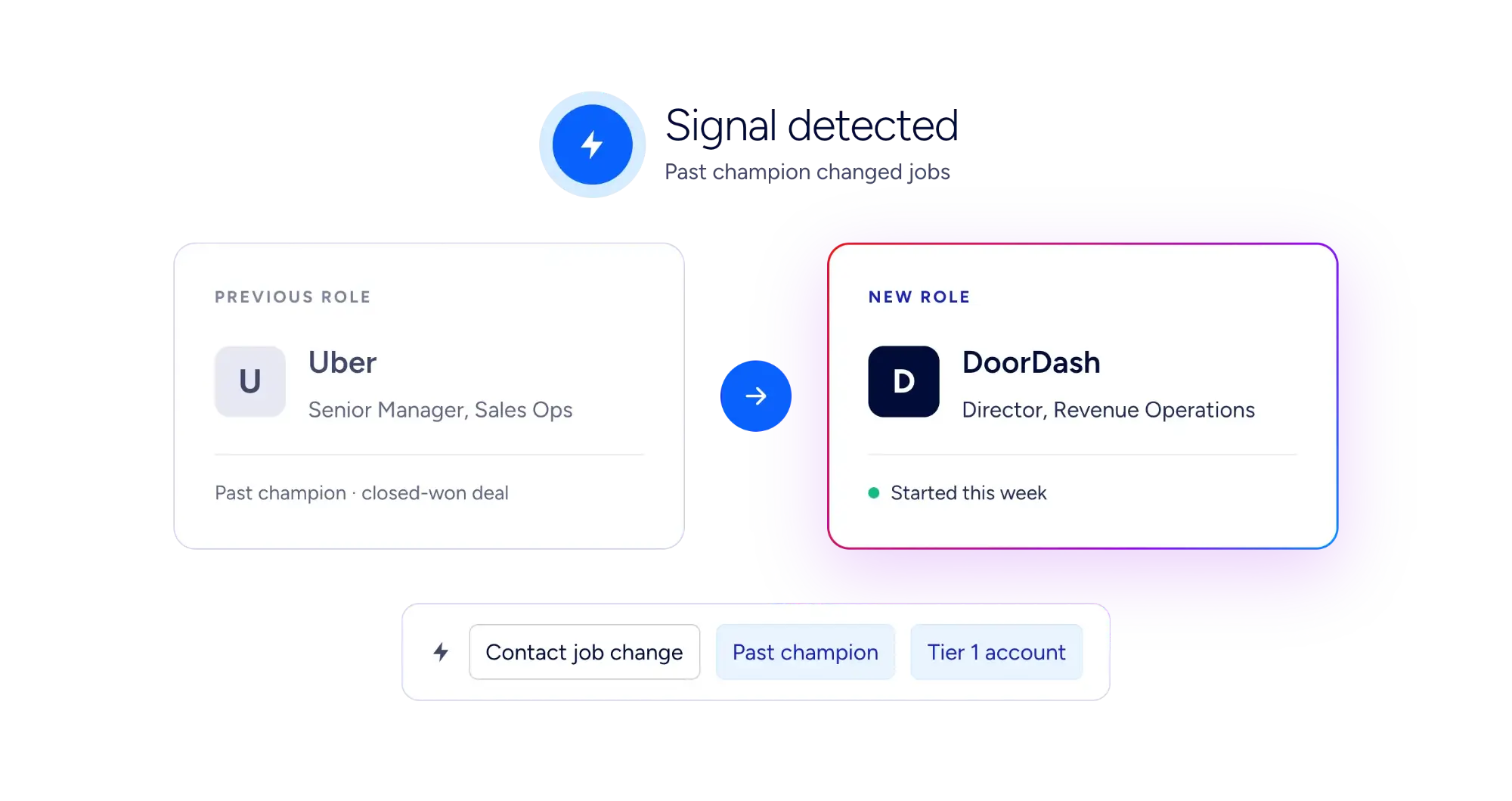
A conventional workflow matches the title, creates a CRM activity that claims “attain out,” and arms off at exactly the purpose the place judgment begins.
An Agent Staff runs on a recurring schedule towards a ZoomInfo viewers of previous champions. It spots the transfer, resolves Jordan and DoorDash, reconstructs Jordan’s function within the authentic Uber deal, and identifies the present account proprietor. An open alternative or a distinct proprietor can change the route, so it checks each.
It then applies your champion play and your Data Base, drafts outreach grounded within the Uber relationship, and sends the account proprietor a short in Slack. When Jordan visits your pricing web page two weeks later, a website-visit set off passes the total occasion context to the Agent Staff so the play retains transferring.
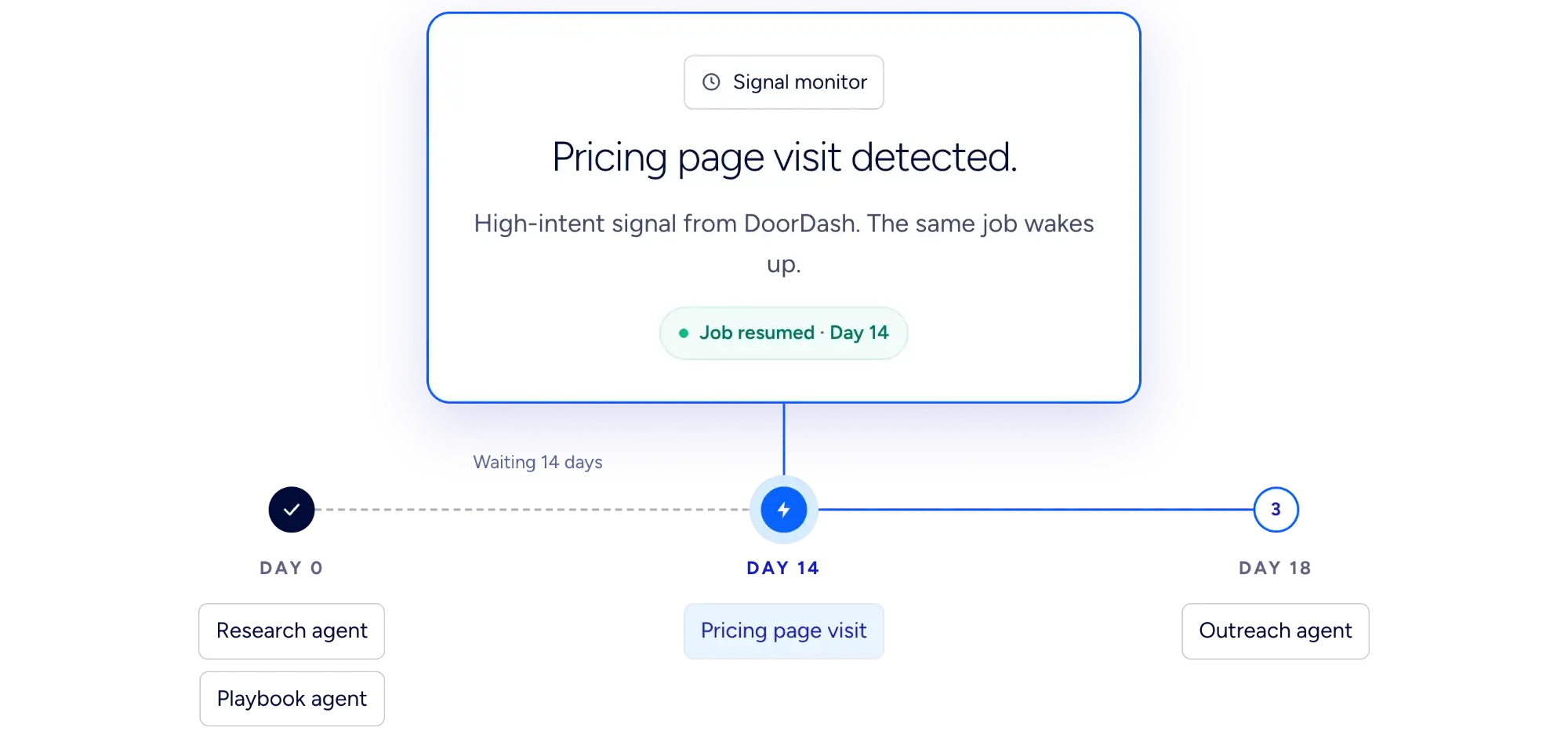
Each step is written again to Salesforce or HubSpot and grounded in your individual GTM context, so your reps and your subsequent play begin with the total historical past.
5 Extra Performs Agent Groups Can Run Finish to Finish
-
A renewal in danger. Ninety days out, engagement has dropped and the champion has gone quiet. Agent Groups assembles the account’s engagement historical past and CRM file, drafts a save plan, and briefs the account proprietor earlier than the QBR.
-
A closed-won handoff. Agent Groups packages the deal historical past, the stakeholders, and each dedication made throughout the sale, so your buyer success group inherits context as a substitute of a clean file.
-
A closed-lost win-back. On a month-to-month schedule, Agent Groups reopens closed-lost alternatives, checks what stalled every deal final time, researches what has modified on the account, and proposes a win-back method to the proprietor.
-
An inbound purchaser. A brand new lead in Salesforce or HubSpot begins a play that enriches, scores, and qualifies the client. It then enrolls the client in the proper sequence in SalesLoft or Outreach. The purpose is changing a professional purchaser, not simply getting a lead routed.
-
A closed-won deal that creates new pipeline. Each time a deal closes, Agent Groups evaluations the total gross sales cycle, together with name transcripts, emails, and CRM data, to know why the shopper purchased. It drafts a case examine, finds 10 rivals of the brand new buyer that are not already clients, and reaches out with messaging tailor-made to every one, backed by the case examine.
What It Seems Like Inside an Agent Staff
Every Agent Staff begins with a set off, typically a purchaser’s sign. From there, shared context shapes every resolution, your play and guardrails set the bounds, and the brokers get to work.
-
Versatile, always-on triggers: Begin a play from guide inputs (single or bulk), recurring schedules, webhooks, CRM occasions in Salesforce or HubSpot, or signal-based occasions like web site visits and accomplished conferences. ZoomInfo Audiences can even function bulk inputs, so indicators corresponding to job modifications can feed a play. Each set off passes full occasion context to the Agent Staff.
-
Multi-agent orchestration: Agent Groups runs on a real-time analysis structure. Customized brokers, every with configurable roles, directions, and instruments, collaborate inside a single play and robotically share context from prior steps. The result’s GTM workflows that suppose throughout steps as a substitute of simply executing them. Conditional routing handles a number of situation paths.
-
AI-ready GTM intelligence: Each Agent Staff has direct entry to ZoomInfo’s verified B2B information: individuals, corporations, engagement historical past, intent indicators, and account scores. Brokers generate advanced queries robotically based mostly on the duty at hand. That information sits alongside your CRM data, engagement historical past, and enterprise context, so each agent works from the identical full understanding of your accounts.
-
Data Base: Encode your ICPs, personas, model pointers, SOPs, and aggressive intelligence on the group or workflow degree. Each agent attracts on it, so outputs replicate how your corporation really works.
-
Context-aware decisioning: Brokers resolve methods to perform their work because the play runs, not when it was constructed. Every one works from the present state of the file, the outputs of prior steps, and its personal objectives, so the play retains working as circumstances change.
Begin From a Template, or Describe Your Personal Play
Constructing an Agent Staff does not require a diagram. Describe your purpose in plain English, and Agent Groups generates the total workflow construction. It additionally handles the sting circumstances and errors you would not know to account for when constructing from scratch.
Or begin from the template library. Pre-built templates cowl the most typical GTM motions:
-
Inbound Lead Activation
-
Outbound Prospecting
-
Closed/Received Account Handoff
-
Closed/Received Competitor Acceleration
-
Assembly Insights & CRM Replace
-
Weekly Gross sales Briefing
Deploy a template as-is, then customise it from there.
Works With the Instruments Your Staff Already Makes use of
Agent Groups is constructed into GTM Studio. That is the place operators construct and run performs, monitor each run, and put Studio’s information and audiences to work.
-
Native integrations: Agent Groups connects natively with Salesforce, HubSpot, Slack, Gmail, SalesLoft, Outreach, and ZoomInfo’s personal information and viewers merchandise. Brokers can learn, create, and replace CRM data, enroll prospects in sequences, and ship emails and Slack messages.
-
Constructed-in capabilities: Brokers come geared up with deep internet analysis, doc and spreadsheet creation, and picture and audio technology, with no integration required.
-
ZoomInfo Audiences: Audiences can function bulk inputs, and brokers can create, replace, and enrich them as a part of a play.
-
The broader ZoomInfo platform: The identical ZoomInfo intelligence is obtainable to the remainder of your AI stack by means of GTM.AI, ZoomInfo’s headless GTM context layer. That features the API, the GTM CLI, and MCP.
Scale AI With Constructed-In Governance
You possibly can’t hand revenue-critical work to AI with out boundaries. A single misfire in a posh GTM workflow can set off a series of incorrect actions and unhealthy information.
ZoomInfo spent years constructing a trusted basis: responsibly sourced information, privacy-rights administration, SOC 2 controls, ISO 27001, and ISO 27701-certified programs. Agent Groups runs on that basis and provides governance to each play.
-
Monitoring: Monitor each play, then shortly determine and proper errors earlier than they have an effect on your corporation.
-
Value visibility: AI credit score utilization is estimated earlier than you activate a play and tracked for every Agent Staff, so there are not any surprises and no runaway spend.
-
Admin controls: Admin dashboards present organization-wide oversight.
-
Function-based entry: Function administration ensures the proper individuals are constructing and working the proper Agent Groups.
-
Grounded outputs: Group-level Data Bases hold each agent aligned along with your ICPs, model, and SOPs.
ZoomInfo Agent Groups FAQ
What’s Agent Groups?
Agent Groups is agentic orchestration for GTM, constructed into ZoomInfo GTM Studio. It coordinates groups of brokers throughout your programs, indicators, and ZoomInfo intelligence to execute full GTM motions. These motions run from sign detection and lead qualification by means of enrichment, routing, outreach, and CRM updates.
What’s the expertise behind Agent Groups?
Agent Groups is constructed on expertise from DoubleO.ai, based by Derek Osgood and Karthik Suresh and now a part of ZoomInfo. It is a multi-agent platform with real-time evaluations, designed so GTM groups can construct multi-agent automation that runs reliably.
How is Agent Groups completely different from workflow automation?
Workflow automation follows a predetermined sequence and breaks when inputs change. Agent Groups runs multi-step, multi-agent performs that cause throughout steps, select the following greatest motion from the present state of the file, and adapt as circumstances change.
How is that this completely different from working my GTM in Claude?
Claude is a good place to construct a play, however these tasks keep in a single individual’s workspace and run solely once they keep in mind to run them. Agent Groups takes the performs that work and runs them for each rep, on each account. It is triggered by stay indicators, grounded in ZoomInfo information, and is monitored centrally.
Is that this a brand new product or a brand new SKU?
Neither. Agent Groups is a part of GTM Studio. There is no new contract, no new SKU, and no separate buy.
Who has entry?
Agent Groups is obtainable in GTM Studio. Contact your ZoomInfo consultant to get began. Admins can management entry on the consumer degree by means of Function Administration.
Which programs does it work with?
Salesforce and HubSpot for CRM, SalesLoft and Outreach for gross sales engagement, and Slack and Gmail for communications, plus ZoomInfo’s personal information and Audiences. It’s also possible to join ZoomInfo to Claude by means of MCP, and use GTM.AI to deliver ZoomInfo context to the remainder of your AI stack.
What controls do I’ve?
Every play defines its triggers, brokers, instruments, and directions. Admin dashboards, role-based entry, and credit score estimates earlier than activation hold you in management. A Pause for Evaluation step for human-in-the-loop approval is on the roadmap for a future launch.
What does it value?
Agent Groups makes use of consumption-based AI Credit, billed towards your present ZoomInfo contract. Earlier than you activate a play, you will see an estimate of the credit it is going to use. Contact your ZoomInfo consultant for pricing particulars.
How do I begin?
Deploy one of many pre-built templates in the present day, or describe a play in plain English and let Agent Groups generate the workflow for you.

