

Salesforce is the world’s #1 CRM by IDC income share, serving over 150,000 corporations throughout gross sales, service, advertising, commerce, and knowledge intelligence. Its CRM captures each deal stage change, kind submission, service interplay, and marketing campaign touchpoint throughout your go-to-market operation.
However a CRM solely is aware of what occurs inside it.
Salesforce tracks the pipeline your reps construct and the circumstances your brokers resolve. By itself, it can not confirm whether or not a prospect’s telephone quantity nonetheless connects, detect which accounts are researching your class this week, flip CRM segments into e-mail campaigns, or hint a closed deal again by the monetary data your accounting group retains.
The proper integrations shut these gaps. They feed your CRM verified knowledge it can not generate by itself, activate outreach from dwell segments, automate workflows throughout disconnected instruments, and provides each group visibility into the total income cycle.
This information covers the strongest integration for every job Salesforce customers mostly want performed:
Every part walks by how the mixing connects with Salesforce, what knowledge flows between the platforms, pricing, and who advantages most.
|
Finest Salesforce Integrations at a Look |
|---|
|
Finest Salesforce Integration for B2B Information Enrichment and Go-to-Market Intelligence. Enriches Salesforce data with verified contact knowledge, purchaser intent alerts, technographic intelligence, and firm attributes from ZoomInfo’s B2B database, giving your group correct knowledge to prospect with and alerts to prioritize accounts which are actively in-market. |
|
Finest Salesforce Integration for Actual-Time Staff Collaboration and CRM Visibility. Turns static CRM data into dwell collaboration areas with bidirectional area modifying, real-time change alerts, and AI-generated summaries, so your group coordinates on offers and circumstances with out leaving their workspace. |
|
Finest Salesforce Integration for E-mail Advertising and marketing and Marketing campaign Execution. Syncs contacts, leads, and marketing campaign membership bidirectionally and writes engagement metrics again to CRM data, enabling focused e-mail campaigns constructed from dwell Salesforce segments with out guide listing exports. |
|
Finest Salesforce Integration for Enterprise Intelligence and Pipeline Analytics. Pulls the total Salesforce knowledge mannequin into interactive dashboards with no row cap, enabling pipeline protection ratios, stage velocity metrics, and cross-system reporting that Salesforce’s native report builder can not produce. |
|
Finest Salesforce Integration for No-Code Workflow Automation. Extends Salesforce’s attain to eight,000+ purposes with no-code automation, supporting bidirectional knowledge sync, multi-step workflows, and conditional routing between your CRM and instruments that lack native Salesforce connectors. |
|
Finest Salesforce Integration for Settlement Execution and Contract Lifecycle Administration. Embeds the total settlement workflow inside Salesforce data, from doc era and signature assortment by contract lifecycle administration, eliminating the tab-switching that slows deal cycles. |
|
Finest Salesforce Integration for Accounting and Finance Information Sync. Syncs prospects, invoices, merchandise, and funds between CRM and accounting, changing closed offers into billing data routinely and surfacing fee standing on Salesforce data so reps by no means need to ask finance whether or not a buyer has paid. |
What Is Salesforce?
Salesforce is a buyer platform that unifies gross sales, service, advertising, commerce, and knowledge groups on a single CRM.
The corporate calls itself “the #1 AI CRM” and the working system for the “Agentic Enterprise.”
Salesforce generated $41.5 billion in income in FY26, has held the #1 CRM market share place by IDC income knowledge for over a decade, and has been named a Gartner Magic Quadrant Chief for Gross sales Pressure Automation 19 years working.
Its Buyer 360 suite covers Gross sales Cloud, Service Cloud, Advertising and marketing Cloud, Commerce Cloud, Information Cloud, and the Agentforce AI platform, all sharing unified buyer knowledge.
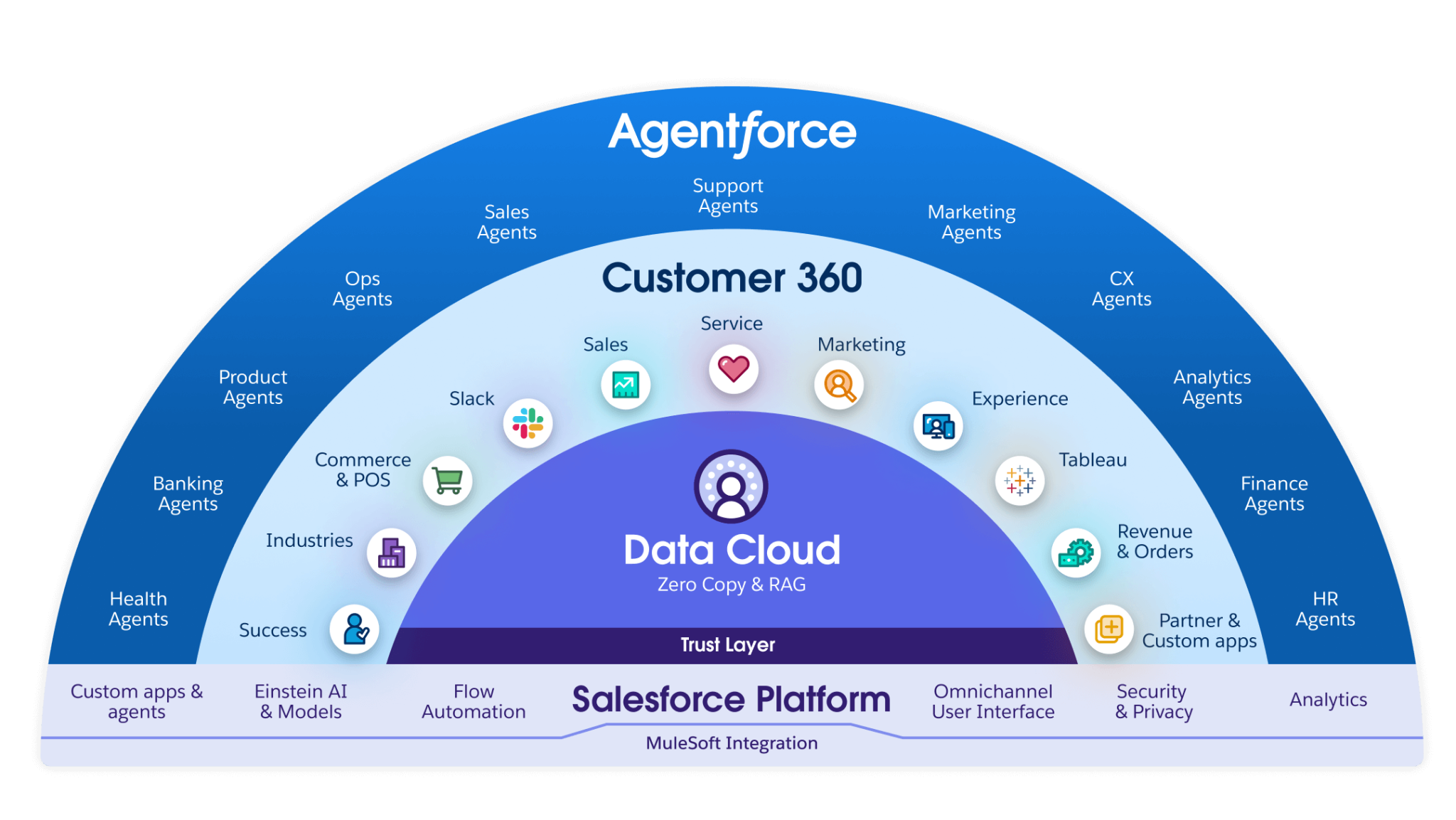
Supply: Consideration CRM Consulting
Salesforce’s integration ecosystem is a defining energy.
AppExchange hosts 9,000+ accomplice apps with 14+ million installs, and 91% of shoppers use at the very least one AppExchange app. On the technical aspect, Salesforce provides an API portfolio spanning REST API, SOAP API, Bulk API 2.0, GraphQL API, Pub/Sub API, and Metadata API.
It helps OAuth 2.0 authentication and offers event-driven structure by Platform Occasions and Change Information Seize.
MuleSoft, Salesforce’s personal integration platform, provides a whole lot of pre-built connectors for enterprise integrations and helps the Mannequin Context Protocol (MCP) for AI agent connectivity. Slack, acquired for $27.7 billion, serves because the conversational layer with bidirectional CRM integration.
The mixing classes out there to Salesforce customers embody:
-
B2B knowledge enrichment: contact intelligence, firm attributes, purchaser intent alerts, technographics
-
Enterprise intelligence: Energy BI, Tableau, CRM Analytics, pipeline dashboards
-
Workflow automation: Zapier, Make, MuleSoft, customized webhooks
-
Accounting and finance: QuickBooks, Xero, NetSuite, bill and fee sync
With that ecosystem as context, listed here are the seven integrations we chosen as the perfect choices for extending Salesforce throughout the classes that matter most to income groups.
1. ZoomInfo: Finest Salesforce Integration for B2B Information Enrichment and Go-to-Market Intelligence
ZoomInfo is a B2B knowledge and go-to-market platform constructed on 500M contacts, 100M corporations, 135M+ verified telephone numbers, and 200M+ verified enterprise e-mail addresses.
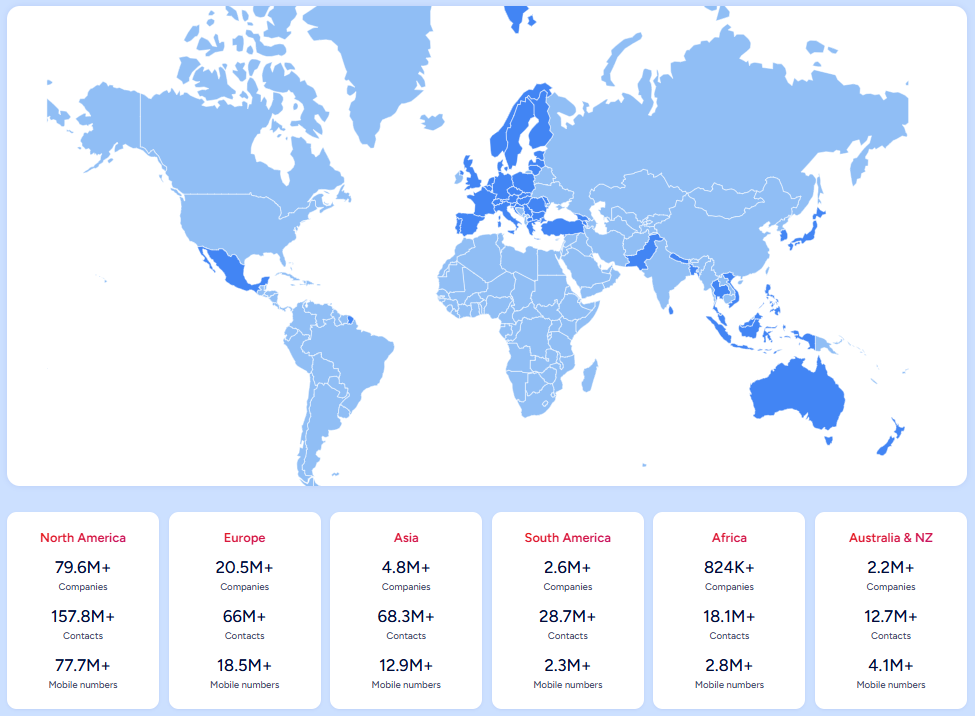
Supply: ZoomInfo
It integrates natively with Salesforce by a devoted AppExchange software to counterpoint your CRM with verified contact knowledge, firm intelligence, purchaser intent alerts, and technographic insights.
Connecting the 2 platforms unlocks:
-
A CRM that stays correct by itself, with verified emails, direct dials, and firm attributes appended and refreshed routinely
How ZoomInfo Integrates with Salesforce
ZoomInfo connects to Salesforce by a native AppExchange software with the Salesforce Sync characteristic, configured through OAuth with bidirectional knowledge circulation.
The mixing is included in ZoomInfo Gross sales Skilled and above.
As a result of ZoomInfo builds and maintains it as a first-party connector, it requires no middleware and stays present with platform updates on each side. ZoomInfo’s GTM Workspace (the execution workspace for sellers) consists of the identical native Salesforce connection, and the ReachOut Chrome Extension exports verified knowledge instantly into Salesforce data from any net web page.
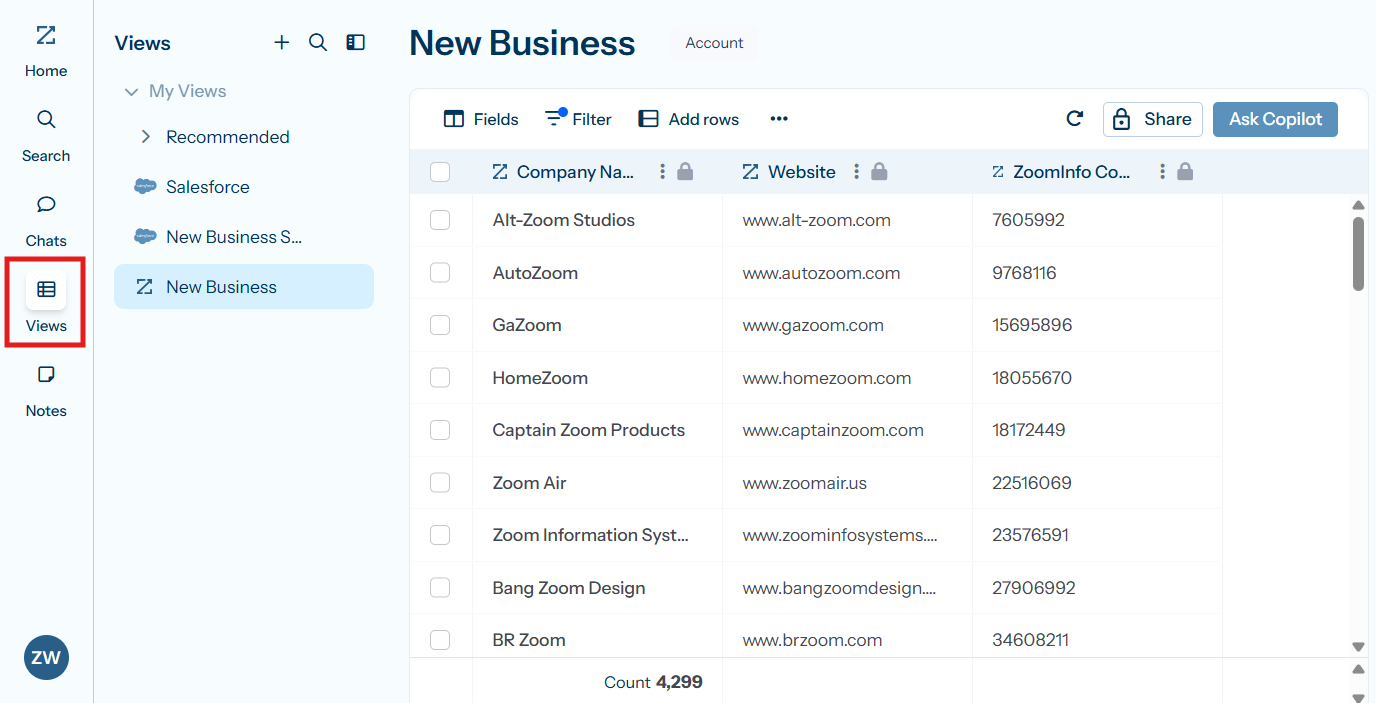
Supply: ZoomInfo
Contact and Firm Information Enrichment: Fill the Gaps Your CRM Can not Fill Independently
Salesforce captures interplay knowledge: emails despatched, varieties submitted, offers moved by pipeline phases.
What it can not do by itself is confirm whether or not a telephone quantity nonetheless works, catch a job change, or reveal an organization’s know-how stack.
When a brand new contact enters Salesforce, ZoomInfo routinely appends the verified enterprise e-mail, direct dial, title, division, and seniority, plus company-level firmographics and technographic knowledge overlaying 30,000+ applied sciences.
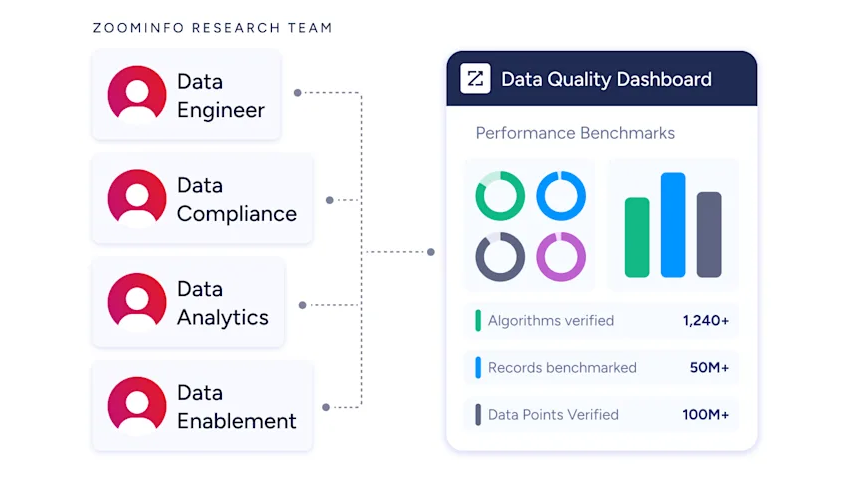
The enrichment runs constantly by a verification pipeline backed by 300+ human researchers, reaching as much as 95% accuracy on first-party knowledge.
ZoomInfo in motion: A prospect fills out a Salesforce web-to-lead kind with solely a reputation and work e-mail. ZoomInfo appends their direct dial, present title, firm profile (a 400-person fintech working HubSpot and Marketo), and three different decision-makers of their division. Your SDR multi-threads the account earlier than the primary name as an alternative of spending 20 minutes researching it.
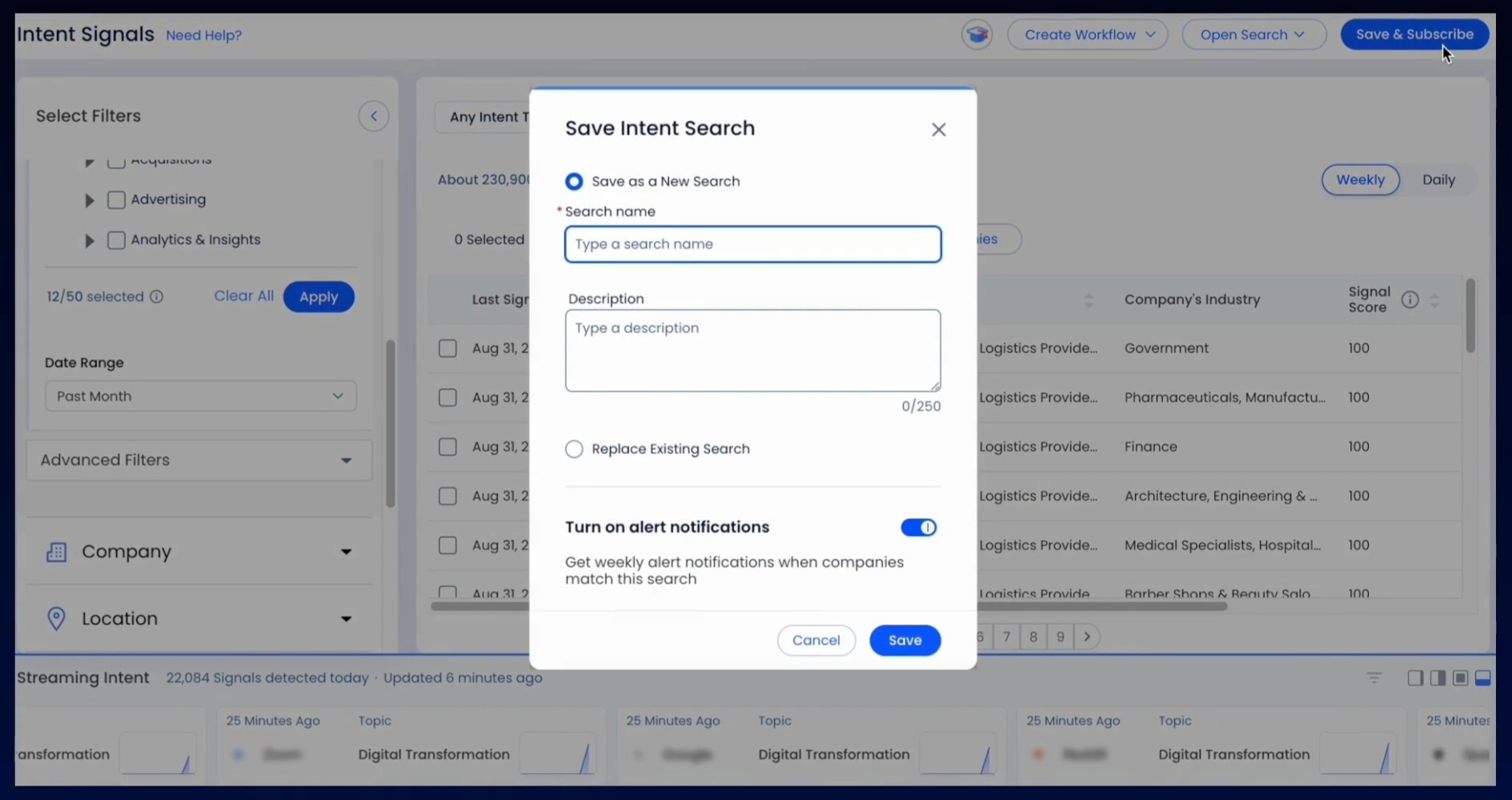
Purchaser Intent Information: Establish Accounts That Are Actively In-Market
ZoomInfo’s Purchaser Intent tracks alerts from 210 million IP-to-Group pairings and 6 trillion+ new keyword-to-device pairings month-to-month, revealing which corporations are researching subjects related to your product.
Supply: ZoomInfo
These alerts circulation into Salesforce data, the place they set off workflows, replace lead scores, and floor precedence accounts. Guided Intent, unique to ZoomInfo, identifies the analysis subjects traditionally correlated with deal success in your online business, so the alerts replicate your precise win patterns moderately than generic key phrase thresholds.
ZoomInfo in motion: ZoomInfo detects a goal account researching “CRM knowledge migration” for 2 weeks. The sign syncs to Salesforce, raises the account’s rating, notifies the assigned rep, and enrolls the first contact in a switching-focused nurture sequence, all whereas the customer continues to be evaluating.
Web site Customer Identification: Convert Nameless Visitors into Pipeline
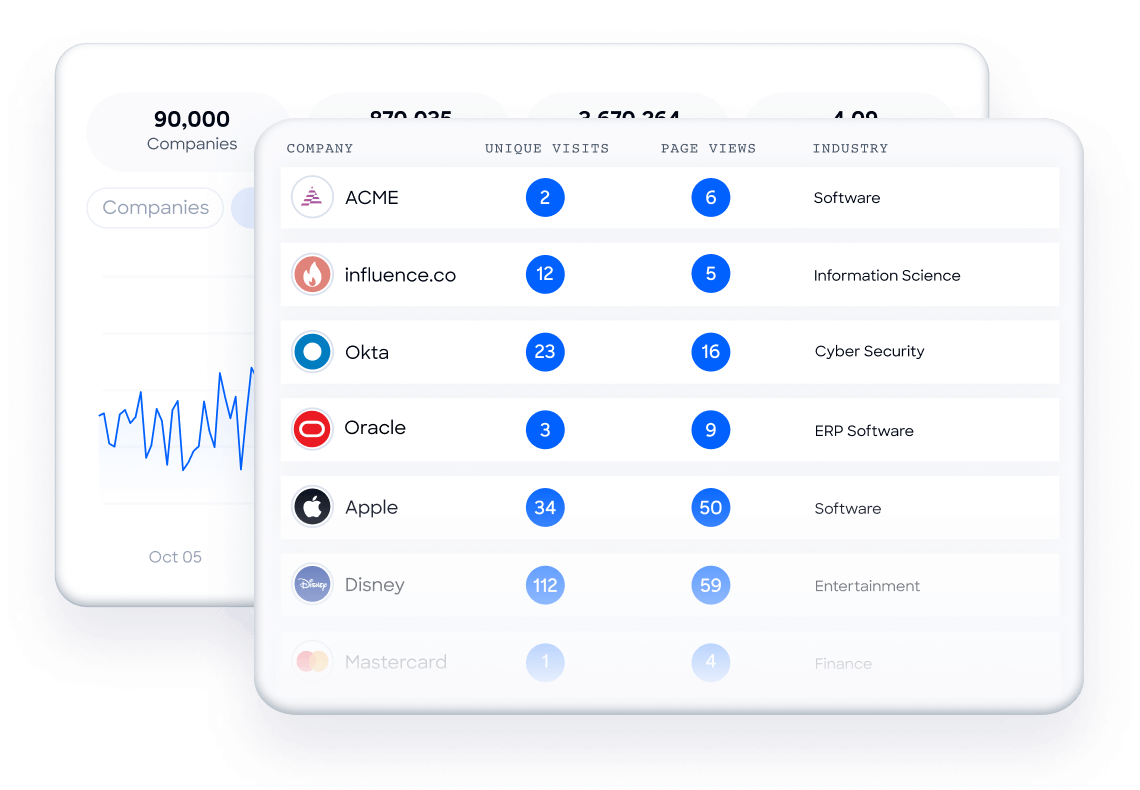
ZoomInfo WebSights resolves nameless web site visitors to corporations (together with buying-team identification and call data), with Automated Visitors Filtering separating real firm visits from bots.
Supply: ZoomInfo
Linked to Salesforce, the businesses visiting your website and the pages they considered floor alongside your CRM knowledge, so high-value guests path to gross sales whereas the curiosity is dwell.
Workflow Automation and Lead Routing
ZoomInfo attributes (firm measurement, business, know-how stack, intent rating) energy Salesforce workflow logic for routing, scoring, and segmentation.
A brand new contact enriched by ZoomInfo routes routinely to the enterprise group at 1,000+ workers or to SMB beneath 100, with no guide triage. Scoring fashions achieve company-level context alongside Salesforce’s behavioral alerts.
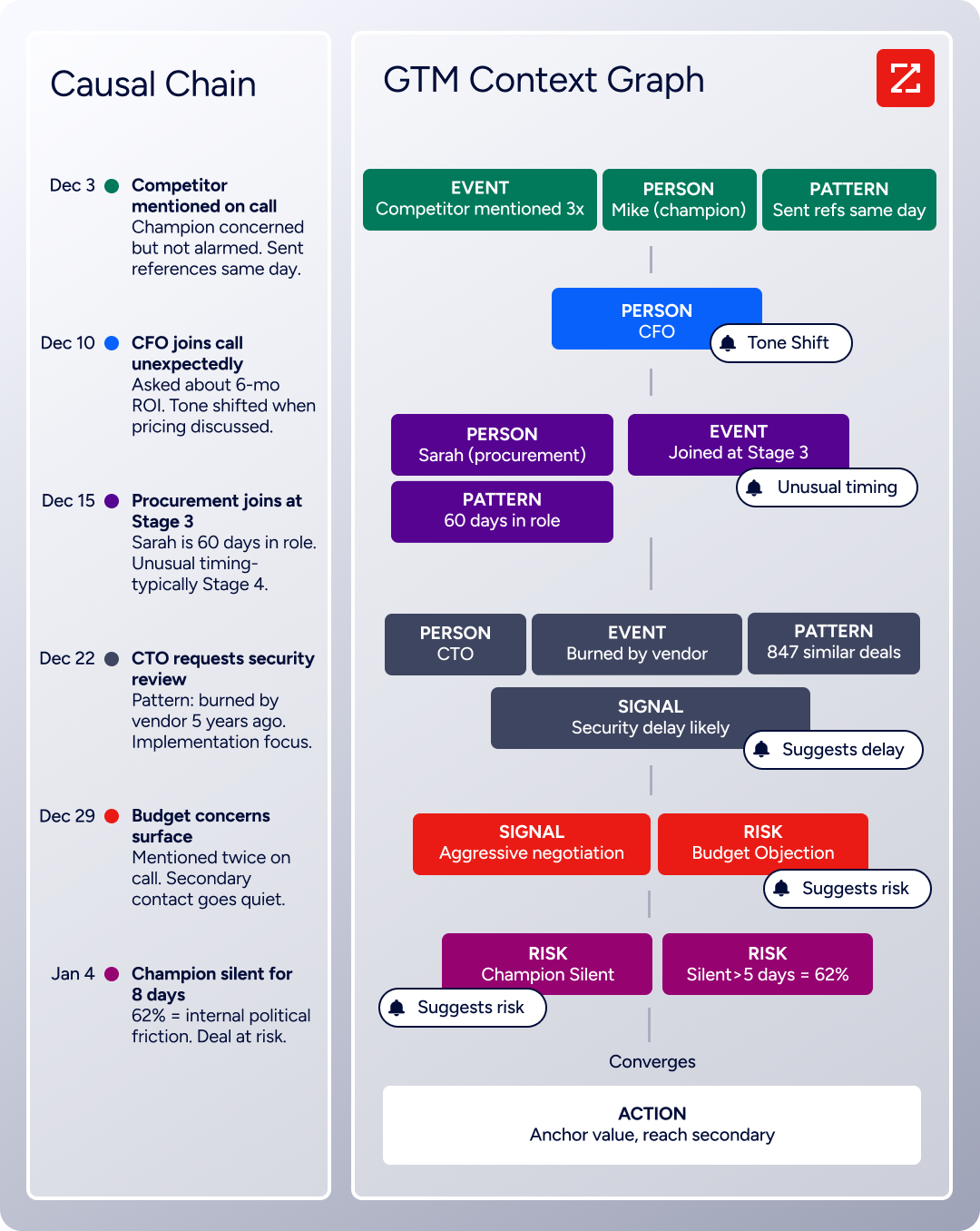
Past the connector itself, the enrichment feeding your Salesforce occasion is a part of a broader intelligence system: the GTM Context Graph processes 1.5B+ knowledge factors every day and fuses ZoomInfo’s B2B knowledge with CRM data, conversations, and behavioral alerts, whereas GTM Studio, APIs, and MCP expose the identical intelligence to any instrument or AI agent.
Seismic’s gross sales group attributed 39% of energetic pipeline to alternatives recognized or influenced by ZoomInfo alerts, reporting 54% productiveness good points and saving 11.5 hours per week per vendor. (Seismic Case Examine)
ZoomInfo Pricing
ZoomInfo makes use of a consumption-based pricing mannequin with customized quotes based mostly on utilization, customers, credit score quantity, and options.
It’s organized into Gross sales, Advertising and marketing, and standalone product strains, every in Skilled, Superior, and Enterprise tiers. The native Salesforce integration is included from Gross sales Skilled up, with Superior including intent alerts and web site customer monitoring.
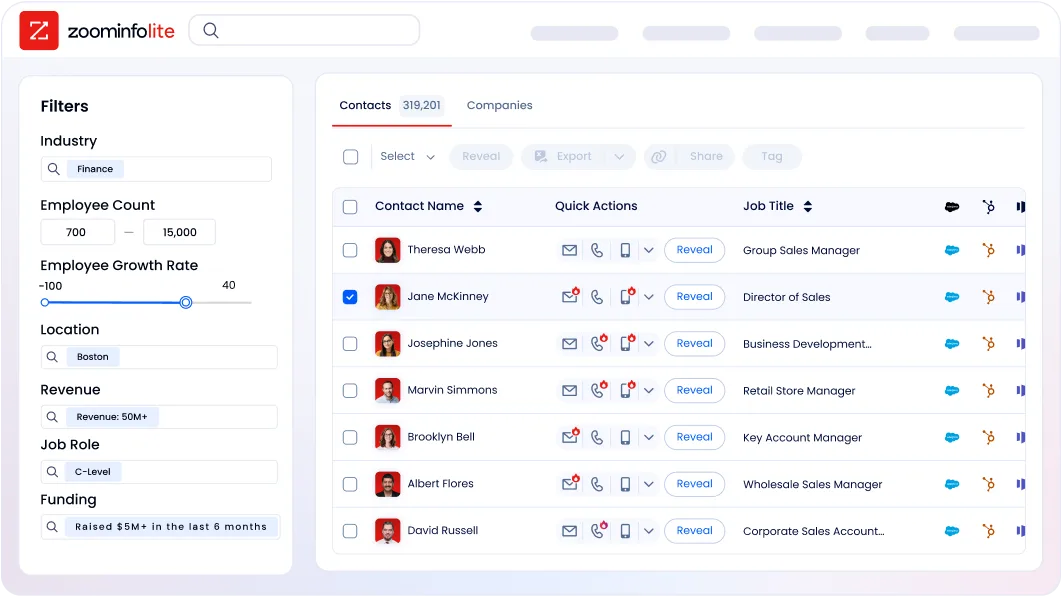
ZoomInfo Lite is a everlasting free tier (no bank card, no time restrict) with 10 month-to-month export credit, searches, the Chrome extension, and CRM integrations, making it a sensible strategy to consider knowledge high quality earlier than committing. A separate 7-day free trial covers paid options.
Who Ought to Use the ZoomInfo Integration?
-
Income operations groups that want firmographic, technographic, and intent knowledge powering Salesforce lead scoring, routing, and segmentation as an alternative of behavioral alerts alone
2. Slack: Finest Salesforce Integration for Actual-Time Staff Collaboration and CRM Visibility
Slack is a piece platform and enterprise messaging instrument that integrates with Salesforce to show static CRM data into dwell collaboration areas the place gross sales groups, service brokers, and cross-functional stakeholders focus on offers, replace fields, and coordinate actions with out leaving their dialog workspace.
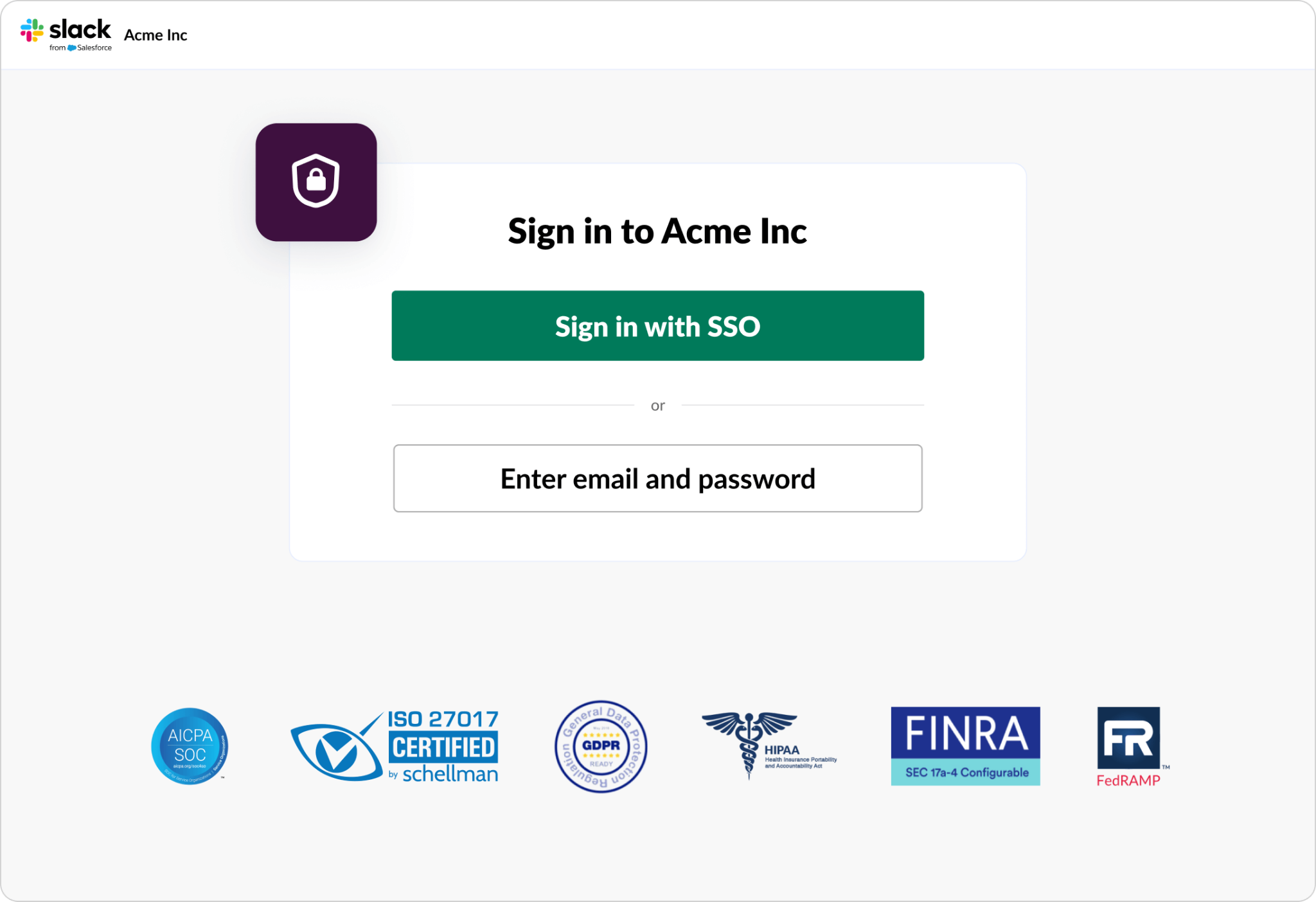
Supply: Slack
Salesforce builds and maintains the mixing following its $27.7 billion acquisition of Slack, with 40+ connectors throughout the Buyer 360 platform.
Key integration capabilities embody:
-
Salesforce Channels that map a devoted Slack channel to a selected Salesforce document (alternative, account, or case) with dwell Document Particulars, Messages, and AI-generated summaries
-
Document change alerts despatched as My Alerts, Channel Alerts, or Bulk Alerts when CRM data change, so the best individuals hear about pipeline motion the second it occurs
-
Bidirectional CRM modifying that lets permitted customers replace alternative phases, case statuses, and account fields instantly from Slack’s Document Particulars tab
How Slack Integrates with Salesforce
The Slack-Salesforce integration is a local, first-party connection that receives ongoing funding as a core Salesforce product.
A Salesforce administrator installs the Slack app from AppExchange, authorizes the connection through OAuth, and configures which customers can create Salesforce Channels, obtain alerts, and replace data from Slack. The mixing works with Slack workspaces on Professional, Enterprise+, and Enterprise+ plans.
1. Salesforce Channels: Persistent Deal Rooms with Bidirectional Document Updates.
Salesforce Channels ties a Slack channel completely to a selected CRM document, mostly an Alternative, Account, or Case. The channel good points three tabs: Messages (commonplace dialog), Document Particulars (dwell Salesforce fields editable in-place), and Abstract (AI-generated recap of channel exercise and document modifications).
When a consumer modifications a area worth within the Document Particulars tab, that replace writes again to Salesforce instantly, triggering the identical validation guidelines and area historical past monitoring as a direct CRM replace. This eliminates the “replace Slack, then replace Salesforce” double-entry drawback.
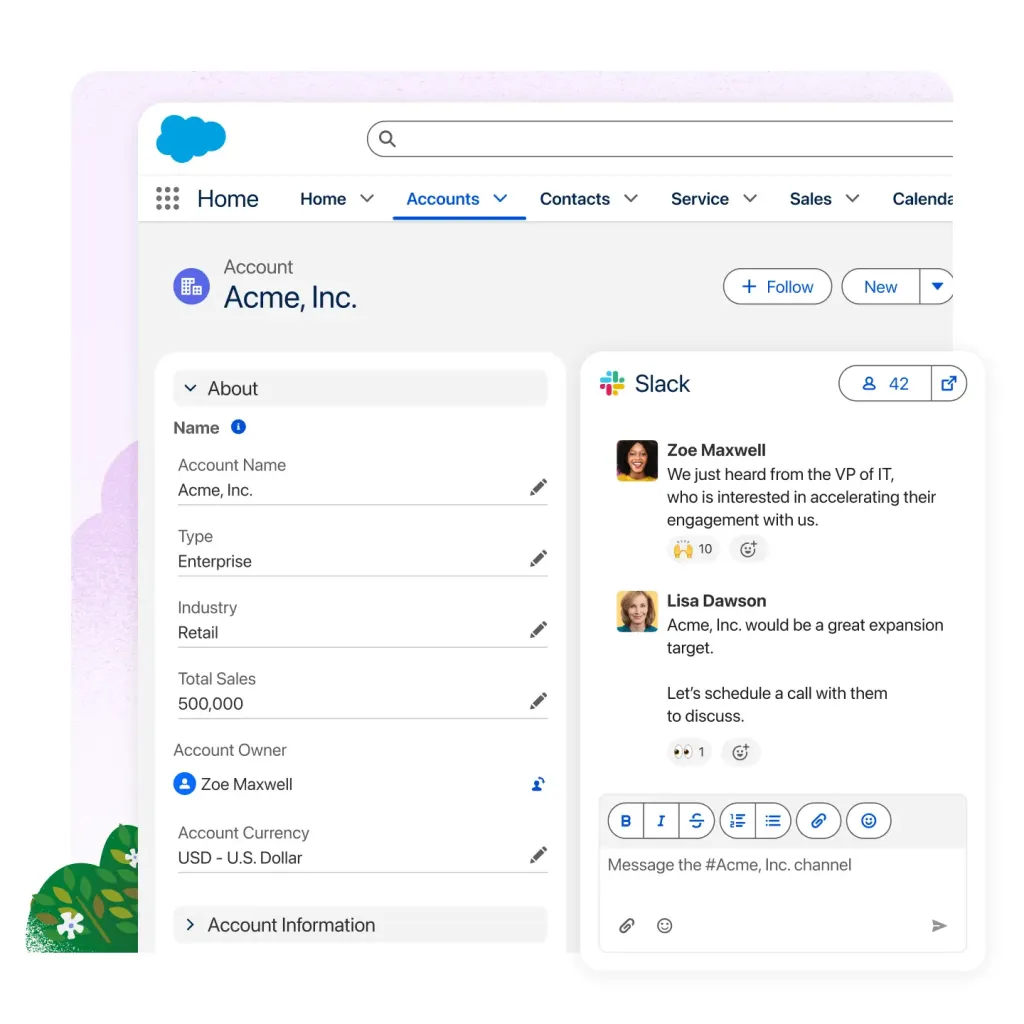
Supply: Salesforce
2. Salesforce Notifications: Actual-Time Alerts Delivered to the Proper Folks.
Three alert varieties change email-based CRM notifications. My Alerts ship private notifications to a consumer’s Slackbot DM when data they personal change. Channel Alerts put up team-level notifications when particular data or document varieties assembly sure standards change.
Bulk Alerts fireplace when any document of a specified sort modifications throughout the org, helpful for operations and compliance monitoring. All alert varieties help dynamic area tokens and embody a “View in Salesforce” hyperlink.
3. Salesforce Actions: Question and Create Data from Slack.
The /salesforce search command returns matching data instantly in Slack. The Add to Salesforce message motion hyperlinks any Slack dialog thread to a CRM document’s Associated Slack Messages element, so future readers can reconstruct the total story behind a deal with out asking “what was mentioned?”
Customers also can create new Salesforce data through the /salesforce create command, making Slack a viable front-end for light-weight CRM knowledge entry.
4. AI-Powered Channel Summaries.
On Enterprise+ and above, the AI Abstract tab generates natural-language recaps of channel exercise and Salesforce document modifications over a selected time window. A supervisor overseeing a number of deal rooms can see the place every deal stands with out studying by a whole lot of messages.
Slack Pricing
Slack makes use of per-seat pricing:
-
Enterprise+ at $15/consumer/month (annual): provides the total AI suite together with Salesforce Channel AI summaries, SAML SSO, and customized retention insurance policies
-
Enterprise+ at customized pricing: multi-workspace administration, native DLP, authorized holds, HIPAA compliance
The Salesforce integration prices nothing past the Slack subscription tier. Slack’s Honest Billing Coverage credit inactive seats routinely.
Who Ought to Use the Slack Integration?
3. Mailchimp: Finest Salesforce Integration for E-mail Advertising and marketing and Marketing campaign Execution
Mailchimp is an e-mail and SMS advertising platform serving over 11 million companies that integrates with Salesforce to sync buyer knowledge bidirectionally, write marketing campaign engagement metrics again to CRM data, and construct focused e-mail audiences instantly from Salesforce segments and listing views.
The mixing connects by a native managed package deal on AppExchange with OAuth authentication.
Key integration capabilities embody:
-
Bidirectional contact, lead, and account sync holding subscriber knowledge aligned between each programs on a recurring schedule
-
Marketing campaign metric writeback recording sends, opens, clicks, bounces, and unsubscribes on the Salesforce Exercise Timeline
-
Viewers segmentation from CRM knowledge utilizing the Salesforce Question Builder to construct Mailchimp audiences from campaigns, listing views, and studies
How Mailchimp Integrates with Salesforce
The Mailchimp for Salesforce integration installs as a managed package deal instantly within the Salesforce org.
Setup requires administrator permissions on each platforms, OAuth authentication, and area mapping configuration. The mixing helps each Salesforce Traditional and Lightning Expertise and works throughout Mailchimp’s Necessities, Normal, and Premium tiers. As soon as configured, syncs run routinely on a configurable schedule (hourly to every day).
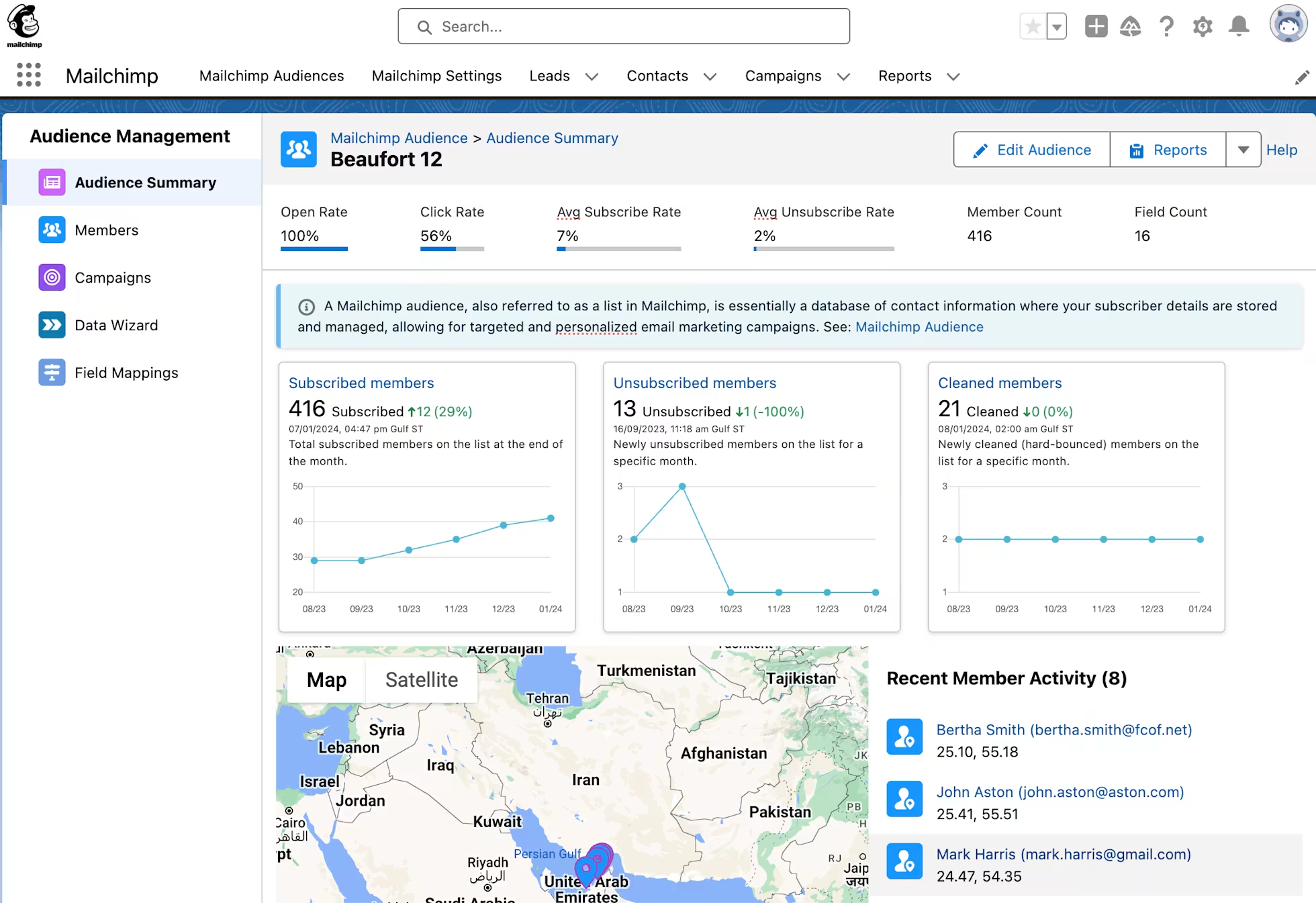
Supply: Mailchimp
1. Bidirectional Contact Sync with Question Builder Focusing on.
Salesforce Contacts, Leads, and Accounts circulation into Mailchimp as viewers members, whereas Mailchimp writes e-mail engagement standing again to customized fields on the Salesforce document. The Salesforce Question Builder lets entrepreneurs assemble focused queries (e.g., “all Contacts the place LeadSource = ‘Webinar’ AND Business = ‘Healthcare'”) and sync matching data into devoted Mailchimp viewers segments.
Recurring syncs hold audiences up to date as Salesforce knowledge modifications. When a contact unsubscribes from a Mailchimp marketing campaign, the mixing writes the opt-out standing on to the CRM.
2. Marketing campaign Engagement Writeback to Salesforce Exercise Timeline.
Each e-mail Mailchimp sends to a synced contact generates Exercise data in Salesforce: Despatched, Opened, Clicked (together with the particular URL clicked), Bounced, Unsubscribed, Complained, and Forwarded.
These occasions seem on the usual Exercise Timeline, so a gross sales rep reviewing a contact earlier than a name can see not solely that the contact opened the product announcement e-mail however that they clicked by to the pricing web page.
The mixing additionally helps Marketing campaign Affect monitoring when Mailchimp campaigns are mapped to Salesforce Campaigns, closing the attribution loop from e-mail ship to closed-won income.
3. Dynamic Viewers Constructing from Salesforce Campaigns and Listing Views.
Moderately than exporting static contact lists, entrepreneurs subscribe whole Salesforce Campaigns, Listing Views, or Reviews as dynamic Mailchimp audiences. A Salesforce Listing View of “Contacts from Enterprise Accounts in Renewal Stage” syncs to Mailchimp as a recurring section that updates as contacts enter or exit the renewal stage.
This eliminates the information drift that happens when a marketer exports an inventory on Monday and sends Wednesday, by which period contacts have unsubscribed, modified corporations, or moved to Closed-Received.
4. Multichannel Coordination with SMS.
Mailchimp’s e-mail and SMS capabilities combine with Salesforce by the identical sync infrastructure, enabling coordinated outreach throughout each channels grounded in CRM knowledge. Prospects utilizing each e-mail and SMS report 97% greater click on charges versus e-mail alone.
Mailchimp Pricing
Mailchimp makes use of contact-count-based pricing. The Salesforce integration is offered on Necessities and above:
-
Necessities: begins at $13/month (500 contacts), 10x month-to-month e-mail ship multiplier, A/B testing, as much as 4-step automations
-
Normal: begins at $20/month (500 contacts), 12x ship multiplier, provides superior segmentation, dynamic content material, ship time optimization, multivariate testing, and generative AI options
-
Premium: begins at $350/month (500 contacts), 15x ship multiplier, limitless seats and audiences, telephone and precedence help
SMS advertising is a paid add-on billed through month-to-month credit score buy. Contact overages are charged based mostly on peak contact rely reached in the course of the billing interval.
Who Ought to Use the Mailchimp Integration?
-
Groups dedicated to Salesforce as their buyer knowledge basis that want e-mail advertising depth (AI content material era, automation flows, multivariate testing) with out adopting a full CRM-replacement platform
-
Gross sales reps who must see e-mail engagement on contact data earlier than calls: the mixing writes marketing campaign opens, clicks, and particular hyperlink exercise to the Salesforce Exercise Timeline
4. Energy BI: Finest Salesforce Integration for Enterprise Intelligence and Pipeline Analytics
Energy BI is Microsoft’s enterprise intelligence platform that integrates with Salesforce to drag CRM knowledge into interactive dashboards that transcend what Salesforce’s native reporting layer provides.
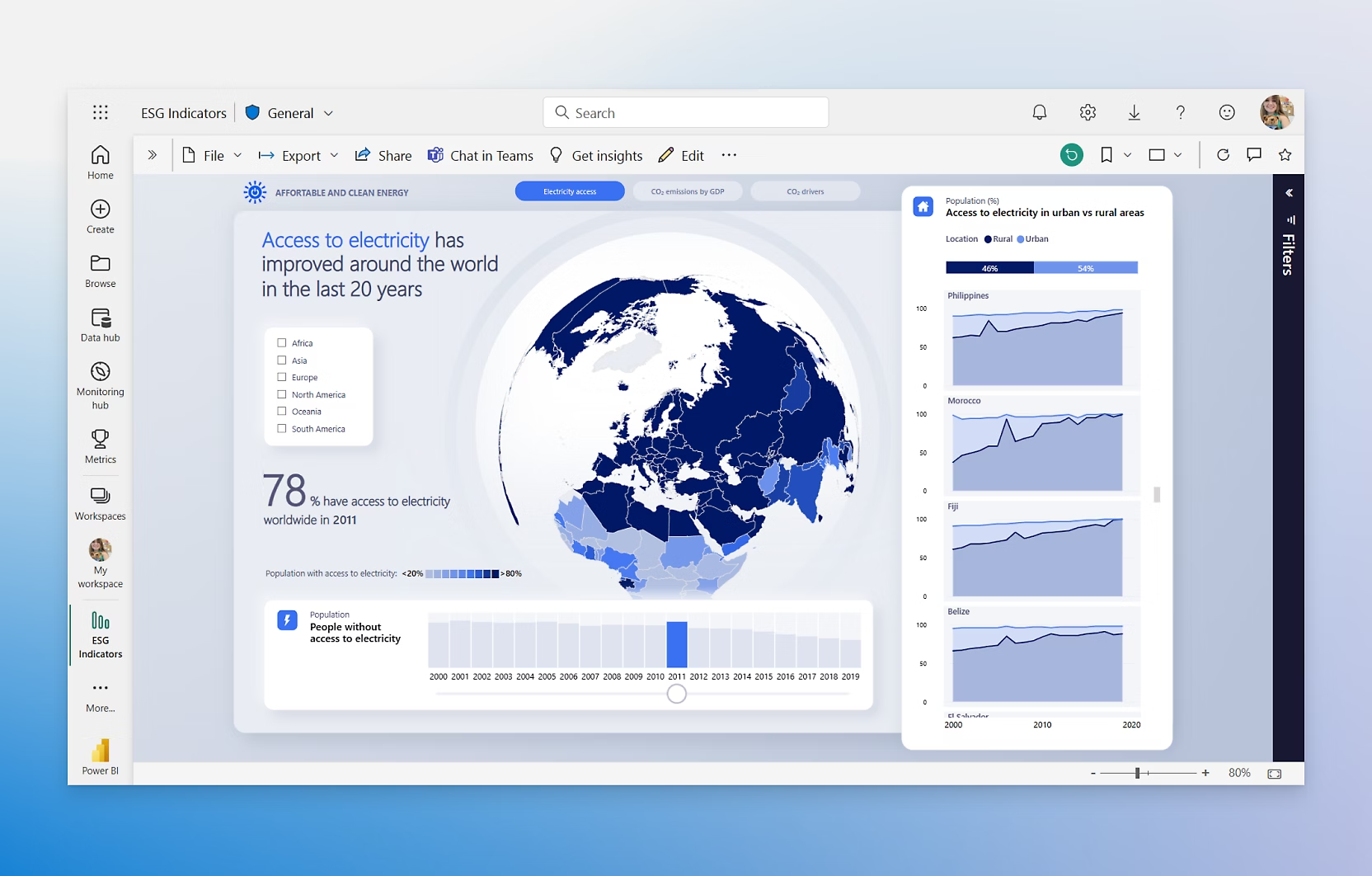
Supply: Microsoft
The mixing connects by two built-in connectors in Energy BI Desktop: the Salesforce Objects connector and the Salesforce Reviews connector, each authenticating through OAuth with no API keys or guide token administration. 97% of Fortune 500 corporations use Energy BI.
Key integration capabilities embody:
How Energy BI Integrates with Salesforce
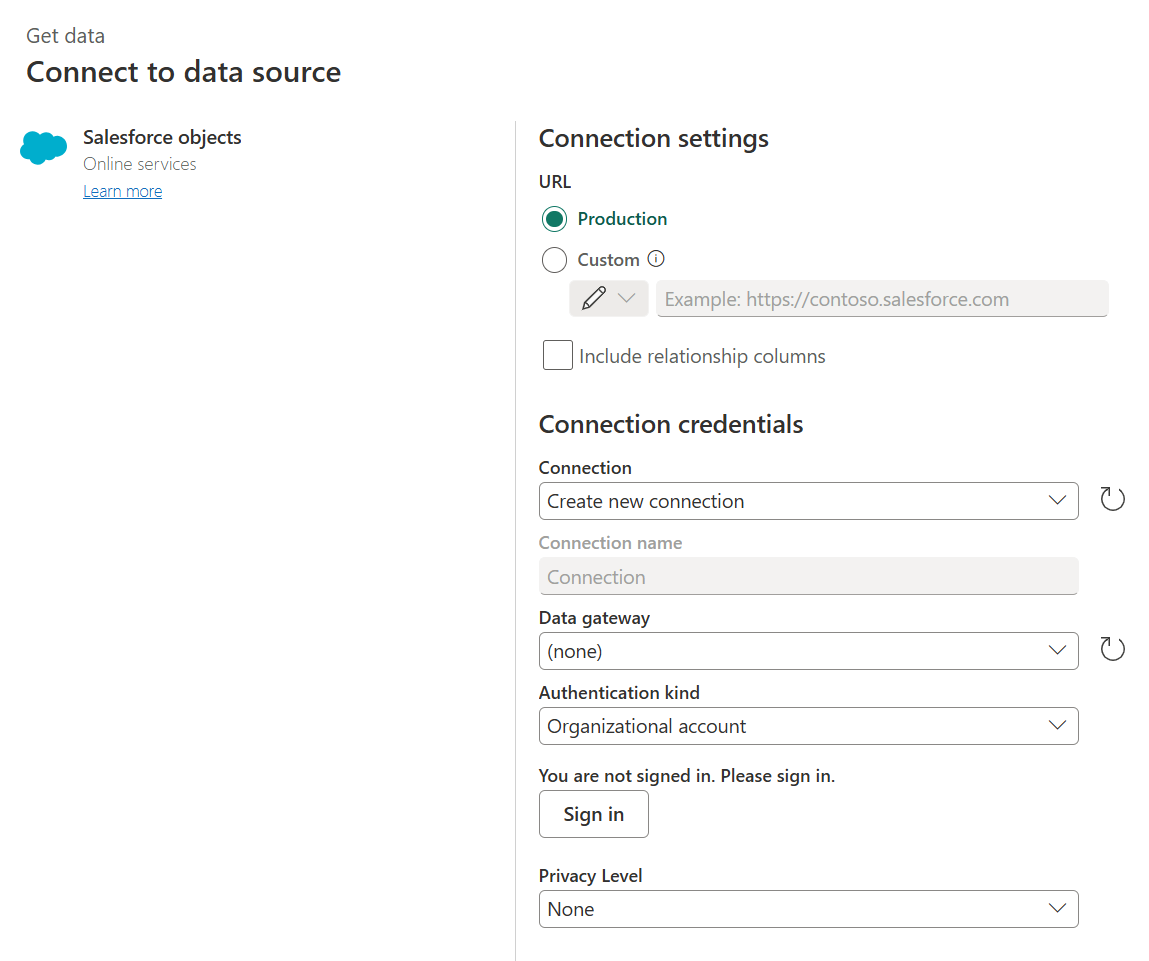
Each connectors are native to Energy BI Desktop, accessible from the Get Information menu with OAuth authentication.
Any analyst with a Salesforce login and Energy BI Desktop (which is free) can arrange the connection in minutes. For scheduled refresh, the workspace requires at the very least a Energy BI Professional license, with refresh working as much as 8 instances per day on Professional or 48 instances per day on Premium/Material capability.
1. Salesforce Objects Connector: Full Information Mannequin, No Row Cap.
The Objects connector exposes Salesforce’s full object mannequin: each commonplace object (Accounts, Contacts, Leads, Alternatives, Circumstances, Campaigns) and each customized object. Analysts choose the objects and fields to drag, and Energy BI ingests your complete dataset.
As soon as the information lands in Energy BI’s in-memory mannequin, analysts be part of objects throughout relationships and apply DAX calculations (rolling win charges, stage velocity, pipeline protection ratios, quarter-over-quarter comparisons) that Salesforce’s native report builder can not produce with out customized report varieties.
Supply: Microsoft
2. Salesforce Reviews Connector: Quick Path for Aggregated Views.
For groups that need speedy visualization with out constructing a knowledge mannequin from scratch, the Reviews connector imports an current saved Salesforce report with its fields, filters, and groupings already utilized. The trade-off is a tough 2,000-row restrict: any report with extra rows will get silently truncated.
This connector works greatest for summary-level studies (pipeline by stage, income by area) and ought to be averted for transactional-level evaluation.
3. Prebuilt Template Apps: Pipeline Dashboards Out of the Field.
Salesforce template apps on Microsoft AppSource ship with preconfigured knowledge connections and report pages overlaying gross sales pipeline by stage, high accounts by income, lead conversion funnels, and quota attainment.
Putting in a template app is self-service: authenticate towards the Salesforce org and the app populates with actual knowledge. Groups can lengthen the prebuilt visuals by including pages, modifying measures, or connecting extra knowledge sources.
4. Embedded Dashboards in Salesforce through AppExchange.
The Energy BI Embedded element out there by Salesforce AppExchange surfaces revealed Energy BI dashboards instantly inside Salesforce data and Lightning pages. A gross sales rep viewing an Account document can see a Energy BI dashboard scoped to that account (pipeline historical past, deal velocity, win/loss tendencies) with out navigating away from Salesforce.
Energy BI Pricing
Energy BI makes use of a hybrid per-user and capacity-based pricing mannequin:
-
Energy BI Free (Material Free) at $0/consumer: consists of Energy BI Desktop for private report creation; can not publish, share, or schedule refreshes
-
Energy BI Professional at $14/consumer/month (annual): publish, share, and schedule automated Salesforce knowledge refreshes as much as 8x/day; included at no extra value in Microsoft 365 E5 subscriptions
-
Energy BI Premium Per Person (PPU) at $24/consumer/month (annual): bigger dataset limits, as much as 48 scheduled refreshes per day, superior AI options
For organizations already working Microsoft 365, Professional licenses could also be bundled in current E5 agreements, making the Salesforce integration free to activate.
Who Ought to Use the Energy BI Integration?
-
Gross sales and income leaders who want pipeline dashboards becoming a member of Salesforce alternative knowledge with monetary, headcount, or operational metrics from different programs
5. Zapier: Finest Salesforce Integration for No-Code Workflow Automation
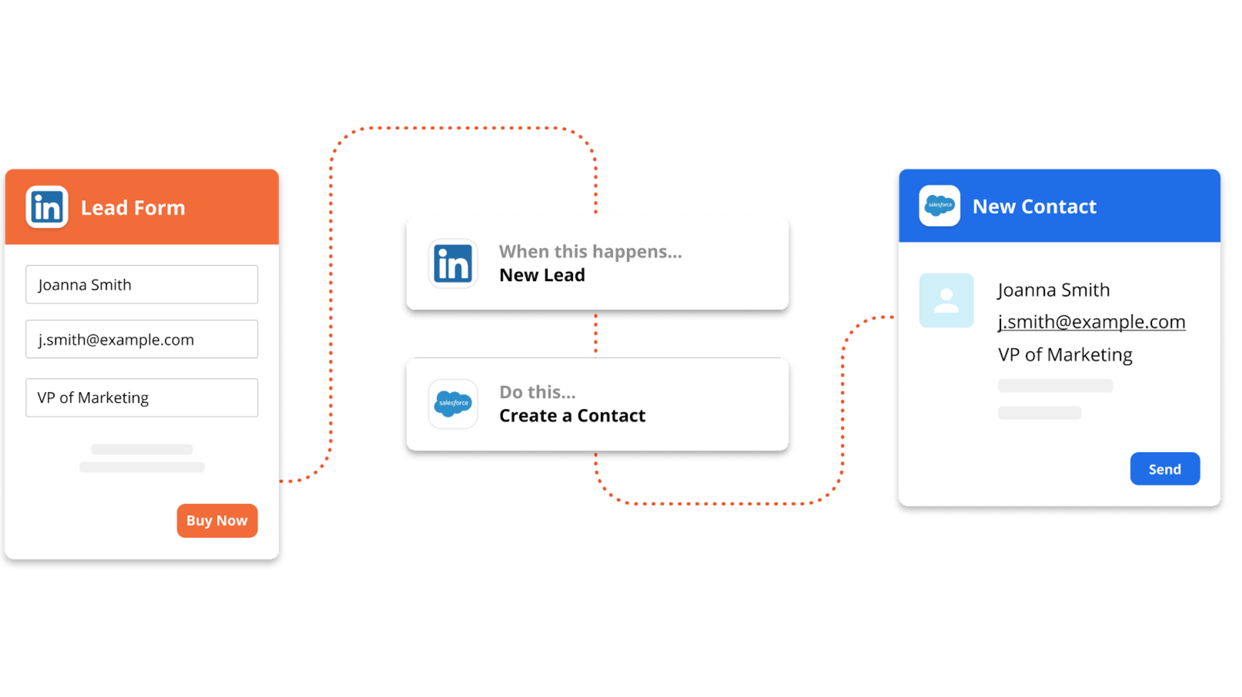
Zapier is a no-code automation platform that integrates with Salesforce to attach your CRM to over 8,000 purposes by automated workflows referred to as Zaps.
It really works in each instructions: Salesforce occasions set off actions in exterior instruments, and exercise in related apps creates or updates Salesforce data. The mixing is listed on AppExchange and connects through OAuth.
Key integration capabilities embody:
-
Salesforce document actions that create and replace data, add attachments and notes, and invoke Salesforce Flows from Zap steps
How Zapier Integrates with Salesforce
Zapier connects by commonplace OAuth 2.0 authorization.
Salesforce API entry is required, which is included in Enterprise Version and above; Skilled Version customers want the API add-on. The mixing helps each polling triggers and Salesforce Move-based actions.
1. Salesforce Triggers: Listening for CRM Occasions.
Zapier watches for occasions in your Salesforce org (new data, up to date data, outbound messages) and fires a Zap every time one happens. Triggers ballot each 2 minutes on Skilled, each 1 minute on Staff and Enterprise. Zapier deduplicates routinely by monitoring every document’s distinctive ID.
2. Salesforce Actions: Writing Information Again into the CRM.
Zapier can create new data in any Salesforce object, replace current data, upsert data (create if not discovered, replace if discovered), add notes and attachments, and invoke Salesforce Flows instantly from a Zap step. The Move invocation lets Zapier set off complicated enterprise logic that already lives in Salesforce with out rebuilding it contained in the automation instrument.
Supply: Salesforce AppExchange
3. Multi-Step Workflows with Conditional Logic.
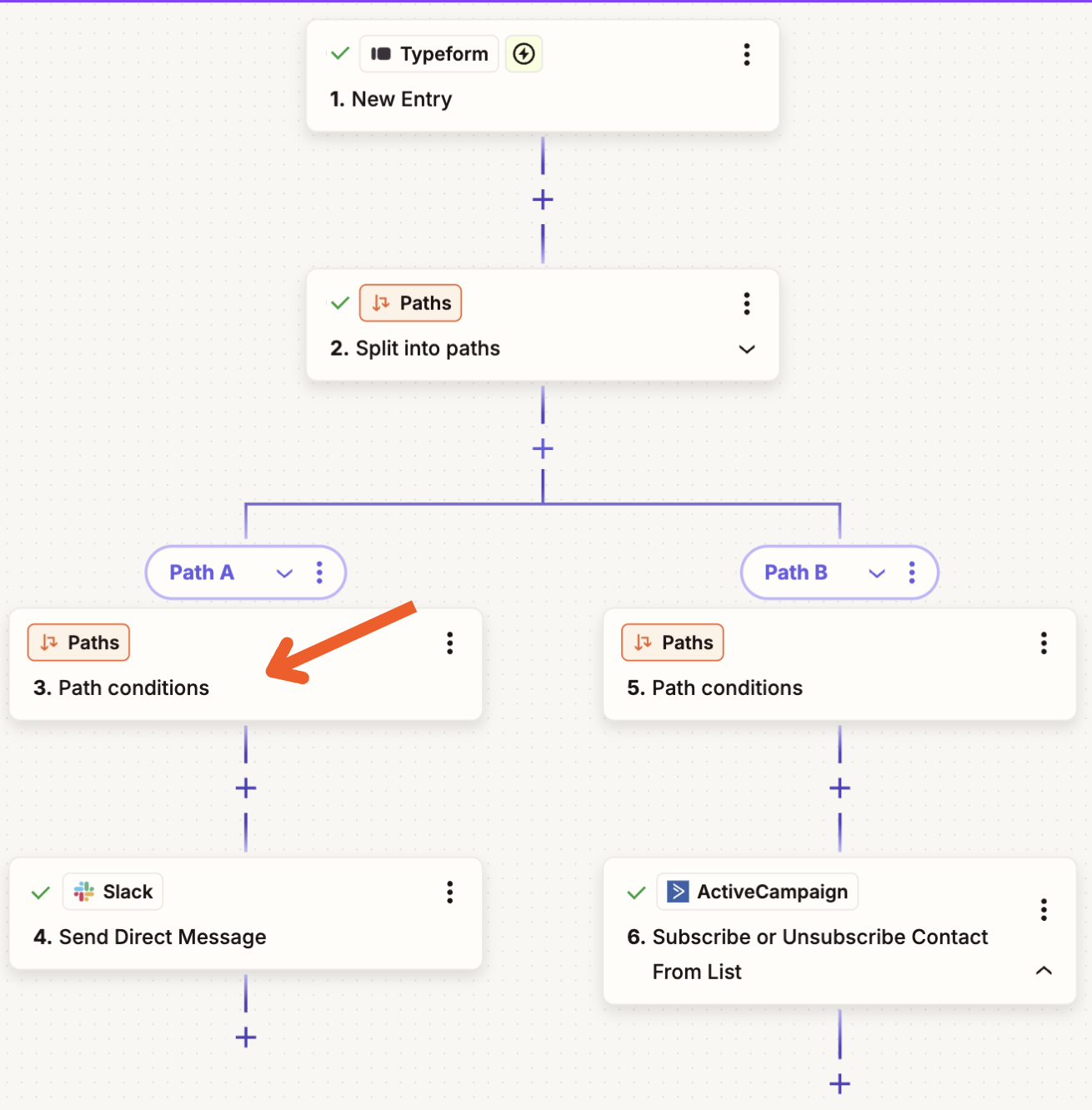
Zapier helps as much as 100 steps per Zap. A typical multi-step workflow may set off on a brand new Salesforce Lead, search for the corporate in a undertaking administration instrument, create a job if not discovered, ship a Slack notification, and add a notice to the Salesforce Lead confirming downstream steps accomplished.
Paths route data by area values (enterprise results in one workflow chain, SMB results in one other), and Filters cease execution on data that don’t meet standards. Filter and Path steps don’t rely as duties.
Supply: Zapier
4. Information Formatting and Webhooks.
The native Formatter instrument handles date parsing, telephone quantity cleanup, title splitting, and quantity formatting inline throughout the Zap. The Webhooks step extends the mixing to any system with an HTTP endpoint, connecting Salesforce to inner instruments, legacy programs, or customized purposes with out constructing a devoted connector.
Zapier Pricing
Zapier makes use of task-based pricing the place every motion step counts as one job:
-
Enterprise: customized pricing, limitless customers, SCIM provisioning, superior admin controls
Challenge job consumption earlier than selecting a plan: a 5-step Zap processing 1,000 new Salesforce Leads per thirty days consumes 4,000 duties. Zapier’s pay-per-task overage billing is offered at 1.25x the plan’s per-task charge.
Who Ought to Use the Zapier Integration?
-
Organizations the place a deal closure should cascade by undertaking administration, billing, and communication instruments routinely
6. DocuSign: Finest Salesforce Integration for Settlement Execution and Contract Lifecycle Administration
DocuSign is an digital signature and settlement administration platform that integrates with Salesforce to deal with your complete settlement lifecycle: producing paperwork from CRM knowledge, gathering signatures, writing outcomes again to data, and managing contracts after the deal closes.
The mixing is offered as a native AppExchange app and thru the newer IAM for Gross sales product, which went usually out there in Could 2026. DocuSign gained the Salesforce 2025 Associate Innovation Award in Excessive Know-how.
Key integration capabilities embody:
-
Ship, monitor, and retailer agreements instantly from Salesforce data with real-time standing monitoring and automated doc attachment on completion
-
Contract lifecycle workflows triggered by Salesforce alternative phases, with inner approval routing, clause libraries, and AI-assisted evaluate
-
Cross-cloud protection spanning Gross sales Cloud, Service Cloud, Income Cloud, and Salesforce CPQ
How DocuSign Integrates with Salesforce
The mixing installs by AppExchange with OAuth authentication and embeds DocuSign’s sending and monitoring interface instantly inside Salesforce data on alternatives, contacts, accounts, and leads.
The native Salesforce integration requires the Enhanced plan or an IAM plan; the usual eSignature plans (Private, Normal, Enterprise Professional) don’t embody Salesforce connectivity.
1. Ship, Observe, and Retailer: Settlement Workflows on Salesforce Data.
From a possibility, a rep sends an NDA, MSA, SOW, or order kind for signature with out opening a brand new browser tab. The DocuSign panel exhibits envelope standing (Despatched, Seen, Signed, Declined) in actual time, and accomplished paperwork connect to the originating Salesforce document routinely.
This replaces the workflow of downloading a template, filling in phrases manually, sending through a separate instrument, monitoring e-mail, downloading the signed PDF, and importing it again to the CRM.
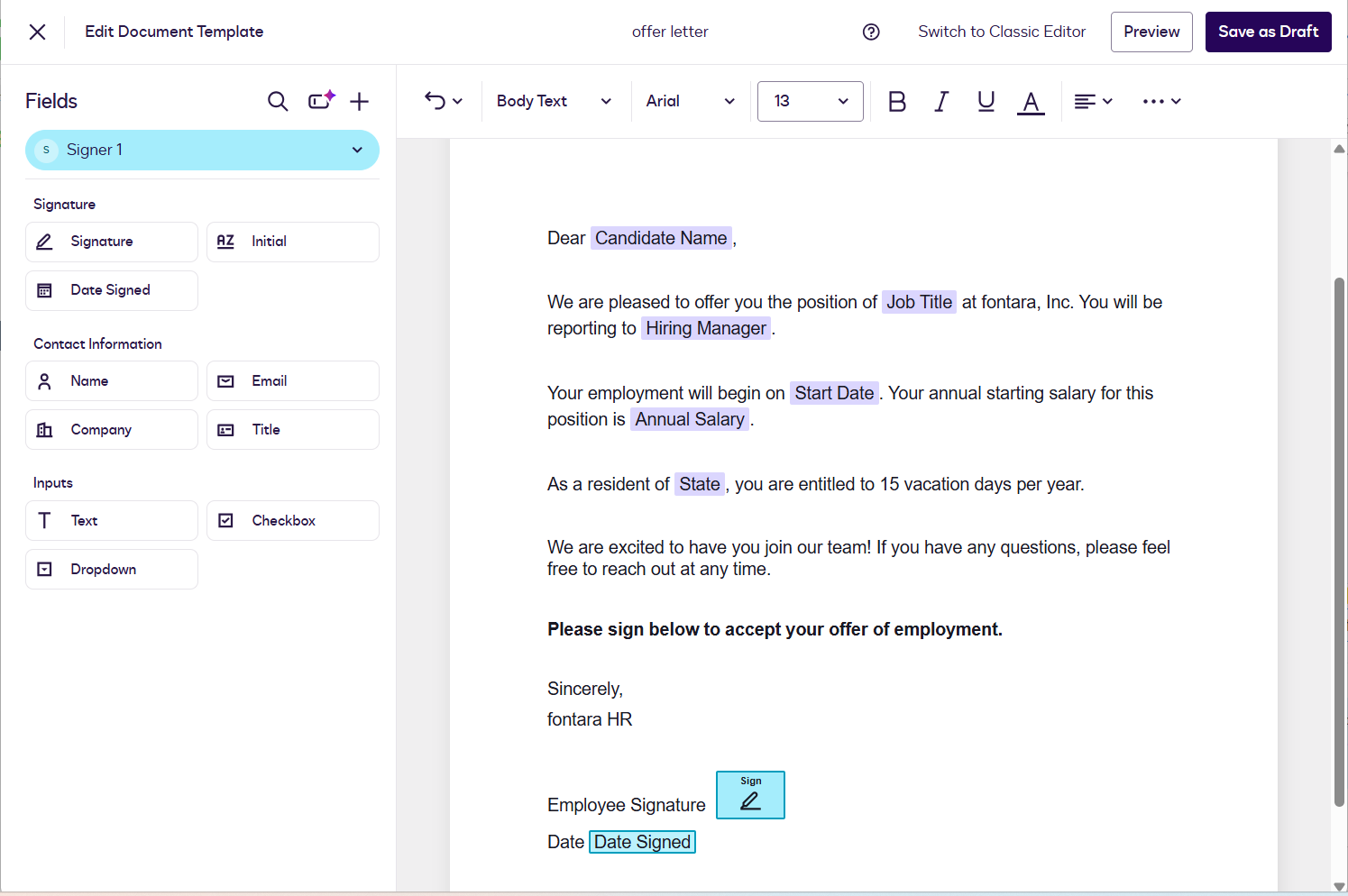
2. Doc Technology and Discipline Writeback.
DocuSign’s Doc Technology characteristic pulls area values instantly from the Salesforce document (contact title, account, deal quantity, product strains, low cost phrases) and auto-populates settlement templates. On completion, signed area values (revised fee phrases, begin dates, supply schedules) write again to mapped Salesforce fields routinely.
Supply: DocuSign
This issues most for Income Cloud and CPQ customers, the place correct post-signature knowledge impacts billing schedules and income recognition.
3. Contract Lifecycle Workflows from Alternative Stage.
By DocuSign CLM, alternative stage modifications set off contract workflows: pulling the suitable template, producing the settlement from CRM knowledge, routing it internally for approval, sending it for signature, and storing the executed contract.
The CLM provides a drag-and-drop workflow editor with 100+ pre-configured steps, a clause library with conditional logic, and AI-assisted evaluate that flags non-standard phrases towards a authorized playbook. A Forrester TEI research discovered 449% ROI for CLM prospects, with a 90% discount in time spent producing gross sales contracts and 85% discount in errors.
4. Income Cloud and CPQ Protection.
For organizations working Salesforce CPQ, DocuSign connects to the quoting layer so an accredited quote flows instantly right into a generated settlement. The pricing, portions, and phrases on the signed contract match the accredited CPQ quote by building, not by guide transcription.
DocuSign Pricing
The Salesforce integration requires the Enhanced plan or an IAM plan:
-
eSignature Enhanced (contact gross sales): customized pricing, minimal 50+ customers; consists of native Salesforce integration, SSO, HIPAA, FedRAMP, and 24/7 dwell help
-
IAM Normal: $50/consumer/month (minimal 3 customers), limitless envelopes, Iris AI, Settlement Supervisor, Workflow Builder
-
IAM Skilled: $80/consumer/month (minimal 3 customers), provides Enterprise Professional eSignature options, 10 workflows
-
IAM Enterprise: contact gross sales, provides AI-assisted evaluate, multi-brand e-mail/net, 24/7 dwell help
The usual eSignature plans (Private at $10/month, Normal at $25/consumer/month, Enterprise Professional at $40/consumer/month) don’t embody Salesforce integration.
Who Ought to Use the DocuSign Integration?
-
Gross sales groups shedding time switching between Salesforce and a separate doc instrument to ship, monitor, and file agreements: DocuSign eliminates that change by embedding the workflow inside CRM data
-
Organizations with multi-party approval routing (authorized evaluate, finance sign-off, govt approval) that need these steps tracked inside Salesforce pipeline phases moderately than managed over e-mail
7. QuickBooks: Finest Salesforce Integration for Accounting and Finance Information Sync
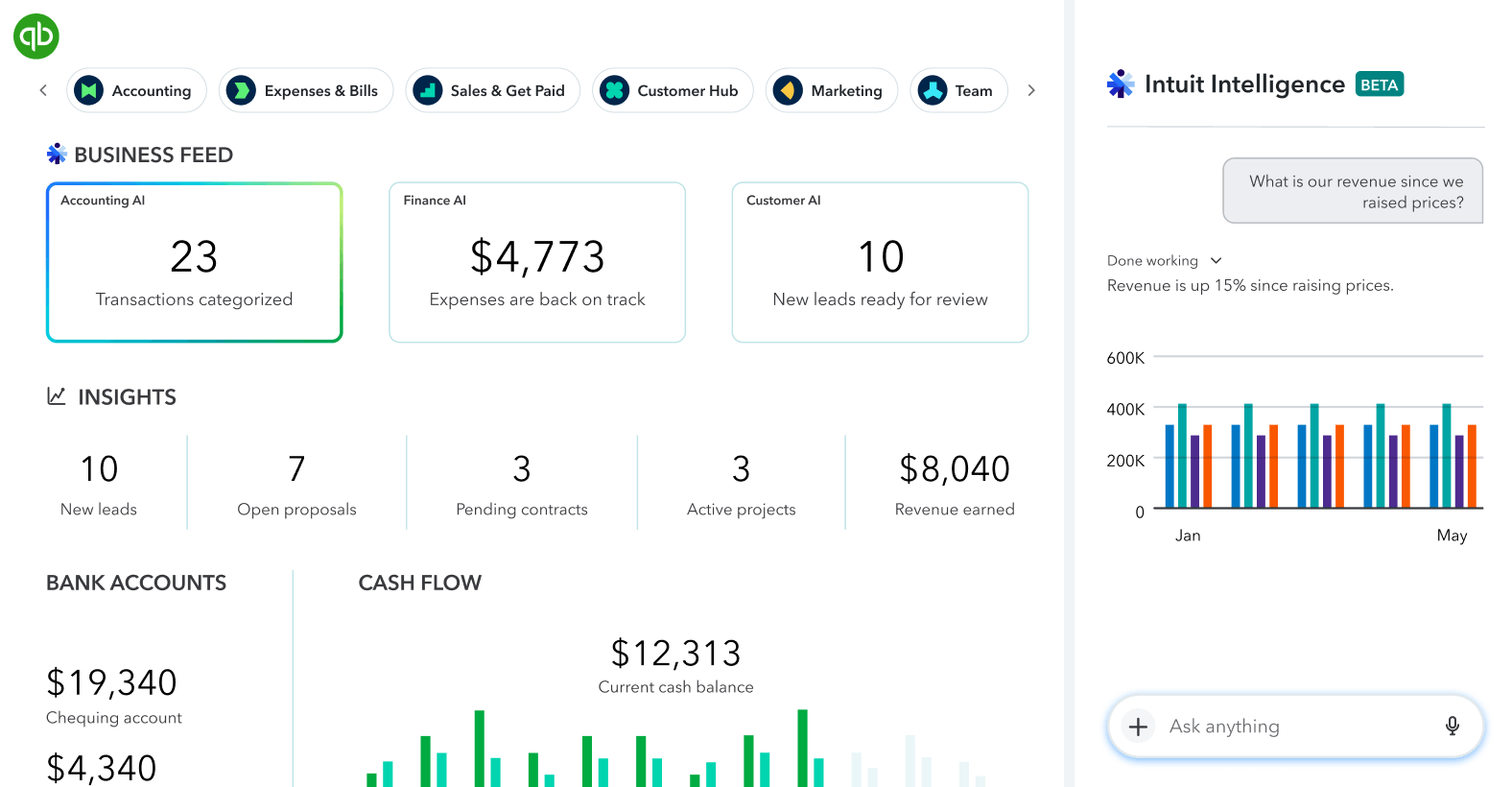
QuickBooks is Intuit’s cloud-based accounting platform that integrates with Salesforce to shut the hole between the income your gross sales group closes and the monetary data your accounting group maintains.
Supply: QuickBooks
The mixing runs by devoted AppExchange connectors (Breadwinner, DBSync, and others) that authenticate through OAuth to each programs, mapping Salesforce fields to their QuickBooks On-line Accounting API equivalents.
Key integration capabilities embody:
-
Bidirectional sync of shoppers, invoices, merchandise, and funds between QuickBooks and Salesforce
-
Product and worth e book synchronization holding gadgets, SKUs, and pricing constant throughout CRM and accounting
How QuickBooks Integrates with Salesforce
QuickBooks connects to Salesforce by AppExchange-listed connectors utilizing OAuth 2.0 for each programs.
These connectors expose configuration interfaces the place admins map fields, outline sync route, set set off situations, and schedule sync frequency (sometimes each 15-60 minutes). Setup requires Salesforce admin permissions to put in and authorize the related app and QuickBooks admin entry for the OAuth connection.
1. Bidirectional Monetary Sync.
The core of the mixing retains buyer data, invoices, funds, and merchandise constant between each programs with out parallel guide data. When a brand new Account is created in Salesforce, the connector creates an identical Buyer in QuickBooks with firm title, billing tackle, major contact, and e-mail.
Product and worth e book sync retains the Salesforce product catalog aligned with QuickBooks’ Gadgets listing, so the road gadgets a rep selects throughout quoting draw from the identical catalog that finance makes use of for invoices.
2. Bill and Estimate Technology from Salesforce.
When a rep closes a deal and strikes an Alternative to Closed Received, the mixing creates a corresponding bill in QuickBooks, pulling the chance title, line gadgets, quantities, billing contact, and fee phrases instantly from the Salesforce document.
The identical mechanism works for estimates in earlier deal phases. The finance group’s QuickBooks queue has the bill ready, pre-populated with the proper merchandise and pricing, and not using a re-entry step.
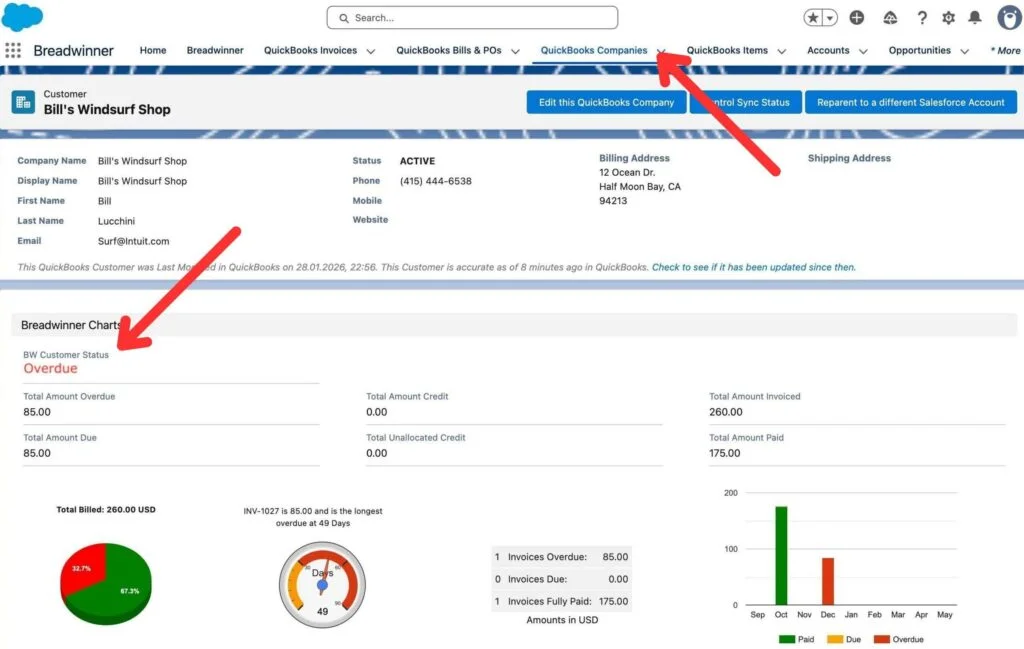
3. Fee Visibility on the Salesforce Document.
By customized fields populated by the connector, reps see instantly on the Salesforce Account web page whether or not the client has an impressive bill, what number of days overdue it’s, the full stability owed, and whether or not the latest fee was obtained. An account govt reviewing their pipeline earlier than a QBR can filter out accounts with overdue balances.
Buyer success managers can use fee historical past as context for well being scoring. This fee knowledge flows from QuickBooks into Salesforce (read-only on the CRM aspect), stopping CRM customers from by chance modifying monetary data.
Supply: Salesforce Apps
QuickBooks Pricing
QuickBooks On-line operates on a flat-fee month-to-month subscription:
-
Plus: $115/month (5 customers + 2 accountants), stock monitoring, buy orders, undertaking profitability; really helpful minimal for product catalog sync and full bill lifecycle
-
Superior: $275/month (25 customers + 3 accountants), batch invoicing, customized permissions, Spreadsheet Sync, Finance AI
The AppExchange connectors carry their very own subscription prices on high of the QuickBooks plan, sometimes $49-$199/month relying on the connector and sync quantity tier. On the Salesforce aspect, the mixing works with Skilled Version and above.
Who Ought to Use the QuickBooks Integration?
Ultimate Verdict
The perfect Salesforce integrations shut gaps your CRM can not fill by itself:
-
ZoomInfo: verified B2B knowledge, purchaser intent, and go-to-market intelligence enriching each document; the highest-impact integration on this listing in case your pipeline is determined by knowledge high quality
These integrations additionally compound: you may run ZoomInfo for enrichment and intent, Slack for deal coordination, Mailchimp for marketing campaign execution, and Energy BI for pipeline analytics on the identical Salesforce occasion, every including a layer of automation that makes the others extra priceless.
For those who join only one, make it the information layer every little thing else is determined by. ZoomInfo’s native Salesforce integration enriches your CRM with verified contact knowledge, purchaser intent alerts, and firm intelligence. ZoomInfo Lite is a everlasting free tier that features Salesforce connectivity, so you possibly can see what verified knowledge and dwell intent alerts do in your pipeline earlier than spending something.
Ceaselessly Requested Questions
What number of integrations does Salesforce help?
Salesforce’s AppExchange market hosts over 9,000 accomplice apps with greater than 14 million installs, spanning CRM, advertising automation, analytics, communication, settlement administration, accounting, and knowledge enrichment.
Past AppExchange, Salesforce’s REST API, Bulk API, GraphQL API, Pub/Sub API, and MuleSoft platform help customized integrations with nearly any system that has an API. The Developer Version offers 15,000 free API calls per 24-hour interval for constructing and testing integrations.
Do Salesforce integrations work on all plan tiers?
Many AppExchange apps work throughout all paid Salesforce editions, however API entry (which most integrations require) is included by default solely on Enterprise Version and above. Skilled Version customers may have the API add-on. Free and Starter Suite tiers have restricted API capabilities.
Superior options like workflow automation, customized objects, and Agentforce AI require greater tiers. Verify every integration’s documentation for edition-specific necessities.
How does Salesforce’s API charge limiting have an effect on integrations?
Salesforce enforces every day API request limits based mostly on version and license rely. Enterprise Version begins at 100,000 calls per rolling 24-hour interval, with per-license allocations stacking on high. Concurrent request limits cap at 25 for manufacturing orgs. Excessive-volume integrations (bulk knowledge enrichment, frequent
Zapier automations) ought to monitor utilization by Salesforce’s API dashboard. Groups approaching limits can use Bulk API 2.0 for big knowledge operations or consider whether or not event-driven approaches (Platform Occasions, Change Information Seize) cut back polling overhead.
Can I join Salesforce to instruments that aren’t on AppExchange?
Sure. Salesforce’s public REST API covers the total CRM knowledge mannequin and helps customized integrations with any system that may make HTTP requests.
For no-code options, Zapier connects Salesforce to eight,000+ apps, and Make offers visible multi-step automation with 3,000+ connectors. MuleSoft’s Anypoint Platform provides a whole lot of pre-built enterprise connectors for complicated integrations.
Salesforce’s Headless 360 initiative can also be exposing each platform functionality as an MCP instrument, enabling AI brokers from exterior programs to invoke Salesforce enterprise logic instantly.
How do I measure whether or not a Salesforce integration is delivering worth?
Salesforce’s reporting instruments help multi-touch attribution that tracks the affect of built-in instruments throughout the client journey. For knowledge enrichment integrations, monitor knowledge completeness scores, lead-to-MQL conversion charges, and gross sales cycle size earlier than and after activation.
For advertising integrations like Mailchimp, measure campaign-influenced pipeline and engagement-to-opportunity conversion. For workflow automation, measure time saved on guide duties and the quantity of automated actions processed month-to-month.
Are Salesforce integrations safe?
Salesforce makes use of OAuth 2.0 for third-party app authentication, which means integrations by no means require you to share your Salesforce password.
The platform holds ISO 27001/27017/27018, SOC 1/2/3, and FedRAMP certifications. Salesforce Protect (a premium add-on) offers occasion monitoring, platform encryption with BYOK, and area audit trails. Every AppExchange app undergoes a safety evaluate. Enterprise environments can use SSO, two-factor authentication, IP allowlisting, and centralized audit logs.
What’s one of the simplest ways to counterpoint Salesforce contact knowledge for B2B groups?
Integrating a devoted B2B knowledge platform offers essentially the most correct enrichment. ZoomInfo’s native Salesforce AppExchange integration routinely appends verified emails, direct-dial telephone numbers, firmographic knowledge, technographic profiles, and purchaser intent alerts to your CRM data.
The enrichment runs constantly by a verification pipeline backed by 300+ human researchers, overlaying 500 million contacts and 100 million corporations.
Salesforce’s Information Cloud consists of its personal enrichment capabilities, however for groups whose pipeline is determined by knowledge accuracy and shopping for sign detection, connecting a platform constructed for B2B intelligence closes the hole between what Salesforce captures and what your reps must act on.
Extra on this matter:

