

Groups that run CallRail for name monitoring and Salesforce as their CRM normally uncover the identical issues inside 1 / 4:
-
name attribution knowledge (which marketing campaign, which key phrase, which supply) lives in CallRail whereas the corresponding leads and offers reside in Salesforce, with no connection between the 2,
Nevertheless, the 2 platforms ended up in the identical stack (a advertising and marketing workforce adopting CallRail to measure cellphone leads whereas the org already runs on Salesforce, an company implementing name monitoring for a consumer’s current CRM, or a workforce including attribution to a mature gross sales workflow), the longer they function and not using a connection, the broader the hole between name knowledge and gross sales knowledge grows.
Connecting CallRail and Salesforce closes that hole.
Name monitoring knowledge flows into Salesforce information so reps can see which advertising and marketing supply drove every inbound name with out leaving the CRM. Attribution metadata (marketing campaign, key phrase, touchdown web page, referring supply) attaches to Leads, Contacts, and Actions, so advertising and marketing spend ties to precise cellphone conversations moderately than clicks alone. When a first-time caller reaches a tracked quantity, the combination can create a brand new Lead in Salesforce routinely, so no name falls via the cracks as a result of somebody forgot to log it.
CallRail gives a native Salesforce integration that handles name logging and lead creation with customized subject mapping out of the field. For groups that want totally different set off logic or conditional workflows, third-party automation instruments like Zapier and Make can bridge the 2 platforms with narrower knowledge protection. Customized API growth utilizing CallRail’s REST API and Salesforce’s REST API can be attainable for groups with particular necessities. Every technique differs in setup complexity, knowledge protection, sync path, and price.
There may be additionally one drawback no connection technique solves: the combination delivers name knowledge to CRM information, however it doesn’t confirm whether or not these information are correct, present, or full.
And that’s the place ZoomInfo is available in. ZoomInfo integrates natively with Salesforce and gives API and MCP entry that may feed verified, enriched contact and firm knowledge into any CRM workflow, so the information behind each inbound name are correct and full earlier than a rep picks up.
This text covers the CallRail-Salesforce integration panorama: which strategies can be found, what knowledge every one handles, the right way to set them up, the use circumstances that justify connecting each platforms, and the constraints to plan for. On the finish, it additionally covers how ZoomInfo matches in as a knowledge enrichment layer that strengthens the information flowing between CallRail and Salesforce.
Let’s begin with an summary of the combination.
Integration Overview
Supply: CallRail
Does a local integration exist?
Sure. CallRail gives a native Salesforce integration that tracks and logs name knowledge into Salesforce with customized subject mapping assist. The mixing is offered via CallRail’s in-app integrations library and handles lead creation, name logging, and attribution knowledge push into Salesforce objects.
What knowledge can sync?
Name information, caller info, attribution metadata (supply, marketing campaign, key phrase, touchdown web page, referring URL), name length, name sort, recording hyperlinks, tags, and notes. CallRail’s native integration helps customized subject mapping, letting groups management which CallRail knowledge populates which Salesforce fields. For groups utilizing CallRail’s Type Monitoring add-on, type submission knowledge may move into Salesforce.
Is the sync bidirectional?
No. The native integration flows one path: CallRail to Salesforce. Name monitoring knowledge, attribution metadata, and lead info push into Salesforce information, however Salesforce knowledge (deal levels, account particulars, lead scores) doesn’t move again into CallRail. Zapier workflows are additionally one-directional per Zap. Bidirectional sync requires customized API growth.
Is it real-time or batch?
The native integration pushes name knowledge into Salesforce shortly after every name completes, working in close to real-time. Zapier processes triggers inside 1 to fifteen minutes relying on plan tier. Customized API integrations can obtain close to real-time sync via CallRail’s webhooks, which hearth instantly on name occasions.
What are the out there strategies?
Native CallRail-Salesforce integration, third-party automation (Zapier, Make), and customized API growth.
|
Methodology |
Setup Issue |
Information Stream |
Actual-time? |
Price |
|---|---|---|---|---|
|
Native (CallRail) |
Low |
CallRail to Salesforce |
Close to real-time |
Included with CallRail plan |
|
Zapier |
Low |
One-way per Zap |
Close to real-time (1-15 min) |
From $19.99/mo |
|
Customized API |
Excessive |
Customizable |
Through webhooks |
Developer time + API utilization |
One distinction price settling upfront: the native integration and Zapier sync new name occasions as they happen. Neither is designed for migrating historic name knowledge into Salesforce. Customized API growth is the one technique that may backfill historic information, since it could actually pull from CallRail’s API with date-range filtering and write to Salesforce in bulk.
Integration Strategies
Native CallRail-Salesforce Integration
The way it works: CallRail’s native Salesforce integration connects the 2 platforms via CallRail’s integrations library. When a name is available in on a tracked quantity, CallRail captures the caller’s info and the attribution chain (which advertising and marketing supply, marketing campaign, key phrase, and touchdown web page drove the decision).
Supply: CallRail
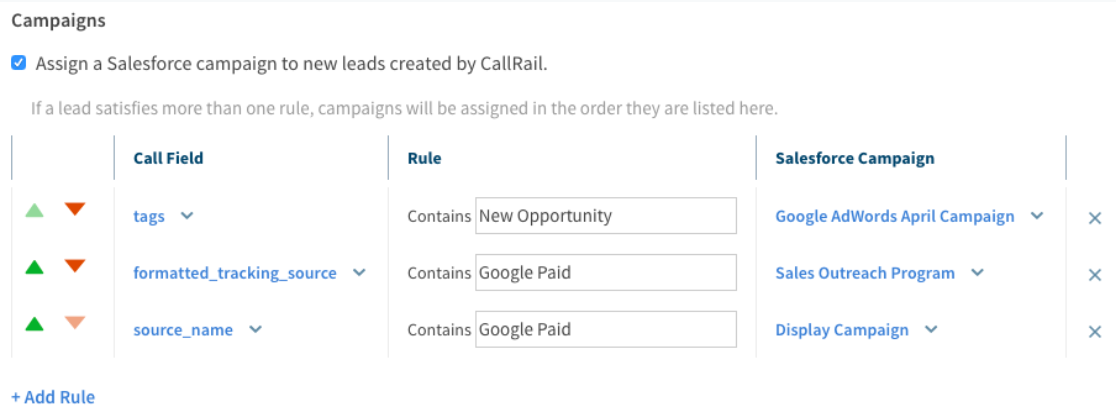
The mixing then pushes that knowledge into Salesforce, both creating a brand new Lead or logging exercise on an current document. Customized subject mapping controls which CallRail knowledge fields populate which Salesforce fields, so groups can tailor the information move to their CRM construction.
What it syncs: Name information with attribution metadata: advertising and marketing supply, marketing campaign title, key phrase, touchdown web page URL, referring URL, caller cellphone quantity, name length, name sort, monitoring quantity, tags, notes, and recording hyperlinks.
For groups utilizing CallRail’s Dialog Intelligence, further knowledge factors like name summaries and lead qualification tags might also be out there. The mixing can create new Leads in Salesforce from first-time callers and log calls as Actions on current Leads, Contacts, or Accounts.
Matches: ongoing sync of name occasions into Salesforce as a part of each day advertising and marketing and gross sales workflows; not a historic migration software.
Setup course of:
-
In CallRail, navigate to the integrations library (Settings > Integrations) and choose Salesforce. Authenticate along with your Salesforce org utilizing OAuth, granting CallRail permission to jot down knowledge to your CRM.
-
Arrange subject mapping between CallRail knowledge factors and Salesforce fields. Map name attribution fields (supply, marketing campaign, key phrase) to the corresponding Salesforce fields on Leads, Contacts, or customized objects.
-
Configure lead creation guidelines: select whether or not CallRail ought to create a brand new Salesforce Lead when it detects a first-time caller, or solely log exercise on current information. Set matching logic (sometimes by cellphone quantity) to stop duplicate information.
-
Outline which name sorts set off the sync (inbound calls, outbound calls, or each) and any filters (minimal name length, particular monitoring numbers, tagged calls solely).
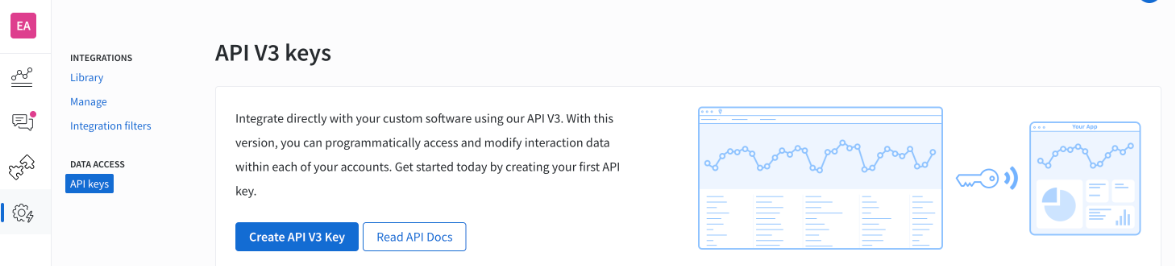
Strengths: First-party integration maintained by CallRail. No third-party software to configure or pay for individually. Attribution knowledge attaches to CRM information routinely, giving advertising and marketing visibility into which campaigns generate cellphone leads with out handbook logging.
Customized subject mapping lets groups management how knowledge lands in Salesforce. API utilization prices don’t apply to knowledge pushed via CallRail’s native integrations, protecting prices predictable.
Supply: CallRail
Limitations: The sync is one-directional (CallRail to Salesforce solely). Salesforce knowledge doesn’t move again into CallRail, so name monitoring experiences in CallRail can not incorporate deal levels or income knowledge from Salesforce.
Full name recordings are accessible by way of a hyperlink again to CallRail moderately than saved natively in Salesforce. CallRail’s deepest CRM integration is with HubSpot (which incorporates options like Voice Help knowledge sync and particular efficiency metrics), and the Salesforce integration doesn’t match the HubSpot integration’s function depth. Setup requires Salesforce System Administrator entry and CallRail admin rights.
Finest for: Advertising and marketing and gross sales groups that want name attribution knowledge inside Salesforce with minimal setup. The usual selection for any group already utilizing each platforms that desires name monitoring knowledge flowing into CRM information routinely.
Zapier
The way it works: Zapier connects CallRail and Salesforce via event-driven automations known as Zaps. Every Zap pairs a set off (an occasion in CallRail) with a number of actions (what occurs in Salesforce).
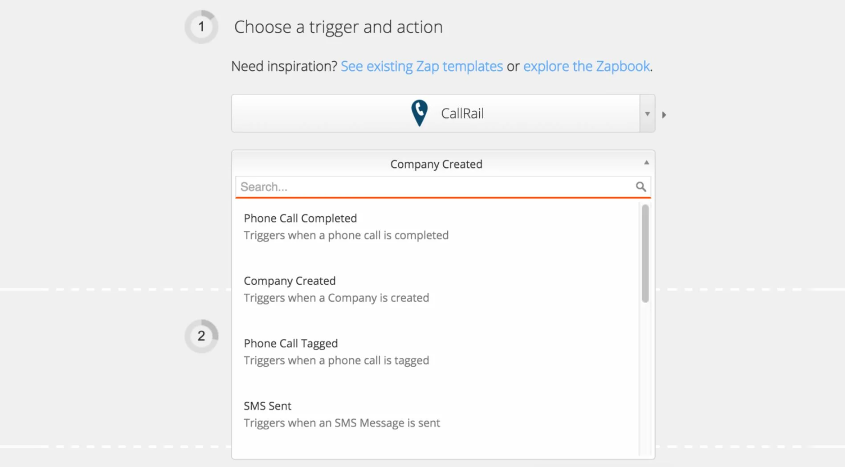
CallRail’s Zapier connector helps 13 triggers protecting calls, texts, type submissions, and tagging occasions. Salesforce’s Zapier connector gives actions for creating and updating information throughout all customary objects.
Supply: CallRail
What it syncs: Relying on the set off chosen, Zapier can seize inbound name completions, outbound name completions, SMS messages, type submissions, name tagging occasions, and extra. Every set off passes name metadata (caller quantity, length, monitoring quantity, tags) into the Zap, the place subject mapping routes that knowledge to Salesforce document fields.
One necessary limitation: CallRail at the moment gives no Zapier actions, which means it features as a knowledge supply solely inside Zaps. Information flows from CallRail to Salesforce, not the reverse.
Matches: ongoing sync of particular name occasions into Salesforce with conditional logic; not a migration software.
Setup course of:
-
Select Salesforce because the motion app and choose the motion (e.g., “Create Lead,” “Create Activity,” or “Replace Document”).
Make gives an analogous reference to a visible situation builder and triggers for inbound name acquired, name modified after ending, and SMS acquired. Make’s per-operation pricing is decrease than Zapier at greater volumes, and its conditional routing and error-handling modules give extra management over complicated workflows.
Strengths: Accessible to any workforce with a Zapier account, no matter which CallRail plan they use. No engineering sources required.
Zapier’s filter and formatting steps can add conditional logic (e.g., solely sync calls over a sure length, or route calls to totally different Salesforce document sorts based mostly on tags). A number of Zap templates exist for widespread CallRail-Salesforce workflows.
Limitations: Every Zap handles one trigger-action pair, so syncing calls, texts, and kinds requires separate Zaps (every counting towards your plan’s process allocation).
Detailed name attribution knowledge (key phrase, marketing campaign, touchdown web page) might not be out there via all Zapier triggers with the identical granularity because the native integration. No bidirectional sync. Historic calls made earlier than the Zap was activated don’t sync. Zapier prices by process rely, and excessive name volumes can accumulate prices.
Finest for: Groups that want conditional workflows past what the native integration helps, resembling routing calls to totally different Salesforce document sorts based mostly on tags, triggering particular automations on type submissions, or creating customized notification flows alongside CRM updates.
Customized API Integration
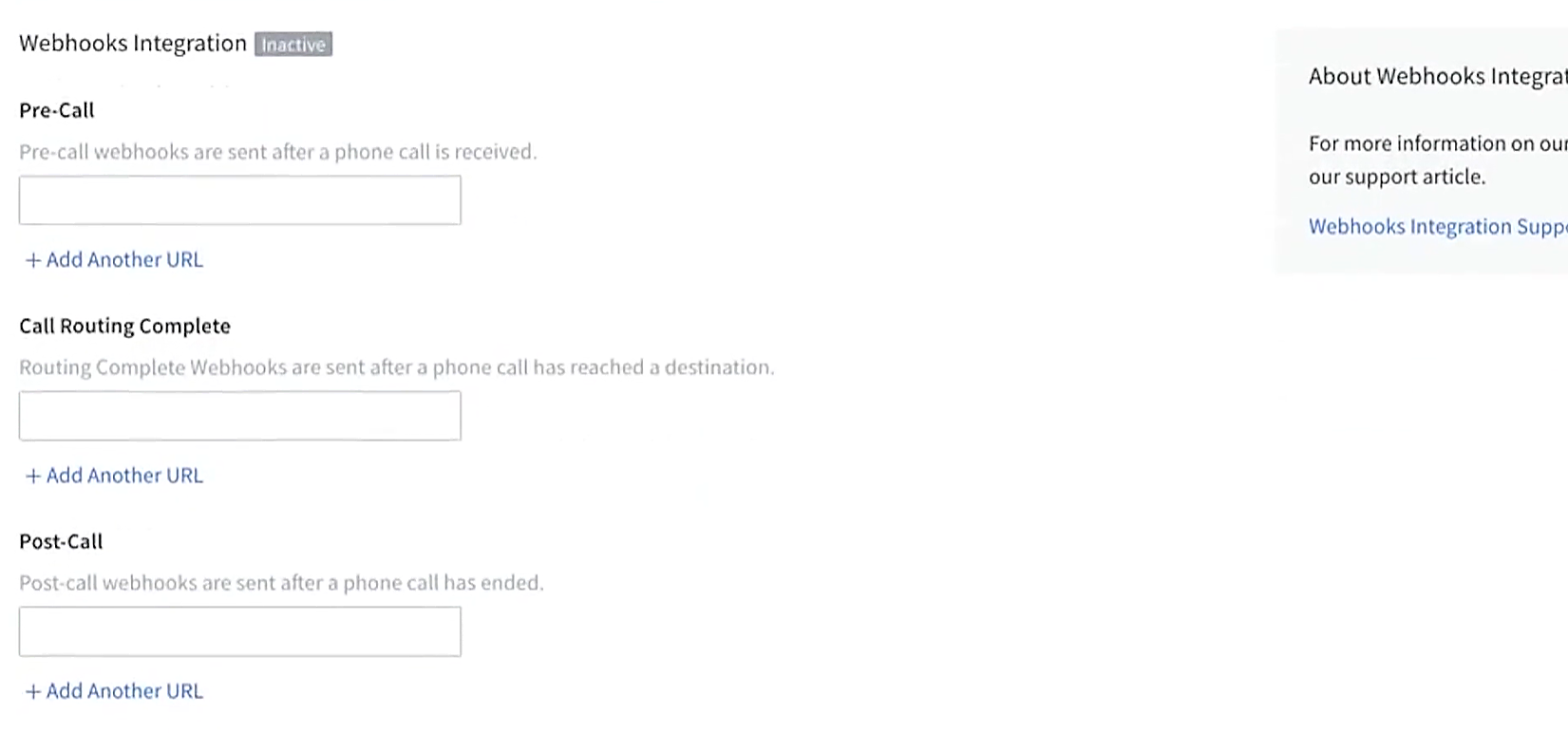
The way it works: Each platforms present full APIs. CallRail’s REST API v3 covers calls, type submissions, textual content messages, corporations, trackers, and tags, with webhook assist for ten occasion sorts together with pre-call, post-call, name modified, textual content message acquired, type submission, and Convert Help completion.
Supply: CallRail
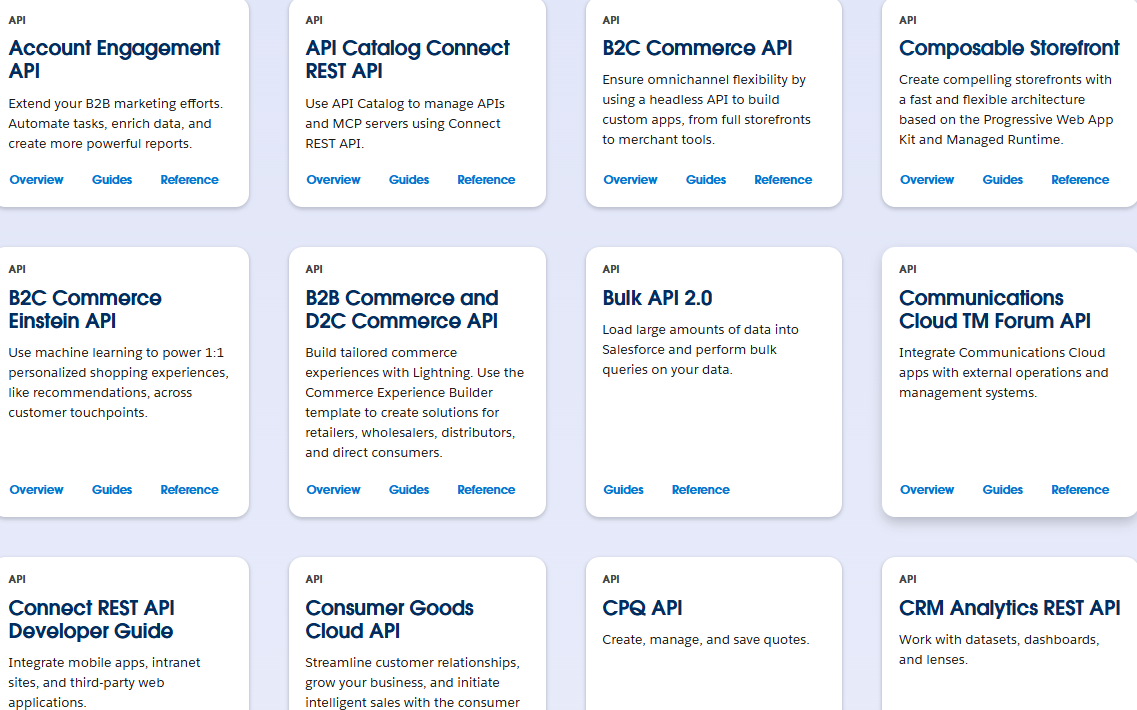
Salesforce’s REST API covers all customary and customized objects, with Platform Occasions and Change Information Seize for event-driven sync. A customized integration connects these APIs immediately, with your individual middleware dealing with authentication, subject mapping, transformation, and error restoration.
Supply: Salesforce
What it syncs: Something each APIs expose. That is the one technique that helps complicated eventualities like syncing Dialog Intelligence knowledge (transcripts, sentiment scores, AI summaries) into customized Salesforce objects, constructing cross-reference logic between CallRail monitoring numbers and Salesforce campaigns, or imposing enterprise guidelines that exceed the native integration’s subject mapping.
Matches: both historic backfill (utilizing CallRail’s API with date-range filtering and Salesforce’s Bulk API 2.0) or ongoing sync; the one technique with no ceiling on both.
Setup course of:
-
Design the information mannequin mapping between CallRail name information and Salesforce objects, together with field-level transformations and a cross-reference desk for matching caller cellphone numbers to Salesforce document IDs.
-
Construct the sync service: a server-side software that listens for CallRail webhooks (JSON POST payloads on name occasions), transforms knowledge based on the mapping, and writes modifications to Salesforce by way of the REST API.
-
Add logging, error dealing with, and retry logic. CallRail enforces fee limits of 1,000 requests per hour and 10,000 per day for basic API calls. Salesforce’s API limits begin at 100,000 requests per 24 hours for Skilled and Enterprise editions, plus per-license allocations.
-
Deploy, monitor, and preserve the combination. CallRail’s knowledge retention coverage retains communication information for 25 months earlier than auto-deletion, which constrains how far again a historic backfill can attain.
Strengths: Full management over what syncs, when, and the way. Can implement complicated enterprise logic, together with syncing Dialog Intelligence outputs, constructing Salesforce Marketing campaign attribution from CallRail monitoring knowledge, and dealing with multi-company CallRail setups that map to totally different Salesforce enterprise models.
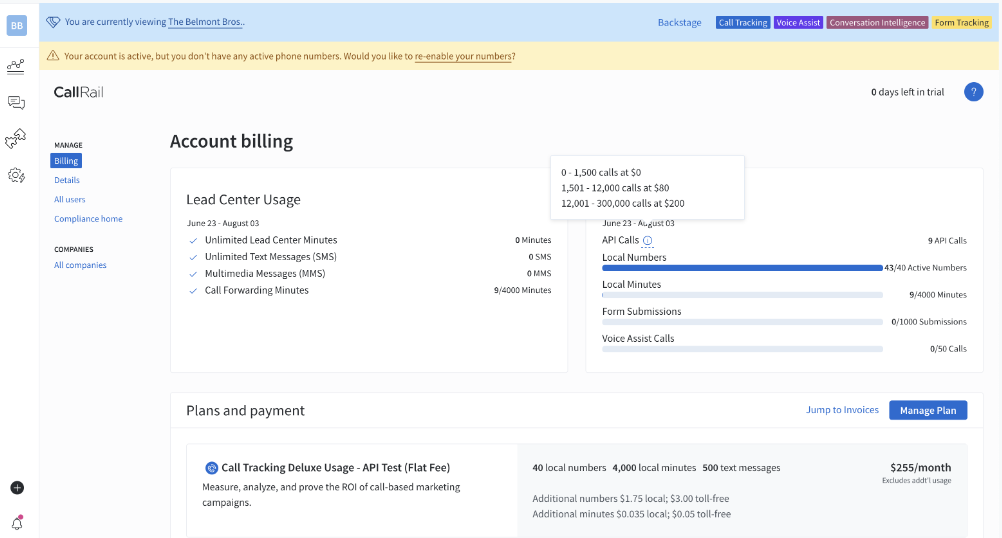
Actual-time sync by way of CallRail webhooks. No per-operation charges from a third-party connector (although CallRail’s API utilization is metered and billed individually from its native integrations).
Supply: CallRail
Limitations: Requires growth sources to construct and preserve. You personal the infrastructure, monitoring, and error restoration. CallRail’s API utilization prices apply to customized integrations (not like the native Salesforce connector, which is exempt).
Each APIs evolve independently: Salesforce variations its API with every seasonal launch (the present model is Summer season ’26, API model 67.0), and CallRail updates its API floor (most lately with the Convert Help Full webhook occasion in December 2024). The preliminary construct takes weeks, not hours.
Finest for: Groups with sync necessities that the native integration and Zapier can not fulfill: syncing Dialog Intelligence knowledge into customized Salesforce objects, constructing complicated matching logic throughout CallRail corporations and Salesforce enterprise models, or backfilling historic name knowledge. Requires in-house growth sources and a long-term dedication to sustaining the combination.
Key Use Instances
1. Advertising and marketing Attribution Contained in the CRM
The commonest cause to attach CallRail and Salesforce is to reply a query neither platform can reply alone: which advertising and marketing campaigns generate revenue-producing cellphone calls? CallRail captures the attribution chain (supply, marketing campaign, key phrase, touchdown web page) for each inbound name.
The native integration pushes that knowledge into Salesforce, the place it attaches to the Lead or Contact document. When that lead converts to an Alternative and closes, the attribution chain connects advertising and marketing spend to closed income with out handbook reconciliation.
Finest integration technique: Native CallRail-Salesforce integration.
2. Automated Lead Creation from Inbound Calls
Service companies in authorized, healthcare, residence providers, and actual property depend on cellphone calls as a main lead supply. With out integration, somebody should manually create a Salesforce Lead for each inbound caller.
The native integration automates this: when a first-time caller reaches a tracked quantity, CallRail creates a Lead in Salesforce with the caller’s cellphone quantity, the monitoring supply, and any name metadata. The rep opens Salesforce and sees the lead already logged, prepared for follow-up.
Finest integration technique: Native CallRail-Salesforce integration.
3. Name Exercise Logging for Gross sales Reporting
Gross sales managers want full exercise information to guage rep efficiency and forecast precisely. When CallRail logs each name as a Salesforce Exercise (with length, recording hyperlink, and attribution), managers see complete name quantity, name outcomes, and engagement patterns alongside electronic mail and assembly knowledge in Salesforce experiences.
This issues most for groups the place cellphone outreach is a main gross sales movement and name exercise wants to seem in the identical reporting layer as different touchpoints.
Finest integration technique: Native CallRail-Salesforce integration.
4. Conditional CRM Updates Primarily based on Name Occasions
Some groups want extra granular management than the native integration gives. For instance, an company would possibly wish to create a Salesforce Activity solely when CallRail tags a name as “certified,” or a workforce would possibly wish to replace a customized subject on a Contact when a name exceeds a sure length.
Zapier’s filter and formatting steps allow these conditional workflows: set a CallRail set off, add a filter situation, and route the consequence to a selected Salesforce motion based mostly on the decision’s attributes.
Finest integration technique: Zapier or Make (event-triggered with conditional logic).
5. Google Advertisements Optimization By way of CRM-Linked Name Information
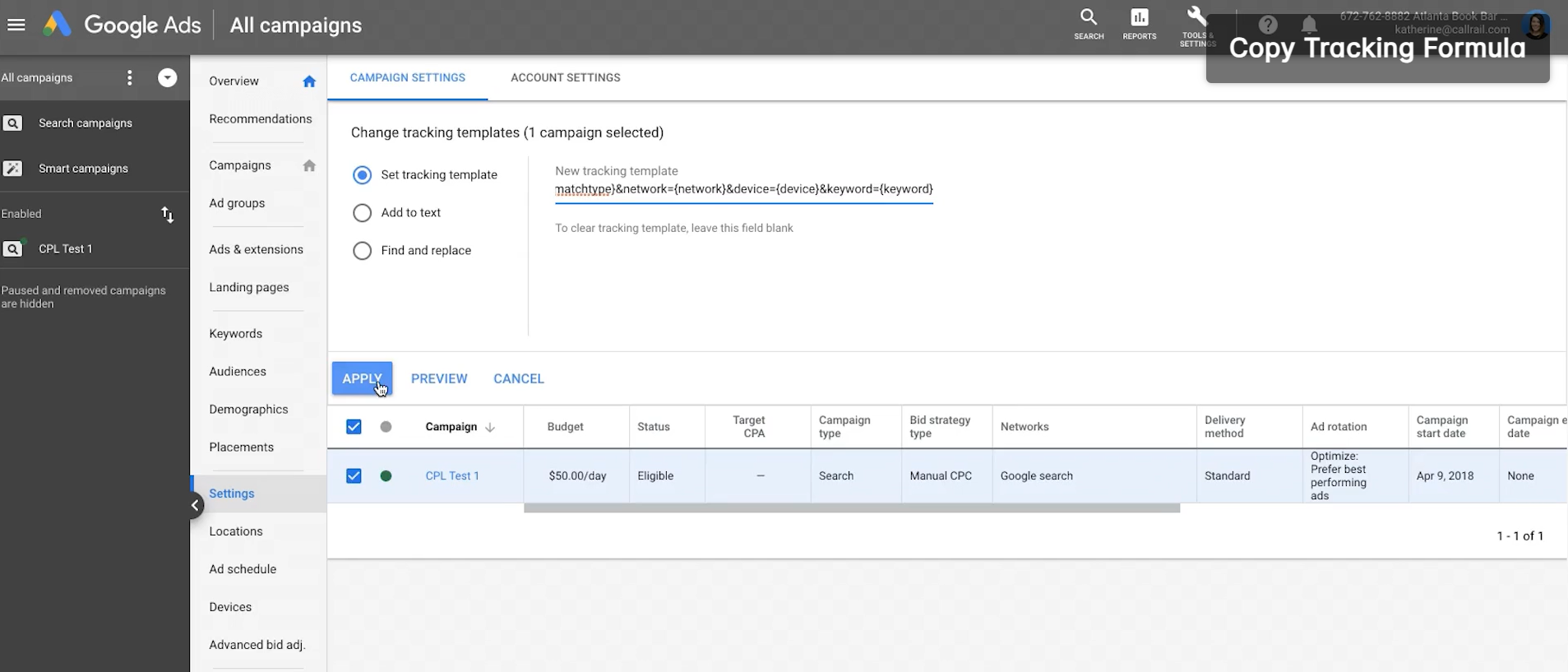
CallRail’s Google Advertisements integration already pushes name conversions again into Google Advertisements for Good Bidding. Connecting CallRail to Salesforce provides a second suggestions loop: advertising and marketing can observe which key phrases and campaigns generate not simply calls, however calls that produce certified pipeline and closed income.
Supply: CallRail
This closed-loop view, out there in Salesforce experiences, lets groups optimize advert spend towards income outcomes moderately than name quantity alone.
Finest integration technique: Native CallRail-Salesforce integration (mixed with CallRail’s Google Advertisements connector).
Limitations and Issues
One-Approach Information Stream
The native integration and Zapier each push knowledge in a single path: CallRail to Salesforce. Salesforce knowledge doesn’t move again to CallRail.
This implies name monitoring experiences in CallRail can not incorporate deal stage, alternative worth, or shut date from Salesforce. Groups that wish to analyze name attribution towards income outcomes should construct these experiences in Salesforce (the place each datasets converge) moderately than in CallRail.
Recording and Transcript Entry
Name attribution metadata syncs into Salesforce fields, however full name recordings are usually not saved natively in Salesforce. The mixing gives a hyperlink again to CallRail the place the recording may be performed. Reps who wish to take heed to a name should click on via to CallRail.
For groups utilizing CallRail’s Dialog Intelligence, AI-generated summaries, sentiment scores, and key phrase tags add worth, however the CI knowledge out there via the native Salesforce integration might not match what the HubSpot integration gives. HubSpot stays CallRail’s most developed CRM connector.
Supply: CallRail
Duplicate Document Administration
When CallRail creates new Leads in Salesforce from inbound callers, duplicate information can accumulate if the matching logic just isn’t configured rigorously. A caller’s cellphone quantity is essentially the most dependable matching key, however variations in formatting (with or with out nation code, dashes, areas) may cause mismatches.
Groups ought to configure matching guidelines within the integration setup and think about Salesforce’s built-in duplicate administration guidelines as a secondary safeguard.
Pricing Implications
The native Salesforce integration is included with CallRail plans at no further price, and API utilization prices don’t apply to knowledge pushed via native integrations. Customized integrations that transcend the usual connector do incur metered API prices based mostly on name quantity.
CallRail’s API enforces fee limits of 1,000 requests per hour and 10,000 per day. On the Salesforce facet, API limits are tied to version and license rely, beginning at 100,000 requests per 24 hours for Skilled and Enterprise editions. Third-party instruments carry their very own prices: Zapier prices by process rely (every synced name occasion counts as a process), beginning at $19.99/month.
Permissions and Entry
Organising the combination requires admin entry on each side. In CallRail, you want account admin rights to configure integrations and handle monitoring quantity settings. In Salesforce, System Administrator entry is required to authorize the OAuth connection and configure field-level permissions.
In case your Salesforce org makes use of field-level safety or sharing guidelines, the combination consumer’s profile will need to have write entry to each subject you plan to populate with CallRail knowledge.
Upkeep
Each platforms replace independently. Salesforce variations its API with every seasonal launch. CallRail provides new webhook occasion sorts and modifies its API floor (the newest addition was the Convert Help Full webhook occasion in December 2024).
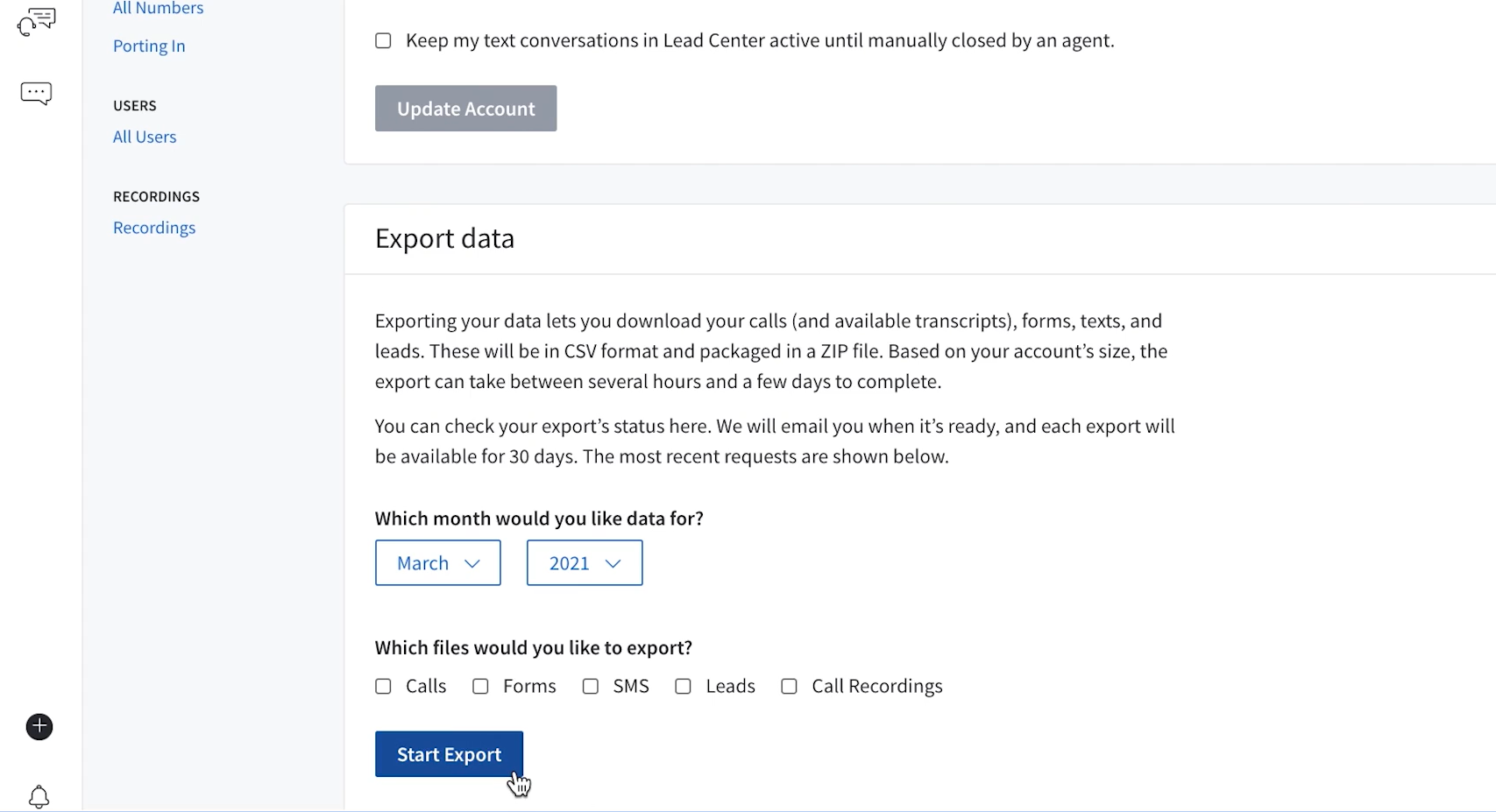
Customized fields added to both platform after the preliminary setup won’t sync except the combination configuration is up to date. CallRail’s knowledge retention coverage routinely deletes communication information after 25 months, which impacts historic knowledge availability for any retroactive evaluation.
Supply: CallRail
What No Methodology Fixes: The Information Itself
Each technique above strikes name monitoring knowledge from CallRail into Salesforce. None of them checks whether or not the contact information in Salesforce are correct, full, or present. A Lead with a disconnected cellphone quantity sits in Salesforce with zero name exercise, and there’s no solution to inform whether or not the silence means disinterest or a stale document.
A Contact with an outdated title nonetheless receives the identical name routing, despite the fact that they modified roles two quarters in the past. The mixing faithfully logs calls on information that will have been improper earlier than the cellphone ever rang.
The place ZoomInfo Matches In
Each technique on this information strikes name monitoring knowledge from CallRail into Salesforce. None of them improves the contact knowledge that determines whether or not inbound calls match the suitable CRM information, whether or not follow-up reaches the suitable individual, or whether or not the Lead document sitting at zero exercise is genuinely chilly or simply carrying a useless cellphone quantity.
That’s the hole ZoomInfo closes.
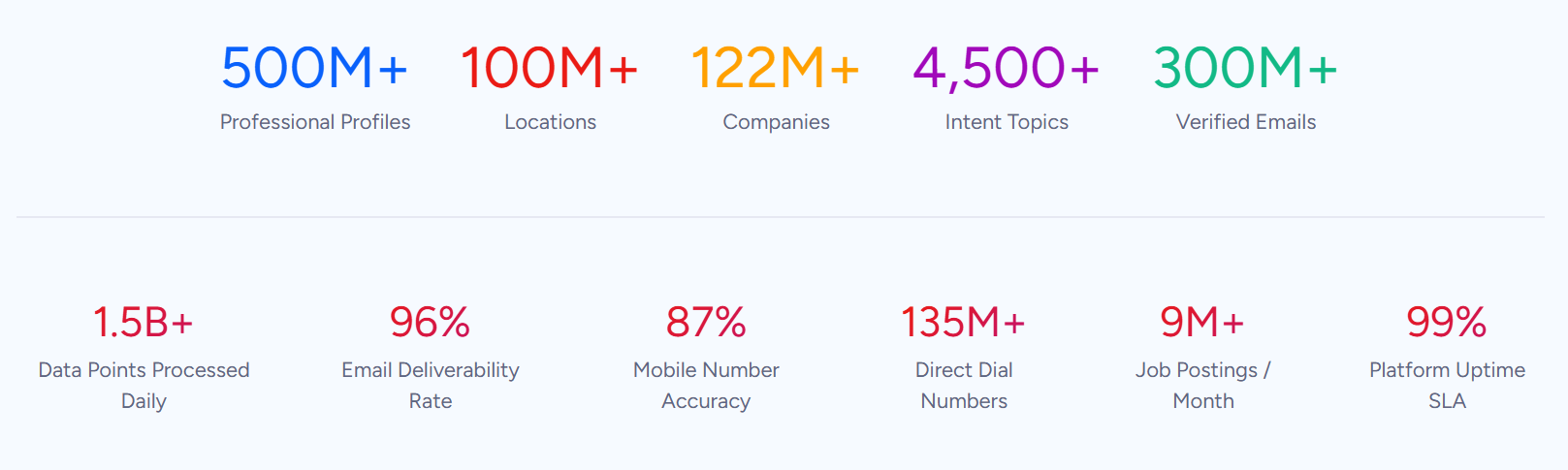
ZoomInfo is a B2B knowledge and go-to-market platform constructed on 500M contacts, 100M corporations, 135M+ verified cellphone numbers, and 200M+ verified enterprise emails. That knowledge is verified via a multi-source pipeline backed by 300+ human researchers and reaching as much as 95% accuracy on first-party knowledge. For groups working a CallRail-Salesforce integration, ZoomInfo addresses the information high quality layer that no name monitoring connector handles.
ZoomInfo integrates natively with Salesforce via its market, offering CRM enrichment, lead routing, and real-time knowledge updates inside Salesforce information. Earlier than a rep follows up on an inbound name logged by CallRail, ZoomInfo ensures the Salesforce document has a verified enterprise electronic mail, an correct job title, present firm particulars, and firm context.
The identical knowledge feeds ZoomInfo’s GTM Context Graph, which processes 1.5B+ knowledge factors each day and unifies third-party intelligence with CRM information, dialog transcripts, and behavioral indicators to floor not simply what occurred in a deal, however why.
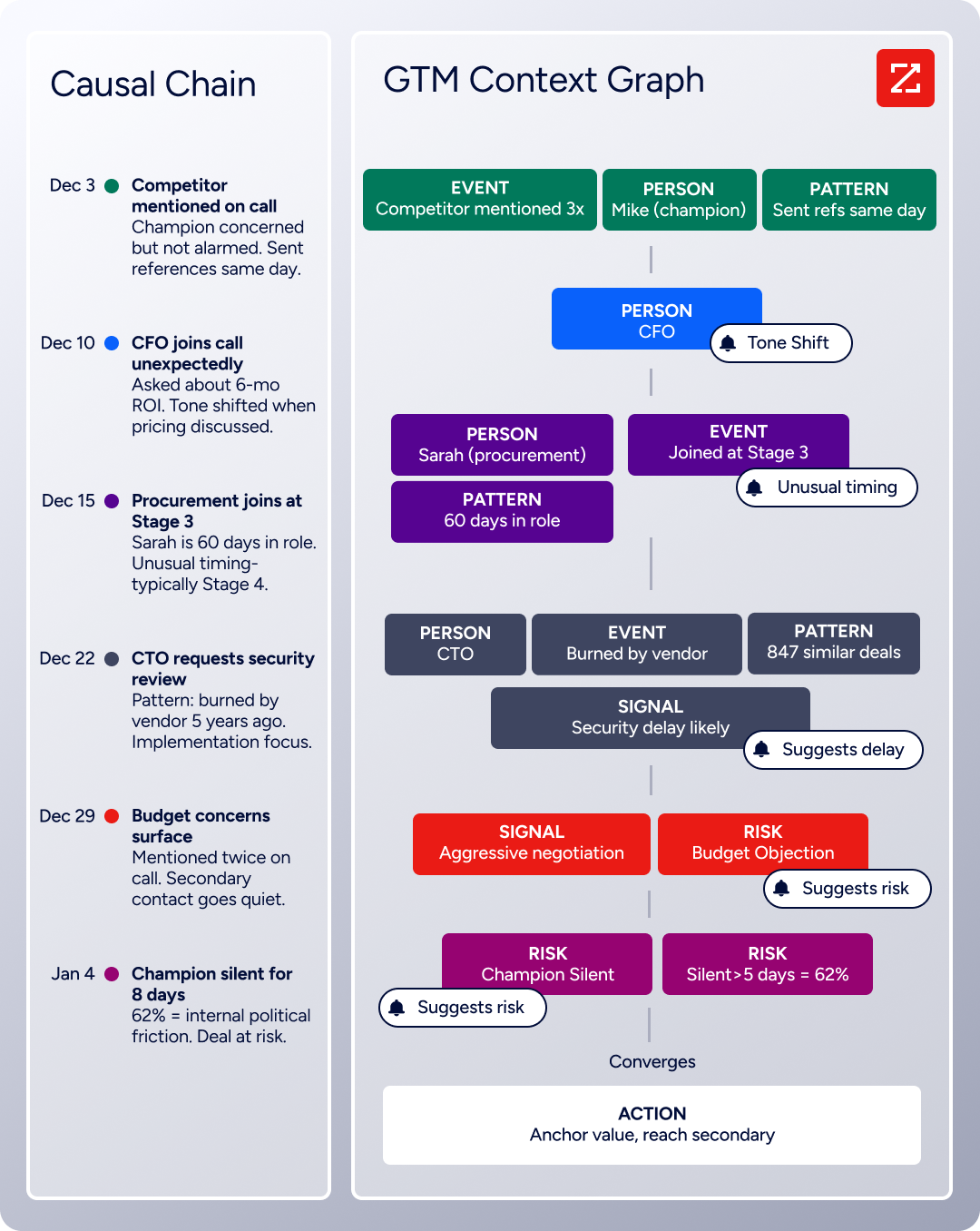
In observe, a workforce working CallRail and Salesforce collectively can use ZoomInfo to complement Salesforce information earlier than and after name exercise lands. When CallRail creates a brand new Lead from an inbound caller, ZoomInfo enrichment can routinely append the caller’s firm, title, division, and verified contact particulars, turning a naked cellphone quantity into an entire document.
When CallRail logs attribution knowledge on an current Contact, ZoomInfo ensures the underlying document is present, so the advertising and marketing attribution attaches to somebody who remains to be on the firm and nonetheless reachable.
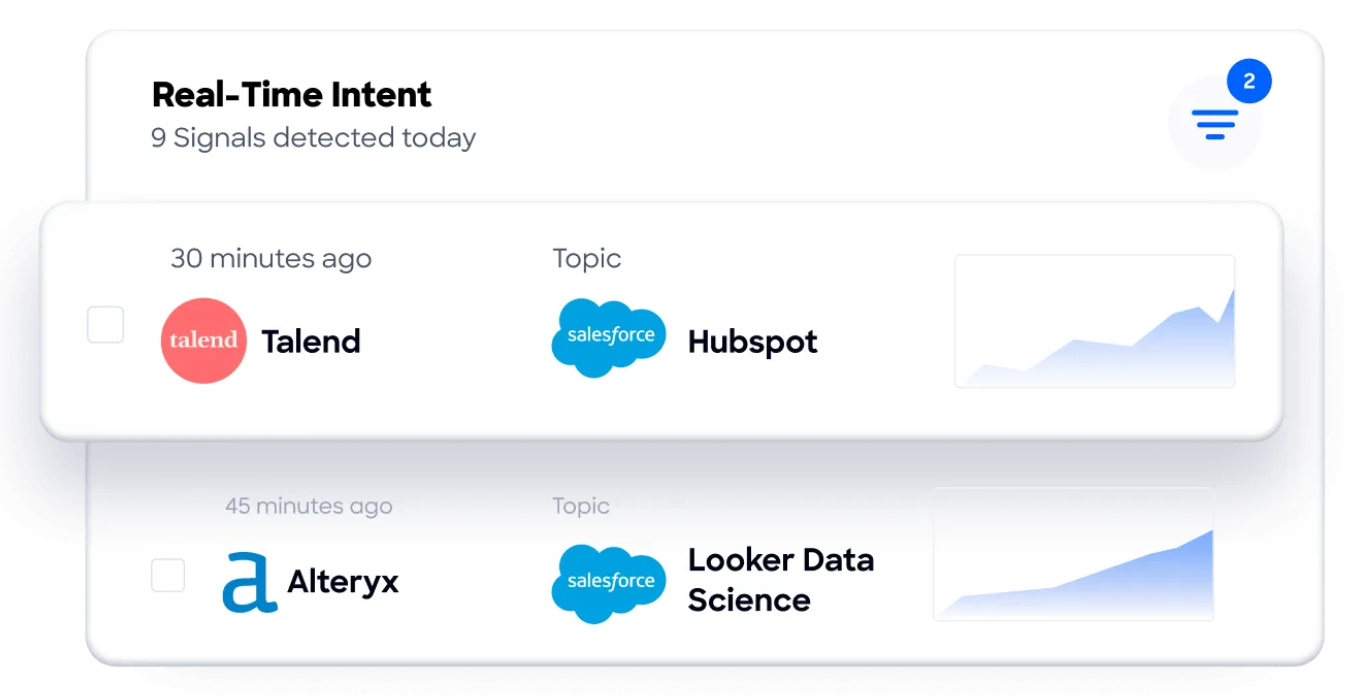
Purchaser Intent knowledge from ZoomInfo, monitoring indicators from 210 million IP-to-Group pairings, can layer onto the identical Salesforce information, serving to groups prioritize follow-up on inbound calls from accounts which are actively researching related options.
Enriched information additionally make the combination itself extra dependable. Fewer clean fields imply fewer matching failures when CallRail tries to affiliate an inbound caller with an current Salesforce document.
Constant cellphone quantity formatting throughout information reduces the false negatives that trigger duplicate Leads. And verified contact knowledge ensures that when a rep sees CallRail’s name attribution on a Salesforce document, they’re reaching out to the suitable individual on the proper firm, not chasing a stale entry.
Seismic’s gross sales workforce attributed 39% of lively pipeline to alternatives recognized or influenced by ZoomInfo indicators, whereas boosting productiveness by 54% and saving 11.5 hours per week. (Seismic)
Last Verdict
A local integration between CallRail and Salesforce exists, and for many groups it’s the proper start line. It handles the core job (pushing name attribution knowledge into CRM information) with minimal setup and no further price. The best selection is determined by the complexity of your name monitoring workflow and the way a lot management you want over the information move.
-
Groups that want name attribution knowledge in Salesforce with minimal configuration ought to activate the native CallRail-Salesforce integration. It covers the first use case (advertising and marketing supply, marketing campaign, and key phrase knowledge on CRM information, plus automated lead creation from inbound calls) and requires no third-party software or engineering sources.
-
Groups with conditional workflows (routing calls to totally different Salesforce document sorts based mostly on tags, triggering particular automations on sure name occasions, or syncing type submission knowledge alongside calls) ought to add Zapier or Make to the native integration, not exchange it.
-
Organizations with complicated necessities (syncing Dialog Intelligence knowledge into customized Salesforce objects, backfilling historic name information, or constructing cross-reference logic throughout a number of CallRail corporations and Salesforce enterprise models) ought to put money into a customized API integration.
Earlier than committing to a technique, make clear what knowledge you want flowing between the 2 platforms and through which path.
If the aim is easy name attribution within the CRM, the native integration is ample and prepared in minutes. If the aim is bidirectional knowledge move that comes with name transcripts, AI insights, and income attribution, customized growth is the trail, and it requires sustained engineering funding. Both method, the standard of the contact knowledge in Salesforce determines whether or not the decision attribution insights produce actionable follow-up or connect to information which are already stale.
ZoomInfo, with its native Salesforce integration and API and MCP entry, is the information enrichment layer that retains CRM information correct whereas the connector retains name knowledge flowing.
FAQ
Does CallRail combine natively with Salesforce?
Sure. CallRail gives a local Salesforce integration that logs name knowledge into Salesforce with customized subject mapping assist. The mixing creates new Leads from first-time callers and logs name exercise (length, recording hyperlinks, attribution knowledge) on current Leads, Contacts, and Accounts. It’s out there via CallRail’s integrations library and doesn’t require a third-party software.
What knowledge does CallRail ship to Salesforce?
The native integration pushes name attribution metadata (advertising and marketing supply, marketing campaign, key phrase, touchdown web page, referring URL), caller cellphone quantity, name length, name sort, monitoring quantity, tags, notes, and recording hyperlinks. Customized subject mapping enables you to management which CallRail knowledge populates which Salesforce fields. For groups with CallRail’s Type Monitoring add-on, type submission knowledge may sync.
Can Salesforce knowledge move again into CallRail?
Not via the native integration or Zapier, each of that are one-directional (CallRail to Salesforce). There isn’t a built-in mechanism to push Salesforce deal levels, lead scores, or account knowledge into CallRail. A customized API integration may pull knowledge from Salesforce and write it to CallRail (by way of CallRail’s API), however this isn’t an ordinary use case and would require growth sources.
Do I want a selected CallRail plan for the Salesforce integration?
CallRail lists Salesforce as a local CRM integration out there via its integrations library. The native integration doesn’t incur CallRail API utilization prices, which solely apply to customized integrations that transcend the usual connector conduct. Actual plan availability ought to be confirmed at callrail.com/pricing, as plan constructions and have inclusions can change.
What occurs if CallRail can not match an inbound caller to an current Salesforce document?
The conduct is determined by your configuration. The mixing can create a brand new Salesforce Lead when no matching document is discovered, or skip the document solely. If lead creation is enabled, the combination makes use of the caller’s cellphone quantity and any captured particulars to populate the brand new Lead. Configure matching logic rigorously to keep away from duplicates from cellphone quantity formatting variations.
Is the Salesforce integration affected by CallRail’s API fee limits?
No. Information pushed via CallRail’s native integrations is exempt from API utilization prices and fee limits. The API fee limits (1,000 requests per hour, 10,000 per day) apply solely to customized integrations constructed on CallRail’s REST API. On the Salesforce facet, the native integration operates inside customary Salesforce API allocations, that are tied to version and license rely.
How does ZoomInfo enhance a CallRail-Salesforce integration?
ZoomInfo solves the information high quality drawback that no name monitoring connector addresses. When CallRail logs an inbound name on a Salesforce Lead, it attaches attribution knowledge to no matter document exists. If that document has an outdated title, a disconnected cellphone quantity, or lacking firm particulars, the attribution knowledge is correct however the follow-up is compromised. ZoomInfo’s native Salesforce integration enriches these information with verified contact knowledge, firm attributes, technographics, and direct dials, so the decision attribution from CallRail attaches to information which are present and full. Intent indicators from ZoomInfo may assist prioritize follow-up on inbound calls from accounts actively researching related options.
Can I sync CallRail’s Dialog Intelligence knowledge to Salesforce?
The native integration primarily handles name metadata and attribution knowledge. Superior Dialog Intelligence outputs (AI-generated summaries, sentiment scores, key phrase detection) might have restricted availability via the native connector. Groups that want full CI knowledge in Salesforce fields ought to consider the customized API path, which might entry name transcription knowledge and AI outputs via CallRail’s API endpoints and write them to customized Salesforce objects or fields.
Construct out your Salesforce stack:

