

One of the best working-from-home ideas come all the way down to 4 habits: declare a devoted workspace, maintain actual hours, reduce distractions on objective, and keep in common contact together with your workforce. These habits matter now that house is an everyday office: about 26% of U.S. paid workdays in 2026 have been work-from-home days, based on SWAA survey information.
Listed below are 24 ideas grouped by objective, from establishing your desk to securing your private home workplace, plus recommendation for managers and the way one communications platform retains calls, chat, and conferences collectively.
Working From House in 2027 by the Numbers
Distant work has settled right into a sample as a substitute of fading away. Amongst U.S. staff whose jobs will be accomplished remotely, Gallup’s hybrid work indicator exhibits that as of August 2026, 54% work hybrid, 25% work solely distant, and 21% work totally on-site.
Measured by days as a substitute of individuals, the image is smaller however regular. The Survey of Working Preparations and Attitudes (SWAA) discovered that about 26% of paid workdays within the U.S. in September 2026 have been work-from-home days.
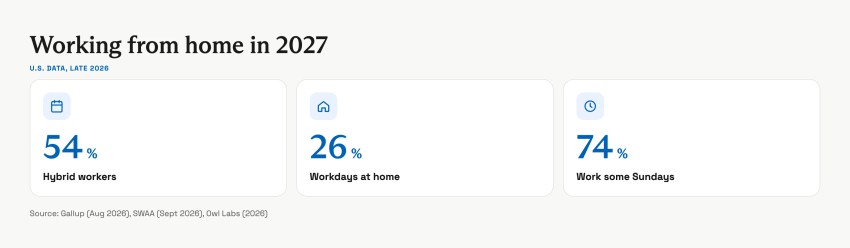
The tougher downside is realizing the place work stops. Within the 2026 Owl Labs hybrid work report, 74% of staff stated they do some work on a typical Sunday, and 21% stated it provides as much as a full or near-full workday. About three in 5 (62%) stated AI has raised how a lot they’re anticipated to perform in a day. Owl Labs sells meeting-room {hardware}, so learn its figures as one vendor’s survey.
Flexibility continues to be value loads to folks. In the identical survey, practically half (47%) stated they’d hand over 10% or extra of their wage to maintain versatile working hours. The ideas beneath make it easier to maintain that flexibility with out letting work spill into each night and weekend.
Set Up a WFH Workspace That Really Works
A great residence workplace does two jobs. It helps you keep targeted and indicators to you and the relations you reside with once you’re working.
1. Declare a devoted spot
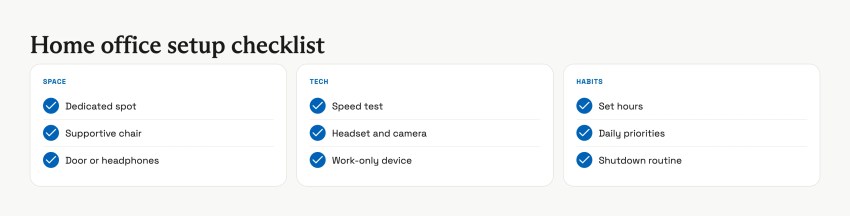
Decide one place that’s just for work, ideally a room with a door. A desk in a quiet nook beats the sofa, mattress, or kitchen desk as a result of you may stroll away once you end work.
Correct lighting issues too: set your display at a proper angle to a window to chop glare and eye pressure. A separate work space additionally makes it simpler to maintain your private life out of your workday.
2. Make it snug and ergonomic
You’ll spend as many hours at this desk as you’ll on the workplace, so set it up the identical means. Use a chair that helps your decrease again, maintain the highest of your monitor close to eye stage, and maintain your wrists straight once you kind.
Should you work on a laptop computer all day, a separate keyboard plus a stand or exterior monitor saves your neck.
3. Management noise with doorways and headphones
Shut the door throughout calls and focus time. When you may’t separate your self from the family, a fan or white noise machine masks background sound, and noise-canceling headphones block a lot of the relaxation.
For calls, a headset with the microphone near your mouth sounds much better to the opposite aspect than a laptop computer mic.
4. Take a look at your Wi-Fi, gear, and units
Run a pace take a look at out of your desk, not from the room with the router, and transfer nearer or add a mesh level if video stutters. Take a look at your digicam, mic, and video conferencing app earlier than an vital consumer assembly, not in its first jiffy.
Owl Labs discovered that two-thirds (66%) of employees lose time in conferences to technical issues reminiscent of dangerous audio or not seeing faces, and that conferences take a mean of six minutes to begin.
Maintain work on a piece gadget the place you may. With a cloud telephone system, your online business quantity runs as an app in your laptop computer or telephone, so that you don’t want a desk telephone at residence or have handy out your private cell quantity.
Professionals and cons of utilizing one laptop computer for every little thing
Utilizing one laptop computer for every little thing is tempting. Right here’s the trade-off:

Professionals
One gadget to hold, cost, and replace
No second machine to purchase
Simple to reply a fast message wherever

Cons
Private apps and notifications compete to your consideration
Firm information sits subsequent to private downloads and accounts
Tougher to change off when the workday ends
Construct a Routine and Set Actual Hours
To do business from home successfully, deal with every day like an workplace day. Set fastened begin and cease instances, open with a brief morning routine, choose your every day priorities, and do your hardest work in your sharpest hours. Distant employees who plan forward the night earlier than begin every day with a transparent record as a substitute of an inbox.
5. Set actual hours and share them
Select working hours that suit your vitality and your family, then stick with them most days. Versatile hours are a perk, not a cause to be out there across the clock. Put your schedule in your calendar and in your workforce chat profile so co-workers know when to anticipate a reply. A set finish time additionally leaves room for sufficient sleep, so your productiveness ranges don’t depend upon late nights.
6. Begin the day with a “commute”
With no commute, the day can begin with electronic mail in mattress.
Substitute it with a brief ritual that indicators work mode, reminiscent of a stroll across the block, espresso on the porch, or ten minutes of planning earlier than you open your inbox. Getting dressed for the day helps some folks make the identical swap, whether or not or not they’re a morning particular person.
7. Decide one to 3 priorities
Earlier than you test messages, write down the one to 3 duties that might make at the moment successful. An extended to-do record is ok, however the quick record decides the place your greatest hours go. Share your priorities together with your supervisor initially of the week, so your plans don’t come as a shock.
8. Work together with your vitality peaks
You in all probability have a stretch of the day when focus comes simply, whether or not that’s early morning or late afternoon. Shield it for deep work, and push routine duties like expense reviews and inbox cleanup into your slower hours.
When you may, schedule calls that want your greatest considering, like consumer pitches, inside your peak.

Productiveness Suggestions for Working From House
At residence, no coworker stops by your desk, however your telephone, inbox, and browser will interrupt you all day. These productiveness ideas for working from residence are about controlling these interruptions so you may keep away from distractions and keep productive.
9. Time-block and observe your time
Block time in your calendar for targeted work the identical means you’d ebook a gathering, and decline invitations that land on it when you may. A time tracker exhibits the place your hours go. Apps like Harvest, RescueTime, and Toggl log time by activity or app, which makes it simpler to identify your best intervals and the duties that quietly eat your afternoons.
10. Batch notifications and block distracting websites
Flip off notifications you don’t want throughout focus blocks, and test electronic mail and chat at set instances as a substitute of when messages arrive. Shut tabs and apps that aren’t a part of the duty in entrance of you. If sure websites maintain pulling you in, a browser extension that blocks them throughout work hours removes the temptation.
11. Save social media for breaks
Transfer social apps off your private home display and silence their notifications throughout working hours. Most telephones now present how a lot time you spend in every app, which is a helpful actuality test. Should you take pleasure in scrolling, put it aside for a deliberate break moderately than the hole between two duties.
12. Use music or ambient sound
Some folks focus higher with background sound. Instrumental music, ambient tracks, or plain white noise are inclined to distract lower than songs with lyrics or podcasts. Companies reminiscent of Focus@Will and Mind.fm provide audio constructed for focus classes, and a primary white noise app works too.
Keep Linked With Your Workforce
Working remotely makes it straightforward to place your head down and disappear. Staying seen takes just a little construction, particularly when a number of folks in your workforce do business from home.
13. Verify in on a rhythm
Agree on a check-in sample together with your workforce, reminiscent of a brief written replace every morning, a weekly video name, or each. Common check-ins floor blockers early, earlier than they flip into missed deadlines.
Good digital workforce communication additionally means matching every form of dialog to the correct channel.
14. Use one communication platform
When calls occur in a single app, chat in one other, and conferences in a 3rd, messages fall by the gaps and coworkers find yourself texting your private cell. A single platform retains conversations, contacts, and recordsdata in a single place. Nextiva places calls, video conferences, and workforce chat in a single app in your desktop, telephone, or browser.
Right here’s a fast tour of enterprise communication instruments and when to make use of every.

15. Let AI take the assembly notes
Taking notes pulls your consideration out of the dialog. Many calling and assembly instruments now transcribe calls and write AI summaries, so you may pay attention through the name and share motion objects afterward. Summaries additionally assist coworkers who missed the assembly catch up with out scheduling one other standing replace.
On Nextiva, AI transcription and summaries are included beginning with the Go plan, with greater month-to-month limits on Enterprise and limitless summaries on CX.
16. Find time for non-work chat
Workplaces create small discuss with out anybody planning it, however distant groups need to make room for it. A social channel, a couple of minutes of chat initially of a name, or an occasional digital espresso retains relationships from turning purely transactional.
Have a good time birthdays, work anniversaries, and completed initiatives the place the entire workforce can see them.
Shield Your Well being and Boundaries
Working from residence removes the commute, and with it the pure stopping factors in a day. The following tips make it easier to maintain your vitality up and your work contained.
17. Take quick breaks and transfer
Step away from the display for a couple of minutes a number of instances a day. Rise up, stretch your shoulders and again, refill your water, or take a telephone name in your ft. Brief, common breaks and lightweight stretches make it easier to return with contemporary focus as a substitute of grinding by a stoop.
18. Eat an actual lunch
Take a correct lunch break free out of your desk, as you’ll on the workplace. Maintain water and easy snacks like fruit and nuts inside attain so that you aren’t raiding the pantry between calls. Planning lunch the evening earlier than makes it simpler to skip the bag of chips.
19. Step outdoors
Get open air no less than as soon as through the workday, even for a ten-minute stroll. Contemporary air, daylight, and a change of scene break up lengthy stretches indoors. Outdoors work hours, make room for train, buddies, and hobbies unrelated to your job.
20. Set boundaries at residence
Set clear boundaries between work life and residential life. Inform the folks you reside with once you’re working and what counts as a cause to interrupt. A closed door or headphones can sign that you simply’re busy. Maintain family chores out of your working blocks, and in return, be totally current for household and buddies when you log out.
Put up a fast notice in workforce chat once you begin a spotlight block, step away, or log out, so coworkers know when to anticipate a reply.
21. Log out on time
With 74% of staff doing a little work on a typical Sunday, based on Owl Labs, a transparent finish to the day issues. End with a brief shutdown routine: notice the place you left off, write down tomorrow’s prime priorities, and shut your work apps. If AI instruments have raised what’s anticipated of you, discuss it by together with your supervisor moderately than absorbing the additional work in your evenings.
Take note of how you are feeling, too. If stress, isolation, or burnout retains constructing, use the psychological well being sources your employer presents or discuss to knowledgeable.
Maintain Your House Workplace Safe
Your own home community is now a part of your organization’s community, and attackers comprehend it. Three habits shut the most typical gaps.
22. Lock down Wi-Fi and use a VPN
Change your router’s default admin password, use WPA2 or WPA3 encryption, and maintain the router’s firmware up to date. Use your organization’s VPN, or a business-grade one, everytime you deal with firm information, particularly on public Wi-Fi.
Comply with your employer’s guidelines on private units and authorised apps.
23. Confirm earlier than you click on
Deal with surprising attachments, hyperlinks, and fee requests with suspicion, even after they seem to come back from a coworker. If a message pushes you to behave quick, affirm it by a distinct channel, reminiscent of a name or a direct chat message. Cellphone calls could be a goal too.
See how VoIP calls get attacked and the right way to defend them.

24. Know the right way to attain IT
Save your IT workforce’s contact particulars and the steps for reporting a suspicious electronic mail, a misplaced gadget, or a doable breach earlier than you want them. Report issues straight away, even in case you assume you clicked one thing by mistake. Quick reviews restrict the harm.
How Managers Can Assist Workers Work From House
Managers form most of what makes distant work succeed or fail. Should you lead individuals who do business from home, deal with these 4 areas to assist every distant worker do their greatest work.
Equip folks correctly
Give distant workers the identical necessities they’d get within the workplace: a dependable laptop computer, a headset, a enterprise telephone quantity, and entry to each instrument they want. A small stipend for a chair or monitor is an easy means to assist folks arrange a workspace they will use all day.
Set norms for communication and hours
Agree on which channel to make use of for what, anticipated reply instances, and the core hours when the entire workforce overlaps. Write the foundations down so new hires don’t need to guess. Our information to managing distant groups goes deeper on check-ins and one-on-ones.
Choose outcomes, not on-line time
Measure folks by what they ship moderately than how typically they seem on-line. Clear weekly targets make that simpler for you and your workforce. Mannequin the boundaries you need, too: in case you ship messages at 10 p.m., your workforce will assume they should reply them. These engagement ideas assist maintain a distributed workforce motivated.
Help residence name middle brokers
House-based gross sales and repair brokers want greater than a laptop computer. They want name routing, queues, and supervisors who can coach them in actual time with out sitting beside them. A cloud contact middle offers distant brokers and supervisors the identical instruments they’d have on a name middle flooring.
How Nextiva Helps You Work From House
The following tips get simpler when your calls, conferences, and messages run on one platform. Nextiva places voice, video conferences, workforce chat, and electronic mail in a single app in your desktop, telephone, and browser, so you may work from your private home workplace or wherever else with the identical enterprise quantity.
| Who’s working from residence | Plan (billed yearly) | What it consists of |
|---|---|---|
| Solo professionals and small groups | Go, $10/consumer/month | Voice, texts, video conferences for as much as 5 folks, electronic mail, workforce chat, and AI transcription and summaries |
| Rising distant groups | Enterprise, $25/consumer/month | The whole lot in Go, plus video conferences for as much as 50, CRM, AI Enterprise Insights, and 24/7 telephone assist |
| House-based gross sales and repair brokers | CX, $75/consumer/month (discuss to gross sales) | Abilities-based routing, queues and callbacks, supervisor pay attention, whisper, and be part of, and limitless NextIQ |
Evaluate each function on our pricing web page earlier than you roll a plan out to your distant workforce.
Make Working From House Work for You
Deal with your private home workplace as an actual office, with a set desk, set hours, and clear boundaries, and dealing from residence will get simpler. Begin small. Decide the ideas that repair your largest downside, whether or not that’s distractions, isolation, or evenings that run late, and add the remaining over time.
Should you’re nonetheless deciding how typically to do business from home, our workplace comparability lays out the trade-offs.
Do business from home on one platform
Calls, video conferences, workforce chat, and AI summaries in a single app in your desktop, telephone, or browser. Plans begin at $10 per consumer per 30 days, billed yearly.
FAQs About Work From House Suggestions
Work from a devoted spot, maintain set hours that you simply share together with your workforce, and choose one to 3 priorities every morning. Do your hardest work throughout your peak vitality hours, batch electronic mail and chat, and finish the day with a brief shutdown routine. A cloud telephone system permits you to use your online business quantity out of your laptop computer or telephone, so work calls keep off your private line.
Time-block targeted work in your calendar, observe the place your hours go, and silence notifications you don’t want throughout these blocks. Save social media for deliberate breaks, and use instrumental music or white noise if silence distracts you. Conserving calls, conferences, and workforce chat in a single app additionally cuts the time you lose switching between instruments.
Use a chair that helps your decrease again, elevate your monitor to about eye stage, and maintain your wrists straight once you kind. Place your desk the place pure mild doesn’t trigger glare, use a headset for calls, and take quick breaks to face and stretch. With the NEXT Platform, you may take calls on whichever gadget fits the second.
Set a check-in rhythm, reminiscent of a brief written replace every morning and a weekly video name. Use one platform for calls, chat, and conferences so messages don’t scatter, and find time for dialog that isn’t about work. Our information to digital workforce communication explains which channel fits every form of dialog.
You’ll want a dependable laptop computer, quick and secure web, a headset with an excellent microphone, and a webcam if the built-in one is weak. A cushty chair and a second monitor assistance on full days. You don’t want a desk telephone: Nextiva’s Go plan runs your online business quantity as an app for $10 per consumer per 30 days, billed yearly, and the pricing web page compares each plan.

