

Your buyer explains the issue to the chatbot. The chatbot can’t repair it, in order that they name.
… The agent who solutions can’t see the chat, so the client begins over, and your new AI will get the blame.
Software sprawl is what’s failing your AI, however one related buyer assist platform can it.
On common, customer support groups use 6.5 instruments to supply assist, and 86% mentioned juggling them created information silos. Since our preliminary research in 2025, that determine has possible gone up, not to mention the dangers surrounding shadow AI.
Software sprawl is what occurs when a group retains including software program to repair one downside at a time till it runs extra instruments than it will probably join, handle, or afford. Every device made sense when somebody purchased it. Collectively, they break up your information, your workflows, and your group’s consideration.
The time period began in IT, the place you’ll additionally hear expertise sprawl, and SaaS sprawl for the cloud-app model of the identical downside.
In an October 2026 research of 356 enterprise IT professionals, Enterprise Administration Associates discovered that enterprises usually run six to eight observability (monitoring) instruments. Of these surveyed, 41% mentioned context switching amongst these instruments slowed their investigations, and 45% cited the talents and staffing burden of working so many.
Outdoors IT, the identical factor occurs with mission administration apps and AI instruments that groups join with out a plan to attach them.
Help groups face the identical sample throughout their communication channels, with a sharper edge, as a result of a buyer is ready on the opposite finish of each swap.
Widespread customer support instruments in a rising stack
Buyer assist stacks improve one channel at a time, as prospects present up on new channels and count on well timed assist on every.
The cellphone system got here first. Then assist desk software program for e mail and ticket administration, when quantity received critical. Then dwell chat software program, as a result of prospects requested for it. Then textual content and messaging apps like WhatsApp, every in yet one more inbox. Then a data base, a chatbot purchased for one channel, a survey device, and a CRM that solely gross sales retains updated.
Every of those customer support instruments does an actual job by itself. The difficulty sits within the gaps between them, the place your customer support group loses the thread.
AI can solely act on the context and methods it will probably attain. A chatbot related solely to your chat widget can’t see the client’s final name, open ticket, or order standing. Nevertheless succesful it’s, it solutions from a partial image, then arms off with nothing.
That’s why AI initiatives constructed on a sprawled stack disappoint. The mannequin could also be succesful, but it surely’s working blind. Groups that monitor what their AI deflection program resolves usually hint the stall again to disconnected instruments.
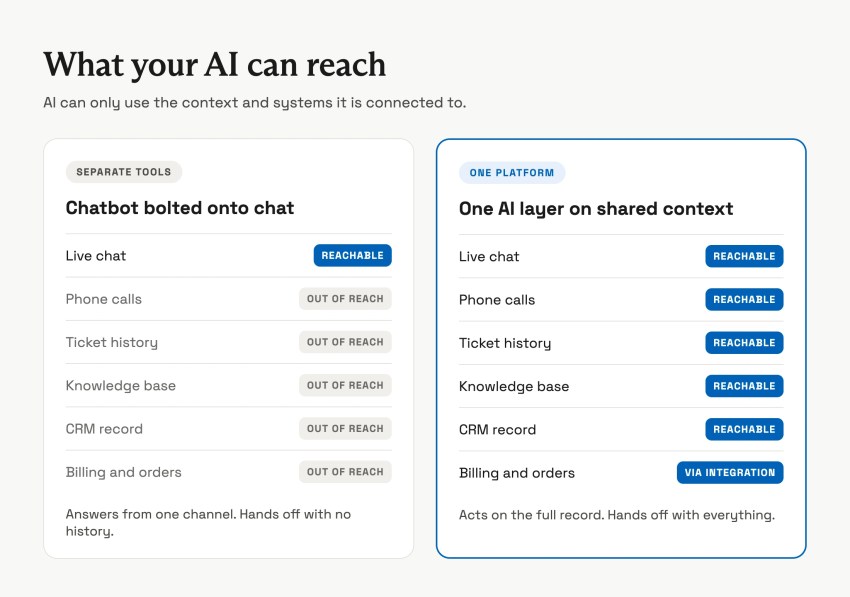
Three failures comply with from that hole.
Misplaced buyer context
Each device retains its personal model of the client, which is the other of a unified buyer expertise. The cellphone system is aware of in regards to the name.
The ticketing system is aware of in regards to the e mail. The CRM is aware of what they purchased. No single display screen or AI agent sees the entire story, so your group can’t reply the straightforward query, “What’s occurring with this buyer?”
Clients repeat themselves, and satisfaction drops
When context doesn’t journey, the client carries it. They retell the issue to the bot, then to the agent, then to the specialist after a switch. Repeating info is without doubt one of the clearest indicators of a high-effort expertise, the sort that drags down your buyer effort rating, satisfaction, and loyalty.
Dangerous handoffs between the AI agent and your group
The handoff is the place a sprawled stack hurts most. If the bot and the agent run assist conversations in numerous instruments, the escalation arrives as a naked ticket or a chilly switch.
An excellent handoff carries the transcript, intent, steps already tried, and account historical past, so the agent picks up mid-conversation as a substitute of ranging from zero.
Sprawl prices greater than the software program invoice and makes customer support operations more durable to run. A lot of the expense hides in agent time, buyer effort, and choices made on partial information.
The issue is widespread. In an October 2026 Acxiom survey that included 700 enterprise leaders, 80% of manufacturers mentioned they discovered it difficult to handle buyer experiences throughout a number of platforms, companions, or suppliers.
Listed below are the price strains to place in your checklist:
| Value line | The place it exhibits up | The best way to measure it |
|---|---|---|
| Overlapping licenses | Paying for chat, voice, and AI options in three totally different instruments | Complete seats and options per device, aspect by aspect |
| Integration maintenance | Syncs that break, connectors that want an admin, information that lags a day behind | Admin hours per 30 days spent on integrations |
| Agent toggle time | Brokers switching screens to search out an order, a previous ticket, or a coverage as a substitute of dealing with buyer inquiries | Common deal with time and screens open per contact |
| Repeat contacts | Clients calling again as a result of the primary channel couldn’t end the job | Repeat contact charge inside 7 days |
| Reporting blind spots | A “contained” chat that turns into a cellphone name the following day appears like a win in a single dashboard | Whether or not any report follows one subject throughout channels |
| Stalled AI | Bots that reply questions however can’t take motion or move context | AI decision charge and escalations with no historical past connected |
| Safety and entry | Extra logins to provision, audit, and take away when individuals go away, and extra copies of delicate information | Variety of methods that maintain buyer information |
| Handbook busywork | Repetitive duties like copying notes between instruments and re-tagging tickets | Hours per week brokers spend on copy-and-paste work |
None of those strains present up as one huge bill. They present up as slower service, pissed off brokers, and AI that stalls within the pilot stage.
The best way to Audit Your Buyer Help Stack
A stack audit exhibits you what every device does, what information it holds, and the place the gaps sit. Block an hour together with your buyer assist group lead and your admin, and work by these steps.
- Checklist each device your assist group touches. Embrace the small ones: survey instruments, screen-sharing apps, shared spreadsheets, and private telephones used for texting prospects.
- Write down the job every device does. One line per device. If two instruments share a job, you’ve discovered overlap.
- Notice the client information every device holds. Name recordings, chat transcripts, tickets, orders, and notes all depend.
- Mark the mixing hole. Does the info attain your different instruments in actual time, as soon as an evening, or by no means?
- Determine to maintain or consolidate. Hold instruments that maintain a system of file your small business can’t transfer, equivalent to billing or an EHR in a healthcare observe. Consolidate instruments that duplicate a channel or disguise dialog historical past.
A pattern buyer assist stack audit
Use a easy desk like this one. The examples present what a typical sprawled stack appears like on paper.
| Software | Job it does | Knowledge it holds | Integration hole | Hold or consolidate? |
|---|---|---|---|---|
| Cellphone system | Inbound and outbound calls | Name logs, recordings, voicemail | Calls by no means attain the ticket or CRM file | Consolidate |
| Dwell chat | Web site conversations | Chat transcripts | Brokers on the cellphone can’t see chats | Consolidate |
| Ticketing system | Electronic mail and case monitoring | Case historical past, tags, SLAs | Nightly sync to CRM; no name or chat historical past | Consolidate |
| Data base | Assist articles and inside solutions | Articles, insurance policies | Bot and brokers learn totally different variations | Consolidate into one supply |
| Chatbot | Solutions internet FAQs | Bot transcripts | Can’t see orders or hand off with context | Consolidate |
| CRM | Buyer file and orders | Contacts, purchases, account particulars | Help can’t write again to it | Hold and combine |
| Billing system | Invoices and funds | Fee historical past | Brokers look it up in a separate tab | Hold and combine |
Then ask 4 questions on each row:
- Who owns every device? If no one can reply, the device is a candidate to retire.
- Which instruments maintain the identical dialog? Duplicate historical past means duplicate work.
- Can your AI learn and act on this information? If not, it will probably’t resolve points that depend upon it.
- What breaks if you happen to flip it off tomorrow? That reply tells you what emigrate first.
2027 AI Buyer Service Playbook
Get the ROI, resolution map, and 90-day plan for placing AI in your assist org.
What to Consolidate First
Begin with the info each device wants, then the channels, then AI. Including AI earlier than the muse is in place repeats the unique mistake by including yet another device with a partial view.
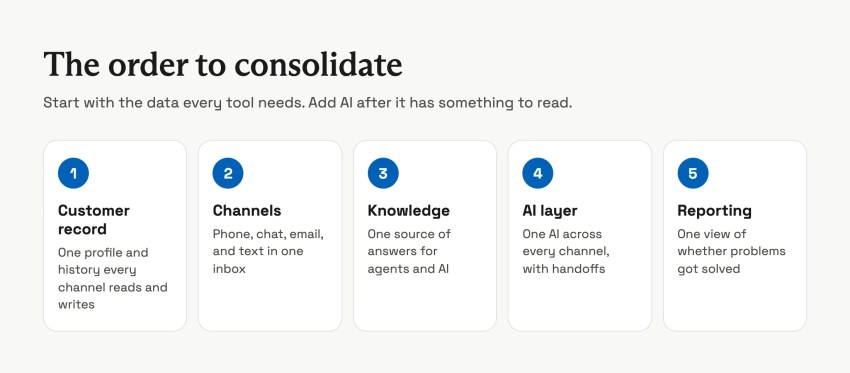
1. One buyer file throughout CRM and assist desk software program
Select the place each interplay happens, from calls and chats to emails and texts. Join it to your CRM so brokers and AI each see who the client is and what occurred final. As a result of the historical past travels with the client, this step tackles repeat questions first.
2. Cellphone, dwell chat, and messaging channels in a single inbox
Convey cellphone calls, dwell chat, e mail, SMS, and social messages right into a unified inbox. Brokers deal with a number of conversations from one display screen and hand a dialog to a teammate with out leaving the thread. A buyer who switches channels stays in that very same thread, which is the core of omnichannel assist.
3. One data base for brokers and AI
Merge duplicate assist facilities and inside wikis into one supply. When your AI agent and your assist group learn the identical solutions, prospects get the identical reply on each channel. It additionally retains self-service choices present, since there’s just one set of articles to replace.
4. One AI layer throughout each channel
Change channel-specific bots with one AI that handles conversational assist throughout voice and digital channels. It learns your small business as soon as, reads the shared file, and takes motion by your present methods. When it wants an individual, it arms off with full context.
5. Reporting on the entire buyer expertise
With one platform beneath, a centralized dashboard can monitor a buyer subject from first contact to decision throughout each channel the client used alongside the best way. That tells you whether or not every downside received solved, quite than which device touched it final, and provides you an sincere learn on customer support efficiency. It additionally exhibits patterns in buyer habits, equivalent to which questions preserve coming again and the place prospects drop off.
Consolidating has actual trade-offs, so weigh each side earlier than you begin.
Professionals and cons of consolidating onto one platform

Professionals
One login, one buyer file, and one AI layer
Fewer integrations to take care of
Reporting follows the entire buyer subject

Cons
Migration takes planning and a few retraining
Some specialist instruments nonetheless want to attach
Switching prices are actual within the first quarter
Consolidate channels and dialog historical past, however preserve methods like billing, ERP, or an EHR. Join them so brokers and AI can learn and act on that information.
What to Search for in Buyer Service Software program
A buyer assist platform earns its place by closing the gaps between channels, information, and AI. Use this guidelines of important options once you examine platforms:
- Shared buyer context. One file, learn and written by each channel, agent, and AI, so brokers can handle buyer interactions with out switching screens.
- Native voice plus digital channels. Cellphone, chat, e mail, and textual content in the identical workspace, with out bolted-on add-ons, so multichannel assist doesn’t imply a number of logins.
- AI that may take motion. An AI agent related to your CRM and enterprise methods, with clear guidelines for when to escalate.
- Context-rich handoffs. Transcript, intent, and historical past journey with each escalation to a dwell agent.
- Actual integration capabilities. Native connections to the CRM and assist desk instruments you propose to maintain, equivalent to Zendesk.
- One set of analytics. Agent efficiency, buyer interactions, and AI ends in one place.
- A user-friendly admin. Your group ought to have the ability to change routing and automation workflows with out a developer.
Customer support software program earns its price by eradicating work, and a dwell demo with your personal information is the quickest solution to see whether or not it does. Run every choice from our software program roundup by this checklist. A small enterprise can begin with the primary 4 gadgets.
Consolidate Buyer Help With Nextiva
The shopper from the opening, who defined the issue to a chatbot after which began over on the cellphone, is precisely who a related platform helps.
NEXT is Nextiva’s unified communications and CX platform. It brings calls, texts, dwell chat, e mail, and video into one place, with dialog historical past connected to the client file. Staff chat helps inside collaboration on difficult circumstances, routing and stream automation ship every dialog to the appropriate particular person, and the platform connects with greater than 50 CRM and enterprise integrations, together with Salesforce, HubSpot, Zendesk, and ServiceNow.
XBert, Nextiva’s AI worker, works inside that platform. It solutions calls, handles chats, books appointments, and resolves points utilizing the identical historical past your group sees.
You select how a lot it handles: full AI decision, AI-led with human oversight, or agent help, the place an individual leads and AI suggests responses and surfaces context.
On this brief demo, a buyer calls a automotive dealership a couple of trade-in. NEXT routes the decision to the appropriate particular person, teammates loop in a supervisor with out leaving the platform, and NextIQ summarizes the dialog and drafts the following reply.

Cedar Monetary, a debt assortment company in Calabasas, California, relied on seven totally different distributors earlier than transferring to Nextiva Contact Middle. It reduce that to 1 vendor and diminished prices by 30%, whereas agent name quantity rose from 70 to 400 calls per day.

“This clever contact middle has reworked our operations by bringing a number of facilities into one unified system.”
Amir Erez
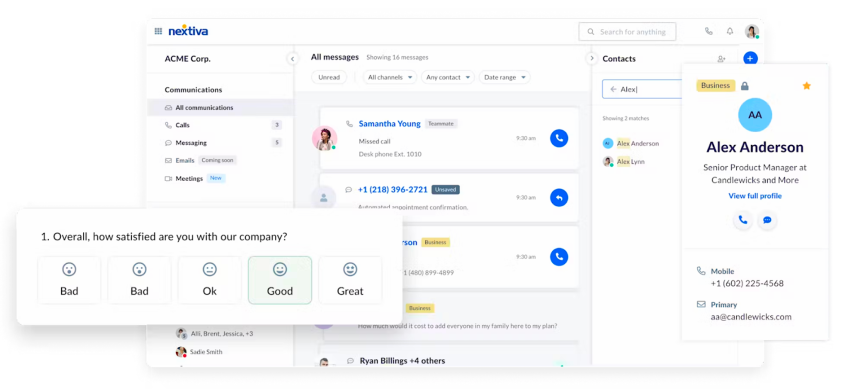
Convey your audit desk to a demo, and our group can map every row to what NEXT replaces and what it connects to.
Improve to a single buyer communications platform
NEXT brings calls, chat, e mail, texts, and XBert AI into one workspace, with one buyer file behind each dialog.
Software sprawl is the buildup of too many overlapping software program instruments, added one downside at a time, till a group can’t join or handle them nicely. It splits information and workflows throughout methods. In buyer assist, it means separate cellphone, chat, ticketing, data base, CRM, and bot instruments that don’t share context. A related buyer assist platform replaces these gaps with one file.
SaaS sprawl is device sprawl restricted to cloud subscription apps, usually purchased by particular person groups with out central IT assessment. Software sprawl is the broader time period and contains on-premises methods and spreadsheets. In observe, each result in wasted licenses, safety gaps, and scattered information. Changing separate apps with one related platform addresses each.
Many assist groups can run on one platform for conversations plus a small set of related methods of file, equivalent to CRM and billing. Nextiva’s 2025 CX Traits Report discovered firms averaged 6.5 assist instruments. The suitable quantity is the smallest set the place each agent and AI sees the total buyer historical past. Nextiva Contact Middle covers voice and digital channels in a single place.
AI can solely use the info and methods it will probably attain. When buyer historical past sits in separate instruments, an AI agent solutions from a partial view, can’t take motion within the methods that maintain the reply, and escalates with out context. Consolidating the client file first provides AI one thing full to behave on. XBert works from the identical buyer historical past your group sees.
Audit first, then consolidate in levels. Transfer the client file and dialog historical past earlier than channels, and channels earlier than AI. Run previous and new instruments aspect by aspect for a brief overlap, retire every device as soon as its information and workflows have moved, and preserve methods of file related. As soon as the file is in place, transferring dwell chat and cellphone into one inbox is a pure second step.

