


Most small assembly rooms run on a compromise. Somebody brings a laptop computer, another person hunts for the HDMI cable, and the webcam clipped to the TV catches two faces and half a shoulder. Then the decision begins 5 minutes late. The {hardware} isn’t the issue by itself. The issue is that it’s 4 items of {hardware} pretending to be one system.
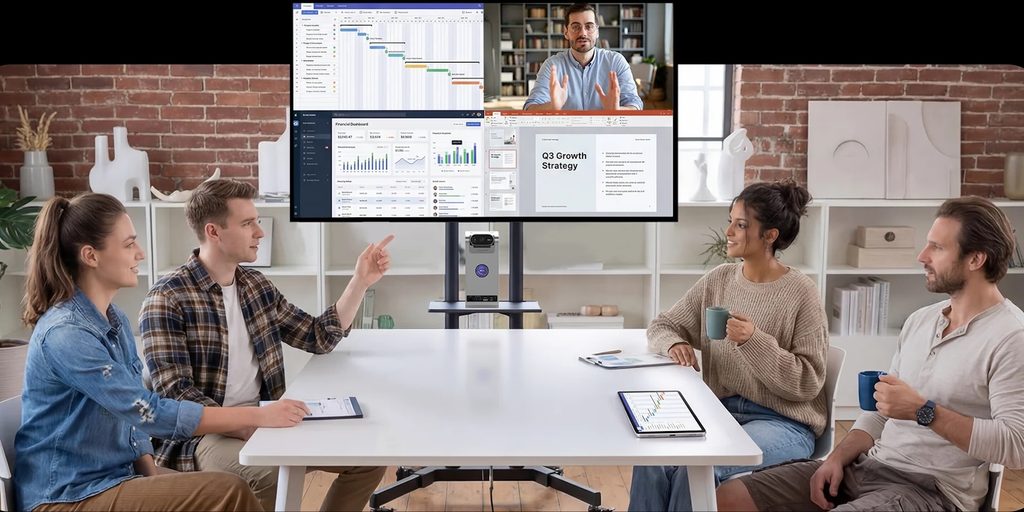
The CZUR StarryHub Core20 is constructed to finish that routine. It packs a 4K digicam, a six-mic array, twin audio system and its personal working system into one field that sits in entrance of a TV. That final half is what units it aside. Core20 runs StarryOS 6.0, so it doesn’t want a laptop computer to host a gathering. You join it to a display, check in to Zoom, Groups or Google Meet, and the room is prepared.
At $999 it isn’t an impulse purchase. So the query is whether or not it replaces sufficient gear, and sufficient friction, to earn that worth.
Design and setup: one field, one cable
Core20 is a compact upright unit, 196.5 × 105 × 238.5 mm and 1.64 kg. It appears to be like nearer to a sensible speaker than to convention room tools, and that’s a praise. The digicam sits up high. The mics and audio system stay within the physique. Across the again you get HDMI in (4K at 60Hz), HDMI out (4K at 120Hz), LAN and USB 3.0.
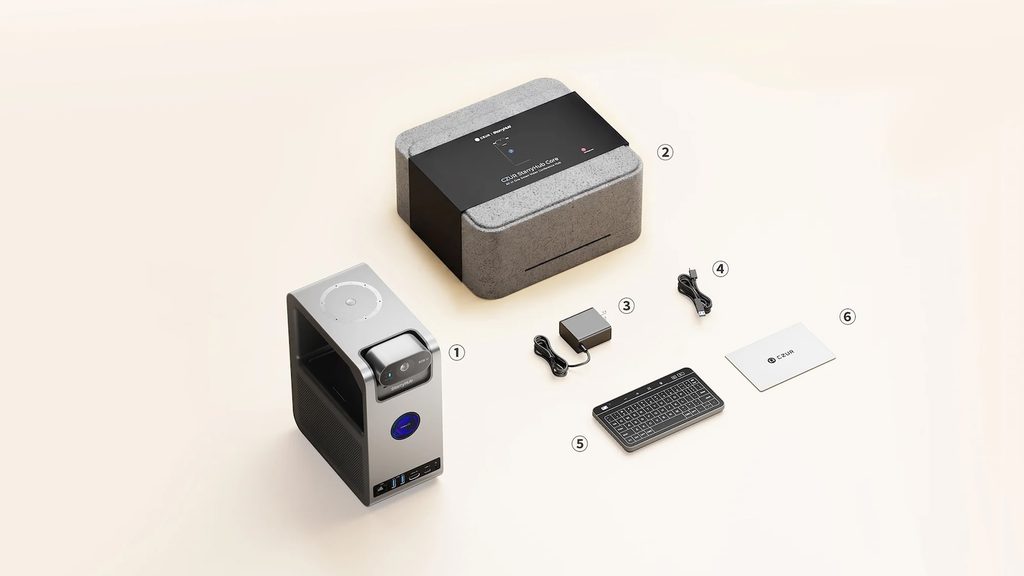
Setup is the place it makes its first good impression. One HDMI cable to the TV or monitor, energy on, observe the prompts. Tuan Do at Techwalls says he completed the preliminary setup in below a minute with out opening the guide. CZUR’s personal setup walkthrough follows the identical brief path. A wi-fi TouchBoard comes within the field for navigating menus and typing assembly IDs, so no one has to dig out a keyboard.
The built-in system is the actual story. StarryOS is Android-based, and Zoom sits proper on the house display. Google Meet isn’t preinstalled, however you’ll be able to add it from the Play Retailer in a few minutes. As soon as signed in, the room behaves like a devoted assembly equipment. Stroll in, faucet be part of, speak.
In case your staff nonetheless needs to run calls from a laptop computer, that works too. BYOM (carry your personal assembly) mode turns Core20 right into a USB digicam, mic and speaker for no matter’s working in your PC. It’s a helpful fallback for the odd consumer who insists on Webex.
Wi-fi casting covers nearly each gadget somebody would possibly stroll in with:
- AirPlay for iPhones, iPads and Macs
- Miracast for Home windows laptops and plenty of Android telephones
- Chromecast and DLNA for Android and Chrome units
- CZURShare, the corporate’s personal casting app
As much as 4 screens can share directly, which fits a design assessment or a side-by-side comparability. Techwalls reported no lag or freezing whereas casting.
Digicam: huge sufficient for the entire desk
The digicam makes use of a 12MP, 1/2-inch sensor and information in 4K UHD. The headline quantity is the 123° subject of view. In a small room that issues greater than decision. A typical laptop computer webcam sees roughly the particular person in entrance of it. At 123°, Core20 can absorb a desk of 4 to 6 individuals from the tip of the room, together with the colleague who at all times sits within the nook.
Broad lenses often carry warped edges. CZUR applies 3D distortion correction to maintain faces on the sides from stretching, and its PureMirror imaging handles coloration and sharpness. Techwalls referred to as the picture high quality “fairly spectacular” subsequent to a laptop computer webcam, which is a good baseline since that’s what most small groups are changing.
AI Sensible Framing does the work an individual used to do with a distant. With a bunch, it widens to suit everybody in. With one particular person on a solo name, it tightens and retains them centered. When somebody joins late and pulls up a chair, the body adjusts with out anybody touching something.
HDR and low-light enhancement assist in rooms that aren’t constructed for video. Suppose a window behind the desk, or overhead lights that depart faces in shadow. These rooms are widespread, they usually’re the place low-cost cameras disintegrate first.
For privateness, the digicam retracts bodily. When it’s down, it’s down. A {hardware} answer beats a software program toggle that it’s important to belief, and it’s a simple factor to level to when somebody within the workplace asks whether or not the room is at all times watching.
Audio: the half individuals discover when it’s dangerous
Distant members forgive a gentle picture. They don’t forgive audio the place half the room sounds prefer it’s in a tunnel. Core20 makes use of a six-microphone array with 360° pickup, so it’s listening in each course, not simply towards the display.
Some CZUR supplies quote a pickup vary of as much as 12 m, whereas the product web page lists 5 to six m. I’d plan across the smaller determine. 5 or 6 meters nonetheless covers a typical huddle room or a small convention desk with room to spare. In case your house is larger, CZUR factors you to the Core30 and Core50 anyway.
The PureVoice 2.0 processing handles echo cancellation and noise discount, and the system is full-duplex. That final level is straightforward to miss. It means individuals on each ends can speak directly with out the audio chopping out, so dialog feels pure as an alternative of walkie-talkie well mannered.
Voices from totally different seats ought to come by at related ranges, whether or not somebody is leaning in on the head of the desk or talking from the again. Techwalls discovered voices clear and the twin 6W audio system loud sufficient that no exterior audio gear was wanted. For a field this dimension, that’s the end result you need.
Sensible assembly options: a couple of earn their place
Core20 ships with a protracted characteristic record. A few of it you’ll use daily. A few of it you’ll present a customer as soon as. These are those value figuring out about.
Auto Speaker Monitoring. The digicam finds whoever is speaking and strikes the body to them. In a dialogue that bounces across the desk, distant attendees cease squinting at a large shot attempting to work out who simply spoke. It’s the characteristic that makes the room really feel much less like a CCTV feed.
Bodily Whiteboard and Auto Zoom. Get up and sketch on an actual whiteboard, and Core20 can zoom in on the board so distant viewers see the writing as an alternative of a white smudge. Groups that also assume with markers will get probably the most from this one.
Gesture Management. Easy hand gestures alter the view with out reaching for the TouchBoard. Helpful if you’re mid-presentation and the distant is on the far aspect of the desk.
Elevate Hand. A bodily raised hand is acknowledged, so in-room members can queue to talk the identical manner distant ones do with a button. It’s a small contact, however it helps conferences the place the room and the display have a tendency to speak over one another.
Recording. Audio, display and video could be recorded proper on the gadget, no laptop computer or cloud subscription required. Helpful for coaching periods or anybody who missed the assembly.
Bilingual Translation. Core20 affords native bilingual translation throughout conferences. For groups that work throughout languages, this might be probably the most sensible characteristic on the record. It’s value testing with your personal language pair earlier than counting on it for a consumer name.
Verdict
The Core20 makes probably the most sense for a small staff that holds video calls daily and is bored with the setup ritual. The PC-free design is the explanation to purchase it. A 123° digicam that frames individuals by itself and a six-mic array that covers the room are what hold you pleased with it. In case your conferences are occasional, a great webcam will do. In case your assembly room is in use from morning to night, this can be a smart strategy to make it work with out anybody serious about it.
Worth: $999 from CZUR

