

PandaDoc serves 68,000+ prospects and has reached $100M in ARR by making it quicker to create, ship, monitor, and signal proposals, contracts, and quotes.
Rated #1 by G2 in proposals, eSignature, and contract administration, PandaDoc handles the doc lifecycle from first draft via legally binding signature and cost assortment.
However paperwork do not exist in isolation.
A proposal pulls its information from a CRM report. A signed contract must set off an bill in your accounting system. A proposal letter is determined by candidate information saved in an applicant monitoring system.
When these connections are guide, your workforce copies information between instruments, updates pipeline phases by hand, and chases cost after a contract is already signed.
The proper integrations shut these gaps. They feed CRM information into doc templates, sync signing occasions again to your pipeline, acquire cost at signature, and push notifications to the channels the place your workforce already works.
This information covers the strongest integration for every of the roles PandaDoc customers mostly want completed:
Every part covers how the mixing connects with PandaDoc, what information flows between the platforms, pricing, and who advantages most.
|
Finest PandaDoc Integrations at a Look |
|---|
|
Finest PandaDoc Integration for CRM-Pushed Doc Technology and Two-Means Deal Sync Generates proposals, quotes, and contracts from Salesforce Alternative information with auto-populated fields, writes doc standing again to the CRM in actual time, and embeds a CPQ engine with guided promoting inside Salesforce. |
|
Finest PandaDoc Integration for Deal-Pushed Doc Automation Syncs deal information bidirectionally between HubSpot and PandaDoc, surfaces doc occasions on deal timelines, and triggers HubSpot workflow automation when contracts are signed, considered, or declined. |
|
Finest PandaDoc Integration for Combining Signal-and-Pay right into a Single Purchaser Session Embeds a Stripe-powered cost area in PandaDoc paperwork so consumers signal and pay in a single session, with automated subscription creation and bill era in Stripe. |
|
Finest PandaDoc Integration for Actual-Time Doc Occasion Notifications Surfaces doc views, signatures, and cost occasions as private DM alerts inside Slack, with per-user notification controls and in-Slack doc creation. |
|
Finest PandaDoc Integration for No-Code Doc Workflow Automation Connects PandaDoc doc occasions to eight,000+ downstream apps, enabling automated CRM updates, cloud storage archiving, and multi-step workflows with out writing code. |
|
Finest PandaDoc Integration for Bridging Signed Contracts and Issued Invoices Creates QuickBooks invoices routinely when PandaDoc paperwork are accomplished, syncs product catalog information, and embeds QuickBooks Funds as a local gateway inside paperwork. |
|
Finest PandaDoc Integration for Automated Provide Letter Workflows and Hiring Standing Sync Pulls candidate information from Greenhouse to auto-populate supply letter templates, archives signed PDFs to candidate profiles, and updates software standing in Greenhouse when gives are accepted or declined. |
What Is PandaDoc?
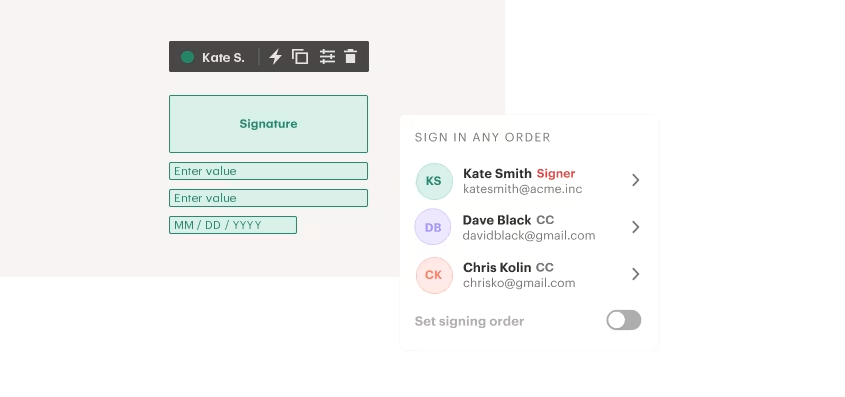
Supply: PandaDoc
PandaDoc is a doc automation platform that mixes doc era, eSignature, CPQ (configure-price-quote), Deal Rooms, workflow automation, and cost assortment in a single workspace.
The corporate calls itself “360-degree doc administration software program,” with a tagline of “Create, Approve, Monitor & eSign Docs 40% Quicker”.
PandaDoc primarily serves gross sales groups at SMB and mid-market firms, notably income operations leaders who work inside CRM instruments like HubSpot, Salesforce, and Pipedrive. Secondary consumers embody HR, authorized, advertising and marketing, and buyer success groups served via devoted team-specific options.
PandaDoc’s integration ecosystem is among the platform’s core strengths.
The integrations catalog spans eight classes: Admin, CPQ, CRM, Design, Integration Platforms, Cost, Productiveness, and Storage.
Native CRM integrations with Salesforce, HubSpot, and Pipedrive embody bidirectional information sync and embedded CPQ capabilities, whereas cost gateways (Stripe, Sq., PayPal) let consumers pay inside paperwork.
On the developer facet, PandaDoc gives a REST API with SDKs in Python, Node.js, Java, and PHP, webhooks for real-time occasion notifications, and a Mannequin Context Protocol (MCP) server for AI agent workflows.
The combination classes out there to PandaDoc customers embody:
-
CRM and gross sales: Salesforce, HubSpot, Pipedrive, Monday.com, Microsoft Dynamics
-
Cost processing: Stripe, Sq., PayPal, QuickBooks Funds, Authorize.internet
-
Cloud storage: Google Drive, OneDrive, Dropbox, Field, SharePoint (through automations)
With that ecosystem as context, listed here are the seven integrations we chosen as the most effective choices for extending PandaDoc throughout the classes that matter most.
1. Salesforce: Finest PandaDoc Integration for CRM-Pushed Doc Technology and Two-Means Deal Sync
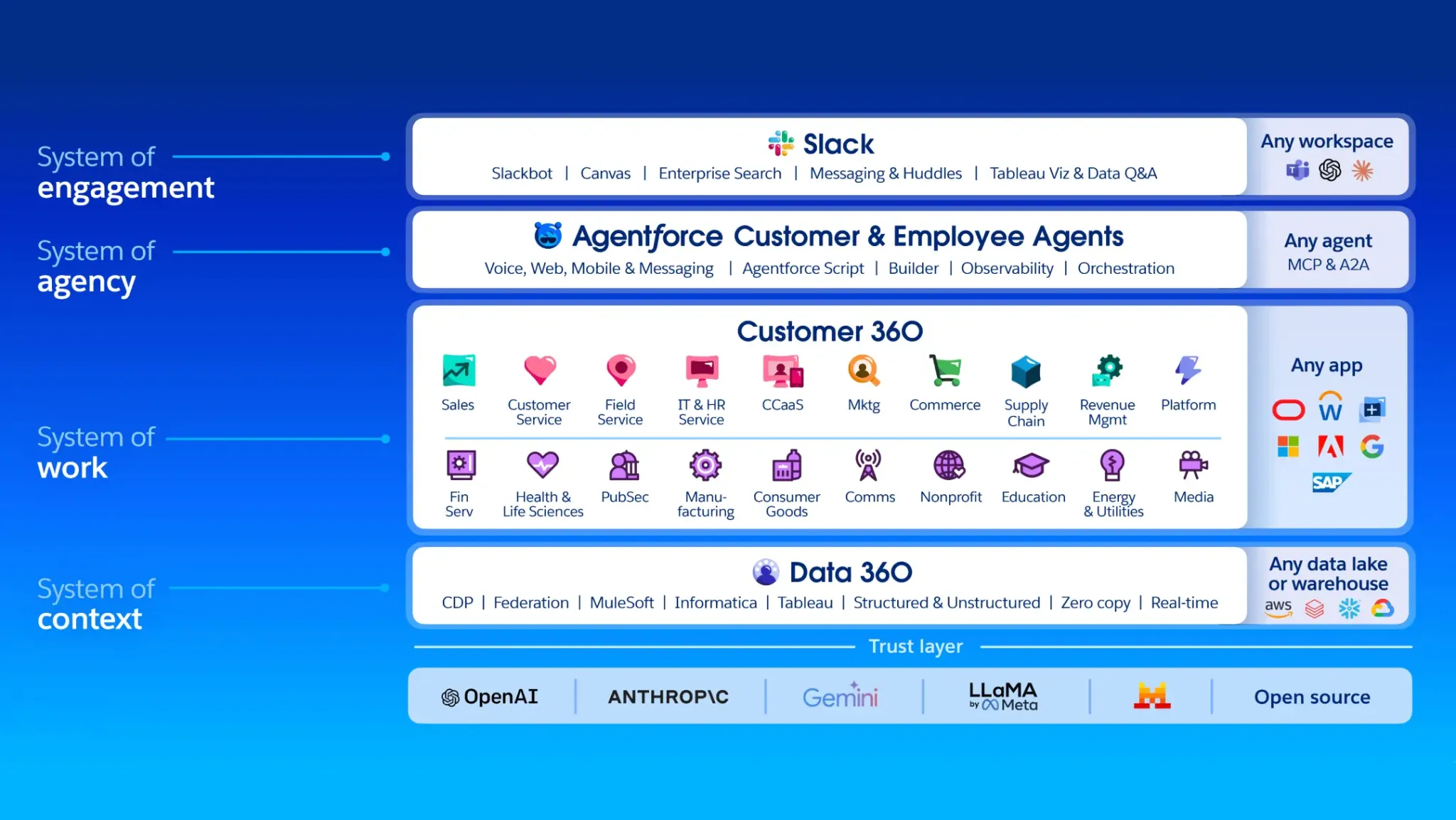
Supply: Salesforce
Salesforce is the world’s #1 CRM by IDC market share, and its native integration with PandaDoc turns the CRM right into a contract engine the place proposals, quotes, and agreements are generated from Alternative and Account information.
It is a first-party connector out there via Salesforce’s AppExchange, with CPQ capabilities working as a local app contained in the CRM.
Key integration capabilities embody:
-
Doc era from Salesforce Alternative, Account, Contact, and Quote information, with CRM information auto-populating PandaDoc templates via mapped area connections
-
Twin Salesforce CPQ connection modes: pushing a Salesforce-generated PDF into PandaDoc as a static doc, or pulling Salesforce CPQ line gadgets into an editable PandaDoc pricing desk
How Salesforce Integrates with PandaDoc
The Salesforce integration is a local, bidirectional connection accessible from Salesforce information. It operates at two ranges: the usual doc era and sync move (out there on PandaDoc Marketing strategy), and the deeper CPQ for Salesforce layer (requiring PandaDoc Enterprise).
1. Doc Technology from Salesforce Information.
When a rep works inside a Salesforce Alternative, they’ll launch PandaDoc, choose a template, and have each related area (firm identify, contact particulars, deal quantity, product line gadgets, customized Alternative fields) auto-populate via pre-configured area mappings.
Admins map Salesforce object fields to PandaDoc template variables as soon as, and each doc inherits the mapping routinely. The combination helps inhabitants from Alternative, Account, Contact, and Quote objects.
2. Bidirectional Standing Sync.
When a PandaDoc doc modifications standing (despatched, considered, signed, accomplished), these occasions seem on the linked Salesforce Alternative report. Gross sales managers reviewing pipeline in Salesforce can see which proposals have been opened and which have accomplished with out logging into PandaDoc.
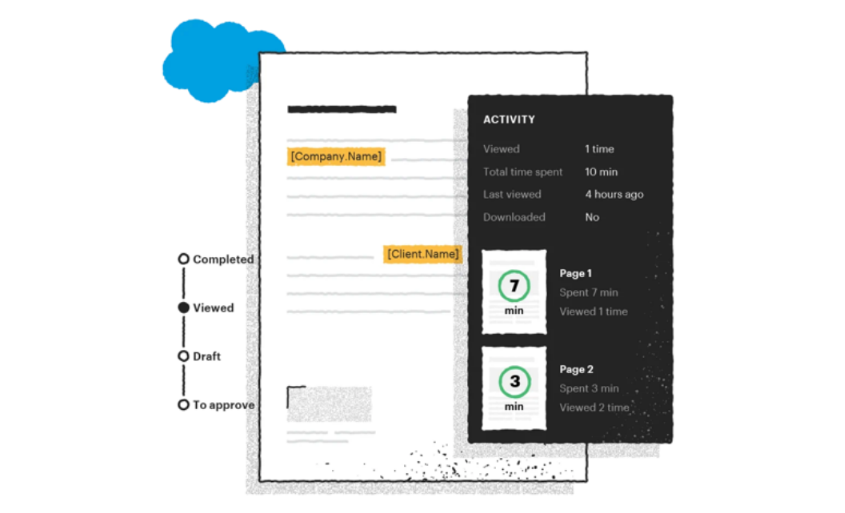
Supply: Salesforce
Within the reverse route, Alternative stage modifications in Salesforce can set off PandaDoc workflow automations that generate and ship paperwork routinely.
3. Native CPQ with Guided Promoting and Conditional Approval Routing.
PandaDoc CPQ for Salesforce runs as a local software contained in the CRM. A guided promoting questionnaire walks reps via product choice and pricing configuration.
The foundations engine applies WHEN/THEN conditional logic for quantity reductions, bundle pricing, required add-ons, and low cost guardrails. Conditional approval workflows fireplace routinely when low cost thresholds are breached, whereas quotes beneath these thresholds advance to accredited standing instantly.
4. Salesforce CPQ Compatibility.
For groups already utilizing Salesforce Income Cloud, PandaDoc helps two connection modes: pushing the Salesforce-generated PDF into PandaDoc for eSignature and monitoring, or pulling Salesforce CPQ line gadgets into an editable PandaDoc pricing desk the place reps can modify portions earlier than sending.
Salesforce Pricing
Salesforce makes use of per-user annual contracts. The editions most related to the PandaDoc integration:
On the PandaDoc facet, the usual doc era and sync integration requires the Marketing strategy ($49/seat/month). CPQ for Salesforce requires PandaDoc Enterprise (customized pricing). Groups ought to price range for each platforms when evaluating whole value.
Who Ought to Use the Salesforce Integration?
2. HubSpot: Finest PandaDoc Integration for Deal-Pushed Doc Automation
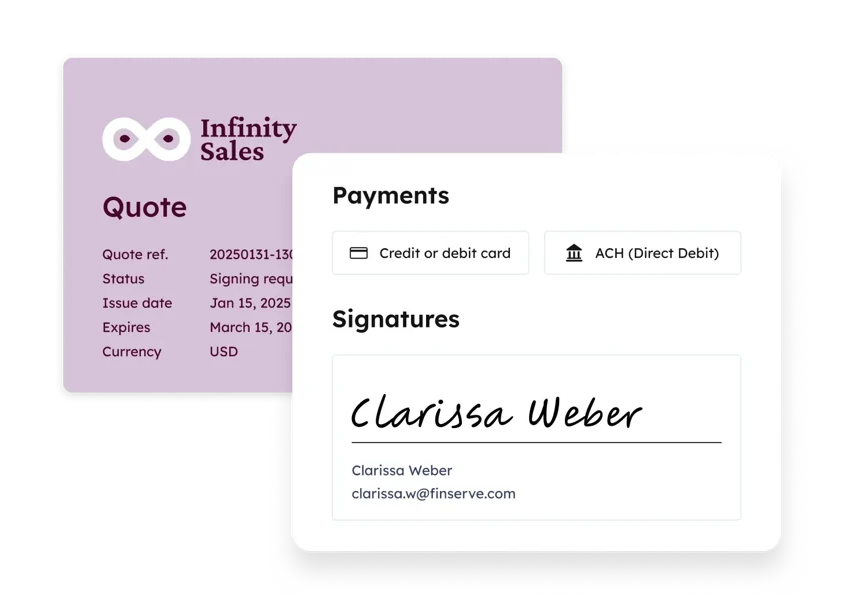
Supply: HubSpot
HubSpot is a CRM and advertising and marketing automation platform that integrates with PandaDoc to automate the quote-to-signature workflow from deal information. It is a native, bidirectional connection that syncs contact and deal information into paperwork and writes doc exercise again to deal timelines with out middleware.
Key integration capabilities embody:
-
Bidirectional deal information sync that auto-populates PandaDoc templates from HubSpot contact, firm, deal, and product line merchandise information
-
Doc occasions (despatched, considered, signed) written again to the HubSpot deal report as exercise timeline entries
How HubSpot Integrates with PandaDoc
The combination installs from PandaDoc’s Extensions market and authenticates through OAuth. HubSpot deal information acquire a devoted PandaDoc panel the place reps can provoke paperwork, view standing, and create Deal Rooms with out leaving HubSpot.
1. Bidirectional Deal Knowledge Sync and Timeline Updates.
When a doc is created from a HubSpot deal report, PandaDoc pulls the contact identify, firm identify, deal worth, and product line gadgets into the template’s variable placeholders.
When a doc is distributed, considered, or signed, PandaDoc writes these occasions again as deal timeline entries, giving managers a chronological audit path of the deal lifecycle in a single report.
One limitation to plan round: value overrides made inside a PandaDoc pricing desk don’t write again to the HubSpot deal quantity area. Reps should replace the deal worth individually after any in-document value adjustment.
2. CPQ for HubSpot with Guided Quoting.
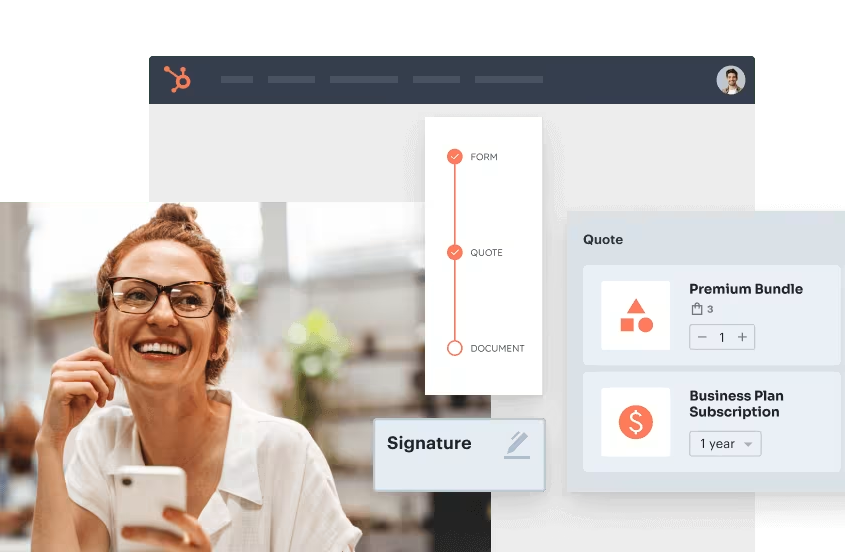
PandaDoc CPQ for HubSpot embeds PandaDoc’s configure-price-quote engine within the HubSpot deal view. Reps choose merchandise via a guided promoting questionnaire, and the CPQ guidelines engine enforces pricing guardrails and bundle necessities set by admins.
Supply: HubSpot
The quote feeds right into a branded PandaDoc doc and routes via approval workflows earlier than sending. CPQ for HubSpot requires PandaDoc Enterprise.
3. HubSpot Workflow Automation from Doc Occasions.
HubSpot’s workflow automation engine (out there on Skilled and Enterprise tiers) can set off on PandaDoc doc outcomes. A accomplished doc can advance the deal stage, create a follow-up activity, and enroll the contact in a post-sale nurture sequence.
A considered however unsigned doc can set off re-engagement emails. A declined doc can notify the deal proprietor and transfer the stage again. This removes the guide step of updating CRM pipeline phases after every signing occasion.
HubSpot Pricing
HubSpot makes use of modular, tier-based pricing. The tiers most related to this integration:
-
Gross sales Hub Skilled: $90/seat/month (annual), plus $1,500 one-time onboarding; unlocks workflow automation required for document-event triggers
-
Gross sales Hub Enterprise: $150/seat/month (annual solely), plus $3,500 onboarding; provides customized objects and superior permissions
PandaDoc’s native HubSpot integration requires PandaDoc Enterprise ($49/seat/month). To get the complete workflow automation worth, groups want each PandaDoc Enterprise and HubSpot Skilled at minimal.
Who Ought to Use the HubSpot Integration?
-
Operations groups that need pipeline phases to advance routinely primarily based on actual doc outcomes (signatures, views, declines) fairly than rep self-reporting.
3. Stripe: Finest PandaDoc Integration for Combining Signal-and-Pay right into a Single Purchaser Session
Supply: Stripe
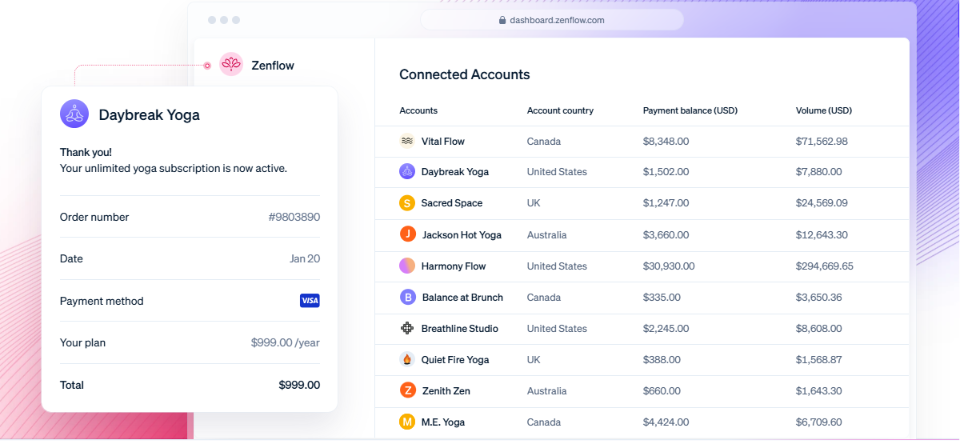
Stripe is a monetary infrastructure platform that integrates with PandaDoc to embed cost assortment contained in the doc signing expertise, turning a signed contract right into a paid contract with none handoff between techniques.
It is a native, direct connection configured inside PandaDoc’s cost settings, requiring no middleware or third-party connectors.
Key integration capabilities embody:
How Stripe Integrates with PandaDoc
An admin connects an current Stripe account through OAuth from PandaDoc’s cost settings. The connection then applies throughout all the workspace; any doc can embody a cost block from the editor.
The combination helps three cost situations: one-time funds, recurring subscriptions, and automated invoicing.
1. Embedded Cost Assortment at Signing.
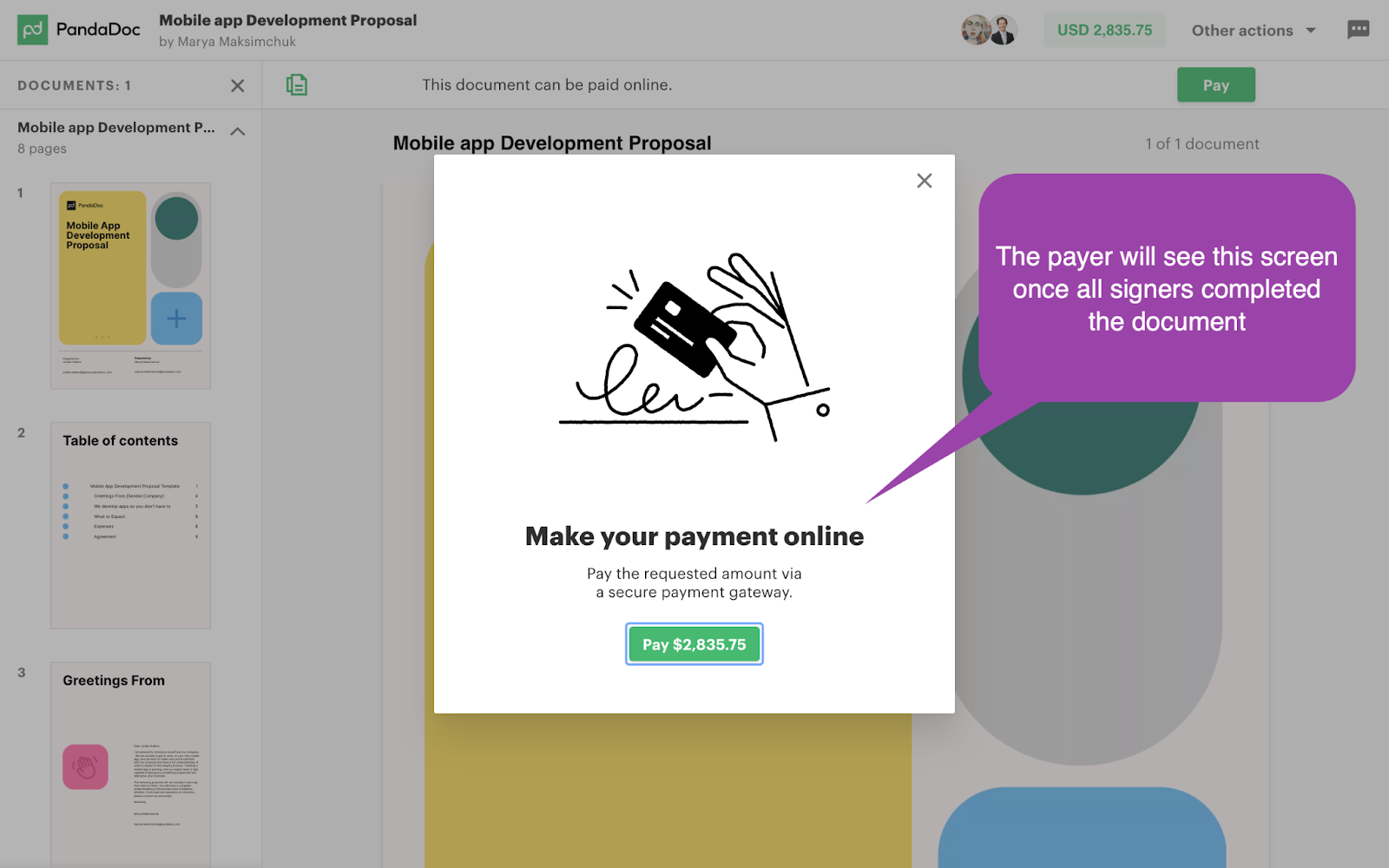
When a purchaser opens a PandaDoc doc configured with Stripe Checkout funds, they see a card entry type on the identical web page the place they overview phrases and signal.
Supply: Stripe
The client completes each actions in a single browser session. This eliminates the sign-then-invoice-then-pay sequence that may delay money assortment by days or perhaps weeks.
For one-time offers, money is collected at contract execution; for subscription offers, the billing relationship prompts instantly fairly than ready for guide setup in Stripe.
2. Recurring Billing with Automated Subscription Creation.
For subscription merchandise, the sender configures the billing interval (weekly, month-to-month, or annual) and period inside PandaDoc. When the client completes the embedded cost, PandaDoc creates the corresponding Stripe subscription routinely. No guide setup within the Stripe Dashboard is required.
The subscription inherits Stripe’s billing lifecycle, together with Sensible Retries that recuperate a median of 41% of failed recurring expenses.
3. Automated Bill Technology on Completion.
When a PandaDoc doc with Stripe funds is accomplished, PandaDoc creates a Stripe bill with buyer particulars, line merchandise quantities, and cost standing already populated.
Finance groups discover the cost cost, subscription object (for recurring offers), and bill all current in Stripe by the point the PandaDoc completion notification fires.
Stripe Pricing
Stripe makes use of a pay-as-you-go mannequin with no setup charges, month-to-month minimums, or contracts. PandaDoc expenses no extra payment for the mixing:
Who Ought to Use the Stripe Integration?
4. Slack: Finest PandaDoc Integration for Actual-Time Doc Occasion Notifications
Supply: Slack
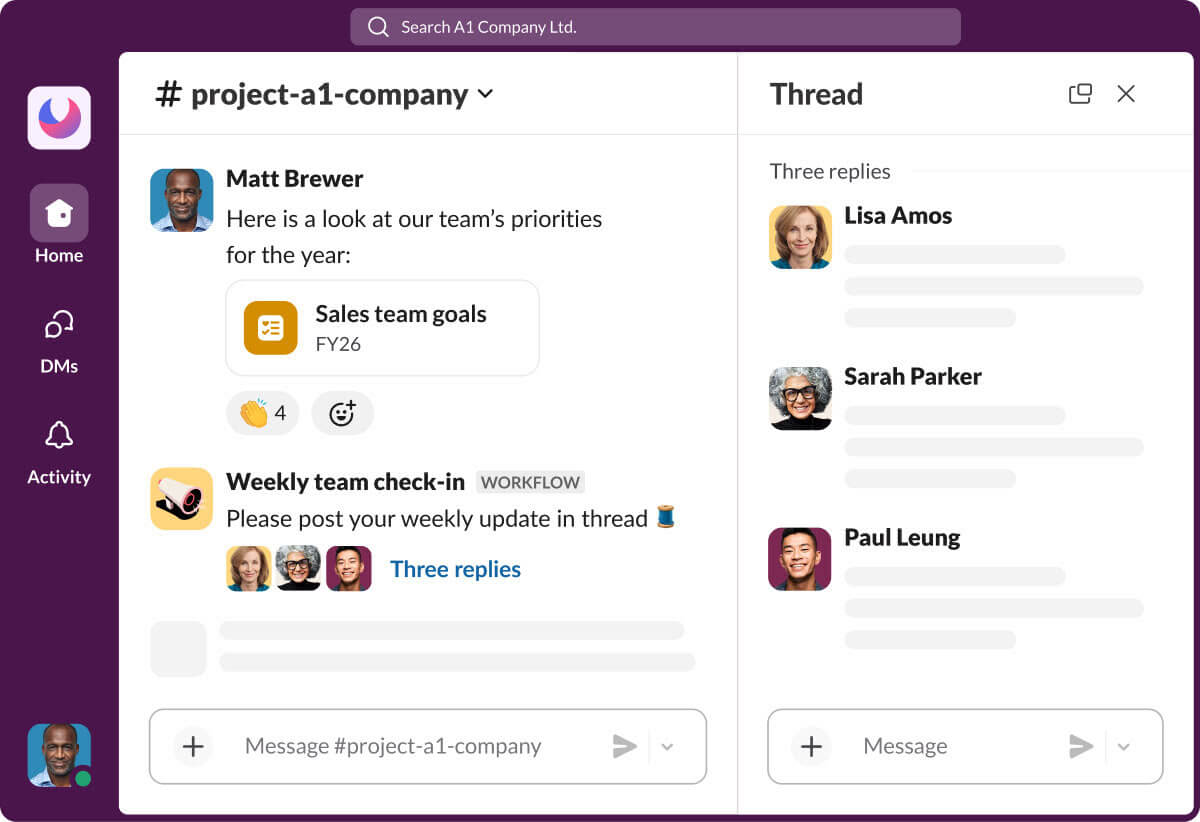
Slack is a workforce communication platform with 200,000+ paid prospects that connects to PandaDoc through a local Slack Market app, surfacing doc occasion alerts contained in the workspace the place gross sales reps already talk.
It is a native market app requiring no API keys or third-party connectors for the core notification and document-creation workflow.
Key integration capabilities embody:
-
Actual-time private notifications when a PandaDoc doc is considered, signed, declined, or paid
-
Prolonged channel-level posting for team-wide visibility, out there by layering a Zapier workflow on prime of the native integration
How Slack Integrates with PandaDoc
Set up follows Slack’s normal app authorization move. Particular person customers join their PandaDoc accounts to their Slack identification, and every rep’s doc occasions path to their private PandaDoc app DMs in Slack.
For team-wide channel posting (the place an AE, SE, and CSM all have to see contract execution), the native integration doesn’t assist this; that use case requires a Zapier workflow layered on prime.
1. Actual-Time Doc Occasion Notifications.
When a PandaDoc doc is considered, signed, declined, or paid, the mixing delivers a direct message to the sending rep’s PandaDoc app DM thread in Slack.
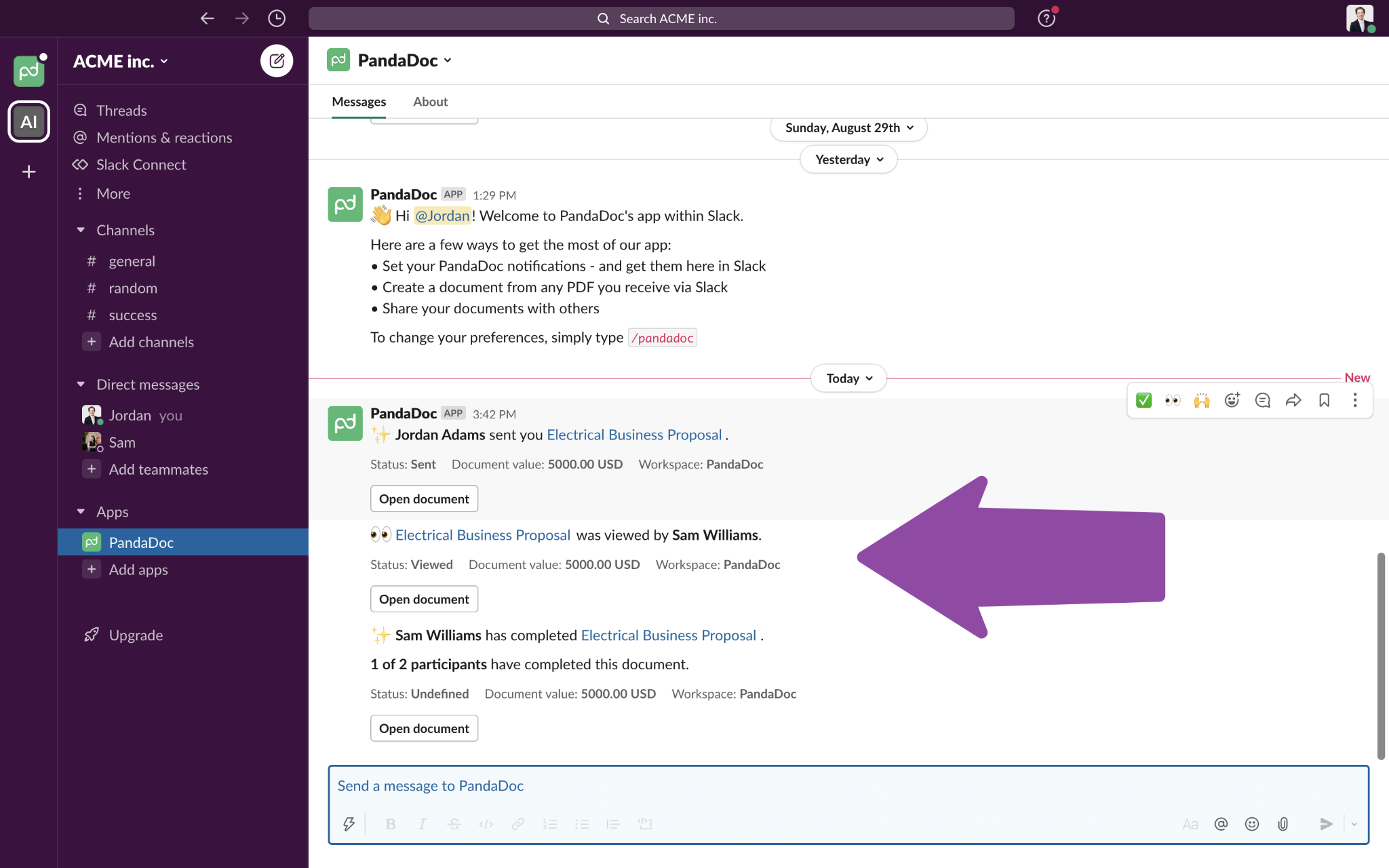
Supply: Slack
View occasions are notably time-sensitive: when a prospect opens a proposal, the rep’s finest follow-up window is inside minutes whereas the content material is recent.
Getting that alert in Slack, the place the rep is already coordinating offers, means the follow-up sign arrives the place it may be acted on instantly.
2. Doc Creation from Slack.
The PandaDoc Slack app lets reps begin a brand new doc from inside Slack utilizing the app command, to allow them to start a proposal or settlement with out leaving an energetic dialog.
The total modifying expertise takes place in PandaDoc’s net interface; the Slack command serves as an entry level that shortens the hole between deciding to create a doc and taking step one.
3. Per-Consumer Notification Preferences.
Every rep configures which doc occasions set off Slack alerts utilizing the /pandadoc handle command. A senior AE managing 40 energetic proposals can filter right down to solely signed and paid occasions, whereas a junior rep with fewer simultaneous offers may choose into view notifications as an early-engagement sign.
All notifications arrive within the PandaDoc app’s private DM thread, conserving deal data out of public channels by default.
Slack Pricing
Slack makes use of per-seat pricing with a Truthful Billing Coverage that credit inactive customers. The PandaDoc integration works on all paid plans:
For groups already utilizing Slack, the PandaDoc integration provides no incremental value. The Zapier layer required for channel-level doc posting provides a separate value if deal quantity exceeds Zapier’s free activity tier.
Who Ought to Use the Slack Integration?
5. Zapier: Finest PandaDoc Integration for No-Code Doc Workflow Automation
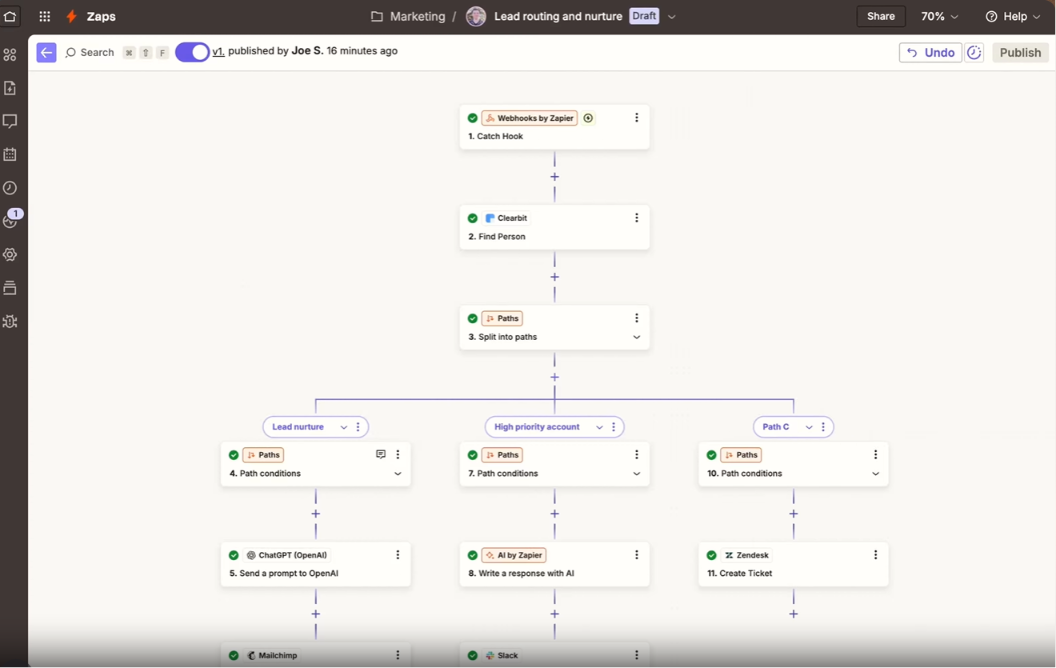
Supply: Zapier
Zapier is a no-code automation platform that integrates with PandaDoc to attach doc lifecycle occasions to automated actions throughout 8,000+ purposes. Each accounts are authenticated inside Zapier’s dashboard, and workflows are constructed inside Zapier’s Zap editor fairly than inside PandaDoc.
PandaDoc lists Zapier in its official integration catalog as the first no-code automation pathway.
Key integration capabilities embody:
-
PandaDoc occasions (Accomplished, Despatched, Considered, Paid, Standing Modified) uncovered as Zap triggers
How Zapier Integrates with PandaDoc
Zapier connects to PandaDoc via a native integration utilizing OAuth. PandaDoc works as each a set off supply and an motion vacation spot, enabling bidirectional automation. The combination requires PandaDoc Marketing strategy or above.
1. Doc-Occasion Triggers for Downstream Automation.
PandaDoc surfaces Doc Accomplished, Despatched, Considered, Paid, and Standing Modified occasions as Zap triggers. A accomplished doc can fireplace a CRM deal stage replace, a Slack channel notification, a Google Drive PDF archive, and a spreadsheet row entry on the identical time.
Set off pace is determined by plan tier: the Free plan polls each quarter-hour; Skilled polls each 2 minutes.
2. Automated Doc Creation from Exterior Occasions.
The “Create Doc from Template” motion permits any Zapier-compatible set off to generate a PandaDoc doc. A brand new deal getting into a particular CRM stage can populate a template with deal information and ship the ensuing doc to the prospect, with no rep opening PandaDoc.
The identical sample applies to HR onboarding, subscription renewals, and consumer consumption workflows the place doc dispatch needs to be automated.
3. Pre-Constructed Zap Templates.
PandaDoc and Zapier publish ready-made templates overlaying the commonest workflows: Slack notifications on doc completion, Google Drive PDF archiving, Salesforce alternative creation on proposal ship, and HubSpot deal stage updates on signing.
Groups with no prior Zapier expertise can have a working PandaDoc automation working inside minutes of authenticating each accounts.
Zapier Pricing
Zapier makes use of task-based pricing the place every motion step counts as one activity:
Most PandaDoc automation workflows require Skilled or above to unlock multi-step Zaps. On the PandaDoc facet, the Zapier integration requires Enterprise ($49/seat/month) or above.
Who Ought to Use the Zapier Integration?
-
Groups utilizing instruments that PandaDoc would not natively hook up with (area of interest CRMs, challenge administration platforms, inner databases) that want doc occasions to set off updates routinely with out code.
-
Organizations the place a signed contract should cascade via a number of downstream techniques directly: a CRM replace, a Slack alert, a cloud storage save, and a challenge activity creation, all from a single PandaDoc occasion.
6. QuickBooks On-line: Finest PandaDoc Integration for Bridging Signed Contracts and Issued Invoices
Supply: PandaDoc
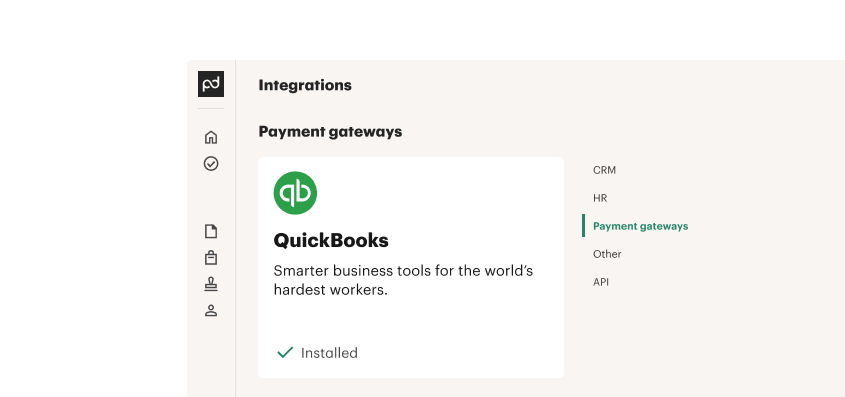
QuickBooks On-line is a cloud-based small enterprise accounting platform that integrates with PandaDoc via two paths: a local QuickBooks Funds gateway embedded in PandaDoc paperwork, and a Zapier-based automation path for post-signature bill creation.
Key integration capabilities embody:
How QuickBooks On-line Integrates with PandaDoc
The combination operates alongside two paths. The cost path is a local, direct connection: QuickBooks Funds is configured as a cost gateway inside PandaDoc. The accounting path runs via Zapier: doc completion triggers bill creation in QuickBooks.
Each paths can work independently or collectively. Notice that the mixing requires QuickBooks On-line particularly; QuickBooks Desktop is just not supported.
1. Automated Bill Creation through Zapier.
When a PandaDoc doc reaches “Accomplished” standing, Zapier triggers QuickBooks On-line to create an bill populated with buyer particulars and line gadgets from the PandaDoc pricing desk.
This eliminates guide bill entry after every closed deal, closing the hole between when a contract is signed and when the accounting report is created. The Zapier workflow requires a paid Zapier plan for multi-step automation.
2. Product Catalog Synchronization.
PandaDoc’s product catalog can sync with QuickBooks On-line gadgets, conserving pricing constant throughout each platforms. When merchandise are up to date in QuickBooks, PandaDoc paperwork replicate present pricing fairly than requiring guide updates in two techniques.
This prevents the discrepancies that come up when line gadgets in a PandaDoc quote drift from what will get invoiced in QuickBooks.
3. Native QuickBooks Funds Gateway.
QuickBooks Funds works as a local cost gateway inside PandaDoc. Patrons pay by bank card inside the doc, and the transaction information in QuickBooks the place invoicing and bookkeeping already occur.
This retains cost exercise contained in the accounting system fairly than producing information in a separate processor. Processing charges are 2.99% for bank card and digital pockets transactions and 1% (max $10) for ACH financial institution funds.
QuickBooks On-line Pricing
QuickBooks On-line makes use of tiered month-to-month subscriptions:
No QuickBooks plan tier restricts the PandaDoc integration. The Zapier-based bill automation requires a paid Zapier subscription, and PandaDoc’s Zapier integration requires Marketing strategy ($49/seat/month) or above. QuickBooks Funds processing charges are charged on every transaction via the embedded gateway.
Who Ought to Use the QuickBooks On-line Integration?
7. Greenhouse: Finest PandaDoc Integration for Automated Provide Letter Workflows and Hiring Standing Sync

Supply: Greenhouse
Greenhouse is the #1-ranked applicant monitoring system on G2 throughout general, enterprise, mid-market, and EMEA classes as of Spring 2026. It integrates with PandaDoc to automate the supply letter lifecycle via PandaDoc’s Exterior Automations engine utilizing pre-built automation recipes.
Key integration capabilities embody:
-
Provide letter auto-population from Greenhouse candidate information (identify, title, compensation, hiring supervisor, recruiter)
How Greenhouse Integrates with PandaDoc
Setup requires enabling the Exterior Automations extension from PandaDoc’s Extensions retailer and choosing the Greenhouse recipe.
As a result of automations are configured on the template stage, each supply letter generated from the configured template inherits the Greenhouse connection routinely, scaling with hiring quantity with out per-document configuration.
Knowledge flows in two instructions: Greenhouse pushes candidate information into PandaDoc at doc creation, and PandaDoc pushes doc outcomes again to Greenhouse.
1. Provide Letter Auto-Inhabitants from Candidate Knowledge.
PandaDoc pulls candidate identify, job title, division, compensation particulars, hiring supervisor, and recruiter data from Greenhouse into the template.
This eliminates guide transcription and the data-entry errors that include copying compensation figures beneath deadline strain. The supply letter that reaches the candidate displays precisely what Greenhouse comprises.
2. Automated Recipient Task.
The combination units doc recipients routinely utilizing Greenhouse’s saved candidate and hiring supervisor data, assigning the proper signers with applicable e mail addresses and roles from Greenhouse information.
This removes the lookup step and eliminates the chance of routing a proposal letter to a stale or incorrect handle.
3. Signed PDF Archiving to Candidate Profiles.
When a candidate indicators the supply letter and the doc reaches Accomplished standing, an automation uploads the signed PDF to the corresponding Greenhouse candidate profile.
The executed supply letter is saved alongside software supplies, interview scorecards, and pipeline exercise with out guide file switch.
4. Software Standing Sync Primarily based on Doc End result.
When a PandaDoc supply letter is Accomplished, an automation marks the candidate as employed in Greenhouse. When a doc is Declined, the automation updates the appliance standing accordingly.
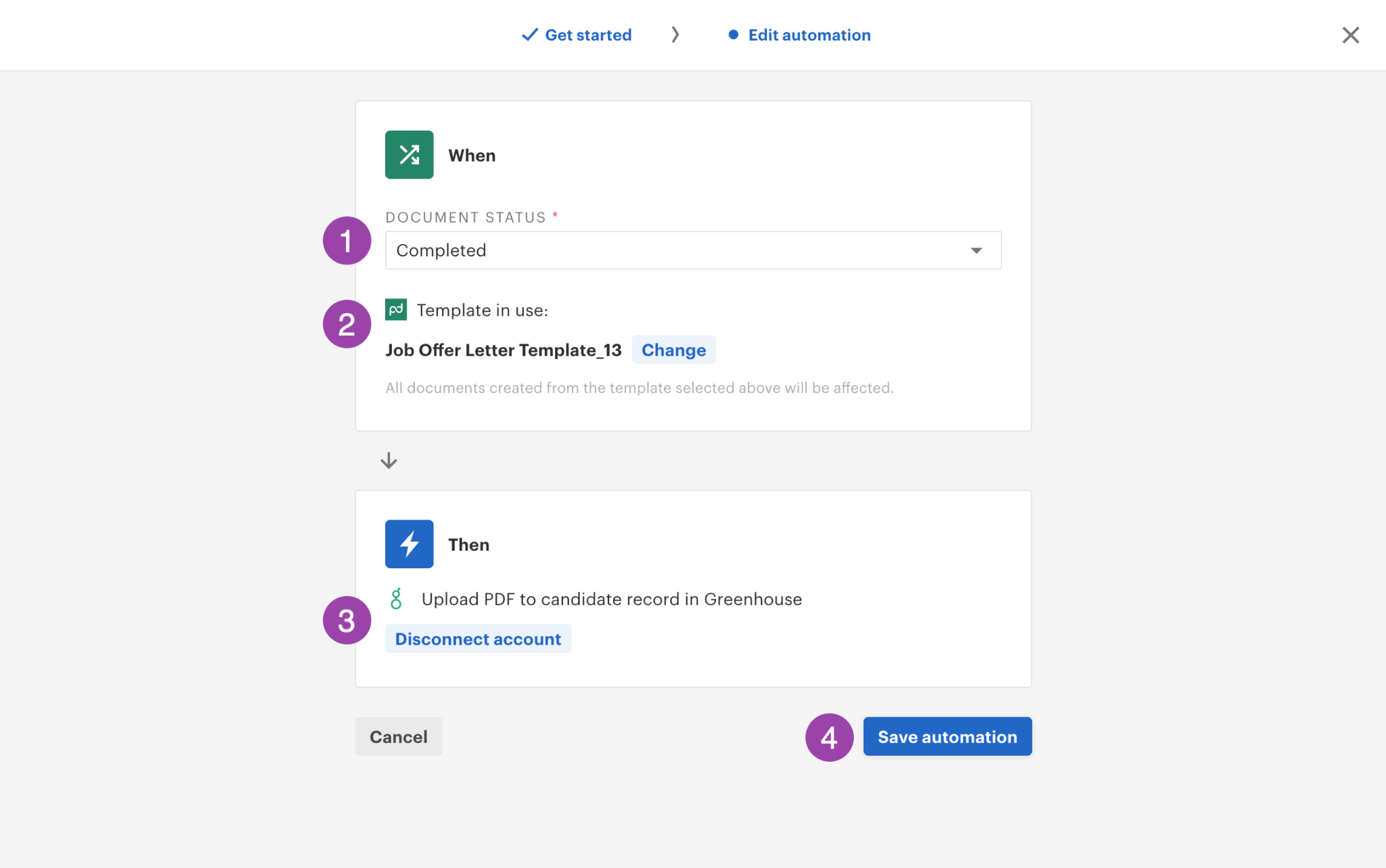
Supply: Greenhouse
These updates fireplace in actual time primarily based on the doc occasion, conserving the ATS pipeline correct with out recruiter intervention.
Greenhouse Pricing
Greenhouse pricing is customized and headcount-based throughout three tiers: Core, Plus, and Professional. No public value checklist is offered; value is determined by plan choice, hiring quantity, and organizational complexity. A gross sales dialog is required for pricing figures. No free trial or free plan is obtainable.
On the PandaDoc facet, Exterior Automations (which energy the Greenhouse integration) can be found as a paid add-on for Marketing strategy accounts and included within the Enterprise plan. No Greenhouse plan tier restricts the candidate report fields or software standing endpoints the mixing touches.
Who Ought to Use the Greenhouse Integration?
-
HR operations groups processing important hiring quantity that want signed PDFs archived to candidate profiles and software statuses up to date routinely, fairly than as guide coordinator duties after every supply.
Additionally Value Contemplating: ZoomInfo

ZoomInfo is an AI-powered go-to-market platform constructed on a B2B information basis of 500M contacts, 100M firms, 135M+ verified telephone numbers, and 200M+ verified enterprise e mail addresses.
Whereas ZoomInfo doesn’t combine with PandaDoc instantly, the 2 platforms serve overlapping audiences and complement one another via shared CRM connections.
The connection works like this: ZoomInfo enriches your CRM (Salesforce, HubSpot, Pipedrive, or Microsoft Dynamics) with verified contact information, firm attributes, technographic profiles, and purchaser intent alerts.
PandaDoc then pulls that enriched information from the identical CRM to auto-populate proposals, contracts, and quotes. The extra full your CRM information, the extra dependable your PandaDoc paperwork change into.
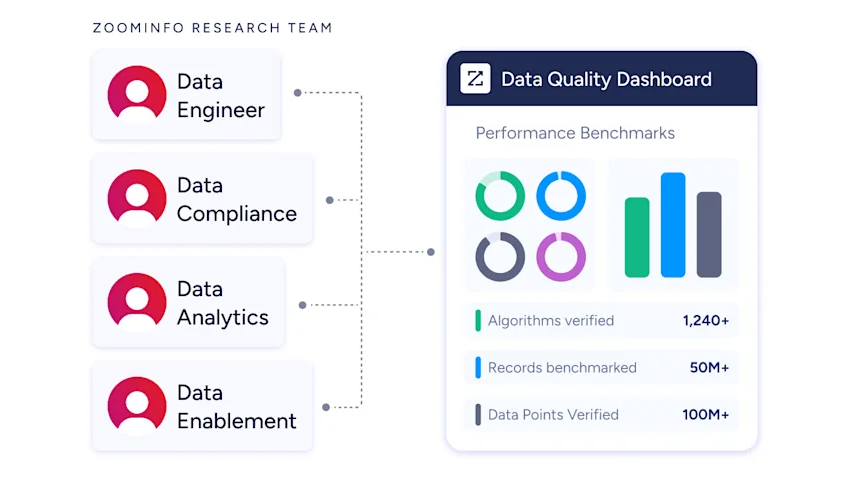
As an alternative of reps verifying a prospect’s title, telephone quantity, or firm particulars earlier than sending a proposal, the enrichment has already occurred upstream via a verification pipeline backed by 300+ human researchers and reaching as much as 95% accuracy on first-party information.
Supply: ZoomInfo
For B2B gross sales groups utilizing PandaDoc to shut offers, information high quality within the CRM is the muse each downstream doc is determined by. A proposal auto-populated with a stale job title or an incorrect firm identify undermines the client expertise.
ZoomInfo solves this on the supply, conserving the CRM layer correct so PandaDoc paperwork replicate present, verified data.
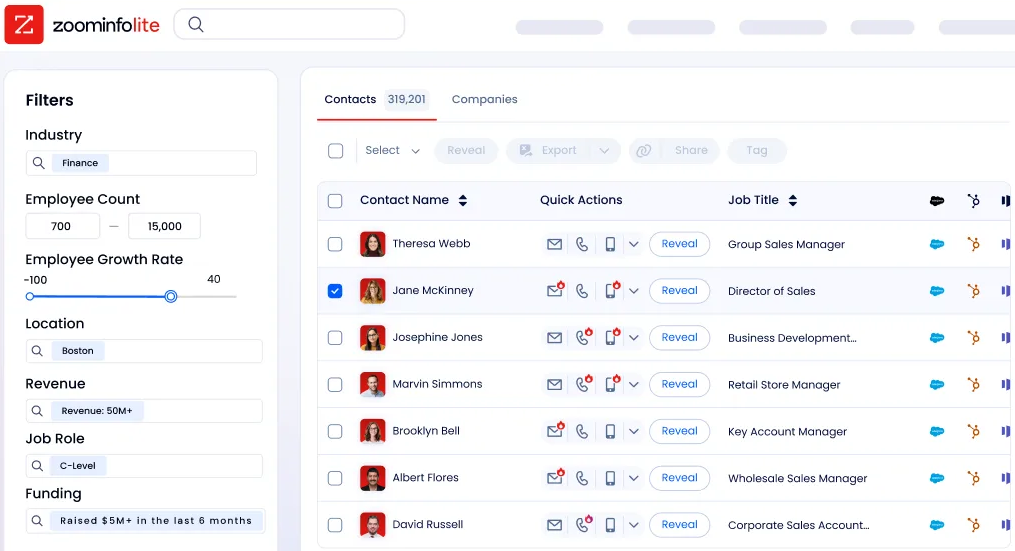
ZoomInfo Lite is a everlasting free tier with CRM integrations, making it a sensible method to consider the information high quality earlier than committing.
Smartsheet’s Senior Supervisor of Gross sales Expertise Enablement referred to as ZoomInfo “our one supply of reality for account information, and much more so for contact information,” noting “there is no different supplier out there that gives you with that stage of element.” (Smartsheet Case Examine)
Remaining Verdict
The most effective PandaDoc integrations join your doc workflows to the techniques the place your information lives, your workforce communicates, and your income will get acknowledged:
-
Salesforce: the deepest CRM integration, with native CPQ, guided promoting, conditional approvals, and bidirectional Alternative sync
-
HubSpot: deal-driven doc automation with pipeline triggers, timeline visibility, and in-CRM quoting
These integrations additionally compound: you may join Salesforce for doc era, Stripe for cost, Slack for notifications, and Zapier for cloud storage archiving on the identical PandaDoc workspace, every extending the worth of the others.
The paperwork PandaDoc generates are solely nearly as good as the information that feeds them. In case your gross sales workforce runs on Salesforce or HubSpot, the accuracy of the contact and firm information in your CRM shapes the standard of each proposal and quote your reps ship. ZoomInfo enriches that CRM layer with verified B2B information from 500M contacts and 135M+ verified telephone numbers, purchaser intent alerts, and technographic intelligence, so the data PandaDoc pulls into your paperwork is present and full. ZoomInfo Lite is free and consists of CRM integrations, so you’ll be able to see what verified information does on your doc accuracy earlier than spending something.
Incessantly Requested Questions
What number of integrations does PandaDoc assist?
PandaDoc’s integrations catalog spans eight classes: CRM, Cost, CPQ, Admin, Design, Integration Platforms, Productiveness, and Storage. Native integrations embody Salesforce, HubSpot, Pipedrive, Monday.com, Stripe, Sq., PayPal, QuickBooks, Slack, Greenhouse, and BambooHR.
Past native connections, PandaDoc’s REST API helps customized integrations with any system that may make HTTP requests, and Zapier extends connectivity to eight,000+ extra apps.
PandaDoc additionally publishes a Mannequin Context Protocol (MCP) server that allows AI brokers to create, route, and execute paperwork programmatically.
Do PandaDoc integrations work on the free plan?
PandaDoc’s free plan helps eSignatures and cost assortment (together with Stripe and QuickBooks Funds), however most integrations require a paid plan. CRM integrations with Salesforce, HubSpot, and Pipedrive require the Marketing strategy ($49/seat/month) or above.
The Zapier and Slack integrations additionally require Enterprise tier. Greenhouse and different Exterior Automations can be found as a paid add-on on Enterprise or included in Enterprise. CPQ requires Enterprise (customized pricing).
Can I take advantage of PandaDoc with a CRM aside from Salesforce or HubSpot?
Sure. PandaDoc gives native integrations with Pipedrive (together with CPQ) and Monday.com, plus documented developer guides for Microsoft Dynamics.
For CRMs with out native assist, Zapier connects PandaDoc doc occasions to just about any CRM with a Zapier connector. PandaDoc’s REST API additionally helps customized CRM integrations for improvement groups that want deeper management over information move and area mapping.
How does PandaDoc’s two-way CRM sync work?
PandaDoc’s bidirectional sync with Salesforce and HubSpot operates in each instructions. Outbound: CRM deal information (contact identify, firm, pricing, customized fields) auto-populates PandaDoc templates at doc creation.
Inbound: doc standing occasions (despatched, considered, signed, accomplished) write again to the CRM deal report as timeline entries. This retains the CRM pipeline correct with out reps manually updating deal phases after doc occasions.
One limitation: value overrides made inside PandaDoc pricing tables don’t write again to CRM deal quantities; that replace should be made manually.
Can PandaDoc acquire funds on the time of signing?
Sure. PandaDoc helps embedded cost assortment via Stripe, Sq., PayPal, QuickBooks Funds, and Authorize.internet. The cost area is added to the doc physique, and consumers full cost in the identical browser session the place they signal.
Stripe’s integration goes furthest, supporting automated subscription creation for recurring expenses and automated bill era upon doc completion. Cost assortment is offered on all PandaDoc plans, together with the free tier.
Is PandaDoc safe sufficient for regulated industries?
PandaDoc holds SOC 2 Sort II certification, helps HIPAA compliance with Enterprise Affiliate Agreements, and is GDPR and CCPA compliant. The platform helps eIDAS throughout all three EU signature tiers together with Certified Digital Signatures (QES).
In 2025, PandaDoc added 21 CFR Half 11 compliant workspaces for FDA-regulated industries. Enterprise options embody SSO through SAML 2.0, customized consumer roles, information residency (US or EU), and a 30-day audit log. Digital signature certificates use Public Key Infrastructure in partnership with Entrust.
What’s one of the simplest ways to make sure correct B2B contact information in your PandaDoc paperwork?
The proposals and contracts PandaDoc generates are solely as correct because the CRM information feeding them. Integrating a B2B information platform together with your CRM ensures the contact names, job titles, telephone numbers, and firm particulars that auto-populate your paperwork are present and verified.
ZoomInfo enriches Salesforce, HubSpot, Pipedrive, and Microsoft Dynamics with information from 500 million contacts and 100 million firms, verified via a pipeline backed by 300+ human researchers reaching as much as 95% accuracy on first-party information.
As a result of PandaDoc pulls from CRM fields, ZoomInfo’s enrichment flows into each doc your workforce generates. ZoomInfo Lite is a everlasting free tier with CRM integrations, so you’ll be able to check how verified information improves your doc accuracy with none upfront value.

