

Claude MCP for gross sales prospecting connects Claude to a stay B2B information supply by the Mannequin Context Protocol, so a rep can discover, enrich, and qualify accounts from a single dialog as a substitute of switching between a database, a CRM, and a spreadsheet. The worth relies upon solely on what information sits behind the connection. Level Claude at ZoomInfo’s GTM AI and it prospects towards verified corporations and contacts. Level it on the open internet and it returns no matter it may well scrape.
This information covers what the connection does, which prospecting jobs Claude can run as soon as it’s in place, the instruments behind every step, and find out how to set it up in Claude Desktop, Claude Code, or Cowork. For groups able to run full GTM performs headless, Agent Groups operates by GTM.AI.
What Claude MCP for Gross sales Prospecting Means
The Mannequin Context Protocol (MCP) is an open customary that lets an AI assistant name exterior instruments. A ZoomInfo MCP server exposes a set of prospecting actions, from looking out corporations to enriching contacts to pulling intent alerts, that Claude can invoke by itself based mostly on a plain-language request.
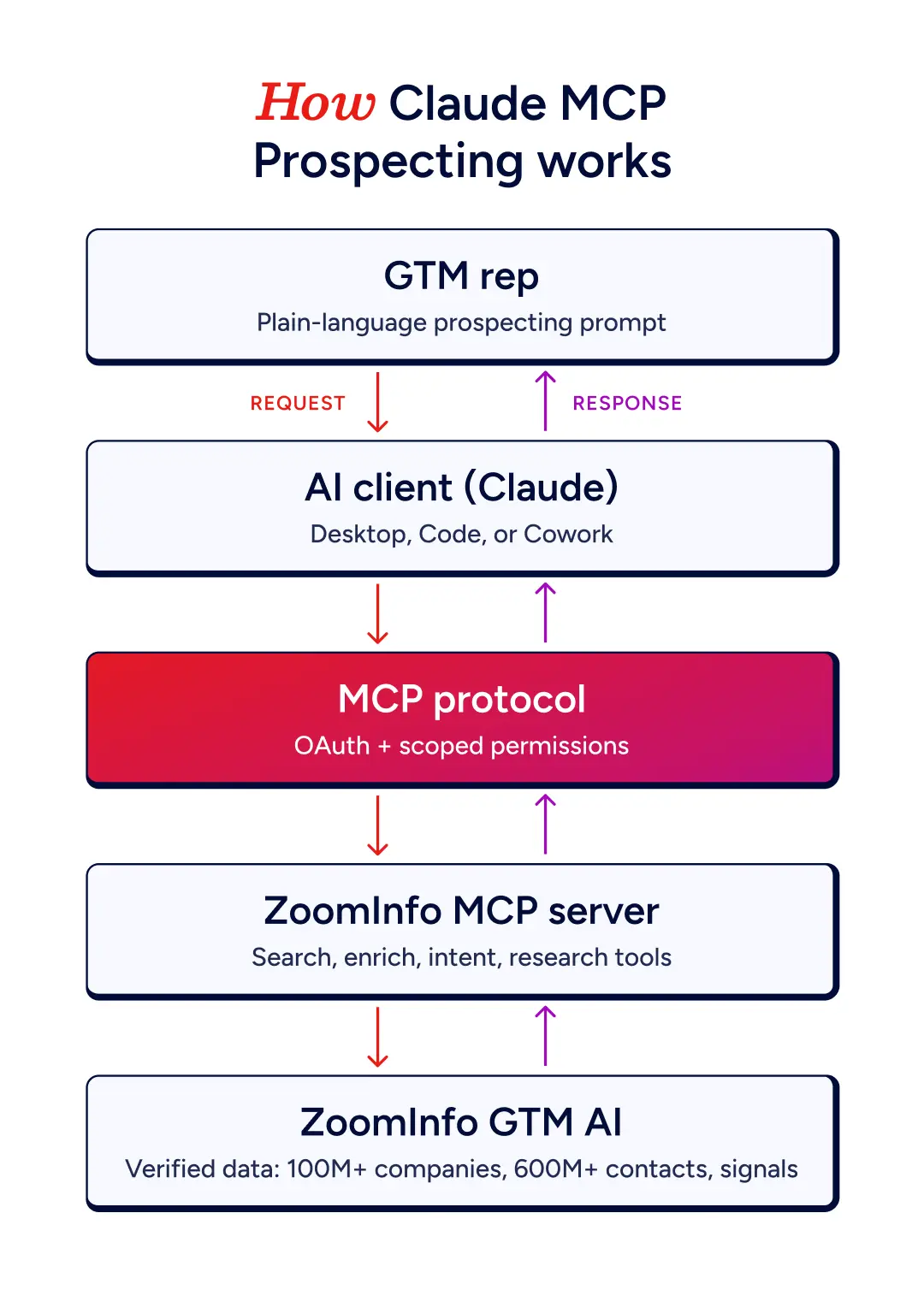
For a rep, that reframes prospecting as a dialog. You describe the result and Claude sequences the steps. Ask for mid-market logistics companies that match your ICP and it searches, filters, and returns a ranked checklist. Ask it to complement the ten strongest and it pulls verified emails and direct dials. The database, the enrichment step, and the completed checklist all stay in a single thread.
Why Verified Information Is the Constraint
Any AI assistant can summarize an organization from its web site. That’s desk stakes and it not often strikes a deal. Prospecting wants the small print a public web page seldom carries, like who owns the shopping for choice, whether or not the account is in-market, and which direct dial truly connects.
With out a grounded information supply, Claude fills these gaps with regardless of the open internet affords, which reads believable whereas being incorrect. With ZoomInfo related, the identical immediate attracts from data which might be repeatedly verified, so a title displays the individual’s present function and a direct dial is one which was captured somewhat than guessed.
The hole is measurable. B2B contact information decays at near 2.1% a month, roughly 1 / 4 of a database a 12 months, and cellphone numbers and job titles go stale sooner than that. Level a succesful mannequin at data getting older at that charge and it’ll prospect confidently into individuals who moved on two quarters in the past.
The rule holds throughout each prospecting process. Enrichment is simply pretty much as good because the supply it attracts from, and that supply units the ceiling on every little thing Claude builds on prime of it.
What Claude Runs Throughout the Prospecting Workflow
As soon as related, Claude covers the prospecting loop finish to finish. The levels a rep would usually unfold throughout instruments collapse into one dialog.
-
Construct a goal checklist. Describe your ICP in plain language and Claude searches by firmographics, then returns a ranked set of accounts. Ask for lookalikes of a closed-won account and it finds corporations with an identical profile.
-
Discover the proper contacts. Claude searches for decision-makers by function, seniority, or operate inside these accounts, and surfaces the complete shopping for committee somewhat than a single title.
-
Enrich for outreach. It fills in verified enterprise emails, direct dials, and present titles, turning a listing of names into a listing you may truly attain.
-
Prioritize by intent. Claude pulls purchaser intent and business-event alerts, flagging which accounts are exhibiting in-market conduct so reps work the warmest first.
-
Draft grounded outreach. With the account’s actual context already within the thread, Claude drafts a sequence formed by function, stage, and the sign that surfaced the account, as a substitute of a generic template.
Every step feeds the following. A single immediate can chain discover, enrich, and rating, then hand again a listing able to import or a draft able to ship. To run full performs from sign to outreach with out handbook handoffs, Agent Groups coordinates specialist brokers that share context and act inside admin-set controls.
What the Related Workflow Replaces
Prospecting has all the time been a relay. A rep filters a database, exports a listing, checks every account in a separate enrichment instrument, switches to a sequencer to write down the outreach, then logs all of it by hand. Each handoff prices time, and the context constructed up in a single step not often survives into the following.
A related setup removes the handoffs. The identical steps run in a single thread, towards one supply, with no export-and-reimport in between.
|
Prospecting step |
The standard method |
With Claude and ZoomInfo |
|
Construct a listing |
Filter a database UI, export a CSV |
Describe the ICP in a sentence, get a ranked checklist |
|
Discover contacts |
Search every account by hand |
Pull the shopping for committee throughout accounts without delay |
|
Get particulars |
Copy-paste, or a second enrichment move |
Verified emails and dials returned inline |
|
Time the outreach |
Guess, or open a separate intent instrument |
Indicators surfaced on the identical checklist |
|
Draft the contact |
Begin from a clean template |
Draft grounded within the account’s actual context |
|
Replace the CRM |
Guide entry into Salesforce or HubSpot |
Enriched data able to route |
The saving is greater than minutes. As a result of the account’s information stays within the dialog, the checklist you constructed informs the contacts you pull, which inform the outreach you draft. Nothing will get re-explained or re-keyed, and reps maintain onto reasoning {that a} tab swap normally throws away. Writing enriched data into Salesforce or HubSpot on a schedule is a separate connection, coated within the FAQ beneath. For working full performs finish to finish, Agent Groups in GTM Studio or headless by GTM.AI coordinates brokers that share context throughout every step.
The ZoomInfo Instruments Behind Every Prospecting Step
Claude selects the proper instrument in your request, so that you by no means have to call one. Understanding what sits beneath helps you are expecting output and value.
|
Instrument |
Function in prospecting |
Credit |
|
Search Corporations |
Discover accounts by firmographic standards |
Free |
|
Discover Related Corporations |
Floor lookalikes of a powerful account |
Free |
|
Search Contacts |
Discover decision-makers by function or seniority |
Free |
|
Discover Really helpful Contacts |
Return outreach-ready contacts for an account |
Free |
|
Search Intent |
Uncover accounts exhibiting purchaser intent |
Free |
|
Enrich Contacts |
Add verified emails and direct dials, as much as 25 per name |
Bulk information |
|
Enrich Corporations |
Add full firmographics, as much as 25 per name |
Bulk information |
|
Account Analysis |
Full intelligence briefing on a goal account |
AI motion |
The sample is value noting. Looking out and list-building are free, so a rep can form and reshape a goal checklist for free of charge, and credit are solely spent when Claude enriches data or runs a analysis agent. That retains the exploratory a part of prospecting low-cost and places spend the place it produces contactable information.
Selecting Your Claude Setup
All three purchasers connect with the identical ZoomInfo MCP server and run by yourself ZoomInfo login, so Claude prospects inside your current permissions and by no means above your seat.
|
Shopper |
Finest for |
Setup |
|
Claude Desktop |
Reps prospecting inside a chat |
Add ZoomInfo from the connector market, sign up with OAuth |
|
Claude Code |
GTM engineers scripting repeatable prospecting workflows |
Set up the ZoomInfo plugin, authenticate over OAuth |
|
Claude Cowork |
Handing off multi-step list-building as a completed deliverable |
Set up the plugin, join, then describe the result |
Every possibility requires bulk information credit on the account, since MCP doesn’t draw on recurring month-to-month credit. Verify these are enabled earlier than your first enrichment name.
A First Prospecting Session, Finish to Finish
A primary session normally begins by orienting Claude to your corporation, then working one actual job.
-
Set context. Claude reads your GTM context, a free name, to study what you promote and who you goal, so its searches match your ICP with out you spelling it out every time.
-
Construct the checklist. Ask for accounts that match a phase, like “Discover 15 mid-market SaaS corporations within the UK that match our ICP.” Claude searches and returns a ranked set.
-
Add the folks. Ask it to search out the VP of Gross sales and RevOps lead at every, then enrich the shortlist for verified contact particulars.
-
Test intent. Have Claude flag which of these accounts are exhibiting shopping for alerts, and reorder the checklist so in-market accounts come first.
-
Draft the contact. Ask for a brief opening e mail per account, formed by the sign that surfaced it.
Claude tells you which ones instruments it should run and the tough credit score price earlier than it spends something, so that you approve each cost earlier than it lands.
A Prospecting Immediate Library
As soon as Claude is related, the immediate is what separates an okay end result from a pointy one. These are beginning factors by job. Swap in your individual industries, areas, and account names, and Claude will affirm the instrument price earlier than it spends any credit.
Construct a contemporary goal checklist.
Discover 25 [industry] corporations in [region] inside [revenue or headcount band] that match our ICP. Rank them by match and present the firmographics you used to attain every.
Broaden from a win.
Right here is an account we simply closed, [company]. Discover 15 lookalikes, and for every, pull the 2 or three folks probably to sit down on the shopping for committee.
Map a shopping for committee.
Map the shopping for committee at [company] for a [product category] choice. Group by function, flag the probably financial purchaser, and enrich every contact with a verified e mail and direct dial.
Triage by intent.
Throughout my goal checklist, which accounts are exhibiting shopping for alerts or current enterprise occasions? Reorder so probably the most energetic are on prime, and title the sign driving every.
Refresh a stale checklist. Claude flags function modifications and lacking direct dials as it really works.
Here’s a CSV of accounts from final quarter. Re-enrich the contacts, flag anybody whose function has modified, and mark data the place the direct dial or e mail is now lacking.
Prep for a name. Pull a decision-ready transient earlier than you dial.
I’ve a name with [name] at [company] tomorrow. Construct a brief transient masking current alerts on the account, the shopping for committee round them, and two openers grounded in what is going on there.
Carve up a territory.
Cut up these 300 accounts into three balanced territories by area and phase, and floor which accounts in every are in-market proper now.
Chain them, too. The output of 1 immediate turns into the enter to the following, so a contemporary checklist feeds the committee map, which feeds the outreach you ship.
Guardrails for Reliable Prospecting
A related Claude is simply as disciplined because the inputs and permissions round it.
-
Outline your ICP earlier than you search. Exact standards produce exact lists. Imprecise prompts return obscure accounts.
-
Watch the credit score line. Verify the credit score price earlier than working enrichment on a big batch.
-
Assessment enriched output. Claude studies its supply per area, so spot-check earlier than a file lands within the CRM or a sequence goes stay.
-
Hold it scoped to your seat. Claude acts inside your ZoomInfo permissions, so it prospects as you and nothing extra.
Prospect Towards Information Claude Can Belief
ZoomInfo’s GTM AI offers Claude a verified basis of firm and speak to intelligence, so each checklist it builds and each contact it enriches displays present data. For full GTM performs that run from sign to motion, Agent Groups coordinates specialist brokers that share context and work inside the controls you set.
Join as soon as and run your first prospecting session from a single immediate. To run full performs finish to finish, discover
Ceaselessly Requested Questions
What Is Claude MCP for Gross sales Prospecting?
It’s Claude related to a B2B information supply over the Mannequin Context Protocol, working the prospecting workflow from a dialog. Claude searches for accounts, finds contacts, enriches data, and drafts outreach based mostly on plain-language prompts.
Do I Have to Write Code to Prospect With Claude?
No. In Claude Desktop you add ZoomInfo from the connector market and sign up with OAuth. Claude Code and Cowork use a one-command plugin set up and the identical browser sign-in.
Which Is Higher for Prospecting, Claude Desktop or Claude Code?
Claude Desktop fits reps working checklist by checklist inside a chat. Claude Code fits GTM engineers who need repeatable, scriptable prospecting workflows. Each attain the identical ZoomInfo information.
Does Prospecting With Claude Use Credit?
Looking out, list-building, and intent discovery are free. Credit are consumed solely when Claude enriches contacts or corporations, or runs a analysis agent. MCP requires bulk information credit, not recurring month-to-month credit.
Can Claude Push Prospects Into My CRM?
By ZoomInfo’s customary MCP connection, enriched information returns within the dialog so that you can assessment and route. Writing data right into a CRM on a schedule makes use of a devoted enrichment connection or the ZoomInfo API. For full GTM performs that run autonomously from sign to motion, Agent Groups operates in GTM Studio or headless by GTM.AI.
How Is This Totally different From Asking Claude to Analysis a Firm With out ZoomInfo?
With ZoomInfo related, Claude solutions from verified, repeatedly refreshed data, returning actual decision-makers, direct dials, tech stack, and shopping for alerts. And not using a grounded supply, it may well solely return a common internet abstract.

