

Groups that run HubSpot and Marketo facet by facet often uncover the identical issues inside 1 / 4:
Nonetheless the 2 platforms ended up coexisting (an acquisition that introduced a second advertising and marketing stack, enterprise advertising and marketing working Marketo whereas a progress crew adopted HubSpot, or completely different areas selecting completely different instruments), the longer each function independently, the broader the hole between what advertising and marketing sees and what gross sales acts on.
Connecting HubSpot and Marketo closes that hole.
Contacts captured in HubSpot movement into Marketo’s scoring and nurture applications so no lead escapes the demand era engine. Marketing campaign engagement tracked in Marketo syncs again to HubSpot’s CRM so gross sales reps see the complete image of purchaser exercise.
When each platforms share the identical contact data and lifecycle knowledge, reporting turns into a single supply of reality as an alternative of two conflicting variations of the funnel.
A local knowledge sync integration exists inside HubSpot’s ecosystem, supporting one-way or two-way sync between the platforms. Third-party automation instruments (Zapier, Make), devoted knowledge sync middleware (Skyvia, LeadsBridge), and customized API growth every provide completely different ranges of management over sync course, knowledge protection, and complexity.
The correct technique will depend on whether or not the purpose is a short lived bridge throughout migration or a long-term parallel operation.
One downside no connection technique solves: the sync strikes data between techniques, however it doesn’t confirm whether or not these data are correct, full, or present.
That’s the place ZoomInfo is available in. ZoomInfo integrates natively with each HubSpot and Marketo, enriching contact and firm data with verified B2B knowledge from a database spanning 500M contacts and 100M firms.
Whether or not data originate in HubSpot or Marketo, ZoomInfo’s Enterprise API and MCP entry can feed verified emails, direct dials, firmographics, and intent indicators into both platform, so each techniques sync correct data earlier than they journey.
This text covers the complete panorama of the HubSpot-Marketo integration: which strategies can be found, what knowledge every one handles, find out how to set them up, the use circumstances that justify sustaining each platforms, and the restrictions to plan for. It additionally covers how ZoomInfo suits in as an information enrichment layer for each platforms.
Let’s begin with an summary of the combination.
Integration Overview
Does a local integration exist?
Sure. HubSpot gives a Marketo knowledge sync integration by way of its App Market, supporting one-way or two-way sync with built-in discipline mappings. Superior sync configuration is offered by way of HubSpot’s Operations Hub.
What knowledge can sync?
Contacts and leads are the first sync objects. Discipline-level knowledge (title, e mail, telephone, firm, lifecycle stage, lead rating, customized properties) could be mapped between the 2 platforms. Marketing campaign membership, exercise historical past, and engagement program knowledge have extra restricted sync help relying on the tactic.
Is the sync bidirectional?
It may be. The native HubSpot knowledge sync helps each one-way and two-way configurations. Third-party instruments like Zapier default to one-way per workflow. Middleware platforms like Skyvia provide bidirectional sync with battle decision. Customized API builds can implement any course.
Is it real-time or batch?
The native sync runs on a scheduled cadence (usually each couple of minutes for contact knowledge). Third-party automation instruments like Zapier set off inside 1 to fifteen minutes. Customized API integrations can method real-time by way of webhooks on the HubSpot facet, although Marketo’s batch-processing structure introduces its personal latency.
What are the obtainable strategies?
Native HubSpot knowledge sync, third-party automation (Zapier, Make), devoted sync middleware (Skyvia, LeadsBridge), and customized API growth.
|
Methodology |
Setup Problem |
Knowledge Move |
Actual-time? |
Value |
|---|---|---|---|---|
|
Native HubSpot Knowledge Sync |
Low |
One-way or two-way |
Close to real-time (minutes) |
Included with HubSpot (Operations Hub for superior options) |
|
Zapier |
Low |
One-way per Zap |
Close to real-time (1-15 min) |
From $19.99/mo |
|
LeadsBridge |
Medium |
Configurable |
Close to real-time |
From paid plans |
|
Skyvia |
Medium |
Bidirectional |
Scheduled (each 5 min+) |
From $19/mo |
|
Customized API |
Excessive |
Absolutely customizable |
Relies on implementation |
Developer time + internet hosting |
One distinction value settling upfront: the native sync and Zapier deal with ongoing document synchronization after activation however don’t migrate historic knowledge created earlier than the connection was established.
Middleware instruments like Skyvia can run a full preliminary sync of current data after which preserve ongoing updates, overlaying each jobs in a single setup. For groups whose main purpose is a one-time knowledge migration reasonably than a everlasting bridge, a customized API construct utilizing HubSpot’s and Marketo’s bulk endpoints is commonly probably the most environment friendly path.
Integration Strategies
Native HubSpot Knowledge Sync
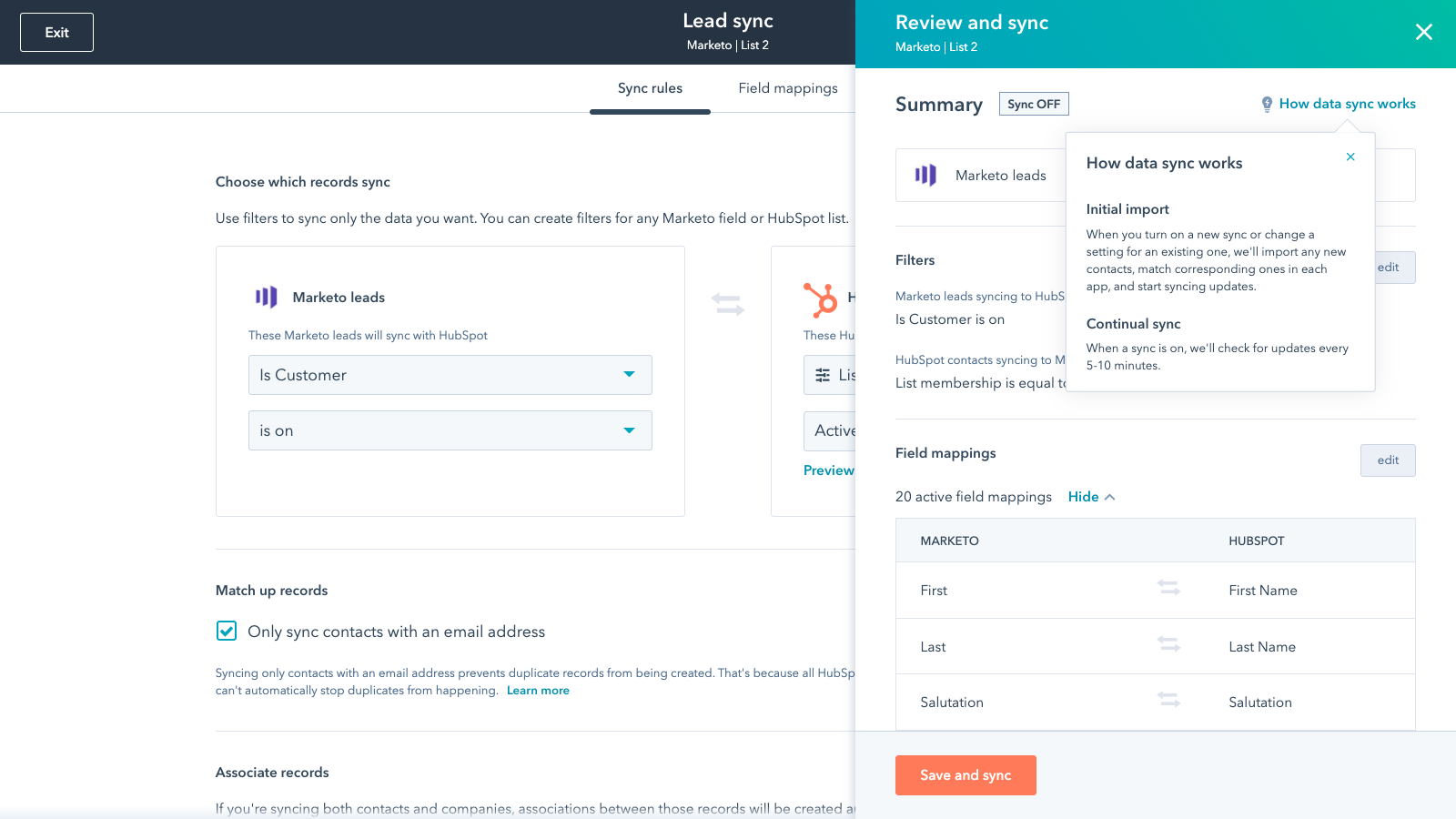
The way it works: HubSpot’s Marketo knowledge sync is offered by way of the HubSpot App Market and makes use of HubSpot’s built-in sync engine to attach contact data between the 2 platforms.
Supply: HubSpot
The sync maps fields between HubSpot contact properties and Marketo lead fields, with default mappings for normal fields and the flexibility to create customized mappings. HubSpot’s Operations Hub unlocks superior sync choices together with customized discipline mappings, sync filters, and knowledge high quality automation.
What it syncs: Contacts and leads (the first object), together with normal fields (title, e mail, telephone, firm, job title) and customized properties when mapped. Lifecycle stage and lead standing could be mapped with customized logic. Marketing campaign membership and detailed exercise knowledge (particular person e mail opens, web page visits, type fills inside Marketo) don’t sync by way of this connector.
Suits: ongoing sync of contact data between each platforms; not a bulk migration instrument.
Setup course of:
-
Authenticate with Marketo by offering your Marketo REST API endpoint URL, Shopper ID, and Shopper Secret (present in Marketo below Admin > Integration > LaunchPoint and Admin > Integration > Net Companies).
-
Select the sync course: HubSpot to Marketo (one-way), Marketo to HubSpot (one-way), or bidirectional (two-way).
-
Assessment the default discipline mappings. HubSpot auto-maps normal fields (first title, final title, e mail, firm, telephone). Add customized mappings for any further fields your crew depends on.
-
Configure sync guidelines: which data ought to sync (all contacts or a filtered subset), how duplicates are dealt with, and which platform takes precedence on conflicting discipline values.
Strengths: No third-party instrument required. Constructed into HubSpot’s ecosystem with a point-and-click setup. Handles ongoing sync with out code. Helps each one-way and two-way configurations. Operations Hub provides knowledge high quality instruments (formatting, deduplication) that clear data as they sync.
Limitations: Sync covers solely contact/lead data. Offers, alternatives, actions, and marketing campaign engagement knowledge don’t movement by way of the native connector. Superior mapping and filtering require Operations Hub (Skilled or Enterprise tier, beginning at $720/mo yearly). Historic data created earlier than activation may have a separate import. Marketo’s customized objects usually are not supported by way of this connector.
Greatest for: Groups that want a low-maintenance contact sync between each platforms with out involving engineering sources. Organizations already on HubSpot Operations Hub that wish to layer knowledge high quality automation on high of the sync.
Zapier
The way it works: Zapier connects HubSpot and Marketo by way of event-driven automations known as Zaps. Every Zap pairs a set off (an occasion in a single app) with a number of actions (what occurs within the different). Each platforms have well-supported Zapier connectors with a spread of set off and motion choices overlaying contacts, lists, and type submissions.
What it syncs: Contacts/leads, record membership, and type submission knowledge. Every knowledge sort requires its personal Zap. Customized fields could be mapped manually within the Zap setup movement. Detailed engagement knowledge (e mail opens, click on monitoring, content material interactions) from Marketo’s applications doesn’t switch by way of Zapier’s normal triggers.
Suits: ongoing sync of recent data and triggered updates; not a migration instrument.
Setup course of:
-
Select a set off app (e.g., HubSpot) and choose the set off occasion (e.g., “New Contact” or “Up to date Contact Property”).
-
Flip the Zap on. For bidirectional sync, create a second Zap with the set off and motion apps reversed, and add a filter step to forestall infinite replace loops.
Strengths: Quick to arrange with no technical data required. The trigger-action mannequin permits conditional logic (e.g., solely sync contacts with a selected lifecycle stage). Template library covers frequent HubSpot-Marketo workflows.
Limitations: Every Zap handles one trigger-action pair, so syncing contacts, record membership, and type knowledge requires separate Zaps (every counting in opposition to your plan’s activity allocation). Bidirectional sync wants duplicate Zaps with loop-prevention logic. No built-in deduplication. Historic data created earlier than activation don’t sync. Zapier costs by activity depend, and high-volume sync eventualities accumulate prices.
Greatest for: Small groups that want a fast, low-cost connection for particular workflows (e.g., sync new HubSpot type submissions into Marketo for nurture enrollment). Groups evaluating whether or not the 2 platforms ought to keep linked long-term earlier than investing in a heavier integration.
Make (Previously Integromat)
The way it works: Make makes use of a visible state of affairs builder the place modules (app actions) join in a flowchart. Every module represents a step: look ahead to a set off, rework knowledge, create or replace a document. Situations can department, filter, loop, and deal with errors, giving extra management over knowledge transformation than Zapier’s linear construction.
What it syncs: The identical objects as Zapier (contacts/leads, record membership, type knowledge), with larger flexibility in how knowledge transforms between platforms. Make helps iterators for batch processing, routers for conditional paths, and aggregators for combining data earlier than writing.
Suits: ongoing sync with conditional logic and knowledge transformation; not a migration instrument.
Setup course of:
-
Create a Make account and add HubSpot and Marketo as connections. HubSpot connects through OAuth. Marketo connects utilizing the REST API endpoint, Shopper ID, and Shopper Secret.
Strengths: Granular management over knowledge transformation, conditional routing, and error dealing with. The visible builder makes complicated workflows simpler to comply with than code. Per-operation pricing is decrease than Zapier at increased volumes. Helps multi-step eventualities that may replace data in each platforms and a 3rd system in a single movement.
Limitations: Steeper studying curve than Zapier’s guided setup. Bidirectional sync nonetheless requires cautious loop-prevention configuration. Each HubSpot and Marketo APIs impose fee limits (HubSpot: 100-190 requests per 10 seconds relying on tier (fee limits); Marketo: 100 calls per 20 seconds (REST API)), and high-volume eventualities may have throttling.
Greatest for: Groups with conditional sync necessities (e.g., solely sync marketing-qualified leads above a sure rating, or route contacts to completely different Marketo applications primarily based on HubSpot record membership). Mid-size groups whose sync volumes make Zapier’s per-task pricing costly.
Devoted Sync Middleware (Skyvia, LeadsBridge)
The way it works: Platforms like Skyvia and LeadsBridge are constructed to attach SaaS knowledge sources. In contrast to general-purpose automation instruments, they perceive CRM and advertising and marketing automation knowledge fashions and provide options designed for the job: scheduled bidirectional sync, discipline mapping with transformation guidelines, battle decision, and deduplication.
What it syncs: Contacts/leads with full discipline mapping together with customized fields, record and phase membership, and (relying on the instrument) restricted exercise knowledge. These instruments map knowledge fashions reasonably than reacting to particular person occasions, in order that they deal with relationships between fields and objects extra reliably than event-based automation.
Suits: each one-time migration (preliminary full sync) and ongoing bidirectional sync.
Setup course of:
-
Map fields between the 2 platforms. Most middleware auto-maps normal fields (title, e mail, telephone) and allows you to manually map customized fields and properties.
Strengths: Constructed for knowledge sync reasonably than basic workflow automation. Handles bidirectional sync with battle decision out of the field. Can migrate historic knowledge, not simply new data. Deduplication logic prevents duplicate data from accumulating. Skyvia helps a variety of SaaS connectors, making it helpful if HubSpot and Marketo are half of a bigger multi-tool sync technique.
Limitations: Much less versatile for non-sync automation (e.g., triggering a Slack notification when a document syncs). Pricing usually scales with document depend and sync frequency. Setup requires a working data of each platforms’ knowledge fashions to map fields appropriately. Exercise-level knowledge (particular person e mail opens, clicks, web page visits) typically doesn’t journey by way of these connectors.
Greatest for: Groups working each platforms long-term (completely different departments or advertising and marketing motions in every). Organizations that have to migrate historic knowledge alongside ongoing sync. Groups the place knowledge hygiene and deduplication are priorities.
Customized API Integration
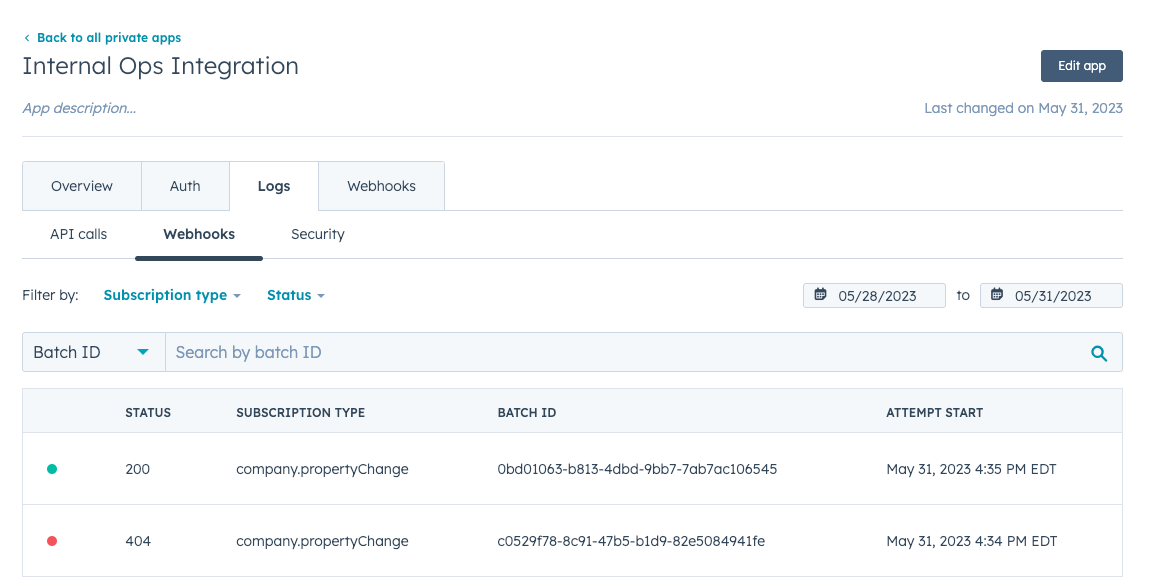
The way it works: Each HubSpot and Marketo present REST APIs. HubSpot’s CRM API covers contacts, firms, offers, tickets, and customized objects with webhook help for real-time occasion notifications.
Supply: HubSpot
Marketo’s REST API covers leads, firms, alternatives, actions, applications, and customized objects. A customized integration connects these APIs immediately, with your individual middleware dealing with authentication, discipline mapping, transformation, battle decision, and error restoration.
What it syncs: Something each APIs expose. That is the one technique that helps complicated sync eventualities like mapping HubSpot lifecycle phases to Marketo program membership, syncing deal/alternative knowledge, pushing Marketo engagement program scores into HubSpot customized properties, or imposing enterprise guidelines that transcend discipline mapping.
Suits: both one-time migration or ongoing sync; the one technique with no ceiling on both.
Setup course of:
-
Register API credentials in each platforms. In HubSpot, create a personal app with the required scopes. In Marketo, create an API-only consumer and a LaunchPoint customized service to acquire a Shopper ID and Shopper Secret.
-
Construct the sync service: a server-side utility that listens for webhooks from HubSpot, polls Marketo’s API for adjustments (Marketo doesn’t help inbound webhooks), transforms knowledge in accordance with the mapping, and writes adjustments to the opposite facet.
-
Implement battle decision logic for bidirectional sync (timestamp-based, source-priority, or field-level guidelines).
-
Add logging, error dealing with, and retry logic. Each APIs have fee limits (HubSpot: 100-190 requests per 10 seconds, 250K-1M per day (utilization particulars); Marketo: 100 calls per 20 seconds, 50,000 per day on most tiers (REST API docs)).
Strengths: Full management over what syncs, when, and the way. Can implement complicated enterprise logic (e.g., mapping HubSpot deal phases to Marketo income cycle mannequin phases). Close to-real-time sync through HubSpot webhooks. No per-record or per-operation charges from a third-party connector.
Limitations: Requires growth sources to construct and preserve. Marketo doesn’t emit subscription-style webhooks, so the Marketo-to-HubSpot course requires polling. API adjustments on both platform (HubSpot launched date-based API versioning in March 2026; Marketo’s legacy SOAP API is being retired July 31, 2026) require ongoing upkeep. The preliminary construct takes weeks, not hours.
Greatest for: Enterprise groups with sync necessities that no off-the-shelf instrument can fulfill. Organizations with in-house growth groups and a long-term dedication to working each platforms. Corporations with complicated knowledge fashions, customized objects, or enterprise logic that should be enforced throughout sync.
Key Use Instances
1. Lead Seize in HubSpot, Nurture in Marketo
Advertising and marketing groups typically use HubSpot for inbound lead seize (kinds, touchdown pages, chatbots) due to its ease of use and free-tier accessibility, whereas working Marketo for enterprise-grade nurture applications with engagement streams, content material exhaustion logic, and multi-dimensional scoring.
A sync pushes new HubSpot contacts into Marketo robotically, enrolling them in the correct nurture program primarily based on mapped properties like trade, firm dimension, or content material matter.
Greatest integration technique: Native HubSpot knowledge sync or Zapier (one-directional, event-triggered).
2. Parallel Operation Throughout Platform Migration
Corporations migrating from Marketo to HubSpot (or the reverse) not often change in a single day. Throughout the transition, each techniques want to remain present so no lead falls by way of the cracks. Middleware like Skyvia can run bidirectional sync on a schedule, conserving data aligned whereas groups ramp on the brand new platform. As soon as migration is full, the sync turns off.
Greatest integration technique: Skyvia or related middleware (bidirectional, scheduled, with historic knowledge migration).
3. Gross sales in HubSpot CRM, Enterprise Advertising and marketing in Marketo
Some organizations use HubSpot’s CRM and Gross sales Hub for pipeline administration (the place HubSpot’s simplicity and native CRM instruments are benefits) whereas working Marketo for complicated B2B advertising and marketing applications (the place Marketo’s automation depth, engagement applications, and Salesforce-native structure matter).
Shared contacts have to exist in each techniques with constant knowledge so advertising and marketing engagement informs gross sales outreach and deal exercise feeds again into advertising and marketing attribution.
Greatest integration technique: Native HubSpot knowledge sync or customized API (bidirectional with battle decision).
4. Content material Advertising and marketing in HubSpot, Demand Era in Marketo
HubSpot’s Content material Hub handles weblog, web site, and content material creation whereas Marketo powers demand era (scoring, routing, marketing campaign orchestration).
When a customer converts on a HubSpot touchdown web page, the contact and their content material interplay historical past want to succeed in Marketo for scoring and nurture enrollment. A Zapier Zap or Make state of affairs triggered by a HubSpot type submission can create or replace the Marketo lead with the related context.
Greatest integration technique: Zapier or Make (one-directional, event-triggered).
5. Consolidated Reporting Throughout Each Platforms
When advertising and marketing applications run throughout each platforms, management wants a unified view of funnel efficiency. Syncing lead standing, lifecycle stage, and marketing campaign membership between HubSpot and Marketo ensures that reporting dashboards (whether or not in HubSpot’s analytics, Marketo Measure, or a BI instrument) replicate the whole image reasonably than displaying solely what occurred in a single system.
Greatest integration technique: Sync middleware or customized API (bidirectional with constant discipline mapping).
Limitations and Concerns
Knowledge That Would not Sync Simply
HubSpot and Marketo mannequin related ideas in another way. HubSpot makes use of “Contacts” with lifecycle phases and related “Offers.”
Marketo makes use of “Leads” (or “Individuals”) with program membership, income cycle phases, and a separate alternative mannequin synced from Salesforce. Mapping HubSpot’s lifecycle stage to Marketo’s lead standing or program membership requires enterprise logic that almost all easy connectors do not deal with robotically.
Engagement knowledge is the largest hole. Marketo’s detailed exercise log (particular person e mail opens, hyperlink clicks, web page visits, engagement program scores, Good Marketing campaign movement actions) and HubSpot’s exercise timeline (e mail monitoring, assembly bookings, name logs, deal stage adjustments) are platform-specific and don’t switch by way of normal sync strategies.
At most, abstract properties (final engagement date, lead rating) could be mapped as static discipline values.
Sync Conflicts
Bidirectional sync creates the chance of conflicting updates. If a advertising and marketing ops crew updates a lead’s rating in Marketo whereas a gross sales rep adjustments the identical contact’s lifecycle stage in HubSpot, which change wins?
With out express battle decision guidelines (timestamp-based, source-priority, or field-level), one replace overwrites the opposite silently. The native HubSpot sync and most middleware instruments default to “most up-to-date replace wins,” which can not produce the correct reply for each discipline.
Pricing Implications
Each platforms impose API fee limits that have an effect on integration efficiency. HubSpot’s fee limits allocate 100 to 190 requests per 10 seconds and 250,000 to 1,000,000 calls per day relying on plan tier. Marketo’s REST API permits 100 calls per 20 seconds and 50,000 calls per day on most tiers.
Third-party instruments carry their very own prices. Zapier costs by activity depend (every synced document counts as a activity). Make costs by operations. Middleware instruments cost by data or sync frequency. For groups syncing hundreds of data each day, these prices compound.
HubSpot’s superior sync options (customized mappings, sync filters, knowledge high quality automation) require Operations Hub Skilled or Enterprise, beginning at $720/mo on an annual contract.
Permissions and Entry
Establishing the combination requires admin entry on either side. In HubSpot, you want Tremendous Admin rights to put in market apps and configure knowledge sync settings.
In Marketo, an admin should create an API-only consumer position, assign API permissions, and generate credentials by way of Admin > Integration > LaunchPoint. If both platform makes use of field-level safety or role-based entry controls, the combination consumer’s permissions should cowl each discipline being synced.
Upkeep
No integration runs indefinitely with out consideration. HubSpot launched date-based API versioning in March 2026, transport new variations twice per 12 months with an 18-month help window. Marketo is retiring its legacy SOAP API on July 31, 2026, requiring all integrations emigrate to REST. Customized fields added after the preliminary setup is not going to sync except the combination configuration is up to date.
Third-party connectors could change pricing, deprecate options, or alter authentication flows. Plan for periodic critiques of the combination’s well being and accuracy.
What No Methodology Fixes: The Knowledge Itself
Each technique above strikes data between HubSpot and Marketo. None of them checks whether or not these data are correct, full, or present. A contact with a useless e mail tackle in HubSpot syncs as a lead with a useless e mail tackle in Marketo.
A document lacking firmographics, carrying an outdated job title, or tied to an individual who modified firms months in the past travels simply as reliably as a clear one. The mixing ensures each techniques agree; it doesn’t guarantee they’re proper.
The place ZoomInfo Suits In
Each technique on this information strikes knowledge between HubSpot and Marketo. None of them improves the information being moved.
When the combination is dwell however advertising and marketing campaigns hit stale contacts (mistaken titles, useless e mail addresses, lacking firm particulars) and lead scoring fashions hearth on incomplete data, the bottleneck is not the connector. That’s the hole ZoomInfo closes.
ZoomInfo is a B2B knowledge and go-to-market platform constructed on 500M contacts, 100M firms, 135M+ verified telephone numbers, and 200M+ verified enterprise e mail addresses.
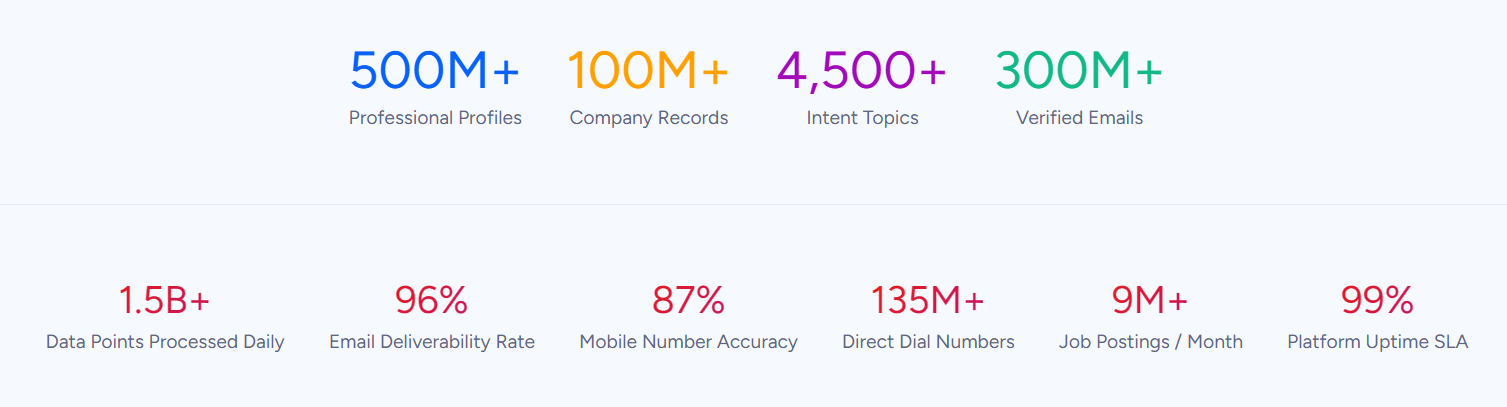
That knowledge is verified by way of a multi-source pipeline backed by 300+ human researchers, reaching as much as 95% accuracy on first-party knowledge. For groups working a HubSpot-Marketo integration, ZoomInfo addresses the information high quality layer that no connector handles.
ZoomInfo integrates natively with each platforms.
The HubSpot integration enriches contact and firm data robotically, syncing verified B2B knowledge (job titles, firm dimension, direct dials) into HubSpot properties.
The Marketo integration by way of the LaunchPoint ecosystem gives knowledge enrichment, FormComplete for type discount, and intent indicators to establish accounts actively researching related matters.
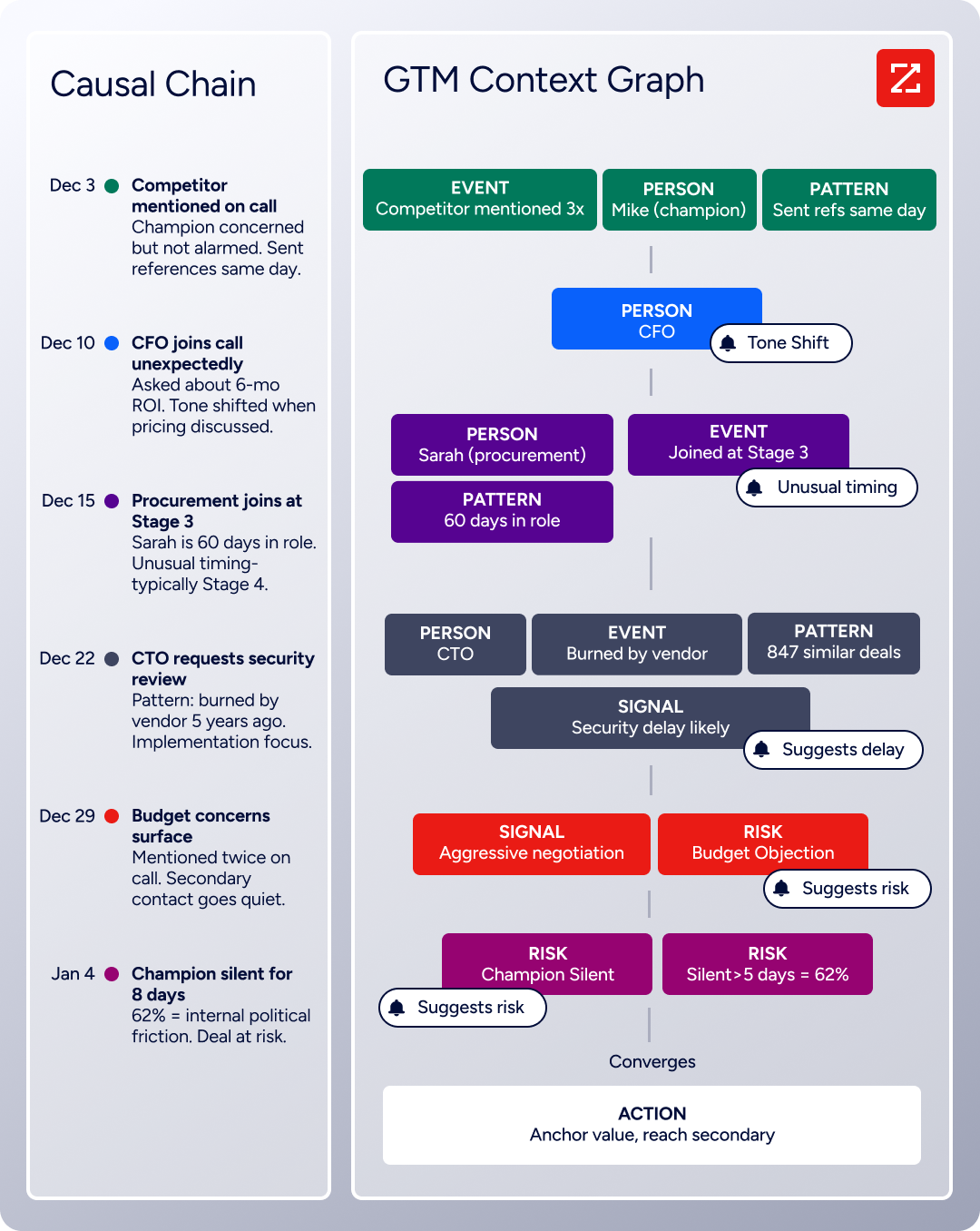
The identical knowledge feeds ZoomInfo’s GTM Context Graph, an intelligence layer that processes 1.5B+ knowledge factors each day, unifying third-party intelligence with CRM data, dialog transcripts, and behavioral indicators to floor not simply what occurred in a deal, however why.
In apply, a crew working each platforms can use ZoomInfo to counterpoint data in every system independently. New contacts coming into HubSpot by way of inbound kinds get enriched with verified emails, direct dials, firmographic knowledge, and technographic profiles earlier than they sync to Marketo.
Leads in Marketo’s database obtain the identical enrichment, guaranteeing that scoring fashions and nurture applications function on full, correct knowledge reasonably than regardless of the lead initially submitted. Purchaser Intent knowledge from ZoomInfo, monitoring indicators from 210 million IP-to-Group pairings, can route into both platform to prioritize accounts actively researching related options.
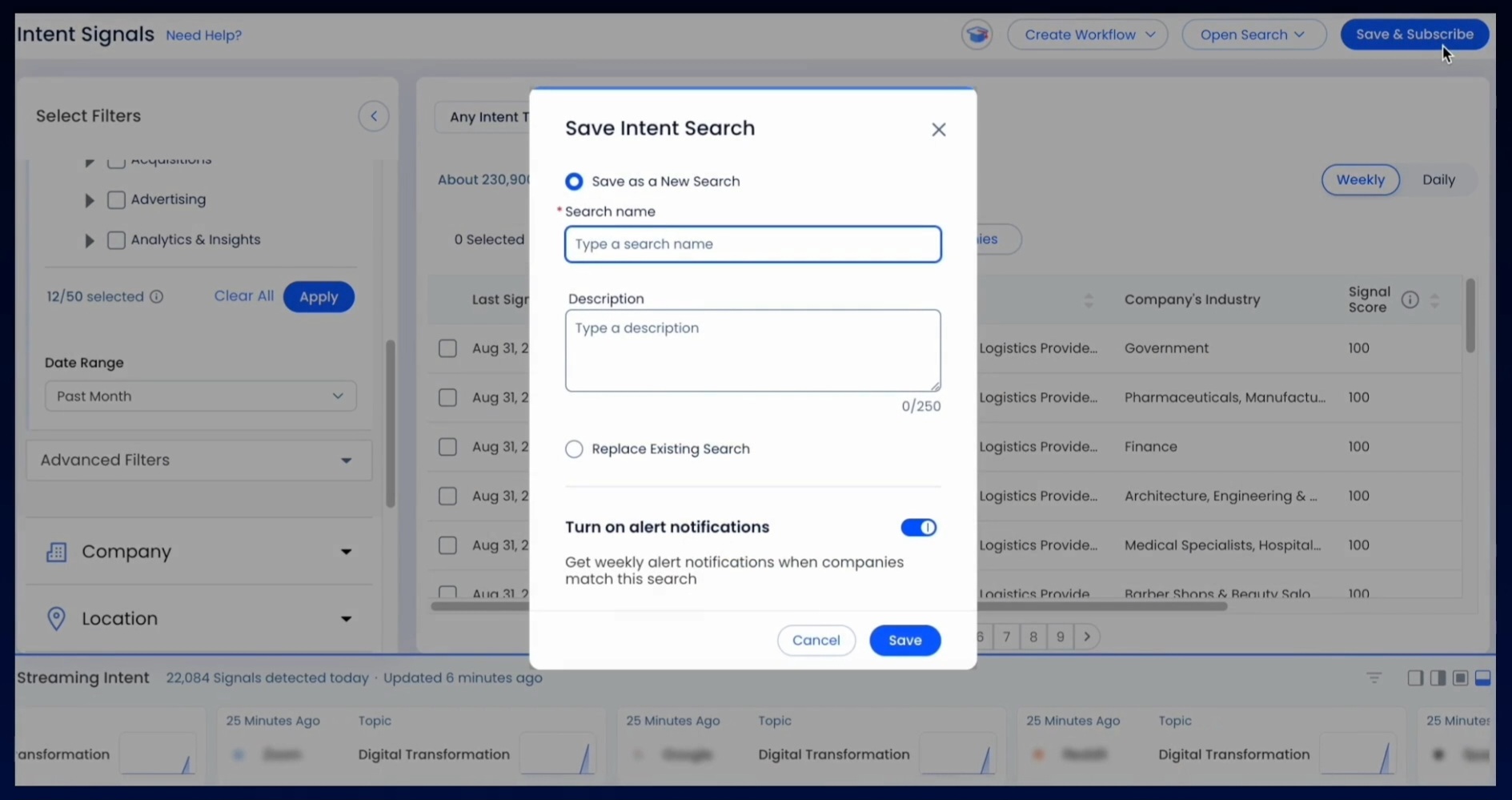
Supply: ZoomInfo
Enriched data additionally make the combination itself extra dependable. Fewer clean fields imply fewer mismatches throughout deduplication. Constant formatting throughout data reduces false positives that create duplicates. When each platforms carry verified, full contact knowledge, the sync delivers worth reasonably than replicating gaps at twice the pace.
Seismic’s gross sales crew attributed 39% of energetic pipeline to alternatives recognized or influenced by ZoomInfo indicators, whereas boosting productiveness by 54%. (Seismic)
Closing Verdict
A local integration exists between HubSpot and Marketo, and third-party instruments provide further flexibility for groups with extra complicated necessities. For many groups, the correct selection will depend on how lengthy each platforms will coexist and what knowledge must movement between them.
-
Small groups that want a fast contact sync ought to begin with the native HubSpot knowledge sync or Zapier. Each are quick to arrange, require no engineering sources, and deal with the most typical use case: conserving contact data aligned throughout each platforms.
-
Groups working each platforms long-term with bidirectional necessities ought to take a look at devoted middleware like Skyvia, which handles battle decision, deduplication, and historic migration in a single instrument.
-
Organizations with complicated knowledge fashions, activity-level sync wants, or enterprise logic that should be enforced throughout sync ought to spend money on a customized API integration.
Earlier than committing to a technique, make clear why each platforms have to coexist.
If the reply is short-term (a migration in progress, a trial interval), hold the sync easy and plan for eventual consolidation on one platform.
If the reply is structural (enterprise advertising and marketing on Marketo, progress advertising and marketing and CRM on HubSpot, every serving a definite movement), spend money on a technique that helps bidirectional sync and battle decision. Both method, the standard of the information in each techniques determines whether or not the combination delivers worth or simply replicates issues throughout two platforms quicker.
ZoomInfo, with native integrations for each HubSpot and Marketo, plus API and MCP entry for any customized workflow, is the information enrichment layer that retains each techniques correct whereas the connector retains them aligned.
FAQ
Does a local integration exist between HubSpot and Marketo?
Sure. HubSpot gives a Marketo knowledge sync integration by way of its App Market that helps one-way or two-way contact sync with built-in discipline mappings. Superior sync choices (customized discipline mappings, sync filters, knowledge high quality automation) can be found by way of HubSpot’s Operations Hub. The mixing handles contact/lead data; exercise knowledge and engagement program particulars don’t sync natively.
Can I sync historic knowledge between HubSpot and Marketo?
The native HubSpot sync and Zapier solely course of data created or up to date after activation.
For historic knowledge, use a middleware instrument like Skyvia (which may run an preliminary full sync earlier than switching to scheduled updates), a migration service like LeadsBridge, or a customized script utilizing each platforms’ bulk APIs. HubSpot’s Bulk Import API and Marketo’s Bulk Extract and Bulk Import APIs deal with giant document units.
How do I keep away from creating duplicate data throughout sync?
Use e mail tackle as the first matching key. Earlier than making a document within the goal system, the combination ought to test whether or not an identical document already exists.
The native HubSpot sync handles deduplication by default utilizing e mail matching. Zapier gives a “Search” step earlier than the “Create” step. Middleware instruments like Skyvia embody deduplication logic with configurable matching guidelines. Customized API integrations ought to use upsert logic on either side (HubSpot’s API helps upsert by e mail; Marketo’s API helps upsert by dedup fields).
What occurs if each platforms replace the identical document concurrently?
With out express battle decision guidelines, one replace overwrites the opposite. The native HubSpot sync and most middleware instruments default to “most up-to-date replace wins.”
Customized API integrations can implement field-level guidelines (e.g., “Marketo owns lead rating, HubSpot owns lifecycle stage”) to forestall vital knowledge from being overwritten. Defining possession per discipline earlier than activating bidirectional sync prevents most conflicts.
What HubSpot and Marketo permissions are wanted to arrange the combination?
In HubSpot, Tremendous Admin entry is required to put in market apps and configure knowledge sync settings. In Marketo, an admin should create an API-only consumer in Admin > Customers and Roles, then create a customized service in Admin > Integration > LaunchPoint to generate the Shopper ID and Shopper Secret. Each platforms require the combination consumer to have entry to each discipline and object being synced.
Does the combination sync engagement knowledge like e mail opens and web page visits?
Not by way of the native connector or most third-party instruments. Marketo’s detailed exercise knowledge (e mail opens, hyperlink clicks, web page visits, type fills, engagement program scores) and HubSpot’s exercise timeline (e mail monitoring, assembly bookings, name logs) are platform-specific and don’t switch by way of normal sync strategies.
Abstract properties (lead rating, final exercise date) could be mapped as static discipline values. Syncing granular exercise knowledge requires a customized API integration that reads exercise data from one platform and writes them as customized actions or timeline occasions within the different.
Is real-time sync potential between HubSpot and Marketo?
Close to real-time sync is achievable on the HubSpot facet. HubSpot helps webhooks that fireside on document adjustments, and the native sync runs on a frequent schedule.
Marketo’s facet is extra constrained: Marketo doesn’t help inbound subscription-style webhooks, so the Marketo-to-HubSpot course requires both polling Marketo’s API or utilizing a third-party connector’s set off mechanism. True sub-second sync between the 2 platforms will not be sensible given Marketo’s batch-processing structure.
How does ZoomInfo enhance a HubSpot-Marketo integration?
ZoomInfo solves the information high quality downside that no sync instrument addresses. Contact data in each platforms decay over time as individuals change jobs, e mail addresses go inactive, and firm particulars shift.
ZoomInfo enriches data in each HubSpot (through native integration) and Marketo (through LaunchPoint integration) with verified contact knowledge, firmographics, technographics, and intent indicators.
Enriched data enhance lead scoring accuracy in Marketo, guarantee outreach reaches legitimate contacts from HubSpot, and scale back sync errors attributable to clean fields, inconsistent formatting, and duplicate data. The end result: the information flowing between each techniques is correct and full earlier than it travels.
See HubSpot along with your different instruments:

