

HubSpot is the agentic buyer platform for scaling firms, serving 288,706 prospects throughout 135+ international locations with a collection spanning advertising and marketing automation, gross sales pipeline administration, customer support, content material creation, commerce, and information operations, all sharing a single Good CRM.
However a CRM solely is aware of what occurs inside it.
HubSpot tracks the emails your reps ship, the offers in your pipeline, the tickets your service group resolves, and the campaigns your entrepreneurs launch. By itself, it can’t confirm whether or not a prospect’s telephone quantity nonetheless connects, let you know which goal accounts are researching your product class this week, seize gross sales exercise in Gmail and Google Calendar, or join your CRM to a whole bunch of area of interest instruments that lack native HubSpot connectors.
The fitting integrations shut these gaps. They feed your CRM verified information it can’t generate by itself, floor deal exercise within the communication instruments your group already makes use of, automate workflows throughout disconnected methods, and join advert spend to closed income.
This information covers the strongest integration for every of the roles HubSpot customers mostly want carried out:
Every part walks via how the combination connects with HubSpot, what information flows between the platforms, pricing, and who advantages most.
Finest HubSpot Integrations at a Look
|
Finest HubSpot Integration for B2B Information Enrichment and Go-to-Market Intelligence. Enriches HubSpot data with verified contact information, purchaser intent indicators, technographic intelligence, and firm attributes from ZoomInfo’s B2B database, giving your group correct prospecting information and indicators to prioritize accounts which are in-market. |
|---|
|
Finest HubSpot Integration for Automated E mail and Calendar Exercise Seize. Logs each Gmail dialog to the matching HubSpot contact report routinely, syncs Google Calendar bidirectionally with availability checks, and surfaces CRM context beside every e mail thread so reps by no means depart their inbox to replace the CRM. |
|
Finest HubSpot Integration for Actual-Time Staff Collaboration and Deal Visibility. Pushes deal stage modifications, type submissions, and buyer interactions into Slack channels routinely, with workflow-triggered motion buttons that permit groups replace CRM data, create duties, and approve offers with out opening HubSpot. |
|
Finest HubSpot Integration for E-commerce Advertising Automation. Syncs prospects, merchandise, orders, and deserted carts bidirectionally and writes buy conduct into HubSpot’s CRM for behavioral segmentation, deserted cart restoration sequences, and lifecycle campaigns constructed from dwell transactional information. |
|
Finest HubSpot Integration for Closing the Loop Between Advert Clicks and Pipeline Income. Pushes HubSpot lifecycle stage occasions again to Google Advertisements as offline conversions, enabling Good Bidding to optimize towards certified pipeline and closed income moderately than lead quantity, with GCLID-based attribution tying each deal again to the precise key phrase that began the connection. |
|
Finest HubSpot Integration for Connecting Your Stack With out Code. Extends HubSpot’s attain to eight,000+ functions with no-code automation, supporting bidirectional information sync, multi-step workflows, and conditional routing between your CRM and instruments that lack native HubSpot connectors. |
What Is HubSpot?
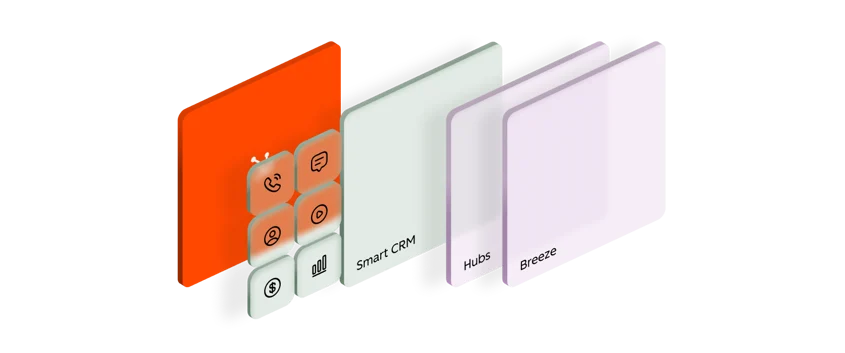
Supply: HubSpot
HubSpot is a buyer platform that unifies advertising and marketing, gross sales, service, content material, information operations, and commerce groups on a single Good CRM. The corporate describes itself as “the agentic buyer platform” for scaling firms, with a core pitch that “disconnected instruments and information sluggish you down. HubSpot connects every thing, and everybody, in a single place.”
Its suite consists of Advertising Hub, Gross sales Hub, Service Hub, Content material Hub, Information Hub, Commerce Hub, and the Good CRM, all sharing a unified information layer. Breeze, HubSpot’s AI layer, runs throughout each hub with brokers for customer support, prospecting, information queries, and content material creation. Notable prospects embody eBay, DoorDash, Reddit, TripAdvisor, and Eventbrite.
HubSpot’s integration ecosystem is likely one of the platform’s defining strengths.
The HubSpot App Market hosts over 2,000 app integrations with 2.5 million lively installs, and HubSpot added 110+ new apps in Q1 2026 alone. On the technical facet, HubSpot provides a REST API masking the total CRM information mannequin, a GraphQL API for CMS information queries, date-based API versioning with 18-month assist home windows, and official SDKs in six languages (PHP, Java, Ruby, Go, TypeScript, Python).
A Distant HubSpot MCP server turned typically accessible in April 2026, giving MCP-compatible AI brokers learn/write entry to HubSpot CRM information. The Information Hub supplies programmable automation with JavaScript and Python code actions inside HubSpot’s workflow engine, and Information Sync connects to 100+ apps with bidirectional, real-time sync out of the field.
The combination classes accessible to HubSpot customers embody:
-
B2B information enrichment: contact intelligence, firm attributes, purchaser intent indicators, technographics
-
E mail and calendar: Gmail, Outlook, Google Calendar, assembly scheduling and exercise logging
-
E-commerce: Shopify, BigCommerce, WooCommerce, buyer and order information sync
-
Paid promoting: Google Advertisements, LinkedIn Advertisements, Meta Advertisements, offline conversion monitoring and viewers sync
-
Workflow automation: Zapier, Make, Workato, customized webhooks and no-code orchestration
-
Productiveness and mission administration: Jira, Asana, Monday.com, cross-system process coordination
With that ecosystem as context, listed below are the six integrations we chosen as the most effective choices for extending HubSpot throughout the classes that matter most to go-to-market groups.
1. ZoomInfo: Finest HubSpot Integration for B2B Information Enrichment and Go-to-Market Intelligence

ZoomInfo is a go-to-market platform constructed on a B2B database of 500M contacts, 100M firms, 135M+ verified telephone numbers, and 200M+ verified enterprise e mail addresses. It integrates natively with HubSpot via ZoomInfo Inbound Enrich, a connector app within the HubSpot App Market that routinely enriches and updates HubSpot CRM data with verified ZoomInfo contact and firm information in actual time.
Connecting the 2 platforms unlocks:
-
A CRM that stays correct by itself, with verified emails, direct dials, and firm attributes appended and refreshed routinely as new contacts enter HubSpot
-
Smarter routing and scoring, with ZoomInfo attributes powering HubSpot workflow logic for lead task, lifecycle stage transitions, and segmentation
How ZoomInfo Integrates with HubSpot

ZoomInfo connects to HubSpot via a native connector app accessible in each the ZoomInfo App Market and the HubSpot App Market, configured through OAuth with bidirectional information circulate. The combination is included in ZoomInfo Gross sales Skilled and above.
As a result of ZoomInfo builds and maintains the connector as a first-party integration, it requires no middleware and stays present with platform updates on each side. ZoomInfo’s GTM Workspace, a workspace for sellers, consists of the identical native HubSpot connection, and the ReachOut Chrome Extension exports verified information immediately into HubSpot data from any internet web page.
Contact and Firm Information Enrichment: Fill the Gaps Your CRM Can not Fill on Its Personal
HubSpot’s Good CRM captures interplay information: emails despatched, types submitted, offers moved via pipeline phases, and conferences booked.
What it can’t do by itself is confirm whether or not a telephone quantity nonetheless works, catch a job change, or reveal an organization’s know-how stack. When a brand new contact enters HubSpot, ZoomInfo routinely appends the verified enterprise e mail, direct dial, title, division, and seniority, plus company-level attributes and technographic information masking 30,000+ applied sciences.
The enrichment runs constantly via a verification pipeline backed by 300+ human researchers, reaching as much as 95% accuracy on first-party information.
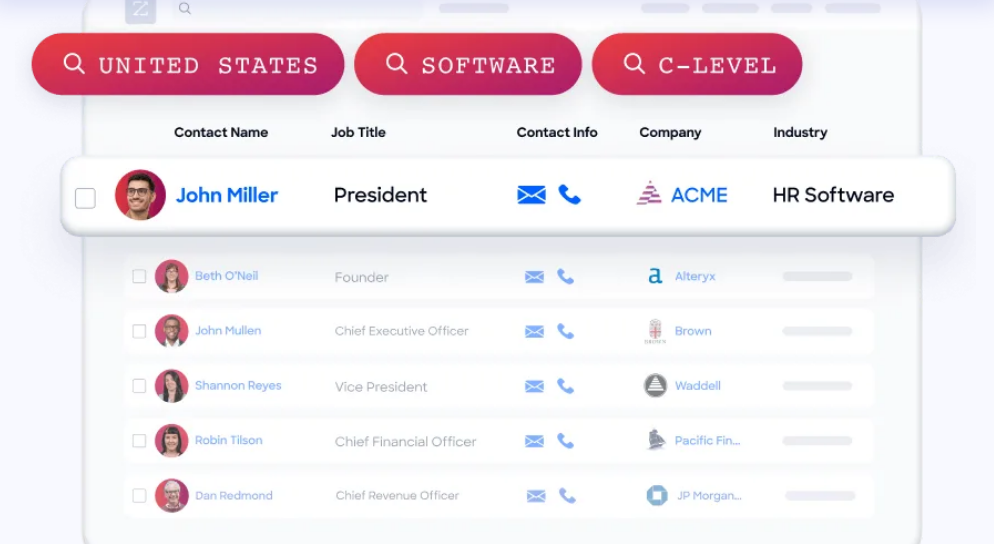
Supply: ZoomInfo
ZoomInfo in motion: A prospect fills out a HubSpot type with solely a reputation and work e mail. ZoomInfo appends their direct dial, present title, firm profile (a 400-person fintech operating Salesforce and Marketo), and three different decision-makers of their division. Your SDR multi-threads the account earlier than the primary name as an alternative of spending 20 minutes researching it.
Purchaser Intent Information: Determine Accounts That Are In-Market
ZoomInfo’s Purchaser Intent tracks indicators from 210 million IP-to-Group pairings and 6 trillion+ new keyword-to-device pairings month-to-month, revealing which firms are researching subjects related to your product.
These indicators circulate into HubSpot data, the place they set off workflows, replace lead scores, and floor precedence accounts. Guided Intent, unique to ZoomInfo, identifies the analysis subjects traditionally correlated with deal success in your enterprise, so the indicators calibrate to your precise win patterns moderately than generic key phrase thresholds.
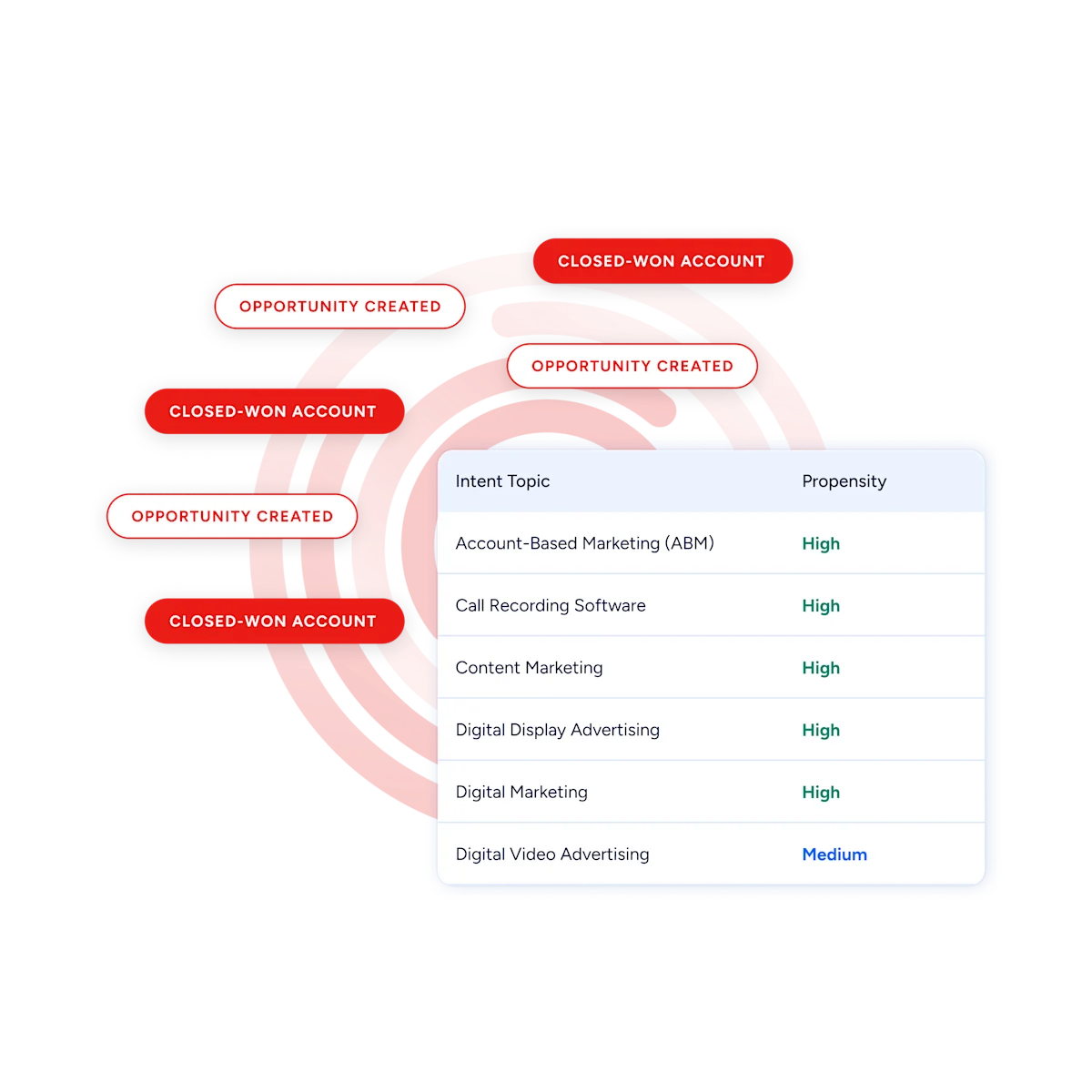
Supply: ZoomInfo
ZoomInfo in motion: ZoomInfo detects a goal account researching “CRM information migration” for 2 weeks. The sign syncs to HubSpot, raises the account’s rating, notifies the assigned rep, and enrolls the first contact in a switching-focused nurture sequence, all whereas the customer continues to be evaluating.
Web site Customer Identification: Convert Nameless Visitors into Pipeline
ZoomInfo WebSights resolves nameless web site visitors to firms, together with buying-team identification and phone data, with Automated Visitors Filtering separating real firm visits from bots.
Related to HubSpot, the businesses visiting your website (and the pages they seen) floor alongside your CRM information, so high-value guests path to gross sales whereas the curiosity is dwell.
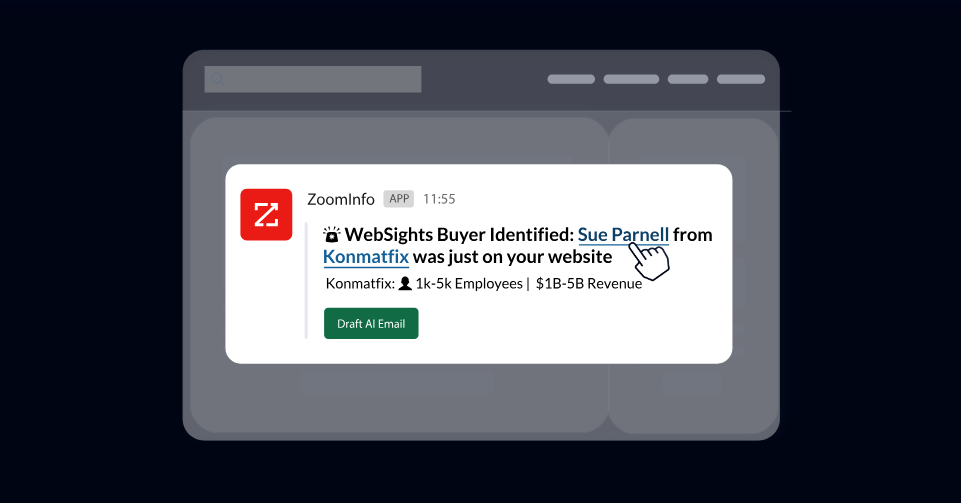
Supply: ZoomInfo
Workflow Automation and Lead Routing
ZoomInfo attributes (firm dimension, {industry}, know-how stack, intent rating) energy HubSpot workflow logic for routing, scoring, and segmentation.
A brand new contact enriched by ZoomInfo routes routinely to the enterprise group at 1,000+ staff or to SMB beneath 100, with no handbook triage. Scoring fashions acquire company-level context alongside HubSpot’s behavioral indicators.
Past the connector itself, the enrichment feeding your HubSpot occasion attracts from a wider intelligence layer: the GTM Context Graph processes 1.5B+ information factors every day and combines ZoomInfo’s B2B information with CRM data, conversations, and behavioral indicators, whereas GTM Studio, APIs, and MCP expose the identical intelligence to any device or AI agent.
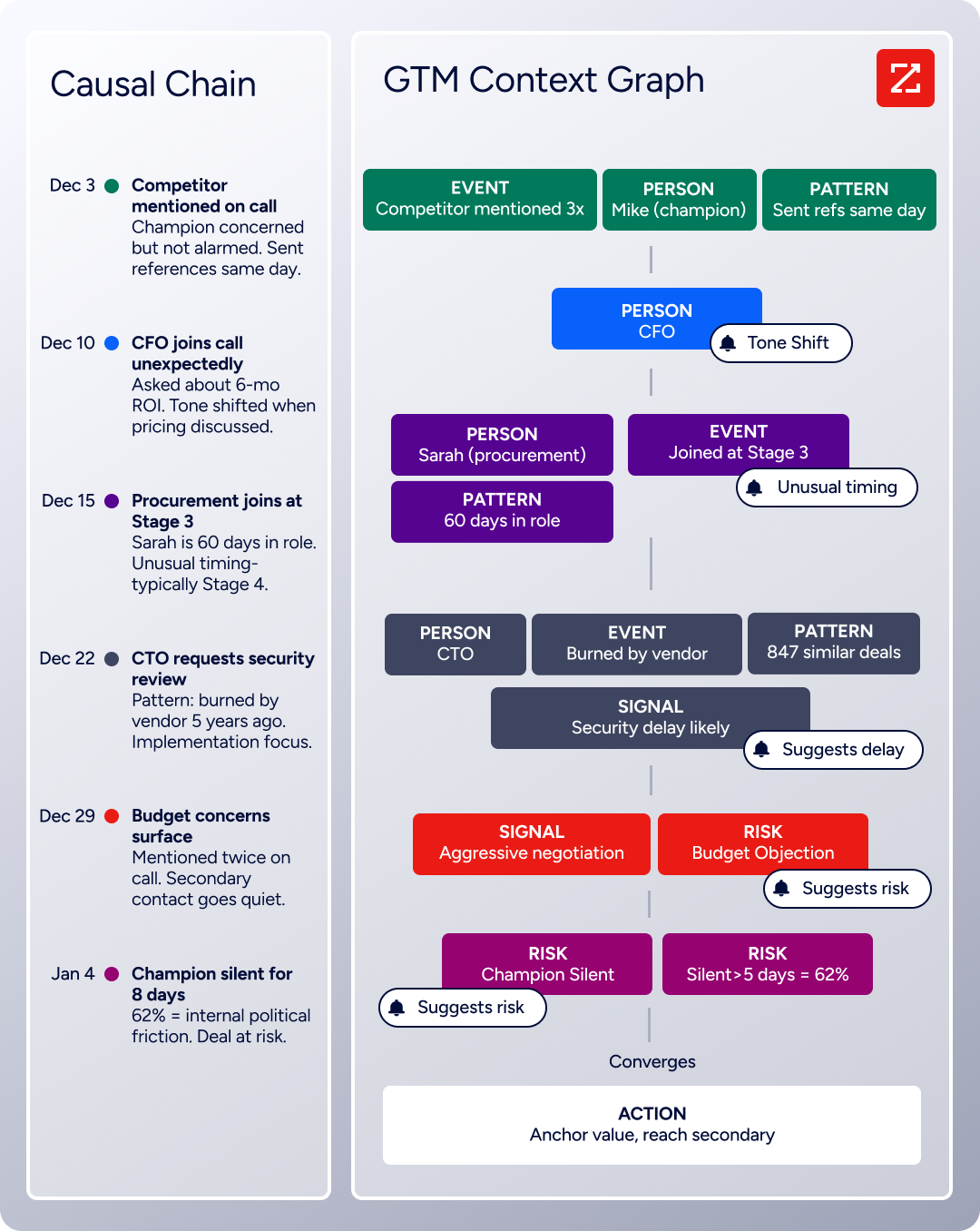
Seismic’s gross sales group attributed 39% of lively pipeline to alternatives recognized or influenced by ZoomInfo indicators, reporting 54% productiveness positive factors. (Seismic Case Research)
ZoomInfo Pricing
ZoomInfo makes use of a consumption-based pricing mannequin with customized quotes based mostly on utilization, customers, credit score quantity, and options.
It’s organized into Gross sales, Advertising, and standalone product strains, every in Skilled, Superior, and Enterprise tiers. The native HubSpot integration is included from Gross sales Skilled up, with Superior including intent indicators and web site customer monitoring.
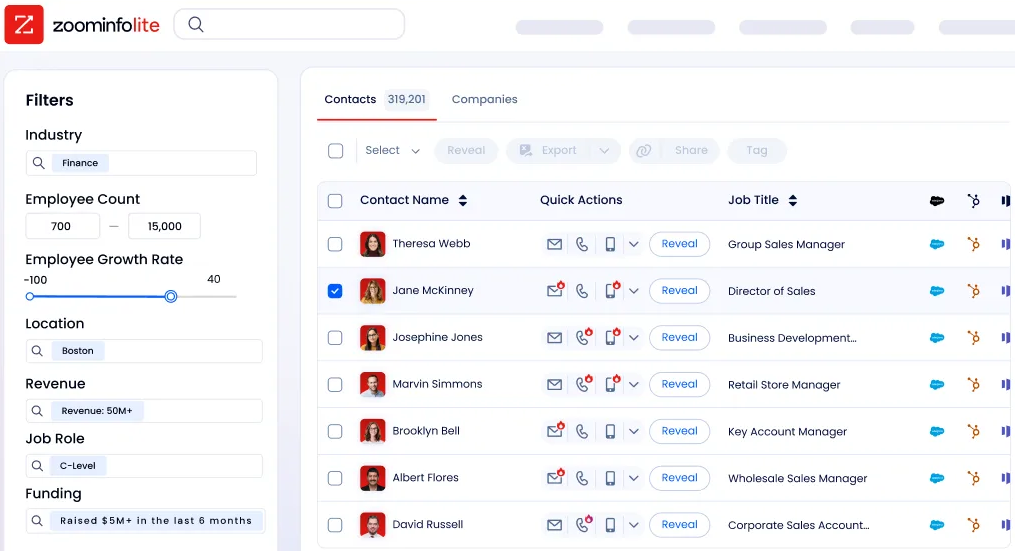
ZoomInfo Lite is a everlasting free tier (no bank card, no time restrict) with 10 month-to-month export credit, searches, the Chrome extension, and CRM integrations together with HubSpot, making it a sensible strategy to consider information high quality earlier than committing. A separate 7-day free trial covers paid options.
Supply: ZoomInfo
Who Ought to Use the ZoomInfo Integration?
-
Income operations groups that want firm attributes, technographic, and intent information powering HubSpot lead scoring, routing, and segmentation as an alternative of behavioral indicators alone
2. Google Workspace: Finest HubSpot Integration for Automated E mail and Calendar Exercise Seize
Supply: Google
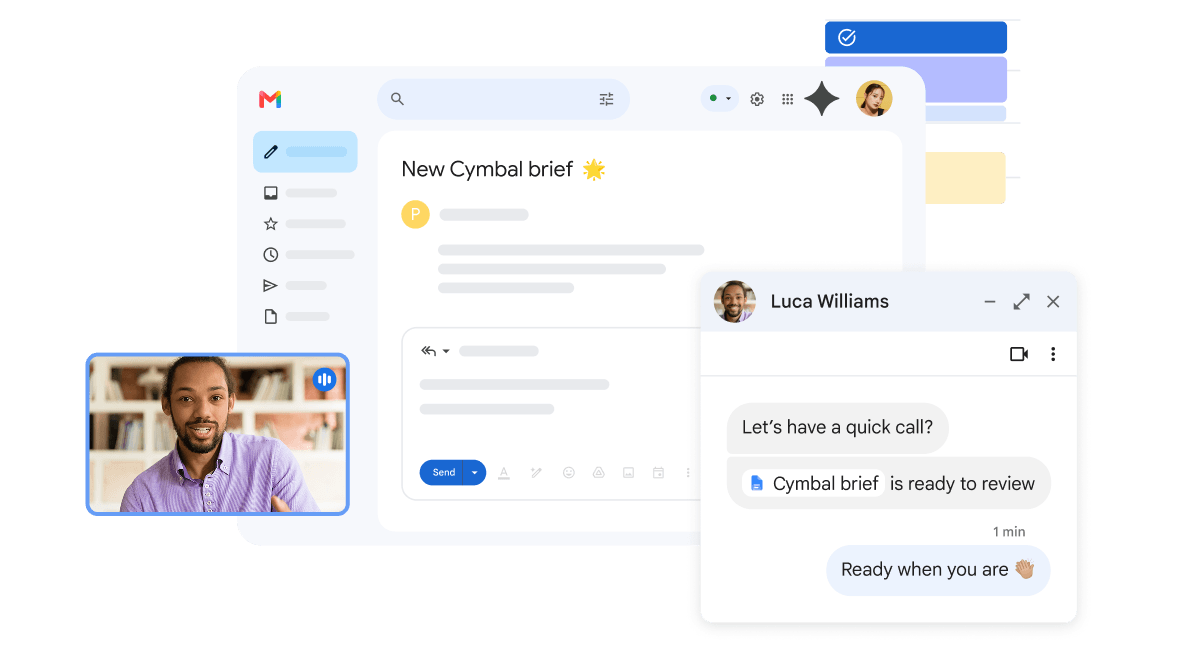
Google Workspace is a cloud productiveness and collaboration platform that integrates with HubSpot to eradicate the handbook work of logging gross sales and advertising and marketing communications. The combination connects via the HubSpot Gross sales Chrome extension, HubSpot’s native Google Calendar sync, and OAuth-based e mail connections for server-side automation.
Key integration capabilities embody:
-
Automated e mail logging and open monitoring the place each Gmail dialog logs to the matching HubSpot contact report in actual time, with open and click on monitoring surfacing in each Gmail and the CRM timeline
-
HubSpot templates, snippets, and sequences accessible inside Gmail’s compose window, auto-filling CRM contact tokens so reps personalize outreach with out switching tabs
-
Full HubSpot CRM context beside every e mail thread, exhibiting the contact report, related firm, open offers, and up to date exercise historical past in a collapsible sidebar
How Google Workspace Integrates with HubSpot
The combination operates via three connection strategies: the HubSpot Gross sales Chrome extension for Gmail (the first interface for gross sales groups), HubSpot’s native Google Calendar sync (configured in HubSpot account settings), and OAuth-based e mail connections for automation workflows.
The Chrome extension installs from the Chrome Internet Retailer and requires a one-time OAuth authentication linking the person’s Gmail account to their HubSpot person report. The extension works throughout HubSpot’s free CRM tier and all paid tiers, although sequences require Gross sales Hub Skilled or Enterprise.
1. One-Click on E mail Logging and Actual-Time Open Monitoring
When the Chrome extension is lively, each e mail a rep sends from Gmail routinely creates an exercise report on the corresponding HubSpot contact, firm, and deal data.
The extension identifies the recipient’s e mail deal with, matches it in opposition to HubSpot’s contact database, and writes the e-mail physique, topic line, timestamp, and recipient record into the CRM timeline. If the recipient’s area matches an organization report however no contact exists, HubSpot can optionally create a brand new contact.
Open and click on monitoring embed a clear pixel and rewrite hyperlinks to cross via HubSpot’s monitoring server, surfacing engagement information in each Gmail (“Opened 3 instances, final opened 2 hours in the past”) and HubSpot’s CRM timeline concurrently.
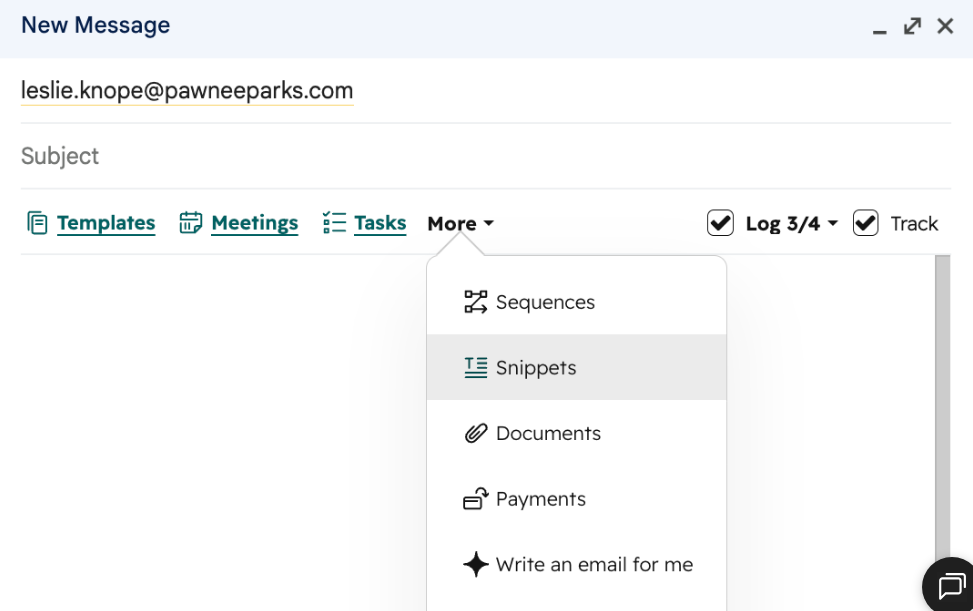
2. HubSpot Templates, Snippets, and Sequences Inside Gmail.
The Chrome extension provides a toolbar in Gmail’s compose window that surfaces HubSpot’s library of e mail templates, textual content snippets, and multi-touch sequences.
Choosing a template inserts the e-mail physique with personalization tokens (first identify, firm identify, deal quantity, lifecycle stage, customized properties) changed with the recipient’s precise CRM information. Textual content snippets develop inline through shortcut codes, and sequences enroll contacts in multi-step cadences that auto-send follow-ups on a schedule whereas unenrolling on reply. Sequences require Gross sales Hub Skilled or Enterprise; templates and snippets can be found on the free CRM.
Supply: HubSpot
3. Bidirectional Google Calendar Sync with Battle Prevention.
Conferences created in HubSpot’s assembly scheduler seem on Google Calendar and vice versa, with modifications propagating inside seconds.
When a prospect visits a rep’s HubSpot reserving web page, they see availability pulled from Google Calendar, stopping double-booking. Conferences booked outdoors HubSpot (a prospect who sends a calendar invite immediately) are detected and logged to the matching HubSpot contact report routinely. If the rep’s Google Workspace account consists of Google Meet, HubSpot can add a Meet hyperlink to each booked assembly.
4. CRM Context Sidebar in Gmail.
The Chrome extension provides a collapsible sidebar in Gmail exhibiting the HubSpot contact report for every e mail thread: related firm particulars, open offers, current exercise historical past, lifecycle stage, and customized properties. Reps see buyer context with out leaving their inbox, which eliminates the tab-switching that causes reps to work from e mail moderately than logging into the CRM.
Google Workspace Pricing
Google Workspace makes use of per-seat pricing with annual or month-to-month billing:
-
Enterprise Starter at $7/person/month (annual): Gmail with customized area, Google Drive (30 GB pooled), Meet (100 individuals), Calendar, Docs, Sheets, Slides, Chat, and Gemini AI assistant; as much as 300 customers
-
Enterprise Customary at $14/person/month (annual): 2 TB pooled storage, Gemini AI throughout apps, Meet recording and noise cancellation (150 individuals), appointment reserving pages, eSignature
-
Enterprise Plus at $22/person/month (annual): 5 TB pooled storage, eDiscovery, Google Vault for information retention, enhanced endpoint administration; as much as 300 customers
-
Enterprise at customized pricing: no person cap, DLP, enterprise information areas, AI Classification for Google Drive
The HubSpot integration works identically throughout all Google Workspace tiers and with free private Gmail accounts, so decide your tier based mostly on storage, compliance, and organizational wants moderately than integration capabilities.
Who Ought to Use the Google Workspace Integration?
-
Organizations whose greatest CRM adoption problem is reps not updating HubSpot: automated e mail logging with zero handbook steps means 100% of communication exercise will get captured, giving managers full visibility with out requiring end-of-day information entry
3. Slack: Finest HubSpot Integration for Actual-Time Staff Collaboration and Deal Visibility
Supply: Slack
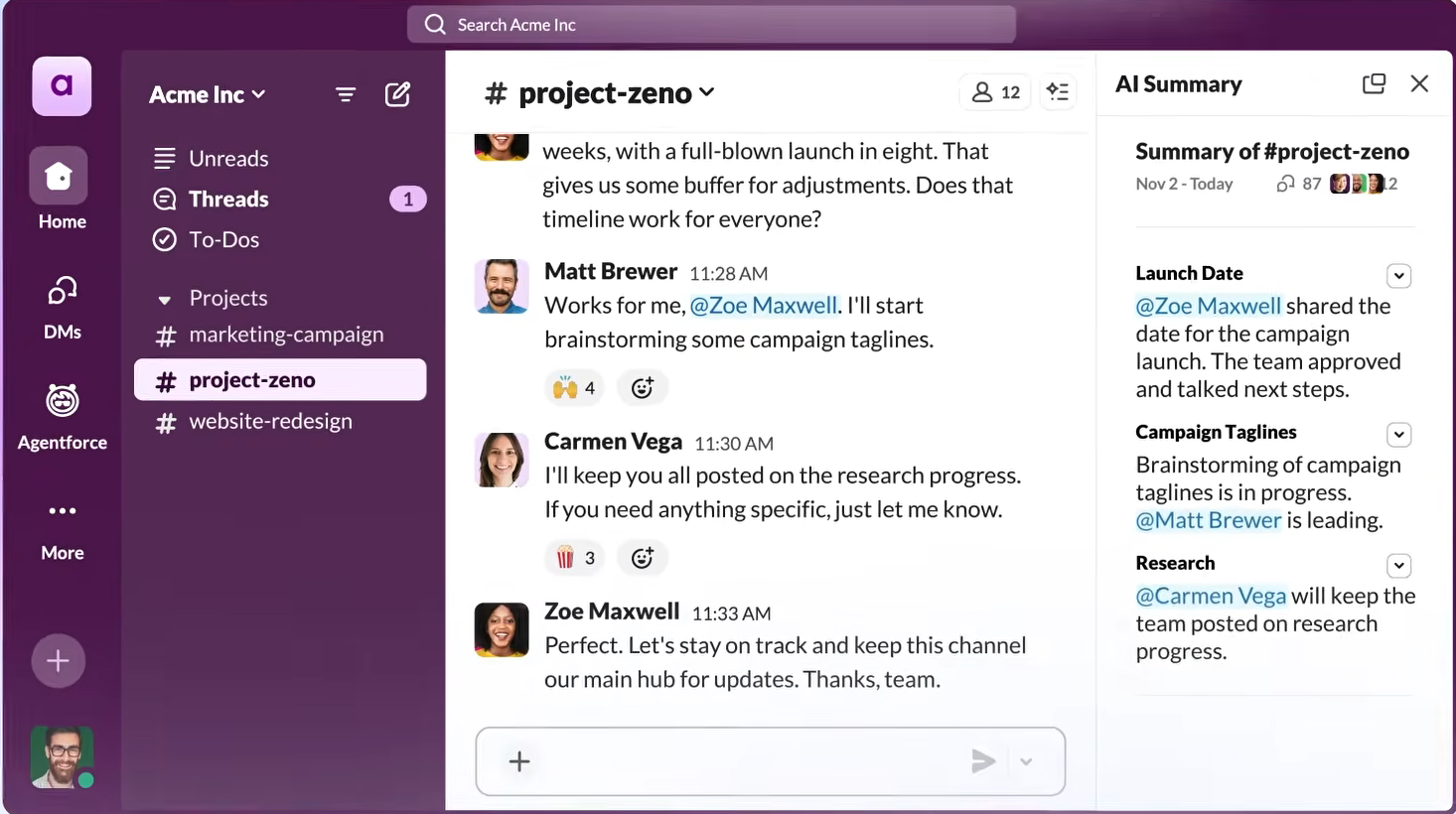
Slack is a group communication platform that integrates with HubSpot to floor CRM exercise, deal updates, type submissions, and buyer interactions contained in the channels the place your go-to-market groups already work. The combination is a native, bidirectional connection constructed and maintained collectively by HubSpot and Slack, requiring no third-party middleware.
Key integration capabilities embody:
-
HubSpot occasion notifications to Slack posting deal stage modifications, type submissions, process due dates, and dwell chat messages into designated channels or direct messages routinely
-
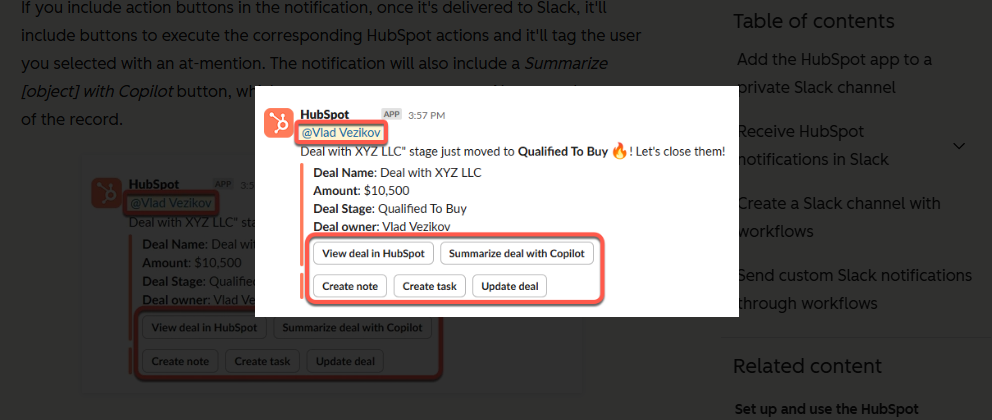
Workflow-triggered messages with motion buttons that permit recipients create duties, log actions, or replace report properties with out opening HubSpot
-
Create HubSpot data from Slack by changing any message right into a word or process and associating it with a contact, firm, or deal
How Slack Integrates with HubSpot
Setup follows an OAuth-based authorization circulate from HubSpot’s App Market. Directors choose which Slack workspace to attach and configure notification routing guidelines via HubSpot’s workflow builder. The combination helps a number of Slack workspaces for enterprises operating separate workspaces by area or enterprise unit. All interplay patterns respect HubSpot’s present person permissions.
1. Occasion Notifications: Actual-Time Pipeline Visibility With out Dashboard Monitoring.
When a tracked occasion happens in HubSpot (a deal strikes to the subsequent stage, a high-value type is submitted, a process turns into overdue), HubSpot posts a structured notification to a delegated Slack channel or sends it as a direct message.
Notifications carry CRM context: the contact identify, firm, deal worth, and a direct hyperlink again to the HubSpot report. The commonest deployment mannequin is channel-based routing: deal notifications go to #sales-pipeline, ticket escalations go to #customer-success, and marketing-qualified lead alerts go to #new-leads.
2. Workflow-Triggered Messages with Motion Buttons.
Utilizing HubSpot’s Workflow Builder, groups design automation sequences that ship Slack messages with inline motion buttons at particular set off factors.
When a deal strikes to “Closed Gained,” a workflow sends a Slack message to the finance group’s channel with the deal identify, quantity, and cost phrases, together with “Approve Contract” and “Request Revision” buttons. Clicking a button writes the approval standing again to HubSpot, triggers follow-up duties, and sends affirmation, all with out anybody opening the CRM.
Buyer success groups use the identical sample for account well being rating modifications, with buttons like “Schedule Verify-In Name” or “Escalate to Account Supervisor” that every set off completely different downstream workflows.
Supply: HubSpot
3. Create HubSpot Information from Slack.
Utilizing Slack’s message actions menu, customers convert any message right into a HubSpot word, process, or ticket and affiliate it with an present contact, firm, or deal.
A buyer’s function request posted in a shared Slack Join channel turns into a HubSpot ticket related to that buyer’s firm report, with out asking the shopper to re-submit it via a assist type. Gross sales groups log deal notes from inside Slack discussions to the deal report, preserving the total context of how a deal was received for future account house owners.
4. Deal Room Channels.
HubSpot workflows routinely create a Slack channel when a deal reaches a particular stage, invite related stakeholders based mostly on deal properties, and hyperlink the channel bidirectionally to the HubSpot deal report. All HubSpot exercise associated to that deal (name logs, doc uploads, stage modifications, process completions) posts to the channel routinely. Messages and selections made within the deal room could be logged again to HubSpot utilizing the message motion menu.
Slack Pricing
Slack makes use of per-seat pricing:
-
Professional at $7.25/person/month (annual): limitless message historical past, limitless app integrations, full HubSpot integration together with occasion notifications, workflow-triggered messages, and report creation
-
Enterprise+ at $15/person/month (annual): provides SAML SSO, SCIM provisioning, conditional workflow branching, customized retention insurance policies, and precedence assist with 4-hour first response SLA
-
Enterprise+ at customized pricing: multi-workspace administration, native DLP, authorized holds, HIPAA compliance, Enterprise Key Administration
The HubSpot integration has no extra value past the Slack subscription. Slack’s Honest Billing Coverage credit inactive seats routinely.
Who Ought to Use the Slack Integration?
4. Shopify: Finest HubSpot Integration for E-commerce Advertising Automation
Supply: Shopify
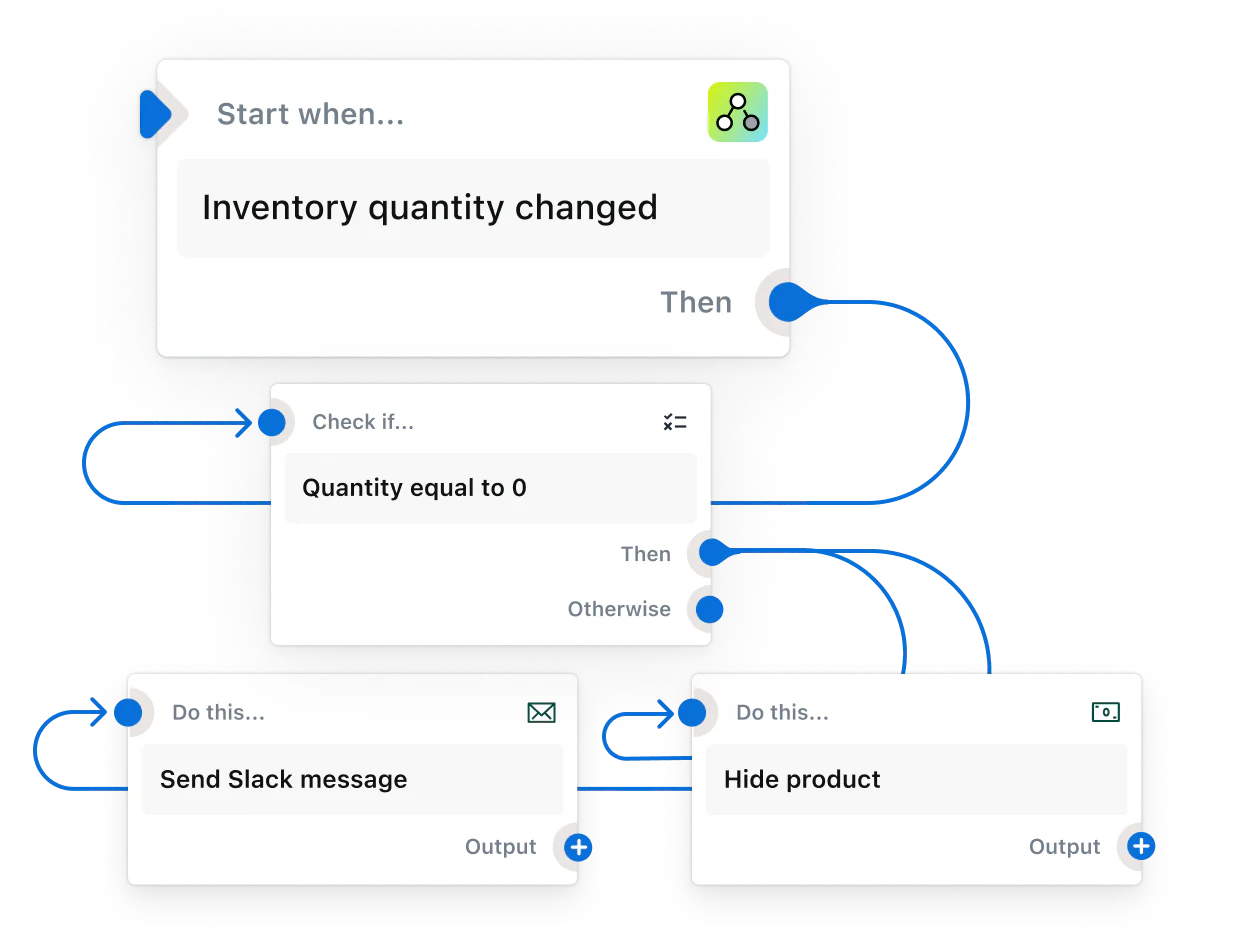
Shopify is a cloud-based commerce platform that integrates with HubSpot to unify on-line retailer information along with your advertising and marketing automation and CRM workflows. The combination is delivered via a native app accessible in each the Shopify App Retailer and the HubSpot App Market, maintained by HubSpot.
Key integration capabilities embody:
-
Orders flowing into HubSpot’s Orders object with subtotal, reductions, tax, whole, and success standing, linked to the matching contact and cart data
-
Behavioral segmentation on buy historical past, lifetime worth, product bought, and buy frequency
How Shopify Integrates with HubSpot
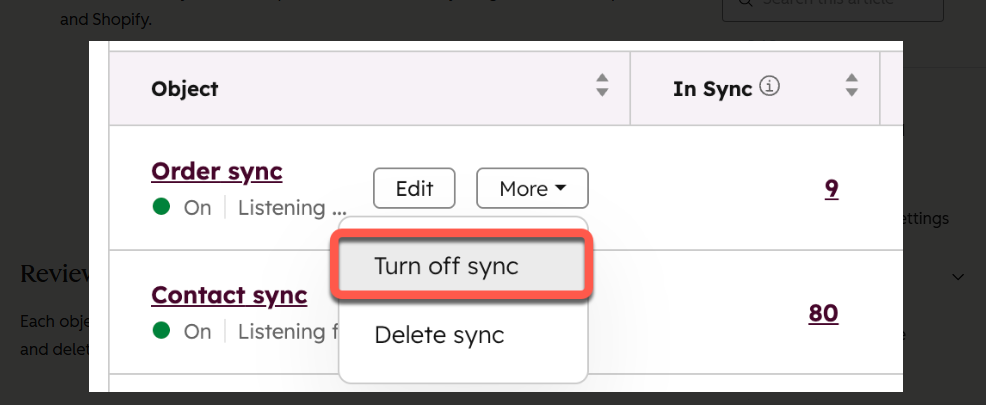
The native connector makes use of OAuth authentication to determine a safe connection. Throughout setup, you authorize HubSpot to entry Shopify retailer information, choose which Shopify location to sync (for multi-location shops), and configure sync preferences.
The preliminary sync can take a number of hours relying on catalog dimension, after which ongoing modifications propagate roughly each ten minutes.
1. Bidirectional Buyer and Product Information Sync.
When a buyer locations an order, their contact report (identify, e mail, telephone, addresses, tags) syncs to HubSpot with the e-mail deal with because the deduplication key. If a contact with that e mail already exists from a weblog subscription or gated content material obtain, the Shopify information merges into the present report moderately than creating a reproduction.
Modifications in HubSpot (up to date telephone numbers, lifecycle stage tags) sync again to the corresponding Shopify buyer report. Product information flows one-way from Shopify into HubSpot’s product library with title, description, worth, pictures, and SKU.
Supply: Shopify
2. Order Monitoring in HubSpot’s Orders Object.
Orders sync one-way into HubSpot’s Orders object and affiliate routinely with the corresponding contact and, if relevant, cart data. Entrepreneurs can section on “final order date greater than 90 days in the past” or “whole order worth higher than $200” to focus on high-value lapsed prospects, and reps reviewing a contact report see the whole buy historical past inline.
3. Deserted Cart Restoration Workflows.
When a consumer enters Shopify’s checkout, supplies an e mail, and leaves with out buying, the deserted checkout syncs into HubSpot’s Carts object and triggers workflow automation. Cart data embody line-item particulars, portions, costs, and whole worth, enabling segmentation: high-value carts would possibly set off a personalised e mail from a gross sales rep, whereas lower-value carts obtain a regular automated sequence.
4. Behavioral Segmentation and Personalization.
Synced order and product information turns into instantly accessible for record constructing, workflow triggers, and e mail personalization. HubSpot’s Good CRM routinely calculates properties like “whole income” and “variety of orders” per contact, updating as new orders sync. E mail personalization tokens pull from Shopify information, and product advice blocks populate dynamically based mostly on earlier purchases.
Shopify Pricing
The Shopify-HubSpot integration app is free to put in. Each platforms cost for his or her respective subscriptions. Costs beneath are from Shopify’s pricing web page (US charges, month-to-month billing; annual billing is roughly 25% cheaper).
-
Primary at $39/month: limitless merchandise, 2 workers accounts, 2.9% + 30¢ on-line card fee, all core e-commerce options wanted for the HubSpot integration
-
Superior at $399/month: 15 workers accounts, customized report builder, carrier-calculated delivery charges, 2.4% + 30¢ card fee
-
Plus from $2,300/month (sometimes a 1-year contract): Checkout Extensibility, B2B, enlargement shops, and elevated API fee limits
All Shopify plans assist the total HubSpot integration function set. To unlock the total worth of synced e-commerce information (workflow automation for deserted cart restoration, superior record segmentation), companies sometimes want HubSpot Advertising Hub Skilled ($800/month annual) or Enterprise ($3,600/month).
Who Ought to Use the Shopify Integration?
-
E-commerce companies that depend on content material advertising and marketing and inbound campaigns to drive visitors, the place connecting the journey from first weblog go to via buy in a single contact report permits attribution and retention campaigns
-
Companies the place post-purchase engagement drives retention and upsells (subscription merchandise, consumables, recurring purchases), so order information flowing into HubSpot triggers automated onboarding sequences, replenishment reminders, and win-back campaigns
-
Groups that want deserted cart restoration customized past generic “you left one thing” emails, utilizing HubSpot’s broader engagement information to reference weblog posts learn, webinars attended, or lifecycle stage for higher-converting sequences
5. Google Advertisements: Finest HubSpot Integration for Closing the Loop Between Advert Clicks and Pipeline Income
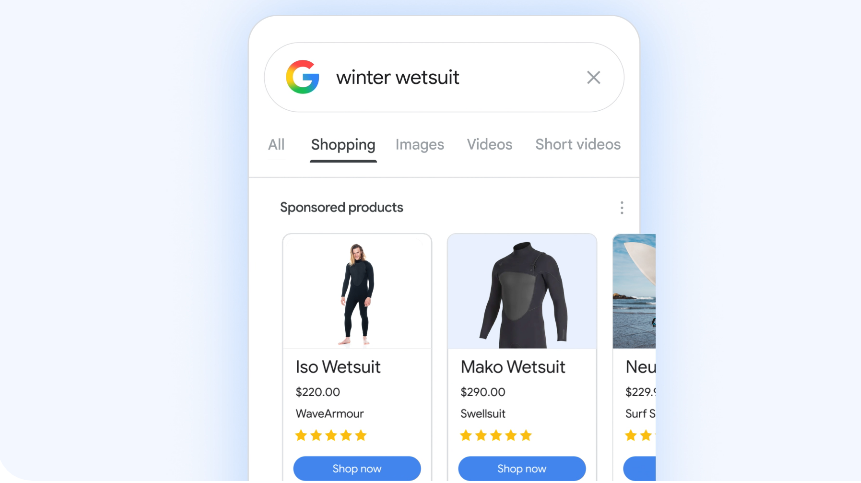
Supply: Google Advertisements
Google Advertisements is Google’s promoting platform that integrates with HubSpot to attach advert spend to pipeline era and closed income.
The combination connects via a native connector that pushes HubSpot lifecycle stage occasions again to Google Advertisements as offline conversions, enabling Good Bidding to optimize for enterprise outcomes moderately than top-of-funnel metrics.
Key integration capabilities embody:
-
Offline conversion and lifecycle sync pushing MQL, SQL, Alternative, and Buyer occasions again to Google Advertisements so Good Bidding optimizes towards pipeline, not type fills
-
Click on-to-deal attribution with Google Click on IDs (GCLIDs) tying each contact, deal, and buyer again to the precise marketing campaign, advert group, key phrase, and search question
How Google Advertisements Integrates with HubSpot
The native integration connects via a one-time OAuth authorization circulate, after which HubSpot routinely appends GCLIDs to touchdown web page URLs for guests arriving from Google Advertisements campaigns.
These GCLIDs are captured on type submission, associating the contact report completely with the precise advert click on that introduced them to your website. The combination helps each HubSpot’s adverts administration instruments and Google’s reporting API.
1. Offline Conversion Sync and Good Bidding Optimization.
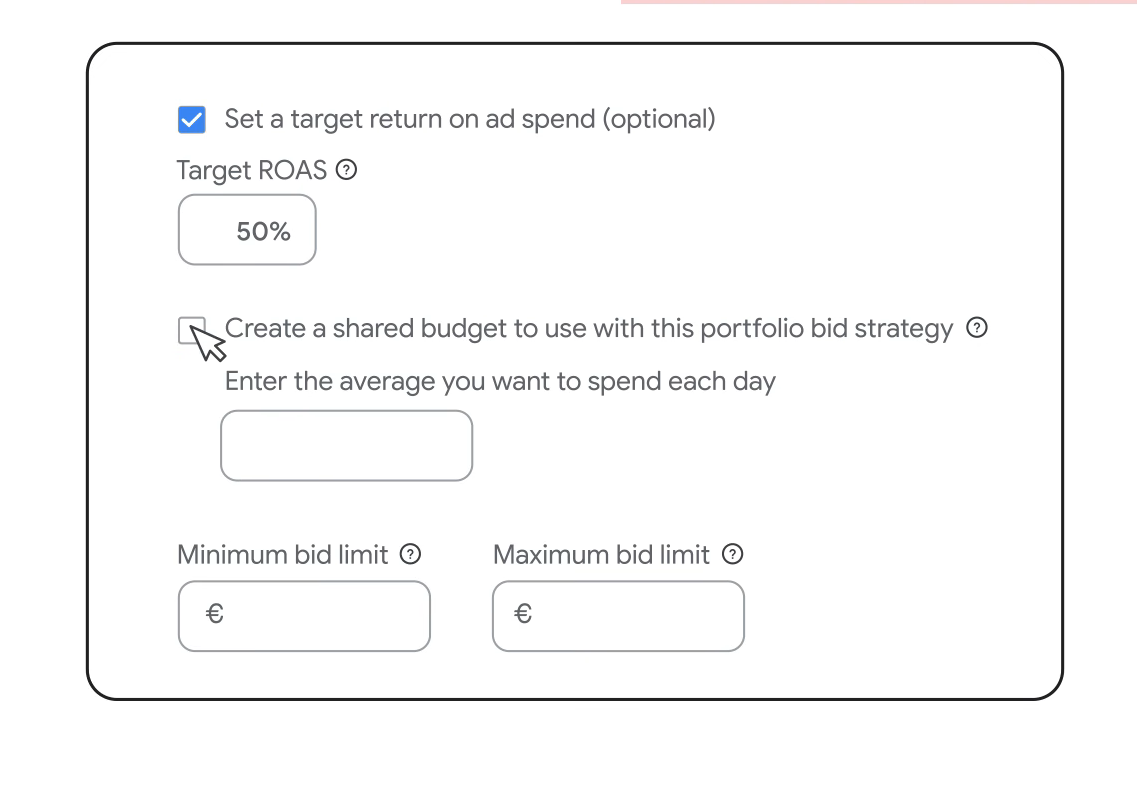
HubSpot creates conversion actions in Google Advertisements for every lifecycle stage you configure (sometimes MQL, SQL, Alternative, Buyer) and routinely fires these conversions again to Google every time an ad-sourced contact reaches a kind of phases.
Good Bidding methods like Goal CPA and Goal ROAS then optimize bids utilizing these pipeline indicators as an alternative of type fills. Over time (sometimes after 30-50 offline conversions per marketing campaign), the algorithm identifies which key phrase themes, viewers segments, and placements produce certified pipeline and shifts spend accordingly.
Supply: Google Advertisements
2. GCLID-Based mostly Attribution and Click on-to-Buyer Monitoring.
HubSpot’s monitoring code captures the distinctive Google Click on ID for each ad-sourced customer and shops it as a contact property. Each downstream income occasion tied to that contact (deal creation, deal stage development, closed-won) carries an attribution path again to the originating advert.
HubSpot helps multi-touch attribution fashions (first-touch, last-touch, linear, time-decay, U-shaped) so Google Advertisements clicks obtain acceptable credit score alongside natural, e mail, and direct touchpoints.
3. Closed-Loop ROI Reporting.
HubSpot pulls value information from Google Advertisements nightly and joins it in opposition to contact data utilizing the GCLID. The Advertisements Dashboard shows every marketing campaign alongside whole spend, contacts generated, prospects generated, income attributed, and calculated ROI, sliceable by time vary, attribution mannequin, and marketing campaign hierarchy.
A marketing campaign producing 500 leads at $40 CPL however solely 2 prospects could be paused, whereas a marketing campaign producing 50 leads at $120 CPL however 10 prospects will get scaled, and people selections occur throughout the identical week.
4. CRM Viewers Sync.
HubSpot contact lists sync to Google Advertisements as Buyer Match audiences for retargeting engaged prospects who have not transformed, excluding present prospects from acquisition campaigns, and constructing lookalike audiences out of your highest-value closed-won prospects. This requires Advertising Hub Skilled or Enterprise.
Google Advertisements Pricing
Google Advertisements operates on a real-time public sale mannequin with no subscription charges, no seat licenses, and no minimal spend. Advertisers compete for placement on each search question via an public sale combining bid quantity, advert high quality rating, and contextual indicators. Accessible bid methods embody:
Google Advertisements costs based mostly on every day budgets, with month-to-month spend capped at 30.4x your every day funds. There aren’t any platform charges or SaaS subscriptions.
Who Ought to Use the Google Advertisements Integration?
-
B2B entrepreneurs who want Good Bidding to optimize towards certified pipeline, not lead quantity, so the algorithm learns which queries and audiences produce leads that gross sales accepts and converts moderately than high-volume inquiries that by no means progress
-
Groups that must show which Google Advertisements key phrases generate prospects, not simply clicks, with closed-loop attribution tying each deal to the precise marketing campaign and key phrase that began the connection
-
Organizations operating retargeting and exclusion campaigns that want CRM segments as Google Advertisements audiences to exclude present prospects, retarget engaged prospects, and construct lookalikes from highest-value prospects
6. Zapier: Finest HubSpot Integration for Connecting Your Stack With out Code
Supply: Zapier
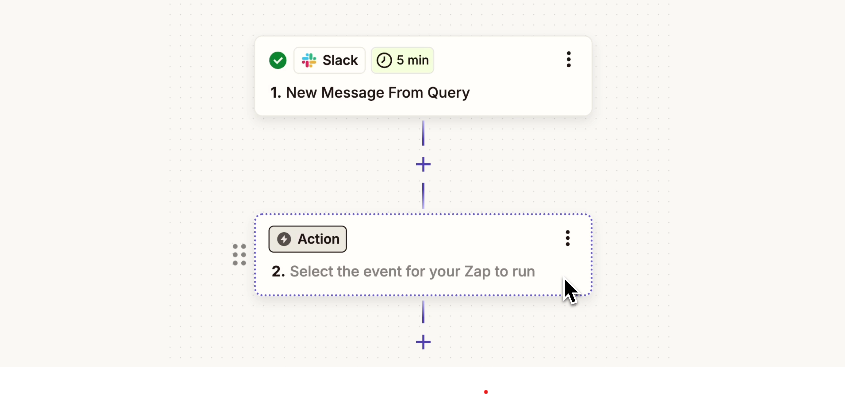
Zapier is a no-code automation platform that integrates with HubSpot to increase your CRM’s attain throughout 8,000+ functions that both lack native HubSpot connectors or whose native integrations do not assist the precise workflow you want. The combination works bidirectionally via a native, pre-built connector utilizing OAuth authentication with no API key administration required.
Key integration capabilities embody:
-
HubSpot occasions triggering actions in exterior instruments: a brand new contact, deal stage change, or type submission fires downstream actions in Slack, Google Sheets, Asana, QuickBooks, or any of 8,000+ related apps
-
Exterior exercise creating or updating HubSpot data: Typeform submissions, Stripe funds, Calendly bookings, and Zoom webinar attendance routinely create contacts, offers, or duties in HubSpot
-
Webhooks extending the combination floor: join HubSpot to proprietary inside instruments, legacy methods, or customized functions with HTTP endpoints
How Zapier Integrates with HubSpot
Zapier connects via commonplace OAuth 2.0 authorization. The combination helps each polling triggers (checking HubSpot for modifications at intervals) and instantaneous triggers through webhooks.
For groups operating HubSpot on Skilled or Enterprise tiers, Zapier interacts with customized objects, customized properties, and sophisticated deal pipelines.
1. Set off-Based mostly Workflow Automation.
The core sample is event-driven: a HubSpot occasion fires a workflow that updates different methods. A deal closing in HubSpot triggers a Zap that creates a mission in Asana, sends a Slack notification, logs deal particulars right into a Google Sheet, and generates an bill in QuickBooks.
The reverse works too: a Calendly assembly booked, a Typeform survey accomplished, or a Stripe cost obtained creates a brand new HubSpot contact, updates lifecycle stage, or enrolls the contact in a workflow. This makes HubSpot a centralized system of report that aggregates buyer interactions throughout your whole tech stack.
2. Contact and Deal Sync Throughout Disconnected Methods.
Zapier maintains parity between HubSpot and exterior databases or SaaS instruments. A contact up to date in HubSpot propagates to a mirrored report in Airtable, a Google Sheet, or a separate CRM utilized by one other enterprise unit.
The reverse circulate works identically. For deal pipeline administration, a deal reaching “Closed Gained” in HubSpot triggers mission creation in Monday.com, buyer provisioning, folder creation in Dropbox, and formatted deal summaries posted to Slack.
3. Multi-App Orchestration with Conditional Logic.
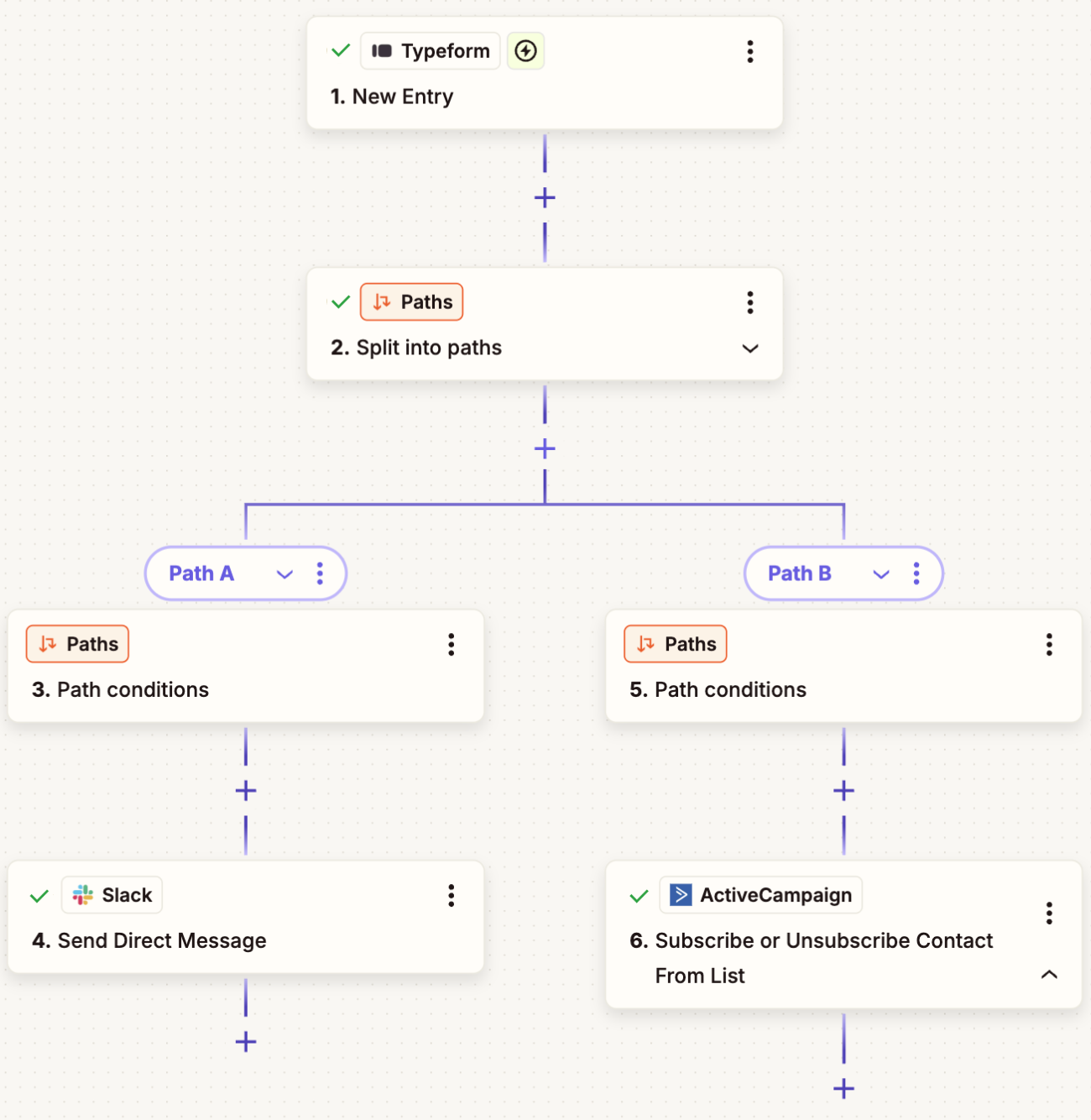
Paths route data by discipline values: enterprise leads go to a high-touch workflow with fast notifications, SMB leads get enrolled in automated nurture, and unqualified leads get tagged for long-term content material advertising and marketing. Looping handles offers with a number of line objects that every want separate processing. The Webhooks step connects HubSpot to methods with out pre-built Zapier integrations, and the Formatter device handles information transformation mismatches between methods.
Supply: Zapier
4. Type and Lead Seize Extensions.
Submissions from specialised type instruments (Typeform, Jotform, Gravity Types) circulate into HubSpot as new contacts. Conversational lead seize instruments like Intercom or Chili Piper feed certified leads again into HubSpot deal administration workflows. Zapier Types can act as a light-weight lead seize device writing to HubSpot for campaigns or occasions the place constructing a full HubSpot touchdown web page is pointless.
Zapier Pricing
Zapier makes use of task-based pricing the place every profitable motion step counts as one process (set off steps, Filters, and Paths don’t rely):
-
Skilled beginning at $19.99/month (annual) for 750 duties: multi-step Zaps, 1-minute polling, conditional logic, automated replay on failure
-
Staff beginning at $69/month (annual) for two,000 duties: as much as 25 customers, shared app connections, SAML SSO
Undertaking process consumption earlier than selecting a plan: a 5-step Zap processing 1,000 new HubSpot contacts monthly consumes 4,000 duties (the set off step is free, however every of the 4 motion steps counts). Zapier’s pay-per-task overage billing is accessible at 1.25x the plan’s per-task fee.
Who Ought to Use the Zapier Integration?
-
Groups utilizing area of interest or specialised instruments with out native HubSpot connectors that also want them synchronized with the CRM, together with industry-specific platforms, legacy enterprise methods, or proprietary inside instruments
-
Organizations the place a deal closure should cascade via mission administration, billing, file storage, and communication instruments routinely, with HubSpot as one node in an extended automation chain
Last Verdict
One of the best HubSpot integrations shut gaps your CRM can’t fill by itself:
-
ZoomInfo: verified B2B information, purchaser intent, and go-to-market intelligence enriching each report; the highest-impact integration on this record in case your pipeline is dependent upon information high quality
-
Slack: CRM occasions become actionable Slack notifications with inline buttons that replace data, create duties, and approve offers
-
Shopify: e-commerce prospects, orders, and deserted carts flowing into HubSpot for behavioral segmentation and lifecycle advertising and marketing
These integrations additionally compound: you would possibly run ZoomInfo for enrichment and intent, Google Workspace for e mail seize, Slack for deal coordination, and Google Advertisements for pipeline attribution on the identical HubSpot occasion, every including a layer of intelligence or automation that makes the others extra priceless.
For those who join only one, make it the info layer every thing else is dependent upon. ZoomInfo’s native HubSpot integration enriches your CRM with verified contact information, purchaser intent indicators, and firm intelligence from a B2B database of 500M+ contacts. ZoomInfo Lite is a everlasting free tier that features HubSpot connectivity, so you may see what verified information and intent indicators do to your pipeline earlier than spending something.
Continuously Requested Questions
What number of integrations does HubSpot assist?
HubSpot’s App Market hosts over 2,000 app integrations with greater than 2.5 million lively installs, spanning CRM, advertising and marketing automation, analytics, communication, e-commerce, promoting, and information enrichment classes.
Past {the marketplace}, HubSpot’s REST API covers the total CRM information mannequin and helps customized integrations with any system that has an API. Official SDKs can be found in six languages (PHP, Java, Ruby, Go, TypeScript, Python), and a Distant MCP server permits AI brokers to learn and write HubSpot CRM information immediately.
Do HubSpot integrations work on all plan tiers?
Many market apps work with HubSpot’s free CRM, however superior integration options rely in your subscription tier.
API entry comes bundled with all plans, with every day name limits: 250,000 calls/day on Free and Starter, 650,000 on Skilled, and 1,000,000 on Enterprise. Options like workflow automation, customized objects, and superior record segmentation require Skilled or Enterprise tiers. Verify every integration’s documentation for tier-specific necessities.
How does HubSpot’s API fee limiting have an effect on integrations?
HubSpot enforces fee limits based mostly on app kind and account tier.
Privately distributed apps get 100-190 requests per 10 seconds relying on tier, with every day limits starting from 250,000 to 1,000,000 calls. Publicly distributed market apps are capped at 110 requests per 10 seconds per put in account.
Excessive-volume integrations should purchase an API Restrict Enhance add-on ($500/month) for a further 1,000,000 calls/day and the next per-second fee. Groups approaching limits ought to take into account batch operations, event-driven webhooks as an alternative of polling, or consolidating redundant API calls.
Can I join HubSpot to instruments that aren’t within the App Market?
Sure. HubSpot’s public REST API covers the total CRM information mannequin and helps customized integrations with any system that may make HTTP requests.
For no-code options, Zapier connects HubSpot to eight,000+ apps, and Make supplies visible multi-step automation. HubSpot’s native Information Sync connects to 100+ apps with bidirectional sync out of the field, and Programmable Automation lets builders run customized JavaScript or Python code inside HubSpot workflows with out exterior middleware.
Are HubSpot integrations safe?
HubSpot makes use of OAuth 2.0 for third-party app authentication, so integrations by no means require sharing your HubSpot password. The platform holds SOC 2 Sort II, SOC 3, and HIPAA attestations, with GDPR and CCPA compliance inbuilt. Information is encrypted at relaxation (AES-256) and in transit (TLS 1.2/1.3). An EU Information Middle is accessible for patrons requiring EU information localization.
Every market app undergoes a safety overview, and enterprises can use SSO, two-factor authentication, IP allowlisting, and centralized audit logs that observe actions by people, automations, and AI brokers.
What’s the distinction between HubSpot’s native integrations and Zapier?
HubSpot’s native integrations (market apps) join immediately between HubSpot and a particular device, providing deeper performance, real-time sync, and tighter information mannequin assist. Zapier connects HubSpot to eight,000+ instruments with no-code automation, together with many instruments with out native HubSpot connectors, however operates on a polling interval (1-Quarter-hour relying on plan) and costs per process.
Use native integrations for core instruments in your stack (CRM enrichment, e mail, group communication) and Zapier for connecting area of interest, legacy, or specialised instruments that lack native connectors.
How do I measure whether or not a HubSpot integration is delivering worth?
HubSpot’s reporting instruments assist multi-touch attribution that tracks the impression of built-in instruments throughout the shopper journey.
For information enrichment integrations, observe information completeness scores, lead-to-MQL conversion charges, and gross sales cycle size earlier than and after activation. For promoting integrations like Google Advertisements, measure cost-per-MQL and cost-per-customer moderately than cost-per-lead. For workflow automation, measure time saved on handbook duties and the quantity of automated actions processed month-to-month.
What’s one of the best ways to complement HubSpot contact information for B2B groups?
Integrating a devoted B2B information platform supplies essentially the most correct enrichment. ZoomInfo’s native HubSpot integration routinely appends verified emails, direct-dial telephone numbers, firm attributes, technographic profiles, and purchaser intent indicators to your CRM data. The enrichment runs constantly via a verification pipeline backed by 300+ human researchers, masking 500 million contacts and 100 million firms.
HubSpot’s Good CRM consists of AI-powered enrichment from e mail threads and internet information, however for groups whose pipeline is dependent upon information accuracy and shopping for sign detection, connecting a platform constructed for B2B intelligence closes the hole between what HubSpot captures and what your reps must act on.

