

Groups that run LinkedIn Gross sales Navigator and Salesforce facet by facet normally uncover the identical issues inside 1 / 4:
-
leads saved in Gross sales Navigator by no means attain Salesforce, so pipeline experiences undercount lively prospects,
-
and Gross sales Navigator exercise (InMails despatched, profiles considered, connection requests accepted) stays invisible within the CRM, leaving managers with an incomplete image of outreach.
Nevertheless the 2 platforms ended up coexisting (an enterprise gross sales org that standardized on Salesforce however adopted Gross sales Navigator for prospecting, or a staff that added Gross sales Navigator licenses on prime of an current CRM), the longer each run independently, the extra engagement information and phone information diverge.
Connecting LinkedIn Gross sales Navigator and Salesforce eliminates that hole.
CRM accounts and contacts sync into Gross sales Navigator so reps see their e book of enterprise with out re-entering information. Gross sales Navigator exercise (InMails, messages, notes, Good Hyperlink views) writes again to Salesforce so each touchpoint seems on the contact report.
Embedded Gross sales Navigator experiences inside Salesforce carry Account IQ summaries, Relationship Maps, and lead suggestions into the CRM, so reps can analysis and have interaction with out switching tabs.
LinkedIn gives a native Salesforce integration on the Superior Plus plan, accessible via the Salesforce AppExchange. For groups on decrease tiers, restricted integration is feasible via the SNAP accomplice ecosystem and customized improvement, although LinkedIn’s closed API program constrains what third-party instruments can do. Every methodology differs in setup complexity, information protection, sync route, and price.
One downside no connection methodology solves: the sync strikes information and exercise between techniques, however it doesn’t confirm, full, or enrich the underlying contact information.
And that’s the place ZoomInfo is available in. ZoomInfo integrates natively with Salesforce and gives API and MCP entry that feeds verified, enriched contact and firm information into any CRM workflow, so the information behind each Gross sales Navigator interplay are correct and full earlier than outreach begins.
This text covers the LinkedIn Gross sales Navigator and Salesforce integration: which strategies can be found, what information each handles, the best way to set them up, the use instances that justify connecting each platforms, and the restrictions to plan for. It additionally covers how ZoomInfo matches in as a knowledge enrichment layer that strengthens the information flowing between Gross sales Navigator and Salesforce.
Let’s begin with an outline of the combination.
Integration Overview
Supply: Salesforce
Does a local integration exist?
Sure. LinkedIn gives a native Salesforce integration accessible via the Salesforce AppExchange. The combination gives CRM Sync (bidirectional information sync), Embedded Experiences (Gross sales Navigator intelligence inside Salesforce), and Exercise Writeback (logging Gross sales Navigator exercise to CRM information). It requires the Superior Plus plan, a minimal of 10 seats, and customized pricing.
What information can sync?
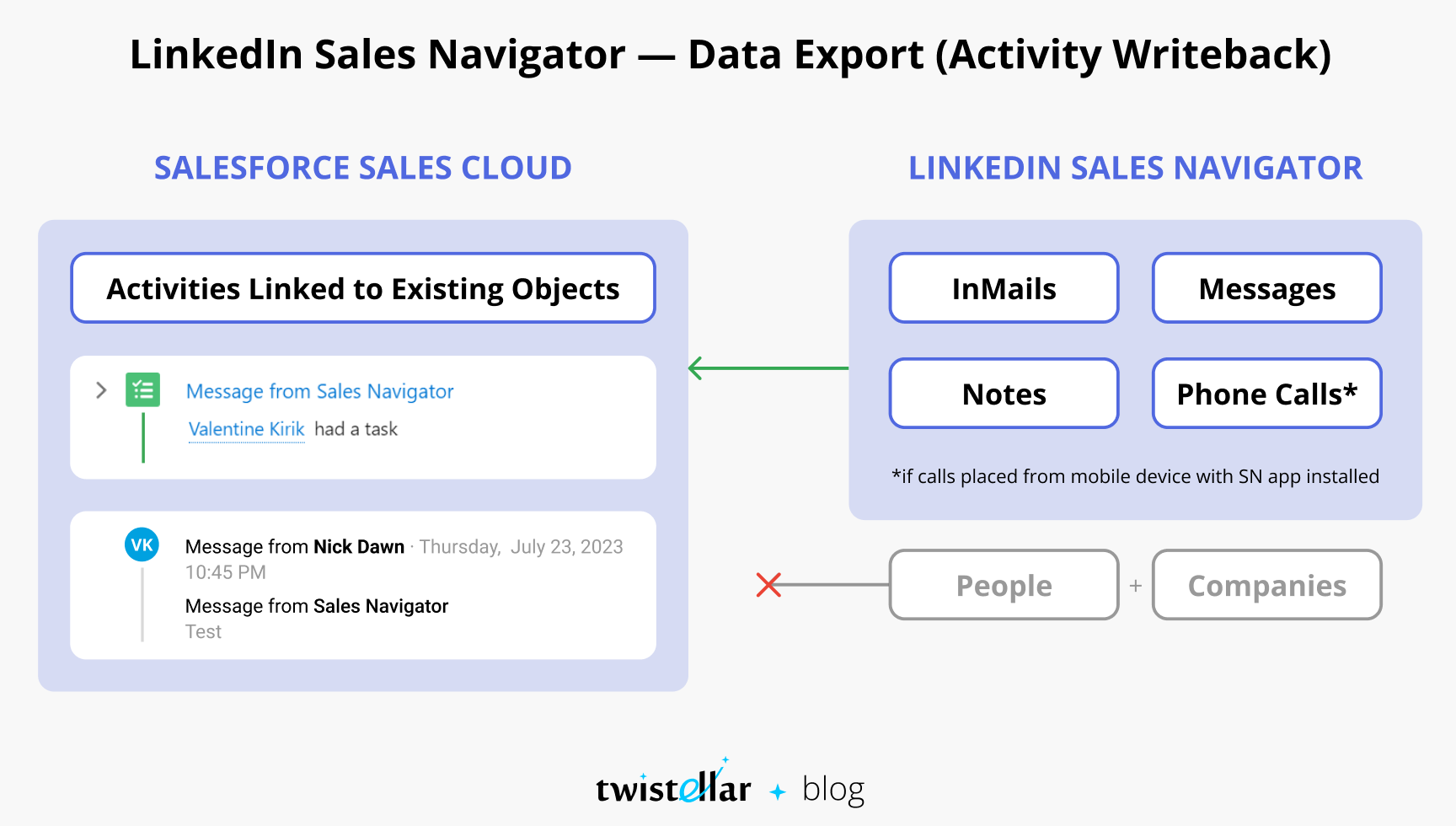
CRM accounts, contacts, and leads sync inbound to Gross sales Navigator. Outbound, Gross sales Navigator writes again InMails, messages, name logs, connection requests, notes, and Good Hyperlink views to Salesforce.
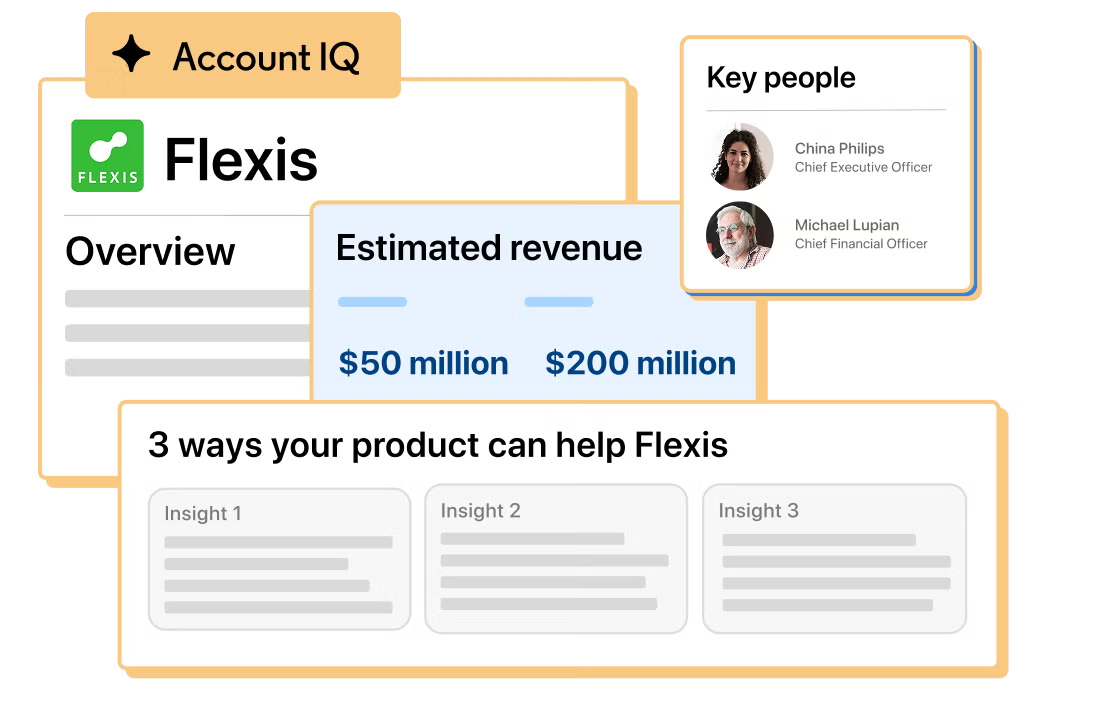
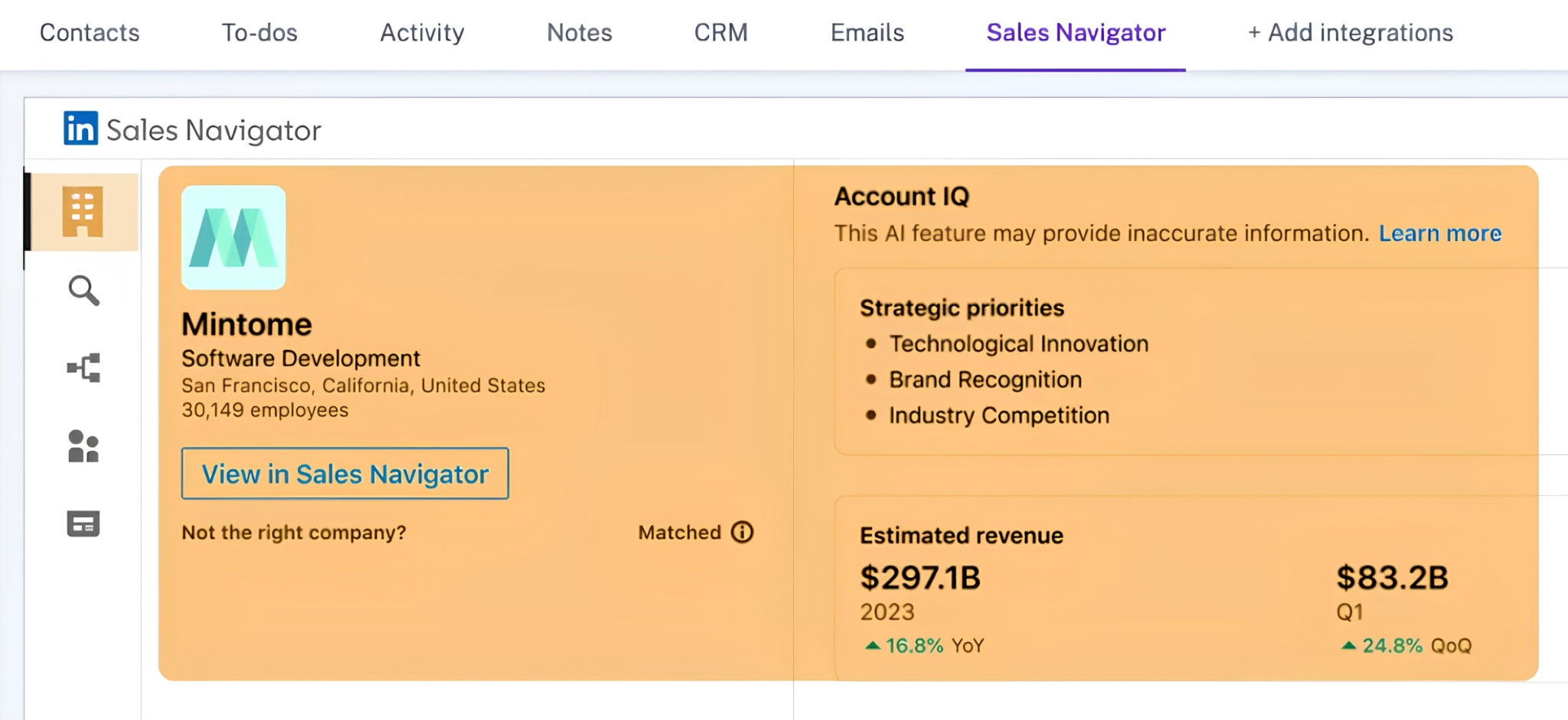
Embedded Experiences floor Account IQ, Discover Key Individuals, and Relationship Map inside Salesforce information. Information Validation flags CRM contacts who’ve left their firm and surfaces title or location discrepancies.
Is the sync bidirectional?
Sure, on the Superior Plus plan. CRM Sync runs day by day: Salesforce accounts, contacts, and leads import into Gross sales Navigator routinely, and Gross sales Navigator exercise writes again to Salesforce information. Decrease-tier plans (Core, Superior) don’t assist CRM Sync.
Is it real-time or batch?
The native CRM Sync runs on a day by day batch schedule. Exercise Writeback logs occasions as they happen, in close to real-time. Embedded Experiences floor stay Gross sales Navigator information inside Salesforce on demand.
What are the accessible strategies?
Native integration (Superior Plus solely), SNAP accomplice integrations (Outreach, Salesloft, Gong), and customized improvement utilizing the Salesforce API alongside Gross sales Navigator’s restricted developer floor.
|
Technique |
Setup Issue |
Information Circulation |
Actual-time? |
Price |
|---|---|---|---|---|
|
Native (Superior Plus) |
Low |
Bidirectional |
Day by day batch sync + close to real-time exercise writeback |
Included with Superior Plus (customized pricing, 10+ seats) |
|
SNAP Companion Instruments |
Medium |
Varies by accomplice |
Varies |
Requires each platform subscriptions + accomplice software value |
|
Customized Improvement |
Excessive |
Customized |
Depends upon implementation |
Developer time + internet hosting |
One distinction price settling upfront: the native integration handles ongoing, bidirectional sync as a part of day by day gross sales operations.
SNAP accomplice integrations (Outreach, Salesloft) lengthen Gross sales Navigator information into gross sales engagement workflows however don’t replicate the CRM Sync or Embedded Experiences. Customized improvement faces a tough constraint: LinkedIn isn’t at present accepting new companions for Gross sales Navigator API entry, and no public REST API exists.
Integration Strategies
Native LinkedIn Gross sales Navigator Integration (Superior Plus Plan)
The way it works: LinkedIn’s native Salesforce integration, accessible via the Salesforce AppExchange, connects the 2 platforms by way of the Gross sales Navigator Software Platform (SNAP).
The combination has three layers: CRM Sync (bidirectional information pipeline), Embedded Experiences (Gross sales Navigator UI inside Salesforce), and Exercise Writeback (logging Gross sales Navigator exercise to CRM information). On the Salesforce facet, the combination makes use of Salesforce’s REST API and object mannequin; on the LinkedIn facet, it makes use of the closed SNAP framework.
Supply: LinkedIn Gross sales Navigator
What it syncs: Inbound to Gross sales Navigator: CRM accounts, contacts, and leads for every seat holder are auto-imported into Gross sales Navigator lists. Outbound to Salesforce: InMails, messages, name logs, connection requests, notes, and Good Hyperlink views write again as logged actions on the corresponding Salesforce information.
Information Validation flags CRM contacts who’ve left their firm and surfaces title or location modifications. Champions Record identifies previous prospects from closed-won offers who moved to new firms. Alternatives at Danger alerts when key contacts go away open offers.
Matches: ongoing bidirectional sync of CRM information and Gross sales Navigator exercise; not a migration software.
Setup course of:
-
In Gross sales Navigator Admin Settings, navigate to CRM Settings and authenticate with Salesforce utilizing OAuth, granting Gross sales Navigator permission to learn accounts, contacts, and leads and write exercise information.
-
Configure CRM Sync scope: select which Salesforce information to import (by possession, territory, or customized guidelines) and which Gross sales Navigator actions to write down again (InMails, messages, notes, connection requests, Good Hyperlink views).
-
Allow Embedded Experiences in Salesforce by including the Gross sales Navigator Lightning elements to Account, Contact, Lead, and Alternative web page layouts. This surfaces Account IQ, Discover Key Individuals, and Relationship Map inside Salesforce.
-
Check with a subset of customers. Confirm {that a} Salesforce contact seems in Gross sales Navigator, ship an InMail from Gross sales Navigator, and make sure the exercise writes again to the Salesforce contact report.
Strengths: First-party integration maintained by LinkedIn and distributed via the Salesforce AppExchange. CRM Sync eliminates guide information entry between techniques, saving an estimated 65 hours per 12 months per person (quarter-hour per day). Embedded Experiences carry Account IQ, Relationship Map, and Discover Key Individuals into Salesforce, eliminating tab-switching. Information Validation flags stale contacts.
Supply: LinkedIn Gross sales Navigator
Limitations: Accessible solely on the Superior Plus plan, which requires customized pricing, an annual contract, and a minimal of 10 seats. CRM Sync runs on a day by day batch schedule, not real-time.
Gross sales Navigator doesn’t create new CRM information from LinkedIn information routinely (it imports current CRM information into Gross sales Navigator, not the reverse, apart from Lead/Contact Creation, which lets customers manually push particular person information from Gross sales Navigator into Salesforce).
LinkedIn member information (profile particulars, firm data) doesn’t export to Salesforce fields; what writes again is exercise metadata, not contact information enrichment.
Finest for: Enterprise gross sales groups (10+ seats) dedicated to each platforms long-term, the place Gross sales Navigator is a core prospecting software and Salesforce is the system of report. Groups that want gross sales exercise logged routinely throughout each techniques and need Gross sales Navigator intelligence embedded of their CRM.
SNAP Companion Integrations (Outreach, Salesloft, Gong)
The way it works: LinkedIn’s Gross sales Navigator Software Platform (SNAP) lets licensed companions embed Gross sales Navigator profile views, insights, and messaging inside their functions. Companions like Outreach, Salesloft, and Gong use SNAP’s Show Companies to floor LinkedIn information inside their platforms.
Supply: LinkedIn Gross sales Navigator
These integrations complement (not change) the native Salesforce integration by extending Gross sales Navigator into gross sales engagement and dialog intelligence workflows that feed information into Salesforce.
What it syncs: SNAP Show Companies embed Gross sales Navigator profiles, exercise feeds, and messaging contained in the accomplice software. The accomplice’s personal Salesforce integration then ensures that engagement information (emails, calls, sequences) logged via the accomplice software reaches Salesforce.
Gross sales Navigator information (LinkedIn profiles, account intelligence) seems within the accomplice UI however doesn’t switch as uncooked information to both the accomplice or Salesforce via this path.
Matches: ongoing workflow extension; dietary supplements however doesn’t change the native CRM Sync.
Setup course of:
-
Set up the accomplice integration from the accomplice’s market (e.g., Outreach Market, Salesloft Market).
-
Configure which Gross sales Navigator elements seem within the accomplice UI (profile widgets, exercise feeds, messaging).
Strengths: Places Gross sales Navigator intelligence into the workflow the place reps already spend their time (sequencing, name preparation, deal evaluation). Gross sales engagement platforms like Outreach and Salesloft deal with the Salesforce exercise sync, so engagement information reaches the CRM routinely. No engineering effort past enabling the accomplice integration.
Limitations: SNAP accomplice entry is a closed, certification-required program. LinkedIn isn’t at present accepting new SNAP companions, so the accessible accomplice integrations are fastened. These integrations show Gross sales Navigator information within the accomplice UI however don’t export LinkedIn member information to the accomplice’s database or to Salesforce. The depth of Gross sales Navigator options accessible varies by accomplice.
Finest for: Groups already utilizing a gross sales engagement platform (Outreach, Salesloft) or dialog intelligence software (Gong) alongside Gross sales Navigator and Salesforce, who need Gross sales Navigator information seen of their workflow software with out changing the native CRM integration.
Customized Improvement
The way it works: Salesforce gives REST, SOAP, and Bulk APIs that assist studying and writing any normal or customized object, plus Platform Occasions and Change Information Seize for event-driven sync.
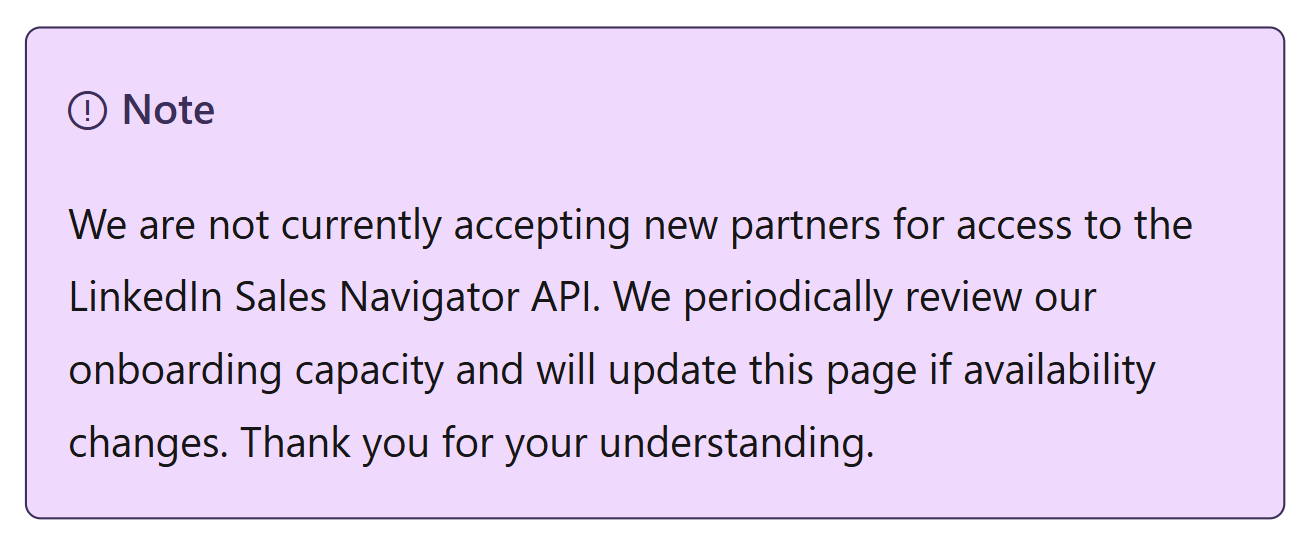
LinkedIn Gross sales Navigator’s developer floor is much extra constrained: API entry is unique to the closed SNAP accomplice program, and LinkedIn isn’t at present accepting new companions. There’s no public REST API for Gross sales Navigator, and no information export to CSV/XLS. A customized integration due to this fact works totally on the Salesforce facet, utilizing Salesforce’s API to construction and route information, whereas counting on the native SNAP integration (or guide processes) for the LinkedIn facet.
Supply: LinkedIn Gross sales Navigator
What it syncs: On the Salesforce facet, something the APIs expose. On the Gross sales Navigator facet, solely what the native SNAP integration delivers (CRM Sync inbound, Exercise Writeback outbound, Embedded Experiences).
Customized improvement can add logic on prime of the info that arrives in Salesforce (routing, scoring, deduplication, transformation) however can’t pull extra information from Gross sales Navigator past what the SNAP integration gives.
Matches: extending the native integration with Salesforce-side automation; not a standalone different to the native connector.
Setup course of:
-
Construct server-side logic that screens Salesforce for Gross sales Navigator exercise information (InMails, messages, Good Hyperlink views) and applies enterprise guidelines: routing leads primarily based on engagement patterns, scoring contacts by LinkedIn interplay frequency, or triggering alerts when Information Validation flags a departed contact.
-
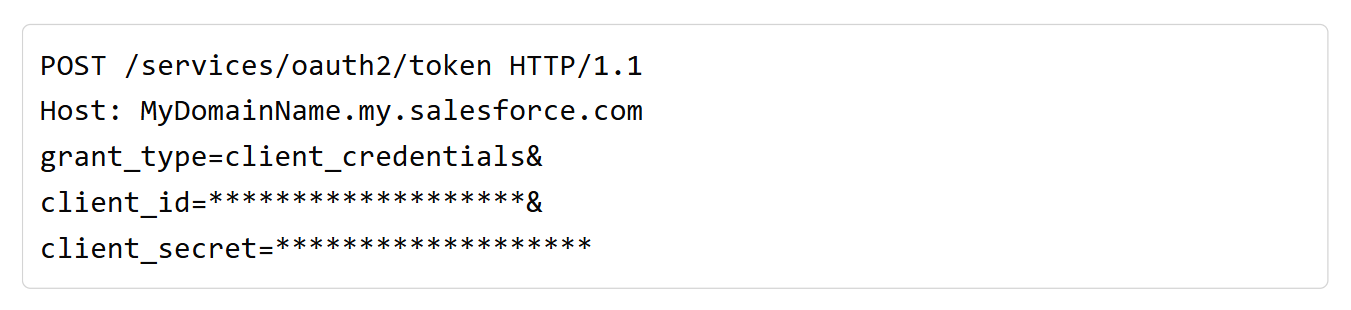
Deploy, monitor, and preserve. Salesforce variations its API with every seasonal launch (the present model is Summer time ’26, API model 67.0), requiring periodic evaluation.
Supply: Salesforce
Strengths: Full management over how Gross sales Navigator exercise information in Salesforce is routed, scored, and acted on. Can implement enterprise guidelines the native integration doesn’t assist (e.g., auto-escalating leads who view a Good Hyperlink 3 times inside every week). Salesforce’s API floor covers any CRM object.
Limitations: Can’t pull information from Gross sales Navigator past what the native SNAP integration gives. LinkedIn’s closed API program means no direct programmatic entry to Gross sales Navigator information. The customized work provides logic on the Salesforce facet, not a bridge to new LinkedIn information. Requires improvement assets to construct and preserve.
Finest for: Enterprise groups that have already got the native Superior Plus integration lively and wish Salesforce-side automation on prime of the info it delivers: customized routing guidelines, engagement scoring primarily based on Gross sales Navigator exercise patterns, or workflow triggers that the native integration doesn’t assist.
Key Use Instances
1. Prospect Analysis With out Leaving Salesforce
An account government getting ready for a name opens the Salesforce Account report and sees the Gross sales Navigator Account IQ abstract within the CRM: strategic priorities, current management modifications, and monetary context.
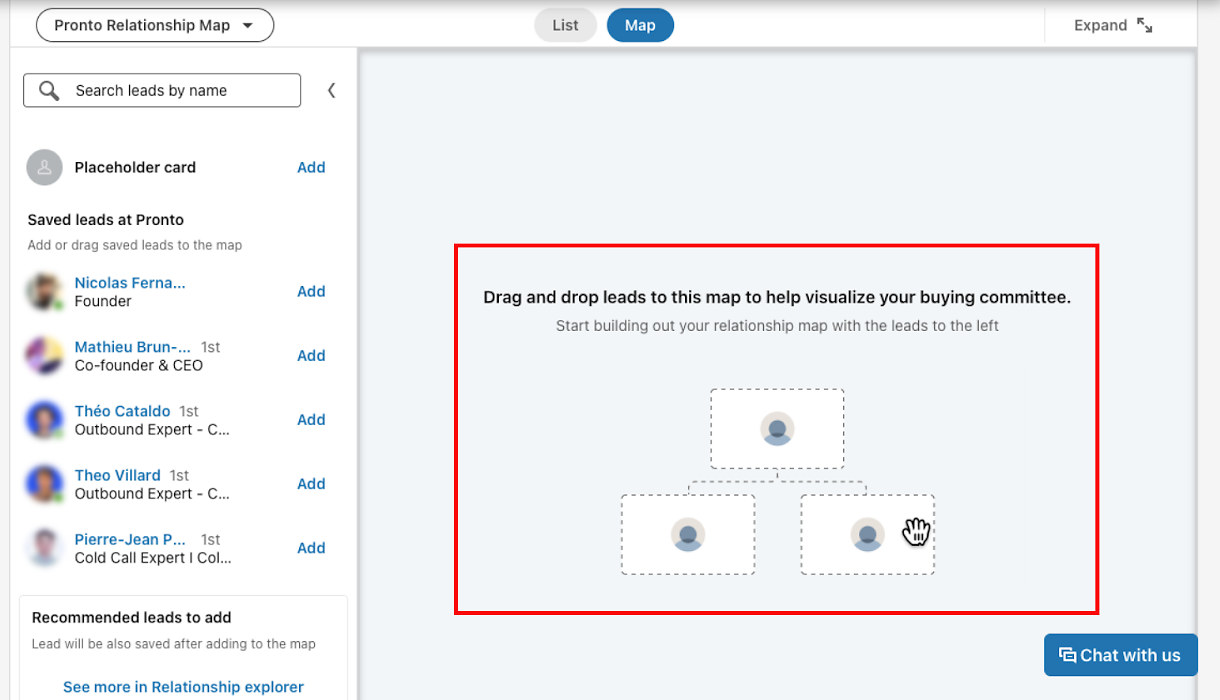
Relationship Map reveals the shopping for committee with position assignments. Discover Key Individuals surfaces stakeholders the rep has not but engaged. The rep researches, drafts speaking factors, and enters the decision with out switching functions.
Supply: LinkedIn Gross sales Navigator
Finest integration methodology: Native integration (Superior Plus), particularly Embedded Experiences.
2. Exercise Logging for Full Pipeline Visibility
SDRs run outbound prospecting via Gross sales Navigator InMail and connection requests. The native integration’s Exercise Writeback logs each InMail, message, and connection request to the corresponding Salesforce Lead or Contact report. Gross sales managers see the complete outreach image (emails, calls, LinkedIn touches) in Salesforce experiences and dashboards with out reps manually logging Gross sales Navigator exercise.
Finest integration methodology: Native integration (Superior Plus), particularly CRM Sync with Exercise Writeback.
3. Champion Monitoring Throughout Job Modifications
A closed-won deal’s main champion leaves the corporate. The native integration’s Champions Record detects the transfer utilizing LinkedIn profile information and surfaces the champion’s new firm as a possible account. On the similar time, Alternatives at Danger alerts the account staff {that a} key contact has left an lively deal, prompting them to re-engage the account and discover a new inside sponsor.
Finest integration methodology: Native integration (Superior Plus), particularly Champions Record and Alternatives at Danger.
4. Multi-Threaded Account Engagement
An AE concentrating on a big enterprise account makes use of the Relationship Map embedded within the Salesforce Account report to establish gaps within the shopping for committee. The place solely two contacts are tracked in Salesforce, the Relationship Map reveals 5 extra stakeholders with affect over the choice.
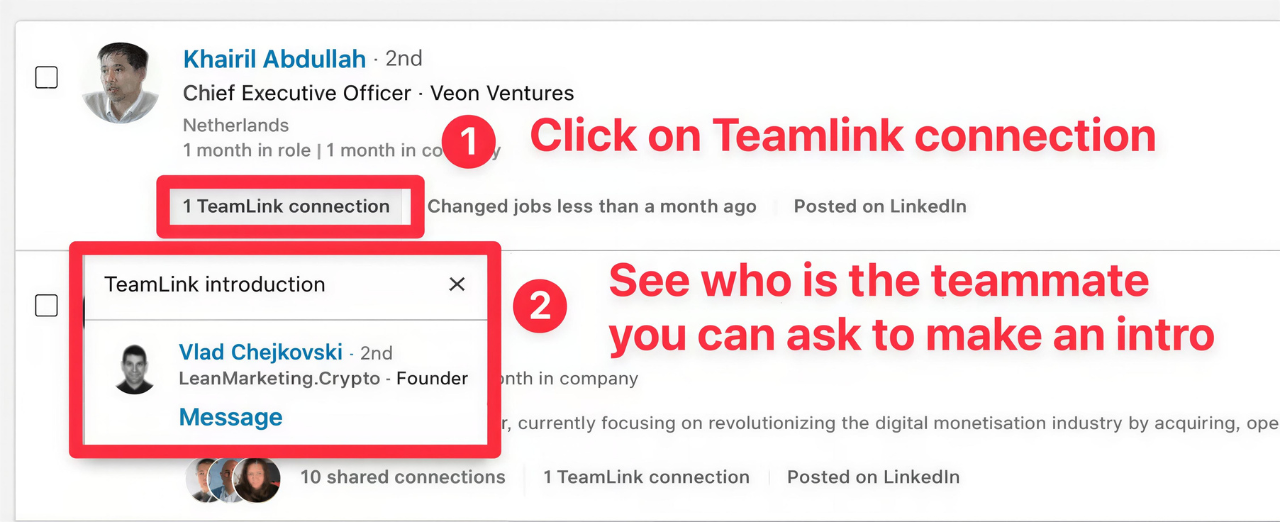
The AE makes use of TeamLink to seek out heat introduction paths via colleagues’ networks and sends customized InMails to increase the thread, with all exercise writing again to the Salesforce alternative.
Supply: LinkedIn Gross sales Navigator
Finest integration methodology: Native integration (Superior Plus), particularly Embedded Experiences and TeamLink.
5. CRM Information Hygiene by way of LinkedIn Validation
RevOps runs a quarterly information high quality evaluation. Gross sales Navigator’s Information Validation has already flagged 200 Salesforce contacts whose LinkedIn profiles present they’ve left their firms. It surfaces title and site discrepancies for one more 150 information.
The RevOps staff makes use of these flags to prioritize which information want updating, archiving departed contacts and correcting stale titles with out manually checking every profile.
Finest integration methodology: Native integration (Superior Plus), particularly Information Validation.
Limitations and Concerns
Plan Gating on Superior Plus
Essentially the most beneficial integration capabilities (CRM Sync, Exercise Writeback, Embedded Experiences, Information Validation, Champions Record, Alternatives at Danger) require Gross sales Navigator’s Superior Plus plan. Superior Plus requires customized pricing, an annual contract, and a minimal of 10 seats.
Groups on Core ($119.99/month per seat) or Superior ($159.99/month per seat) can’t entry the native Salesforce integration’s core options. This creates an actual value barrier for smaller groups.
Day by day Batch Sync, Not Actual-Time
CRM Sync operates on a day by day batch schedule. A contact added to Salesforce within the morning doesn’t seem in Gross sales Navigator till the following sync cycle.
For groups that want information accessible proper after creation, this lag creates a window the place reps could also be working in Gross sales Navigator with out seeing their latest CRM information. Exercise Writeback operates in close to real-time, however the inbound CRM-to-Gross sales Navigator sync doesn’t.
LinkedIn Information Does Not Enrich Salesforce Information
A typical false impression: the native integration doesn’t push LinkedIn profile information (job titles, firm particulars, contact data) into Salesforce fields. LinkedIn member information stays inside Gross sales Navigator and the Embedded Experiences layer.
What writes again to Salesforce is exercise metadata (InMail despatched, message acquired, Good Hyperlink considered), not verified contact particulars. Reps can see LinkedIn information via Embedded Experiences in Salesforce, however the information doesn’t populate CRM fields for reporting, routing, or automation.
No Public API for Gross sales Navigator
LinkedIn isn’t at present accepting new companions for Gross sales Navigator API entry. The SNAP program is closed to new entrants, and no public REST API exists. Information export to CSV/XLS isn’t accessible.
Third-party automation instruments like Zapier and Make can’t construct Gross sales Navigator connectors, and customized integrations can’t entry Gross sales Navigator information programmatically. The native integration is the one direct path between the 2 platforms.
Permissions and Entry
Organising the native integration requires admin rights on either side. In Salesforce, System Administrator entry is required to put in the AppExchange bundle and configure API-enabled profiles.
In Gross sales Navigator, Admin-level entry is required to configure CRM Settings and authorize the Salesforce connection. Salesforce orgs utilizing field-level safety or sharing guidelines should guarantee the combination person’s profile has entry to each object and subject the place exercise information shall be saved.
Upkeep
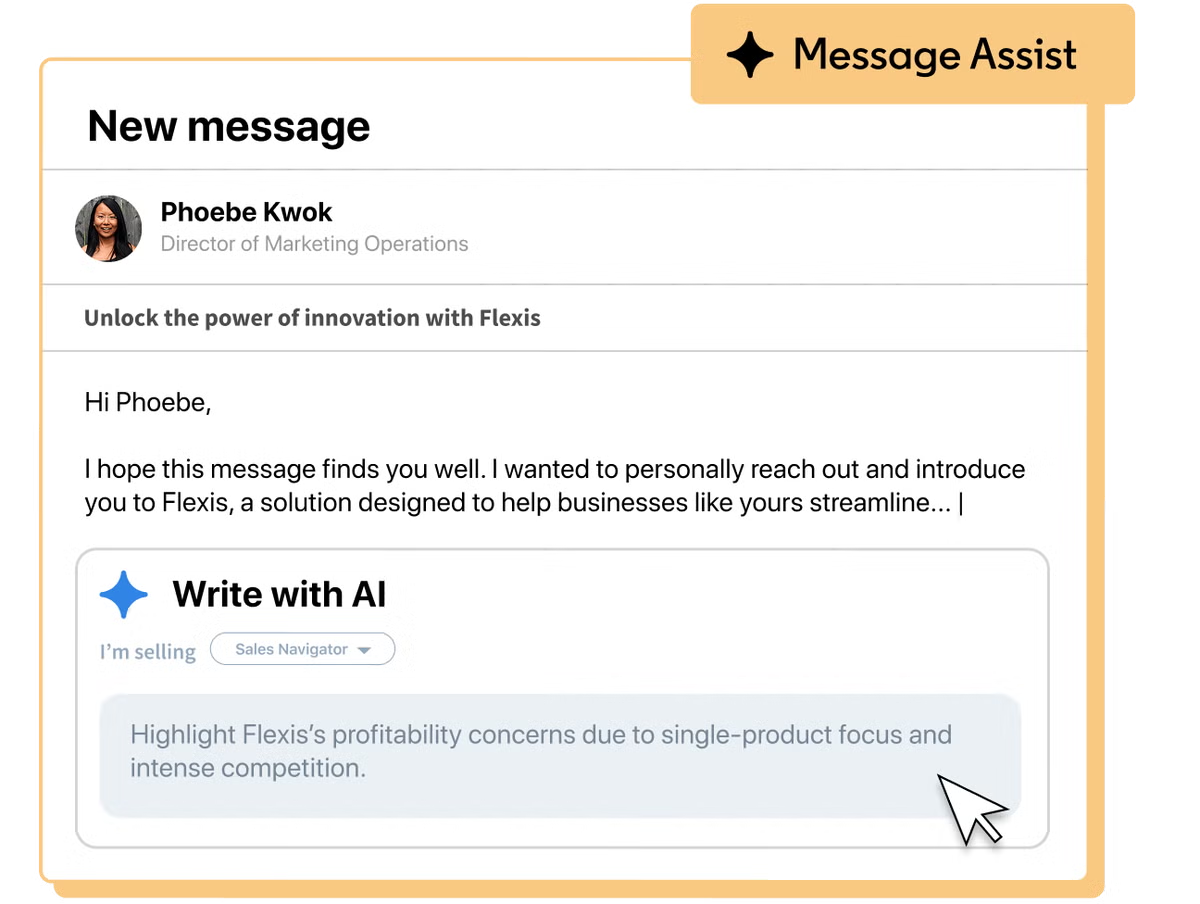
Each platforms evolve independently. LinkedIn updates Gross sales Navigator options on a rolling foundation (the October 2024 AI capabilities launch and the Gross sales Assistant beta are current examples).
Supply: LinkedIn Gross sales Navigator
Salesforce variations its API with every seasonal launch. Modifications on both facet can have an effect on how Embedded Experiences render, which exercise varieties write again, or how CRM Sync handles new object varieties. Overview the combination’s well being periodically, particularly after main product updates on both platform.
What No Technique Fixes: The Information Itself
Each methodology above strikes information and exercise between Gross sales Navigator and Salesforce. None of them checks whether or not the underlying contact information is correct, full, or present.
A Salesforce contact with a lifeless cellphone quantity syncs into Gross sales Navigator as a lead with a lifeless cellphone quantity. A contact report lacking firm information, direct dial, or verified electronic mail travels simply as reliably as a clear one. The combination retains each techniques aligned; it doesn’t make them proper.
The place ZoomInfo Matches In
Each methodology on this information strikes information between LinkedIn Gross sales Navigator and Salesforce. None of them improves the info being moved. When the combination is stay however pipeline information remains to be incomplete (outdated direct dials, lacking verified emails, stale firm particulars, incomplete firm context), the bottleneck is now not the connector. That’s the hole ZoomInfo closes.
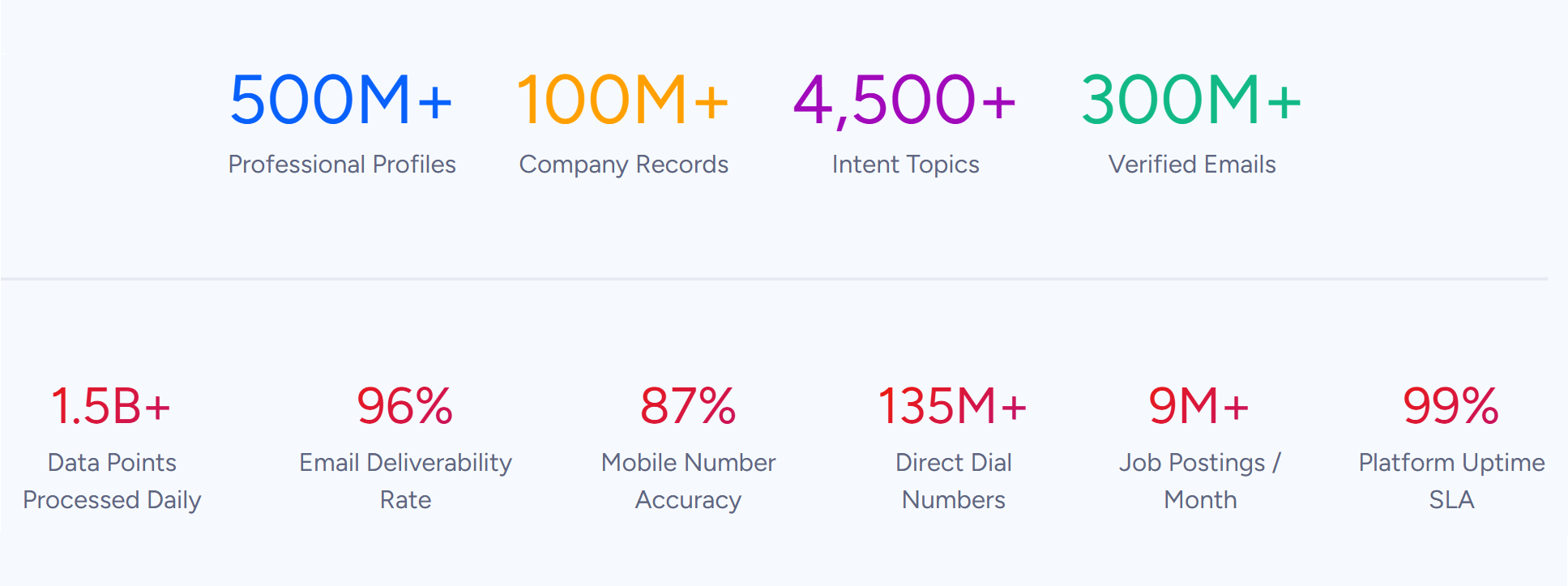
ZoomInfo is a B2B information and go-to-market platform overlaying 500M contacts, 100M firms, 135M+ verified cellphone numbers, and 200M+ verified enterprise emails.
Supply: ZoomInfo
That information is verified via a multi-source pipeline backed by 300+ human researchers, reaching as much as 95% accuracy on first-party information. For groups working a Gross sales Navigator and Salesforce integration, ZoomInfo addresses the info high quality layer that no connector handles.
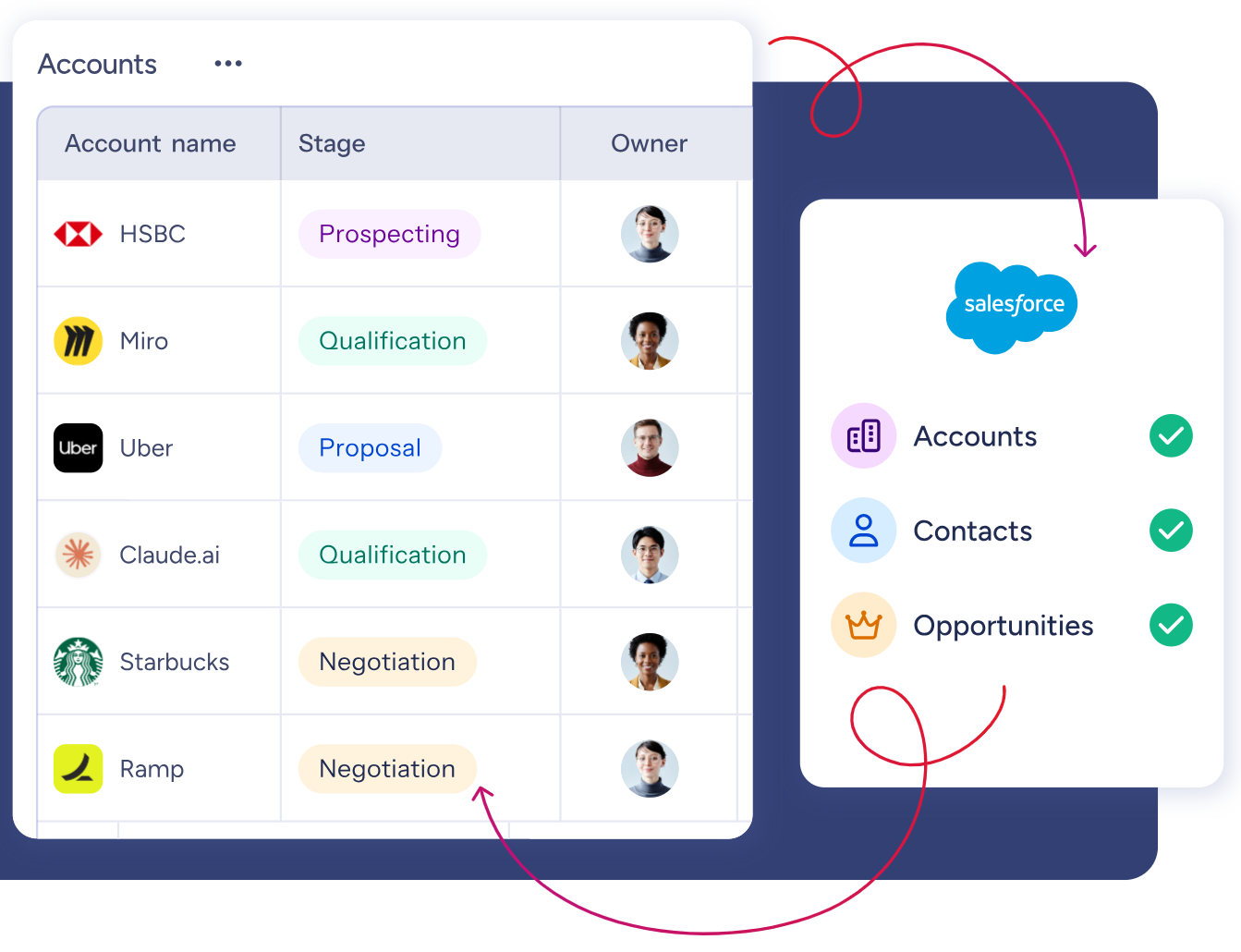
ZoomInfo integrates natively with Salesforce via its market, offering CRM enrichment, lead routing, and real-time information updates inside Salesforce information.
Supply: ZoomInfo
Earlier than a rep opens the Gross sales Navigator Embedded Expertise on a Salesforce account, ZoomInfo ensures the underlying CRM report has verified enterprise emails (so outreach reaches actual inboxes), correct direct-dial cellphone numbers (so calls join), present titles and org chart information (so messaging targets the proper stakeholder), and full firm profiles (so territory project and routing guidelines work accurately).
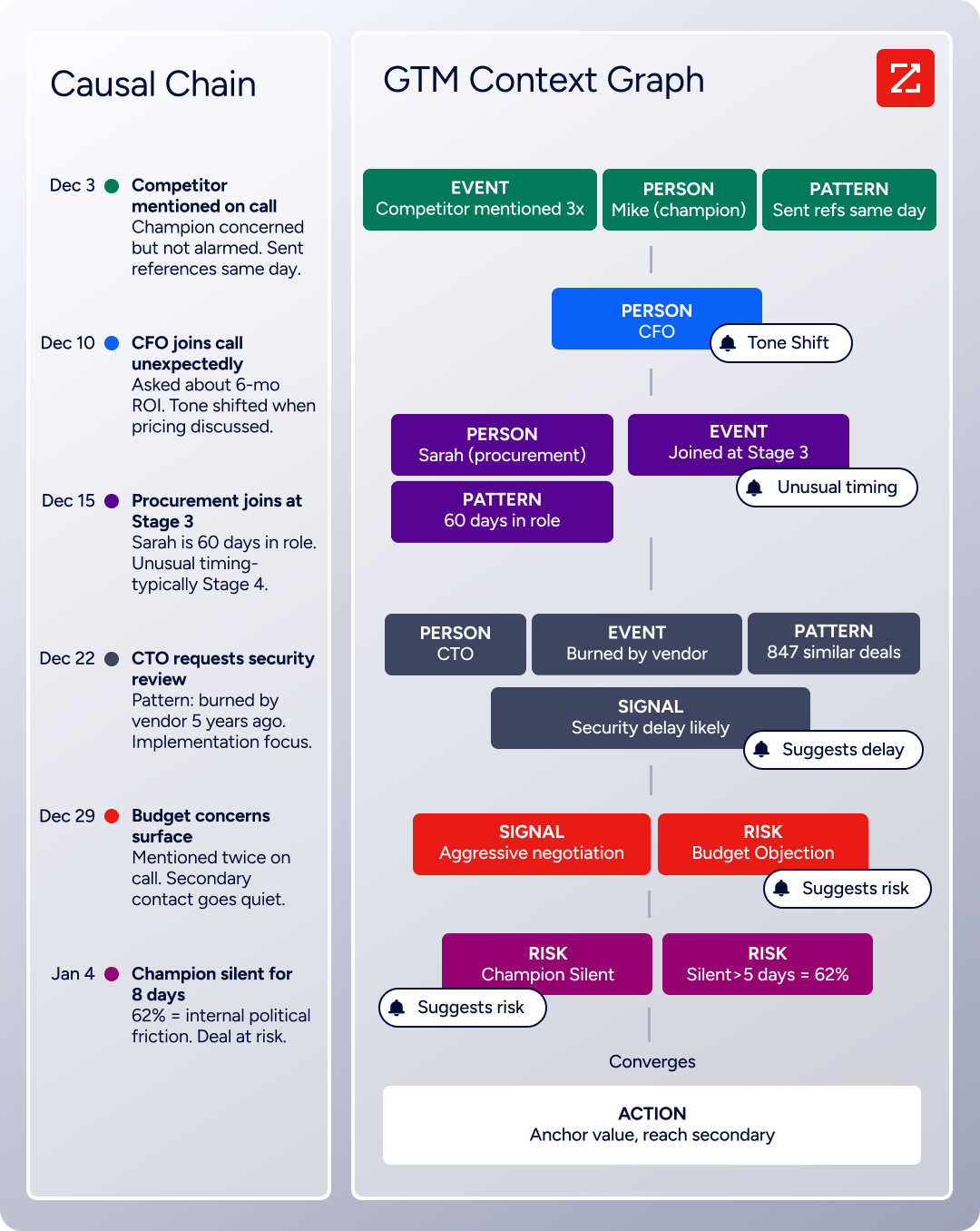
The identical information feeds ZoomInfo’s GTM Context Graph, which processes 1.5B + information factors day by day and unifies third-party intelligence with CRM information, dialog transcripts, and behavioral indicators to floor not simply what occurred in a deal, however why.
Supply: ZoomInfo
In observe, a staff working each Gross sales Navigator and Salesforce can use ZoomInfo to counterpoint Salesforce information repeatedly, then let the native Gross sales Navigator integration sync these enriched information into Gross sales Navigator.
The end result: Gross sales Navigator’s prospecting filters and Purchaser Intent indicators function on verified, full information, and the exercise information that writes again to Salesforce attaches to contacts with correct data.
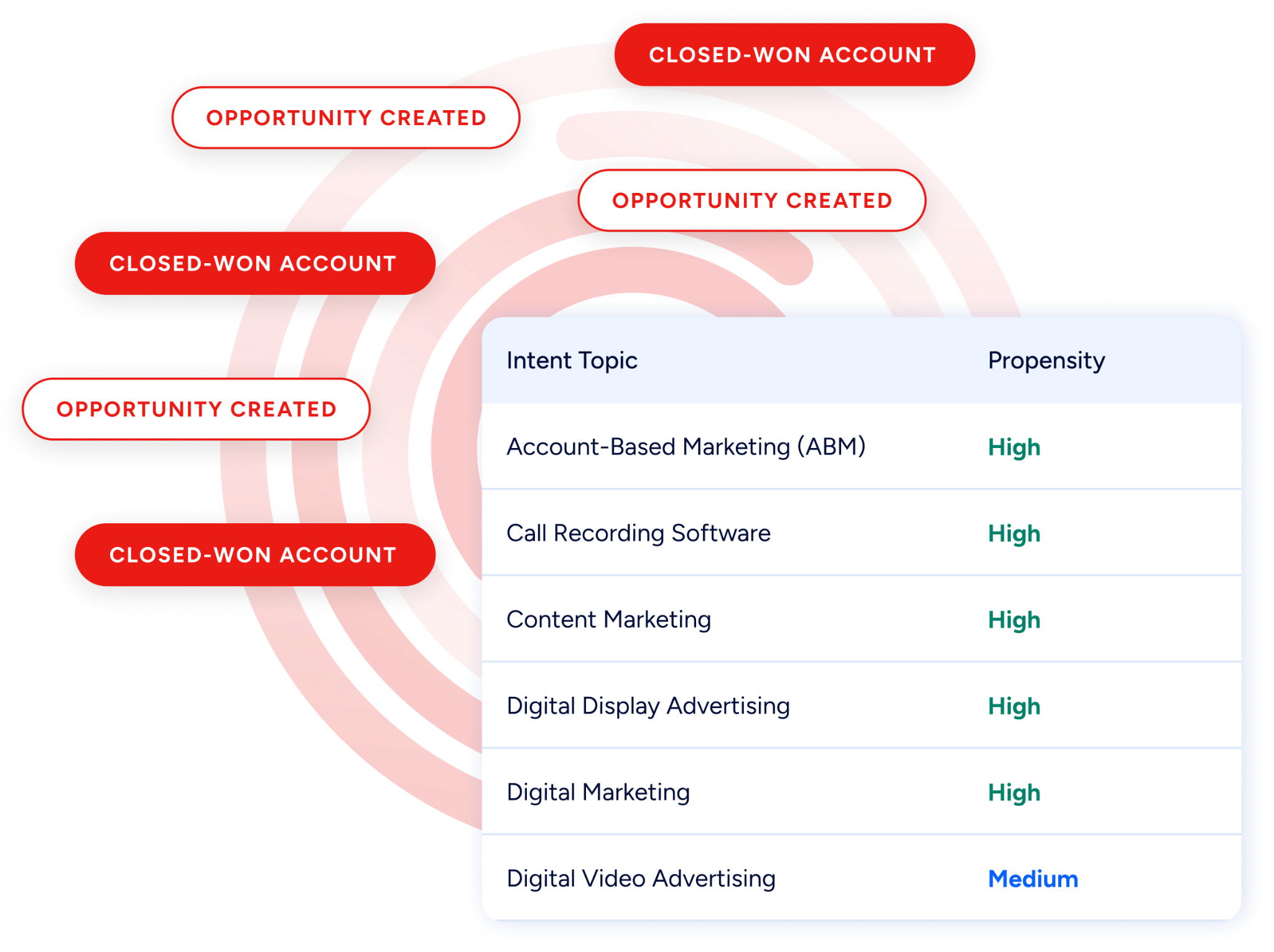
Purchaser Intent information from ZoomInfo, monitoring indicators from 210 million IP-to-Group pairings, enhances Gross sales Navigator’s personal 180+ intent indicators by including off-LinkedIn analysis exercise that Gross sales Navigator’s platform-native indicators don’t seize.
Supply: ZoomInfo
Enriched information additionally make the Gross sales Navigator integration extra beneficial. Information Validation flags change into extra actionable when the CRM information being validated had been correct to start with. Champions Record and Alternatives at Danger alerts connect to contacts with verified direct dials and emails, so the rep can act instantly as an alternative of researching the best way to attain the individual.
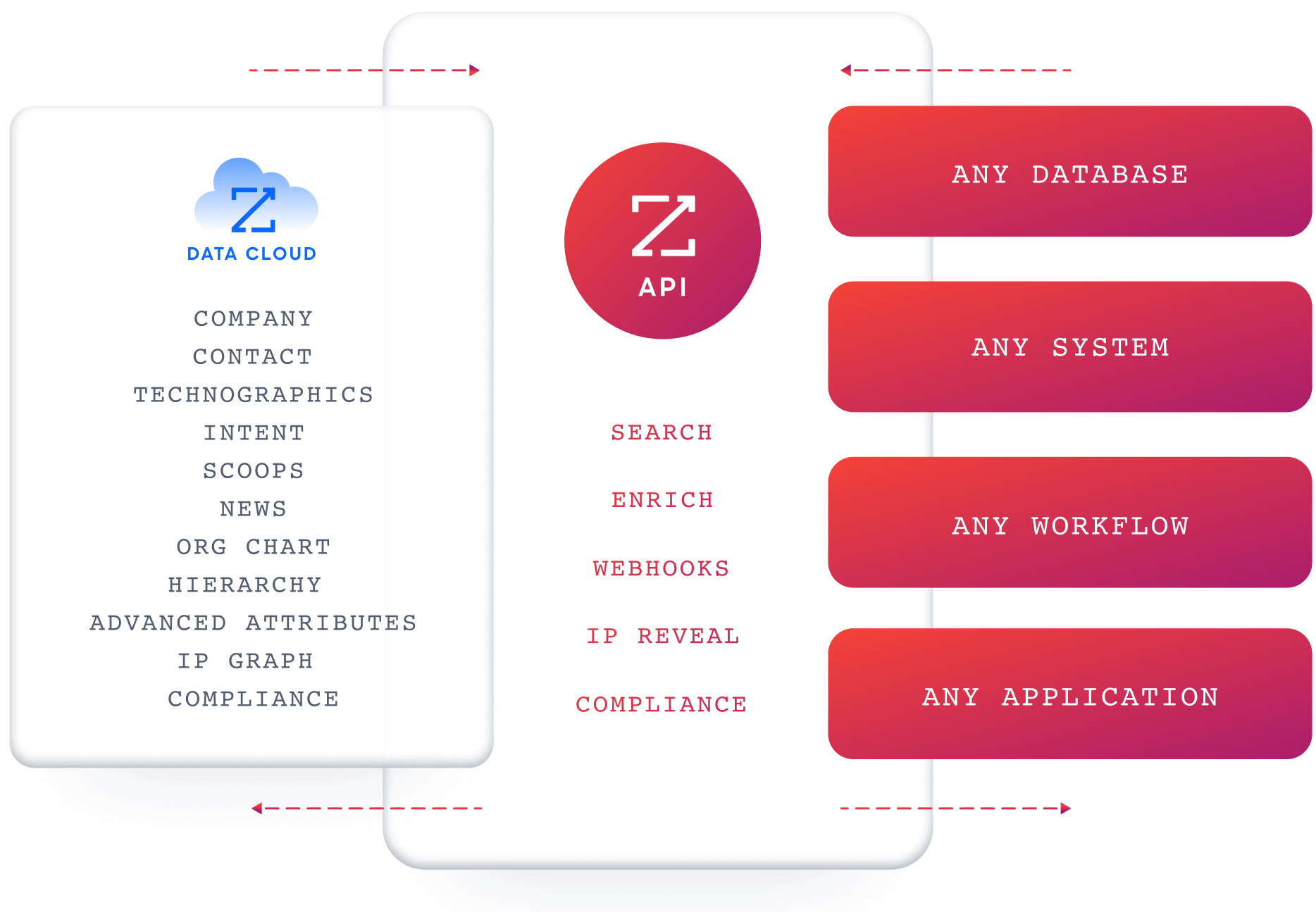
And for groups utilizing ZoomInfo’s API or MCP entry, the identical verified information can feed any customized workflow or AI agent, extending intelligence past what both Gross sales Navigator or Salesforce gives natively.
Supply: ZoomInfo
Seismic’s gross sales staff attributed 39% of lively pipeline to alternatives recognized or influenced by ZoomInfo indicators, whereas boosting productiveness by 54% and saving 11.5 hours per week. (Seismic)
For a direct comparability of LinkedIn Gross sales Navigator and ZoomInfo as prospecting platforms, see our LinkedIn Gross sales Navigator vs. ZoomInfo breakdown.
Remaining Verdict
A local integration between LinkedIn Gross sales Navigator and Salesforce exists, however it’s gated behind Gross sales Navigator’s Superior Plus plan (10+ seats, customized pricing, annual contract).
Groups on decrease tiers have restricted choices: SNAP accomplice instruments lengthen Gross sales Navigator into engagement platforms, and customized improvement can add logic on the Salesforce facet, however neither replicates the CRM Sync, Embedded Experiences, or Exercise Writeback that the native integration gives. For many groups, the proper selection depends upon plan tier and the way central Gross sales Navigator is to day by day gross sales workflow.
-
Gross sales groups on Superior Plus that use Gross sales Navigator as a core prospecting software ought to activate the native Salesforce integration. It’s the solely methodology that delivers bidirectional CRM Sync, Exercise Writeback, Embedded Experiences, Information Validation, and Champion Monitoring, and it requires no third-party software or engineering assets.
-
Groups on Superior plans that use a gross sales engagement platform (Outreach, Salesloft) ought to allow the SNAP accomplice integration for his or her engagement software. This brings Gross sales Navigator information into the workflow the place reps sequence and name, with the engagement platform dealing with the Salesforce sync.
-
Organizations that want customized routing, scoring, or automation primarily based on Gross sales Navigator exercise information ought to construct on the Salesforce API facet, utilizing the native integration as the info pipeline and including enterprise logic on prime. This path requires improvement assets and doesn’t increase the info accessible from Gross sales Navigator.
Earlier than investing within the integration, make clear what position Gross sales Navigator performs within the gross sales course of.
If Gross sales Navigator is a prospecting software utilized by a subset of the staff, the price of Superior Plus (10+ seats at customized enterprise pricing) could not justify the combination for each seat. If Gross sales Navigator is embedded within the day by day workflow of all the gross sales org, the native integration pays again shortly in lowered context-switching and full exercise visibility.
Both approach, the standard of the contact information in Salesforce determines whether or not the combination delivers worth or simply syncs incomplete information quicker.
ZoomInfo, with its native Salesforce integration and API and MCP entry, is the info enrichment layer that ensures each techniques carry verified, full information whereas the connector retains them aligned.
FAQ
Does LinkedIn Gross sales Navigator combine natively with Salesforce?
Sure, however solely on the Superior Plus plan. The native integration, accessible via the Salesforce AppExchange, gives CRM Sync (day by day bidirectional information sync), Exercise Writeback (InMails, messages, notes, Good Hyperlink views logged to Salesforce information), and Embedded Experiences (Account IQ, Relationship Map, Discover Key Individuals inside Salesforce).
Superior Plus requires a minimal of 10 seats and customized pricing via LinkedIn’s gross sales staff. Groups on Core or Superior plans can’t entry CRM Sync or Embedded Experiences.
Can I join Gross sales Navigator and Salesforce with out an Superior Plus plan?
Not with the identical depth. Core and Superior plans don’t assist CRM Sync, Exercise Writeback, or Embedded Experiences.
Groups on these plans can use Gross sales Navigator’s browser-based interface alongside Salesforce, and so they can allow SNAP accomplice integrations (Outreach, Salesloft, Gong) that floor Gross sales Navigator information in workflow instruments. However the direct Gross sales Navigator-to-Salesforce information pipeline requires Superior Plus.
Does the combination push LinkedIn contact information into Salesforce fields?
No. The native integration doesn’t populate Salesforce fields with LinkedIn profile information (job titles, firm names, contact data). What writes again to Salesforce is exercise metadata: InMails despatched, messages acquired, connection requests, Good Hyperlink views.
LinkedIn member information is seen via Embedded Experiences inside Salesforce, however it doesn’t switch into CRM fields to be used in experiences, routing guidelines, or automation.
What Salesforce permissions are wanted to arrange the combination?
System Administrator entry in Salesforce is required to put in the Gross sales Navigator app from the AppExchange and configure the OAuth connection.
In case your Salesforce org makes use of field-level safety or sharing guidelines, the combination person’s profile will need to have write entry to each object and subject the place Gross sales Navigator exercise information shall be saved. On the Gross sales Navigator facet, Admin-level entry is required to configure CRM Settings.
Can I exploit Zapier or Make to attach Gross sales Navigator with Salesforce?
No. LinkedIn Gross sales Navigator doesn’t have connectors accessible via Zapier, Make, or different general-purpose automation platforms. The SNAP accomplice program (which permits third-party integrations) is a closed, certification-required platform, and LinkedIn isn’t at present accepting new companions.
The accessible integration paths are the native Superior Plus integration, current SNAP accomplice instruments, and customized improvement on the Salesforce facet.
How does ZoomInfo enhance a Gross sales Navigator-Salesforce integration?
ZoomInfo solves the info high quality downside that no connector addresses. The Gross sales Navigator integration syncs information between the 2 platforms, however it doesn’t confirm, full, or enrich the underlying contact information.
ZoomInfo’s native Salesforce integration enriches CRM information with verified enterprise emails, direct-dial cellphone numbers, firm information, technographic profiles, and intent indicators. These enriched information then sync into Gross sales Navigator by way of the native integration, so reps prospect and have interaction towards verified information somewhat than stale or incomplete information.
Does Gross sales Navigator provide a public API for customized integrations?
No. Gross sales Navigator API entry is unique to the closed SNAP accomplice program, and LinkedIn isn’t at present accepting new companions. There is no such thing as a public REST API, no information export to CSV/XLS (information portability is barely via CRM Sync on Superior Plus), and no webhook functionality documented in public sources.
Customized improvement for this integration operates totally on the Salesforce API facet, including logic on prime of information delivered by the native SNAP integration.
Is the Gross sales Navigator-Salesforce sync real-time?
Not fully. CRM Sync (importing Salesforce information into Gross sales Navigator) runs on a day by day batch schedule. Exercise Writeback (logging Gross sales Navigator exercise to Salesforce) operates in close to real-time. Embedded Experiences show stay Gross sales Navigator information inside Salesforce on demand. Groups that want instant report availability in Gross sales Navigator after CRM creation ought to plan for as much as a 24-hour delay.
Construct out your Salesforce stack:

