

Groups that run Adobe Marketo Interact and Microsoft Dynamics 365 facet by facet normally uncover the identical issues inside 1 / 4:
-
leads created in Dynamics by no means attain the appropriate nurture observe in Marketo, so advertising and marketing sends generic sequences to prospects the gross sales group has already certified,
-
lead scores in Marketo drift out of sync with alternative levels in Dynamics, leaving reps chasing alerts that now not mirror actuality,
Nevertheless the 2 platforms ended up coexisting (advertising and marketing selected Marketo for its automation depth whereas the group standardized on Dynamics for CRM, or completely different departments picked instruments independently), the longer they run and not using a connection, the broader the hole between what advertising and marketing is aware of and what gross sales sees.
Connecting Marketo and Microsoft Dynamics 365 closes that hole.
Leads captured and scored in Marketo movement into Dynamics so gross sales reps work from data that carry full engagement historical past. Alternative information in Dynamics flows again into Marketo so nurture packages modify messaging based mostly on deal stage. Customized fields, marketing campaign membership, and exercise information journey each methods, giving each groups a shared view of each prospect with out guide imports or CSV exports.
A native integration exists between the 2 platforms, constructed and maintained by Adobe. Past the native connector, groups can prolong or customise the mixing by third-party automation instruments like Zapier or Make, or by customized API growth utilizing each platforms’ REST APIs. Every methodology differs in setup complexity, sync course, information protection, and price.
There may be additionally one drawback no connection methodology solves: the sync strikes data between methods, but it surely doesn’t confirm, full, or enhance the info inside them.
That’s the place ZoomInfo is available in. ZoomInfo integrates natively with each Microsoft Dynamics 365 and Marketo, and presents API and MCP entry that may feed verified, enriched information into both platform, so the data flowing between Marketo and Dynamics are correct and full earlier than the sync ever strikes them.
This text covers the Marketo-Dynamics integration: which strategies can be found, what information every one handles, tips on how to set them up, the use instances that justify connecting each platforms, and the constraints to plan for. It additionally covers how ZoomInfo suits in as a knowledge enrichment layer for each platforms.
Let’s begin with an summary of the mixing.
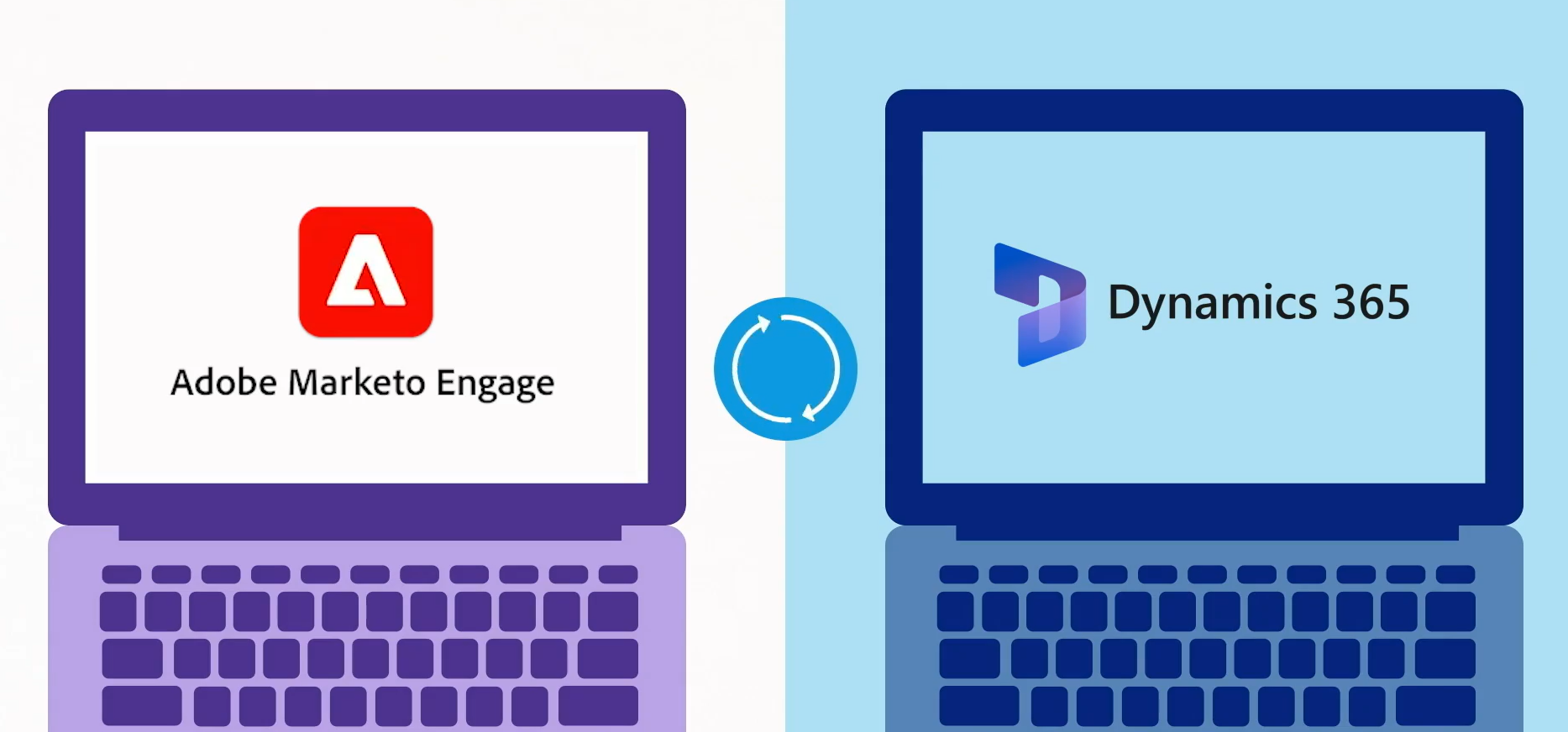
Integration Overview
Supply: Adobe
Does a local integration exist?
Sure. Adobe Marketo Interact features a native bidirectional sync with Microsoft Dynamics 365. The connector is constructed into Marketo and put in in Dynamics by way of the official Marketo Lead Administration resolution on Microsoft AppSource. It runs repeatedly within the background and is included with all Marketo Interact subscription tiers.
What information can sync?
Leads, contacts, accounts, alternatives, customized entities, and Dynamics campaigns. The native sync covers customary and customized fields on these objects. Exercise information (electronic mail opens, clicks, kind fills, internet visits) flows from Marketo into Dynamics by the Gross sales Perception add-on. Lead scores sync bidirectionally.
Is the sync bidirectional?
Sure, with object-specific guidelines. Leads and contacts sync bidirectionally between Marketo and Dynamics. Accounts sync from Dynamics to Marketo (Dynamics is the system of document for account information). Alternatives sync from Dynamics to Marketo. Customized entities may be configured for bidirectional sync relying on setup.
Is it real-time or batch?
The native sync runs on a steady background cycle. Marketo processes modifications in batches all through the day slightly than on a hard and fast schedule. In follow, most document modifications propagate inside minutes, although the precise timing is determined by sync queue quantity and system load.
What are the obtainable strategies?
Native Marketo-Dynamics sync (built-in), third-party automation (Zapier, Make), and customized API growth.
|
Technique |
Setup Issue |
Information Move |
Actual-time? |
Price |
|---|---|---|---|---|
|
Native (Marketo-Dynamics Sync) |
Medium |
Bidirectional |
Close to real-time (steady batch) |
Included with Marketo |
|
Zapier |
Low |
One-way per Zap |
Close to real-time (1-15 min) |
From $19.99/mo |
|
Make (Integromat) |
Medium |
Configurable per situation |
Close to real-time or scheduled |
From $10.59/mo |
|
Customized API |
Excessive |
Absolutely customizable |
Actual-time by way of webhooks |
Developer time + internet hosting |
One distinction price settling upfront: the native connector handles ongoing bidirectional sync of core CRM and advertising and marketing objects as a part of each day operations, making it the default place to begin for many groups.
Zapier and Make work higher for extending the mixing with event-triggered workflows the native sync doesn’t cowl (resembling pushing information to third-party instruments when a sync occasion happens). Customized API growth is reserved for organizations with complicated information fashions or enterprise logic that neither the native connector nor automation instruments can fulfill.
Integration Strategies
Native Marketo-Dynamics Sync (Constructed-In Connector)
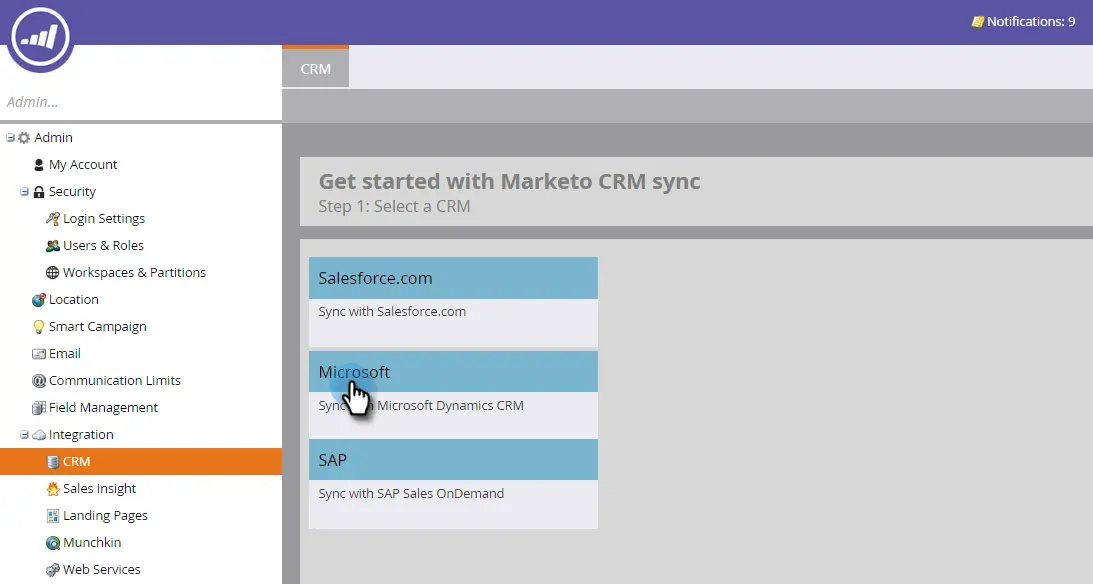
The way it works: Adobe Marketo Interact features a native bidirectional sync with Microsoft Dynamics 365 that runs repeatedly within the background. The connector is put in on the Dynamics facet because the official Marketo Lead Administration resolution and configured from Marketo’s Admin panel.
Supply: Adobe
As soon as activated, it maintains a persistent connection between the 2 methods, syncing document modifications all through the day in background batch cycles. Marketo additionally presents Gross sales Perception for Microsoft Dynamics, which surfaces advertising and marketing engagement information (electronic mail opens, internet visits, lead scores, fascinating moments) inside Dynamics data for gross sales reps.
What it syncs: Leads, contacts, accounts, alternatives, customized entities, and Dynamics campaigns. Customary fields map routinely; customized fields may be mapped manually. Lead scores sync bidirectionally.
Exercise information (electronic mail interactions, kind fills, internet visits) flows into Dynamics by way of the Gross sales Perception add-on, showing on lead and phone data as engagement historical past.
Matches: ongoing bidirectional sync of core CRM and advertising and marketing automation objects; the first integration methodology for groups operating each platforms long-term.
Setup course of:
-
Map customized fields between the 2 platforms. Customary fields (identify, electronic mail, telephone, firm) map routinely. Customized fields require guide mapping within the Marketo Admin panel beneath Discipline Administration.
-
Run the preliminary sync. Relying on database measurement, this could take a number of hours as Marketo copies the complete document set from Dynamics. As soon as full, the continual background sync maintains each methods going ahead.
Strengths: First-party integration maintained by Adobe, included at no further value with all Marketo subscriptions. Handles bidirectional sync of leads, contacts, accounts, and alternatives with out third-party middleware.
Gross sales Perception surfaces advertising and marketing engagement information inside Dynamics data, giving reps visibility into prospect conduct with out leaving the CRM. Helps customized entity sync for organizations with prolonged information fashions.
Limitations: The sync runs in background batch cycles slightly than true real-time, so modifications could take a number of minutes to propagate. Battle decision defaults to “final write wins,” which may produce surprising outcomes when each methods replace the identical area on the identical time.
The preliminary sync can take hours for big databases, and the sync person in Dynamics consumes a license seat. Complicated multi-entity sync configurations require cautious planning to keep away from round updates or information collisions.
Finest for: Any group operating each Marketo and Dynamics long-term. That is the default integration methodology and ought to be the start line for many organizations, with different strategies layered on high solely when the native connector doesn’t cowl a selected workflow.
Zapier
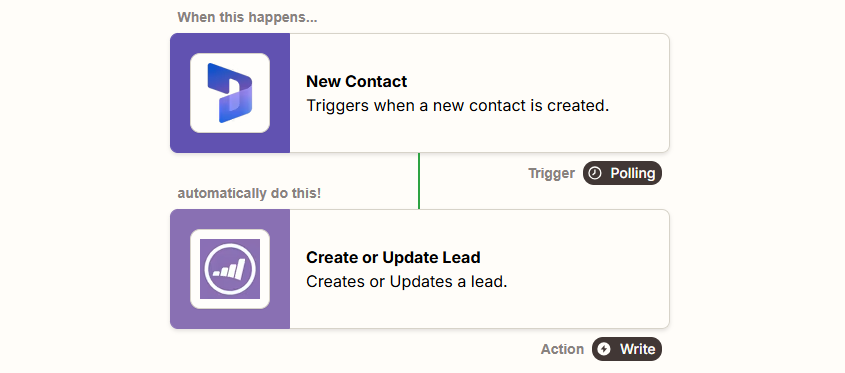
The way it works: Zapier connects Marketo and Dynamics by event-driven automations referred to as Zaps. Every Zap pairs a set off (an occasion in a single app) with a number of actions (what occurs within the different). Each platforms have Zapier connectors, enabling workflows that complement the native sync with event-triggered automations.
Supply: Zapier
What it syncs: Contacts, leads, corporations/accounts, and offers/alternatives on an event-by-event foundation. Every Zap handles one trigger-action pair. Customized fields may be mapped manually within the Zap setup movement.
Zapier works greatest alongside the native sync to deal with workflows the native connector doesn’t cowl (resembling notifying a Slack channel when a brand new MQL syncs, or making a process in a challenge administration software when a chance reaches a sure stage).
Matches: ongoing event-triggered workflows that stretch the native sync; not a substitute for the native connector’s bidirectional object sync.
Setup course of:
-
Select a set off app (e.g., Marketo) and choose the set off occasion (e.g., “New Lead” or “Up to date Lead”).
-
Flip the Zap on. For bidirectional workflows, create a second Zap with the set off and motion apps reversed, and add a filter to forestall infinite loops.
Strengths: Quick to arrange with no technical information required. A template library covers widespread Marketo-Dynamics workflows. Helpful for extending the native sync with event-triggered automations that contain third-party instruments. Zapier’s filter and formatting steps can add conditional logic the native sync doesn’t help.
Limitations: Every Zap handles one trigger-action pair, so a number of workflows require separate Zaps (every counting in opposition to the plan’s process allocation). Not an alternative to the native bidirectional sync. Historic data created earlier than the Zap was activated don’t sync. No built-in deduplication or battle decision.
Finest for: Groups that have already got the native sync operating and need to set off actions in third-party instruments (Slack notifications, challenge administration duties, spreadsheet logging) based mostly on sync occasions between Marketo and Dynamics.
Make (Previously Integromat)
The way it works: Make makes use of a visible situation builder the place modules join in a flowchart. Every module represents a step: look ahead to a set off, remodel information, create or replace a document. Situations can department, filter, loop, and deal with errors, providing extra management than Zapier’s linear construction.
Like Zapier, Make works greatest as a complement to the native sync for workflows requiring conditional logic or multi-step information transformation.
What it syncs: The identical objects as Zapier (contacts, leads, corporations/accounts, offers/alternatives), with extra flexibility in how information transforms between platforms. Make helps iterators for batch processing, routers for conditional paths, and aggregators for combining data earlier than writing.
Matches: event-triggered workflows with conditional logic or multi-step information transformation; extends the native sync slightly than changing it.
Setup course of:
Strengths: Granular management over information transformation and conditional routing. The visible builder makes complicated workflows simpler to observe than code. Batch operations and error dealing with are in-built. Per-operation pricing is decrease than Zapier at greater volumes.
Limitations: Steeper studying curve than Zapier’s guided setup. Not a substitute for the native bidirectional sync. Each the Marketo and Dynamics APIs impose fee limits, and high-volume eventualities may have throttling. Requires understanding of each platforms’ information fashions to configure accurately.
Finest for: Groups with conditional sync necessities the native connector doesn’t deal with (e.g., routing results in completely different Dynamics entities based mostly on Marketo program membership, or triggering multi-step workflows when particular area mixtures change). Mid-size groups whose automation volumes make Zapier’s per-task pricing costly.
Customized API Integration
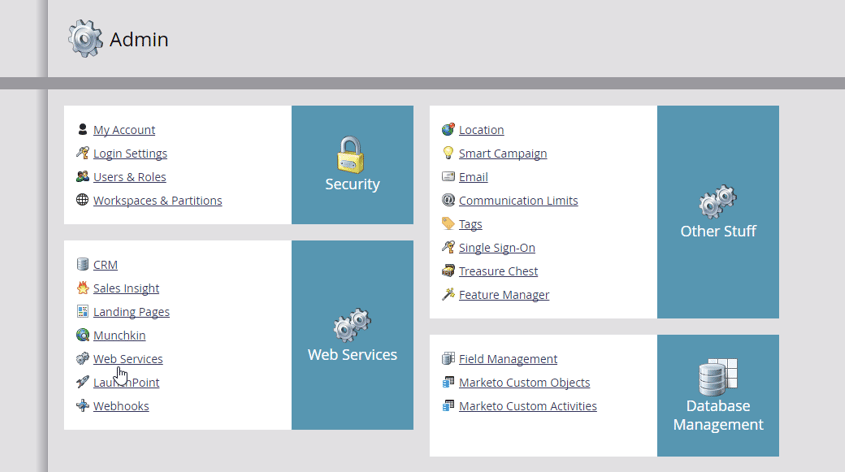
The way it works: Each Marketo and Dynamics expose REST APIs. Marketo’s REST API covers leads, corporations, alternatives, actions, packages, and customized objects, with webhook help for outbound occasion notifications. Dynamics’ Dataverse Internet API implements OData 4.0 and covers all customary and customized tables, with webhook help for real-time occasion notifications. A customized integration connects these APIs immediately, with your personal middleware dealing with authentication, area mapping, transformation, battle decision, and error restoration.
Supply: Adobe
What it syncs: Something each APIs expose. That is the one methodology that helps complicated sync eventualities like merging duplicates throughout platforms, syncing customized objects the native connector doesn’t help, or imposing enterprise guidelines that transcend area mapping.
Matches: both extending the native sync with customized logic or constructing an entire integration for organizations with necessities the native connector can’t fulfill.
Setup course of:
-
Construct the sync service: a server-side software that listens for webhooks from Dynamics and polls Marketo’s exercise stream (Marketo webhooks are outbound-only, not subscription-based), transforms information in keeping with the mapping, and writes modifications to the opposite facet.
-
Implement battle decision logic for bidirectional sync (timestamp-based, source-priority, or field-level guidelines).
-
Add logging, error dealing with, and retry logic. Marketo’s API permits 50,000 calls per day with a fee restrict of 100 calls per 20 seconds. Dynamics enforces fee limits of 6,000 requests per person per 5-minute window.
Strengths: Full management over what syncs, when, and the way. Can implement complicated enterprise logic. No per-record or per-operation charges from a third-party connector. Can prolong the native sync with customized processing logic that runs earlier than or after the usual sync cycle.
Limitations: Requires growth assets to construct and preserve. You personal the infrastructure, monitoring, and error restoration. API modifications on both platform (Marketo’s SOAP API retires July 31, 2026; Dynamics variations its API with every seasonal launch) require ongoing upkeep. The preliminary construct takes weeks, not hours.
Finest for: Enterprise groups with sync necessities that neither the native connector nor off-the-shelf automation instruments can fulfill. Organizations with in-house growth groups and complicated information fashions, customized objects, or enterprise logic that have to be enforced throughout sync.
Key Use Circumstances
1. Automated Lead Handoff from Advertising to Gross sales
Advertising captures and nurtures leads in Marketo by electronic mail campaigns, webinars, and content material downloads. When a lead reaches the MQL threshold (based mostly on Marketo’s lead scoring), the native sync pushes the lead and its full engagement historical past into Dynamics. It seems within the gross sales rep’s queue with the rating, engagement timeline, and the precise content material that drove qualification. The rep sees precisely what the prospect engaged with earlier than the primary name.
Finest integration methodology: Native Marketo-Dynamics sync (built-in, bidirectional, steady).
2. Alternative-Based mostly Nurture Adjustment
When a gross sales rep creates or advances a chance in Dynamics, the sync updates the related lead or contact in Marketo. Sensible Campaigns in Marketo can set off on alternative stage modifications, shifting the prospect from a generic nurture stream right into a deal-specific content material observe (case research, ROI calculators, implementation guides) that matches the place they’re within the shopping for course of. If the deal stalls or closes misplaced, the prospect re-enters a re-engagement nurture.
Finest integration methodology: Native Marketo-Dynamics sync (alternative information flows from Dynamics to Marketo, triggering Sensible Marketing campaign logic).
3. Gross sales Visibility into Advertising Engagement
Gross sales reps utilizing Dynamics have to see which prospects are partaking with advertising and marketing content material earlier than making outreach calls. Marketo Gross sales Perception for Dynamics surfaces electronic mail opens, internet web page visits, content material downloads, webinar attendance, and lead scores on the lead and phone data inside Dynamics. Reps can kind their e-book of enterprise by engagement recency and rating to prioritize the warmest leads.
Finest integration methodology: Native Marketo-Dynamics sync with Gross sales Perception add-on.
4. Occasion and Webinar Observe-Up Routing
Advertising runs webinars by Marketo’s Interactive Webinars or a related software and captures registration and attendance information. A Zapier or Make workflow triggers when a webinar attendee’s standing updates in Marketo, making a follow-up process in Dynamics assigned to the account proprietor. This ensures well timed post-event outreach with out counting on the gross sales group to test Marketo experiences.
Finest integration methodology: Zapier or Make (event-triggered, extending the native sync with a task-creation workflow in Dynamics).
5. Account-Based mostly Marketing campaign Activation
Advertising identifies goal accounts in Dynamics based mostly on firmographic standards and deal stage. The native sync carries account information into Marketo, the place Sensible Lists phase contacts by account membership. Advertising then runs account-specific campaigns (personalised emails, focused adverts, junk mail triggers) in opposition to these segments. Marketing campaign response information syncs again to Dynamics, giving the account group visibility into which shopping for committee members are partaking.
Finest integration methodology: Native Marketo-Dynamics sync (bidirectional, with Marketo Sensible Record segmentation on synced account information).
Limitations and Issues
Information Mannequin Variations
Marketo makes use of a flat lead/contact mannequin the place each particular person document is a “lead” till transformed. Dynamics separates leads and contacts into distinct entities with a proper conversion course of. The native sync handles this mapping, however groups should determine how unconverted Marketo leads map to Dynamics entities and the way Dynamics lead-to-contact conversion impacts the sync. Misconfigured mappings can create duplicate data or break affiliation chains between contacts and accounts.
Sync Latency
The native sync runs in steady background batch cycles, not true real-time. Throughout high-volume durations (massive checklist imports, bulk area updates), sync latency can develop from minutes to longer. Groups that want on the spot information propagation for time-sensitive workflows (lead routing inside seconds of a kind fill, for instance) could have to complement the native sync with webhook-triggered customized logic.
Battle Decision
Bidirectional sync creates the danger of conflicting updates. If a advertising and marketing ops supervisor updates a lead’s trade area in Marketo whereas a gross sales rep modifications the identical area in Dynamics, the native sync resolves the battle with a “final write wins” method based mostly on timestamp. This may occasionally not produce the proper end result for each area. Groups ought to designate a system of document per area (e.g., Dynamics owns account-level information, Marketo owns engagement information) and implement that by permissions or sync filters.
Pricing Implications
The native sync is included with all Marketo Interact subscription tiers, however Marketo’s pricing is quote-based and scales with database measurement. Because the sync provides Dynamics contacts to the Marketo database, the contact rely grows, doubtlessly affecting licensing prices. On the Dynamics facet, the sync person consumes a license seat. Marketo’s API fee limits (50,000 calls per day, 100 calls per 20 seconds) have an effect on customized integrations constructed on high of the native sync.
Third-party automation instruments carry their very own prices. Zapier costs by process rely (every synced document counts as a process). Make costs by operations. For groups operating supplemental automations at excessive quantity, these prices compound.
Permissions and Entry
Organising the native sync requires admin entry on either side. In Marketo, you want Admin-level permissions to configure CRM integrations. In Dynamics, you want System Administrator entry to put in the Marketo Lead Administration resolution and create the sync person. In case your Dynamics org makes use of field-level safety or customized safety roles, the sync person’s function will need to have learn/write entry to each entity and area you propose to sync.
Upkeep
Each platforms replace independently. Marketo releases updates on a rolling foundation, and Adobe is retiring the SOAP API on July 31, 2026, requiring any legacy integrations emigrate to REST. Dynamics follows a twice-yearly launch wave cadence which will introduce schema modifications or deprecate options. Customized fields added after the preliminary sync setup won’t sync except somebody updates the sphere mapping. Periodic opinions of the mixing’s well being and area mappings are essential to catch drift.
What No Technique Fixes: The Information Itself
Each methodology above strikes data between Marketo and Dynamics. None of them checks whether or not these data are correct, full, or present. A lead with a useless electronic mail handle in Marketo syncs as a lead with a useless electronic mail handle in Dynamics. A contact with an outdated title and mistaken telephone quantity travels simply as faithfully as a clear document. The mixing ensures each methods agree; it doesn’t guarantee they’re proper.
The place ZoomInfo Matches In
Each methodology on this information strikes information between Marketo and Microsoft Dynamics 365. None of them improves the info being moved. When the mixing is stay however pipeline information continues to be incomplete (mistaken titles, lacking direct dials, outdated firm particulars, useless electronic mail addresses), the bottleneck is now not the connector.
That’s the hole ZoomInfo closes.
ZoomInfo is a B2B information and go-to-market platform constructed on 500M contacts, 100M corporations, 135M+ verified telephone numbers, and 200M+ verified enterprise electronic mail addresses. That information is verified by a multi-source pipeline backed by 300+ human researchers and reaching as much as 95% accuracy on first-party information. For groups operating a Marketo-Dynamics integration, ZoomInfo handles the info high quality layer that no connector touches.
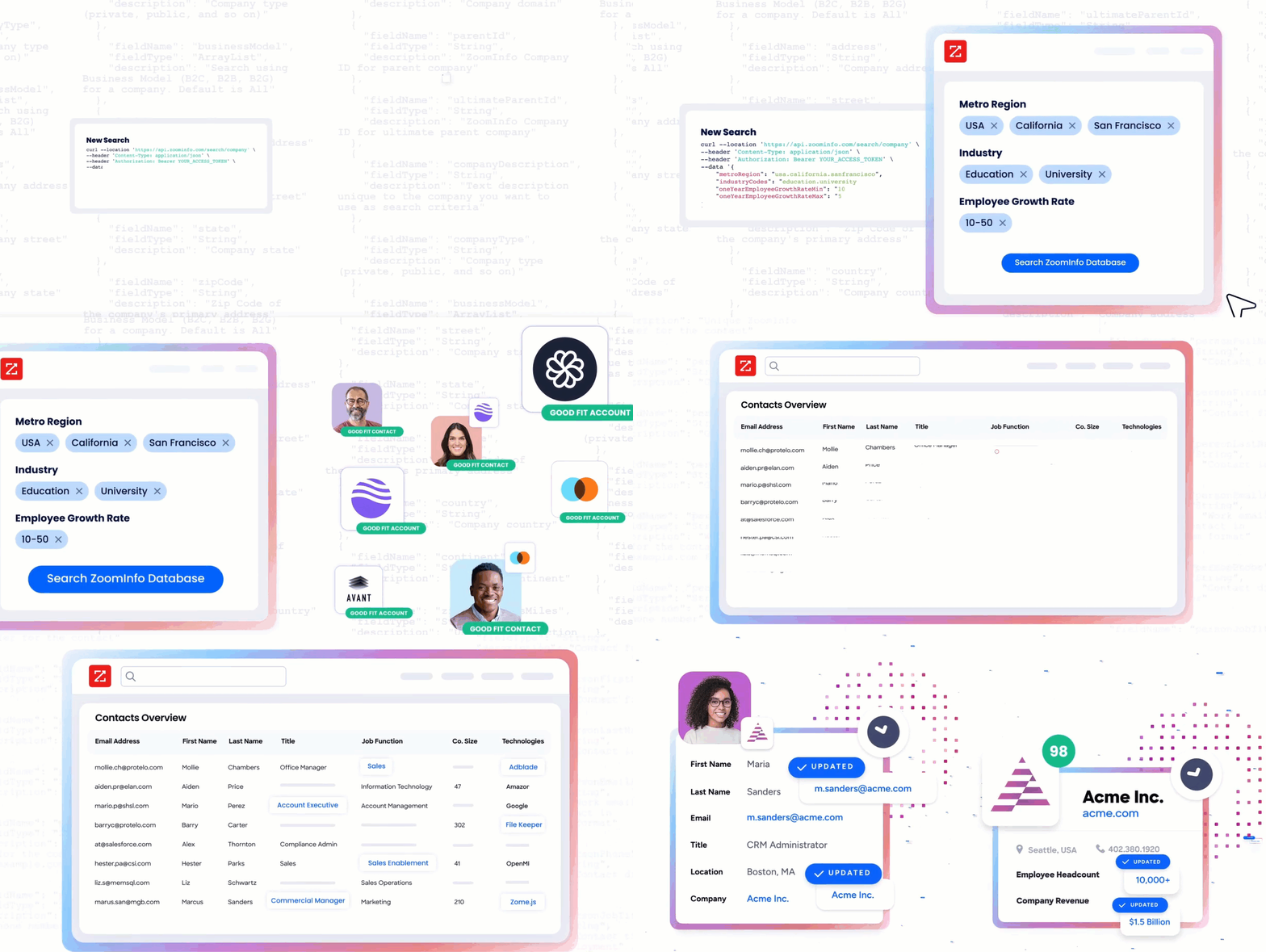
ZoomInfo integrates natively with each platforms. The Microsoft Dynamics 365 integration embeds ZoomInfo inside Dynamics, enabling CRM enrichment, lead routing, and real-time information updates on contact and account data. The Marketo integration supplies a local API connector for bidirectional information sync, importing ZoomInfo’s verified contact and firm information into Marketo’s database and exporting Marketo engagement information again to ZoomInfo. For groups constructing past the native connectors, ZoomInfo’s Enterprise API and MCP server expose the identical information to any customized workflow or AI agent.

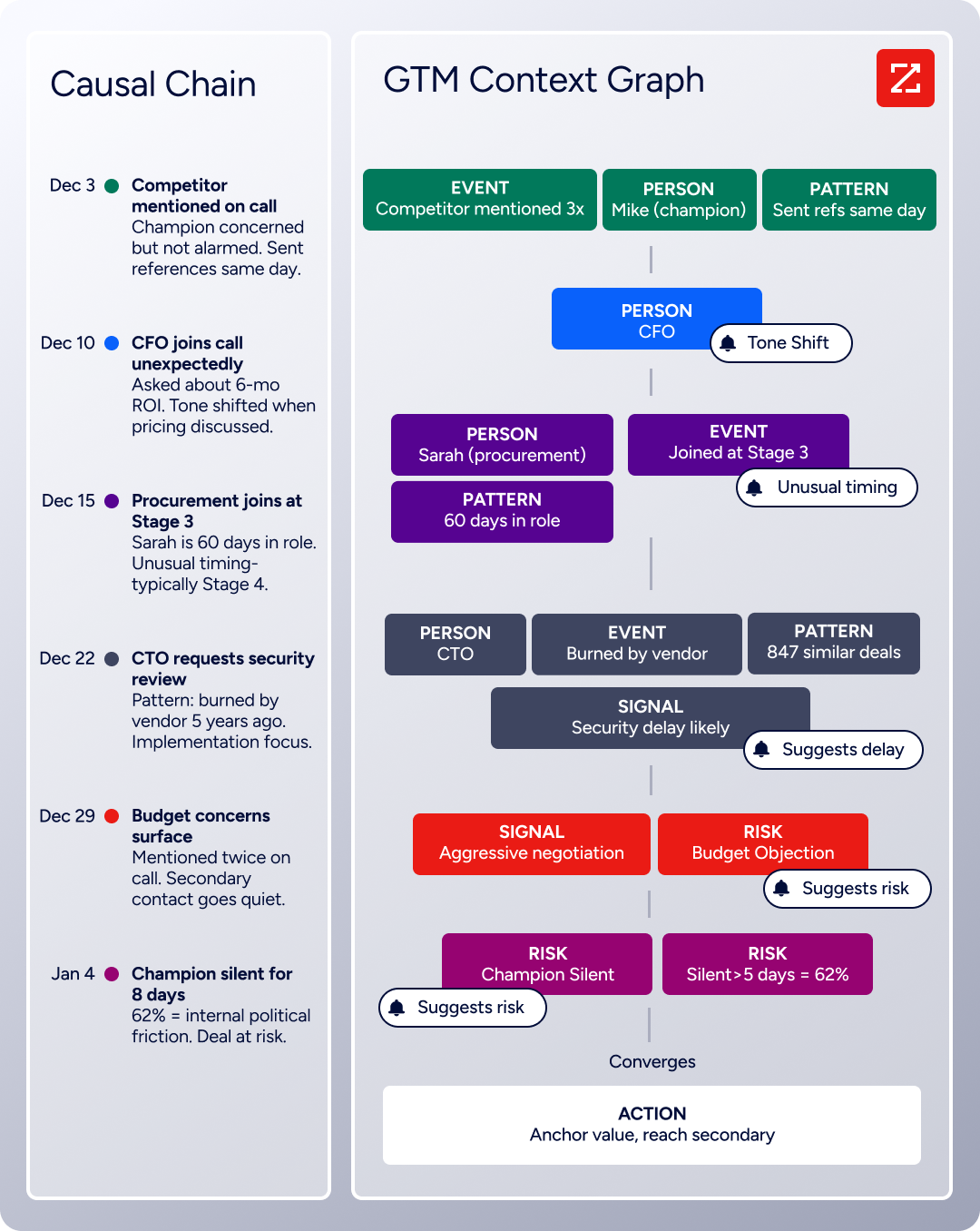
The identical information feeds ZoomInfo’s GTM Context Graph, an intelligence layer that processes 1.5B+ information factors each day and combines third-party intelligence with CRM data, dialog transcripts, and behavioral alerts to floor not simply what occurred in a deal, however why. Purchaser Intent information from ZoomInfo, monitoring alerts from 210 million IP-to-Group pairings, may be routed into both platform to prioritize accounts which can be actively researching related options.
In follow, a group operating each Marketo and Dynamics can use ZoomInfo to counterpoint data in Dynamics (the place the native integration handles it routinely), and people enriched data sync into Marketo by the native Marketo-Dynamics connector. Alternatively, groups can use ZoomInfo’s Marketo integration to counterpoint the advertising and marketing database immediately, guaranteeing leads enter nurture packages with verified emails, correct job titles, and full firm profiles no matter which system captured them first. Enriched data additionally make the Marketo-Dynamics sync itself extra dependable: fewer clean fields imply fewer mismatches throughout deduplication, constant formatting reduces false-positive duplicates, and verified contact information means Marketo’s lead scoring displays actual engagement slightly than exercise on stale data.
Seismic’s gross sales group attributed 39% of lively pipeline to alternatives recognized or influenced by ZoomInfo alerts, whereas boosting productiveness by 54% and saving 11.5 hours per week. (Seismic)
Remaining Verdict
A local bidirectional integration exists between Marketo and Microsoft Dynamics 365, constructed and maintained by Adobe and included with all Marketo subscriptions. For many groups, this native connector is the appropriate place to begin and the spine of the mixing. The selection is how a lot to construct round it.
-
Groups that want event-triggered automations past the native sync’s scope (Slack notifications, process creation in challenge administration instruments, multi-system routing) ought to layer Zapier or Make on high of the native connector for particular workflows.
-
Organizations with complicated information fashions, customized entities, or enterprise logic that have to be enforced throughout sync ought to put money into customized API growth to increase or complement the native integration.
Earlier than committing to further layers, make clear why each platforms have to coexist.
If the reply is structural (advertising and marketing wants Marketo’s automation depth, the group standardizes on Dynamics because the CRM of document, and each instruments serve distinct groups), put money into the native sync plus Gross sales Perception and evaluation the sphere mapping quarterly. If the reply is transitional (evaluating whether or not to consolidate onto one platform), maintain the sync configuration easy and defer customized growth till the long-term structure is settled. Both method, the standard of the info in each methods determines whether or not the mixing delivers worth or simply replicates issues in two locations directly.
ZoomInfo, with native integrations for each Microsoft Dynamics 365 and Marketo plus API and MCP entry, is the info enrichment layer that retains each methods correct whereas the connector retains them aligned.
FAQ
Does a local integration exist between Marketo and Microsoft Dynamics 365?
Sure. Adobe Marketo Interact features a built-in bidirectional sync with Microsoft Dynamics 365 that runs repeatedly within the background. It covers leads, contacts, accounts, alternatives, customized entities, and marketing campaign information. The connector is put in in Dynamics because the Marketo Lead Administration resolution and configured from Marketo’s Admin panel. It’s included with all Marketo subscription tiers at no further value.
What information syncs between Marketo and Dynamics by default?
The native sync handles leads, contacts, accounts, alternatives, and Dynamics campaigns. Customary fields map routinely; customized fields require guide mapping. Lead scores sync bidirectionally. With the Gross sales Perception add-on, advertising and marketing engagement information (electronic mail opens, clicks, kind fills, internet visits, fascinating moments) flows from Marketo into Dynamics and seems on lead and phone data.
Is the Marketo-Dynamics sync real-time?
Not true real-time. The native sync runs in steady background batch cycles, processing modifications all through the day. Most document updates propagate inside minutes beneath regular quantity. Throughout high-volume durations (massive imports, bulk updates), sync latency can improve. Groups needing sub-minute information propagation for particular workflows could have to complement the native sync with customized webhook-triggered logic.
How do I forestall duplicate data throughout sync?
The native sync makes use of electronic mail handle as the first matching key for leads and contacts. Earlier than making a document, it checks whether or not an identical document already exists within the goal system. Groups ought to maintain electronic mail addresses constant throughout each platforms and keep away from guide imports that bypass the sync’s deduplication logic. For organizations with complicated matching necessities (matching on area, firm identify, or composite keys), customized API logic could also be wanted.
What occurs when the identical area is up to date in each methods?
The native sync makes use of a “final write wins” method based mostly on timestamp. If a marketer updates a lead’s trade in Marketo and a gross sales rep modifications it in Dynamics earlier than the sync runs, the newer change overwrites the opposite. To keep away from conflicts, designate a system of document per area (Dynamics for account-level information, Marketo for engagement information) and implement field-level permissions so every group solely edits the fields their system owns.
Can I exploit Zapier or Make as a substitute of the native sync?
Zapier and Make can join Marketo and Dynamics, however they deal with particular person event-triggered workflows slightly than bidirectional object sync. They work greatest as dietary supplements to the native connector, including automations the native sync doesn’t cowl (process creation, cross-tool notifications, conditional routing). Utilizing them as the only real integration methodology would require dozens of separate automations and wouldn’t match the native connector’s breadth or reliability for core object sync.
What permissions are wanted to arrange the mixing?
Admin-level permissions in Marketo are required to configure CRM integrations. In Dynamics, System Administrator entry is required to put in the Marketo Lead Administration resolution and create the devoted sync person. The sync person in Dynamics will need to have learn/write entry to all entities and fields included within the sync. In case your Dynamics org makes use of field-level safety, the sync person’s safety function should explicitly grant entry to each synced area.
How does ZoomInfo enhance a Marketo-Dynamics integration?
ZoomInfo solves the info high quality drawback that no sync software addresses. Contact data in CRMs and advertising and marketing automation platforms decay as folks change jobs, telephone numbers go inactive, and firm particulars shift. ZoomInfo enriches data with verified contact information, firmographics, technographics, and intent alerts. Its native integrations with each Dynamics and Marketo deal with enrichment in each methods, whereas its API and MCP entry can feed the identical verified information into any customized workflow. The end result: the info flowing between each methods is correct and full, which reduces sync errors from clean fields, inconsistent formatting, and duplicate data.

