

Groups that run HubSpot and Google Analytics aspect by aspect uncover the identical issues inside 1 / 4:
-
web site engagement metrics stay in GA4 whereas contact-level conversion information lives within the CRM, so neither system tells the complete story,
Nevertheless the 2 platforms ended up coexisting (a advertising workforce that adopted GA4 for site visitors evaluation alongside HubSpot for lead administration, or a corporation the place analytics and CRM possession sits in several departments), the longer each run independently, the broader the hole between what advertising measures and what gross sales acts on.
Connecting HubSpot and Google Analytics closes that hole.
Customer conduct tracked in GA4 flows into the identical system the place your workforce nurtures leads and closes offers, so advertising attribution displays pipeline influence reasonably than proxy metrics.
HubSpot occasion information feeds again into GA4, placing kind submissions, CTA clicks, and lifecycle stage modifications alongside pageviews and session information. Analytics groups see conversions previous the thank-you web page.
HubSpot provides a native Google Analytics integration that embeds GA4 monitoring on HubSpot-hosted content material.
Groups that want deeper information circulation (pushing HubSpot occasions into GA4 or syncing CRM information again to analytics) can use Zapier, Google Tag Supervisor, or customized API improvement, every with completely different ranges of management. The strategies differ in setup complexity, sync route, information protection, and price.
One downside no connection technique solves: the mixing tracks what guests do, however it doesn’t inform you who these guests are, whether or not they match your best buyer profile, or whether or not their contact information continues to be correct.
That’s the place ZoomInfo is available in. ZoomInfo integrates natively with HubSpot by its market (offering real-time contact and firm enrichment inside HubSpot data) and connects to Google Analytics by its WebSights product by way of Google Tag Supervisor, figuring out the businesses behind nameless web site site visitors.
Its Enterprise API and MCP server feed verified information into any workflow, conserving the data behind the analytics correct and full.
This text covers the complete panorama of the HubSpot-Google Analytics integration: which strategies can be found, what information each handles, find out how to set them up, the use circumstances that justify connecting each platforms, and the constraints to plan for.
On the finish, it covers how ZoomInfo suits in as an information enrichment and customer identification layer that strengthens each platforms.
Let’s begin with an summary.
Integration Overview
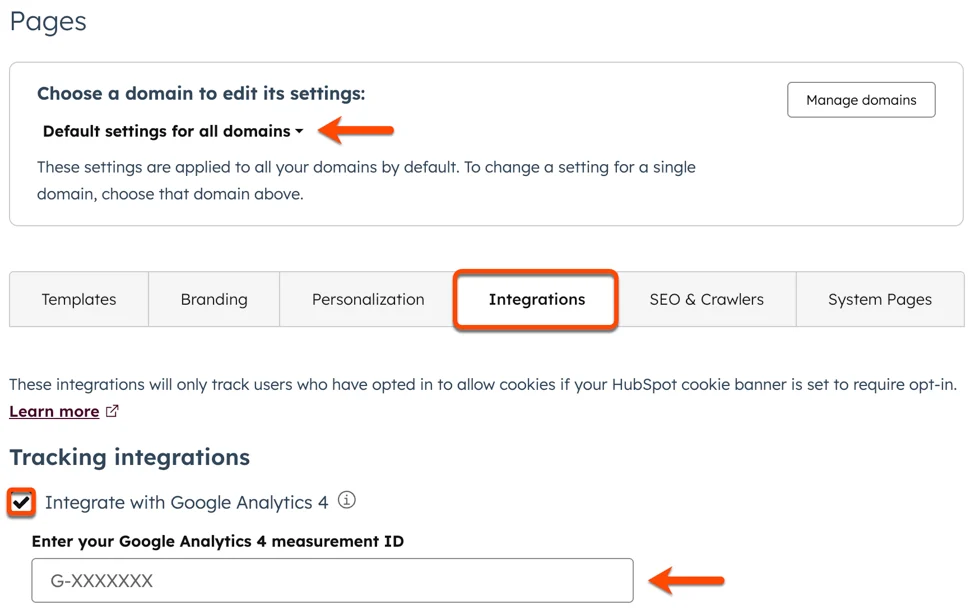
Supply: HubSpot
Does a local integration exist?
Sure. HubSpot supplies a native Google Analytics integration that lets customers add a GA4 Measurement ID in HubSpot settings.
HubSpot then embeds GA4 monitoring code on all hosted pages (web site pages, touchdown pages, and weblog posts), capturing customer conduct inside GA4 stories. Market apps just like the Google Analytics Connector add additional syncing capabilities.
What information can sync?
Pageviews, classes, site visitors sources, and consumer conduct on HubSpot-hosted content material circulation into GA4 mechanically by the native integration.
With Google Tag Supervisor or customized configuration, you possibly can push HubSpot kind submissions, CTA clicks, and lifecycle stage modifications to GA4 as customized occasions. HubSpot’s personal analytics monitor contacts, offers, and advertising attribution internally, whereas GA4 tracks the broader web site engagement image.
Is the sync bidirectional?
Not natively. The first information circulation runs from HubSpot content material exercise into GA4. GA4 doesn’t push information again into HubSpot by the native integration. Bidirectional circulation requires third-party instruments or customized API improvement.
Is it real-time or batch?
The native integration is real-time: GA4 monitoring fires on each web page load. GA4 processes information with typical freshness of 2 to six hours for traditional properties, with realtime stories obtainable inside minutes. Zapier triggers inside 1 to fifteen minutes relying on plan tier.
What are the obtainable strategies?
Native HubSpot setting (GA4 Measurement ID), Google Tag Supervisor (GTM) for customized occasion monitoring, third-party automation (Zapier), and customized API improvement.
|
Technique |
Setup Problem |
Information Move |
Actual-time? |
Value |
|---|---|---|---|---|
|
Native (GA4 Measurement ID) |
Straightforward |
HubSpot content material to GA4 |
Sure |
Included |
|
Google Tag Supervisor |
Medium |
HubSpot occasions to GA4 |
Sure |
Free |
|
Zapier |
Medium |
One-way per Zap |
Close to real-time (1-15 min) |
From $19.99/mo |
|
Customized API |
Exhausting |
Customized |
Relies upon |
Dev time |
One distinction value settling upfront: the native integration and GTM cowl ongoing, automated monitoring of web site exercise and occasions as they occur. Zapier handles event-triggered flows between the 2 platforms for particular CRM actions (new contact created, deal stage modified).
Customized API improvement is the one technique with no restrict on what information strikes or by which route, however it requires engineering assets to construct and keep.
Integration Strategies
Native HubSpot-Google Analytics Integration (GA4 Measurement ID)
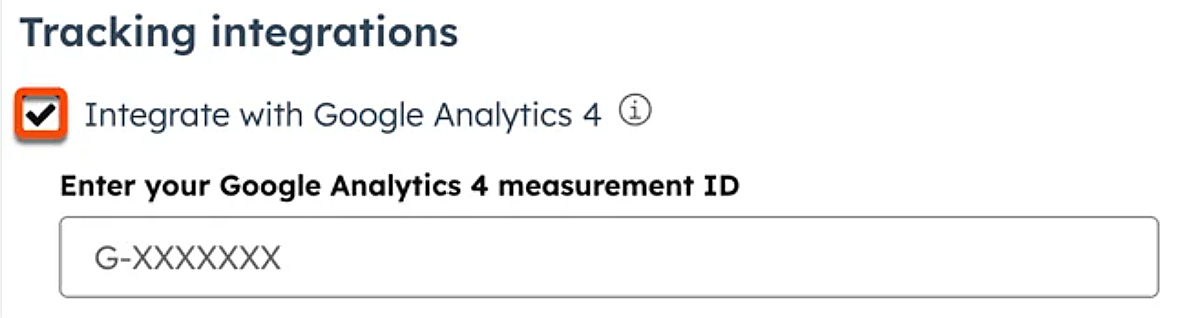
The way it works: HubSpot lets directors add a GA4 Measurement ID within the platform settings. As soon as configured, HubSpot injects the GA4 monitoring code (gtag.js) into the header of all hosted pages: web site pages, touchdown pages, and weblog posts.
Supply: HubSpot
GA4 captures each customer interplay on these pages and consists of them in commonplace stories alongside site visitors from non-HubSpot sources.
What it syncs: Pageviews, classes, site visitors supply attribution, consumer engagement metrics (scroll depth, outbound clicks, file downloads if enabled in GA4), and any GA4 enhanced measurement occasions. HubSpot-specific occasions like kind submissions and CTA clicks don’t monitor as GA4 occasions by this technique alone; these require GTM configuration or HubSpot monitoring code customization.
Matches: ongoing, automated monitoring of customer conduct on HubSpot-hosted content material; not an information migration or CRM sync device.
Setup course of:
-
In HubSpot, navigate to Settings > Web site > Pages (or Settings > Content material > Pages, relying in your HubSpot model).
-
In the event you use HubSpot’s CMS in your web site, the monitoring code applies to all hosted pages mechanically. For exterior pages, add the GA4 monitoring code manually or by way of Google Tag Supervisor.
-
Configure GA4 enhanced measurement settings (scroll monitoring, outbound clicks, website search) to seize further engagement information mechanically.
Strengths: Easiest setup, no third-party instruments required. Monitoring fires on each HubSpot-hosted web page mechanically. No ongoing upkeep past conserving the Measurement ID present. Free on all HubSpot and GA4 tiers.
Limitations: Solely tracks exercise on HubSpot-hosted content material. HubSpot kind submissions and CTA clicks don’t seem as discrete GA4 occasions with out further configuration. No information flows from GA4 again into HubSpot. Doesn’t join GA4 consumer classes to HubSpot contact data (the 2 methods use completely different id fashions).
Finest for: Groups utilizing HubSpot’s CMS that need GA4 to seize the identical site visitors information alongside their different net properties. The start line for any HubSpot-GA4 connection.
Google Tag Supervisor (Customized Occasion Monitoring)
The way it works: Google Tag Supervisor sits between HubSpot and GA4 as a container layer, letting groups outline customized tags, triggers, and variables that fireplace GA4 occasions based mostly on particular consumer actions.
HubSpot’s monitoring code emits JavaScript occasions for kind submissions, CTA clicks, and different interactions. GTM captures these occasions and sends them to GA4 as customized or beneficial occasions, extending the native integration’s protection past pageviews.
What it syncs: Any consumer interplay a JavaScript occasion or information layer variable can seize: kind submissions (together with kind ID and web page URL), CTA clicks, video performs, chat widget interactions, and customized occasions outlined in HubSpot’s monitoring code.
GTM also can cross HubSpot UTM parameters, referral information, and consumer properties into GA4 for richer attribution.
Matches: ongoing occasion monitoring for particular HubSpot interactions the native GA4 integration doesn’t seize; works alongside the native Measurement ID setup.
Setup course of:
-
Create a Google Tag Supervisor account and container if you don’t have already got one. Add the GTM container snippet to your HubSpot web site (Settings > Web site > Pages > Web site Header HTML, or by way of a HubSpot module).
-
Create customized triggers for HubSpot-specific occasions. For kind submissions, use a Customized Occasion set off listening for the hsFormCallback occasion (HubSpot’s JavaScript API fires this on kind completion). For CTA clicks, use a Click on set off focusing on HubSpot CTA button courses or IDs.
-
Create GA4 Occasion tags linked to every set off. Map related information (kind ID, web page URL, CTA title) as occasion parameters so they seem in GA4 Discover stories.
Strengths: Superb management over which HubSpot interactions turn into GA4 occasions. No value past configuration time. Retains all tag administration in a single place. Helps conditional logic (fireplace solely on particular pages, for particular consumer segments, or based mostly on URL parameters).
GTM’s model management and preview mode scale back the chance of damaged monitoring.
Limitations: Requires working data of GTM’s tag/set off/variable mannequin. HubSpot’s JavaScript occasion naming and information layer construction can change with platform updates, requiring tag upkeep. Doesn’t push GA4 information again into HubSpot.
The information that flows is event-level, not contact-level: GA4 sees {that a} kind was submitted however doesn’t obtain the contact’s e-mail, title, or HubSpot lifecycle stage.
Finest for: Advertising ops groups that want HubSpot kind submissions, CTA clicks, and different conversion occasions in GA4 stories for attribution modeling and funnel evaluation. Groups already utilizing GTM for tag administration throughout their web site.
Zapier
The way it works: Zapier connects HubSpot and Google Analytics by event-driven automations referred to as Zaps. Every Zap pairs a set off (an occasion in a single app) with a number of actions (what occurs within the different).
Supply: HubSpot
Since GA4 lacks a broad Zapier set off connector, the first use case flows from HubSpot to GA4: a HubSpot occasion (new contact, deal stage change, kind submission) triggers a Zapier motion that sends information to GA4 by way of the Measurement Protocol or creates a report in an intermediate system.
What it syncs: HubSpot CRM occasions (new contacts, up to date deal properties, kind submissions, record membership modifications) can set off GA4 occasions by way of the Measurement Protocol.
You may pull primary GA4 report information into different instruments by Zapier’s GA4 connector, although the obtainable triggers and information scope are narrower than direct API entry.
Matches: ongoing event-based sync for particular CRM actions; not a substitute for web site monitoring or a full analytics pipeline.
Setup course of:
-
Select HubSpot because the set off app and choose the set off occasion (e.g., “New Contact,” “New Deal,” or “New Kind Submission”).
Strengths: No engineering assets required. Fast to arrange for particular occasion flows. Zapier’s filter and formatting steps add conditional logic (e.g., solely ship occasions for contacts in a particular lifecycle stage). Works with HubSpot’s free and paid tiers.
Limitations: Every Zap handles one trigger-action pair, so syncing a number of occasion varieties requires a number of Zaps (every counting towards your plan’s activity allocation). GA4’s Zapier connector has narrower set off choices than HubSpot’s.
The Measurement Protocol requires a client_id for every occasion, including complexity to discipline mapping. Latency runs 1 to fifteen minutes reasonably than on the spot. Historic information doesn’t sync.
Finest for: Groups that need particular CRM occasions (closed-won offers, MQL standing modifications) to seem as GA4 occasions for conversion monitoring or viewers constructing, with out establishing GTM or customized code.
Customized API Integration
The way it works: Each platforms expose full APIs.
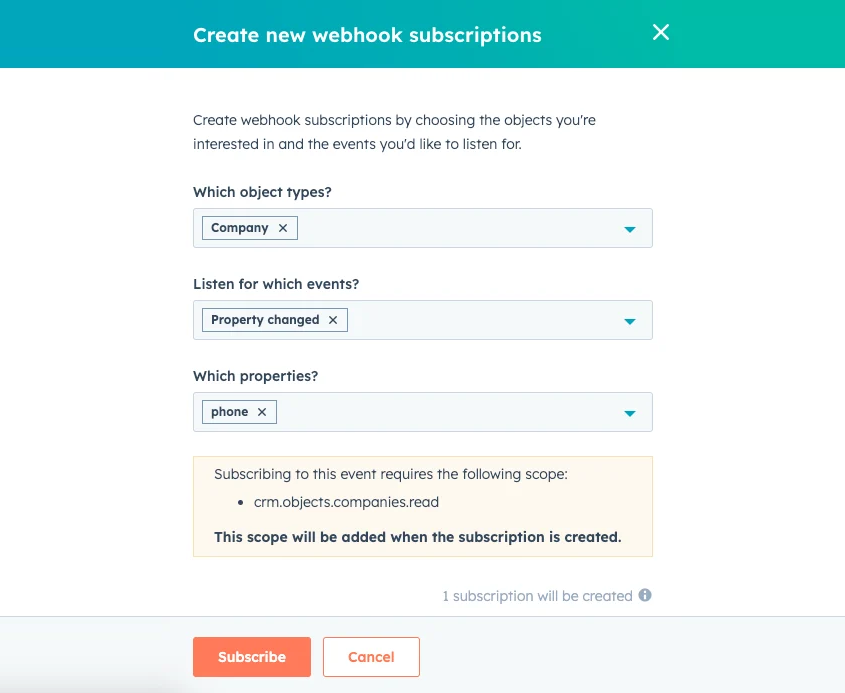
HubSpot’s REST API covers all CRM objects, advertising occasions, and workflow information, with webhook assist for real-time occasion notifications.
Supply: HubSpot
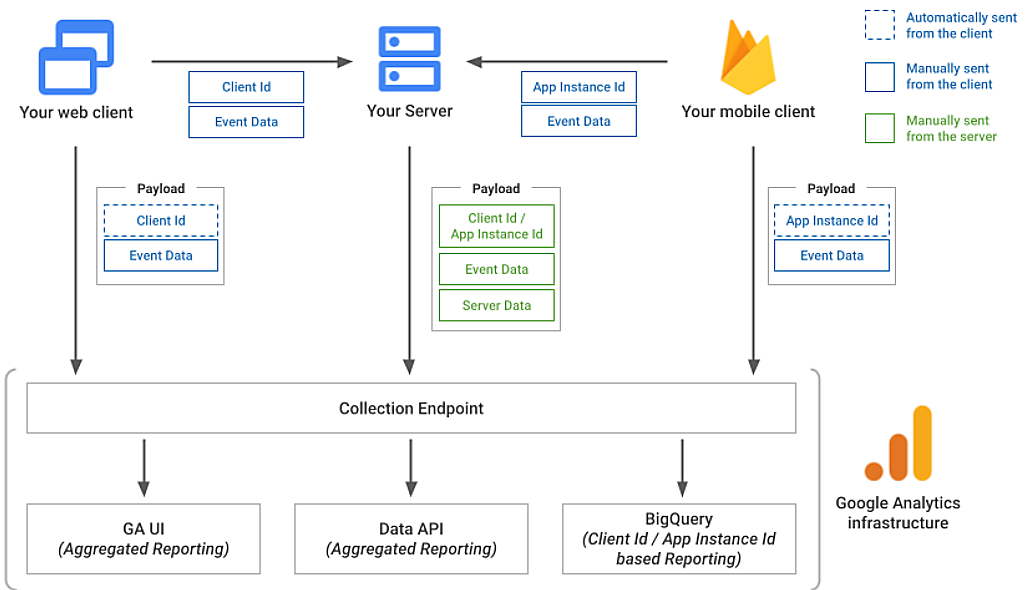
GA4’s Information API offers programmatic entry to report information, the Admin API manages property configuration, and the Measurement Protocol accepts server-side occasions by way of HTTP POST.
Supply: Google Analytics
A customized integration connects these APIs instantly, with middleware dealing with authentication, information mapping, and sync logic.
What it syncs: Something each APIs expose. You may ship HubSpot contact and deal information to GA4 as occasions or consumer properties by way of the Measurement Protocol.
You may pull GA4 report information (site visitors, conversions, viewers membership) into HubSpot by way of the Information API and retailer it as contact properties or use it to set off workflows. That is the one technique that helps bidirectional information circulation and complicated transformation logic.
Matches: both one-time information backfill or ongoing bidirectional sync; the one technique with no restrict on both.
Setup course of:
-
Register API credentials in each platforms: a HubSpot non-public app or OAuth app with the required scopes, and a Google Cloud undertaking with the GA4 Information API and Admin API enabled plus OAuth 2.0 or service account credentials.
-
Design the info mannequin mapping between HubSpot objects and GA4 occasions/dimensions (e.g., HubSpot lifecycle stage modifications turn into GA4 customized occasions; GA4 site visitors supply information turns into a HubSpot contact property).
-
Construct server-side middleware that listens for HubSpot webhooks (contact created, deal stage modified) and sends corresponding occasions to GA4 by way of the Measurement Protocol, together with a client_id or user_id for id stitching.
Strengths: Full management over what syncs, when, and the way. The one technique able to bidirectional information circulation. Can implement enterprise logic no off-the-shelf connector helps (e.g., attribution fashions that mix GA4 path information with HubSpot deal values). No per-record or per-operation charges from a third-party connector.
Limitations: Requires improvement assets to construct and keep. Id stitching between GA4’s nameless consumer mannequin and HubSpot’s contact-based mannequin is the first technical problem.
Each platforms model their APIs (HubSpot makes use of date-based versioning; GA4’s Information API is on v1beta), requiring ongoing upkeep. The preliminary construct takes weeks, not hours.
Finest for: Organizations with in-house improvement groups that want GA4 analytics information inside HubSpot workflows (or vice versa) in methods no connector or automation device helps. Enterprise groups constructing closed-loop attribution fashions that mix web site analytics with CRM income information.
Key Use Circumstances
1. Advertising Attribution Throughout the Full Funnel
Advertising groups monitor marketing campaign efficiency in GA4 (site visitors, engagement, conversion occasions) however measure pipeline influence in HubSpot (leads, MQLs, closed-won offers).
By pushing HubSpot kind submissions and lifecycle stage modifications into GA4 as customized occasions (by way of GTM or the Measurement Protocol), groups can construct GA4 funnel stories that reach from first web site go to by lead conversion, connecting advert spend to pipeline reasonably than stopping on the kind submission.
Finest integration technique: Google Tag Supervisor for kind submission occasions; customized API for lifecycle stage and deal information.
2. GA4 Viewers Constructing from CRM Information
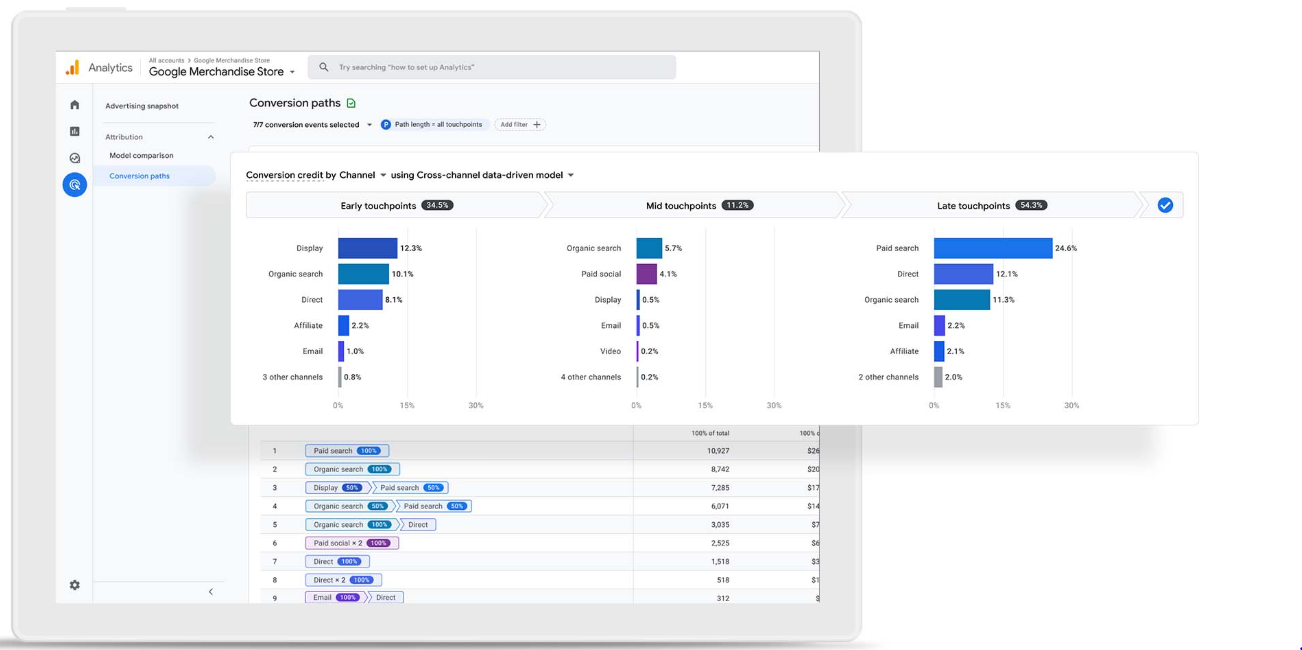
GA4 lets entrepreneurs create audiences based mostly on occasion information and activate them in Google Advertisements.
Supply: Google Analytics
By sending HubSpot CRM occasions (new MQL, deal stage change, buyer standing) into GA4 by way of the Measurement Protocol, groups can construct GA4 audiences segmented by CRM lifecycle stage. A “Present Prospects” viewers in GA4 can exclude acquisition campaigns, whereas a “Excessive-Intent MQLs” viewers can set off focused remarketing.
Finest integration technique: Zapier or customized API (HubSpot lifecycle stage modifications despatched to GA4 as Measurement Protocol occasions).
3. Content material Efficiency Tied to Lead High quality
HubSpot tracks which weblog posts, touchdown pages, and CTAs generate leads, however GA4 supplies deeper engagement context: time on web page, scroll depth, site visitors supply, and cross-session conduct. Connecting each methods lets advertising groups establish which content material drives not simply site visitors (GA4) however certified leads (HubSpot), informing content material technique with pipeline information reasonably than pageview counts.
Finest integration technique: Native integration (GA4 monitoring on HubSpot content material) plus GTM (kind submission occasions with page-level parameters).
4. Paid Marketing campaign Optimization with CRM Conversion Information
Google Advertisements bidding algorithms optimize towards GA4 conversion occasions. By sending HubSpot deal milestones (SQL, closed-won) again to GA4 as offline conversions by way of the Measurement Protocol, groups feed precise income alerts into Google Advertisements’ bidding mannequin. The algorithm then optimizes for clicks that produce income, not clicks that produce kind fills.
Finest integration technique: Customized API (HubSpot deal stage webhooks pushing occasions to GA4 by way of the Measurement Protocol, with Google Advertisements linked to the GA4 property).
5. Multi-Contact Reporting Throughout Channels
GA4’s data-driven attribution distributes conversion credit score throughout touchpoints utilizing machine studying, however it solely sees web site interactions. HubSpot tracks e-mail opens, assembly bookings, and gross sales calls.
A customized integration that sends HubSpot engagement occasions into GA4 extends the attribution mannequin to incorporate offline and CRM-based touchpoints, giving management a clearer image of which channels drive pipeline.
Finest integration technique: Customized API (HubSpot engagement occasions pushed to GA4 as Measurement Protocol occasions with constant consumer identifiers).
Limitations and Concerns
Id Stitching Is the Core Problem
GA4 tracks nameless customers by way of consumer IDs and, optionally, consumer IDs. HubSpot tracks identified contacts by way of e-mail addresses and HubSpot contact IDs.
These two id methods share no widespread key by default. Connecting a GA4 session to a HubSpot contact report requires passing a shared identifier (usually the HubSpot contact ID or a hashed e-mail) into GA4 as a consumer property in the mean time of kind submission or login. With out this step, the 2 platforms’ information exists in parallel however can’t be joined on the consumer stage.
Information That Does Not Sync Natively
The native integration is one-directional: it embeds GA4 monitoring on HubSpot content material so pageview information flows into GA4. HubSpot-specific objects (contacts, offers, tickets, lifecycle phases) don’t seem in GA4 with out further configuration. Conversely, GA4 information (classes, bounce charges, site visitors sources, viewers membership) doesn’t circulation into HubSpot contact data by any native mechanism.
GA4 Information Sampling on the Free Tier
GA4 applies sampling to Discover stories when queries exceed 10 million occasions, decreasing the precision of customized analyses that mix GA4 information with HubSpot occasion information. Unsampled reporting requires Analytics 360, the paid enterprise tier.
For groups working high-volume campaigns, this sampling introduces uncertainty into attribution fashions that depend upon exact event-level information.
Pricing Implications
The native HubSpot-GA4 integration is free on all tiers of each platforms. GTM is free. Zapier fees by activity depend (every synced occasion counts as a activity), beginning at $19.99/month. Customized API integrations carry developer time and internet hosting prices.
On the GA4 aspect, the Information API makes use of a token bucket quota system with limits that fluctuate by property sort (commonplace vs. Analytics 360). On the HubSpot aspect, API price limits scale by subscription tier, from 250,000 requests/day on Free and Starter to 1,000,000 on Enterprise.
Permissions and Entry
The native integration requires admin entry in HubSpot (Settings > Web site > Pages) and a GA4 property with Editor or Administrator entry. GTM configuration requires GTM container publish rights plus GA4 Editor entry.
Customized API integrations require a HubSpot non-public app or OAuth app with acceptable scopes and a Google Cloud undertaking with the related APIs enabled. Organizations utilizing GA4’s field-level information restrictions or property entry controls ought to affirm the mixing credentials have adequate permissions.
Upkeep
Each platforms replace repeatedly. HubSpot launched date-based API versioning in March 2026 with twice-yearly model releases. GA4’s Information API stays in v1beta. GTM tags that depend on HubSpot’s JavaScript occasion names can break if HubSpot modifications its monitoring code construction.
GA4’s enhanced measurement settings can change with out discover, affecting which occasions fireplace mechanically. Any integration past the native Measurement ID setup requires periodic evaluate.
What No Technique Fixes: The Information Itself
Each technique above connects two methods that monitor customer conduct and handle contacts. None checks whether or not the contact data in HubSpot are correct, whether or not the businesses visiting your web site are identifiable, or whether or not the leads getting into your pipeline match your best buyer profile.
An nameless customer in GA4 stays nameless no matter how nicely the monitoring works. A HubSpot contact with a useless e-mail handle generates a kind submission occasion in GA4 that appears similar to at least one from a verified purchaser.
The mixing strikes information between platforms; it doesn’t enhance the info being moved, and it doesn’t reveal who the nameless guests are.
The place ZoomInfo Matches In
Each technique on this information connects HubSpot and Google Analytics for monitoring and attribution.
None solves the 2 issues beneath: nameless web site guests that GA4 can not establish past a consumer ID, and CRM data in HubSpot which may be incomplete, outdated, or lacking the element wanted to qualify leads.
That’s the hole ZoomInfo closes.
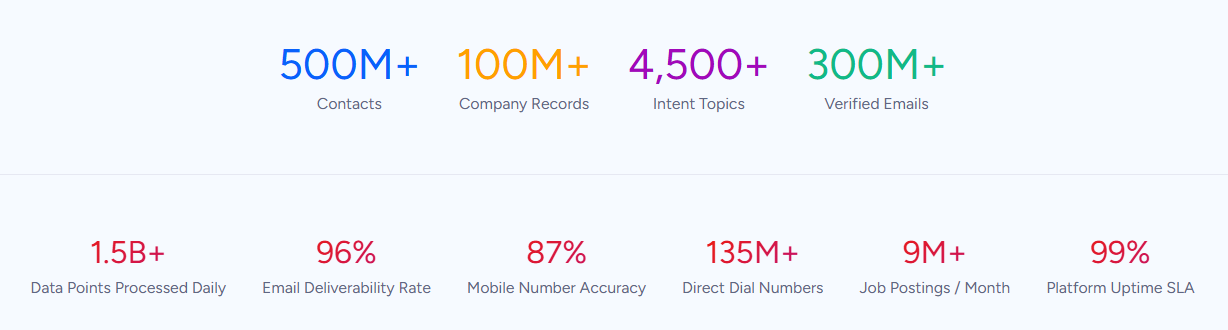
ZoomInfo is a B2B information and go-to-market platform constructed on 500M contacts, 100M firms, 135M+ verified cellphone numbers, and 200M+ verified enterprise emails. That information runs by a multi-source verification pipeline backed by 300+ human researchers, reaching as much as 95% accuracy on first-party information.
For groups working a HubSpot-Google Analytics integration, ZoomInfo addresses the customer identification and information high quality issues that no connector handles.
On the HubSpot aspect, ZoomInfo integrates natively by the HubSpot App Market by way of ZoomInfo Inbound Enrich, offering real-time contact and firm information enrichment, scheduled database refresh, and lead scoring and routing inside HubSpot CRM data.
When a brand new lead enters HubSpot by way of a kind submission, ZoomInfo can mechanically append verified enterprise e-mail, direct dial, job title, firm attributes, and technographic information to the report, filling gaps the HubSpot-GA4 integration can not.
On the Google Analytics aspect, ZoomInfo’s WebSights product integrates with GA4 by way of Google Tag Supervisor, resolving nameless web site site visitors to firms utilizing 210 million IP-to-Group pairings.
The place GA4 sees an nameless session with a consumer ID, WebSights identifies the corporate behind the go to, the pages they seen, and the shopping for workforce contacts at that firm.
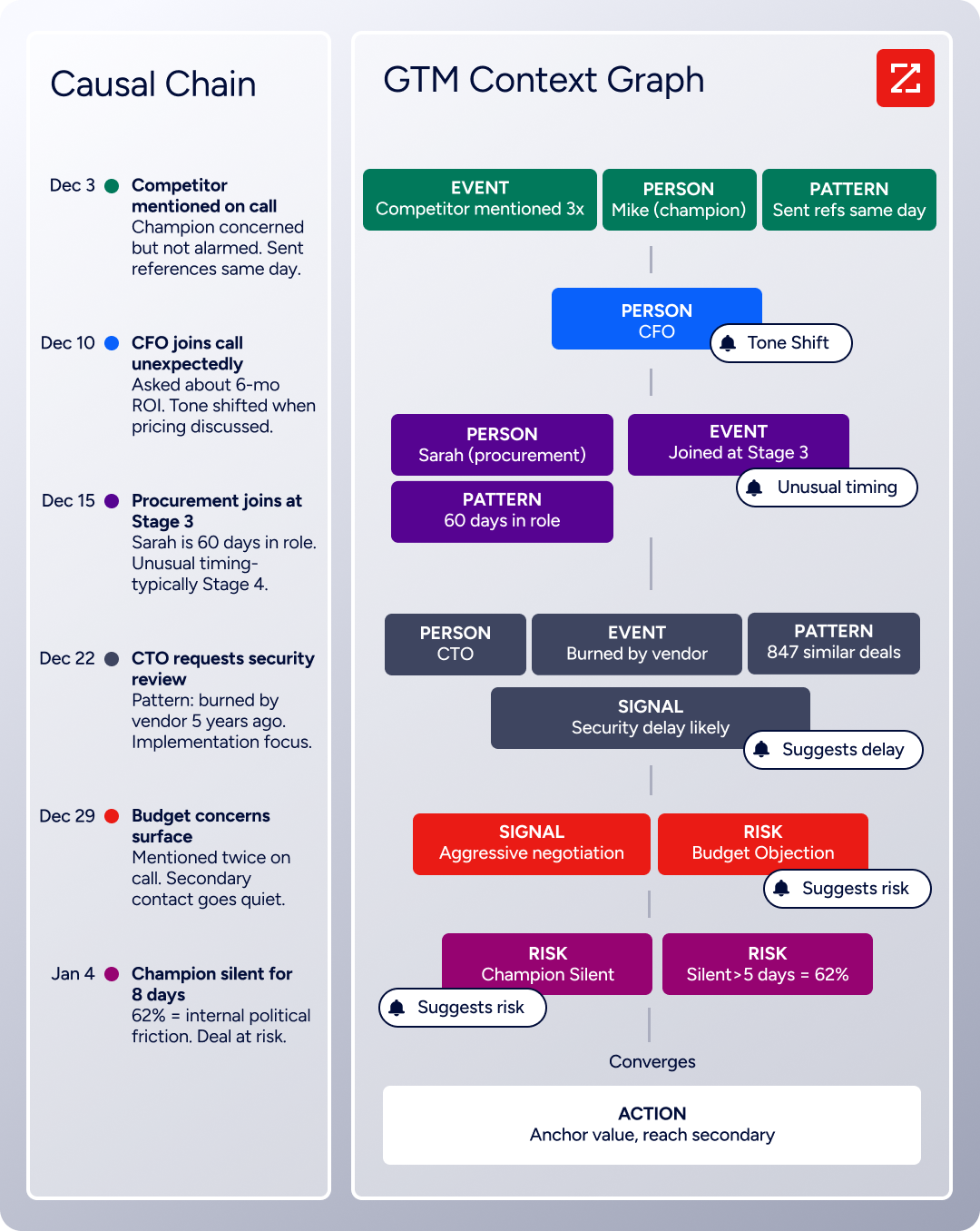
That information feeds into ZoomInfo’s GTM Context Graph, which processes 1.5B+ information factors each day and combines third-party information with CRM data, dialog transcripts, and behavioral alerts.
In follow, a workforce working each HubSpot and GA4 can use ZoomInfo to shut the loop on three fronts.
First, WebSights identifies firms visiting your website earlier than they fill out a kind, turning GA4 site visitors information under consideration intelligence you possibly can act on.
Second, Inbound Enrich verifies and completes the contact data that enter HubSpot by kind submissions, so the info flowing into your CRM (and again into GA4 as occasions) is correct.
Third, Purchaser Intent information from ZoomInfo prioritizes which accounts to focus on based mostly on analysis alerts, informing each HubSpot outreach sequences and GA4 viewers segments.
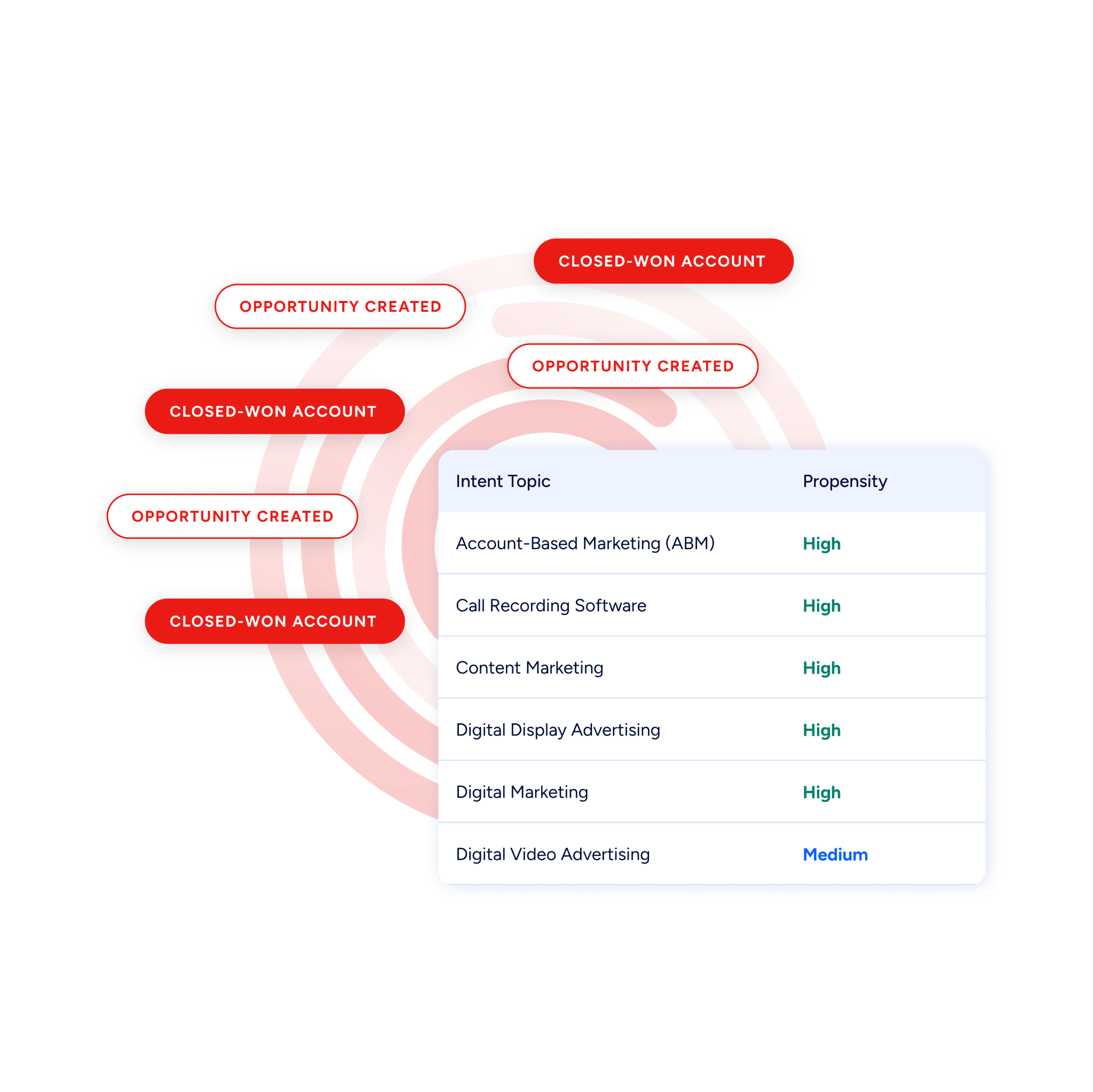
Enriched, recognized information additionally makes the HubSpot-GA4 integration itself extra invaluable. When lifecycle stage modifications circulation from HubSpot into GA4 as conversion occasions, these occasions connect to data which were verified and enriched, so GA4’s attribution fashions replicate purchaser high quality reasonably than form-fill quantity.
When GA4 audiences are constructed from CRM occasions, the underlying contact information is full sufficient to make these audiences significant for Google Advertisements focusing on.
Seismic’s gross sales workforce attributed 39% of lively pipeline to alternatives recognized or influenced by ZoomInfo alerts, whereas boosting productiveness by 54% and saving 11.5 hours per week. (Seismic)
Remaining Verdict
A local HubSpot-Google Analytics integration exists, protecting the essential job of embedding GA4 monitoring on HubSpot-hosted content material. Past that, each deeper connection (kind submission occasions, CRM information in GA4, GA4 metrics in HubSpot) requires Google Tag Supervisor, Zapier, or customized improvement.
For many groups, the suitable selection is dependent upon scale and complexity.
-
Groups that want particular HubSpot CRM occasions (lifecycle stage modifications, deal milestones) in GA4 for viewers constructing or Google Advertisements optimization ought to use Zapier or the Measurement Protocol by way of a light-weight server-side script.
Earlier than committing to a technique, make clear what query you are attempting to reply.
If the query is “how does our HubSpot content material carry out within the broader context of web site site visitors,” the native integration is sufficient. If the query is “which advertising channels drive pipeline, not simply kind fills,” you want CRM occasions flowing into GA4 for attribution.
Both manner, the standard of the info in each methods determines whether or not the mixing delivers perception or simply connects two incomplete footage.
ZoomInfo, with its native HubSpot integration, WebSights integration with GA4 by way of Google Tag Supervisor, and API and MCP entry for any workflow, identifies nameless guests, enriches CRM data, and ensures each platforms work from correct, full information.
FAQ
Does HubSpot have a local Google Analytics integration?
Sure. HubSpot lets directors add a GA4 Measurement ID within the web site settings, which embeds GA4 monitoring code on all HubSpot-hosted pages (web site pages, touchdown pages, weblog posts). This captures pageviews and commonplace engagement metrics in GA4 mechanically.
The mixing is on the market on all HubSpot tiers, together with the free plan, and works with the free GA4 tier. It requires no third-party device or customized code.
Can I monitor HubSpot kind submissions in Google Analytics?
Sure, however not by the native Measurement ID integration alone. You may monitor HubSpot kind submissions in GA4 by configuring Google Tag Supervisor to hear for HubSpot’s JavaScript kind submission occasions and fireplace corresponding GA4 occasion tags.
This requires GTM entry and familiarity with HubSpot’s monitoring code occasion construction. As soon as configured, kind submissions seem in GA4’s occasion stories and you’ll mark them as key occasions for conversion monitoring.
Does GA4 information circulation again into HubSpot?
Not by any native integration. The information circulation is one-directional: HubSpot content material exercise goes into GA4. To convey GA4 information into HubSpot (site visitors sources, session counts, viewers membership), you want a customized API integration that queries the GA4 Information API and writes the outcomes to HubSpot contact or firm properties.
Some third-party market apps supply partial options, however an entire bidirectional sync requires customized improvement.
How do I join GA4 conversion information to HubSpot offers for attribution?
This requires customized improvement. Ship HubSpot deal stage modifications (SQL created, closed-won) to GA4 as Measurement Protocol occasions, utilizing a shared identifier (usually a HubSpot contact ID handed as a GA4 user_id at kind submission) to sew the conversion again to the unique web site session.
As soon as linked, GA4’s data-driven attribution mannequin distributes credit score throughout the touchpoints that preceded the deal, and the conversion sign can feed into Google Advertisements for bidding optimization.
What does the mixing value?
The native HubSpot-GA4 integration is free on all tiers of each platforms. Google Tag Supervisor is free. Zapier plans begin at $19.99/month for 750 duties. Customized API integrations haven’t any platform charges however require developer time and internet hosting.
Each platforms impose API price limits that scale with subscription tier. GA4’s paid tier (Analytics 360) removes information sampling and provides larger API quotas, however its pricing shouldn’t be publicly listed and requires contacting Google Gross sales.
Can I establish which firms go to my web site utilizing HubSpot and GA4 collectively?
Circuitously. GA4 tracks nameless guests by way of consumer IDs, and HubSpot solely identifies guests who fill out a kind or match by way of e-mail. For company-level identification of nameless web site site visitors, you want a third-party device.
ZoomInfo’s WebSights product resolves nameless visits to firms utilizing IP-to-Group matching and integrates with GA4 by way of Google Tag Supervisor, including an organization identification layer that neither platform supplies by itself.
How does ZoomInfo enhance a HubSpot-Google Analytics integration?
ZoomInfo addresses the 2 issues no connector solves: nameless customer identification and CRM information high quality. Its WebSights product identifies firms behind nameless GA4 classes by way of Google Tag Supervisor. Its native HubSpot integration (ZoomInfo Inbound Enrich) mechanically appends verified contact information, firm attributes, and technographics to new CRM data.
The outcome: GA4 site visitors information connects to recognized firms reasonably than nameless classes, and the HubSpot data behind each conversion occasion are correct and full. Attribution fashions turn into extra dependable and viewers segments extra significant.
Will the HubSpot-GA4 integration work on non-HubSpot-hosted pages?
The native Measurement ID integration applies solely to HubSpot-hosted content material (pages inbuilt HubSpot’s CMS). For pages hosted elsewhere, add the GA4 monitoring code independently (by way of GTM or a direct gtag.js snippet). You may nonetheless add HubSpot’s personal monitoring code to exterior pages to trace contacts, however the native GA4 integration setting in HubSpot doesn’t inject monitoring on pages exterior HubSpot’s CMS.
Extra HubSpot integrations:

