

Groups that run Zoom Cellphone and Salesforce facet by facet often uncover the identical issues inside 1 / 4:
-
name exercise lives in Zoom Cellphone whereas deal information dwell in Salesforce, so reps toggle between instruments to attach conversations to pipeline,
-
contacts created throughout cellphone calls by no means make it into the CRM, leaving gaps in reporting and follow-up,
Nevertheless, the 2 platforms ended up coexisting (a gross sales crew selecting Zoom Cellphone for its communications whereas the org runs on Salesforce, separate departments adopting completely different instruments, or an IT consolidation placing Zoom Office alongside an entrenched CRM), the longer they function and not using a connection, the extra name information goes untracked and the tougher it turns into to tie cellphone exercise to income.
Connecting Zoom Cellphone and Salesforce closes that hole.
Name exercise logs circulation into Salesforce information routinely so managers can see outbound and inbound name quantity with out asking reps to replace the CRM manually. Inbound calls set off contact lookups and display pops so reps know who is looking earlier than they reply.
Click on-to-dial from Salesforce contact, lead, and alternative information eliminates guide quantity entry so that each name is logged in opposition to the suitable report from the beginning.
Zoom affords a native Salesforce integration via the “Zoom for Lightning” app, accessible on the Salesforce AppExchange and the Zoom Market.
For groups needing workflows past what the native connector covers, third-party automation instruments like Zapier can lengthen the mixing, and customized API growth affords full management for advanced necessities. Every methodology differs in setup complexity, sync route, information protection, and price.
There’s additionally one downside no connection methodology solves: the mixing logs calls and syncs exercise, nevertheless it doesn’t confirm whether or not the contacts these calls are logged in opposition to are nonetheless correct, nonetheless on the firm, or nonetheless reachable on the quantity on file.
And that’s the place ZoomInfo is available in. ZoomInfo integrates natively with each Salesforce and Zoom Cellphone, and affords API and MCP entry that may feed verified, enriched contact information into both platform, so the information behind each name are correct and full earlier than the cellphone rings.
This text covers the Zoom Cellphone-Salesforce integration: which strategies can be found, what information every one handles, easy methods to set them up, the use instances that justify connecting each platforms, and the restrictions to plan for. On the finish it additionally covers how ZoomInfo matches into the image as an information enrichment layer that strengthens the information flowing between Zoom Cellphone and Salesforce.
Let’s begin with an outline of the mixing.
Integration Overview
Supply: Zoom Cellphone
Does a local integration exist?
Sure. Zoom affords a native Salesforce integration known as “Zoom for Lightning,” accessible on the Salesforce AppExchange. It embeds a Zoom Cellphone dialer widget inside Salesforce, allows click-to-dial, logs name exercise routinely, and surfaces Zoom AI name summaries linked to Salesforce information.
What information can sync?
Name exercise is the first sync: inbound and outbound name logs, name length, name recordings, voicemails, and AI-generated name summaries. Contact matching happens on inbound calls by way of caller ID lookup in opposition to Salesforce information. Contacts might be created in Salesforce from Zoom Cellphone when no match exists. SMS exercise can be logged relying on configuration.
Is the sync bidirectional?
Partially. Name exercise flows from Zoom Cellphone into Salesforce routinely. Zoom Cellphone reads Salesforce contact information for caller identification and click-to-dial, however CRM area updates don’t push again into Zoom Cellphone’s contact system. The info circulation is primarily Zoom Cellphone to Salesforce for exercise logging, with Salesforce to Zoom Cellphone for contact lookup.
Is it real-time or batch?
The native integration operates in close to real-time. Name logs and exercise information seem in Salesforce as calls full. Click on-to-dial and display pops perform in actual time throughout lively calls. Third-party automation instruments like Zapier set off inside 1 to fifteen minutes relying on plan tier.
What are the accessible strategies?
Native Zoom for Lightning integration, third-party automation (Zapier), and customized API growth utilizing the Zoom Cellphone API and Salesforce API.
|
Methodology |
Setup Issue |
Information Circulate |
Actual-time? |
Value |
|---|---|---|---|---|
|
Native (Zoom for Lightning) |
Low |
Zoom Cellphone to Salesforce (exercise); Salesforce to Zoom Cellphone (contact lookup) |
Close to real-time |
Included with Zoom Cellphone plans |
|
Zapier |
Medium |
One-way per Zap |
Close to real-time (1-15 min) |
From $19.99/mo |
|
Customized API |
Excessive |
Totally customizable |
Actual-time by way of webhooks |
Developer time + internet hosting |
One distinction price settling upfront: the native integration handles each ongoing exercise logging and real-time caller identification, making it the one methodology that covers each jobs in a single setup.
Zapier handles event-triggered flows with narrower information protection. Customized API growth is the one path for groups that have to sync information objects or implement enterprise logic that neither the native connector nor Zapier helps.
Integration Strategies
Native Zoom for Lightning Integration
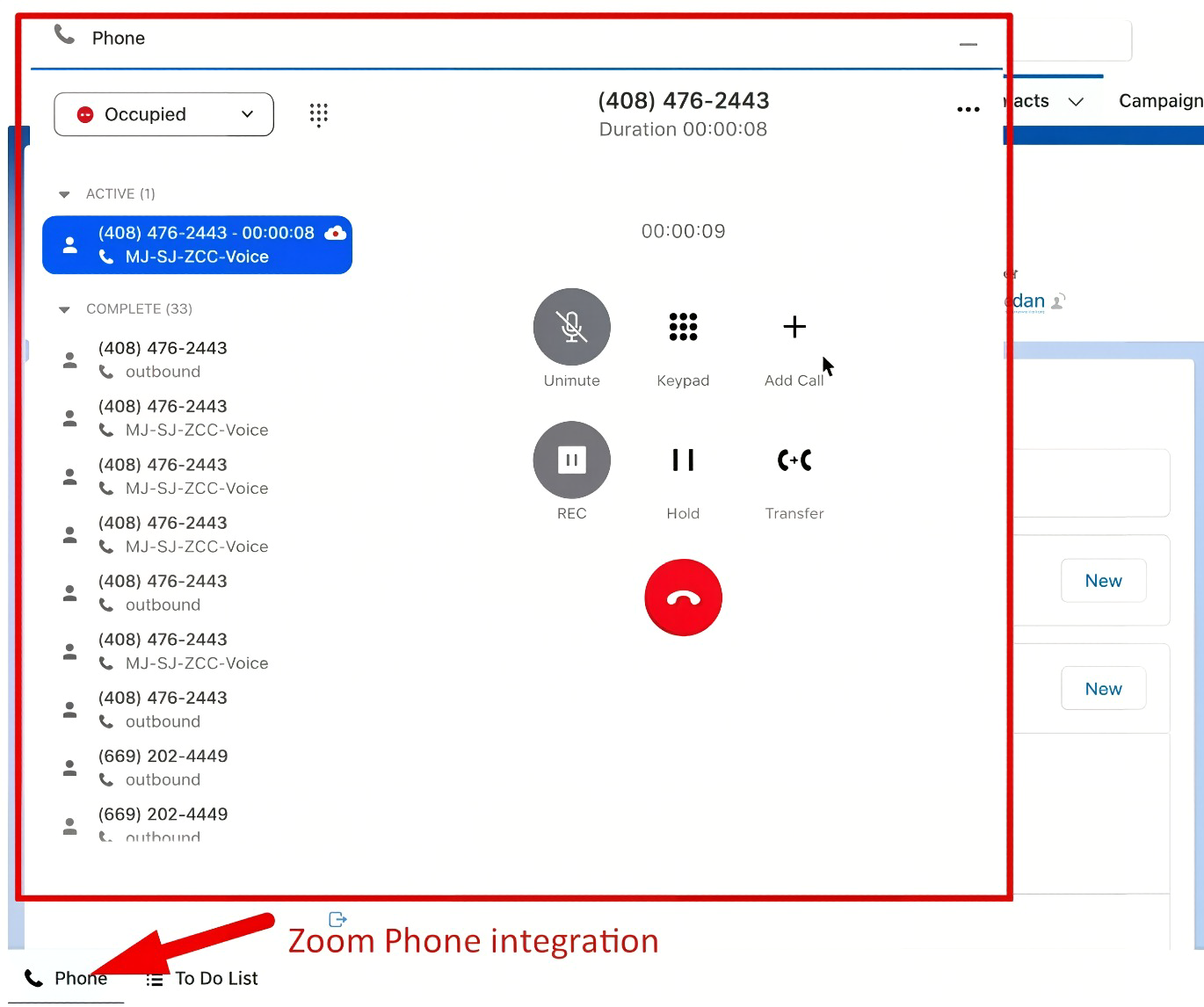
The way it works: Zoom’s native Salesforce integration installs as a managed package deal from the Salesforce AppExchange, embedding a Zoom Cellphone dialer widget contained in the Salesforce Lightning interface. When a rep makes or receives a name via Zoom Cellphone, the mixing matches the cellphone quantity in opposition to Salesforce information and logs the decision as an exercise on the matching Lead, Contact, or Account.
Supply: Salesforce
Inbound calls set off a display pop displaying the caller’s Salesforce report so the rep has context earlier than answering. Zoom AI name summaries hyperlink to Salesforce information after calls full, giving managers and reps a searchable, structured recap with out guide note-taking.
What it syncs: Inbound and outbound name logs (caller, callee, length, timestamp), name recordings, voicemail information, SMS exercise, and AI-generated name summaries. Contact lookup on inbound calls makes use of Salesforce Lead, Contact, and Account information. When a caller has no matching Salesforce report, the mixing can create a brand new contact routinely.
Suits: ongoing sync of name exercise into Salesforce as a part of each day gross sales and repair workflows; not an information migration device.
Setup course of:
-
Within the Zoom admin portal, navigate to the Market and find the Salesforce integration. Authorize the connection utilizing OAuth, granting Zoom permission to learn Salesforce contact information and write exercise information.
-
Configure which Zoom Cellphone occasions ought to create Salesforce exercise information (accomplished calls, missed calls, voicemails, SMS messages) and set the default report kind for logged actions.
-
Add the Zoom Cellphone dialer element to the related Salesforce Lightning web page layouts (Lead, Contact, Account, Alternative) utilizing the Lightning App Builder so reps can click-to-dial from CRM information.
-
Take a look at by putting a name from inside Salesforce to a recognized contact and verifying the exercise log, recording hyperlink, and AI abstract seem on the right report.
Strengths: First-party integration maintained by Zoom and distributed via the Salesforce AppExchange. No third-party device to configure or pay for individually.
Click on-to-dial, automated name logging, display pops, and AI name summaries all work inside Salesforce Lightning with out leaving the CRM. Helps automated contact creation for unknown callers. AI name summaries remove guide post-call note-taking.
Limitations: The sync is primarily one-directional for exercise information (Zoom Cellphone to Salesforce). Customized fields, deal stage updates, and complicated CRM workflows will not be triggered by the native connector alone.
The mixing requires Salesforce Lightning Expertise (not accessible in Salesforce Basic). Setup requires admin entry on each platforms. AI name abstract options require a qualifying Zoom Office paid plan with AI Companion enabled.
Greatest for: Gross sales and repair groups already utilizing each Zoom Cellphone and Salesforce that want name exercise tracked within the CRM with minimal setup. Groups the place reps spend most of their day in Salesforce and wish to name from the CRM with out switching to a separate dialer utility.
Zapier
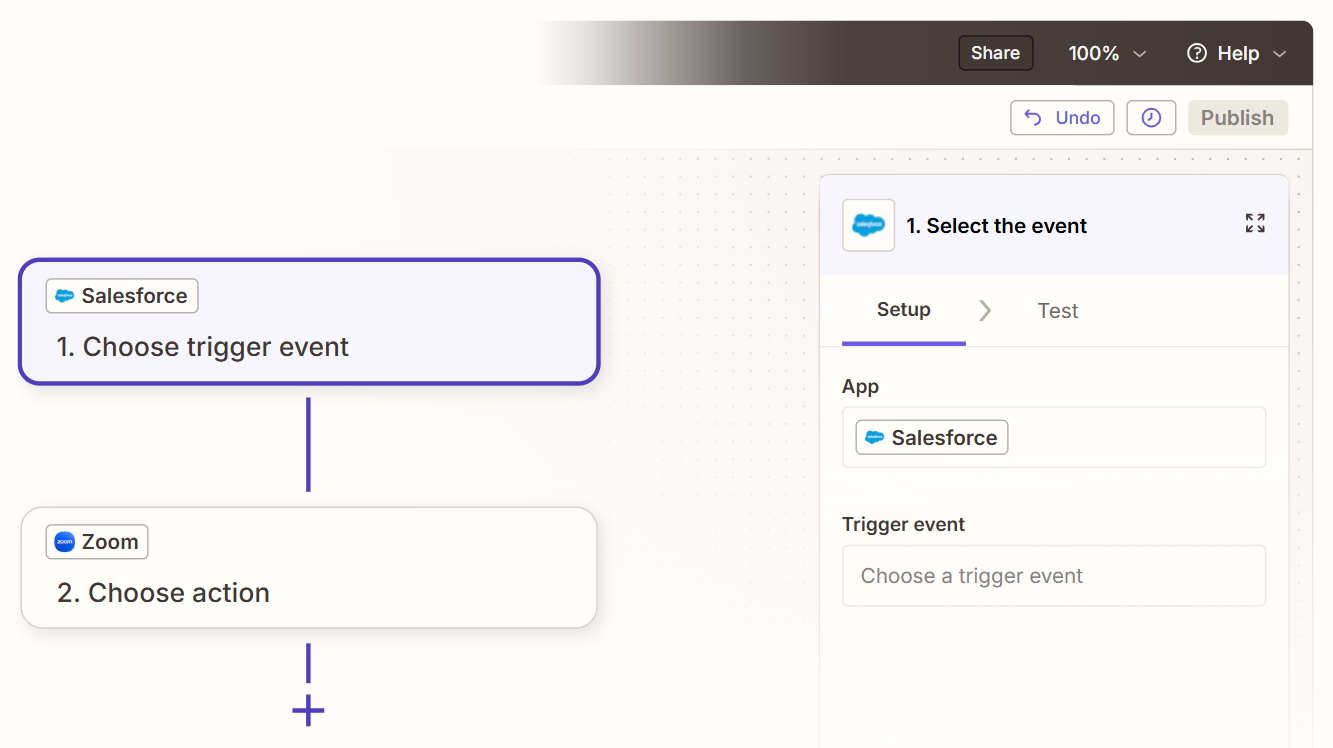
The way it works: Zapier connects Zoom Cellphone and Salesforce via event-driven automations known as Zaps. Every Zap pairs a set off (an occasion in a single app) with a number of actions (what occurs within the different).
Supply: Zapier
Zoom Cellphone occasions like accomplished calls, missed calls, new recordings, and new voicemails can set off actions in Salesforce corresponding to creating Duties, updating information, or sending notifications. Each platforms are well-supported Zapier connectors, so the accessible trigger-action mixtures cowl the key use instances.
What it syncs: Name metadata (caller quantity, callee quantity, length, timestamp, name kind), recording URLs, voicemail transcripts, and SMS messages. Every information kind requires its personal Zap. Customized area mapping is guide and configurable within the Zap setup circulation. Zapier doesn’t present the embedded dialer widget or display pop performance that the native integration affords.
Suits: ongoing sync of particular name occasions into Salesforce workflows; not a substitute for the native integration’s real-time dialer options.
Setup course of:
-
Map the accessible fields from the Zoom Cellphone set off (caller quantity, length, recording URL) into the corresponding Salesforce fields.
-
Flip the Zap on. For added information varieties (voicemails, SMS, recordings), create separate Zaps for every.
Strengths: No engineering assets required. Fast to arrange to be used instances the native integration doesn’t cowl, corresponding to triggering Salesforce workflows from name occasions or routing name information to customized objects. Zapier’s filter and formatting steps add conditional logic (e.g., solely log calls longer than two minutes, or solely create information for calls from particular space codes).
Limitations: No embedded dialer, click-to-dial, or display pop performance. Every Zap handles one trigger-action pair, so overlaying a number of name occasion varieties requires separate Zaps.
Zapier costs by job depend, and excessive name volumes accumulate prices rapidly. Calls made earlier than the Zap was activated don’t sync. Latency of 1 to fifteen minutes means exercise logging is delayed in comparison with the native integration’s quick sync.
Greatest for: Groups that already use the native Zoom for Lightning integration however have to set off extra Salesforce workflows from name occasions. Groups on Salesforce editions or Zoom Cellphone plans the place the native integration doesn’t cowl a particular requirement and a light-weight automation can fill the hole.
Customized API Integration
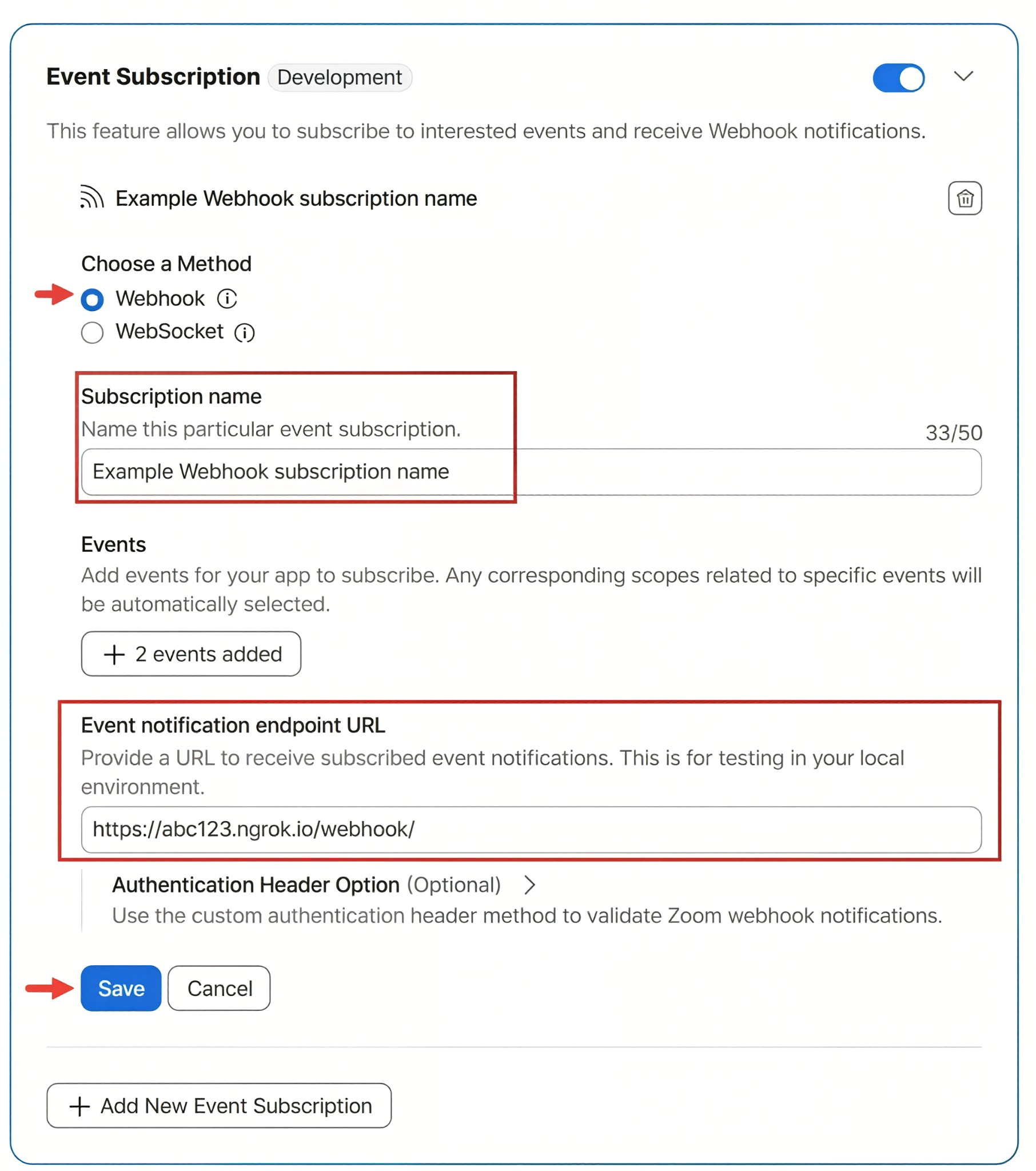
The way it works: Each platforms present broad APIs. Zoom Cellphone’s REST API covers customers, name logs, voicemail, name queues, recordings, SMS, and gadget administration, with webhook assist for real-time occasion notifications.
Supply: Zoom Cellphone
Salesforce’s REST API covers all normal and customized objects, with Platform Occasions and Change Information Seize for event-driven sync. A customized integration connects these APIs straight, with your personal middleware dealing with authentication, area mapping, information transformation, and error restoration.
What it syncs: Something each APIs expose. That is the one methodology that helps superior situations like syncing name queue analytics into Salesforce reviews, writing Salesforce information again into Zoom Cellphone person profiles, imposing enterprise guidelines throughout name logging (e.g., routing exercise information to particular Alternative levels primarily based on name consequence), or syncing customized objects that neither the native connector nor Zapier helps.
Suits: both specialised ongoing sync or advanced information flows; the one methodology with no ceiling on customization.
Setup course of:
-
Construct the sync service: a server-side utility that subscribes to Zoom Cellphone webhooks for name occasions, transforms the information in response to the mapping, and writes exercise information to Salesforce by way of its REST API.
-
Implement matching logic: lookup the caller’s cellphone quantity in opposition to Salesforce Contacts/Leads, resolve what to do when no match is discovered, and deal with edge instances like a number of matching information.
-
Add logging, error dealing with, and retry logic. Zoom Cellphone APIs carry diminished charge limits (roughly 50% of ordinary Zoom API quotas). Salesforce’s each day API request allocation begins at 100,000 requests per 24 hours for Skilled and Enterprise editions.
Strengths: Full management over what syncs, when, and the way. Actual-time sync by way of webhooks on Zoom Cellphone’s facet and Platform Occasions on Salesforce’s facet. Can implement arbitrarily advanced enterprise logic, together with name routing guidelines, customized scoring, and multi-object updates. No per-operation charges from a third-party connector.
Limitations: Requires growth assets to construct and preserve. Zoom Cellphone webhooks retry failed deliveries solely thrice (at 5, 20, and 60 minutes), with no assured supply after that. Zoom’s webhook endpoint should reply inside three seconds. API adjustments on both platform require ongoing upkeep. The preliminary construct takes weeks, not hours.
Greatest for: Organizations with sync necessities that neither the native connector nor Zapier can fulfill. Groups with in-house growth assets and complicated information fashions or enterprise logic that have to be enforced throughout name exercise logging. Corporations that want to drag Zoom Cellphone analytics information (name queue efficiency, agent utilization) into Salesforce for consolidated reporting.
Key Use Instances
1. Computerized Name Exercise Logging for Gross sales Reps
Reps make dozens of calls each day via Zoom Cellphone. With out an integration, every name requires guide logging in Salesforce, and most reps skip it. The native Zoom for Lightning integration logs each name (inbound and outbound) as a Salesforce Job on the matching Contact, Lead, or Alternative report routinely. Managers get correct exercise metrics with out counting on rep self-discipline.
Greatest integration methodology: Native Zoom for Lightning integration.
2. Display screen Pops for Inbound Gross sales and Service Calls
When a prospect or buyer calls in, the native integration matches the incoming quantity in opposition to Salesforce information and shows the caller’s report earlier than the rep solutions. The rep sees the account identify, current alternatives, open instances, and final exercise, and may greet the caller by identify and begin an knowledgeable dialog with out scrambling to lookup the contact mid-call.
Greatest integration methodology: Native Zoom for Lightning integration.
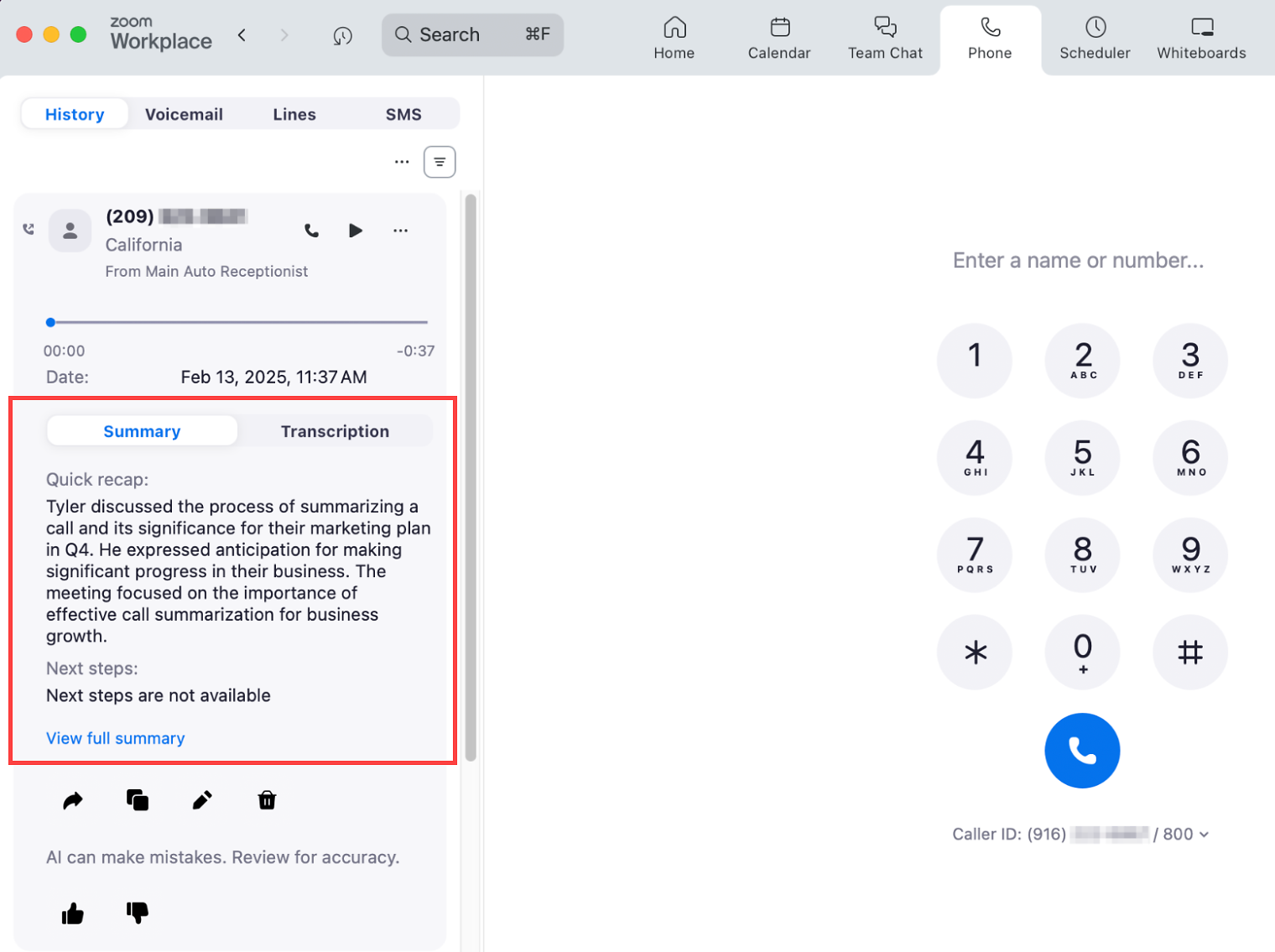
3. AI Name Summaries Linked to Alternative Data
After a discovery name or negotiation, the rep wants a structured abstract of what was mentioned, what was agreed on, and what the subsequent steps are.
Zoom AI Companion generates post-call summaries routinely, and the native Salesforce integration hyperlinks these summaries to the related Alternative report. Managers reviewing pipeline can learn the AI abstract in Salesforce as an alternative of asking the rep to recap the decision.
Supply: Zoom Cellphone
Greatest integration methodology: Native Zoom for Lightning integration.
4. Triggering Salesforce Workflows from Name Occasions
A gross sales course of might require particular actions when sure name occasions happen: a missed name from a high-value prospect ought to create a follow-up Job, a accomplished name over quarter-hour ought to replace the Alternative stage, or a voicemail from a particular space code ought to notify a regional supervisor. Zapier handles these conditional, event-driven workflows with out engineering assets.
Greatest integration methodology: Zapier.
5. Consolidated Name Analytics in Salesforce Studies
Operations groups that want to investigate name patterns (calls per rep, common name length, time-of-day distribution, call-to-meeting conversion) inside Salesforce’s reporting framework can use a customized API integration to drag Zoom Cellphone name log information into customized Salesforce objects. This lets them cross-reference name information with pipeline and income information in a single reporting layer.
Greatest integration methodology: Customized API integration.
Limitations and Concerns
Information That Does not Sync Natively
The native Zoom for Lightning integration focuses on name exercise and make contact with lookup. It doesn’t sync Zoom Cellphone system configuration (name queues, auto-attendant settings, person assignments) into Salesforce.
Name queue analytics, agent efficiency metrics, and detailed routing information require both the Zoom Cellphone Buyer Engagement Pack add-on (which supplies its personal dashboards) or a customized API construct to floor that information in Salesforce. Electronic mail thread historical past, Zoom Assembly recordings, and Zoom Chat messages are separate information streams from Zoom Cellphone name logs.
Sync Course Constraints
The mixing is primarily one-directional for exercise information: Zoom Cellphone pushes name logs into Salesforce. Salesforce area updates, deal stage adjustments, and workflow outcomes don’t circulation again to Zoom Cellphone.
If a rep updates a contact’s cellphone quantity in Salesforce, that change doesn’t propagate to Zoom Cellphone’s listing. Groups that want bidirectional information circulation will want a customized API integration or a middleware layer.
Pricing Implications
The native Zoom for Lightning integration is included with Zoom Cellphone plans at no extra value. Nevertheless, Zoom Cellphone’s AI Companion options (name summaries, voicemail job extraction) require a qualifying paid Zoom Office plan. Zoom Cellphone plans begin at $10/person/month (metered) or $15/person/month (US & Canada limitless).
On the Salesforce facet, API entry is included with paid editions, however each day API request allocations (beginning at 100,000 for Skilled/Enterprise) might constrain high-volume customized integrations. Third-party instruments add their very own prices: Zapier costs by job depend beginning at $19.99/month.

Supply: Salesforce
Permissions and Entry
Establishing the native integration requires admin entry on each platforms. In Salesforce, System Administrator entry is required to put in the AppExchange package deal and configure Lightning web page layouts.
In Zoom, admin rights are required to authorize the Salesforce connection and configure which name occasions are logged. In case your Salesforce org makes use of field-level safety or sharing guidelines, the mixing person’s profile will need to have write entry to the objects and fields the place name exercise might be saved.
Upkeep
Each platforms replace independently. Zoom Cellphone releases new options on an everyday cadence (AI Companion updates, agentic post-call workflows introduced for April 2026, new dialer capabilities). Salesforce variations its API with every seasonal launch.
The native AppExchange package deal receives updates from Zoom, however customized configurations (Lightning web page layouts, area mappings, workflow guidelines constructed on high of name exercise information) want periodic assessment to make sure compatibility. Zapier Zaps might break if both platform adjustments its API floor or authentication circulation.
What No Methodology Fixes: The Information Itself
Each methodology above strikes name exercise from Zoom Cellphone into Salesforce. None of them checks whether or not the contact information in Salesforce are correct, present, or full. A rep calls a quantity listed on a Lead report; if that quantity is disconnected, the decision fails, however the integration faithfully logs the failed try on a report that was already stale.
A contact who modified jobs three months in the past nonetheless sits within the pipeline with zero name exercise, and there’s no option to inform whether or not that silence means disinterest or a useless quantity. The mixing logs what occurs; it doesn’t enhance what was there earlier than the decision was made.
The place ZoomInfo Suits In
Each methodology on this information strikes name exercise between Zoom Cellphone and Salesforce. None of them improves the contact information that determines whether or not a name connects within the first place.
When the mixing is dwell however reps are dialing disconnected numbers, reaching the fallacious particular person as a result of a contact modified roles, or lacking direct dials as a result of the CRM solely has a fundamental workplace line, the bottleneck is not the connector.
That’s the hole ZoomInfo closes.
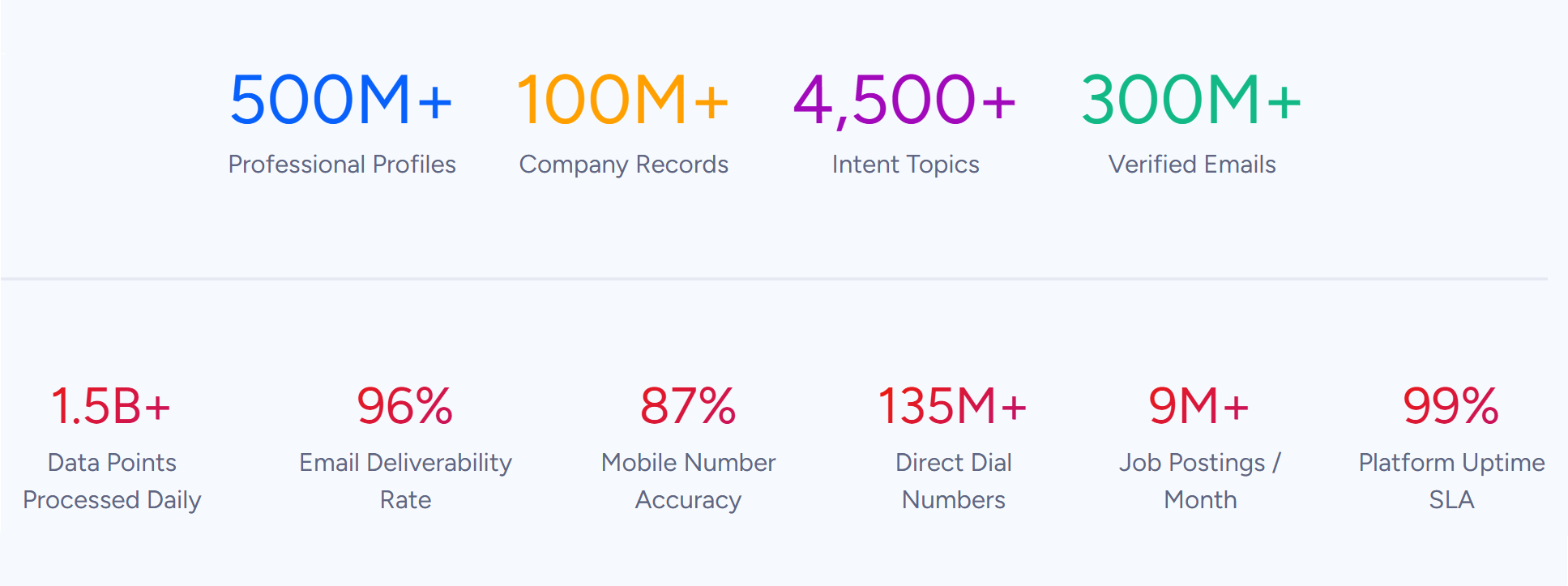
ZoomInfo is a B2B information and GTM platform constructed on broad B2B information constructed on broad B2B information: 500M contacts, 100M corporations, 135M+ verified cellphone numbers, and 200M+ verified enterprise electronic mail addresses. For groups working Zoom Cellphone calls via Salesforce, ZoomInfo addresses the information high quality layer that no call-logging connector handles. ZoomInfo Agent Groups construct on that very same basis to run full outreach performs finish to finish: coordinated specialist brokers share context, work from every account’s present state, and act throughout the approvals and limits you set, so a logged name can flip into actual follow-up as an alternative of sitting as an idle Job.
Supply: ZoomInfo
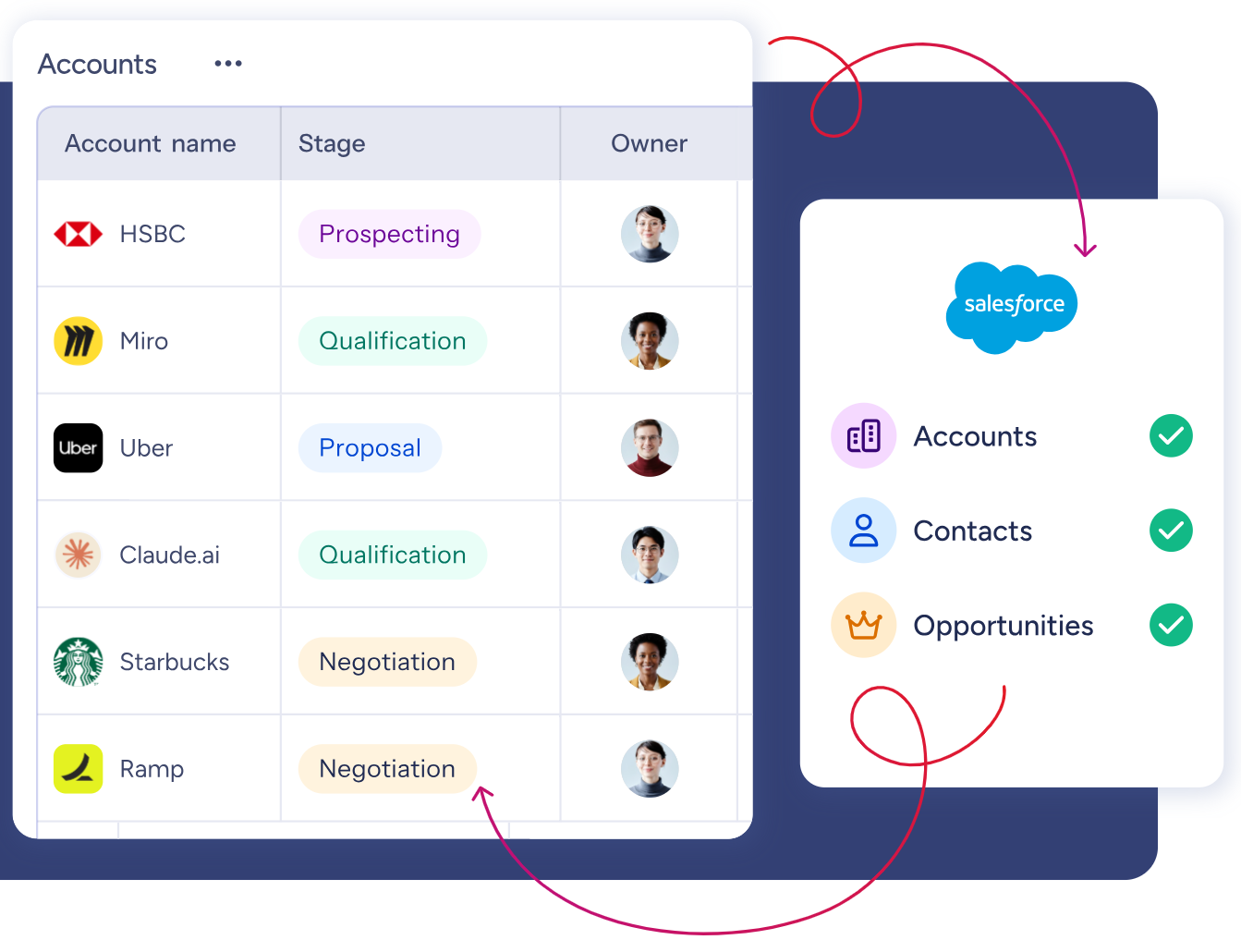
ZoomInfo integrates natively with each platforms. The Salesforce integration, accessible via the AppExchange, supplies CRM enrichment, lead routing, and real-time information updates inside Salesforce information. The Zoom Cellphone integration connects ZoomInfo’s information on to the calling platform.
Supply: ZoomInfo
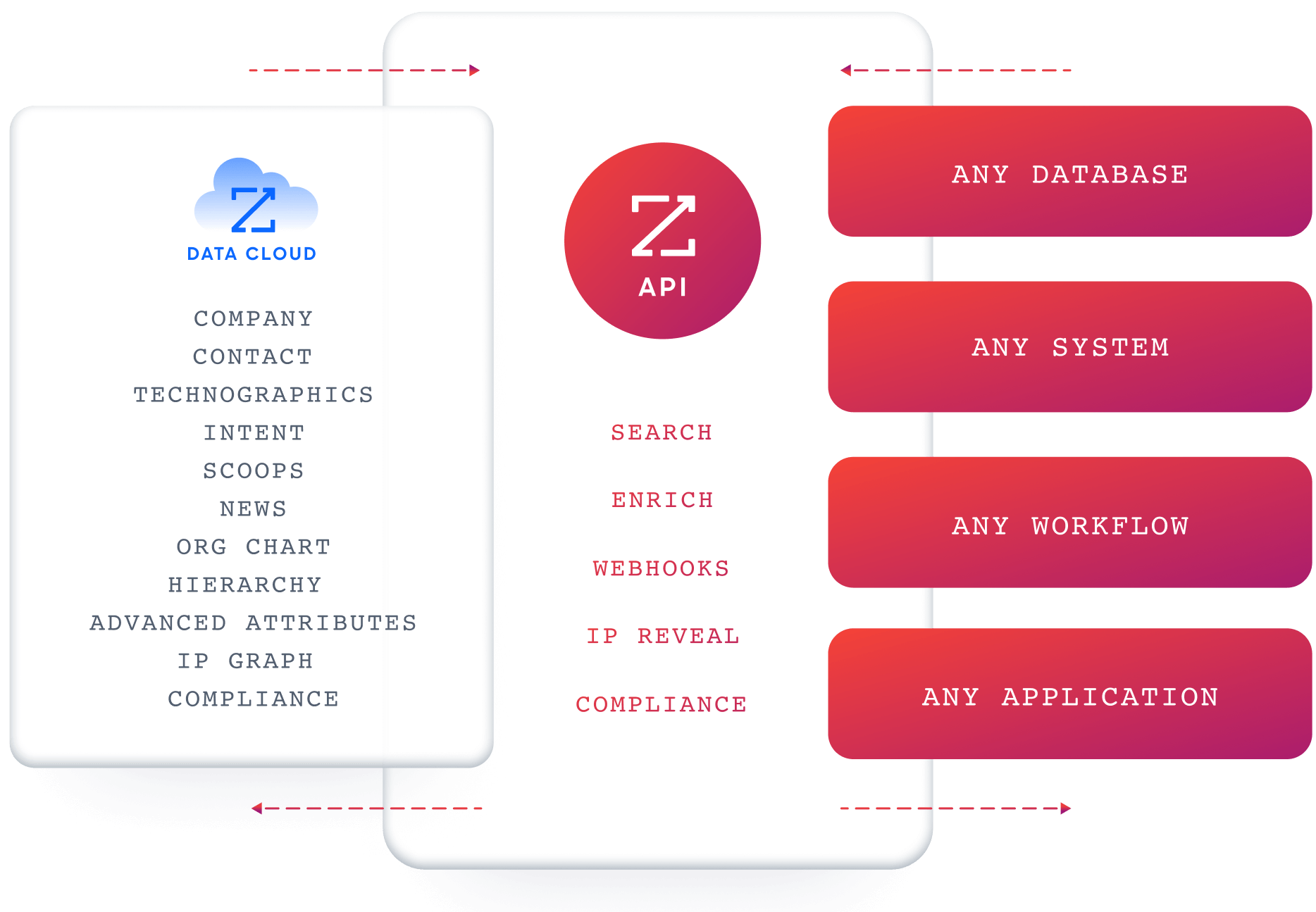
For groups constructing past these native connectors, ZoomInfo’s Enterprise API and MCP server expose the identical information to any customized agent, inside device, or accomplice platform.
Supply: ZoomInfo
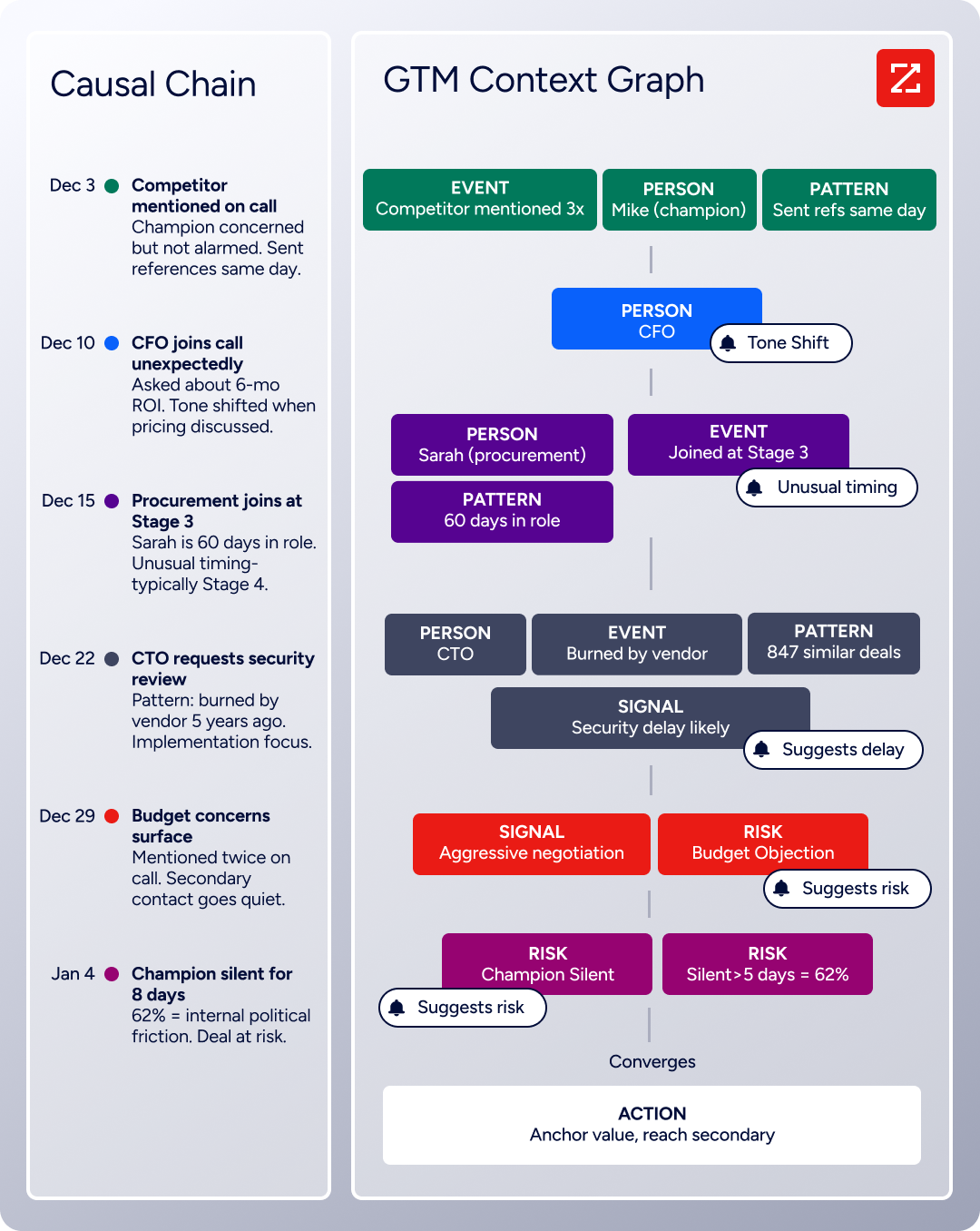
The identical information feeds ZoomInfo’s GTM Context Graph, which processes 1.5B + information factors each day and combines third-party intelligence with CRM information, dialog transcripts, and behavioral alerts to floor not simply what occurred in a deal, however why.
Supply: ZoomInfo
In observe, a crew utilizing Zoom Cellphone for outbound gross sales via Salesforce can use ZoomInfo to complement Salesforce information earlier than a rep dials a single quantity.
Verified direct dials imply calls attain the suitable particular person quite than routing via a basic switchboard. Correct job titles imply reps will not be pitching somebody who moved to a distinct division. Present employment information means the pipeline doesn’t fill with contacts who left the corporate two quarters in the past.
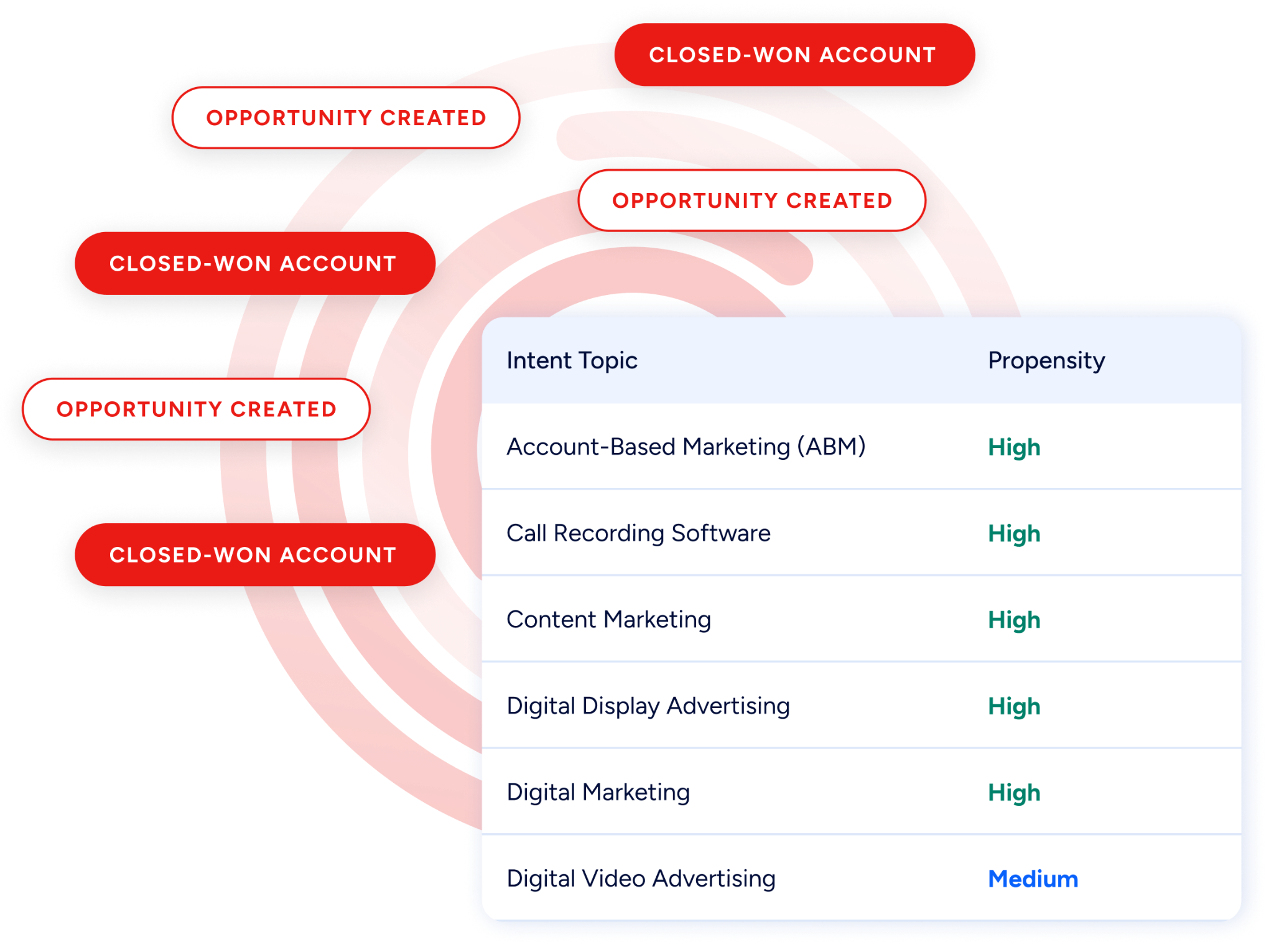
Purchaser Intent information from ZoomInfo, monitoring alerts from 210 million IP-to-Group pairings, can prioritize which accounts obtain name outreach first, so reps spend dialing time on prospects who’re actively researching related options quite than working via a stale checklist alphabetically.
Supply: ZoomInfo
Enriched information additionally make the Zoom Cellphone-Salesforce integration extra productive. When name exercise logs in opposition to information with verified cellphone numbers and correct contact particulars, the ratio of linked calls to complete makes an attempt rises. Fewer clean fields imply fewer unmatched inbound calls touchdown and not using a display pop.
And when AI name summaries connect to information that appropriately establish the client’s function, title, and firm context, these summaries grow to be helpful for deal assessment quite than annotations on information which will already be fallacious.
Seismic’s gross sales crew attributed 39% of lively pipeline to alternatives recognized or influenced by ZoomInfo alerts, whereas boosting productiveness by 54% and saving 11.5 hours per week. (Seismic)
Ultimate Verdict
A local integration between Zoom Cellphone and Salesforce exists and covers the core use case effectively: automated name logging, click-to-dial, display pops, and AI name summaries inside Salesforce Lightning. For many groups, the suitable alternative will depend on how a lot they want past what the native connector supplies.
-
Gross sales groups that primarily want name exercise tracked in Salesforce ought to activate the native Zoom for Lightning integration instantly. It’s included with Zoom Cellphone plans, requires no third-party device, and handles the most typical call-to-CRM workflows out of the field.
-
Groups that want conditional workflows triggered by particular name occasions (missed calls creating follow-up duties, lengthy calls updating deal levels) ought to layer Zapier on high of the native integration to deal with the event-driven logic the native connector doesn’t cowl.
-
Organizations with advanced reporting necessities, customized Salesforce objects, or bidirectional sync wants ought to put money into a customized API integration utilizing the Zoom Cellphone API and Salesforce REST API.
Earlier than committing to a technique, make clear what consequence you want from the mixing.
If the purpose is making certain each name is logged in opposition to the suitable Salesforce report so exercise reporting is correct, the native integration handles it. If the purpose is constructing name information into pipeline analytics, deal scoring, or customized workflows, a mix of the native connector and Zapier or customized growth is the suitable path.
Both manner, the standard of the contact information in Salesforce determines whether or not reps join with the suitable individuals once they dial.
ZoomInfo, with its native integrations for each Salesforce and Zoom Cellphone and API and MCP entry for any system, is the information enrichment layer that ensures reps are calling verified contacts at correct numbers whereas the connector retains each dialog tracked. As soon as that information is in place, ZoomInfo Agent Groups can carry the play ahead, working outreach from sign to name throughout the approvals and limits a crew units.
FAQ
Does Zoom Cellphone combine natively with Salesforce?
Sure. Zoom affords a local Salesforce integration known as “Zoom for Lightning,” accessible via the Salesforce AppExchange. It embeds a Zoom Cellphone dialer widget inside Salesforce Lightning, supplies click-to-dial from CRM information, logs name exercise routinely, shows display pops on inbound calls, and hyperlinks Zoom AI name summaries to Salesforce information.
The mixing is included with Zoom Cellphone plans at no extra value, although AI name abstract options require a qualifying Zoom Office paid plan.
What name information syncs between Zoom Cellphone and Salesforce?
The native integration syncs inbound and outbound name logs (together with caller, callee, length, and timestamp), name recordings, voicemail information, SMS exercise, and AI-generated name summaries.
Name exercise is logged as Duties on matching Salesforce Lead, Contact, or Account information. Contact lookup on inbound calls matches the caller’s quantity in opposition to Salesforce information to show the right report earlier than the rep solutions.
Can I exploit Zoom Cellphone’s click-to-dial from inside Salesforce?
Sure. As soon as the Zoom for Lightning app is put in and the dialer element is added to Salesforce Lightning web page layouts, reps can click on any cellphone quantity on a Lead, Contact, Account, or Alternative report to provoke a Zoom Cellphone name straight. The decision is positioned via Zoom Cellphone and logged in opposition to the Salesforce report routinely.
Does the mixing work with Salesforce Basic?
No. The native Zoom for Lightning integration requires Salesforce Lightning Expertise. Organizations nonetheless working Salesforce Basic would want to both migrate to Lightning or use Zapier or a customized API integration to attach Zoom Cellphone name information to Salesforce.
What Zoom Cellphone plan do I want for the Salesforce integration?
The native Salesforce integration is obtainable on all Zoom Cellphone calling plans, together with the US and Canada Metered plan (roughly $10/person/month), the US and Canada Limitless plan ($15/person/month), and the World Choose plan ($20/person/month). AI Companion options like post-call summaries require a qualifying Zoom Office paid plan with AI Companion enabled.
Are Zoom Cellphone’s AI name summaries accessible in Salesforce?
Sure. When AI Companion for Zoom Cellphone is enabled, post-call summaries (together with key dialogue factors, dates, names, and subsequent steps) are generated routinely and linked to the corresponding Salesforce report via the native integration. This eliminates guide note-taking and offers managers a structured recap of each name contained in the CRM.
How does ZoomInfo enhance a Zoom Cellphone-Salesforce workflow?
ZoomInfo solves the information high quality downside that no call-logging integration addresses. Earlier than a rep dials, ZoomInfo ensures the Salesforce contact report has a verified direct-dial cellphone quantity (so the decision connects), an correct job title (so the dialog is related), and present employment particulars (so the rep just isn’t calling somebody who left).
ZoomInfo integrates natively with each Salesforce and Zoom Cellphone, and its Purchaser Intent information can prioritize which accounts ought to obtain name outreach primarily based on lively analysis alerts. The consequence: extra calls join, exercise logs in opposition to correct information, and AI name summaries connect to contacts who’re verified and reachable.
What occurs to name logs if the mixing disconnects?
Calls made throughout a disconnection will not be retroactively logged in Salesforce. Name information stays in Zoom Cellphone’s personal name historical past and might be accessed via the Zoom admin portal, however the Salesforce exercise information for these calls would must be created manually or via a bulk sync after the mixing is restored.
The native integration doesn’t embrace a built-in mechanism for backfilling missed exercise logs throughout an outage.
Extra Salesforce integrations:

