

I evaluated 25+ instruments utilizing G2 Information and opinions to finalize the 8 greatest on-line appointment scheduling software program. These are Microsoft 365, Calendly, Certified, Jotform, GReminders, Cal.com, Waitwhile, and Sq. Level of Sale.
Each missed appointment was as soon as a confirmed reserving. The hole between the 2 is the place income leaks. It begins with a reminder that did not ship and ends with a shopper who moved on.
The time price of coordinating conferences and appointments provides up quick. In line with Calendly’s State of Conferences 2024 report, 43% of staff spend not less than three hours every week simply scheduling conferences. The proper appointment scheduling software program closes the hole between confirmed bookings and accomplished appointments. Reliable reminders, calendar sync, and reserving pages that purchasers full with out assist additionally give hours again to your week.
Each enterprise wants one thing totally different from scheduling software program. A solopreneur reserving consultations and an enterprise gross sales workforce routing inbound pipeline want virtually totally totally different options. Selecting effectively begins with a transparent image of your individual workflow, so you’ll be able to match every instrument to the work it should assist.
I began with the G2 Fall 2026 Grid® Report for on-line appointment scheduling software program, then used AI to investigate a whole bunch of verified G2 opinions. The evaluation targeted on themes together with ease of setup, reminder reliability, integration depth, cost dealing with, and assist high quality. Every entry exhibits what the instrument does effectively, the place G2 reviewers flag friction, and which consumers it serves greatest.
8 greatest on-line appointment scheduling software program I like to recommend
- Microsoft 365: Greatest for Microsoft ecosystem scheduling
An enterprise productiveness suite with native appointment reserving by Microsoft Bookings, built-in throughout Outlook, Groups, and the complete Microsoft stack. (Begins at ~$7/person/month) - Calendly: Greatest for gross sales groups automating high-volume assembly reserving
A gathering automation platform that lets income groups route, qualify, and schedule prospects by customizable reserving flows. (Free tier out there; paid plans begin at ~$10/seat/month) - Certified: Greatest for B2B income groups routing inbound pipeline on Salesforce
An AI-powered platform that converts web site guests into booked conferences by conversational routing constructed natively inside Salesforce. (Pricing out there on request) - Jotform: Greatest for form-first appointment reserving with upfront information assortment
A no-code type and workflow builder that mixes appointment scheduling, shopper information seize, and cost assortment in a single embeddable type. (Free tier out there; paid plans begin at $34/month, billed yearly) - GReminders: Greatest for professionals lowering no-shows by automated reminders
A scheduling and reminder platform that automates SMS, e mail, and cellphone reminders constructed immediately round Google Calendar and Microsoft Outlook. (Free trial out there; paid plans begin at ~$8/person/month) - Cal.com: Greatest for developer and technical groups wanting open-source scheduling
An open-source scheduling platform with API-first structure, a beneficiant free tier, and deep customization for groups that need to personal their reserving stack. (Free tier out there; groups plan begins at ~$12/person/month, billed yearly) - Waitwhile: Greatest for service companies managing waitlists and scheduled appointments
A queue administration and appointment scheduling platform that handles walk-in waitlists and pre-booked appointments throughout a number of service places. (Free tier out there; paid plans begin at ~$31/month) - Sq. Level of Sale: Greatest for SMBs combining scheduling with in-person funds
An built-in POS and appointment scheduling system that connects in-person funds, stock administration, and shopper reserving for service companies. (Free plan out there; paid plans begin at ~$49/month per location, plus processing charges)
* In line with the G2 Fall 2026 Grid® Report, these appointment scheduling instruments are top-rated of their class. I’ve included their strengths and pricing particulars that can assist you select the precise platform to your workforce.
The choice that truly issues right here is not which scheduling instrument has essentially the most options. It is whether or not the instrument you are evaluating meets your corporation wants.
Solo practitioners and unbiased service suppliers want a instrument that forestalls double bookings and ends e mail back-and-forth with out requiring admin assist to run it. Multi-staff service companies want one thing structurally totally different: shared availability administration, location-level guidelines, and cost assortment on the level of reserving to maintain operations clean. Enterprise income groups want routing logic, CRM integration, and automatic handoffs, so the scheduling layer has to operate as pipeline infrastructure, not only a calendar sync.
That vary exhibits up within the Fall 2026 Grid, the place small companies are the biggest reviewer group for six of the eight merchandise right here, led by GReminders at 94% and Sq. Level of Sale at 92%, whereas Microsoft 365 and Certified lean mid-market and enterprise.
What I exploit to separate a fundamental reserving hyperlink from a scheduling system is a straightforward check: what occurs after somebody books? A reserving hyperlink stops at affirmation. A scheduling system handles the encircling workflow, together with consumption, reminders, cost, and CRM updates, with out requiring a human to set off every step. The additional that automation extends earlier than and after the appointment, the extra the instrument features as operational infrastructure moderately than a calendar instrument.
How did I discover and consider the perfect appointment scheduling software program?
My start line was the G2 Fall 2026 Grid® Report for on-line appointment scheduling software program, which ranks instruments by market presence and satisfaction scores from verified reviewers. I used that rating to construct an preliminary longlist of 25+ instruments earlier than making use of additional standards. As a result of the Grid blends the 2, I name out the place a product’s placement leans extra on market presence than on reviewer satisfaction.
From there, I used AI to investigate a whole bunch of verified G2 opinions throughout every shortlisted platform, assessing each instrument towards a constant set of themes, together with reminder reliability, integration depth, ease of setup, cost dealing with, and assist responsiveness. I tracked recurring patterns throughout opinions moderately than particular person accounts, specializing in instruments in lively use throughout monetary, healthcare, gross sales, and multi-location service companies. G2 scores and rankings referenced all through replicate information pulled from G2 in 2026.
Visuals and product references are sourced from G2 vendor listings and publicly out there product documentation.
What makes the perfect appointment scheduling software program price it: My standards
Evaluating scheduling software program with no clear framework is guesswork. My standards come from patterns in G2 assessment information, targeted on what impacts each day operations moderately than characteristic counts. Every one displays issues you do not discover when operations run easily and people you’ll be able to’t ignore when one thing goes unsuitable. Based mostly on my analysis and evaluation, this is what you must search for when selecting the right appointment scheduling software program.
- Ease of setup and preliminary configuration: The strongest instruments present a purposeful reserving state with out technical intervention. I checked out how lengthy preliminary configuration takes for availability guidelines, reserving pages, and calendar connections. G2 assessment patterns weigh ease of setup as one of many highest satisfaction drivers on this class, as a result of decrease adoption charges suggest a much less useful gizmo.
- Reminder and notification reliability: Reminders in scheduling software program assist scale back no-shows, whereas notifications equivalent to confirmations, reschedule alerts, and cancellation notices hold purchasers knowledgeable. I evaluated SMS and e mail assist, timing configurability, and whether or not G2 opinions describe supply of reminders and confirmations as constant. Late or missed reminders go away purchasers unprepared and push no-show charges up.
- Calendar and power integration depth: Two-way sync with the calendars a enterprise already makes use of, equivalent to Google Calendar or Outlook, is the baseline. Sturdy instruments prolong integration into CRMs, video conferencing, and cost processors with out handbook workarounds.
- Reserving web page high quality and shopper expertise: Completion charges drop when reserving requires too many steps or mishandles time zones. I appeared for platforms that deal with scheduling logic cleanly behind an interface that new purchasers discover straightforward to grasp and navigate.
- Fee assortment at level of reserving: For service companies, accumulating cost at reserving reduces no-shows and removes a separate invoicing step. I evaluated native processor assist, deposit choices, and whether or not the absence of this operate requires a further instrument.
- Multi-user and workforce scheduling capabilities: Spherical-robin task, shared availability administration, and org-level scheduling guidelines are what separate solo-focused instruments from these constructed for groups. This criterion shouldn’t be missed, particularly for any enterprise coordinating throughout a number of workers or places.
- Reporting and attendance visibility: No-show charges, cancellation patterns, and reserving quantity reveal whether or not a scheduling course of is working. I weighted this extra closely for platforms serving groups, the place the absence of reporting removes the power to enhance over time.
- Help high quality and concern decision: When scheduling breaks, bookings cease. G2 opinions flag assist high quality with notable frequency on this class. I evaluated how usually points floor in opinions and whether or not decision is immediate or sluggish and scripted.
Commerce-offs run by each criterion. A instrument that excels at automated reminders could supply restricted workforce scheduling functionality. A platform constructed for enterprise pipeline routing could require technical sources that the majority small companies can’t justify. Consider every shortlisted instrument intently towards your individual workflow earlier than you choose one. The checklist under comprises real person opinions from G2’s On-line Appointment Scheduling class. To qualify for inclusion, a product should:
- Have a scheduler that may be seen, managed, and edited by directors and a number of customers
- Collect contact info for appointment makers
- Ship appointment notifications to prospects
- Comprise a type of cost integration for purchasers’ appointments
- Permit for integration with different workplace merchandise, equivalent to e mail, calendar, or video conferencing instruments
This information was pulled from G2 in 2026. Some opinions could have been edited for readability.
1. Microsoft 365: Greatest for Microsoft ecosystem scheduling
An workplace supervisor who books shopper conferences in Outlook, joins them in Groups, and recordsdata notes in SharePoint not often needs a fourth instrument only for scheduling. Microsoft 365 is a productiveness suite whose Bookings, Outlook, and Groups apps deal with appointment scheduling contained in the stack workers already open day by day. Organizations standardized on Microsoft hold ending up right here, and reviewers say the scheduling layer delivers most when that’s already true.
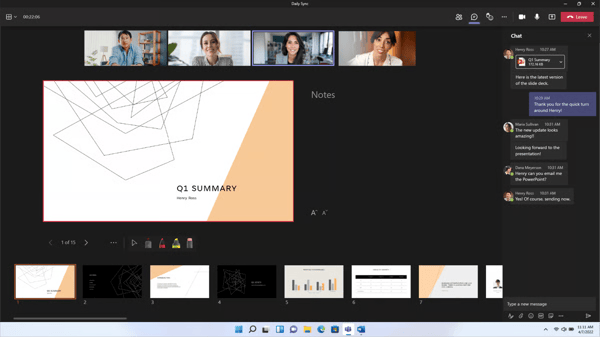
On the Fall 2026 Grid, Microsoft 365’s G2 Rating of 95 is the best within the class, with a satisfaction rating of 90 throughout 173 opinions. Microsoft 365 earns its scheduling case by how effectively its apps work collectively. Outlook, Groups, Microsoft Bookings, and SharePoint join with out separate configuration work, so each instrument the workforce makes use of each day is already synchronized. G2 reviewers add time savers, equivalent to sharing a SharePoint file inside a Groups chat and reaching the synced calendar on the go. I would middle the worth on on a regular basis time financial savings.
Reviewers admire the instrument for simplifying operations and spotlight a number of examples. For example, some customers say reserving a Groups assembly from inside Outlook takes a single click on. They describe it as a one-step course of during which affirmation, video hyperlink, and calendar block are dealt with mechanically. The scheduling notification rating sits at 90%, reflecting how rapidly these confirmations attain each events. In case your workforce coordinates each day conferences by Outlook, this workflow removes each handbook step between an invitation and a confirmed reserving.
What caught my consideration is the 91% rating for multi-calendar integration in G2 Information, a degree above the 90% class common. Inside Microsoft 365, customers can see their colleagues’ availability immediately in Outlook with out switching to a separate instrument. For companies coordinating conferences throughout a number of folks, this built-in visibility removes a step that the majority scheduling instruments require an exterior integration to deal with.
Copilot extends what Microsoft 365 does round scheduling. G2 reviewers reference AI helping with assembly preparation, reside doc modifying, and e mail search in the identical instrument. As a secondary energy, scheduling turns into an end-to-end workflow. G2 reviewers describe Copilot summarizing missed conferences, drafting follow-up emails, and constructing a devoted assembly abstract agent, so the appointment’s aftermath will get dealt with inside the identical platform.
With Microsoft 365, your scheduling workflow and doc administration can function throughout the similar surroundings. G2 reviewers report file sharing, co-authoring, and assembly coordination all working in a single platform. Reviewers in IT providers report spending noticeably much less time attempting to find recordsdata and knowledge after consolidating onto Microsoft 365. That consolidation can enhance effectivity.
Video conferencing in Microsoft 365 runs end-to-end throughout the similar platform. Based mostly on my analysis, Groups can deal with fast calls and full shopper conferences alike, with hyperlinks embedding mechanically in calendar invites. The G2 video conferencing score throughout opinions stands at 91%, above the 86% class common. I discovered that for reviewers, that native assembly infrastructure is a degree of differentiation from different devoted scheduling platforms.
Whereas scheduling in Microsoft 365 connects natively throughout the Microsoft stack, integrating with non-Microsoft CRMs or exterior instruments requires further configuration work. G2 reviewers flag third-party integration complexity as a recurring friction level. How a lot it issues relies on your stack. In case your instruments already reside within the Microsoft ecosystem, it’s possible you’ll by no means hit this. In case your scheduling should attain outdoors it, plan for preliminary setup work to bridge the hole.
Help responsiveness is a documented concern throughout G2, with a number of reviewers describing prolonged wait instances and escalated points which can be closed with out decision. Companies working time-sensitive scheduling operations, significantly when a reserving failure wants same-day consideration complain of poor assist responses. Nevertheless, G2 reviewers who flag these delays nonetheless price the platform extremely general, attributing their continued use to the reliability of the scheduling infrastructure not requiring the assist workforce’s involvement usually. High quality of assist scores 89% in G2 Information, under Calendly at 92% and Waitwhile at 96%.
Microsoft 365 suits organizations that need reserving, conferences, paperwork, and follow-up in a single place. Scheduling sits inside Outlook and Groups, the instruments your workers already open day by day, with Bookings and SharePoint shut by. In case your group already runs on the Microsoft stack, I would put Microsoft 365 close to the highest of your scheduling shortlist. G2 implementation information backs the match, with common person adoption at 93%, the best of the eight merchandise right here, and 85% of groups going reside by an in-house workforce.
What I like about Microsoft 365:
- Scheduling a Groups assembly immediately from Outlook takes one click on, with hyperlink era, calendar blocking, and affirmation all dealt with mechanically inside the identical platform.
- Calendar visibility throughout the group is embedded natively, permitting real-time availability checks throughout a number of customers and departments with none further instrument or configuration.
What G2 customers like about Microsoft 365:
“Essentially the most useful factor about Microsoft 365 is that all the things is in a single place. My calendar syncs with Groups, Bookings, and extra. I’ve entry to the data on the go too.”
– Microsoft 365 assessment, Lisa S.
What I dislike about Microsoft 365:
- Third-party integration with non-Microsoft CRMs and exterior instruments takes additional setup work. Consumers whose stacks prolong past Microsoft meet the additional setup first, whereas Outlook and Bookings scheduling works absolutely contained in the Microsoft ecosystem.
- Help responsiveness is a persistent concern throughout G2 opinions, with prolonged wait instances and escalated points that closed with out decision. Even so, G2 opinions describe core platform efficiency as constant for each day scheduling operations.
What G2 customers dislike about Microsoft 365:
“Help may be fairly sluggish and unaccommodating at instances however often its OK. They might do higher by going above and past for smaller enterprise homeowners.”
– Microsoft 365 assessment, Aaron S.
If the appointments you are reserving are interviews, there’s an entire class constructed for that. Discover the greatest interview scheduling software program for instruments that deal with panels, reschedules, and candidate comms with out the workarounds.
2. Calendly: Greatest for gross sales groups automating high-volume assembly reserving
A gross sales rep who trades three emails simply to land one assembly has already misplaced a part of the day, and a workforce doing that every one week loses way more. Calendly is a scheduling platform constructed round reserving hyperlinks, calendar sync, and routing types that verify conferences with out the back-and-forth. Gross sales groups, consultants, and client-facing professionals hold selecting it to take scheduling off their plate.
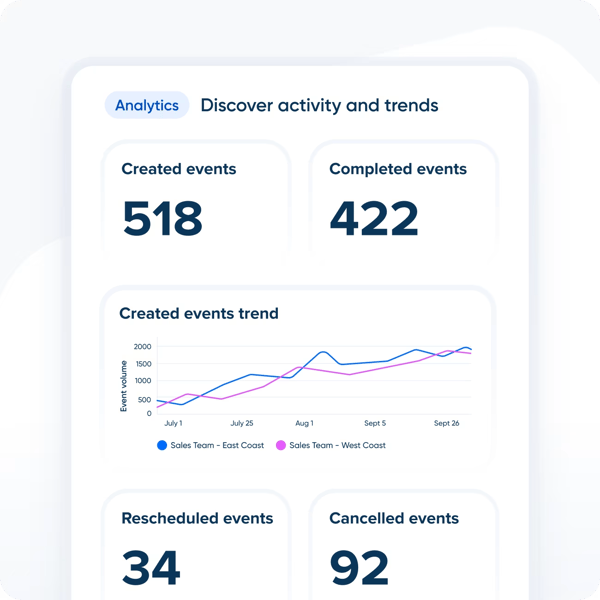
On the Fall 2026 Grid, Calendly has the biggest assessment base by a large margin at 2,064 opinions, with a satisfaction rating of 99 and a G2 Rating of 90. The reserving hyperlink is Calendly’s core mechanism. G2 opinions level to the identical final result repeatedly: share a hyperlink, the e-mail ping-pong stops, and the assembly is confirmed mechanically on either side. With a hyperlinks characteristic rating of 93% on G2 Information, I can see how the mechanics work. G2 reviewers additionally calculate 10 to fifteen minutes saved per assembly booked, and from my studying of the info, that effectivity compounds into hours of recovered admin time every week.
Throughout the G2 opinions I analyzed, calendar sync high quality is a praise-worthy functionality. The platform connects bidirectionally with Google Calendar, Outlook, and Apple Calendar, reflecting availability in actual time and blocking taken slots mechanically. Multi-calendar integration scores 92% on G2 Information, above the 90% class common, which displays reviewers’ appreciation of zero double-bookings.
Reminder automation is the place Calendly earns its hold past reserving. The platform sends confirmations as quickly as a slot is reserved, then reminds your purchasers earlier than the assembly. G2 reviewers tie reminders to fewer no-shows, together with a healthcare front-office person who additionally cites fewer last-minute cancellations. The confirmations and reminders rating reaches 94% throughout verified G2 accounts.
World scheduling is the place Calendly persistently delivers. The platform auto-detects the invitee’s time zone and shows out there slots of their native time, lowering probabilities of missed conferences. G2 opinions throughout geographies name this out particularly, with the time zone detection consequence touchdown at 94% throughout verified accounts. For international groups and worldwide gross sales, I would think about this one among Calendly’s clearest sensible benefits.
One factor I would level to as Calendly’s most underused functionality is the routing type layer. G2 reviewers working gross sales operations be aware routing types qualifying prospects earlier than they attain the calendar, directing every reserving to the precise workforce member mechanically. This eliminates the necessity for handbook lead sorting. It earns the platform its core place in high-volume gross sales workflows past particular person scheduling.
Availability management is Calendly’s most quietly helpful functionality. Buffer instances, each day assembly limits, and lead time necessities are all configurable with out technical setup. G2 opinions flag these as key to stopping assembly exhaustion and defending targeted work time. Availability settings are rated at 94%, and blocked time settings at 93%, giving your scheduling setup a dependable basis.
G2 reviewers flag routing types, round-robin task, CRM integration, branding removing, and superior consumption fields as paid-plan options. Folks working inbound qualification, and companies presenting Calendly as a part of their very own model, attain the entry-tier ceiling earlier than the characteristic set they want. But, G2 opinions on the entry tier hold crediting the reserving hyperlink and calendar sync as absolutely purposeful.
A number of G2 reviewers describe the admin backend as inflexible when establishing complicated workforce scheduling, together with round-robin guidelines and multi-step automated workflows. Anybody coordinating multi-person calendars with layered guidelines meets the inflexible setup first. Regardless of this, G2 opinions name spherical robin particularly helpful for merging a number of folks’s calendars right into a single user-facing reserving calendar.
Calendly fits gross sales and client-facing roles that reside in reserving hyperlinks. Quick confirmations, dependable calendar sync, and routing types hold high-volume assembly stream shifting with little admin work. If a confirmed assembly in a number of clicks is your precedence, I would put Calendly close to the highest of your shortlist. Calendly suits solo consultants and rising gross sales flooring alike. G2 implementation information factors to a fast rollout, with a median of 0.7 months to go reside and 85% of groups launching by an in-house workforce. Small companies make up 63% of its Grid reviewers and mid-market corporations 28%.
What I like about Calendly:
- Actual-time calendar sync with Google Calendar and Outlook prevents double-bookings mechanically. G2 reviewers persistently cite this because the characteristic that makes sharing reserving hyperlinks dependable for each day use.
- Routing types qualify inbound prospects mechanically and direct bookings to the precise workforce member earlier than any rep is concerned, eradicating a full layer of handbook lead sorting.
What G2 customers like about Calendly:
“I like Calendly as a result of it presents the easiest way to supply an appointment system for our purchasers. Shoppers can schedule their appointments very simply by choosing the assigned dates and instances in addition to the way in which they wish to meet, both in individual, by cellphone, or videoconference. They get a affirmation e mail and a textual content message affirmation too.”
– Calendly assessment, Carlos C.
What I dislike about Calendly:
- G2 opinions flag that routing types, round-robin task, CRM integration, and branding controls sit behind paid plans. Gross sales and company consumers on entry plans attain the ceiling early, although the reserving hyperlink and calendar sync work at each tier.
- G2 person opinions be aware that the admin backend feels inflexible for complicated workforce scheduling, equivalent to round-robin guidelines and multi-step automations. Folks coordinating multi-person calendars meet the rigidity first, whereas the client-facing reserving expertise stays clear and dependable.
What G2 customers dislike about Calendly:
“Nothing a lot, but when I’ve to place one thing out; the branding and customization choices are fairly restricted on lower-tier plans. Additionally, whereas the UI is clear for the booker, the admin backend can really feel a bit inflexible when making an attempt to arrange complicated workforce primarily based “Spherical Robin” guidelines or multi-step automated workflows in comparison with newer, extra versatile opponents.”
– Calendly assessment, Aman J.
3. Certified: Greatest for B2B income groups routing inbound pipeline on Salesforce
A customer lands in your pricing web page at 11 p.m., has a query, and leaves as a result of no rep is on-line. Certified is an AI-powered conversational platform that turns web site guests into booked conferences, routing chats straight to rep calendars inside Salesforce. B2B income groups working Salesforce as their system of file hold ending up right here.
On the Fall 2026 Grid, Certified’s G2 Rating of 90 ties Calendly for second place, backed by a satisfaction rating of 98 and a Web Promoter Rating of 98 throughout 479 opinions. Piper, the AI SDR, is the place Certified’s differentiation lives. The agent qualifies leads, solutions product questions, and books conferences onto rep calendars, working constantly throughout time zones. G2 reviewers admire the instrument for reworking their top-of-funnel. Pipeline enhancements that surfaced throughout G2 accounts I analyzed for this text: sooner speed-to-lead, fewer prospects misplaced to after-hours lag.
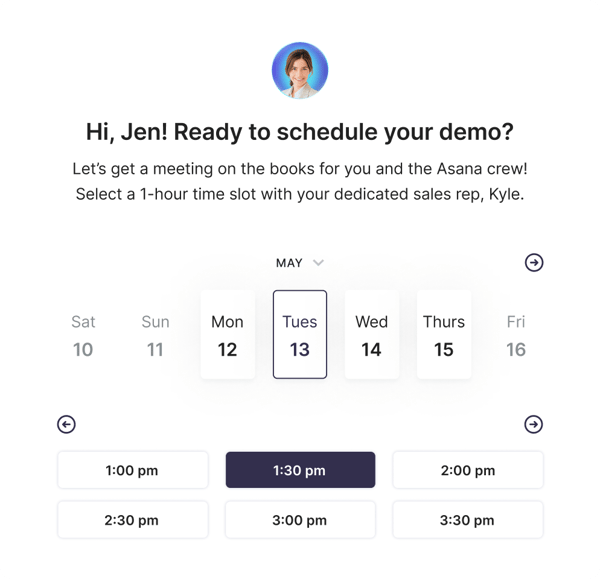
Changing web site guests to booked conferences in actual time is what Certified was engineered for. The platform routes high-intent prospects to out there reps the second intent fires, surfacing calendar availability inside your present Salesforce workflow. The Certified G2 Information consists of customers reporting conferences booked doubling after deployment. At 97% for web site integration, the best within the class, the reserving mechanism holds reliably throughout verified G2 accounts.
The Salesforce integration is the core cause enterprise income groups select Certified. Routing guidelines, lead possession, and CRM context all feed immediately into how the platform qualifies and routes incoming guests. G2 opinions flag the depth of this as a standout, and the scheduling notifications determine stands at 95%. Based mostly on my evaluation of the opinions, the CRM-first structure may be termed because the instrument’s clearest structural benefit.
Actual-time visibility into which accounts are on the web site and what they’re partaking with runs by all the things Certified does. G2 reviewers recount shifting from blind outbound to intent-driven engagement, with goal account exercise surfacing earlier than any rep reaches out. This shifts how follow-up will get prioritized. When you run account-based advertising and marketing, that intelligence sits immediately in your pipeline workflow.
Certified scores 99% for high quality of assist on G2. Many reviewers who point out implementation title their Success Architect by first title, crediting them immediately for on-time deployment, integration stability and measurable time-to-value. In my evaluation of the opinions, the hands-on assist mannequin is the sample that the majority distinguishes the platform from class friends.
As I dug into Certified’s G2 opinions, I observed customers highly-rated the instrument’s pace of iteration. Groups replace chat flows, routing guidelines, and AI agent habits throughout the platform with out developer involvement. G2 reviewers report testing and deploying adjustments instantly when pipeline situations shift. Availability settings, which govern how rep calendars floor inside conversations, rating 96% on G2 Information, above the 93% class common.
Routing logic, CRM area mapping, and dialog stream configuration take time to get proper. G2 opinions in RevOps roles flag the preliminary setup as needing strong coordination throughout gross sales, advertising and marketing, and technical groups. Organizations with out devoted CRM admin assist will face the steepest ramp-up. Though G2 reviewers who leaned on their devoted Success Architect actively concerned throughout deployment say having that assist made the distinction in getting absolutely up and working.
Pipeline attribution monitoring and chat efficiency evaluation require handbook work outdoors the platform. G2 reviewers point out constructing their very own reporting to measure what Certified contributes to the pipeline. For groups the place ROI justification is an ongoing inside requirement, that hole creates recurring overhead. Regardless, G2 reviewers credit score assembly quantity and lead high quality, and a few cite pipeline affect monitoring and closed-won income visibility.
Certified pays off most for B2B income groups that run Salesforce as their system of file. Routing logic and lead context run deepest there, and HubSpot and Marketo join natively for different stacks. Check your reporting wants early within the trial. If after-hours inbound conferences are the purpose, I would e-book Certified amongst your first demos. G2 implementation information exhibits a median of 1.5 months to go reside, with 24% of groups utilizing the vendor providers workforce, and mid-market corporations make up 72% of its Grid reviewers.
What I like about Certified:
- Piper AI SDR qualifies leads, solutions product questions, and books conferences onto rep calendars 24/7 with out human involvement, eliminating the speed-to-lead lag that prices pipeline outdoors enterprise hours.
- Palms-on implementation assist earns particular reward. G2 reviewers title their Success Architect or buyer success supervisor and credit score that individual with holding the platform launch on schedule.
What G2 customers like about Certified:
“The perfect half for me is Piper, the AI SDR Agent. It isn’t only a chatbot; it truly thinks and causes to qualify leads 24/7. It is primarily automated our top-of-funnel by reserving conferences even when our workforce is offline, and that has considerably elevated our pipeline with out including extra headcount.”
– Certified assessment, Levi H.
What I dislike about Certified:
- G2 opinions flag routing logic, CRM area mapping, and dialog stream configuration as time-intensive to get proper. Certified will not be a self-serve deployment, and groups with out devoted RevOps or an implementation useful resource ought to think about vital setup time. What I take from the G2 Information is that this price is actual however front-loaded moderately than ongoing. That stated, G2 reviewers determine constant supply as soon as the platform reaches operational stability.
- Pipeline attribution monitoring and chat efficiency evaluation require handbook work outdoors the platform, and G2 reviewers point out constructing their very own reporting to measure what Certified contributes to the pipeline. For groups the place ROI justification is an ongoing inside requirement, that provides recurring overhead. Even so, G2 reviewers credit score assembly quantity and lead high quality, and a few cite pipeline affect monitoring and closed-won income visibility.
What G2 customers dislike about Certified:
“There is a degree of complexity to Certified that causes some preliminary friction on setup. We have now numerous guidelines and workflow concerns when automating Certified information flows to our automation and CRM platforms.”
– Certified assessment, Eric C.
In case your scheduling issues come out of your calendar, not your reserving instrument, take a look at my assessment of the greatest calendar apps to get the muse proper first.
4. Jotform: Greatest for form-first appointment reserving with upfront information assortment
Amassing shopper particulars, taking a deposit, and providing a time slot often means three instruments and three logins. Jotform is a no-code type builder that mixes consumption, cost assortment, and appointment reserving in a single embeddable type. Small service companies and practices that want shopper info earlier than a time is confirmed hold touchdown right here.
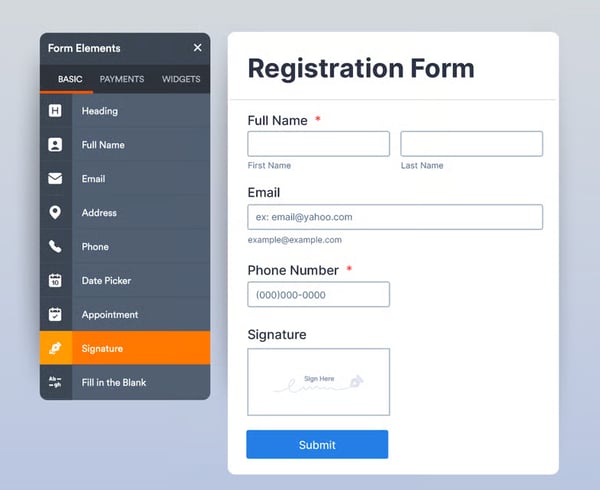
Jotform’s Grid profile is a small-business one: a G2 Rating of 74 from 121 opinions, with small companies making up 76% of reviewers. Jotform’s type builder is the place the G2 assessment information concentrates most strongly. The drag-and-drop interface lets non-technical customers construct skilled reserving and consumption types in minutes, with templates overlaying the most typical appointment eventualities. In my assessment of the G2 Information, ease of use is available in at 94%, and it’s the element that surfaces most reliably. G2 reviewers throughout industries name type creation fast and simple.
Your appointment workflow does not finish on the type submission. Jotform connects with Google Calendar to auto-create appointments and ship confirmations; Stripe and PayPal deal with cost at reserving. G2 reviewers credit score these connections with changing a number of separate instruments, with hyperlinks scoring 91%, simply above the 90% class common. The combination breadth positions Jotform as a scheduling and information assortment layer alongside its form-building core.
Branding management is a differentiator on this class, and Jotform delivers it with out requiring design experience. G2 opinions element adapting types to match their actual model, including logos and customizing colours and structure. The branding rating throughout G2 accounts is available in at 91%, above the 88% class common. I would spotlight this as significant in a scheduling context, the place purchasers choose professionalism from the reserving web page first.
As per my analysis of the appointment scheduling instruments, I can see why Jotform’s AI builder separates it from customary type instruments in G2 Information. Reviewers point out the AI drafting types from prompts and resolving conditional logic mid-build. Throughout G2 opinions, the AI generates correct types from plain textual content and solutions intent questions on conditional construction. For appointment workflows requiring consumption logic earlier than a reserving confirms, this functionality removes vital handbook configuration work.
Fee assortment on the level of reserving is dealt with by native Stripe and PayPal integrations, accumulating deposits or full quantities contained in the reserving type itself. G2 reviewers in service companies title the payment-form mixture as what changed their earlier techniques. The cost acceptance rating measures 84% throughout G2 accounts, under the 86% class common. What stayed with me from the info is how small operators describe this as their full reserving and income layer.
Embedding a reserving type immediately into an internet site turns Jotform right into a scheduling instrument for service companies. Google Calendar integration auto-populates appointments on submission, together with your shopper’s consumption information captured in the identical interplay. G2 opinions in healthcare, training, {and professional} providers name this the workflow that ended phone-based scheduling. Healthcare G2 opinions credit score this with releasing front-desk workers from handbook reserving coordination.
Free plan caps on types, month-to-month submissions, and cost transactions speed up improve stress, and G2 reviewers report hitting these limits sooner than anticipated as soon as a reserving workflow goes reside. Sole merchants and small nonprofits constructing their first client-facing reserving system point out this repeatedly. But, G2 opinions who upgraded discover the paid tiers as delivering constant satisfaction.
In line with some G2 reviewers, shared workspace entry and multi-admin reserving performance are restricted to be used. For in depth utilization, you’ll require an enterprise subscription, and lean groups the place two or three customers want shared type entry encounter this ceiling with no proportionate characteristic improve to justify the plan soar. Even with that hole, G2 assessment information confirms that Jotform’s core type constructing, cost assortment, and appointment reserving features carry out effectively throughout accounts.
The AI builder is the potential most consumers miss earlier than signing up. It drafts conditional consumption logic from plain-text prompts, which implies the shape that precedes your reserving may be constructed and examined with out handbook area configuration. For intake-heavy workflows, that adjustments the setup timeline significantly. G2 implementation information exhibits a median of 0.6 months to go reside, the shortest on this checklist after Sq. Level of Sale, and an estimated payback interval of 5 months.
What I like about Jotform:
- The drag-and-drop type builder will get skilled reserving and consumption types reside in minutes, with templates overlaying frequent appointment eventualities and no design abilities required.
- Google Calendar integration auto-creates appointments on submission, whereas Stripe and PayPal deal with cost at reserving, consolidating consumption, scheduling, and cost into one client-facing type.
What G2 customers like about Jotform:
“Very easy to adapt to our branding, take funds and signed paperwork.”
– Jotform assessment, Verified Person in Main/Secondary Training.
What I dislike about Jotform:
- G2 reviewers who construct lively reserving techniques on the free plan flag type and submission caps as restrictive, with sole merchants and nonprofits hitting limits rapidly. Paid tiers ship constant satisfaction as soon as unlocked.
- G2 opinions flag that shared type entry and multi-admin workflows require an enterprise plan. Lean operations needing two or three shared admins encounter this price ceiling. G2 assessment information confirms core type constructing, cost assortment, and reserving features carry out persistently regardless.
What G2 customers dislike about Jotform:
“Very low restrict on signed types per 30 days.”
– Jotform assessment, Verified Person in Biotechnology.
5. GReminders: Greatest for professionals lowering no-shows by automated reminders
For a monetary advisor or well being practitioner, one no-call no-show is a billable hour that doesn’t come again. GReminders is a scheduling and reminder platform that sends textual content, e mail, and voice reminders from a single calendar entry and syncs with CRMs equivalent to Redtail. Advisory companies and client-based practices that want reminders to run with out handbook work hold ending up right here.
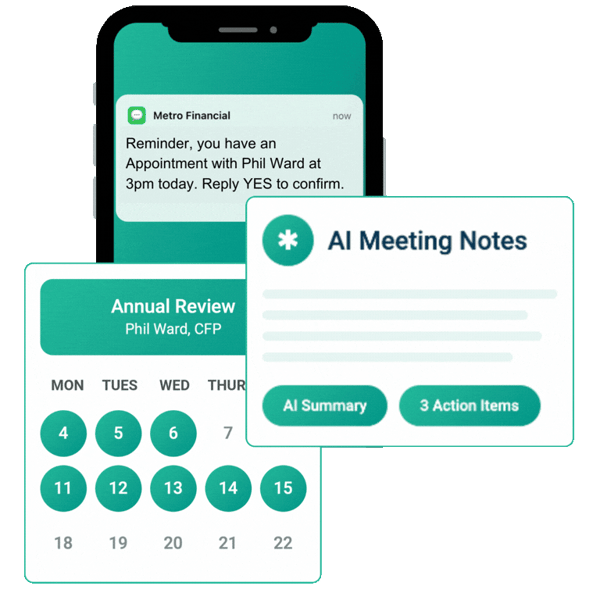
GReminders’ Grid rating of 73 comes from 438 opinions and a satisfaction rating of 94, the third highest on this checklist, with small companies making up 94% of reviewers. Automated reminders are the core operate GReminders delivers, and the G2 Information places concrete numbers on the result. G2 reviewers report no-shows dropping by half after deployment, with textual content, e mail, and voice reminders all firing mechanically from a single calendar entry. The confirmations and reminders rating holds at 94%, a degree above the 93% class common. The determine that surfaces in G2 assessment information: monetary providers accounts describe no-call no-shows falling by over 50% after deployment.
The Redtail CRM integration is the characteristic that drives GReminders adoption in monetary advisory companies. It pulls shopper information from Redtail, triggers workflows, and syncs calendar entries bidirectionally with out handbook information switch. G2 opinions in monetary providers name this the deepest CRM integration of their tech stack. The combination depth, in my evaluation, is central to GReminders’ advisory observe worth case.
The AI notetaker is the place GReminders extends previous scheduling and reminder automation into one thing qualitatively totally different for client-facing professionals. The instrument transcribes conferences throughout Zoom, cellphone, and in-person codecs, identifies audio system, and produces structured summaries that push on to Redtail. G2 opinions spotlight utilizing their assembly summaries as the idea for post-meeting emails and workflow triggers. The accuracy is larger than that of earlier standalone notetakers.
One thing the G2 assessment information satisfied me of early: the pre-meeting transient is GReminders’ clearest value-add past reminders. The platform generates a contextual abstract earlier than every assembly, drawing from previous emails, CRM notes, and assembly historical past. G2 reviewers convey strolling into shopper conferences absolutely ready with out handbook analysis. That degree of readiness scales as shopper quantity grows.
In case your observe entails scheduling a big shopper base for annual opinions, the majority ship functionality stands out. GReminders sends personalised assembly invites to full shopper lists mechanically, triggered by CRM tags or date-based guidelines, with out requiring particular person outreach. G2 reviewers describe changing an admin-heavy assessment scheduling routine with a single automated marketing campaign. Invites land reliably too, with scheduling notifications scoring 93% in G2 information. Assist throughout rollout is a transparent a part of what you get with GReminders. G2 reviewers describe named workers becoming a member of setup calls, fixing points in actual time, and offering hands-on onboarding. I would level to responsiveness and follow-through because the habits that stand out, and high quality of assist charges 93% in G2 assessment information. The assist file counts when setup takes actual configuration time.
G2 reviewers flag the preliminary setup as steep, with reminder templates, CRM area mapping, and workflow triggers all needing devoted configuration time. Monetary advisors and well being practitioners dealing with their very own onboarding single out this part as the best level of friction within the platform’s lifecycle. Regardless of that, G2 opinions describe the reminder automation working reliably within the background as soon as setup is full, with no use for ongoing intervention.
The reserving web page and admin interface are labeled as visually dated throughout a number of G2 opinions, with structure, navigation, and design all cited by reviewers whose purchasers encounter it as a primary impression. Service professionals in industries the place the reserving expertise displays model high quality encounter this hole most immediately. Some G2 reviewers even be aware it impacts shopper notion earlier than an appointment is confirmed. That stated, the reminder supply and automation accuracy are famous by G2 opinions as working individually from how the interface presents.
The pre-meeting transient is what separates GReminders from each different reminder-focused platform on this class. Earlier than every appointment, advisors obtain a briefing assembled from the shopper’s earlier correspondence, CRM information, and prior conferences. At scale, that preparation layer turns into a significant operational benefit for high-volume shopper practices. G2 implementation information exhibits common person adoption of 79%, above the 73% class common, and a median of 1.4 months to go reside.
What I like about GReminders:
- Automated textual content and e mail reminders set off from a single calendar entry, and G2 reviewers throughout monetary providers, development, and software program report fewer no-shows after deployment.
- Bulk ship automation lets practices invite total shopper lists to assessment conferences utilizing CRM tags, changing an admin-heavy handbook scheduling routine that G2 reviewers describe.
What G2 customers like about GReminders:
“I like how GReminders presents bulk ship automation that integrates with our CRM, eliminating the necessity to name and e mail purchasers individually to schedule conferences. Their AI notetaking instrument stands out for being extra correct than earlier instruments we have used, and it is efficient at organizing conversations, figuring out audio system, and capturing duties and motion objects mentioned. I additionally just like the customizable fields of their assembly scheduling app, permitting us to tailor the instrument on to our wants. It’s extremely straightforward to ship in questions or requests and get responses promptly, which was a major enchancment over our earlier expertise with Microsoft Bookings the place there was no contact individual to succeed in.”
– GReminders assessment, David G.
What I dislike about GReminders:
- G2 opinions flag reminder templates, CRM area mapping, and workflow triggers as requiring devoted configuration time, particularly for solo practitioners with no technical assist. Although reviewers be aware the platform as working reliably within the background as soon as operational.
- The reserving web page and admin interface are described as visually dated throughout G2 opinions. For client-facing professionals the place the reserving expertise displays on their model, it is a actual trade-off. It’s the one space the place I really feel the platform’s purposeful energy and its presentation are out of step with one another. Even so, the reminder engine and automation features carry out dependably whatever the interface look.
What G2 customers dislike about GReminders:
“Whereas the setup course of wasn’t significantly difficult, it did require fairly a little bit of effort initially. Moreover, I am not a fan of the interface’s look and general really feel, it comes throughout as considerably outdated to me.”
– GReminders assessment, Joel M.
6. Cal.com: Greatest for developer and technical groups wanting open-source scheduling
A technical workforce that desires to personal its reserving stack, information included, tends to search out paid schedulers a poor match. Cal.com is an open-source scheduling platform with an API-first design and a free plan that features limitless occasion sorts and Stripe funds. Builders and privacy-conscious organizations hold selecting it, and small companies make up 89% of its Grid reviewers.
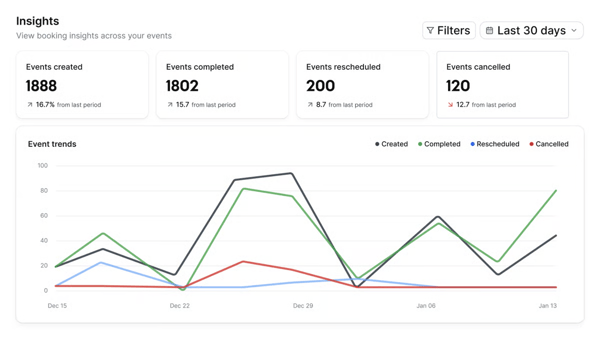
Cal.com’s Grid placement rests on 138 opinions, a G2 Rating of 70, and a satisfaction rating of 81, with small companies making up 89% of reviewers. Cal.com’s free plan consists of limitless occasion sorts, calendar connections, and Stripe funds. G2 reviewers verify the vary and describe working a full scheduling workflow on the plan. Fee assortment occurs upfront by the Stripe integration, so purchasers pay for the time being of reserving. Separate occasion sorts allow you to cowl totally different assembly codecs, together with paid periods, from one account.
The open-source structure is the place I would begin any analysis of Cal.com for technical consumers. G2 reviewers specify transparency as a deciding issue, with European G2 reviewers particularly selecting the platform to maintain scheduling information off third-party servers. The codebase is publicly accessible and self-hostable. For regulated industries and privacy-conscious organizations, that structure adjustments the analysis totally.
I’ve observed a number of reviewers say that Cal.com scales workforce and group scheduling effectively. Spherical-robin distribution, collective scheduling, and department-level availability all run inside one admin layer. G2 reviewers in higher-tier corporations point out the visibility throughout shared calendars as a significant operational shift. What the G2 Information exhibits me confirms this: blocked time settings clock in at 92%, a degree above the 91% class common, and centralized scheduling management compounds in worth as headcount grows.
Customization depth is one other persistent energy in Cal.com G2 suggestions. The platform helps superior availability guidelines, buffer settings, reserving limits, and embed choices that adapt to your particular scheduling context. G2 reviewers switching from paid platforms spotlight getting extra configuration flexibility at a decrease price. The open API extends this additional for technical groups constructing Cal.com right into a customized workflow.
A number of reviewers admire the instrument’s reserving web page high quality. The interface masses rapidly, the design is clear, and the client-facing checkout requires minimal steps. G2 opinions cite Cal.com’s quick embed loading avoiding costing bookings resulting from web page lag. The platform earns dependable day-to-day satisfaction for load pace and design readability.
Price management sits on the middle of Cal.com’s enchantment. G2 reviewers reward clear, predictable pricing and name the worth distinctive for what the platform consists of. Spherical-robin and routing workflows cowl workforce scheduling wants. Integrations with Google Calendar, Zoom, and Notion work reliably day after day. On the idea of my analysis, that case is the strongest differentiator for cost-conscious technical consumers.
Integration settings and superior occasion configurations require extra navigation than the reserving expertise suggests. G2 reviewers flag the documentation as inadequate for non-technical operators working by it independently. Nonetheless, the G2 reviewers who accomplished the setup body the complexity as front-loaded moderately than recurring, with the reserving expertise working cleanly as soon as the preliminary work is finished. Most say the time invested upfront was price it for the management and customization gained.
G2 opinions speak about organization-wide admin controls and routing workflows gated behind higher-tier plans. These options sit behind the Groups and Organizations tiers. Builders constructing Cal.com right into a broader workflow uncover the admin structure they want requires a plan improve earlier than it’s accessible. Set towards that, G2 reviewers on the free tier describe particular person scheduling and availability features as overlaying most single-user instances with out hitting that ceiling. G2 reviewers throughout plan ranges hold crediting the deep customization of assembly sorts, availability logic, and branding as the rationale the platform holds its place.
Few platforms on this class supply Cal.com’s mixture: a completely open-source, self-hostable scheduling stack. For regulated industries the place shopper information can’t contact third-party servers, that architectural possibility closes the analysis earlier than characteristic comparisons develop into related. G2 Information backs the associated fee case, with an estimated payback interval of three months, the shortest of the eight merchandise right here, and a median of 0.8 months to go reside.
What I like about Cal.com:
- The open-source structure offers technical groups information possession, self-hosting choices, and clear platform habits, which G2 reviewers connect with compliance wants and long-term belief within the product.
- Limitless occasion sorts, calendar connections, workflow automation, Stripe funds, and Cal Video ship on the free plan, making the no-cost entry level extra succesful than most paid scheduling tiers.
What G2 customers like about Cal.com:
“I like how detailed the personalization and customization choices are on Cal.com, with a lot of superior features for availability and reserving limits. I admire that it integrates with Stripe for cost processing, making it straightforward to gather funds upfront. It is spectacular that the strong options I am utilizing are included within the free plan, I solely should pay for cost processing. It seems like a really highly effective instrument, and it does not price me something aside from paid session transactions.”
– Cal.com assessment, Brittany C.
What I dislike about Cal.com:
- G2 opinions flag that logic and integration settings require extra navigation than the clear interface implies, making a steeper setup curve for non-technical groups. That stated, core reserving features maintain reliably as soon as the configuration is in place.
- A number of G2 reviewers be aware that workflows and organization-wide admin controls require the Groups or Organizations tier. Builders evaluating Cal.com on the idea that open-source means full characteristic entry for free of charge encounter this boundary sooner than anticipated. I would think about this price clarifying earlier than committing to the free tier for a workforce deployment. Nonetheless, G2 reviewers point out that the free plan scheduling features maintain up for almost all of use instances.
What G2 customers dislike about Cal.com:
“The setup of Cal.com is overwhelming, which might be improved. The documentation for various integrations and occasion configurations wants higher readability, because it takes time to determine easy methods to use them successfully. Additionally, I believe the person interface might be extra refined, particularly when managing a number of occasion sorts or settings. It might be smoother and higher.”
– Cal.com assessment, Vaishnav V.
7. Waitwhile: Greatest for service companies managing waitlists and scheduled appointments
A reception desk with walk-ins on the counter and booked appointments on the calendar often finally ends up working two techniques and a clipboard. Waitwhile is a queue administration and appointment scheduling platform that runs a reside walk-in waitlist subsequent to a full reserving calendar. Retail counters, labs, veterinary practices, and banks with regular walk-in visitors hold selecting it.
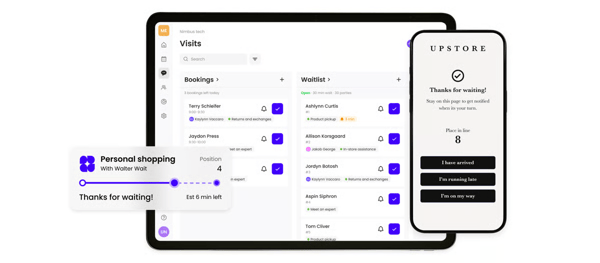
Waitwhile earns a satisfaction rating of 82 and a Web Promoter Rating of 92 on the Fall 2026 Grid, with a G2 Rating of 68 from 182 opinions. Stroll-in prospects be part of a reside queue by textual content or QR code, and booked purchasers maintain confirmed slots in the identical interface. I see within the G2 Information that one system cuts the additional work of working queues and bookings in two instruments. Within the G2 Information, scheduling notifications rating 96%, a robust mark for the messages that go to walk-ins and booked purchasers.
Actual-time queue updates make Waitwhile’s buyer expertise distinctive. Clients obtain texts as their place advances and may go away after becoming a member of, then return when it’s their flip. G2 reviewers in healthcare labs and retail paint this because the characteristic that eradicated crowded ready rooms. The identical visibility extends to your workers, who see shopper standing and queue place in a single view.
One factor the G2 reviewers appreciated in regards to the instrument is its intuitive UI. A number of G2 reviewers describe the UI expertise as clear and simple to make use of. Workers at know-how counters, veterinary practices, and authorities places of work admire that coaching colleagues takes minutes and helps in dealing with their first prospects. Such clean adoption is uncommon in service operations software program.
In-platform messaging lets workers textual content purchasers immediately from the dashboard, flagging delays or answering questions. G2 opinions in retail and veterinary practices point out this as what changed calling names throughout a crowded room, with one noting it’s particularly helpful at places with out parking, the place prospects wait of their vehicles as an alternative. The communication score throughout verified G2 accounts is 93%, above the 90% class common. The practicality this provides to each day operations is, throughout the Waitwhile accounts I reviewed, one of many platform’s clearest strengths.
Operational information in Waitwhile features as a workflow intelligence layer alongside the scheduling core. Wait time averages, each day go to totals, and repair kind breakdowns are generated mechanically. The sample I see within the Waitwhile G2 Information: analytics persistently shock customers coming from customary scheduling instruments with how a lot visibility is included. G2 reviewers in retail and training determine attaching these metrics on to KPIs.
If your corporation runs a number of workers members, service stations, or places, Waitwhile manages all from one admin interface. Every useful resource has particular person availability settings, appointment sorts, and coloration coding for fast visible differentiation. G2 opinions in veterinary practices, animal shelters, and banking establishments verify utilizing this to coordinate throughout groups. The scheduling structure scales cleanly with the scale of the operation.
G2 reviewers flag slim customization, with requests for extra coloration decisions, checkbox choices, resizable board columns, and editable textual content reminders. The requests come from retail and better training workflows the place folks construct consumption types and reminder messages round a selected service. Nevertheless, G2 reviewers illustrate the core waitlist and appointment structure as dealing with customary service operations reliably, with out the workarounds easier instruments require.
G2 reviewers ask for extra buyer element on the workers display screen, equivalent to the rationale for a go to, gadget concern, IMEI, and guarantee standing. The requests come from retail and IT providers workflows the place workers deal with device-related appointments. Although G2 reviewers describe Waitwhile’s buyer information as organized, with appointment time and former visits straightforward to assessment.
Put merely, Waitwhile runs a reside queue in actual time subsequent to a full appointment calendar. Clients see their place transfer, and workers see the queue and calendar in a single view. Reception desks, labs, and retail counters with regular walk-in visitors get essentially the most from a reside queue beside the calendar. In case your day mixes drop-ins and bookings, I would start the analysis right here. Branding scores 94%, second solely to Certified, and common person adoption reaches 84%, the second highest on this checklist behind Microsoft 365.
What I like about Waitwhile:
- The 2-in-one structure handles each walk-in queue administration and superior appointment scheduling from a single dashboard, eradicating the necessity for separate instruments in service operations.
- Actual-time SMS queue updates let prospects wait anyplace and return when referred to as, with G2 reviewers in retail and healthcare describing this as what eradicated crowded ready rooms.
What G2 customers like about Waitwhile:
“I like that Waitwhile helps in scheduling prospects for appointments and sending them reminders, particularly for appointments made far into the long run. It is nice for managing totally different sources and their availability, which is admittedly helpful since we’ve a number of folks working in our firm. Every useful resource can have their very own appointment e-book, time, and even coloration, which makes it straightforward to distinguish them.”
– Waitwhile assessment, Ana C.
What I dislike about Waitwhile:
- G2 reviewers need extra coloration decisions, checkbox choices, and editable textual content reminders. Retail and better training workers constructing consumption types are affected. Regardless, G2 reviewers price the usual waitlist and reserving stream as reliable.
- G2 reviewers need reason-for-visit, gadget, IMEI, and guarantee particulars seen to workers. Workers dealing with gadget appointments in retail and IT providers are affected. Elsewhere, G2 reviewers name buyer information organized.
What G2 customers dislike about Waitwhile:
“I want there was extra info concerning the shopper’s cause for an appointment, and making that seen to us, the workers.”
– Waitwhile assessment, Kelvin S.
8. Sq. Level of Sale: Greatest for SMBs combining scheduling with in-person funds
A stylist who books a shopper, takes a deposit, and rings up the ultimate cost in three totally different apps offers up time between appointments. Sq. Level of Sale connects appointment reserving, in-person funds, and shopper information in a single ecosystem. Small service companies equivalent to salons, studios, and solo practices hold ending up right here, with small companies making up 92% of its Grid reviewers.
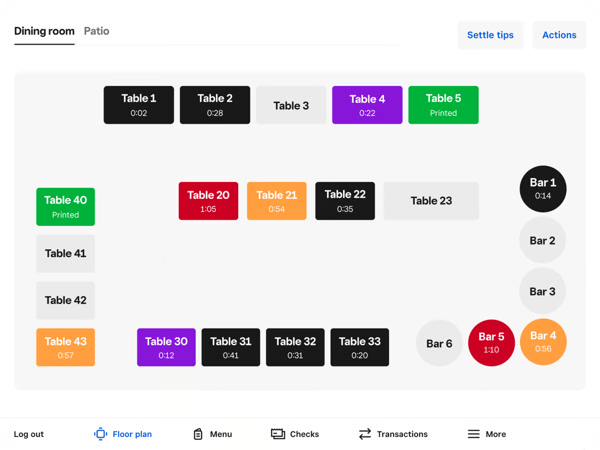
Deposits at reserving give me the clearest cause to have a look at Sq.. G2 reviewers describe accumulating deposits and prepayments for the time being a shopper books. When you lose income to no-shows, cash taken upfront offers your reserving actual weight. The Sq. G2 Information exhibits deposits and prepayments in use at pictures, vineyard, and sweetness companies.
Sq. fees a charge on every transaction, so prices rise and fall with income. What strikes me within the Sq. G2 Information is how clearly this pricing mannequin serves solo service practitioners. G2 reviewers who switched from paid schedulers describe decrease prices and one much less month-to-month invoice.
Consumer administration in Sq. captures contact info, appointment historical past, and repair preferences in a persistent profile. G2 reviewers worth shopper particulars, historical past, and notes saved in a single place, which issues for homeowners scheduling and speaking from the identical gadget. The profile information compounds because the shopper relationship extends. For the service-business context I reviewed within the G2 Information, this longitudinal shopper file is the place Sq. earns appreciable loyalty.
The net reserving functionality is what I see G2 reviewers referencing for client-facing affect in Sq.. Shoppers decide a time and e-book with out back-and-forth communication. Sq. hosts the reserving web page, hyperlinks it from web sites and social profiles, and sends affirmation mechanically. G2 opinions element this as what eliminated their reliance on cellphone or e mail for normal appointment reserving.
Automated appointment reminders are despatched by way of SMS and e mail with out handbook enter as soon as configured. Confirmations and reminders rank at 97% throughout G2 Information, the best within the class and above the 93% common. G2 reviewers show purchasers receiving reminder texts earlier than appointments, which saves homeowners from sending every one by hand. The reliability of this operate retains the calendar intact between reserving and supply.
Service customization covers appointment sorts, period, and workers task with flexibility for numerous service choices. G2 reviewers map out constructing full-service menus and controlling particular person workers availability from a single interface. Availability settings are scored at 97%, the best within the class. The mix of service customization and workforce administration is, from what I’ve extracted from the Sq. G2 Information, the clearest case for multi-practitioner service companies.
G2 reviewers flag gaps when connecting Sq. to outdoors calendars and accounting instruments, together with Google Calendar sync, Apple calendars, and QuickBooks Desktop add-ons. The gaps attain sole operators who handle their schedule from a private calendar and homeowners who ship gross sales information to accounting software program. Even so, G2 reviewers describe the reserving calendar and shopper information as organized and fast to examine.
Advertising and marketing instruments and sure admin features can be found on desktop solely. G2 reviewers who’re SMB homeowners working their enterprise from a cellphone be aware the shift in structure after they do have to change over, significantly when the duty is time-sensitive. Although, this doesn’t have an effect on how G2 opinions describe reserving consumption, confirmations, and cost processing because the core features that are absolutely purposeful on cell.
Stepping again, Sq. fits homeowners who run a service enterprise from one app and need room to develop. Loyalty packages and advertising and marketing instruments arrive on the Plus plan, and superior reporting arrives on Premium. Tiered plans let a enterprise add options as places and workers develop. I would begin on the Free plan and improve when your wants name for extra. Its Grid placement leans on 26 opinions and a satisfaction rating of 72, the bottom on this checklist, with common person adoption of fifty% and an estimated payback interval of 11 months, so I would deal with it as a match for small service companies moderately than a default decide. G2 implementation information does present the shortest rollout right here, at 0.2 months on common to go reside.
What I like about Sq. Level of Sale:
- Reserving and cost processing function throughout the similar ecosystem, so appointment checkout flows immediately into Sq.’s POS with out reconciliation or tool-switching between service supply and cost.
- Automated SMS and e mail reminders hearth with out handbook enter as soon as configured, with G2 accounts for Sq. rating confirmations and reminders at 97%.
What G2 customers like about Sq. Level of Sale:
“What stands out most about Sq. Level of Sale for ROTHLEYS GROUP is the way it balances simplicity with flexibility one thing that’s particularly precious in the event you’re working totally different providers. Workers can rise up to hurry rapidly, which reduces coaching time and retains operations working easily. One other sturdy level is its built-in ecosystem. Funds, reporting, stock, and buyer information all sit in a single place. That makes it simpler to trace efficiency throughout websites and preserve consistency in how providers are delivered and billed.”
– Sq. Level of Sale assessment, Jean R.
What I dislike about Sq. Level of Sale:
- G2 reviewers report gaps linking Sq. to Google Calendar, Apple calendars, and QuickBooks Desktop. Sole operators and homeowners syncing accounting information are affected. Nonetheless, G2 reviewers name the reserving calendar and shopper information organized.
- G2 reviewers managing their enterprise primarily from cell flag that advertising and marketing instruments and a number of other admin features are desktop-only. For SMB homeowners who run operations from a cellphone or pill, this creates a recurring want to change to a browser for duties that ought to be mobile-native. For my part, it is a bigger friction level than it’d seem on paper, significantly for solo operators managing all the things from one gadget. Even so, core reserving and cost features on cell stay dependable.
What G2 customers dislike about Sq. Level of Sale:
“The one factor that might make Sq. Level of Sale even higher is making the identical issues that is out there on the desktop model out there on the app. Having the ability to have entry to issues like advertising and marketing campaigns and newsletters from the app would make the general expertise a lot simpler on the go.”
– Sq. Level of Sale assessment, Asiah D.
Comparability of the perfect appointment scheduling software program
| Software program | G2 score | Free plan | Supreme for |
|---|---|---|---|
| Microsoft 365 | 4.6/5 | No free plan; trials out there | Organizations already working on Outlook and Groups |
| Calendly | 4.7/5 | Sure | Gross sales and client-facing groups automating high-volume assembly reserving |
| Certified | 4.9/5 | No free plan | B2B income groups changing inbound pipeline on Salesforce |
| Jotform | 4.6/5 | Sure | Service companies needing form-first reserving with upfront information assortment |
| GReminders | 4.6/5 | Free trial | Professionals lowering no-shows by automated multi-channel reminders |
| Cal.com | 4.6/5 | Sure | Developer and technical groups wanting open-source scheduling |
| Waitwhile | 4.8/5 | Sure | Service companies managing walk-in queues and scheduled appointments |
| Sq. Level of Sale | 4.6/5 | Sure | SMBs combining appointment scheduling with in-person cost processing |
G2 rankings are primarily based on person opinions and are topic to vary over time.
Greatest appointment scheduling software program: Ceaselessly requested questions (FAQs)
Received extra questions? G2 has the solutions!
Q1. Which appointment scheduling software program is most trusted by observe homeowners and workplace managers?
Observe homeowners and workplace managers belief the instruments that keep dependable with out fixed consideration, and that exhibits up in assessment quantity and advice scores. Calendly has the biggest assessment base on the Fall 2026 Grid at 2,064 opinions and a satisfaction rating of 99, which reviewers tie to reserving hyperlinks that purchasers full with out assist. GReminders earns a satisfaction rating of 94 from monetary advisory and well being practices, because of reminder automation that runs quietly as soon as it’s configured. Waitwhile posts a Web Promoter Rating of 92 from reception and front-desk groups, which reviewers credit score to an interface that workers be taught in minutes.
Q2. Which appointment scheduling software program is highest rated for skilled reserving experiences and shopper conferences?
Knowledgeable reserving expertise relies on a web page that masses cleanly, respects time zones, and appears just like the enterprise behind it. Calendly scores 94% for time zone detection and 94% for availability settings, which reviewers say retains shopper conferences freed from double bookings. Certified charges 95% for branding and 95% for hyperlinks, the best within the class on each, because of reserving that occurs inside web site conversations. Waitwhile charges 94% for branding, with reviewers describing an intuitive interface that workers decide up inside minutes.
Q3. Which appointment scheduling instruments do small enterprise homeowners undertake for unified operational administration?
Small enterprise homeowners often need one place to handle bookings, funds, and shopper particulars as an alternative of juggling separate instruments. Sq. Level of Sale suits that want, with small companies making up 92% of its Grid reviewers and reserving, deposits, and shopper information dealt with in a single ecosystem. Jotform serves small groups too, at 76% small enterprise reviewers, by combining consumption types, funds, and calendar sync in a single embeddable type. Cal.com reaches 89% small enterprise reviewers, because of a free plan with limitless occasion sorts and Stripe funds.
This autumn. Which appointment scheduling software program presents full enterprise ecosystems past reserving?
Some consumers need scheduling to sit down inside a bigger working layer as an alternative of standing alone. Microsoft 365 covers that by Outlook, Groups, Bookings, and SharePoint working collectively with out separate configuration. Certified extends scheduling into pipeline infrastructure, with routing guidelines and lead possession flowing from Salesforce into each reserving. Sq. Level of Sale extends it into the purpose of sale, the place reviewers describe funds, reporting, and buyer information in a single place.
Q5. Which appointment scheduling software program reduces back-and-forth emails?
Again-and-forth emails finish when purchasers can decide a time with out anybody replying. Calendly scores 93% for hyperlinks, and reviewers describe sharing one hyperlink and having the assembly confirmed on each calendars, with some estimating 10 to fifteen minutes saved per reserving. Cal.com scores 90% for hyperlinks and presents limitless occasion sorts on its free plan, so every assembly format will get its personal reserving web page. Microsoft 365 removes the change inside Outlook, the place reviewers say reserving a Groups assembly takes a single click on.
Q6. Which appointment scheduling software program helps consolidate a number of enterprise instruments?
Consolidation issues most when consumption, cost, and reminders reside in separate subscriptions. Jotform replaces that stack with one embeddable type that captures shopper information, collects cost by Stripe and PayPal, and syncs to Google Calendar. Sq. Level of Sale combines reserving and in-person funds, and reviewers who switched from paid schedulers describe decrease prices and one much less month-to-month invoice. GReminders brings reminders, Redtail CRM sync, and an AI notetaker collectively for client-facing practices.
Q7. Which appointment scheduling software program collects reserving questions and integrates with Zapier workflows?
Zapier workflows matter when reserving solutions want to succeed in a CRM, spreadsheet, or chat instrument with out customized code. Cal.com reviewers title Zapier among the many integrations that save them time, and the platform scores 89% for multi-calendar integration and 90% for hyperlinks on the Fall 2026 Grid. Waitwhile reviewers describe linking to different sources by its API or Zapier connections, and its 93% communication rating suits the messages these workflows ship. Jotform collects reserving questions in a type builder that scores 94% for ease of use, which reviewers say non-technical workers can construct with out assist.
Q8. What ought to small enterprise homeowners consider in appointment scheduling software program with cost integration?
Fee integration comes all the way down to when cash is collected, which processors are supported, and what processing prices. Sq. Level of Sale collects deposits and prepayments at reserving and fees a charge per transaction, which reviewers say fits solo practitioners as a result of prices rise and fall with income. Jotform collects deposits or full quantities by Stripe and PayPal contained in the reserving type, although its cost acceptance rating of 84% sits under the 86% class common. Cal.com takes cost upfront by Stripe on its free plan, and one reviewer notes that processing charges are the one price.
Q9. Which appointment scheduling software program presents automated reminders that scale back no-show charges in enterprise environments?
Enterprise reminder packages want supply that stays constant throughout places and groups. Waitwhile scores 94% for confirmations and reminders and 96% for scheduling notifications, with 21% of its Grid reviewers at enterprises, and reviewers in banking and retail describe managing reservations throughout places from one admin view. Certified scores 95% for scheduling notifications with 24% enterprise reviewers, which reviewers tie to routing that books conferences with out rep involvement. Microsoft 365 has the biggest enterprise base at 27%, with a 90% scheduling notification rating and confirmations that Outlook and Groups generate mechanically.
Q10. Which appointment scheduling software program is greatest for homeowners managing shopper conferences and lowering no-shows?
Homeowners managing shopper conferences want reminders that fireplace with out handbook work and confirmations that purchasers truly act on. GReminders scores 94% for confirmations and reminders, and reviewers in monetary providers describe no-call no-shows falling by greater than half after rollout. Calendly matches that 94% rating, and reviewers tie its confirmations and reminders to fewer no-shows and fewer last-minute cancellations.
From the reserving hyperlink to the enterprise system
The scheduling class is splitting in a path that issues for any purchaser getting into it in the present day. Reserving hyperlink instruments stay efficient for high-volume, low-complexity assembly workflows in gross sales and consulting. Alongside them, a rising cluster is folding scheduling right into a enterprise working layer, including consumption, cost, notes, reminders, and shopper information right into a single workflow. Consumers who entered on the lookout for a reserving web page are leaving with a CRM-adjacent system, and the fastest-growing platforms are people who made that enlargement really feel pure.
Characteristic checklists have develop into much less helpful as an analysis technique. Two platforms can each supply reminders, whereas one sends a single SMS and the opposite ties multi-channel sequences to CRM triggers. What issues now’s how deeply a characteristic integrates with the encircling workflow. Consumers ought to check for information stream: the place shopper information goes after a reserving, what occurs mechanically, and what requires handbook intervention.
My very own learn, watching this class intently in G2 opinions, is that the workflow layer across the appointment, pre-meeting briefs, automated post-visit notes, intake-linked reminders, and follow-up sequences, is the place the clearest separation between platforms will hold exhibiting up. These capabilities are migrating from premium add-ons into baseline expectations, and the platforms which have already constructed them in have an actual head begin. For consumers, that is price weighing now: the deeper a platform is embedded in day-to-day workflow, the extra it prices to change away from later.
Want scheduling that goes past shopper bookings? My assessment of the greatest enterprise scheduling software program covers instruments constructed for workforce coordination and inside useful resource planning too.

